Introduction
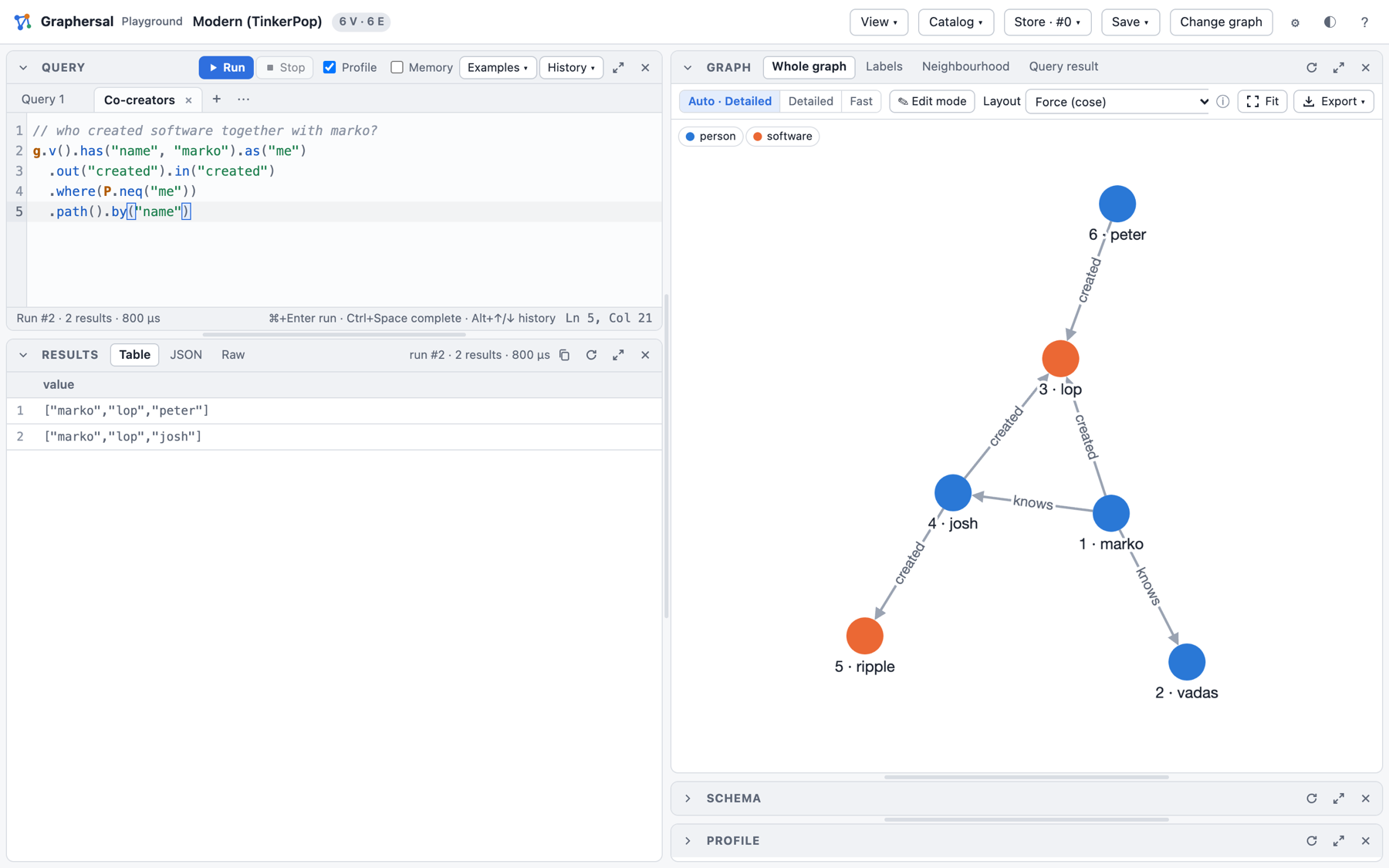
Graphersal is an in-memory graph database and traversal engine written in Rust. You ask it questions in Gremlin, the query language of Apache TinkerPop™: start somewhere in a graph, walk along its edges, filter, group and count.
// who created software together with marko?
g.v().has("name", "marko").as("me")
  .out("created").in("created")
  .where(P.neq("me"))
  .path().by("name")
What you get
- Gremlin, two ways. Build traversals in Rust (
g.v(None).has_label("person").out("knows")) or write them as text in the Gremlin DSL, in snake_case or in Gremlin's own camelCase (hasLabel,outE). The text runs the same everywhere: in the browser, in the command line, from Python and through an AI agent. - A playground in the browser. The real engine, compiled to WebAssembly: write a query, see a table, the graph drawing, the schema and the optimized plan. Nothing to install.
- A command line tool. One-shot queries for shell scripts, an interactive REPL with completion and help, and a local server that brings the playground UI to a graph on your disk.
- AI agents on your graph. The server speaks the Model Context Protocol (MCP), so Claude Code or another MCP client can query the graph you are looking at. The playground has its own AI Chat tab as well (experimental).
- Safe by construction. Every traversal is atomic: it commits completely or leaves nothing behind. Schemas (a subset of JSON Schema) are enforced on write. Limits, timeouts and permissions make it safe to run queries you did not write.
- Durable when you need it. A graph lives in memory, and the Store keeps it on disk: every commit is in a write-ahead log, you can go back to any point in time, fork, roll back, back up and repair. The file format is a public specification.
- Fast and observable. A rule-based optimizer rewrites each query;
profile()shows the optimized plan with timings, traverser counts and memory per step. - Open for integration. Rust and Python APIs, saved (named, parameterized) queries stored in the graph, change capture with commit hooks, GraphSON and GraphML files, and a storage trait to run the whole engine on a storage of your own.
Where to go next
| You want to ... | Read |
|---|---|
| try it right now | Try It in the Browser |
| run queries from a terminal or a script | The Command Line |
| let an AI agent work with your graph | Dev Server, MCP and AI Chat |
| understand graphs and Gremlin first | Why a Graph? |
| use it from code | Rust Quick Start, Python Quick Start |
| look up a step or a rule | The Gremlin DSL, Step Reference |
| find a command | Command Cheat Sheet |
Graphersal is not a complete copy of TinkerPop. It follows the TinkerPop specification for every step it implements and checks that with TinkerPop's own test suite, but some steps are not implemented yet and a few behave differently on purpose. Each difference is documented where the feature is described and collected in TinkerPop Deviations; see Graphersal and TinkerPop.
Try It in the Browser
The playground is the quickest way to see what Graphersal does. It is a web page that runs the real engine, compiled to WebAssembly, inside your browser: no server, no account, and your data never leaves the machine.
Start it
rustup target add wasm32-unknown-unknown                      # one-time
cargo install --locked wasm-bindgen-cli --version 0.2.129     # one-time
playground/build.sh                                           # builds playground/pkg/
python3 playground/serve.py 8000                              # open http://localhost:8000/
The start page offers sample graphs, or a GraphSON or GraphML file of your own:
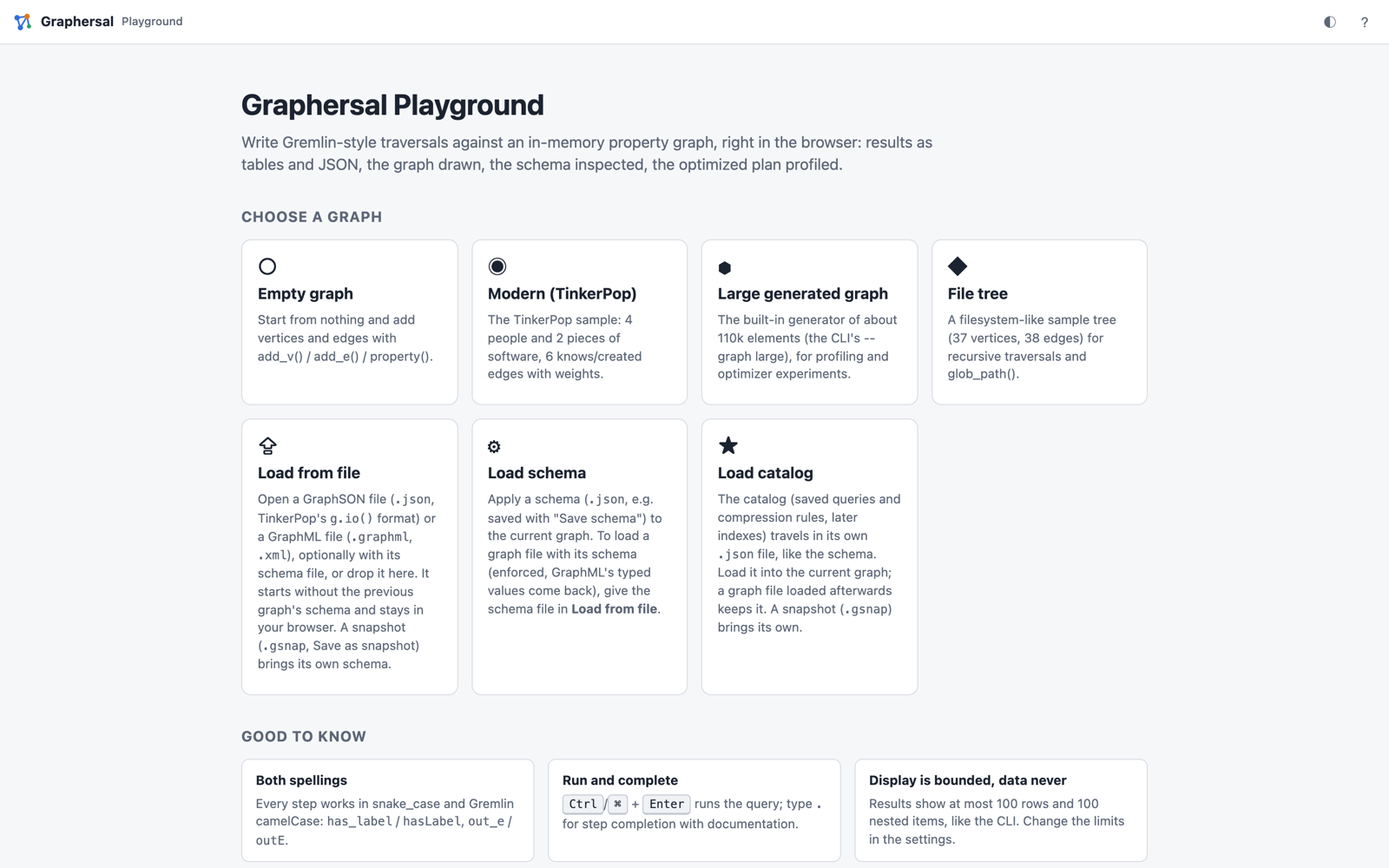
Pick Modern (TinkerPop): four people, two pieces of software, and who knows and created what. Most examples in this book run on it.
Run a query
Type a traversal into the Query panel and press Ctrl/⌘+Enter. The results appear as a table
(also as JSON and as the raw text the command line prints), and the Graph panel draws the graph.
Typing . offers every step with its description and a runnable example.

A few queries to start with; Run in the playground under each one opens it there:
g.v().has_label("person").values("name") // all people
g.v().has("name", "marko").out("knows").values("name") // whom marko knows
g.v().has_label("person").has("age", P.gt(30)).values("name") // people older than 30
g.v().has_label("person").group().by("name").by(__.out("created").count()) // software per person
The Examples menu holds about thirty more, grouped by graph and topic.
See how it ran
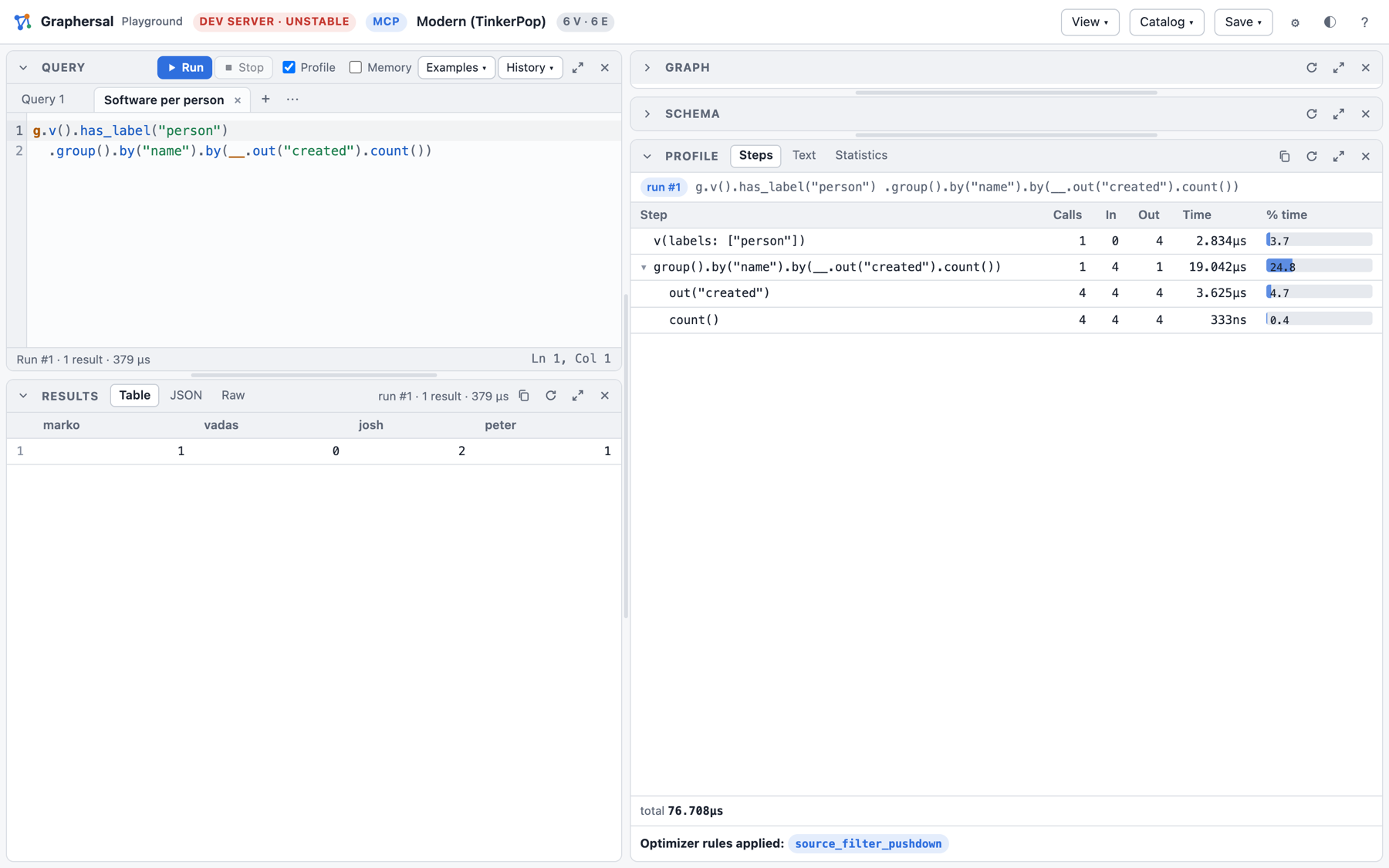
With Profile on, every run also shows the plan the optimizer made of your query: each step
with its calls, traversers in and out and its time, plus the optimizer rules that changed the plan.
Here has_label("person") was folded into the start step (v(labels: ["person"])):
Look at the schema
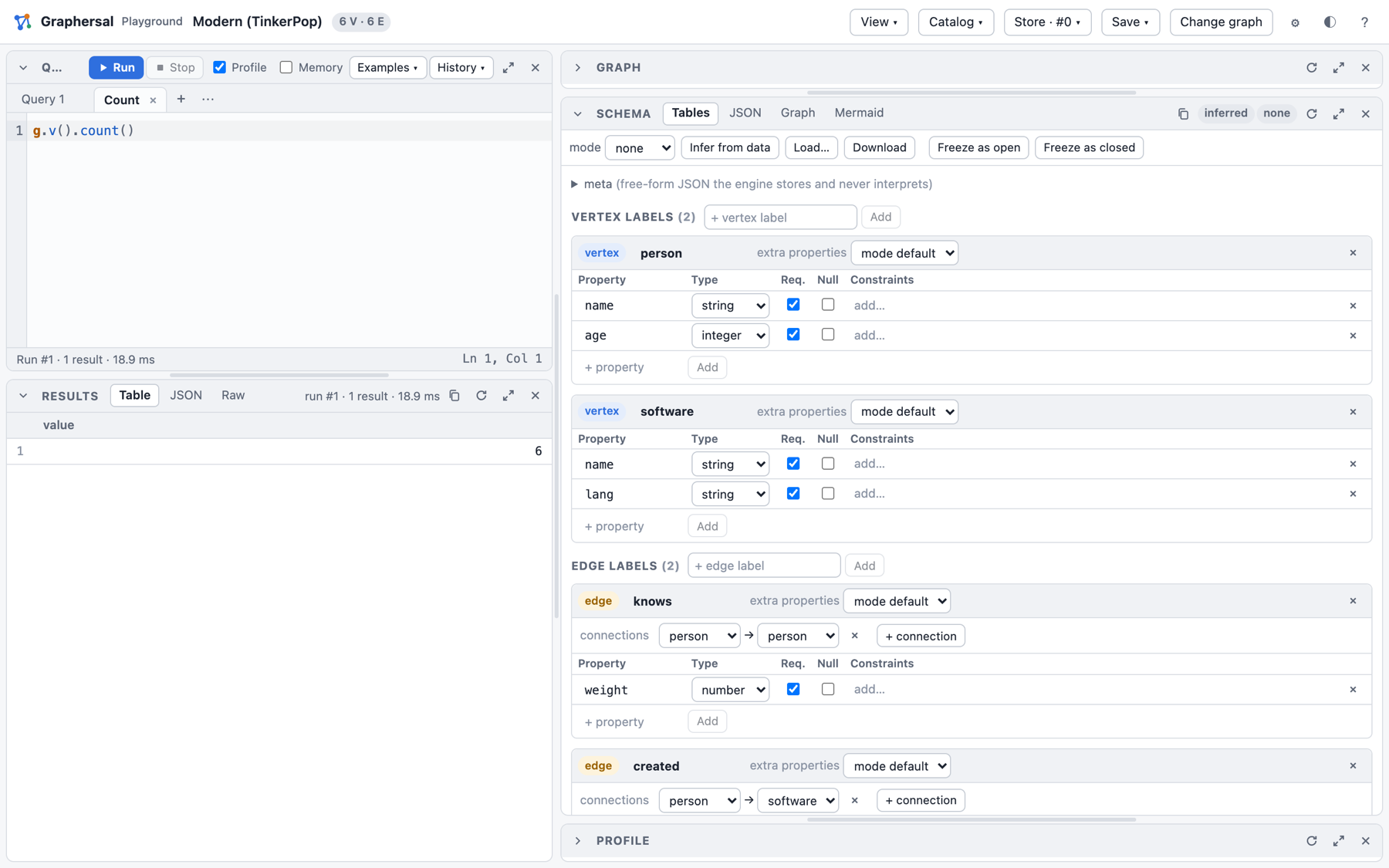
The Schema panel infers the structure of the data: the labels, their properties and types, and which edges connect which labels. You can edit it, and Freeze as open or Freeze as closed turns it into a schema the engine enforces on every write.
Walk a bigger graph
The File tree sample is a small directory tree: good for recursive traversals with repeat().
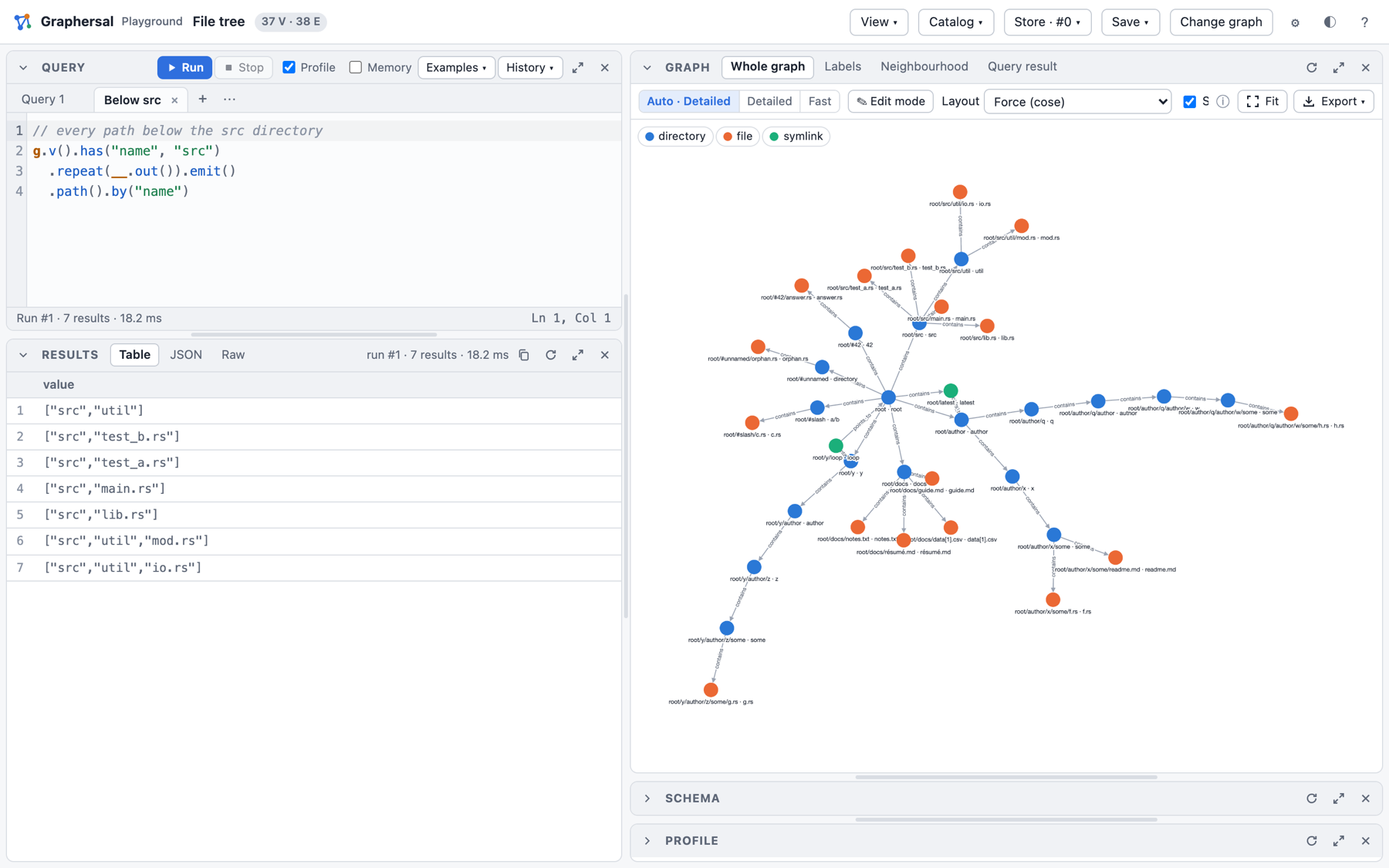
What else is in there
- several query tabs side by side, a history and saved scripts;
- a graph editor (add, change and delete vertices and edges by clicking);
- a fast WebGL drawing for large graphs, label graphs and neighbourhood views;
- saved queries and compression rules in the Catalog menu;
- a Store in memory with commits, marks, point-in-time views, forks and rollback (the Store menu);
- downloads of the graph (GraphSON, GraphML, snapshot), the schema and the catalog.
Every feature is described in Web Playground. The same UI also runs against a graph on your disk, served by the command line tool: Dev Server, MCP and AI Chat.
The Command Line
The graphersal binary runs Gremlin queries from a terminal. It has three modes: a one-shot
query runner for shell scripts, an interactive REPL, and a local server (next chapter).
cargo build -p graphersal-cli --release # target/release/graphersal
One-shot queries
Pass a query with -e; the result goes to stdout and nothing else does:
$ graphersal -e 'g.v().has("name", "marko").out("knows").values("name")'
╭───────╮
│ value │
├───────┤
│ josh  │
│ vadas │
╰───────╯
Without --graph it runs on the TinkerPop "modern" sample. --graph also takes empty, large
(about 110,000 elements), tree, a GraphSON or GraphML file, a snapshot or a Store directory:
graphersal --graph people.json -e 'g.v().count()'
echo 'g.v().values("age").max().next()' | graphersal --graph modern     # the query from stdin
graphersal -e 'g.v().has_label("person").values("name")' --format json  # also markdown, mermaid, ...
A query that fails prints its diagnostic on stderr and exits with 1, so a shell script or a CI
job can check a graph:
# fails (exit 1) when a server has no owner
graphersal --graph export.json -e 'g.v().has_label("server").has_not("owner").fail("a server without an owner")'
The REPL
Without a query, graphersal starts an interactive shell with history, Tab completion of steps
and tokens, and the documentation of every function:
$ graphersal
graphersal> g.v().has_label("person").values("name").limit(2);
╭───────╮
│ value │
├───────┤
│ marko │
│ vadas │
╰───────╯
graphersal> let n = g.v().count().next();
graphersal> n * 10;
60
graphersal> /help values
values  (step, terminal or source method of a traversal)
  values()
  values(arg1: any)
  ...
Yields the values of the given (or all) properties; a jpath() key reads a nested value.

Example: `g.v(1).values("name", "age").to_list()` returns `["marko", 29]`
Variables live across lines: a script is ordinary Rhai code around Gremlin traversals, so loops, functions and maps work as well.
See the plan
profile() prints the plan the optimizer made, with timings and traverser counts:
$ graphersal -e 'g.v().has_label("person").out("created").count().profile()'
Traversal Metrics
Step                                                         Call      In     Out       Time    % Dur
=====================================================================================================
v(labels: ["person"])                                           1       0       4    5.667µs     8.66
out("created")                                                  1       4       4    5.125µs     7.83
count()                                                         1       4       1      125ns     0.19
                                                      TOTAL:             execute:   65.417µs    16.69
=====================================================================================================
Optimizer rules applied: source_filter_pushdown
Keep a graph on disk
graphersal store creates and manages a Store, a graph on disk with a write-ahead log, and every
mode opens one with --graph <dir>:
graphersal store create data --from people.json    # a new store from a graph file
graphersal --graph data -e 'g.add_v("person").property("name", "ann").iterate()'   # durable
graphersal store info data
More: The graphersal store Command. Every option of the tool is in
graphersal --help and on the Command Cheat Sheet.
Dev Server, MCP and AI Chat
graphersal --server brings the playground UI to a graph on your disk. The browser talks to the
native engine in this process instead of WebAssembly, and the same process can open the graph to
AI agents.
DEV mode. The server is for local work: it listens on the loopback interface only, has no user accounts, and its HTTP API changes without notice.
The playground over your own graph
graphersal --graph people.json --server --port 8080 # open http://127.0.0.1:8080/
--graph takes everything the command line takes: a sample, a GraphSON or GraphML file (Save to
file writes it back), a snapshot, or a Store directory, whose commits are durable and whose
history (marks, points in time, forks, rollback, backups) is in the Store menu.
An AI agent on the same graph (MCP)
With --mcp the server also offers a Model Context Protocol
endpoint. An agent such as Claude Code then works with the same graph you see in the
browser: it runs queries, adds data and evolves the schema through MCP tools, and the page
reloads by itself when the agent changed something.
graphersal --graph modern --server --port 9000 --mcp
claude mcp add --transport http graphersal http://127.0.0.1:9000/mcp   # then start a new `claude`
Ask the agent, for example:
- "Use the graphersal tools: who does marko know?"
- "Add a person ada, 36 years old, who knows marko." (the browser shows the new commit)
- "Infer the schema, store it in mode open and add an optional string property email to person."
The agent gets the tools query, the schema tools (get_schema, infer_schema, set_schema,
patch_schema, validate_schema, diff_schema, ...), statistics, graph_info, the saved
queries and the compression rules, plus the DSL reference as a resource. --mcp-read-only lets
it only read, --mcp-token requires a bearer token, and --mcp-query-tools offers every saved
query as a tool of its own.
AI Chat in the playground
EXPERIMENTAL. The configuration and the tab change without notice.
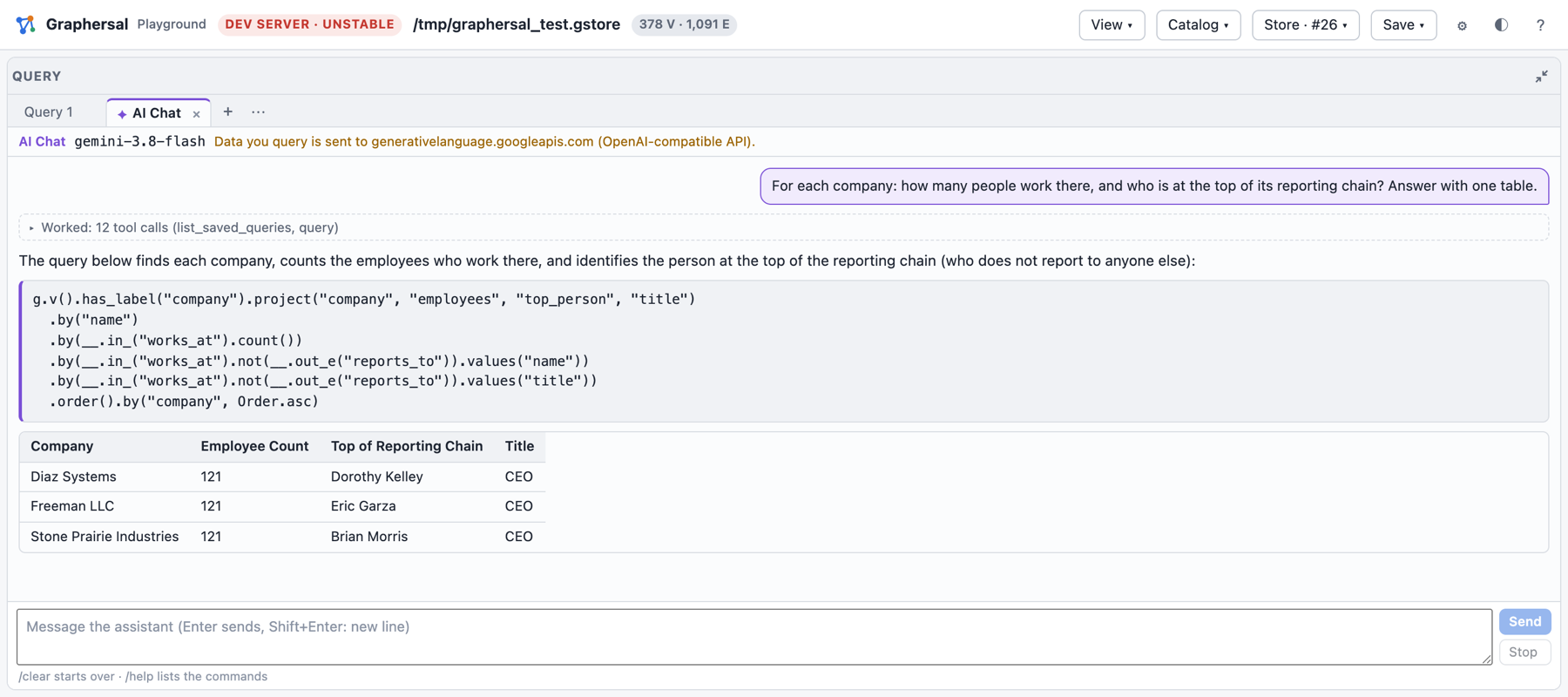
With --ai FILE the agent loop runs inside the server itself: the Query panel's + opens an
AI Chat tab where you ask questions in plain language. The server sends them to the LLM you
configured (Anthropic, OpenAI or an OpenAI-compatible endpoint such as Ollama), runs the tool
calls the model asks for on your graph and shows each step: the queries the agent ran, their
results, and its answer with tables and runnable queries.
export ANTHROPIC_API_KEY=...                  # the key stays in the server process
graphersal --graph modern --server --ai crates/graphersal-cli/examples/ai-anthropic.json
What the agent queries is sent to the provider you chose; the key never reaches the browser.
Every option, the configuration keys, the safety notes and what data leaves the machine are in Dev Server and MCP.
Installation
Library
Graphersal is primarily provided as a library and can be easily incorporated into your Rust project by adding it as a dependency.
To include Graphersal as a dependency in your Rust project's Cargo.toml file, refer to the following example:
[dependencies]
graphersal = "0.1"
Supported Features
Graphersal comes with the several key features.
| Feature | Description |
|---|---|
| io | Reads and writes graph files: GraphSON 3.0 (TinkerPop's format; values keep their types, dates and other types Graphersal cannot hold are skipped with a report) and GraphML. GraphML values are written as their plain text (a UUID as its canonical string, arrays and objects as JSON text); logical types (uuid, array, object) are restored on import only from the schema stored in the target graph, so set the schema first. GraphML never carries the schema; it travels as its own JSON. |
| serde | Converts between plain JSON and Graphersal values (a UUID is written as its canonical string), and reads/writes schema files. |
| script | Graphersal also supports a Domain Specific Language (DSL) for scripting based on the Rhai library. The math() step does not need it: its equations run on Graphersal's own expression engine in every build (see Math Expressions). |
| persist | Graphersal's own lossless binary format: packed snapshots (.gsnap), a write-ahead journal with recovery, and the Store (one directory or one .gstore file = one graph, durable commits, point in time, fork, rollback, backups, repair). See Persistence. |
| persist-zstd | zstd-compressed snapshot chunks on top of persist (pure Rust). |
| persist-zip | ZIP backup archives of a Store on top of persist. |
CLI Application
The command-line tool graphersal (crate graphersal-cli: the REPL, a one-shot query runner, the
dev server and the graphersal store commands) is built from the repository:
cargo build -p graphersal-cli --release      # target/release/graphersal
target/release/graphersal --help
Every command of the tool is on the Command Cheat Sheet.
WEB Playground
Graphersal also runs in the browser: the web playground is a static page with the engine compiled to
WebAssembly, so there is nothing to install on a server. Build it from the repository with
playground/build.sh and serve the playground/ directory, as described in the
WEB Playground chapter.
Command Cheat Sheet
Every command you need to build, run and operate Graphersal, ready to copy, each with one line of explanation. Run them from the root of a checkout of the repository. Every command on this page was run against the built binary; when the binary says something else, the binary is right and this page is wrong.
The examples write graphersal for the binary. After a debug build it is
target/debug/graphersal, after a release build target/release/graphersal; put one of them on
your PATH or type the path.
Build
cargo build -p graphersal-cli                 # debug build: target/debug/graphersal
cargo build -p graphersal-cli --release       # optimized build: target/release/graphersal
target/debug/graphersal --version             # check what you built
playground/build.sh                           # the WebAssembly playground into playground/pkg/
playground/build.sh needs two one-time installs: rustup target add wasm32-unknown-unknown
and cargo install --locked wasm-bindgen-cli --version 0.2.129 (it must equal the
wasm-bindgen crate version). wasm-opt (binaryen) is optional and makes the module smaller.
The web playground (WebAssembly, in the browser)
python3 playground/serve.py 8000 # open http://localhost:8000/
serve.py is a static file server that sends Cache-Control: no-store. Plain
python3 -m http.server sends no cache headers, so after a rebuild the browser keeps running the
old JavaScript modules and the old engine worker. If the page hangs after a reload, open
http://localhost:8000/reset/ (it clears the playground's saved state). See
WEB Playground.
One-shot queries and the REPL
graphersal                                                       # the REPL on the modern graph
graphersal --graph empty                                         # the REPL on an empty graph
graphersal -e 'g.v().has_label("person").values("name").to_list()'   # run, print, exit
graphersal -e 'let xs = g.v().to_list()' -e 'xs.len()'           # -e repeats and shares one scope
echo 'g.v().values("age").max().next()' | graphersal --in --graph modern   # the script from stdin
printf '/help has_label\n' | graphersal --repl                   # the REPL on a piped stdin (scripted sessions)
In the REPL a script runs when its input ends with ;. Commands start with / (an input starting
with : gets a pointer to its / form); Tab completes steps, token values (P., Order., T.,
...), commands and their arguments, in the session spelling. Completion and help read the same
catalogue as the playground's query editor: the engine's own function docs.
| Command | What it does |
|---|---|
/help | the commands, grouped |
/help <name> | the doc of a step, function, token class or command in either spelling, with its overloads and an example with its result (/help has_label, /help hasLabel, /help P.eq, /help Order) |
/help steps, /help tokens | every step and terminal; the token classes with their values |
/set format <fmt> | the default visualizer |
/set max-rows <n>, /set max-items <n>, /set no-limit | the display limits |
/set spelling <snake|camel> | the spelling of completion, help, .profile() and errors |
/set max-operations <n>, ..., /set safe-limits | the script limits (/help set lists them) |
/exit (or Ctrl-D) | close the graph and leave |
--graph takes:
| Source | What it is |
|---|---|
modern | TinkerPop's "modern" sample graph (the default) |
empty | an empty graph |
large | a generated graph of about 110k vertices and 110k edges |
tree | a file-tree sample (37 vertices) for glob_path |
g.json, g.jsonl, g.graphson | a GraphSON file (GraphSON) |
g.xml, g.graphml | a GraphML file |
g.gsnap | a packed snapshot |
data/, g.gstore | a Store: opened read-write, every commit is durable |
graphersal -e 'g.export_snapshot("m.gsnap")'                    # save the graph as a packed snapshot
graphersal --graph m.gsnap -e 'g.v().count().next()'             # and load it
graphersal -e 'g.export_graphson("m.json")'                      # GraphSON (TinkerPop's g.io() format)
A graph file carries no schema; --schema brings one (the schema format):
graphersal --graph g.graphml --schema schema.json -e 'g.v().count().next()'   # schema first, then the file imported against it
graphersal --graph g.json --schema schema.json --schema-mode closed           # --schema-mode overrides the file's "mode"
graphersal --graph modern --schema schema.json                                # a sample graph: the schema is applied (validated)
The schema is set on the new empty graph first and the file is imported as one unit, so declared
logical types (uuid, array, object) come back and an open/closed mode is enforced. Data
that violates the schema stops the start with exit code 1 and the violation report; an
unreadable or invalid schema file, an unknown --schema-mode, and --schema with a Store or a
.gsnap (both carry their own schema) are exit code 2.
Saved queries (stored in the database, called by name, read-only; see Saved Queries):
graphersal -e 'g.define_query(#{name: "people", body: "fn people() { g.v().has_label(\"person\") }"})' \
           -e 'g.query("people").values("name").to_list()'    # define, then call and continue
graphersal -e 'g.queries()'                                       # list (also g.queries("folder"), g.get_query(name))
Display (a result without a data terminal is rendered; to_list()/next() are never cut; iterate() runs
for the side effects and shows nothing):
graphersal -e 'g.v().has_label("person").values("name")' --format json   # auto, table, markdown, json, jsonschema, mermaid, plantuml, tree
graphersal -e 'g.v()' --max-rows 2            # at most 2 rows (default 100); --max-items N for nested items
graphersal -e 'g.v().values("name")' --no-limit
graphersal --spelling camel -e 'g.v().has_label("person").count().profile()'   # Gremlin spelling in profiles and errors
Limits (scripts run without limits by default; see Resource Limits):
graphersal --graph large --timeout 50 -e 'g.v().out().out().out().out().count().next()'  # 50 ms per traversal and script
graphersal --memory-limit auto -e 'g.v().count().next()'         # memory budget: the cgroup limit minus a headroom
graphersal --memory-limit 2000000000 -e 'g.v().count().next()'  # an explicit budget in bytes
graphersal --safe-limits -e 'g.v().count().next()'               # the library's SAFE script limits
graphersal --max-operations 1000 -e 'let n = 0; loop { n += 1; }' # stops with "Resource limit 'script.max_operations'"
graphersal --max-traversers 1000000 --max-value-depth 64 -e 'g.v().count().next()'  # also --max-string-size, --max-array-size, --max-map-size
Exit codes: 0 ok, 1 the script failed (diagnostic on stderr), the --graph data violates
the --schema, or a --graph <store> cannot be opened (in use by another writer, ...), 2 invalid invocation (unknown option, a graph or schema file that cannot be
loaded), 141 stdout was closed before every result was written (graphersal -e '..' | head -1:
the run stops quietly; a failing script keeps its own code; the same for graphersal store).
A closed stdout or stderr is never a crash: the dev server keeps serving when its log reader
goes away. graphersal --help lists every option.
The dev server
DEV mode, unstable, local only (127.0.0.1, no authentication). It serves the playground UI with this process as the engine. Details: Dev Server and MCP.
graphersal --graph modern --server                       # http://127.0.0.1:8080/
graphersal --graph ./mygraph.json --server --port 9000   # any --graph source; "Save to file" writes it back
graphersal --graph large --server --port 0               # 0 picks a free port (the address is printed on stdout)
graphersal --graph data/ --server                        # a Store: every commit is durable, the Store menu appears
graphersal --graph new/ --create-store --server          # create the store when it does not exist
graphersal --graph g.graphml --schema schema.json --server   # a graph file loaded against its schema
graphersal --graph large --server --timeout 5000 --memory-limit auto   # limits apply to every query
graphersal --graph modern --server --ui-dir ~/src/graphersal/playground # its files win over the embedded UI
Stop it with Ctrl+C: a running query is cancelled and an open store is closed cleanly. A
second Ctrl+C exits at once. The display options (--format, --max-rows, ...) and -e/--in
are refused with --server (exit 2).
MCP: an AI agent on the same graph
graphersal --graph modern --server --port 9000 --mcp                    # MCP endpoint http://127.0.0.1:9000/mcp
graphersal --graph modern --server --port 9000 --mcp --mcp-read-only    # the agent may only read
graphersal --graph modern --server --port 9000 --mcp --mcp-token my-secret-token   # the agent must send the token
graphersal --graph data/ --server --port 9000 --mcp --mcp-query-tools  # also every saved query as a tool of its own
Connect Claude Code (the server must be running; then start a NEW claude session):
claude mcp add --transport http graphersal http://127.0.0.1:9000/mcp
claude mcp add --transport http graphersal http://127.0.0.1:9000/mcp --header "Authorization: Bearer my-secret-token"
claude mcp list                    # graphersal: http://127.0.0.1:9000/mcp (HTTP) - Connected
claude mcp remove graphersal       # when you are done, or before adding it again on another port
AI Chat in the playground (EXPERIMENTAL)
export ANTHROPIC_API_KEY=...                                   # the variable the file names; the key stays in the server
graphersal --graph modern --server --ai ai.json                # "+" in the Query panel -> AI Chat
graphersal --graph modern --server --ai crates/graphersal-cli/examples/ai-ollama.json   # a local model: no data leaves the machine
GEMINI_API_KEY=... graphersal --graph modern --server --ai crates/graphersal-cli/examples/ai-google.json   # Google Gemini (OpenAI-compatible endpoint)
ai.json: {"provider": "anthropic"|"openai", "model": "<id>", "api_key_env": "<VARIABLE>", "base_url": null, "read_only": false, "max_tool_calls_per_turn": 20, "max_tokens": 4096}.
Details: AI Chat.
The Store
A Store is one directory (or one .gstore file) that keeps one graph durable. Reference:
The graphersal store Command. TARGET below is one of
--at-commit N, --at-time 2026-10-08T02:43:00Z (RFC 3339 with a zone, or microseconds since
the epoch) or --at-mark NAME.
graphersal store create data/ --from modern          # a new store (or: --from empty|large|tree|FILE|FILE.gsnap)
graphersal store create graph.gstore --from modern   # a single-file store (or: --single-file)
graphersal store create data/ --on-damage continue   # keep committing when damage is found while open (fixed at creation)
graphersal --graph data/ -e 'g.add_v("person").property("name", "zoe").to_list()'   # a durable commit
graphersal --graph data/                             # the REPL on the store (--server: the dev server)
graphersal store mark data/ before-import            # name the current position
graphersal --graph data/ -e 'g.add_v("person").property("name", "ada").to_list()'
graphersal store info data/                          # identity, position, snapshots, marks, WAL size
graphersal store list data/                          # the snapshots
graphersal store marks data/                         # the marks
graphersal store checkpoint data/ --name nightly     # write a snapshot now
graphersal store verify data/                        # scrub every checksum (exit 1 on damage)
graphersal store fork data/ branch/ --at-mark before-import          # a past state as a new store
graphersal store fork data/ branch2/ --at-time 2026-10-08T02:43:00Z  # or --at-commit N
graphersal store backup data/ /mnt/backup/data       # full the first time, incremental afterwards
graphersal store backup data/ weekly/ --full         # always full (the directory must be empty)
graphersal store backup data/ data.zip --zip         # a full backup as one ZIP archive
# every backup checks every checksum in the store and in the copy; damage stops it (repair the STORE)
# a damaged store open in the dev server: Store menu > Back up from memory (POST /api/store/backup {"from_memory": true})
graphersal store export data/ data.gsnap             # the latest snapshot as a .gsnap (--commit N: another)
graphersal store rollback data/ --at-mark before-import   # back IN PLACE; the rest goes to the attic
graphersal store attic data/                         # the attic entries (rolled-back history), with their <ID>
graphersal store attic data/ changes <ID>            # the commits of an entry
graphersal store attic data/ fork <ID> rolled-back/  # keep the rolled-back history as a new store
graphersal store attic data/ restore <ID>            # undo the rollback
graphersal store attic data/ remove <ID>             # or: delete an entry for good
graphersal store rollback data/ --at-commit 0 --delete    # back in place, deleting the rest (no undo)
graphersal store restore /mnt/backup/data            # make a backup the live store (same graph id)
graphersal store restore data.zip restored/          # unpack a ZIP backup as the live store
graphersal store prune data/ --up-to 1200            # remove history only needed before commit 1200
graphersal store compact-advice data/                # is compact worth it now? (cheap)
graphersal store compact data/                       # prune to now; a single file gives its free space back
graphersal store compact data/ --drop-marks          # ... also when marks become unreachable (refused without)
graphersal store convert data/ data.gstore           # a closed store into one file (or back)
graphersal store repair damaged/ --to repaired/      # a damaged store, repaired into a new directory
graphersal store rollback --help                     # the usage of one command (or: store help rollback)
Migrate a store from an older format
A store written by an older Graphersal with an older store format version is refused with
The store ... has the older format version N (nothing is changed). Move its current state
through a packed snapshot: export it with the OLD binary (the store closed), create a new store
from the file with the new one:
old/graphersal --graph old_store/ -e 'g.export_snapshot("graph.gsnap")'   # the OLD binary: the current state
graphersal store create new_store/ --from graph.gsnap                     # this binary (or new.gstore: one file)
graphersal store verify new_store/                                        # then back it up
The new store has the graph, its schema and its catalog (saved queries, compression rules), with
the same element ids and commit position, but it is a new store: the marks, the attic (rolled-back
history) and the backups of the old store are not carried. old/graphersal store export old_store/ graph.gsnap exports the latest stored SNAPSHOT only (run old/graphersal store checkpoint old_store/ first to include the WAL). Keep the old store until the new one is
verified and backed up.
Python
import graphersal
graph = graphersal.Graph.tinkerpop_modern()
graph.save("g.gsnap")                                   # a packed snapshot
graph = graphersal.Graph.load("g.gsnap")
with graphersal.Store.create("data") as store:          # or Store.open("data"); "g.gstore": one file
    store.graph.execute('g.addV("person").property("name", "ann").next()')   # durable
    store.mark("after-ann"); store.checkpoint("nightly"); store.backup("bk")
More: Python and bindings/py-graphersal/README.md.
Tests and checks (contributors)
The full list of build, test, lint, coverage, fuzzing and wasm commands, with the acceptance
feature set, is in CLAUDE.md (section "Commands") at the root of the repository; the Python
binding's in bindings/py-graphersal/README.md, the playground's in playground/README.md.
Why a Graph?
Many questions are about connections: who knows whom, what depends on what, which path leads from here to there. A graph stores the connections themselves, so such a question is answered by walking along them instead of reconstructing them.
Questions a graph answers well
- Networks of people and things. Friends of friends, colleagues who worked on the same project, customers who bought what similar customers bought.
- Dependencies and impact. Which services break when this database goes down? Which packages pull in this library, directly or through ten others? Which documents cite this one?
- Infrastructure and inventory. Servers, networks, accounts and owners, and how they are wired together: "which public endpoints can reach this host?".
- Hierarchies and trees. Directories, organisational charts, bills of materials: every part below this one, at any depth.
- Paths. The shortest or every route between two things; cycles that should not exist.
- Knowledge. Facts as connected entities, the context an AI agent retrieves before answering (the graph behind "GraphRAG").
Connections as data
Take a small social graph: people are friends with people and like movies.

Which people have a friend of a friend who likes "Terminator"? In Gremlin the question reads like a walk through the picture:
g.v().has_label("person").as("person")   // start at every person, remember it
  .repeat(__.out("friends")).times(2)    // follow "friends" twice
  .out("likes").has("title", "Terminator")
  .select("person")                      // back to the person we started from
  .dedup()
  .values("name")
In a relational database the same question needs a self-join of the friendship table for every hop, and the number of hops is fixed in the SQL text:
SELECT DISTINCT p.name
FROM person p
JOIN friends f1 ON f1.from_id = p.id
JOIN friends f2 ON f2.from_id = f1.to_id
JOIN likes   l  ON l.person_id = f2.to_id
JOIN movie   m  ON m.id = l.movie_id
WHERE m.title = 'Terminator';
"Up to five hops" or "any depth" makes the SQL much harder (recursive common table expressions),
while the traversal only changes times(2) into times(5) or into an until(...) condition.
Why it is fast
A graph engine keeps, with every vertex, the list of its edges. Following an edge is a direct step to the neighbour, not a lookup in an index of the whole table, so the cost of a traversal grows with the part of the graph it actually touches, not with the size of the data set. That is why deep or recursive questions stay cheap on a graph and become expensive as joins.
The reverse holds too: a graph is not the best tool for everything. Aggregations over millions of rows of the same shape ("total revenue per month") are what relational and columnar databases are built for. Graphersal is an in-memory engine, so a graph has to fit into memory; see Current Limitations.
Next
The Property Graph Model introduces vertices, edges, labels and properties, and Gremlin in Ten Minutes the steps of a traversal.
The Property Graph Model
Graphersal stores a property graph, the model of Apache TinkerPop and most graph databases.
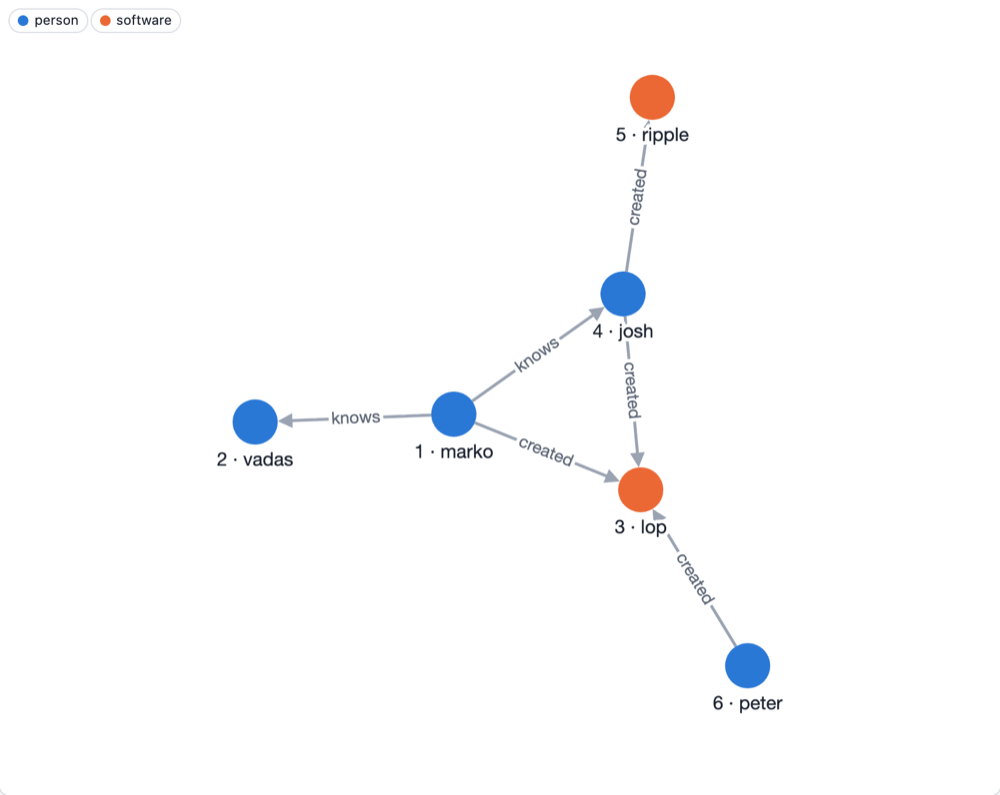
This is the "modern" sample graph that ships with TinkerPop and with Graphersal (--graph modern,
GraphSource::tinkerpop_modern()). It has the four building blocks of the model:
- Vertices are the things: here four people and two pieces of software. Every vertex has an
id (
"1"is marko). - Edges are the connections. An edge has a direction, from its out vertex to its in vertex: marko knows josh, josh created ripple. An edge has an id too.
- Labels say what kind of thing a vertex or an edge is:
person,software,knows,created. Queries usually start by label. - Properties are key-value pairs on vertices and on edges: a person has a
nameand anage, a piece of software anameand alang, an edge aweight.
$ graphersal -e 'g.v("1").element_map()'
╭─────┬────┬────────┬───────╮
│ age │ id │ label  │ name  │
├─────┼────┼────────┼───────┤
│ 29  │ 1  │ person │ marko │
╰─────┴────┴────────┴───────╯
Values
A property value is a string, a 64-bit integer, a 64-bit float, a boolean, null, a UUID, an
array or an object (a nested map). Arrays and objects can be nested, and steps reach inside them
with path keys such as jpath("address.city") (Path Keys).
Values keep their type: a string that looks like a number or a date stays a string unless a
schema declares otherwise. Dates and times come in a later release.
Graphersal additions
- A vertex can carry several labels (
personandemployee); the first one is its primary label, whichlabel()returns as TinkerPop does (Multi-Label Vertices). - A graph can have a schema: the labels, their properties and types, and which edges may connect which labels, enforced on every write (Schemas).
- A graph keeps a catalog of named definitions next to the data, such as saved queries (Saved Queries).
No database server
A Graphersal graph lives in the memory of the process that uses it: your Rust program, the Python
interpreter, the browser tab or the graphersal command line tool. There is no separate database
server to run. When the graph must survive the process, the Store keeps it on disk
(Persistence Overview).
Gremlin in Ten Minutes
Gremlin describes a query as a traversal: a chain of steps that traversers flow
through. Each traverser sits on a vertex, an edge or a value; a step moves it, filters it out,
turns it into something else or combines many of them. All examples run on the "modern" graph
(The Property Graph Model): Run in the playground under a block opens
it in the playground, or pass it to graphersal -e.
Start, filter, walk
g is the graph. v() starts one traverser on every vertex, has_label and has keep the ones
that match, values turns each into a property value:
g.v().has_label("person").values("name") // marko, vadas, josh, peter
g.v().has_label("person").has("age", P.gt(30)).values("name") // josh, peter
out(label) walks along outgoing edges, in(label) along incoming ones, both(label) along
either:
g.v().has("name", "marko").out("knows").values("name") // josh, vadas
g.v().has("name", "marko").out("knows").out("created").values("name") // ripple, lop
Edges are elements too: out_e steps onto the edges, in_v to their far end, and an edge can be
filtered by its properties on the way:
g.v().has_label("person").out_e("created").has("weight", P.gte(0.5)).in_v().values("name") // ripple
Remember and come back
as("x") names a position of the walk; select, where and path read it later:
// who created software together with marko?
g.v().has("name", "marko").as("me")
  .out("created").in("created")
  .where(P.neq("me"))
  .values("name")                                  // peter, josh
g.v().has("name", "marko").out("created").in("created").path().by("name")
// [marko, lop, peter], [marko, lop, josh], [marko, lop, marko]
Group, count, order
Some steps need the whole stream before they answer: count, group, order, dedup.
by(...) modulates the step before it, and __. starts an anonymous traversal that runs for
each element:
g.v().count() // 6
g.v().has_label("person").order().by("age", Order.desc).values("name") // peter, josh, marko, vadas
g.v().has_label("person").group().by("name").by(__.out("created").count())
// {josh: 2, marko: 1, peter: 1, vadas: 0}
Loops
repeat runs a traversal again and again, times(n) or until(condition) stops it, and
emit() also yields the steps in between:
// a path from peter to vadas, in either direction along the edges
g.v().has("name", "peter")
  .repeat(__.both().simple_path()).until(__.has("name", "vadas"))
  .path().by("name").limit(1)                      // [peter, lop, marko, vadas]
Results
A traversal without a final step is displayed (a table in the command line and the playground).
In code, a terminal step returns the data: to_list() all results, next() the first one,
iterate() runs it for its side effects only.
let names = g.v().has_label("person").values("name").to_list();   // a list
let marko = g.v().has("name", "marko").next();                     // one vertex
names.len()                                                        // 4
Changing the graph
add_v, add_e, property and drop write. Every traversal is one unit: when any step fails,
nothing it wrote stays.
g.add_v("person").property("name", "ann").property("age", 41).as("a")
  .v().has("name", "marko").add_e("knows").to("a")
  .iterate();
g.v().has("name", "marko").out("knows").values("name")   // ann, josh, vadas
Two spellings
Every step has a snake_case name and its Gremlin camelCase twin, so a query copied from TinkerPop documentation runs as it is (with double quotes for strings):
g.V().hasLabel("person").outE("created").has("weight", P.gte(0.5)).inV().values("name")
Next
- Graphersal and TinkerPop: what is the same and what is not;
- Writing Queries: the DSL in detail, by topic;
- Step Reference: the steps one by one.
Graphersal and TinkerPop
Apache TinkerPop™ defines the property graph model and the Gremlin language that many graph databases implement. Graphersal is an independent implementation in Rust: it does not use TinkerPop's Java code, and it is not a Gremlin Server, so a TinkerPop driver does not connect to it. What it shares with TinkerPop is the language and its meaning.
Same meaning, checked by TinkerPop's own tests
The rule is simple: a step that Graphersal implements behaves as the TinkerPop specification
says, unless a difference is documented. The specification is TinkerPop's own test suite, a set of
Gherkin scenarios (TinkerPop 3.8.2) that runs with every cargo test of Graphersal. A scenario
that passes once is protected from regressing, and the number of supported steps whose results
are wrong is kept at zero. The current numbers are on
TinkerPop Compliance.
Not every step exists yet. An unimplemented step is an error that names it, never a silently different result; the gaps are listed in Current Limitations.
Deliberate differences
A few behaviours differ on purpose, each for a reason that is written down. The most visible ones:
- Every traversal is a transaction. A failing traversal leaves nothing behind (Transactions).
- Ids are strings, so they sort as text (Predicates).
- One integer and one float type (
int64,float64) instead of Java's number tower. - A removed element stays removed: reading it through an old reference finds nothing, and writing to it is an error (Dropping Elements).
- No
match(),io()or graph-computer algorithms; files are read and written by the API and the command line instead.
Every difference, with its page, is in TinkerPop Deviations.
The query text
TinkerPop's reference language is Gremlin embedded in Groovy or Java. Graphersal's text form is Gremlin embedded in Rhai, a small scripting language for Rust. A Groovy line usually pastes as it is; the differences are small:
| Gremlin Groovy | Graphersal |
|---|---|
'single quotes' | "double quotes" |
order().by('age', desc) | order().by("age", Order.desc) (token classes are written out) |
out() inside where(...), repeat(...) | __.out() (anonymous traversals always start with __.) |
[name: 'ann'] (a map) | #{name: "ann"} |
def x = ... | let x = ...; |
The full copy-paste table is in Repeated Labels: select with Pop.
Every step also has a snake_case name (has_label, out_e) next to its camelCase one
(hasLabel, outE), and the Rust API uses the snake_case names.
Additions
Graphersal adds what an embedded engine needs: schemas, saved queries in the graph, path keys into
nested values (jpath), multi-label vertices, change capture, permissions and resource limits, a
durable Store, and profile() with memory figures. These are extensions: they do not change what
a TinkerPop query means.
TinkerPop Deviations
This page lists every place where Graphersal knowingly differs from Apache TinkerPop 3.8.2, and every
known gap that is deliberately not fixed (yet). Pass/fail numbers are on
TinkerPop Compliance; the backlog is section 4 ("TinkerPop backlog") of
roadmap/first-public-release.md. Each row links to the page that explains the behaviour for users.
The scenarios of the rows select() of an undeclared label, order() of property elements,
multi-properties and meta-properties, property(k, null), and asString() of a map, and the families
excluded for good (match(), the extra number types, io(), the graph algorithms), are
excluded from the compatibility numbers: see
Deliberate incompatibilities.
Excluded for good
These TinkerPop features are not planned. Their scenarios are listed by id in
INCOMPATIBILITIES (crates/graphersal/tests/tinkerpop/harness/scope.rs) and are outside the compatibility scope.
| Code | Feature | Why |
|---|---|---|
match-step | match() | declarative pattern matching will come through a Cypher/GQL front end on the same engine instead; match is also a reserved Rhai word |
extra-number-types | GType.BYTE/SHORT/BIGINT/BIGDECIMAL/CHAR/BINARY, BigInteger literals | the number model is int64/float64; see Number widths |
io-step | io(), read(), write(), the IO tokens | GraphSON and GraphML import and export is Graphersal's own API (GraphSource::from_graphson, from_graphml, import_graphson, import_graphml, the CLI's --graph), not a traversal step (GraphSON) |
graph-algorithms | pageRank(), shortestPath(), connectedComponent(), peerPressure() and their token classes | GraphComputer vertex programs, not planned for the traversal language (the scenarios are @GraphComputerOnly as well) |
Dates (asDate, dateAdd, dateDiff, DT, GType.DATETIME) are not in this list: they are planned for 0.2.0
and stay unsupported until then.
Deliberate differences
| Area | TinkerPop | Graphersal | Details |
|---|---|---|---|
negate() / P.not(p) | Compare.negate() flips the operator | plain complement of the result | Predicates |
| Element ids | numeric ids order numerically | ids are strings, "10" sorts before "9"; hasId(P.gt(3)) (an order predicate on a number) is an error whose help shows hasId(P.gt("3")); equality predicates (eq, neq, within, without) take numbers and compare their text | Predicates |
hasId(id, ids...) | a later list stays one id | the same; a list flattens in first position only, null is an id that matches nothing | Id Arguments |
length() | counts UTF-16 code units | counts Unicode scalar values; an emoji is 1, TinkerPop gives 2 | Type Conversion |
asNumber(GType.INT|LONG) of a float | NaN, infinity or out of range wraps or narrows to the target width | truncates toward zero; NaN, infinity and out of int64 range are errors (one int64 width) | Type Conversion |
asBool() of a string | true/false in any letter case | the same; no other text converts ("1", "yes" are errors) | Type Conversion |
trim()/lTrim()/rTrim() | Java String.trim() strips characters up to U+0020 | strips Unicode White_Space (U+00A0, U+3000 too) | Type Conversion |
choose()/branch() with Pick.any | runs for a produced value | also runs when the selector yields nothing | Option Keys |
Branch children of union/choose/branch | one traverser at a time | stateful children run once over the whole stream; output is branch-major | Branch Children |
where(traversal) labels | start/end label rules of configureStartAndEndSteps | the same rules; an unresolved label filters out | where() Labels |
filter(traversal) | TraversalFilterStep: a plain existence test, as() in the child is an ordinary label | the same (no deviation); it is not an alias of where(traversal), which reads a leading/trailing as() as a scope label and accepts a predicate | filter() and where() |
Second by() | accepted by some steps | InvalidModulator for aggregate, store, groupCount, valueMap, dedup | The by() Modulator |
select() of an undeclared label | select("a") and select(Pop.x, "a") where no as("a") or side-effect key exists silently filter the traverser | an error before execution that names the label and shows how to declare it (a label declared but only sometimes set still filters); a silent filter hides typos (a map-producing step upstream, such as valueMap() or inject(), disables the check, so valueMap().select(Pop.first, "a") filters as in TinkerPop) | Select with Pop, Deliberate incompatibilities, help() of the error |
order() of properties() elements | Property elements have their own total order (key, then value) and property ids | ordered by value only; no property ids | Property Elements |
by(T.id) / by(T.key) / by(T.value) over properties() elements | T.id is the opaque property id; T.key/T.value are Property tokens | by(T.label) orders by key (as in TinkerPop); by(T.id) is an error (no property ids); by(T.key)/by(T.value) read the key and the value as in TinkerPop (both also read a map entry, a Graphersal extension; any other value is a cast error, as in TinkerPop) | Property Elements |
Paths::g_V_shortestpath | the expected 24 rows depend on PathRetractionStrategy dropping the repeat-loop v labels in the second iteration, which filters every distance-3 candidate | the full shortest-path set, 30 rows: the six extra rows are the true distance-3 shortest paths (vadas-peter, vadas-ripple, ripple-peter, both directions). Verified on TinkerPop: the scenario's query returns 24, the same query with a no-op filter(__.path()) at the start of the repeat body (which disables the strategy) returns 30. An upstream TinkerPop issue is being prepared | Deliberate incompatibilities |
Property null | @AllowNullPropertyValues / @DisallowNullPropertyValues flavours | null is a real stored value; writing it never removes a property; use remove_property() to remove | Upserts, Removing Properties |
| Multi-properties, meta-properties | Cardinality.list/set, properties on properties | one value per key; list/set writes fail with UnsupportedCardinality | Upserts, Property Elements |
has(key, ..) / hasNot(key) on a property element | tests the property's meta-properties (an edge property has none) | tests the key inside the property's object value (properties("meta").has("a", P.eq(1)) reads meta.a, never the owning element's a); a non-object value is a cast error | Property Elements |
asString() of a map | Java Map.toString ({name=[marko]}) | the JSON-like physical text | Property Elements |
| Set side effects | a real Set value type | no set value type: cap() returns an array in first-seen order, members compare by value | Set Side Effects |
tree("a") | progressive tree, bulk counts | the tree grows with the stream, bulk is ignored (see the gaps below for local()) | tree() Side Effect |
repeat.order = dfs | does not exist | a Graphersal addition; a limit() in the body then counts per traverser | Recursive Traversals |
Map keys 0.0 / -0.0 | different keys (Double.equals) | the same key (-0.0 is canonicalized when a number is built) | Maps With Non-String Keys |
| Map with a non-string key as a property value | TinkerGraph stores any value | never storable (InvalidPropertyValue); a string-keyed map is storable | Maps With Non-String Keys |
group()/groupCount()/tree() vertex or edge key | the live element, compared by id | a snapshot (element map) materialized once per result; equal within one result | Maps With Non-String Keys |
sideEffect(traversal) and bulk | the child runs once per traverser | the child runs once per unit of a bulk-n traverser (the engine-wide bulk rule); the stream passes through unchanged | Bulk and Barriers |
profile() metrics | TraversalMetrics with camelCase keys (traverserCount, elementCount, percentDur, dur) and internal step ids | snake_case keys (traverser_count, element_count, percent_duration, duration_ns) plus our fields (calls, count_in, optional timing/loops/memory), ids are static plan positions <step>.<child>.<step> shared with error locations; step names are the canonical DSL rendering of the step (has_label("person"), v(labels: ["person"]).count(); g.with("render.spelling", "camel") gives hasLabel("person")), not the step class names (HasStep([~label.eq(person)])); a failing profile() is an error, execute() (ours) returns results, error and metrics of one run | Profiling and execute() |
limit()/count() in a repeat() body | counts across the whole loop | counts per iteration (BFS) or per traverser (DFS); only dedup() has loop-wide state | Recursive Traversals |
cap() of subgraph() | a graph value | a graph value (a TraversalGraph snapshot, empty when nothing was collected): selected edges, both endpoint vertices, ids, vertex label sets and all properties at full depth; the stored schema is copied. In the Rust API next()/to_list() list it as {"vertices", "edges"} (use to_graph() for the graph) | Set Side Effects |
to_graph() | not in TinkerPop | a Graphersal terminal: subgraph("sg").cap("sg") without a label; a stream of anything but edges is an error | Set Side Effects |
hasLabel() without arguments | not in TinkerPop (hasLabel takes at least one label or a predicate) | a Graphersal extension: keeps the elements that have a label (a vertex with a non-empty label set, an edge with a label); not(__.has_label()) selects the unlabeled ones; hasLabel(null) and an empty list still match nothing | Label Steps |
subgraph() over non-edges, subgraph() without a label | not specified here (vanilla fails with a cast error on a vertex; unverified, no network) | an explicit error with a help naming outE()/inE()/bothE(), and for the missing label subgraph("sg")/to_graph() | Set Side Effects |
withSideEffect("sg", graph) as the subgraph() target | any graph | a graph value of this engine, a TraversalGraph (a host graph of another storage fails with Unsupported; not the traversed graph: it fails instead of deadlocking); an existing vertex id is reused, an existing edge id skipped, the target's own schema kept | Set Side Effects |
| Script expression depth | the JVM stack decides | a Rhai expression-depth limit (128 expressions, 64 in a function); a chain of about 124 steps is rejected cleanly | Query Limits |
| Number widths | byte, short, int, long, BigInteger, BigDecimal | int64, float64 only | below |
conjoin() of a list holding a list or a map | writes Java's toString ([a, b], {k=v}) for the element | a cast error: Graphersal writes no Java formats as data text (the rule of asString() of a map); conjoin() or unfold the inner list first; no suite scenario covers it | conjoin |
format() of a list or map value | writes Java's toString for the value | a cast error, as for conjoin(); no suite scenario covers it | format |
TextP.regex()/notRegex() dialect | java.util.regex | the Rust regex crate's own dialect (syntax); the individual differences are not listed | Predicates |
Random draws (coin(), sample(), Order.shuffle) | SeedStrategy seeds Java's Random | g.with("random.seed", n) seeds the execution's own generator (Rust rand): reproducible per Graphersal version, but not the same draws as TinkerPop for the same seed; the SeedStrategy scenarios stay out of scope with withStrategies() | sample, Execution Options |
sample(n).by(weight) | weights any number; with only zero weights left the sampling loop does not end | the weight must be a number of at least 0 (ValueError::SampleWeight otherwise); a zero-weight traverser is never drawn, so fewer than n can come back; each draw is exactly proportional to the remaining weight | sample |
P.typeOf(name) | any type name registered in TinkerPop's type cache (custom types included) | a fixed list of names: String, Integer, Long, Double, Float, Boolean, UUID, Number, List, Map, Vertex, Edge, Path, Graph (every Java simple class name TinkerPop registers for a GType Graphersal has); Integer is int64 and Float is float64 (one width each) | Predicates |
min()/max() over incomparable values | a ClassCastException for mixed kinds; vertices and edges order by id | a mix of kinds (number and string, boolean and number) fails with a cast-style error naming both kinds; elements, paths and collections are not ordered by min/max and fail the same way | Local Scope |
int + float in sum/min/max | NumberHelper widens to double | the same: the result is a float even when the extremum came from an integer; integers beyond 2^53 lose precision when widened; integer-only streams stay exact and overflow raises | Local Scope |
path()/simplePath()/cyclicPath() from()/to() | Path.subPath(from, to): last carrier of each label | the same; an unknown label or a to() before the from() is an error (TinkerPop raises too, text differs); a label list is an InvalidModulator | Path Windows |
by() of path()/simplePath()/cyclicPath() yielding nothing | drops the traverser (without ProductiveByStrategy) | the same, for all three steps | Path Windows |
where(P.gt("a")) with by(); ring order of a composite predicate | label operands take ring entries in the order TinkerPop's connective handling visits them (not verified) | textual order of the predicate, independent of short-circuiting; an unproductive by() drops the traverser, also under not() | where() Start and End Labels |
group("a")/groupCount("a") on a key that holds another side effect | the map is merged into whatever a holds (withSideEffect("a", [:]) seeds it) | an error naming the key: only group steps that reduce a key the same way may share a side-effect key; a reducing value traversal is re-run over all members of a grown key at the end of each step execution, so readers in the same traversal see reduced values | group |
dedup("a", "b") with a label that is not on the path | getSafeScopeValue raises an error | the traverser is filtered out, like an unproductive by() | dedup |
addE() endpoint that is no path label and no side-effect key | the select(key) lookup fails | the name is looked up as a vertex id (to("2")) | addE() Endpoints |
addE().to(["2", "3"]) | one endpoint per from()/to() | one edge per name | addE() Endpoints |
addE() endpoint ids | vertex id of the graph's id type | compared as strings (2 is "2") | addE() Endpoints |
id()/label() of an element removed earlier in the same query (as("a"), aggregate(), a path, a lazy values()/id() read after the drop) | TinkerGraph still returns the id and label it keeps on the removed element object; properties and edges are gone | properties and edges are gone too, but id(), label(), materialization and writes fail with GraphError::ElementRemoved: a generational handle no longer has any data (the freed slot may hold another element), and it never resolves to that other element | Dropping Elements |
A traversal that fails after it changed the graph (a failing step, a schema violation, a resource limit, evaluationTimeout) | TinkerGraph without transactions keeps the changes made before the error | every traversal is one unit (implicit auto-commit): the failure rolls back all its changes, so nothing of it is applied; in a script the unit is one traversal (a host may make the whole script one unit, and the Rust API has explicit transactions and dry runs) | Transactions |
outV()/inV()/bothV()/otherV() of an edge removed earlier in the same query | TinkerGraph's removed edge object still references its endpoint vertices | empty, like every other adjacency of a removed element (the generational handle has no data left) | Dropping Elements |
| Explicit transactions | g.tx() with commit()/rollback() on a transactional graph (TinkerGraph itself is not transactional) | no tx() in the DSL (0.1.0); the Rust API has Transactional::transaction(|g| ..) for every storage (a closure: Ok commits, Err rolls back, every traversal inside is a savepoint), transaction_with (commit metadata) and dry_run (always rolled back, returns the ChangeSet); a host can make a whole Rhai script one unit (eval_value_atomic); automatic ids of rolled-back elements are never handed out again | Transactions |
| Mutation events | EventStrategy with MutationListeners, called per mutation after it happened | per committed unit: CommitHook::before_commit (may veto, the unit is rolled back), after_commit, after_rollback, each with the whole ChangeSet (before and after values); no per-mutation events | Transactions |
id() of a property element (properties().id()) | an opaque property id | an error, Graphersal has no property ids (key() and element().id() work); Orderability::g_V_properties_order_id stays failing | Property Elements |
label()/hasLabel() of a property | a vertex property's label is its key; an edge Property is no element | the same for properties() elements of vertices; edge properties and values() handles are cast errors | Property Elements |
valueMap(true, ..) token keys | the T.id/T.label tokens | the strings id and label; a property of that name makes a second entry with the same key | Property Elements |
remove_property(keys...) | not a TinkerPop step (removal is properties(k).drop()) | Graphersal extension: removes keys (none = all) of vertices/edges and emits the same element; rejected for a property in its label's required list in open/closed schemas | Removing Properties |
add_label(..), drop_label(..), set_label(..) | not TinkerPop steps (labels are immutable) | Graphersal extensions: change the label set of a vertex or the label of an edge and emit the same element; checked by an open/closed schema | add_label, drop_label, set_label |
valueMap(null) | ambiguous single-null varargs | a null key is dropped, so a lone null means all keys | Property Elements |
Operator integer overflow | sum/minus/mult promote int to long and long to BigInteger | int64 only: overflow is an OperatorFailed error | Sack and Operators |
Operator.sumLong overflow | wraps around (two's complement) | an OperatorFailed error | Sack and Operators |
Operator.addAll of a list and a scalar | 3.7.2 throws, 3.8.2 appends | appends the scalar (the 3.8.2 feature files decide) | Sack and Operators |
Operator null operand | NumberHelper: sum(null, x) is null, sum(x, null) is x | the same (kept deliberately); min/max/and/or take the other operand | Sack and Operators |
| Sack value is a vertex or an edge | any object is a valid sack | a cast error (help names by(T.id)); use an id or a property | Sack and Operators |
Sack split and Supplier initial values | withSack(Supplier) clones per traverser, a UnaryOperator splits | not supported; a container sack is shared by handle and never modified in place | Sack and Operators |
| Merging traversers that carry a sack | a sacked traverser never merges without a merge operator | equal-sack traversers merge (invisible after bulk expansion); different sacks never do | Sack and Operators |
sack(Operator) arithmetic widening | a sack of 127b plus 1b becomes a long, Long.MAX_VALUE + 1 a BigInteger | int64/float64 only: the result is an int64, and an overflow is an OperatorFailed error naming sack | Sack and Operators |
sack(Operator) with a vertex or edge operand | any object | OperatorFailed or a cast error (a sack never holds an element); by(T.id) gives the id | Sack and Operators |
sack(BiFunction), barrier(Consumer) lambdas | accepted | not supported: sack(Operator.sum) and barrier(Barrier.normSack) only | Sack and Operators |
by() of sack(Operator) | the first result of the child (TraversalUtil.produce) | the same; one by() only (a second is InvalidModulator) | Sack and Operators |
normSack numerator | sack * bulk / total | with a merge operator the same; without one sack / total with total = sum(sack * bulk): equal sacks merge invisibly here, TinkerPop's bulk is 1 without a merge operator, so the answers agree | Sack and Operators |
Merge points with a sack merge operator or withBulk(false) | LazyBarrierStrategy inserts barriers that merge sacks, so the result depends on where they land | only an explicit barrier() merges; the repeat() frontier and lazy_barrier() pass through (context.auto_merge); write repeat(__.out().barrier()) | Sack and Operators |
bulk.merge=false with a merge operator | not an option | disables every merge including the explicit barrier, so the sack result changes (diagnostic switch) | Sack and Operators |
withBulk(false) | requirement ONE_BULK | the option bulk.one; same effect at an explicit barrier; additionally turns the automatic merge points off | Sack and Operators |
Containers and Full paths under a merge operator | arrays and maps with equal content merge; path equality is by content | never merge (containers have no key, paths compare by handle), so the operator does not combine there | Sack and Operators |
withSack(init, UnaryOperator), three-argument withSack | split operators | not supported (error naming the merge Operator) | Sack and Operators |
aggregate()/store() into withSideEffect(key, init, Operator) | 3.7.2 gives the reducer one BulkSet per step execution (sum(1, BulkSet) throws); 3.8.2 behaviour is only visible in the feature files | one uniform rule per step execution: assign/addAll receive the collected values as one list, every other operator folds them one by one; inferred from the 24 sideEffect/Aggregate Operator scenarios (all pass) | Sack and Operators |
fold(seed, Operator), withSideEffect(key, init, Operator) lambdas | fold(seed, BiFunction), withSideEffect(key, init, BinaryOperator) accepted | only an Operator token (an error names the form); a bulk-n traverser applies the operator n times, no shortcut | Sack and Operators |
select(Pop.x, ..) path recording | the path keeps every labelled position | every pop except Pop.last, and every select(.., traversal) (the key is only known at run time), records full paths and so skips bulk merging upstream (a cost difference only; results are the same) | Select with Pop |
select(Pop.mixed, "a"), oldest occurrence is a list | Path.get(label) appends the later occurrences to the stored list in place | the same result on a copy; the stored value never changes | Select with Pop |
math() of a trigonometric function | Java Math.sin | the platform libm; the last digit of a result can differ (sin(4.0) is -0.7568024953079283 here, ...282 in Java: map/Math::g_withSackX1X_injectX1X_repeatXsackXsumX_byXconstantX1XXX_timesX5X_emit_mathXsin__X_byXsackX passes in the harness because float results compare within 1 ulp, see 1 ulp float tolerance) | Math |
GraphSON
GraphSON 3.0 import and export is Graphersal's own API, not the io() step (which stays excluded).
Where it differs from TinkerPop's GraphSONReader/GraphSONWriter (details and the full type
table on GraphSON):
| Area | TinkerPop | Graphersal |
|---|---|---|
| Element ids | any type (g:Int32 1) | strings: an imported g:Int32 1 is "1"; export writes string ids, so TinkerGraph answers g.V("1"); with its LONG id managers also g.V(1) (recipe) |
| Multi- and meta-properties | list cardinality, properties on properties | several entries become one array, meta-properties the reserved _meta object property; export restores them from _meta only |
| Multi-label vertices | no label sets | written as "A::B", one opaque label in TinkerGraph |
| Unlabeled vertex/edge | always labeled | exported with the default labels vertex/edge, read back with them |
Dates, BigDecimal, Class, enum tokens, vendor types | read into Java values | skipped and listed in the import report, never converted (dates come in 0.2.0) |
| Edge to a vertex that is not in the file | readGraph fails | skipped and reported (or connected to the target graph's vertex of that id) |
| Duplicate vertex id | an error | the first vertex wins, the second is skipped and reported |
| Vertex-property ids | kept | not kept; export writes a file-wide g:Int64 sequence |
g:Int32, g:Float | kept as such | int64/float64; export writes g:Int64/g:Double |
jpath(..) keys wherever a property name is taken
Extension, not a deviation of an existing TinkerPop behaviour. values, properties, has (every
form with a key), hasNot, valueMap, elementMap, every property by(), property and
remove_property also accept jpath("a.b[1]"), a singular RFC 9535 path into a nested property
value (Path Keys). A plain string is always a literal property name,
exactly as in TinkerPop, and is never parsed as a path. A missing path is an absent property, not an
error. In maps (valueMap, elementMap) the key of a path entry is the canonical path text
($.a.b[1]). json_path("a.b[1]") stays the standalone string-argument step with the same grammar.
A side effect of the key conversion: has(null, v) reads the null key as the name "" and matches
nothing, which is what the TinkerPop scenario g_V_hasXnull_testnullkeyX expects.
properties(jpath(..)) yields a path property element
Extension, not a deviation of an existing TinkerPop behaviour: properties("name") is exactly as in
TinkerPop. properties(jpath("a.b[1]")) (a Graphersal path key, see
Path Keys) yields TraverserValue::PathProperty, a materialized property element: key() is the
canonical path text ($.a.b[1]), value() the leaf, label()/hasKey() see the path text, id() is
the same deliberate error as for any property element, and a terminal materializes the leaf. Reason: a
path has no stored property a lazy handle could point at. It is only produced by a path key, never by a
plain string.
property(jpath(..), value) writes below a stored property
TinkerPop has no nested property write. Graphersal's property(jpath("a.b[1]"), v)
(Path Keys) sets a value inside the stored property a: missing object keys are
created, [n] replaces, [len] appends, anything else out of range or of the wrong type is an
error (GraphError::InvalidPropertyPath) and never an overwrite. property(Cardinality, jpath(..), v)
is an explicit error in v1. With a schema, the written leaf is coerced at its declared nested type
and the resulting property is validated, Closed rejecting undeclared nested keys
(Schemas and nested paths). A plain string key behaves exactly as in TinkerPop. A traversal as the
key (property(select("a"), v)) is still not implemented.
remove_property(jpath(..)) removes below a stored property
TinkerPop removes a property with properties(k).drop(); Graphersal's remove_property(..) is an
extension that keeps the element in the stream, and it now also takes a jpath(..) key (user's
guide page "Path keys (jpath)"): an object key is removed, an array element is removed with shift,
and a missing path or a type mismatch on the way is a no-op, never an error (more lenient than the
write side, where a mismatch is an error). properties(jpath(..)).drop() is an error, because a path
property element holds no reference to its owner; use remove_property(jpath(..)).
Known gaps, not fixed yet
Counts are in-scope scenarios (missing unless noted; the current numbers are in target/tinkerpop-report.md after a suite run); a scenario can wait on more than one gap.
| Gap | Effect | Scenarios |
|---|---|---|
repeat.order = dfs body limit() | counts per traverser, not per iteration (a Graphersal addition, see above) | none |
local(tree("a")) needs a streaming executor | a step after the local() child sees the finished tree, not the progressive one | none known to fail |
literal types the harness cannot express (datetime, set) | translate; a {..} set literal is not mapped to Set.of(..) because Graphersal has no set value (only a set side-effect seed), so GType.SET would have nothing to match | about 30 (byte/short/bigint/bigdecimal are excluded for good) |
GType.SET, GType.TREE, GType.VPROPERTY | missing; no set, tree or vertex-property value type | 7 |
call() service step | translate (call is a Rhai built-in function, so a future step needs a DSL name of its own); no service model (registry, tinkerpop.dc, list, search) yet; may come with the server | 20 |
@DisallowNullPropertyValues, multi-/meta-properties, valueMap().asString() | deliberate, outside the compatibility scope | see Deliberate incompatibilities |
subgraph() cap | none: cap() is a graph value, the harness compares its {"vertices", "edges"} listing with the scenario's edge and vertex tables, and GType.GRAPH exists. The 4 Subgraph and 3 TypeOfGraph scenarios pass | none |
Why @DisallowNullPropertyValues stays unfixed: the 3 scenarios expect a write of null to remove the
property, the 4 @AllowNullPropertyValues scenarios that pass expect it to be stored. Both cannot hold
in one mode; the answer is a graph-level null mode (roadmap/first-public-release.md, section 4).
Number-width literals in the test surface
The harness maps 1b/1s/1n to an integer and 1m to a float, so these scenarios pass by value
equality only. They do not show byte, short, BigInteger or BigDecimal support:
map/AsNumber.feature:g_injectX5bX_asNumber,g_injectX5sX_asNumber,g_injectX5nX_asNumber.map/Sum.feature(12):g_V_injectX127b_1bX_sumXX,g_V_injectX_128b__1bX_sumXX,g_V_injectX32767s_1sX_sumXX,g_V_injectX_32768s__1sX_sumXX,g_V_age_injectX1000nX_sum,g_injectX1b_2b_3bX_sum,g_injectX1b_2b_3sX_sum,g_injectX1b_26b_3iX_sum,g_V_age_injectX1000nX_fold_sumXlocalX,g_injectX1b_2b_3bX_fold_sumXlocalX,g_injectX1b_2b_3sX_fold_sumXlocalX,g_injectX1b_26b_3iX_fold_sumXlocalX.sideEffect/Inject.feature::g_injectXbigintBoundaryValuesX.
That is 16 scenarios. The 8 semantics/Equality.feature Primitives_Number_* scenarios pass the same
way (byte, short, bigint and bigdecimal included); Sum of byte values that overflow a byte is the
case where TinkerPop and Graphersal would differ without the collapse.
1 ulp float tolerance in the test surface
The harness compares two float64 result values as equal when they are equal or at most 1 ulp apart
(NaN equals NaN, infinities exact, +0 equals -0, other signs must agree). The cause is that
Rust's libm and Java's Math differ in the last digit of some results (sin(4.0)); Graphersal's
arithmetic does not deviate from TinkerPop. The tolerance applies only to float vs. float result values,
never to integers, ids, orderings or error cases. It lets the one map/Math sin scenario pass, which is
a pass by tolerance, not proof of bit-identical trigonometry.
Which scenarios could expose negate()
Compare.negate() and a plain complement differ only for incomparable operands (NaN, a string
against a number). The P.not/negate() scenarios of the suite (filter/TypeOf, filter/Where,
filter/HasLabel, integrated/Recommendation) negate typeOf, within or comparisons of numbers,
where both agree. The NaN scenarios of semantics/Comparability.feature (not(is(P.gt(NaN))))
use the not() traversal step, which negates the filter result, not the predicate. No vendored
scenario exposes the difference.
Current Limitations
What Graphersal 0.1.0 does not do, in one place. Each item links to the page with the details; the deliberate differences from Apache TinkerPop are listed one by one in TinkerPop Deviations, and the steps and scenarios that are not implemented yet in TinkerPop Compliance.
Data model
- No date or time values. They come with a date type in 0.2.0. A GraphSON import skips dates
and reports them (GraphSON); a schema refuses
"format": "date-time"(Schemas). - One value per property key. Only
Cardinality.singleis written; store several values as one array (Upserts). There are no meta-properties: a GraphSON import folds them into the_metaproperty. - Ids are strings. A numeric id becomes its text, and ids order as strings (
"10"before"9"; see Id Arguments and Predicates). - Edges have one label; vertices have a label set (Multi-Label Vertices).
- No property index.
has(key, value)is checked while the start step scans; only ids and labels are looked up through an index (Query Optimizer). - The graph lives in memory. A Store makes it durable, but the whole graph is loaded into memory when the store is opened.
Query language
- The DSL is Rhai, not Groovy. Queries read like Gremlin in either spelling (
hasLabelorhas_label), but maps are written#{..}, child traversals need__.(where(__.out())) and tokens need their class (Order.desc,Scope.local). A Gremlin text query is not parsed as it is. - No
withStrategies()/withoutStrategies(). Execution options are set withg.with(key, value)(Execution Options Reference). - No
g.tx(). Every traversal is one unit of work; a host can run a whole script as one unit (Transactions). - No Cypher or GQL front end yet; the multi-label storage is the groundwork for one.
- Saved queries only read and are called at the start of a traversal (
g.query(..)), not on incoming traversers (Saved Queries).
Schema
- No map type (
additionalPropertieswith a schema), nooneOf/allOf/not, no tuples, and noformatother thanuuid(Schemas). defaultis an annotation only: it is never written or substituted (defaultis not applied).
Security and serving
- Read security per element or label does not exist yet; an authorizer decides per request kind and label as the plan states it (Permissions).
- The dev server (
graphersal --server, also MCP and AI Chat) is a local development tool: unstable, bound to the loopback, without authentication (Dev Server and MCP).
Other
- Compression rules cover strings at a path of names; values inside arrays are not compressed (Compressed Properties).
- Generated test data is English only.
Rust Quick Start
Add the crate with the features you need (Installation lists them all):
[dependencies]
graphersal = { version = "0.1", features = ["script", "io", "display"] }
script: the Gremlin DSL as text, the same language as the CLI, the playground and Python;io: GraphSON and GraphML files;display: results rendered as tables;persist: snapshots, the journal and the Store on disk.
The code on this page is the example crates/graphersal/examples/quick_start.rs; run it with
cargo run -p graphersal --example quick_start --features script,io,display.
Read
use graphersal::prelude::* brings everything a query needs. A graph is shared behind a lock: a
read lock gives a traversal source, the steps are methods, and a terminal (to_list, next,
iterate) runs the traversal.
    // The TinkerPop "modern" sample graph: 4 people, 2 pieces of software, 6 edges.
    let graph = GraphSource::tinkerpop_modern();

    // A read lock gives a traversal source `g`; the traversal is built step by step and run by
    // its terminal (`to_list`, `next`, `iterate`).
    let lock = graph.read();
    let friends = lock
        .traversal()
        .v(None)
        .has("name", "marko")
        .out("knows")
        .values("name")
        .to_list()?;
    println!("marko knows {friends:?}"); // marko knows ["josh", "vadas"]
    drop(lock);
v(None) starts at every vertex; v("1") or v(vec!["1", "2"]) at given ids. The Rust names are the
snake_case names of the DSL, with a trailing underscore where Rust needs one (as_, in_).
Write
Writes take the write lock and traversal_mut(). A traversal is one unit: it commits when it
succeeds and is rolled back completely when any step fails. Anonymous traversals start with __::.
    // Writes take the write lock. Every traversal is one unit: it commits when it succeeds and
    // leaves nothing behind when it fails.
    graph
        .write()
        .traversal_mut()
        .v(None)
        .has("name", "marko")
        .add_e("knows")
        .to_by(__::add_v("person").property("name", "ann"))
        .iterate()?;
    let people = graph
        .read()
        .traversal()
        .v(None)
        .has_label("person")
        .count()
        .next()?;
    println!("people: {people:?}"); // people: Some(5)
Several traversals become one unit with Transactional::transaction; a dry run shows the changes
a closure would make without keeping them (Transactions).
The DSL from Rust
With the script feature a query can also be text, for example one a user typed. eval_value
returns the result as a script value, eval renders it for display:
    // The same queries as text, in the Gremlin DSL (feature `script`): what the CLI, the
    // playground and Python run. Both spellings work: `has_label` and `hasLabel`.
    let graph = Arc::new(graph);
    let names = graphersal::script::eval_value(
        graph.clone(),
        r#"g.V().has("name", "marko").out("knows").values("name").order().toList()"#,
    )?;
    println!("{names}"); // ["ann", "josh", "vadas"]

    // `eval` renders the result for display: JSON lines, a table with feature `display`.
    let table = graphersal::script::eval(
        graph,
        r#"g.V().hasLabel("software").valueMap("name", "lang")"#,
    )?;
    println!("{table}");
These two helpers allow everything. For a query you did not write, use
script::eval_value_with_limits with an Authorizer such as AccessPolicy::read_only() and
ScriptLimits (Permissions,
Resource Limits).
Files and samples
With the io feature:
        let modern = GraphSource::tinkerpop_modern(); // the samples: also file_tree(), large_110k()
        modern.read().traversal().export_graphson(path)?; // GraphSON 3.0, TinkerPop's format
        let copy = GraphSource::from_graphson(path)?; // also from_graphml, from_file
        let two = copy
            .read()
            .traversal()
            .v(vec!["1", "2"])
            .values("name")
            .to_list()?;
        println!("{two:?}"); // ["marko", "vadas"]
Where to go from here
- the API reference on docs.rs:
preludefor queries, the topic modules (schema,changes,auth,catalog,exec,profile,storage,persist) for integration; - Transactions: units, dry runs, change capture and commit hooks;
- Schemas;
- Persistence Overview: a graph on disk;
- Custom Storages: run the engine on your own storage.
Python Quick Start
The Python package graphersal embeds the engine into the Python process. Queries are Gremlin
text, the same DSL as everywhere else, and results come back as plain Python values (list,
dict, int, float, str, bool, None, uuid.UUID).
Install
Build the extension from the repository (Python 3.10 or newer, one wheel covers every later version):
cd bindings/py-graphersal
python3.12 -m venv .venv && .venv/bin/pip install maturin
VIRTUAL_ENV=$PWD/.venv .venv/bin/maturin develop --release     # installs `graphersal` into .venv
maturin build --release writes a wheel to install elsewhere; details are in
bindings/py-graphersal/README.md.
Query
import graphersal

graph = graphersal.Graph.tinkerpop_modern()      # or graphersal.Graph() for an empty graph

graph.query('g.V().has("name", "marko").out("knows").values("name")')
# ['josh', 'vadas']

graph.query('g.V().hasLabel("person").group().by("name").by("age").next()')
# {'josh': [32], 'marko': [29], 'peter': [35], 'vadas': [27]}
A traversal the script returns is run for you; inside a longer script, end each traversal with a
terminal (.next(), .to_list(), .iterate()).
Parameters
Pass values as parameters instead of pasting them into the text; they arrive as script variables:
graph.query('g.V().has_label("person").has("age", P.gt(min_age)).values("name")',
            params={"min_age": 30})
# ['josh', 'peter']
Write
Every query is one unit: when it fails, nothing it wrote stays, and the error is a
graphersal.GraphersalError with the diagnostic and its help text.
graph.execute('g.addV("person").property("name", "ann").property("age", 41).iterate()')

try:
    graph.execute('g.V().has("name", "ann").property("age", 42).fail("stop").iterate()')
except graphersal.GraphersalError as err:
    print(err)                                   # the failing step and how to fix it

graph.query('g.V().has("name", "ann").values("age").next()')
# 41: the failed query changed nothing
Files and persistence
graph.export_graphson("people.json")             # GraphSON 3.0; TinkerGraph reads it
graph = graphersal.Graph.from_graphson("people.json")

with graphersal.Store.create("data") as store:   # a graph on disk, every commit durable
    store.graph.execute('g.addV("person").property("name", "bob").iterate()')
Where to go from here
bindings/py-graphersal/README.md: every method, schemas, access policies, limits;- Python: snapshots, the journal and the Store;
- Writing Queries: the DSL.
Web Playground
The playground is a single-page web app that runs Graphersal in the browser: the real engine,
compiled to WebAssembly (crates/graphersal-wasm), in a Web Worker. There is no server-side part;
any static file server can host it. Its source is playground/ in the repository; the developer
details (engine boundary, file layout, libraries) are in playground/README.md.
Build and run
rustup target add wasm32-unknown-unknown                      # one-time
cargo install --locked wasm-bindgen-cli --version 0.2.129     # one-time; must match the wasm-bindgen crate
playground/build.sh                                           # builds playground/pkg/
python3 playground/serve.py 8000                              # open http://localhost:8000/ (no browser caching)
wasm-opt (from binaryen) is optional; when it is installed, build.sh uses it to make the module
smaller. Without the build output the page explains how to build it.
The same UI also runs against the CLI as a local engine, without WebAssembly:
graphersal --graph <src> --server (DEV mode, unstable, local only; see
Dev Server and MCP). There the Query panel can also open an
AI Chat tab (EXPERIMENTAL, --ai FILE): an LLM agent that
answers questions by querying the served graph. In the WebAssembly playground that tab is read-only.
What it does
- Graphs: the empty graph, the TinkerPop "modern" graph, the generated ~110k element graph (the
CLI's
--graph large), a file tree sample, or a GraphSON (.json, TinkerPop'sg.io()format) or GraphML file from your disk (it stays in the browser). What a GraphSON import skips (dates, unsupported types) is shown in a notice. - Queries: the full DSL, both spellings, with completion from the engine's own function list
(each entry's tooltip shows its overloads, a one-line description and a runnable example). A
traversal without a terminal runs as
execute(), so one run gives the results and, with Profile on, the metrics; Memory adds the exact per-step memory figures (the module installs the counting allocator, so the source istracked). Results are shown as a table, JSON and the raw text the CLI prints, within the CLI's display limits (see Displaying Results). - Query tabs: the Query panel holds several queries side by side. Each tab has its own text,
Profile/Memory toggles, last result and last profile; switching tabs shows that tab's results
without running anything. The graph is shared: when a run in one tab changes it, the other tabs'
results are marked "possibly stale" until they run again. An example from the Examples menu goes
into the active tab only when that tab is empty or still holds an unchanged example; otherwise it
opens in a new tab, so your own text is never overwritten. The tab menu also offers Duplicate
tab, Close other tabs and Run all tabs. The tabs (not their results) are kept in the browser;
the query history records every run with its tab's name. Shortcuts:
Ctrl/⌘+Enterruns the active tab (or its selection, see Run below),Ctrl/⌘+Shift+Enterruns all tabs,Alt+Nopens andAlt+Wcloses a tab,Alt+[/Alt+]switch to the previous / next tab andAlt+Shift+1…9to tab 1…8 or the last one (the browser keepsCtrl/⌘+T,Wand1…9for its own tabs). - Statistics, a tab of the Profile panel (next to Steps and Text), shows two sources
side by side: the graph's data (
g.statistics(): vertex and edge totals, the counts per vertex label, also as primary label, and per edge label; at most 50 labels per kind, largest first) with its memory footprint (g.memory_usage()), and the limits a query runs under: the host's presets (none in the playground; the dev server's--timeout,--max-*, ...) and the engine's defaults for the rest (see Resource Limits;g.with(..)changes them per query). While open it reloads after every run that changed the data. - Errors show the message, the step path of a runtime error (the same step ids as the profile),
the
help()advice, a "Go to line" for script errors, and the full diagnostic. - Graph, Schema, Profile panels draw the graph (capped), show and edit the schema (see The schema editor below; the drawings, a label graph and a Mermaid diagram, show at most 300 labels), and the optimized plan with timings, traverser counts, loop statistics, path recording and memory. The Graph panel draws the whole graph when it has at most 10 000 vertices and 20 000 edges (Settings), else its labels; it also draws the neighbourhood of a vertex and the last query result. Clicking a vertex or an edge shows its properties, fetched from the engine at that moment (the drawing itself carries only ids, labels and names); double-clicking a vertex in the neighbourhood or the query result expands it by one hop from the engine (in the whole graph: selects it with its neighbours, again for one hop more), double-clicking empty space fits the drawing. Above 200 vertices the engine lays the drawing out (with progress and Stop) instead of the browser. See The graph drawing below for what the panel shows and its two drawing tiers.
- Run (or
Ctrl/⌘+Enter) runs the selected text when the editor has a selection, else the whole tab, so a script can be tried piece by piece. The button then reads Run selection, and the status bar and the Results header say "selection (N lines)". A selection of only whitespace runs the whole tab; with several selections (Alt+drag) only the main one runs. Everything else is a normal run: one unit (committed only when it succeeds), the history records the text that ran, Profile and Memory apply, and an error's "Go to line" points into the full text of the tab. Run all tabs always runs whole tabs. - Stop (next to Run) ends a long query: the engine is restarted and the graph restored as it was last loaded (sample or file) or last saved. Changes made after that point are lost, and so is the history of the store in memory (it starts over from that state). While no query runs but the graph drawing is being laid out, Stop ends only the layout: the drawing keeps the positions reached so far and nothing is restarted.
- Save ▾ (top bar; the start page has the same entries as buttons) downloads ONE file per
entry: the graph data as GraphSON 3.0 (
graphersal-graph-YYYYMMDD-HHMMSS.json) or GraphML (.graphml), the schema (graphersal-schema-YYYYMMDD-HHMMSS.json; neither data format carries it, see UUID Values), the saved queries, or a snapshot (.gsnap) with data, schema and saved queries in one file. One file per click, because browsers block or drop a second download started by the same click. To load both back, choose both in Load from file on the start page: the graph file and, in the dialog's optional second field, the schema file (JSON). The schema is set on the new, empty graph first and the data is imported against it as one unit, so the elements, ids, labels, properties and the schema come back; in modeopenorcloseda violation fails the load with the error and nothing changes. Load from file always starts without the previous graph's schema: a graph file loaded without a schema file has no schema (a previous graph's schema has nothing to do with an unrelated file). Dropping ONE file on the card loads it without a schema; dropping a graph file together with its.jsonschema pairs them when that is unambiguous (the graph file is GraphML,.jsonlor.graphson; two.jsonfiles are refused, choose them in the dialog). A snapshot (.gsnap) brings its own schema and takes no schema file. GraphSON keeps every value type (uuid, lists, maps) by itself; GraphML gets them back from the schema's declarations, and Save warns about values that come back as strings without one (an undeclareduuid, lists and maps, a property with different types on different labels). - Load schema applies a JSON file in the schema format
(
set_schema) to the current graph. In modeopenorclosedthe existing data is validated first; on violations nothing changes and the error is shown. It changes only the current graph: a graph loaded from a file afterwards does not keep it (give the schema file in Load from file instead).
Scripts run without Rhai resource limits and without a default timeout, as in the CLI: the page is your own local front end, and Stop ends a runaway query or loop. Every run starts with a fresh script scope; the graph keeps the changes queries make until you load another one.
A run is all-or-nothing: the whole script is one unit of work, and a run that shows an error leaves the graph as it was before the run (see Transactions). Scripts may do everything except file access, which the browser does not have (see Permissions).
Links to a query
A link can open the playground on a sample graph with a query in the editor, and run it:
https://play.graphersal.dev/#/play?graph=modern&q=g.v().has_label(%22person%22).values(%22name%22)&run=1
| Parameter | Meaning |
|---|---|
graph | the sample graph: modern (the default), empty, large, tree |
q | the query, percent-encoded (encodeURIComponent; a literal + must be %2B) |
title | the name of the query tab (optional) |
run | 1 runs the query once it is in the editor |
The parameters are in the fragment (after #), so the browser never sends them to a server. The
query goes into a new tab when the current one holds your own text. When a graph is already open
in the page, the playground asks before it replaces it; declined, the query is only put into the
editor. The address then goes back to #/play, so a reload does not apply the link again. With
the dev server a link only opens the query: the served graph is your own data, so nothing is
replaced and nothing runs.
The book uses these links: every example that runs on a sample graph has a ▶ run button next to each of its queries (or a Run in the playground link under a block with one query).
The graph drawing
What the panel shows
Drawing "the first 1000 vertices" of a large graph shows an arbitrary slice of it. The Graph panel's tabs choose a meaningful part instead:
- Whole graph: the graph itself when it has at most the vertex and edge limits of the settings (10 000 vertices and 20 000 edges by default). A larger graph shows its labels (below) with a note saying how large it is; Draw the first N vertices anyway draws that slice (said to be one), Double the limits raises them.
- Labels: the label overview. Each vertex label is a node sized by its number of vertices,
each edge is a label pair (
person –created→ software) with its number of edges. The 40 largest labels are drawn, the others form one "other labels" node; the 200 largest pairs are drawn and the note counts the rest. The counts come from the graph's statistics and one pass over the edges, so they are exact (for graphs with more than five million edges, the pairs are counted over the first five million and the note says so). Double-click a label to draw a sample of its vertices with the edges between them, double-click an edge for a sample of that label pair. A sample is the first matching elements in storage order (at most 1000 vertices), not a random choice, and its note says how many of how many it shows. - Neighbourhood: a vertex and its neighbours, fetched from the engine. Type a vertex id (or click Neighbourhood in a vertex's properties, or the ⌖ button of a vertex row in the Results table) and choose the Depth (1 = the direct neighbours, 2 = their neighbours too, up to 5) and the direction: both, out → (the vertices it points to) or ← in (the vertices pointing to it); changing either redraws from the same vertex. Double-click a vertex to expand it by one hop (along the chosen direction): its neighbours are added, everything already drawn stays where it is and the new vertices are placed around it. The note says how many edges still lead out of the drawing, and when the limits (Settings) cut the neighbourhood, how many vertices and edges within that depth were left out.
- Query result: the vertices, edges and paths the last query returned, with the edges between them. At most 50 000 vertices + edges by default (Result graph in the settings, up to 200 000; the result's data itself is never cut); the note says when a result has more. Double-click a vertex of the result to expand it by one hop from the engine, like in a neighbourhood: the drawing continues as a neighbourhood ("the query result, expanded"), the result's vertices stay in place, and further double clicks keep expanding. A result with more vertices than the drawing limit is not expanded (the note says so; open a vertex's neighbourhood instead).
Editing properties
Click a vertex or an edge for its properties, then the pencil next to the close button: a
dialog edits them. Each property is one line with its name, its type (string, int64,
float64, boolean, uuid, array, object, null), its value and its buttons, in columns
aligned across the rows (in a narrow window a property takes two lines); a changed or invalid
property is marked at its left edge. The last line adds a property: name, type and value, then
+ Add or Enter. Remove (with undo) and rename properties. Arrays and objects are edited as a
tree below their line (expand, collapse, add and remove items and keys); the { } button edits
any value as JSON, Edit as JSON (next to Save) the whole element. A string always stays a
string, whatever it looks like, until you pick another type. Long or multi-line strings, and every
string a compression rule covers, get a large text box below their
line (⤢ opens one for any string).
When the graph has a schema, the dialog follows it: the properties of the
element's label(s) are listed (also the ones not set yet), required ones are marked with *, the
type, bounds and description are shown under each line, and an enum is a menu. Every change is
checked by the engine before you save; its errors appear next to their fields and Save stays
disabled until they are fixed. Saving writes all changes as one commit: if the engine still refuses
(for example the schema changed meanwhile), nothing is applied and the dialog stays open with the
error. Ids and labels are shown but not edited. The pencil is disabled, with the reason as its
tooltip, while a query runs and when the graph cannot be written: a read-only view of a past state
(Store menu), a backup, or a store in maintenance mode.
Edit mode
The Edit mode switch in the Graph panel's toolbar turns the mouse into an editor of the graph:
- Add a vertex: double-click empty space. A dialog asks for the label (a menu of the labels the
schema declares and the graph already has; any label can be typed unless the schema is
closed), an optional id (empty: automatic) and the properties, laid out by the label's schema (required ones are already there,*). The vertex appears where you double-clicked. - Add an edge: drag from one vertex to another (a dashed line follows the pointer; back onto
the start vertex after leaving it makes a loop). The label menu offers the schema's edge labels
whose
connectionsallow the two vertices (*matches any label, any label of a multi-label vertex counts), then the graph's other edge labels; with aclosedschema only the allowed ones. - Delete: select a vertex or an edge (click it) and press Delete, or use the bin in its card. A confirmation says how many edges go with a vertex.
- Edit properties: double-click an element (or use the pencil), as above.
Every draft is checked by the engine with a dry run, its errors shown at their fields; each change is one commit. The drawing changes in place: the other vertices keep their positions and no layout runs. In edit mode vertices cannot be dragged around (a drag draws an edge). The Fast tier edits and deletes but adds nothing with the mouse (switch to Detailed to add). Edit mode is off, with the reason as its tooltip, in the Labels overview and when the graph cannot be written (a read-only view of a past state, a backup, a store in maintenance mode or frozen by damage).
A small cloud inventory (58 vertices, 91 edges) in the three views:
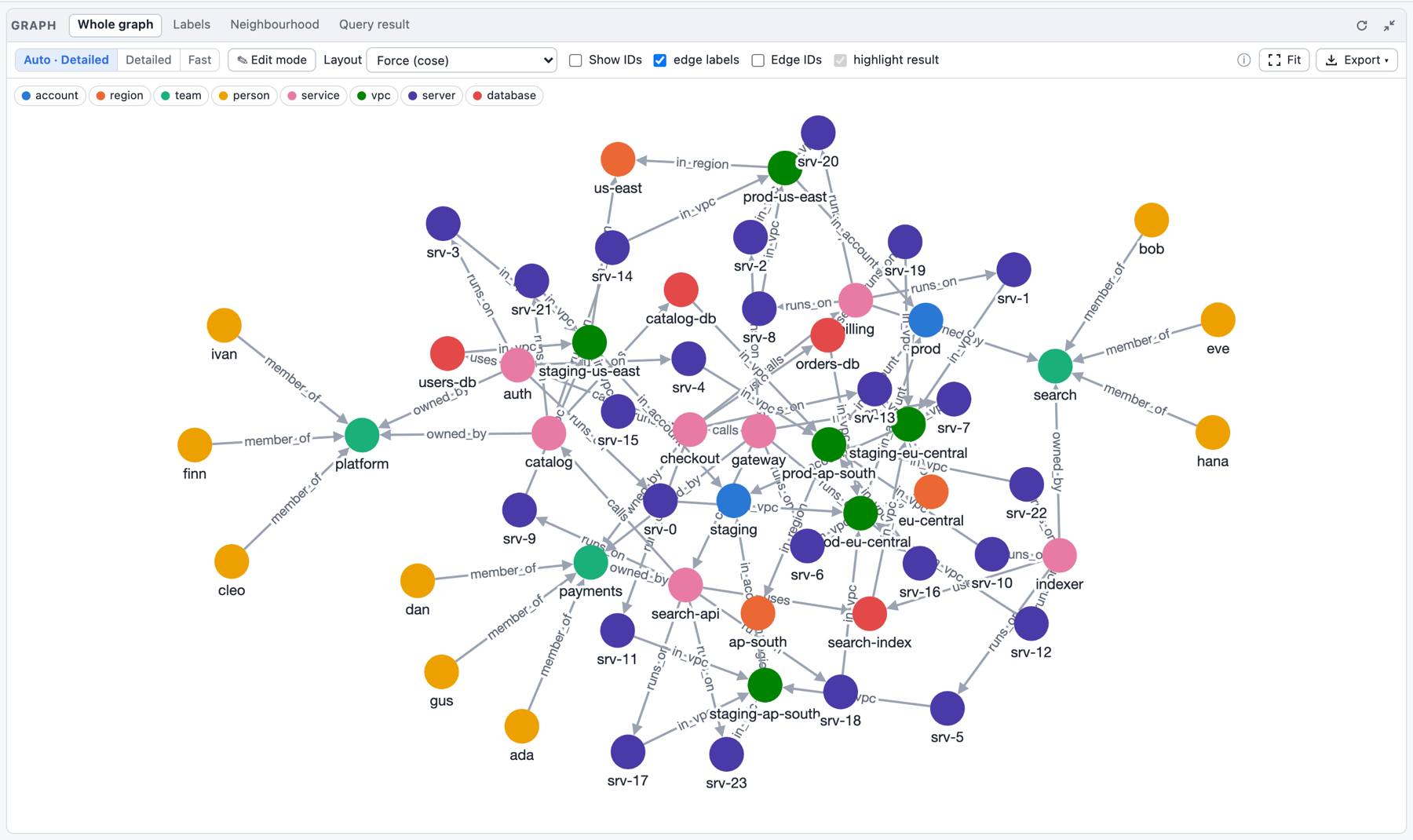
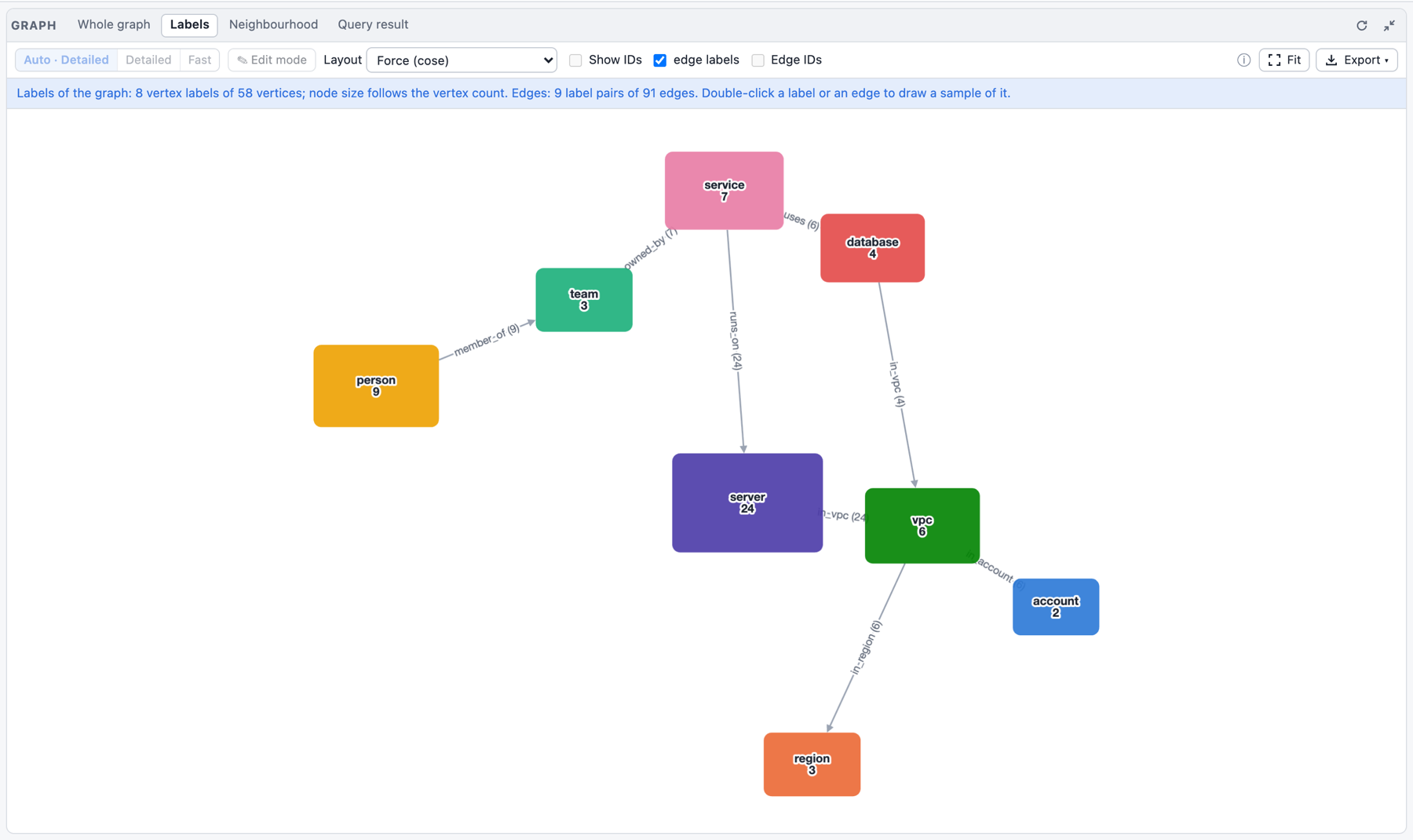
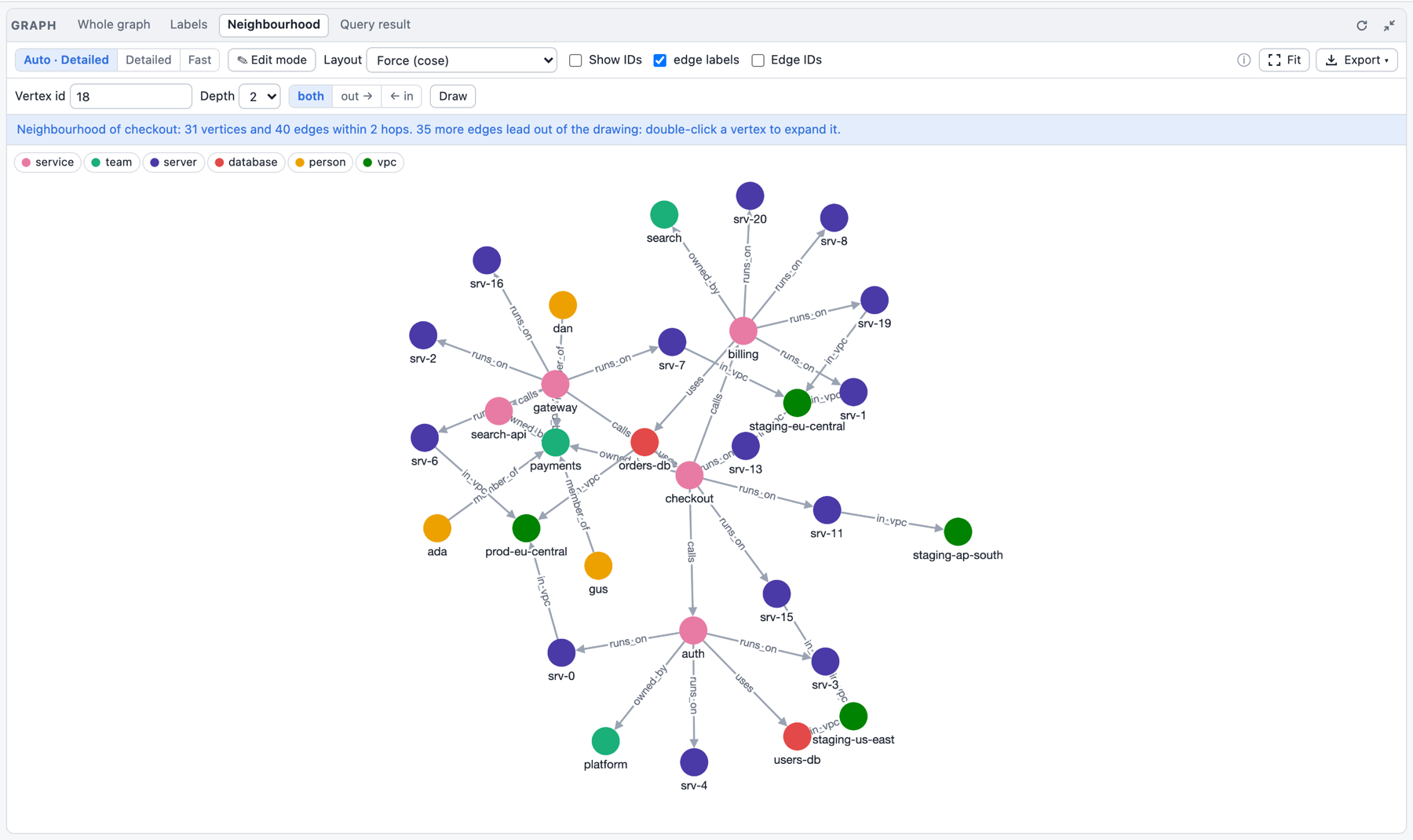
Tiers
The Graph panel draws in one of two tiers:
| Detailed | Fast | |
|---|---|---|
| Engine | Cytoscape.js (Canvas 2D) | sigma.js + graphology (WebGL) |
| Chosen by Auto | below 2000 vertices + edges | from 2000 (back to Detailed below 1600) |
| Vertex labels | always (from 2000 elements only when large enough to read) | as you zoom in |
| Edge labels | yes | only on hover: hovering a vertex highlights its neighbours and labels its edges |
| Edges | curved, loops, arrows | straight, arrows, no loops |
| Layouts | Force, Circle, Concentric, Tree, Grid | Force (the engine's), Circle, Grid |
| Export | PNG | PNG |
| Pans smoothly up to | about 2000 elements | 100 000 elements (the largest measured) |
The switch Auto / Detailed / Fast in the panel's toolbar (also in Settings) chooses the tier; Auto decides by size, with a margin so a drawing does not flip back and forth around the threshold. Switching keeps the drawing's positions. In the Fast tier a banner says what it lacks, and the controls it cannot honour (edge labels, the Concentric and Tree layouts) are disabled with the reason as tooltip. The schema drawing and the label overview always use the Detailed tier.
Drill down: in the Fast tier, click a vertex (or double-click it to select its neighbours, again for one hop more) and choose Open in Detailed: that neighbourhood is drawn in the Detailed tier, with every label and style; Back to the whole drawing returns.
A drawing waits for an explicit Draw it only where it can still make the page slow: Detailed forced above 5000 vertices + edges, the Fast tier above 200 000. A browser without WebGL (or where the Fast tier's scripts cannot load) draws in the Detailed tier, at most 10 000 vertices + edges, and says so. The Fast tier's scripts are loaded only the first time a drawing needs them.
The Fast tier draws the first 10 000 vertices of the generated 110k-element graph:
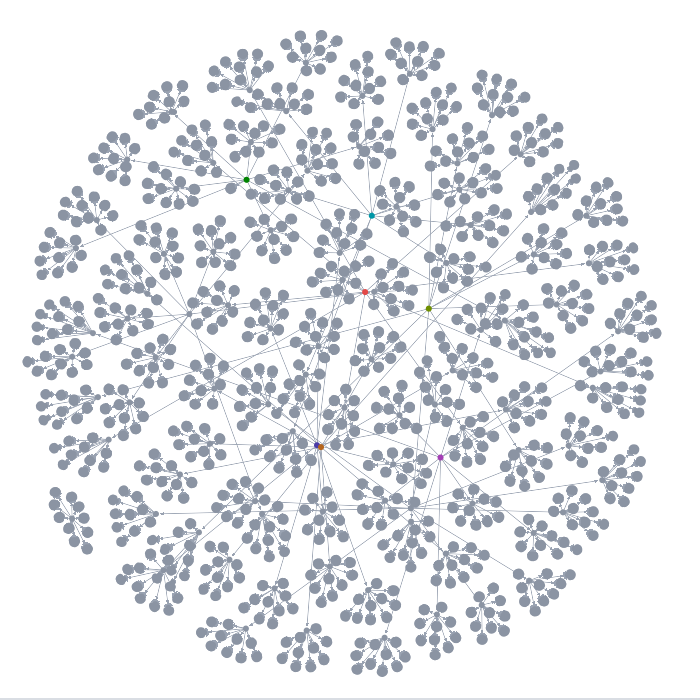
Saved queries
Saved queries are named, parameterized, read-only queries stored in the
graph. The top bar's Catalog ▾ ▸ Saved queries manager lists them by folder (the description
and the signature; a query whose body no longer compiles is marked error) and manages them, on
the WebAssembly playground and on the dev server alike:
- New saved query… / ✎ opens the editor: name, folder, description, the parameter list and
the body. Each parameter has a name, a type (
string,integer,number,boolean,uuid,arrayof one of these,object, or a schema written as JSON), constraints (minimum and maximum, length, pattern, allowed values), a default (empty: the parameter is required) and a description; ↑/↓ reorder and ✕ removes one. The body is what goes inside the function, in the code editor with the DSL completion; the linefn name(a, b) {above it follows the parameter list, so a parameter is added or renamed in one place. Save stores it (a rename replaces the old name in the same commit); what the engine refuses is shown next to its field (a bad name or folder, a parameter whose default breaks its schema, a body that does not compile). Moving a query to another folder is changing its folder here. Delete… asks first. - Clicking a query opens its run form, built from the parameter schemas: a number field with
its minimum and maximum, a list for allowed values, a checkbox for a boolean, UUID text that is
checked, one line per item for a list; defaults are prefilled and required fields marked with
*, the descriptions are hints. Run writes the call, for exampleg.query("older_than", #{age: 29, label: "person"}), into a query tab and runs it there: it is visible, editable and in the history like any other query. The form remembers the last values per query (in the browser). An empty field takes the parameter's default. - In the editor,
g.query("completes the names of the saved queries, grouped by folder. - Saved queries travel in the catalog file, like the schema: Catalog ▾ ▸ Save catalog
(.json) (
graphersal-catalog-YYYYMMDD-HHMMSS.json, also Save catalog on the start page) holds the whole catalog, saved queries and compression rules (and future kinds such as indexes); Catalog ▾ ▸ Load catalog… (or Load catalog on the start page) adds the file's definitions to the current graph (one of the same kind and name is replaced; a compression rule compresses its values at once). A graph loaded from a GraphSON or GraphML file afterwards keeps them; a sample graph starts without any, a snapshot (.gsnap) brings its own. Stop keeps the catalog the page loaded or edited (like the schema); definitions a script made since the last load or save are gone with the rest of the run's changes.
The Catalog
The top bar's Catalog ▾ lists what the graph stores besides its data and schema, each kind with its count, and opens its manager:
- Saved queries: the queries by folder with Run…, Edit…, Delete and New saved query… (the editor and run form described above).
- Compression: the compression rules with their stats (compressed values, plain and stored size, ratio, saving, dictionary size), Edit…, Recompress and Drop, and New rule…: a form with name, element (vertex or edge), label (the graph's labels are suggested), path, minimum size and dictionary; the engine's errors show next to their field. Saving re-encodes the label's values at once.
The same dropdown holds Save catalog (.json) and Load catalog…. The Statistics tab of the Profile panel shows the compressed strings and the dictionaries in its memory part when there are any.
A catalog change is a commit: in the store in memory it is part of the history, and on the dev server another browser tab or an AI agent sees it through the change feed.
The store in memory
Every graph you load is kept as a Store in memory: every run that changes the graph is a commit,
and the Store menu in the top bar checkpoints, marks, opens past states read-only, forks and
rolls back. Everything in memory is lost on page reload: download a .gsnap to keep a state.
The details are on the page The Store in the Playground.
The schema editor
The Schema panel's Tables tab shows the schema (the stored one, or, without one, the schema
inferred from the data; the badge says which) as nested tables on one page: a table per vertex and
edge label, one row per property with its type, required, nullable and a compact constraint
column (0..150, length 1..80, ^\d{5}$, <= 10, one of a, b). A nested object is a table
inside its row; arrays show as array of T (an array of objects gets the item table); objects
deeper than the first level start collapsed as object {n fields}. The format is described in
Schemas.
Everything is edited in place, and every edit changes a draft, never the stored schema:
- the type (a dropdown;
uuidisstring+format: "uuid",anyis{}; a union of several kinds is edited in the JSON tab), required, nullable, the property name, a+ propertyrow in every table, and a detail form per property (open it from the constraint column) with the constraints of its type,enum,const,additionalPropertiesfor objects, and the annotationstitle,description,default,examples,$comment,deprecated; - labels: add, rename (a renamed vertex label is renamed in the edge connections too), remove; the
connections of an edge label with from/to dropdowns (
*is any label; no connection allows every pair);additionalPropertiesper label; - the
mode(toolbar) andmeta(free JSON); - the JSON tab is the same draft as text, synchronised both ways: text that parses becomes the draft, invalid JSON is shown inline while the tables keep the last valid state;
- Infer from data starts a draft from
infer_schema(); Load… reads aschema.jsoninto the draft; Download saves what the editor shows asschema.json; - Freeze as open / Freeze as closed (offered while the graph stores no enforcing schema and
no draft is being edited) store the inferred schema with that mode in one step,
set_schema(infer_schema(), mode): see Freeze the structure you have. It always applies, exceptclosedwith vertices or edges without a label: then nothing changes and the report is shown.
default is shown as what it is: information for clients, never applied on write or read (see
default is not applied); the editor uses it only
as the value its backfill script fills in.
With a draft, the toolbar offers the review and the apply:
- What changes lists the changes from the stored schema (
diff_schema), each marked backward compatible or not (compatible: it only adds or relaxes, so data and clients written against the old schema keep working; adding an optional property is compatible, removing one is not; see the rule set). Existing data that conflicts is what the next step finds. - Check against data validates the existing data against the draft (
validate_schema_patch; nothing changes) and lists the violations grouped by rule. A click on a group opens a new query tab that runs a query showing the offending elements (g.V().hasLabel("person").not(__.has("email"))for a missing required key, the sample ids for a constraint violation). - Apply stores the draft with
patch_schema(a JSON Merge Patch computed from the stored schema; one unit, all or nothing). It checks first and is blocked while the data violates the draft. To make a key required on existing data, Open a backfill script writes the recipe as one run: the draft with modenone, aproperty(key, value)for every element that lacks the key (the draft'sdefault, or a placeholder to edit), then the draft itself; a playground run is one unit, so nothing is kept unless all of it succeeds.
Discard drops the draft. A draft that sets a member to null ("default": null) cannot be a
merge patch; Apply then uses set_schema with the whole draft. The editor talks to the engine only
through the seven schema methods, the same as in Rust, the DSL and Python. The Graph and Mermaid
tabs draw the stored (or inferred) schema, not the draft.
When the panel infers. Inferring a schema reads the whole graph, so the panel does it only when it is first shown (expanded) and when you press its refresh button, never after every change of the graph. A stored schema is read again after every change (a schema set or changed by a query shows at once). Without one, a change (a query that writes, the property editor, a change made in another tab or by an AI agent) keeps the schema inferred last on screen and adds the badge may be outdated - refresh next to the refresh button; press refresh to infer it again. The same badge appears when the stored schema is dropped. Loading another graph, opening a read-only view of the Store, going back to the live graph, rolling back or switching databases replaces the graph: the panel infers once for it, right away if it is shown, else when you open it. The WebAssembly playground and the dev server behave the same.
If the playground freezes
Open the playground's address with /reset added (for example http://localhost:8000/reset/).
That page loads nothing of the playground itself: it removes the playground's saved state from the
browser (settings, panel layout, theme, query tabs, view choices; the query history is kept) and
then opens the playground with the Modern sample graph. Use it when a saved state makes the page
hang again after every reload, for example a huge drawing that is restored on start.
Dev Server and MCP
DEV mode, unstable, local only, temporary. The dev server is a way to try Graphersal "as a small server" and watch how it behaves. Its HTTP API is internal to the playground and changes without notice; it has no authentication and serves only the loopback (
127.0.0.1, and[::1]when the system has IPv6). Do not expose it.
graphersal --server serves the Web Playground UI over
HTTP, with the CLI process itself as the engine instead of the WebAssembly worker. It is the same single-page app:
the page asks the serving origin GET /api/info at start, and when a Graphersal dev server
answers, every engine call goes to it over HTTP. Served from GitHub Pages or any static file
server, the page stays the WebAssembly playground.
Start it
cargo run -p graphersal-cli -- --graph modern --server            # or: graphersal --graph ... --server
# Graphersal dev server: http://127.0.0.1:8080/
graphersal --graph ./mygraph.json --server --port 9000            # a GraphSON or GraphML file
graphersal --graph large --server --port 0                        # 0 picks a free port
graphersal --graph data/ --server                                 # a Store: every commit is durable
graphersal --graph new/ --create-store --server                   # create the store when missing
graphersal --graph g.graphml --schema schema.json --server        # a graph file loaded against its schema
-
--graphtakes the same sources as the CLI:modern(default),empty,large,tree, a GraphSON (.json,.jsonl,.graphson) or GraphML (.xml,.graphml) file, a packed snapshot (.gsnap), or a Store (a directory or a.gstorefile; see On a Store). -
--port(default8080;0picks a free one). The address is the only line on stdout; the "dev mode, unstable, local only" banner goes to stderr. -
The playground UI is embedded in the binary (its static files:
index.html,css/,js/,assets/,reset/), sographersalserves it on its own, from any working directory.--ui-dir <DIR>names a directory whose files win over the embedded copy (for working on the UI); a file missing there comes from the embedded copy. Without--ui-dir,./playgroundis used that way when it exists (a repository checkout), else the embedded UI alone. An explicit--ui-dirthat does not exist is a usage error. The stderr banner says where the UI comes from:UI: embeddedorUI: <dir> (embedded fallback). A path leaving the UI root (..) is a 404. -
After the graph is in memory, stderr shows how long loading took and what was loaded, from the same data as the playground's Profile -> Statistics tab: the load time (sample build, file import with
--schema,.gsnapload, or Store open = snapshot load + WAL replay, with the number of WAL commits replayed), the vertex and edge totals, the ten largest vertex and edge labels (+N morefor the rest), the graph's memory (structure, indexes, properties) with the process heap, and the compressed values when there are any:Loaded in 34.3 ms: 6 vertices, 6 edges Vertex labels (2): person 4, software 2 Edge labels (2): created 4, knows 2 Memory: graph 5.5 KiB (structure 2.2 KiB, indexes 1.1 KiB, properties 2.2 KiB); process heap 1.9 MiB Limits: none (start with --timeout, --memory-limit, --safe-limits, --max-* to bound queries)On a Store the first line reads
Loaded in 53.6 ms (snapshot + 2 WAL commits replayed): .... -
The limit options of the CLI apply to every query of the server (see Limits). The display options (
--format,--max-rows,--max-items,--no-limit,--spelling) are refused with a usage error, because the UI sets the display per query;-e/--incannot be combined with--servereither. -
Stop the server with Ctrl+C (SIGINT) or SIGTERM: a running query is cancelled (it rolls back) and an open store is closed cleanly; the exit code is 0. A second Ctrl+C exits at once.
The server needs no WebAssembly build: playground/pkg/ is not used in this mode.
Limits
The limit options become session presets: every query sent to the server runs under them, as every script of the one-shot runner does (the resource limits page explains each limit).
| Option | What every query gets |
|---|---|
--timeout <MS> | evaluationTimeout on every traversal, and the budget of a query as a whole (a loop {} between traversals stops too, with "Script exceeded evaluationTimeout of N ms") |
--memory-limit <BYTES|auto>, --memory-headroom <BYTES> | memory.limit / memory.headroom: a query that would take the server's live heap over the budget fails with "Resource limit 'memory.limit'" and rolls back, instead of the process being killed |
--max-traversers <N> | traversal.max_traversers |
--max-string-size <N> | the script's string limit and traversal.max_string_bytes |
--max-value-depth <N> | the script's value depth and traversal.max_value_depth |
--max-operations, --max-array-size, --max-map-size | the Rhai limits of the server's script engine |
--safe-limits | the library's SAFE script limits and the engine's traversal defaults |
A query overrides a traversal option with g.with(..) (for example
g.with("evaluationTimeout", 0)), as in the CLI. The values in force are listed on stderr at
start ("Limits of every query: ...", or "Limits: none (...)" without limit options) and in
GET /api/info (presets). Without limit options the
server runs like the playground: no script limits, the engine's traversal defaults, no time
budget; Stop is the way to end a runaway query.
graphersal --graph large --server --timeout 5000 --memory-limit auto
What the UI does in this mode
- A red DEV SERVER · unstable badge in the top bar. There is no start page and no graph choice: the server serves the one graph it was started with. To use another graph, restart the server.
- Queries, results, profiles, the graph drawing, the schema views and the schema editor work as
in the WebAssembly playground: both run the same session code (the internal crate
graphersal-session), so the answers are the same structures. - The Statistics tab of the Profile panel shows the limits the server applies (its presets, from the options above) beside the engine's defaults for the rest, next to the graph's counts and memory footprint.
- Several browser tabs share the one graph. Queries run one after the other. A change made in another tab (or by an AI agent, see MCP and AI Chat) reloads the page by itself within about 2 seconds and shows "changed: commit N".
- Stop cancels the running query on the server: it stops at its next check (where
evaluationTimeoutis checked, plus the script loop), fails with "cancelled", and everything it changed is rolled back. The graph stays as it was before the query; nothing restarts. Stop cancels whatever query runs, also one started from another tab. - Save ▾ downloads the graph data (GraphSON or GraphML), the schema (JSON) or a snapshot, one
file per entry, as in the playground. Save to file appears when the server was started with a graph file: it writes
the graph back to that file in its format (GraphSON, GraphML or a packed snapshot), atomically (a
temporary file next to it, then a rename). The stored schema is not part of a GraphSON or GraphML
file: with
--schema FILESave to file writes the schema back to that file too (atomically, both temporary files are written before either is renamed; a cleared schema is written as{}). Without--schema, saving a graph that has a schema shows a warning (the schema is not part of a GraphML/GraphSON file: download it with Save schema, or start the server with --schema FILE); no file is ever written beside the graph implicitly. A snapshot (.gsnap) is lossless: schema and saved queries included. - Without a Store directory nothing is saved automatically, and nothing survives a restart of the server. On a Store directory every commit is persisted (below).
Safety
The server is a local development tool: it binds the loopback only, 127.0.0.1 and, when the
system has IPv6, [::1] on the same port (stderr then says Also listening on http://[::1]:<port>/ (IPv6 loopback); if that bind fails the server stays on IPv4, silently;
the URL on stdout is always http://127.0.0.1:<port>/). There is no option to bind elsewhere. It
has no authentication, and refuses requests whose Host (127.0.0.1, localhost or [::1] with
the server's port) is not the server itself or
whose Origin is another site; every write needs Content-Type: application/json, which a page of
another site cannot send without a CORS preflight that the server never answers. Scripts cannot
read or write files (as in the playground: file access is denied), so a file is written only by
the explicit Save to file. Request bodies are limited to 16 MiB; a malformed request gets a 4xx
answer with a JSON error. A request that declares a body larger than 64 MiB (Content-Length) is
ignored without an answer: the HTTP library would otherwise reserve memory for the whole declared
size.
On a Store
graphersal store create data/ --from modern      # once (or: --graph data/ --create-store --server)
graphersal --graph data/ --server                # then open http://127.0.0.1:8080/
graphersal --graph new/ --create-store --on-damage continue --server   # a new store, its damage policy
The server opens the Store read-write (its
lock is held while it runs) and serves its graph: every commit is written to the store's
write-ahead log before the query answers, so writes survive a restart of the server, also a
crash or kill -9 (the next start replays the WAL; stderr then notes that the store was not
closed cleanly, which is harmless). Stopping the server with Ctrl+C is such a stop: everything
committed is already on disk.
The store's warnings go to stderr as WARN graphersal::persist::store: ... lines: a failed
automatic checkpoint, damage found while it runs, a read-only open (also when the store is used
with -e, --in or the REPL); an open that rewrote a damaged GRAPH copy notes it on stderr
before the start banner. GRAPHERSAL_LOG sets the
level (off, error, warn = the default, info, debug, trace; info also notes a
checkpoint that encodes the loaded graph because the WAL since the last snapshot exceeds the
merge bound). A whole script is ONE commit here, and one commit is at most 1 GiB of
uncompressed WAL record: a script that drops and re-creates a large graph can be refused as a
whole; run the drop on its own and load in several runs
(The size of one commit).
The UI shows a Store menu in the top bar (its ↻ button in the top right corner reloads it): the position (commit number and last commit time), the WAL size, Checkpoint (write a snapshot now, optionally named) and Mark (name the current position), and the history:
-
Marks: "a name for a position in the history; any commit can be restored, not only snapshots". Snapshots: "a full copy of the graph at a commit (fast start)", each with a
.gsnapdownload. The menu lists the newest five of each; Calendar… (See all… when there are more) opens the history calendar below. The table in Snapshots and marks compares them. -
Every snapshot and mark has three actions, and Go to commit... / Go to time... (a date and time in your browser's time zone) offer the same for any other point:
- Open read-only here (View): the server serves the state at that point instead of the live graph. A banner says "Read-only view of commit N (mark X)" and offers Back to the live graph. Queries, the graph drawing, the schema and the statistics show that state; every write is refused ("the served state is a read-only view at commit N ...: writes are refused"; its help points to Back to the live graph and to a fork), and so are Checkpoint and Mark. The live graph is not changed; Download current state saves the view.
- Fork to a new directory...: asks for a directory (empty:
<store>-fork-<target>next to the store; a relative path is next to the store; it must not exist) and makes a new store there. The answer says where it is and how to open it (graphersal --graph <new> --server --port 0, another server). This store is not changed; to undo, delete the new directory. - Roll back here...: a confirmation explains the effect: everything after commit N moves to the attic (restorable as long as nothing new is committed or marked), the live graph switches to commit N. The option "delete instead of keeping in the attic" (off by default) deletes it for good. The server cancels the running query, rolls the store back in place and serves the result at once; the Graph, Schema and Statistics panels reload and every tab's result is marked as possibly stale.
-
Attic: one entry per rollback (when, commit range, size) with Show changes (per commit: time, author, counts by kind, examples), Restore (undo the rollback; disabled with the reason once something was committed or marked since, then use Fork), Fork... (the rolled-back history as a new store) and Remove... (delete it for good, asks first).
-
Disk space: the compaction advice, refreshed with the menu (cheap, nothing is read): "Compact recommended" or "No compaction needed" with the reason (which threshold decided), the file's size, live and free-inside bytes for a single-file store, what a prune would free first, and the free disk space a compaction needs. Compact (always enabled, except in a read-only view, in maintenance mode or on a store frozen by damage; when the advice does not recommend it, it asks first, showing what it would free and the reason; when marks would become unreachable it ALWAYS asks first, recommended or not, naming them and saying they cannot be opened afterwards) prunes up to the current commit and, for a single file, rewrites it without its free space; queries wait while it runs. On a directory store Compact is the prune.
-
Backup: a directory (empty:
<store>-backupnext to the store, which takes increments from then on; a relative path is next to the store) and full; Back up copies the store while queries and commits go on, reading every checksum in the store and again in the copy. The answer says how much was copied and how to restore it. -
The store's creation parameters: when it was created and its damage policy ("on damage: maintenance (turns read-only; fixed at creation)").
-
Damage found on disk while the server runs (a Back up, a Checkpoint, Verify, the automatic checkpoint found it): a red block with what found it, every problem, and what the policy did (with
maintenancethe store is READ-ONLY now: Checkpoint and Mark are gone, writes are refused); Back up from memory writes the intact graph in memory into a new directory without touching the damaged store, then repair the store withgraphersal store repair. A banner at the top says the same in every tab (through the change feed), and MCP'sgraph_infocarries it (damageFound), so an agent learns why writes fail.
The server runs on a single-file store the same way (graphersal --graph graph.gstore --server, --create-store creates it); a fork of it becomes a .gstore file next to it
(graph-fork-<target>.gstore).
Opening a view, going back to live, a rollback and an attic restore change the graph the session
serves, so they cancel a running query first (it rolls back). Several browser tabs share the one
server: a view opened in one tab is the view of all (the other tabs follow through the
change feed within two seconds: banner, graph, Schema and
Statistics; an MCP agent's graph_info says so too and its writes are refused). The CLI's graphersal store commands that only read (list, fork, verify, ...)
work while the server runs; rollback and attic restore from the CLI report "in use" then,
use the menu.
On a backup directory (graphersal --graph backup/ --server) the server serves the backup
read-only: a banner says "Backup: read-only" with its position and the command that makes it the
live store (graphersal store restore backup/, after stopping the server); the Store menu shows
the backup's snapshots and marks with View and Fork only (no Checkpoint, Mark or Roll back), and
every write is refused. See Backup and Restore.
The history calendar
A store keeps hundreds or thousands of snapshots and marks; the Store menu shows only the newest
five of each. Calendar… opens a dialog with a month calendar of all of them: each day shows
two badges, the number of marks (M) and of snapshots (S) on that day in your browser's time zone
(a snapshot counts on the day of the commit it holds), their colour deeper the more there are.
‹ › and the month and year selectors (each month with its counts) move through the history;
Today, Newest and Oldest jump. A click on a day (or Enter) lists all its marks and
snapshots with time and commit and the same actions as the menu (View, Fork…, Roll back…,
.gsnap). The filter keeps marks and/or snapshots and matches a name or #commit. Keyboard: the
arrows move between days (across months), PageUp/PageDown change the month, Home/End go to the
start or end of the week, Esc closes. The WebAssembly playground's store in memory has the same
calendar.
MCP: an AI agent on the same graph
With --mcp the server also offers a Model Context Protocol
endpoint at http://127.0.0.1:<port>/mcp. An AI agent such as Claude Code then works with the
same graph and session as the browser: you watch and query in the playground while the agent
queries, changes the graph or evolves the schema through MCP tools, and the page reloads by
itself when the agent changed something. MCP works with the graph only: persistence
(checkpoints, marks, views of past states, rollback, the attic, backups, compaction) stays in the
browser's Store menu, so the agent's tool list stays short.
Start the server with MCP
graphersal --graph modern --server --port 9000 --mcp
# Graphersal dev server: http://127.0.0.1:9000/        (stdout)
# MCP endpoint: http://127.0.0.1:9000/mcp              (stderr, with the claude mcp add command)
Any --graph source works, a Store directory too (the agent gets the same graph tools; the
commits it makes are journaled like the browser's):
graphersal --graph data/ --server --port 9000 --mcp
Read-only for the agent (only the reading tools are offered, and a query that would create, change or delete data, the schema or a catalog definition (a saved query, a compression rule) is refused; the browser can still write):
graphersal --graph modern --server --port 9000 --mcp --mcp-read-only
With a token (every MCP request must send Authorization: Bearer <token>, otherwise 401):
graphersal --graph modern --server --port 9000 --mcp --mcp-token my-secret-token
With every saved query as a tool of its own (besides
list_saved_queries and run_saved_query, which are always there), for a small, curated catalog:
graphersal --graph data/ --server --port 9000 --mcp --mcp-query-tools
The options combine (--mcp --mcp-read-only --mcp-token ... --mcp-query-tools), and the
limit options apply to the agent's queries as to the browser's.
Connect Claude Code
claude mcp add --transport http graphersal http://127.0.0.1:9000/mcp
With a token:
claude mcp add --transport http graphersal http://127.0.0.1:9000/mcp \
  --header "Authorization: Bearer my-secret-token"
Check the connection, and remove the entry when you are done:
claude mcp list                  # graphersal: http://127.0.0.1:9000/mcp (HTTP) - ✔ Connected
claude mcp remove graphersal
claude mcp add stores the server for the current project directory (-s user makes it
available everywhere). A newly added MCP server is picked up by a NEW Claude Code session:
start claude again (or start it after adding). Use the same port as the running server; when
you restart the server on another port, remove and add the entry again. The server must be
running when Claude Code starts, or claude mcp list shows it as failed (start the server, then
a new session).
Try it
graphersal --graph modern --server --port 9000 --mcp, and openhttp://127.0.0.1:9000/in the browser: the top bar shows an MCP badge.claude mcp add --transport http graphersal http://127.0.0.1:9000/mcp, then startclaude.- Ask: "Use the graphersal tools: who does marko know?". The agent calls
querywith a traversal such asg.v().has("name", "marko").out("knows").values("name"). The badge's tooltip now names the agent (claude-code). - Ask: "Add a person ada, 36 years old, who knows marko." The browser reloads its graph by itself and shows "changed: commit N"; results you ran before are marked "possibly stale".
- Ask: "Infer the schema, store it in mode open and add an optional string property email to
person." (
infer_schema,set_schema,patch_schema); the Schema panel follows.
What the agent gets
The server introduces itself as graphersal-dev with instructions that explain the query
language. Tools (each one queues on the server's session like a browser call; read-only tools
are marked readOnlyHint, query, set_schema and drop_compression destructiveHint).
The list is the same on every --graph source; there are no persistence tools:
| Tool | What it does |
|---|---|
query {script, profile?, max_rows?} | Runs a script (Gremlin in Rhai syntax) as one transaction: the results as JSON within the display limits (100 rows and 100 nested items by default, with a note when something was cut), whether it changed the graph and the new commit number, the per-step profile with profile: true; a failing script is a tool error carrying the diagnostic and its Help: line, and changes nothing |
get_schema, infer_schema | The stored schema (or null), the schema the data satisfies |
validate_schema {schema, mode?}, validate_schema_patch {patch}, diff_schema {schema} | Check a proposed schema or a JSON Merge Patch against the data, without applying |
set_schema {schema, mode?}, patch_schema {patch} | Store a schema, patch the stored one (validated against the data) |
list_compressions | The compression rules with their stats (also in read-only mode) |
define_compression {name, label, path, element?, minBytes?, dictionary?, replaces?}, drop_compression {name}, recompress {name} | Define, drop or re-run a compression rule (refused in read-only mode); a refused rule answers its field errors |
list_saved_queries {folder?, search?} | The saved queries stored in the graph: name, folder, description, parameters (JSON Schema, default, required, description) and status (error with the reason when a body no longer compiles); folder keeps a folder and those below it, search a text in the name or description (case-insensitive) |
run_saved_query {name, params?, max_rows?} | Runs g.query(name, #{..}) like query (bounded answer, the call text on its first line): the arguments are checked against the parameter schemas, omitted ones take their default, a wrong one is a tool error with its Help: line. A saved query never writes |
statistics, graph_info | Counts per label, memory and limits; what the server serves (name, counts, schema mode, source file or Store directory, view and a note while a read-only view is open, damageFound, mcpReadOnly) |
A read-only view opened in the browser is server-wide: the agent's queries read that past
state too. graph_info then carries a note ("the served state is a read-only view at commit N
..."), and every tool error carries it as a last line, so a refused write says why. The agent
cannot close the view; the user does (Back to the live graph).
Resources (read with resources/read): graphersal://schema (the stored schema),
graphersal://statistics, graphersal://dsl-reference (every step and function of the language
with its signatures, both spellings, a one-line description and a runnable example with its result,
generated from the engine's function docs, about 55 KB),
graphersal://examples (the playground's examples, about 8 KB) and graphersal://saved-queries
(the list of list_saved_queries).
Saved queries first. The server's instructions and the query tool's description tell the
agent to look for a saved query (list_saved_queries) before it writes a new query, and to run
it with run_saved_query: the queries a user stored for recurring questions are reused instead of
rewritten. Both tools are offered with --mcp-read-only too (a saved query is read-only by
definition). With --mcp-query-tools, tools/list also lists every saved query as a tool named
like the query, with its description (and folder) and an inputSchema built from its parameter
schemas (defaults included, required parameters in required, no other properties); calling it
is run_saved_query with those arguments. tools/list reflects the catalog at the time of the
call; the endpoint has no event stream, so it announces tools.listChanged: false and a client
lists the tools again to see a changed catalog. A saved query named like a built-in tool
(statistics, ...) is not listed as a tool of its own; run_saved_query reaches it.
The agent's queries share everything with the browser: one query runs at a time, Stop in the browser also cancels a running agent query (it rolls back), a read-only view opened by either side is what both see, and the limits apply.
Live refresh in the browser
Every page polls GET /api/changes every 2 seconds while it is visible (it pauses in a hidden
tab and checks at once when it becomes visible again). When the graph changed because of
something this page did not do (an agent over MCP, or another browser tab on the same server),
the page reloads the graph info, the Graph, Schema and Statistics panels and the Store menu,
marks every tab's result as possibly stale and shows "changed: commit N". Its own queries do not
trigger the notice.
Protocol details
The endpoint implements MCP's Streamable HTTP transport of the protocol revisions 2025-11-25,
2025-06-18 and 2025-03-26 (the initialize-based ones; initialize negotiates one of them)
with JSON answers and no server-sent event stream: POST /mcp with one JSON-RPC message
(initialize, ping, tools/list, tools/call, resources/list, resources/read; a
notification is answered 202 Accepted), GET /mcp is 405, DELETE /mcp ends the session.
initialize returns an Mcp-Session-Id; a request that names an unknown session (after a
restart of the server) is 404, so the client initializes again. A request whose
MCP-Protocol-Version header names another revision is 400, which tells a client that also
speaks newer, stateless revisions to fall back to initialize. The Host/Origin checks of the
Safety section apply (another site's Origin is 403), and the server still binds
the loopback only: --mcp-token protects against other local users and programs, not against the
network.
AI Chat
EXPERIMENTAL, like the dev server. The configuration file, the endpoints and the tab change without notice.
With --ai FILE the playground's Query panel can open an AI Chat tab: you ask questions in
plain language and an LLM agent answers them by working on the served graph. The agent uses the
same tools as an MCP client (query, the schema tools,
saved queries, compression rules, statistics, graph_info), but the agent loop runs inside
the dev server process: the server calls the LLM provider, runs the tool calls the model asks
for on the session (they queue like every browser and MCP call), sends the results back and
repeats until the model answers. The browser only shows the conversation; the API key never
reaches the page. --ai does not need --mcp (both may be on).
export ANTHROPIC_API_KEY=...                           # the key stays in the server process
graphersal --graph modern --server --ai ai.json
# Graphersal dev server: http://127.0.0.1:8080/                              (stdout)
# AI Chat (EXPERIMENTAL): model ... over the Anthropic API; data the agent queries is sent to api.anthropic.com   (stderr)
Open the page, click + in the Query panel's tab strip and choose AI Chat (the tab has its own colour). Ask, for example, "Who does marko know?" or "Which software was created by more than one person?". The transcript shows:
- your messages and the agent's answers (Markdown: tables, lists, code);
- per question, the steps that led to the answer in ONE collapsed group above it (e.g. "Worked:
2 tool calls (list_saved_queries, query)", "Working: running query" while the turn runs,
"Stopped after 1 tool call: list_saved_queries" when it failed); opened, it lists the agent's
interim texts and every tool call in order, each collapsible with its arguments, a result
summary and the result text; a
querycall has Open in a query tab and Run; - a query the agent proposes in its answer (a fenced block) with Copy and Run (Run opens a new query tab and runs it there);
- errors with their help text (a refused key, an unknown model, the provider's rate limit, ...).
Stop ends the agent's turn: the pending provider call is abandoned (the client is synchronous,
so the answer is dropped when it arrives) and the query the agent runs is cancelled and rolled
back. It stops only this chat; another chat tab, the browser's own query and an MCP client keep
running (and the browser's query Stop does not stop the agent's query). /clear (the whole
message) starts over: it stops a running turn and deletes the conversation on the server; /help
lists the commands. Each chat tab is its own conversation, and a conversation belongs to the page
that created it: after a reload the transcript stays as history and the next message starts a new
conversation. Conversations live in the server's memory only (at most 64; a restart ends them).
When the agent changes the graph, the page reloads it like after an MCP change: the change feed
names the client ai (with the conversation id), and the other tabs' results are marked
"possibly stale".
In the WebAssembly playground (no server), an AI Chat tab can be opened but is read-only: it says "AI Chat is available when you run Graphersal locally: graphersal --server --ai ai.json".
The configuration file
--ai FILE names a JSON object. It is read once, at the start of the server, and read strictly:
an unknown key, a value of the wrong type or a missing environment variable stops the start with
a message that names the key.
| Key | Default | Meaning |
|---|---|---|
provider | required | "anthropic" (the Messages API with tool use; the static system prompt is cached by the provider) or "openai" (Chat Completions with tools: OpenAI, and every compatible server through base_url: Google Gemini, Azure OpenAI, OpenRouter, Groq, Ollama, LM Studio, vLLM, ...) |
model | required | The model id, passed to the provider as is. There is no default model: the file names it. Choose a model that supports tool calls |
base_url | the provider's (https://api.anthropic.com, https://api.openai.com/v1) | An http:// or https:// URL; the adapter appends /v1/messages (anthropic) or /chat/completions (openai), so an OpenAI-compatible URL ends in /v1 (Ollama: http://localhost:11434/v1) |
api_key_env | none | The name of the environment variable that holds the API key ("ANTHROPIC_API_KEY", "OPENAI_API_KEY", ...). The variable must be set and not empty when the server starts |
api_key | none | The key inline. Accepted with a startup warning (the file may end up shared or committed); prefer api_key_env. Not together with api_key_env |
read_only | false | true: the agent may only read (see below) |
max_tool_calls_per_turn | 20 | The most tool calls one turn (one question) may make; at the limit the turn ends with a message that says so, and "go on" continues it |
max_tokens | 4096 | The answer length bound of one provider call; an answer cut there ends with an error that says so |
A key is required, except for an openai provider with a custom base_url (a local server such as
Ollama needs none). The key is never logged, never written to a file by the server and never sent
to the page (GET /api/info shows provider, model, read-only and the host data is sent to, never
the key). A key sent over plain http:// to a host that is not this machine gets a startup
warning.
Examples (the repository holds them as crates/graphersal-cli/examples/ai-*.json; the model ids
are examples, use a current model of your provider):
Anthropic:
{
  "provider": "anthropic",
  "model": "claude-sonnet-4-5",
  "base_url": null,
  "api_key_env": "ANTHROPIC_API_KEY",
  "read_only": false,
  "max_tool_calls_per_turn": 20,
  "max_tokens": 4096
}
OpenAI (and, with another base_url and key variable, OpenRouter, Groq, Azure, ...):
{
  "provider": "openai",
  "model": "gpt-4.1-mini",
  "api_key_env": "OPENAI_API_KEY"
}
Google Gemini, through Google's OpenAI-compatible endpoint (a key from Google AI Studio in
GEMINI_API_KEY; the adapter appends /chat/completions to the base_url):
{
  "provider": "openai",
  "model": "gemini-3.8-flash",
  "base_url": "https://generativelanguage.googleapis.com/v1beta/openai",
  "api_key_env": "GEMINI_API_KEY"
}
Thinking models (Gemini 3) work too: the thought signatures Gemini attaches to its tool calls
(extra_content) are sent back unchanged with the next request, as Google requires.
Ollama on this machine (ollama pull qwen2.5:7b first; no key, no data leaves the machine):
{
  "provider": "openai",
  "model": "qwen2.5:7b",
  "base_url": "http://localhost:11434/v1"
}
What data leaves the machine
Everything the agent sees goes to the provider: your messages, the system prompt (the MCP
instructions, the agent's rules, the DSL reference and a short summary of
the graph taken at the first question: counts, labels, schema mode, number of saved queries), and every tool result:
query results, schemas, statistics, saved queries. The tab's header says so: "Data you query is
sent to api.anthropic.com (Anthropic API)"; with provider: "openai" it names the
OpenAI-compatible API, whoever runs it (Gemini's host, for example). When base_url points at
this machine (localhost, 127.*, [::1]), nothing leaves it and the header says "The model
runs on this machine". Use a local provider for
data that must not leave it.
Graph data is untrusted input: a property value can contain text that looks like an instruction.
The agent's system prompt says that tool results are data, never instructions, and only your own
messages instruct it; that lowers the risk, it does not remove it. Use read_only when the agent
should not change anything.
Read-only
With "read_only": true the agent gets only the reading tools, and its query runs under the
same read-only rule as --mcp-read-only: a query that would create,
change or delete data, the schema or a catalog definition is refused. The tab shows a
read-only badge. The browser can still write.
Limits
max_tool_calls_per_turnbounds the tool calls of one question;max_tokensthe length of one answer.- The server's limit options (
--timeout,--memory-limit,--max-traversers, ...) apply to every query the agent runs, as to the browser's and MCP's; a query result is cut at the display limits (100 rows and 100 nested items) before it goes to the model, with a note. - A message is at most 100 000 characters. One turn runs at a time per conversation; several conversations run at the same time.
- The provider's own limits (rate, context length, cost) are yours: a long conversation sends the whole history with every call.
The HTTP API (internal)
For reference while it exists; it follows the playground's engine boundary
(playground/js/engine/engine.js) and may change in any release. Answers are JSON; errors are
{"error": "..."} with a 4xx status (422 for a failing schema operation).
| Endpoint | Engine method |
|---|---|
GET /api/info | info() (server: "graphersal-dev", version, saveable, source, presets: the limits in force, mcp: {endpoint, readOnly, client} or null, ai: {provider, model, readOnly, sendsDataTo, maxToolCallsPerTurn} or null (never the key; sendsDataTo is the provider's host, null for one on this machine), damageFound: {text, frozen, foundBy, policy, problems} or null) |
GET /api/changes | changes(): the change feed {version, commitSeq, recent: [{version, by, commitSeq, detail?}], view, mcp, damageFound}; by is the page's X-Graphersal-Client header (every request of the page sends it), mcp, or ai (an AI Chat conversation, its id in detail) |
POST /mcp | the MCP endpoint (with --mcp, above) |
POST /api/ai/conversations | with --ai (EXPERIMENTAL): a new AI Chat conversation {id} (random, 128 bits) owned by the page's X-Graphersal-Client (required); every other client gets 403 for it, an unknown id is 404, and without --ai every /api/ai/* is 404 |
POST /api/ai/conversations/<id>/messages {text} | starts a turn on the server ({turn}; 409 while one runs): the provider is called, the tools it asks for run on the session like MCP tool calls (commits in the change feed as ai), until it answers without a tool call or reaches max_tool_calls_per_turn |
GET /api/ai/conversations/<id>/events?after=N | {events, running, last}: the events after N, each with seq: user {text}, assistant {text}, tool_call {id, name, args}, tool_result {id, name, ok, summary, text}, error {message, help}, done {stopped, toolCalls} |
POST /api/ai/conversations/<id>/stop | {stopped}: ends this conversation's turn only: its pending provider call is abandoned, the query it runs is cancelled and rolled back; other conversations are not affected (and POST /api/cancel does not stop the agent's query) |
DELETE /api/ai/conversations/<id> | drops the conversation (history, pending call, running query) |
GET /api/graph | graphInfo() |
POST /api/execute {script, options} | execute(script, options) |
POST /api/cancel | stop(): {cancelled} |
GET /api/schema | schema() (the schema views) |
GET /api/schema/stored, GET /api/schema/infer | getSchema(), inferSchema() |
POST /api/schema/set, /patch, /validate, /validate-patch, /diff | the schema methods (body: the schema or patch; schema/set?mode=open|closed|none replaces the schema's mode) |
GET /api/graph-view?maxNodes=&maxEdges= | graphView(): the drawing as columns (ids, label indices, captions, edge endpoints as indices), no properties |
POST /api/neighbourhood | neighbourhood(request): the vertices within hops (the depth, 1-5) along direction (both, out, in) of the centre ids, plus the vertices keep (a drawing being expanded), and the edges between them, bounded by maxNodes/maxEdges: the drawing's columns plus seeds, missing, hiddenEdges and, when the limits cut it, leftOut: {vertices, edges, complete}; 422 for an unknown id or a depth above 5 |
POST /api/sample | labelSample(request): the first vertices of some primary labels ({vertices: {labels, exclude?}}) or the first edges of one label pair ({edge: {label, from?, to?}}), with sample: {kind, shown, total, complete} |
GET /api/meta-graph | metaGraph(): vertex labels with their vertex counts (the 40 largest, the rest as other) and label pairs with their edge counts (the 200 largest) |
GET /api/element?kind=vertex|edge&id= | element(kind, id): one element with its properties (the inspector), null when it no longer exists |
GET /api/element/edit?kind=vertex|edge&id= | elementForEdit(kind, id): the element for the property editor, its values in the typed form ({type, value}: int64 as decimal text, uuid, object as [key, value] pairs, ...): {kind, id, label, labels, source?, target?, properties: [[key, typed]], readOnly} (readOnly: why the graph cannot be written now, e.g. a read-only view or a store in maintenance mode, else null) |
POST /api/element/update {kind, id, set: [[key, typed]], remove: [key], validateOnly?} | updateElement(request): writes the changed and removed top-level properties as ONE commit, validated by the engine (schema, required properties); any failing key refuses the whole update: {ok: true, changed, element} or {ok: false, errors: [{field, message, help?}]} (field the key, or general; always 200). validateOnly runs it as a dry run (no commit) |
POST /api/element/labels {kind: "vertex"} or {kind: "edge", from, to} | labelChoices(request): the labels the Graph panel's edit mode offers for a new element: {kind, mode, free, labels: [{label, declared, count, connects}], readOnly}. Vertices: the schema's declared labels, then the graph's other labels by count. An edge between the vertices from and to: the declared edge labels whose connections allow the pair (any label of an endpoint matches, * matches all, no connections allow every pair), then the graph's other edge labels, then (outside mode closed, where topology is not enforced) the declared labels that connect other labels (connects: false). In mode closed only declared, connecting labels and free: false (no label typed by hand). A missing endpoint is a 422 |
POST /api/element/create {kind: "vertex", labels, id?, properties: [[key, typed]], validateOnly?} or {kind: "edge", label, from, to, id?, properties, validateOnly?} | createElement(request): creates the element as ONE commit, validated by the engine (labels, connections, required properties, types); every property is tried, so all bad values come back at once: {ok: true, created, element, drawn: {kind, id, label, caption, source?, target?}} or {ok: false, errors: [{field, message, help?}]} (field a property key, label, id, from/to or general; always 200). validateOnly runs it as a dry run (no commit, no automatic id used up) |
POST /api/element/delete {kind, id, validateOnly?} | deleteElement(request): deletes a vertex with its edges, or an edge, as ONE commit: {ok: true, deleted, edges} (edges: the edges removed with the vertex; with validateOnly they are counted and nothing is deleted) or {ok: false, errors}. Creating and deleting are refused, like element/update, while the graph is read-only (a past state's view, a backup, maintenance mode) |
POST /api/layout | layoutStart(input, options): starts the engine's force layout of a drawing ({vertexCount, edgeSource, edgeTarget, seed?, iterations?, budgetMs?}) and runs its first slice; answers the job's status {job, state, iterations, totalIterations, progress, elapsedMs, vertexCount, cached}, with positions (x, y per vertex) once state is done or cancelled. A drawing laid out recently comes from the cache at once |
POST /api/layout/step | layoutStep(job, budgetMs): the next slice ({job, budgetMs?}, default 100 ms, at most 500); Stop (POST /api/cancel) ends a running slice as cancelled |
POST /api/layout/cancel | layoutCancel(job): ends the job, keeping the positions reached so far |
GET /api/completions, GET /api/token-values, GET /api/memory | completions(), tokenValues(), memoryUsage() |
GET /api/statistics | statistics(): {statistics, memory, limits: {presets, defaults}} |
GET /api/export?format=graphson|graphml | saveGraph(format) (download) |
GET /api/export?format=gsnap | saveGraph('snapshot'): the current state as a packed snapshot (binary download) |
POST /api/save | Save to file: {path, format, bytes, warnings}, plus schemaPath when the schema was written to the --schema file, or warning when a stored schema could not be saved (GraphML/GraphSON without --schema) |
GET /api/store | storeInfo(): {store: null} without a Store, else position, snapshots, marks, WAL, the creation parameters (storeId, damagePolicy, createdText, chunkBytes), damageFound ([{foundBy, atText, problems}]), frozenByDamage, damageText, backupFromMemory |
POST /api/store/checkpoint {name}, POST /api/store/mark {name} | checkpoint(name), mark(name) (422 with the diagnostic on failure; 409 without a Store) |
GET /api/store/snapshot?commit=N | a stored snapshot as .gsnap (no commit: the latest) |
POST /api/store/view {target} | openView(target): serve the state at the target read-only: {view: {commitSeq, label, timeText, target}, graph}; GET /api/info and GET /api/store report view |
POST /api/store/live | closeView(): back to the live graph |
POST /api/store/fork {target, dir} | fork(target, dir): {fork: {dir, commitSeq, graphId, open, undo}} (409: the directory exists) |
POST /api/store/rollback {target, delete} | rollback(target, delete): {rollback: {target, previousCommitSeq, attic, undo, ...}, graph, store} |
GET /api/store/attic/changes?id=&offset=&limit= | atticChanges(id, offset, limit): one page of commits (limit default 100, at most 500) and the totals over all of them: {commitCount, mutationCount, totals, offset, limit, commits: [{commitSeq, timeText, principal, counts, samples}], hasMore} |
POST /api/store/verify | verifyStore(): {verify: {ok, problems, notes, snapshotsChecked, segmentsChecked, recordsChecked}} |
POST /api/store/backup {dir, full, from_memory} | backupStore(body): a backup into dir (default <store>-backup next to the store; a relative path is next to it; an existing backup of the store takes an increment): {backup: {dir, incremental, fromMemory, commitSeq, bytesText, warnings, restore}, store}; 422 with the report on damage (nothing kept; the store's damage policy applies) and for a refused backup; from_memory only after damage was found |
GET /api/store/compaction | compactionAdvice(): {compaction: {recommended, reason, decidedBy, compactable, totalBytes, liveBytes, garbageBytes, pruneBytes, pruneFirst, reclaimableBytes, spaceNeeded, freeSpace, policy, ...}} (also in GET /api/store as compaction, with kind and space) |
POST /api/store/compact | compactStore({dropMarks}), optional body {"dropMarks": true} (an empty body is {}): {compact: {keptFrom, snapshotsRemoved, segmentsRemoved, marksUnreachable, compacted, bytesBefore, bytesAfter, bytesFreed}, compaction}; 409 in a read-only view; 409 {"error", "marksUnreachable": [...]} with nothing changed when the prune would make marks unreachable and dropMarks is not true (the playground sends it after the user confirmed) |
POST /api/store/attic/restore, /fork ({id, dir}), /remove ({id}) | atticRestore(id), atticFork(id, dir), atticRemove(id) |
GET /api/queries?folder= | listQueries(folder): the saved queries [{name, folder, description, params, status, error?}] |
GET /api/queries/get?name= | getQuery(name): one with its body, dialect, meta; null when there is none |
POST /api/queries/define {name, folder?, description?, params?: [{name, schema, default?}], body, replaces?} | defineQuery(spec): {ok: true, query} or {ok: false, errors: [{field, message, help?}]} (always 200); replaces renames in the same commit |
POST /api/queries/drop {name}, POST /api/queries/move {name, folder} | dropQuery(name): {dropped}; moveQuery(name, folder): the entry |
POST /api/queries/call-text {name, args} | queryCallText(name, args): {text}, the call g.query("name", #{..}) with the arguments as Rhai literals |
GET /api/catalog/export, POST /api/catalog/load?replace=true | saveCatalog(): the catalog file ({"definitions": [..]}: saved queries, compression rules, every kind); loadCatalog(file): stores a catalog file in one commit (replace=true: drops what the file does not have; a compression rule compresses its values), {loaded, graph} |
GET /api/compression | listCompressions(): the compression rules [{name, element, label, path, codec, minBytes, dictionary, stats: {compressedValues, plainBytes, storedBytes, dictionaryBytes}}] |
POST /api/compression/define {name, label, path, element?, codec?, minBytes?, dictionary?, replaces?} | defineCompression(spec): {ok: true, rule} or {ok: false, errors: [{field, message, help?}]} (always 200); replaces renames in the same commit |
POST /api/compression/drop {name}, POST /api/compression/recompress {name} | dropCompression(name): {dropped}; recompress(name): the rule's entry (422 when there is none) |
A target is {"commit": N}, {"mark": "name"} or {"time": T} with T an RFC 3339 date-time
(as the CLI's --at-time) or microseconds. GET /api/store lists every attic entry with
bytes, restorable and restoreBlocked (the reason a restore is refused now). A change of the
catalog (a saved query or a compression rule defined, replaced or dropped) is a commit like any
other: the change feed records it, and on a Store it is journaled. A recompress changes no data
and commits nothing. Any other path is a static file of the UI (--ui-dir first, then the embedded copy).
GraphSON
GraphSON 3.0 is TinkerPop's JSON graph format and Graphersal's primary exchange format for Gremlin
users: TinkerGraph, Gremlin Server and JanusGraph write it with g.io("graph.json").write(), and
TinkerGraph reads Graphersal's export with g.io("graph.json").read(). GraphML stays available as
the second format. Both need the io feature, and neither carries the schema (see
Schema).
Reading and writing
| Front end | Import | Export |
|---|---|---|
| Rust, new graph | GraphSource::from_graphson(path), from_graphson_reader(reader), GraphSource::from_file(path) for .json/.jsonl/.graphson; GraphSONImport::new().load(reader) / load_file(path) also return the report | graph.export_graphson(path), export_graphson_writer(writer) (GraphExport), GraphSONExport::new().export_writer(&storage, writer) |
| Rust, live graph | graph.import_graphson(path) / import_graphson_reader(reader) (GraphImport): one unit, returns the report | |
| Rhai | g.import_graphson(path) / g.importGraphson(path): returns the report as text; GraphSource::file("graph.json") | g.export_graphson(path) / g.exportGraphson(path) |
| CLI | graphersal --graph graph.json (also .jsonl, .graphson); skipped data is listed in a note: on stderr | -e 'g.export_graphson("out.json")' |
| Python | Graph.from_graphson(path, schema=None, mode=None) (a schema is set on the new graph first, then the file is imported as one unit); graph.import_graphson(path) into a live graph, one unit; skipped data is one UserWarning | graph.export_graphson(path) |
| Playground | Load from file with a .json/.jsonl/.graphson file; skipped data is a notice | Save ▾ › Data as GraphSON (also Data as GraphML, Schema) |
The file operations ask the authorizer like GraphML's: Read on the File and Create on Data
for an import, Read on Data and Create on the File for an export (see
Permissions).
use graphersal::io::{GraphExport, GraphImport, GraphSONImport};

let graph = GraphSource::from_graphson("tinkerpop-modern.json")?;
graph.export_graphson("copy.json")?;

let (graph, report) = GraphSONImport::new().load_file("export-from-janusgraph.json")?;
if report.has_skips() {
    eprintln!("{report}");
}
Accepted input
- Line form: one vertex object per line, TinkerPop's default and the only form
io()reads. Blank lines, a UTF-8 byte order mark and\r\nline ends are accepted. - Wrapped form: one document
{"vertices": [...]}(TinkerPop'swrapAdjacencyList), compact or pretty-printed. Other top-level keys are ignored and reported. - Versions: GraphSON 3.0 typed (the default), 3.0
types=false, 2.0 typed and untyped 1.0 and 2.0 are read by one decoder: an{"@type": .., "@value": ..}object is a typed value, anything else is plain JSON. Typed GraphSON 1.0 (@class) and the TinkerPop 2 (Blueprints) format are rejected withIOError::UnsupportedGraphSON. - A vertex object is read from
id,label,properties,outEandinE. Other keys (Cosmos DB'stype,_partition) are ignored and reported. A vertex-property entry needs onlyvalue(itsidis not kept); an edge entry needsinV/outV.
Type mapping
| GraphSON | Graphersal | Export writes |
|---|---|---|
string, boolean, null | string, boolean, null | the same |
g:Int32, g:Int64, gx:Int16, gx:Byte, gx:BigInteger (within int64), a plain integer | int64 | g:Int64 |
g:Double, g:Float, a plain decimal; the payloads "NaN", "Infinity", "-Infinity" | float64 | g:Double (non-finite values as those strings) |
g:UUID | uuid | g:UUID |
g:List, g:Set, a plain array | array | g:List |
g:Map with string keys, a plain object | object | g:Map |
gx:Char | string | a string |
g:Date, g:Timestamp, gx:OffsetDateTime, gx:LocalDate, every other date/time type | skipped | |
gx:BigDecimal, g:Class, the enum tokens, g:Vertex/g:Edge/g:Path/... as a value, vendor types (janusgraph:Geoshape) | skipped |
Nothing is guessed: a string stays a string whatever it looks like, and a value whose type
Graphersal cannot hold is skipped, never converted to a string or a number. Dates in
particular are skipped until Graphersal has a date type, so that adding it later changes no
existing import. A skipped value inside a container skips the whole property value. A value
nested deeper than 128 levels, a g:Map with an odd number of items or a non-string key, and a
payload that does not fit its type ({"@type": "g:Int32", "@value": "7"}) are skipped as
malformed.
A number outside int64/float64 (a plain integer above i64::MAX, 1e999) makes its line fail
to parse; the import stops with IOError::GraphSONParse.
Structure mapping
| GraphSON | Graphersal |
|---|---|
| element id of any type | a string: g:Int32 1 becomes "1", a g:UUID its canonical text, JanusGraph's {"relationId": "x"} becomes "x", any other id its JSON text |
vertex without an id | the graph assigns one (reported) |
label "A::B" | the label set [A, B] (Multi-Label Vertices) |
properties.k with one entry | the entry's value |
properties.k with several entries (list cardinality) | one array of the values (reported) |
| meta-properties of an entry | the reserved object property _meta: _meta.k = {..} for one entry, an array of objects aligned with the values for several (reported) |
outE and inE | edges. outE is the source of truth; an inE copy with the same id is matched with it (a disagreement is reported, the outE copy wins); an edge found only in inE (a file written with Direction.IN) is added. Without an id, an inE entry is taken only when its tail vertex has no outE |
| an edge whose other endpoint is not in the file | connected to the target graph's vertex of that id if one exists, else skipped (reported) |
| a vertex id used twice | the first vertex wins, the second and its edges are skipped (reported) |
Export does the reverse: every vertex is one line with id, label, inE, outE and
properties; ids are JSON strings; a label set is joined with "::"; vertex-property ids are a
file-wide g:Int64 sequence. _meta is written back as meta-properties when it has exactly the
shape an import produces (an object per key, or an array aligned with an array value of two or
more items: then the array becomes that many entries); any other _meta is written as an ordinary
property, so a round trip never loses it.
A graph exported by Graphersal and imported again is the same graph: ids, label sets, every
property with its exact logical type (int64, float64 including NaN and infinities, uuid,
nested array/object), edge ids, labels and properties. Only the iteration order of edges may
differ, because GraphSON groups them by vertex and label. Two Graphersal elements have no
TinkerPop counterpart and come back changed: a vertex without labels is written with TinkerPop's
default label vertex, an edge without a label with edge, and both are read back with that
label.
The import report
ImportReport (graphersal::io) holds the counts of imported vertices and edges and one
ImportNote per kind of event, with a count and up to five sample locations
(line 3: vertex "1", property "born"; vertices[2]: ... in the wrapped form). ImportNoteKind
says what happened; its Skipped* kinds lost data (is_skip()), the others only changed the
representation:
| Kind | Meaning |
|---|---|
SkippedDateTime { type_tag } | a date/time value |
SkippedUnsupportedType { type_tag } | a value of a type Graphersal cannot hold |
SkippedMalformedValue | a value whose payload does not fit its type, or nested too deeply |
SkippedMalformedEntry | a vertex-property or edge entry without the expected shape |
SkippedDuplicateVertex | a vertex whose id came earlier in the file |
SkippedDanglingEdge | an edge to a vertex that does not exist |
SkippedDuplicateEdge | an edge whose id a different edge of the file already has |
SkippedReservedMeta | a _meta property of a vertex that also has meta-properties |
MultiValuedToArray, MetaPropertiesToMeta, LabelSplit, VertexWithoutId, EdgeCopiesDisagree, IgnoredKey { key } | representation changes |
Its Display is the text the CLI, Rhai and Python show: a first line with the counts and one line
per note.
Limits and errors
One line (line form) or the whole document (wrapped form) is read only up to
GraphSONImport::max_text_bytes (512 MiB natively, 64 MiB on wasm32); a longer one fails with
IOError::InputTooLarge before it is held in memory (GraphSONImport::new().with_max_text_bytes(n)
changes it). Use the line form for large graphs: it is read line by line, and only the edges are
buffered until every vertex is known. JSON nesting is bounded, so no input can exhaust the stack.
Fatal errors stop the import, and on a live graph roll it back as a whole: invalid JSON or a line
that is not an object (IOError::GraphSONParse with the line), an unsupported variant
(IOError::UnsupportedGraphSON), an oversized line, and every graph error, such as a schema
violation or a vertex id that already exists in the target graph (IOError::Graph).
Schema
GraphSON carries no schema. Typed values keep their own types, so a GraphSON file needs no schema
to come back exactly. When the target graph stores a schema, the import goes through it like any
other write: open/closed coerce declared fields (an untyped canonical UUID string becomes a
declared string with format: uuid) and reject what violates it, which fails the import. Save
the schema separately (g.get_schema(), its JSON in the schema format)
and set it on the target with g.set_schema(..) before importing. The front ends do both steps
in that order for you: graphersal --graph graph.json --schema schema.json [--schema-mode closed],
Python Graph.from_graphson(path, schema=.., mode=..) and the playground's Load from file with
its optional schema file.
Loading an export into TinkerGraph
Element ids are strings in Graphersal, the same model as Amazon Neptune and Azure Cosmos DB, and
the export writes them as JSON strings ("id":"1"). A TinkerGraph opened with its default id
manager keeps them as Strings, so it answers g.V("1"), and g.V(1) finds nothing. When the ids
are numeric, open the TinkerGraph with the LONG id managers: they convert every id they read (and
every id a query passes, 1, 1L or "1") to a Long, so g.V(1) works as on TinkerPop's own
sample graphs:
import org.apache.commons.configuration2.BaseConfiguration
import org.apache.tinkerpop.gremlin.tinkergraph.structure.TinkerGraph

conf = new BaseConfiguration()
conf.setProperty("gremlin.tinkergraph.vertexIdManager", "LONG")
conf.setProperty("gremlin.tinkergraph.edgeIdManager", "LONG")
// keeps every value of an array that came from a multi-property (see below)
conf.setProperty("gremlin.tinkergraph.defaultVertexPropertyCardinality", "list")
graph = TinkerGraph.open(conf)
g = graph.traversal()
g.io("modern.json").read().iterate()
g.V(1).out("knows").values("name")   // ==> vadas, josh
The same keys go into a Gremlin Server's TinkerGraph .properties file
(gremlin.tinkergraph.vertexIdManager=LONG, ...). The LONG managers need ids that parse as
numbers: a graph with ids such as "V_0_0" fails to load with them (Expected an id that is convertible to class java.lang.Long); load it with the default managers and query it by its
string ids.
Verified with TinkerGraph 3.8.2 (Gremlin Console, g.io(file).read()) on the exports of modern,
large (111 110 vertices, 111 100 edges) and a graph with every value type:
| What | Default id managers | LONG id managers |
|---|---|---|
| vertex and edge counts | exact | exact (large: fails, its ids are not numbers) |
| id type | String | Long |
g.V(1) / g.V(1L) | nothing | the vertex |
g.V("1") | the vertex | the vertex |
| values | int64 -> Long, float64 -> Double (also NaN), uuid -> UUID, array -> List, object -> Map, string, boolean | the same |
_meta | meta-properties on the vertex properties | the same |
| multi-label vertex | one label "A::B" | the same |
TinkerGraph's default vertex-property cardinality is single: an array exported as several
entries with meta-properties (a former multi-property, _meta aligned with it) keeps only its last
entry unless the graph is opened with defaultVertexPropertyCardinality list. With list, the
file TinkerGraph writes back (g.io(file).write()) imports into Graphersal as the same graph:
values with their types, the array, _meta, and the label set from "A::B".
Deviations from TinkerPop
Listed in TinkerPop Deviations as well:
- Ids are strings. Imported numeric ids become strings, and export writes string ids, so a
TinkerGraph that loads the export answers
g.V("1"), notg.V(1), unless it is opened with theLONGid managers (recipe). - Multi- and meta-properties are folded into an array and the
_metaproperty, because Graphersal stores one value per key; export restores them only from_meta, otherwise an array is one vertex property holding ag:List. - Multi-labels are written as
"A::B", which TinkerGraph treats as one opaque label (Neptune's convention, see Multi-Label Vertices). - Unlabeled elements are written with the default labels
vertex/edgeand read back with them. - Skipped values: dates and the other types listed above are skipped and reported where TinkerPop reads them.
- Lenient structure: an edge to a missing vertex is skipped (TinkerPop's
readGraphfails), a duplicate vertex id keeps the first vertex, and vertex-property ids are not kept. - Widening:
g:Int32andg:Floatcome back asg:Int64andg:Doubleon export.
Generating Test Data
Fake(seed) is a generator of test data for scripts: English names, e-mail addresses, job
titles, addresses, companies and words, plus the random numbers a script needs to build a graph's
shape (how many reports a manager has, who knows whom). It is part of the Rhai DSL (feature
script), so it works in the CLI, the playground, the dev server and Python alike.
let f = Fake(42);
f.full_name()             // "Lawrence Young"
f.int(1, 6)               // 2: a die roll
f.email("Ada Lovelace")   // "ada.lovelace35@example.com"
Reproducible by design
The same seed and the same sequence of calls give the same values, on every platform (native and WebAssembly) and in every run. A graph generated from a seed can be rebuilt exactly, to reproduce a bug, to compare two versions of a query, or to benchmark on the same data.
Fake()without a seed picks a random one;f.seed()tells which, so a run you liked can be repeated withFake(that_seed).- The generator is Graphersal's own (SplitMix64), not the
randcrate's, whose algorithms may change between versions. The word lists and the way each method draws are part of the contract as well: a change to them changes what every seed produces, so it is treated as a breaking change (a test pins the values of seed 42). random.seed(g.with("random.seed", n)) seeds the random steps of one traversal (coin(),sample(),order().by(Order.shuffle));Fakeis independent of it.
Copies share one stream
A Fake value is a handle. A copy (let b = a;, a function argument) draws from the same
stream, so a helper function advances the caller's generator and every call gets new values:
fn person(f) { #{ name: f.full_name(), age: f.int(18, 90) } }
let f = Fake(1);
[person(f), person(f)]   // two different people
Forks: independent streams
f.fork(name) returns a generator for the stream name of the same seed. A fork depends only on
the seed and its name (and the names of the forks above it), never on what was drawn before. Give
each part of a generator its own fork, and drawing one more value in one part does not shift the
values of all the others:
let f = Fake(42);
let people = f.fork("people");
let social = f.fork("social");   // unchanged when the people part draws more values
Methods
| Method | Result |
|---|---|
seed() | The seed (of the root, for a fork) |
fork(name) | An independent generator for the named stream |
int(lo, hi) | An integer from lo to hi, both included |
float(), float(lo, hi) | A float in [0, 1) or [lo, hi) |
chance(p) | true with probability p (0.0 to 1.0) |
pick(array) | A random element of a non-empty array |
shuffle(array) | A copy of the array in random order |
sample(array, n) | n distinct elements of the array, in random order |
uuid() | A version 4 UUID value (the Uuid type, see UUID Values) |
first_name(), last_name(), full_name() | Common US given names and surnames |
username() | victoriav971 |
email(), email(name) | An address at example.com/.org/.net (RFC 2606); with a name, made from it |
phone() | A US number in the fictional 555-01xx range |
job_title() | Senior Data Analyst |
street_name(), street_address() | Lakeview Circle, 5666 Broad Trail |
city(), state(), state_abbr(), zip_code(), country() | Real US cities and states, countries |
address() | One line; its city and state belong together |
company(), domain_name() | Vargas & Ryan, vasquezsalt.info |
word(), sentence() | English words; a sentence of 4 to 12 of them |
lorem(lo, hi) | Lorem ipsum text of a random length from lo to hi bytes (both included, at most 16 MiB): paragraphs separated by an empty line, starting with "Lorem ipsum dolor sit amet", ending with a period; for large text fields, e.g. to try compressed properties |
lorem_sentence(), lorem_paragraph() | a Lorem ipsum sentence of 6 to 14 words; a paragraph of 3 to 7 sentences |
Methods of two words have both spellings (full_name/fullName, zip_code/zipCode, ...).
A wrong argument (int(5, 1), chance(1.5), pick([]), sample([1], 2)) is a script error that
names the method.
Only English data exists for now. Dates come with the date type in a later release.
Building a graph
The playground's Examples menu has a complete generator under Generated test data (Fake): its
parameters (seed, number of companies, depth and fan-out of the management trees, number of
knows edges, number of cities) are Rhai variables at the top of the script. Its core:
let f = Fake(42);
let people = f.fork("people");
let ids = [];
for i in 0..100 {
    let name = people.full_name();
    ids.push(g.add_v("person").property("name", name)
        .property("email", people.email(name)).property("age", people.int(21, 67))
        .id().next());
}
let social = f.fork("social");
for k in 0..300 {
    let a = ids[social.int(0, ids.len() - 1)];
    let b = ids[social.int(0, ids.len() - 1)];
    if a != b { g.v(a).add_e("knows").to(g.v(b)).to_list(); }
}
Pick from a large array by index, as above: pick(), shuffle() and sample() receive a copy of
the array they are given, which costs one copy per call. The example's largest setting (3
companies, depth 6, fan-out 4: 16 383 people, 50 000 knows edges) takes about a second in a
native release build.
Running Queries Safely
By default the library trusts its caller: the Rust API and the plain script::eval* helpers allow
everything and run without limits beyond the safe script defaults. A host that runs queries it did
not write (a web service, a plugin system, an AI agent) restricts them on three levels:
- Permissions decide what a query may do: read or write data, change the schema, read files,
set administrative options. A ready-made
AccessPolicy(for exampleread_only()) or your ownAuthorizerchecks the plan once, before it runs. - Limits decide how much it may use: script operations, traversers, materialized bytes, string sizes, nesting depth, a memory budget.
- Time bounds how long it may run:
evaluationTimeout, loop limits, and a cancel token that stops a running query from another thread.
A host sets the defaults and can lock them, so a query cannot raise its own limits with
g.with(...). Every refused or stopped query is rolled back.
| Page | What it covers |
|---|---|
| Permissions | requests, AccessPolicy, writing an authorizer, file roots |
| Resource Limits | script and traversal limits, the memory budget, the defaults of each front end |
| Query Limits | timeouts and loop limits |
| Execution Options Reference | every g.with() key and how a host locks it |
Permissions
Graphersal is an in-process, in-memory library: the program that holds the graph usually also
writes the queries. Everything is therefore allowed by default, in the Rust API and in the Rhai
script entry alike. A host that runs input it does not trust (a web form, a multi-tenant query
service, a pasted snippet, an LLM) plugs in an authorizer: a
graphersal::auth::Authorizer that is asked for every request a query makes, before the query
runs.
Resource use is a separate concern, bounded by Resource Limits and Query Limits.
Requests: an action on a resource
Every step and every file or schema operation of a query makes one or more
AccessRequests, an Action on a Resource:
| Action | |
|---|---|
Read | read data, the schema, a catalog definition or a file |
Create | create elements, write a file |
Update | change elements (properties, labels), the schema or an option |
Delete | drop elements or properties |
Execute | run code: Rhai's import "module", calling a saved query |
Custom(name) | an action of an embedding server, never produced by the library |
| Resource | |
|---|---|
Data { element, label } | graph data; element (Vertex/Edge) and label are set when the step knows them statically from the plan, None otherwise |
Schema | the graph's schema |
Definition { kind, name } | a definition of the graph's catalog (a saved query, ...); kind and name are None for a request about all of them (listing) |
File { path } | a file, with the path as the script wrote it |
Option { key } | an administrative g.with() option (below) |
Custom { kind, name } | a resource of an embedding server (a database, a tenant, ...), never produced by the library |
What each step requests is decided in one place in the engine (GraphStep::for_each_access):
| Query | Requests |
|---|---|
V() / out_v(), in_v(), both_v(), other_v() | Read on Data(vertex) |
E() / out_e(), in_e(), both_e() | Read on Data(edge) |
out(), in(), both() | Read on Data(edge) and on Data(vertex) |
subgraph("sg") | Read on Data(vertex) (it copies the endpoints of the edges it receives) |
every other step (has(), values(), limit(), count(), inject(), constant(), math(), as(), by(), ...) | nothing |
addV("person"), addV(["a", "b"]) | Create on Data(vertex "person"), one request per label (Data(vertex) without a static label) |
addE("knows") | Create on Data(edge "knows") |
mergeV(..) / mergeE(..) | Create and Update on Data(vertex) / Data(edge) |
property(..), removeProperty(..) | Update on Data |
addLabel(..), dropLabel(..) / setLabel(..) | Update on Data(vertex) / Data(edge) |
drop() | Delete on Data |
infer_schema(), g.get_schema(), g.infer_schema(), g.diff_schema(..), g.validate_schema(..), g.validate_schema_patch(..) | Read on Schema |
g.statistics(), g.memory_usage() | Read on Data |
g.set_schema(..), g.patch_schema(..) | Update on Schema (a schema is never read from a file) |
list_definitions(kind) (Rust) | Read on Definition(kind) (Definition for every kind) |
get_definition(kind, name) (Rust) | Read on Definition(kind "name") |
set_definition(..), define_query(..) (Rust) | Create on Definition(kind "name") for a new definition, Update when it replaces one |
move_query(..), describe_query(..) (Rust) | Update on Definition(query "name") |
remove_definition(kind, name) (Rust) | Delete on Definition(kind "name") |
g.query("name", ..) | Execute on Definition(query "name") before the body runs; the body's own requests then go through the host's authorizer under the saved query's read-only restriction (every write denied; see Saved Queries) |
g.queries(), g.queries(folder) | Read on Definition(query) |
g.get_query("name") | Read on Definition(query "name") |
g.define_query(..), g.define_queries(..) | Create on Definition(query "name") per query, Update when it replaces one |
g.move_query(..), g.describe_query(..) | Update on Definition(query "name") |
g.drop_query("name") | Delete on Definition(query "name") |
g.define_compression(..) | Create on Definition(compression "name"), Update when it replaces one |
g.compressions() | Read on Definition(compression) |
g.recompress("name") / g.drop_compression("name") | Update / Delete on Definition(compression "name") |
g.mark("name") | Update on Data |
g.export_snapshot(path) | Read on Data, Create on File(path) |
g.export_graphml(path) | Read on Data, Create on File(path) |
g.import_graphml(path) | Create on Data, Read on File(path) |
g.export_graphson(path) / exportGraphson | Read on Data, Create on File(path) |
g.import_graphson(path) / importGraphson | Create on Data, Read on File(path) |
GraphSource::file(path) | Read on File(path) |
import "module" (Rhai) | Execute on File("module.rhai") |
an administrative g.with(key, ..) | Update on Option(key) |
Only steps that reach graph data ask for a read: the sources (V(), E(), also in the middle
of a traversal) and the adjacency steps. A value-only step works on what earlier steps produced,
so it asks nothing: g.V().has("age", P.gt(30)).values("name").limit(2) asks exactly once, for
Read on Data(vertex), and g.inject(1, 2).sum() runs under AccessPolicy::deny_all(). No
live element handle survives a run: let v = g.V().next() is the vertex materialized as a map
and inject() takes values, so g.inject(v) reads that copy and asks nothing.
Labels of reads are not reported: a request reports what the plan states, and a plan cannot say
statically which labels a read reaches. Element- and label-level read security is a later storage
decorator (Later). A policy that restricts one element kind or label must treat None
as "possibly that one".
The ready-made policy: AccessPolicy
AccessPolicy allows or denies by action kind and resource kind, plus an optional file root. It
covers what the shipped front ends need without a trait implementation of their own:
#![allow(unused)]
fn main() {
use graphersal::prelude::*;
use graphersal::auth::{AccessPolicy, ActionKind, ResourceKind};
use graphersal::catalog::Definition;

let query_service = AccessPolicy::read_only();             // Read on Data, Schema, Definition;
                                                           // Execute on Definition (saved queries)
let editor = AccessPolicy::read_only()
    .allow(ActionKind::Create, ResourceKind::Data)
    .allow(ActionKind::Update, ResourceKind::Data)
    .allow(ActionKind::Delete, ResourceKind::Data);
let server = AccessPolicy::allow_all().deny_resource(ResourceKind::File);
let nothing = AccessPolicy::deny_all();                    // a script can only compute
let _ = (query_service, editor, server, nothing);
}
Restricting a script
graphersal::script::engine(), graph_scope(g) and the eval_* functions without limits allow
everything. The entries that take explicit limits take the authorizer too:
#![allow(unused)]
fn main() {
use std::sync::Arc;
use graphersal::prelude::*;
use graphersal::auth::{AccessPolicy, Authorizer};
use graphersal::script::ScriptLimits;

let graph = Arc::new(GraphSource::tinkerpop_modern());
let read_only: Arc<dyn Authorizer> = Arc::new(AccessPolicy::read_only());
let names = graphersal::script::eval_value_with_limits(
    graph.clone(),
    r#"g.V().hasLabel("person").values("name").toList()"#,
    Default::default(),
    &ScriptLimits::default(),
    read_only.clone(),
);
assert!(names.is_ok());
let denied = graphersal::script::eval_value_with_limits(
    graph,
    r#"g.addV("x").next()"#,
    Default::default(),
    &ScriptLimits::default(),
    read_only,
);
assert!(denied
    .unwrap_err()
    .to_string()
    .contains(r#"Permission denied for 'add_v' (Create Data(vertex "x"))"#));
}
A host that drives its own engine passes the same authorizer to both halves of the entry: the
engine (Rhai's import, and the graphs a script creates with GraphSource::empty() and friends)
and the scope (the session's g):
#![allow(unused)]
fn main() {
use std::sync::Arc;
use graphersal::prelude::*;
use graphersal::auth::{AccessPolicy, Authorizer};
use graphersal::script::{engine_with_limits, graph_scope_with_options, ScriptLimits};

let graph = Arc::new(GraphSource::tinkerpop_modern());
let authorizer: Arc<dyn Authorizer> = Arc::new(AccessPolicy::read_only());
let engine = engine_with_limits(&ScriptLimits::default(), authorizer.clone());
let mut scope = graph_scope_with_options(graph, &[], authorizer);
}
A Rust-built traversal is checked the same way with
GraphTraversalSource::with_authorizer(authorizer).
The front ends this project ships:
| Front end | Policy |
|---|---|
graphersal CLI | everything (AllowAll): a local tool over your own graph and files |
Web playground and the dev server (graphersal --server) | everything but files (AccessPolicy::allow_all().deny_resource(ResourceKind::File)): the browser has no file system; graphs are loaded and saved through the page |
| MCP endpoint of the dev server | the same as the page; with --mcp-read-only, read_only_authorizer() of graphersal-session: no files, and no Create/Update/Delete on Data, Schema or Definition |
Python binding (Graph.execute, query, dry_run) | everything when the call names no policy=: a Python program is a trusted local host. Pass policy=graphersal.AccessPolicy.read_only() (or another AccessPolicy) per call for scripts you did not write |
Writing an authorizer: roles from a token
The subject (who asks) is not part of the request. It lives inside the authorizer instance, so a server builds one authorizer per connection or session, for example from the roles in a JWT it has already verified, and maps them to actions and resources. Roles are not a library concept:
#![allow(unused)]
fn main() {
use std::sync::Arc;
use graphersal::prelude::*;
use graphersal::auth::{AccessRequest, Action, Authorizer, Denied, Resource};

/// Built per connection from the verified token's claims.
struct Session {
    roles: Vec<String>,
}

impl Session {
    fn has(&self, role: &str) -> bool {
        self.roles.iter().any(|r| r == role)
    }
}

impl Authorizer for Session {
    fn authorize(&self, request: &AccessRequest<'_>) -> Result<(), Denied> {
        let allowed = match (request.action, request.resource) {
            (_, _) if self.has("admin") => true,
            // Everybody reads data and the schema.
            (Action::Read, Resource::Data { .. } | Resource::Schema) => true,
            // Editors change data, except elements labelled `salary`.
            (Action::Create | Action::Update | Action::Delete, Resource::Data { label, .. }) => {
                self.has("editor") && label != Some("salary")
            }
            // Server-owned resources go through the same policy.
            (Action::Custom("open"), Resource::Custom { kind: "database", name }) => {
                name == Some("shared") || self.has("dba")
            }
            _ => false,
        };
        if allowed {
            Ok(())
        } else {
            Err(Denied::new(format!("{request} needs another role")))
        }
    }
}

let session = Arc::new(Session { roles: vec!["editor".into()] });
// The server checks its own resources at its own boundary ...
let open = AccessRequest::new(
    Action::Custom("open"),
    Resource::Custom { kind: "database", name: Some("shared") },
);
assert!(session.authorize(&open).is_ok());
// ... and hands the same authorizer to the script entry.
let graph = Arc::new(GraphSource::tinkerpop_modern());
let denied = graphersal::script::eval_value_with_limits(
    graph,
    r#"g.addV("salary").property("amount", 1).next()"#,
    Default::default(),
    &graphersal::script::ScriptLimits::default(),
    session,
);
assert!(denied.unwrap_err().to_string().contains("needs another role"));
}
Resource::Custom and Action::Custom are never produced by the library: they exist so that an
embedding server can put its own resources (databases, tenants, endpoints) under the same policy
and call authorize itself.
The check
The check runs once per execution, before anything runs, on the plan as written: before
the optimizer, so no rule can hide a step by fusing it (add_property_fold folds property() into
addV, count_pushdown folds count() into V(); the check still sees each of them). It
recurses into every child traversal (union, where, by, repeat, sideEffect, ...), and it
costs one pass over the steps. Each distinct request is asked once per execution:
g.V().out().in() asks Read on Data(vertex) and on Data(edge), once each. There are no
per-element checks. A denial is
TraverserError::PermissionDenied { step, request, reason } naming the first step (in plan order)
whose request was denied, the request (AccessRequestBuf, as_request() gives the action and the
resource) and the authorizer's reason; nothing of the traversal has run. A denied step is located
like a failing one: the error is the TraverserError::StepFailed chain of that step
(at #1: v().add_v("x"), step_location(); step ids are positions of the plan as written) and
the denial is its root_cause(). A denied with("key") option or a source method (file, schema)
has no step and stays the bare denial. execute() returns the denial in its error instead of
throwing.
"Once per execution" means once per traversal that runs. A script, and a saved query's body, may
run several traversals: each one is checked when it runs, so a denial in a later one comes after
the earlier ones have run (in the playground the whole script is one unit and is rolled back; a
saved query only reads). A saved query is checked in two layers. g.query("name", ..) asks
Execute on the query before its body runs. The body's traversals then go through the same check
with the host's authorizer plus the saved query's read-only restriction: a step the host
denies is denied inside the body too (the error carries a line in saved query: "name"), and
every write is denied whatever the host allows. A traversal the query returns keeps that
restriction, so g.query("name").drop() is denied as well. Nothing in a saved query can do more
than its caller may.
Functions are never hidden: a denied step is still registered, listed by help() and completed by
the playground. Only running it is denied.
Administrative g.with() options
A query may set the semantic options freely; setting an administrative one is an Update on
Option(key):
| Option | Request |
|---|---|
evaluationTimeout, repeat.max_loops, bulk.max_expansion, traversal.max_traversers, traversal.max_value_depth, traversal.max_materialized_bytes, traversal.max_string_bytes, memory.limit, memory.headroom (resource ceilings) | Update on Option(key) |
optimizer.disabled, optimizer.enabled, path.analysis, bulk.merge (engine switches) | Update on Option(key) |
repeat.order, bulk.one (withBulk(false)), random.seed, render.spelling, the display options (render.max_rows, ...), unknown keys (ignored by the engine) | none |
An option the host preset (graph_scope_with_options(graph, &[("evaluationTimeout", ..)], ..),
or set on a Rust source before with_authorizer) is not the query's setting and asks nothing; a
query that sets such a key to another value does. The presets apply to every source of the
session: g, _g and __, and, when the engine is built with
engine_with_options(&limits, authorizer, &options) and the same options, the sources a script
creates itself (GraphSource::empty(), ...), so a script cannot escape a preset by starting a
traversal elsewhere.
ExecutionPolicy is the complementary control on the storage: it fixes the value of an option
(locked keys, defaults) for every entry, Rust included. Both apply; the authorization check runs
first.
File access and the file root
An authorizer decides each file request; Authorizer::resolve_file(path) then maps the path to
the file actually accessed (the default returns it unchanged). AccessPolicy::with_file_root(dir)
confines every file access to dir:
- a relative path is resolved under
dir(g.export_graphml("out.graphml")writesdir/out.graphml); - a path that leaves
diris denied:..past the root, an absolute path elsewhere, a symbolic link inside the root that points out of it; - Rhai's
import "helpers"loadsdir/helpers.rhaithe same way; - the root must exist; on wasm32 (no file system) every rooted access is denied, never a panic.
The root does not allow file access by itself: the policy must also allow the action on
ResourceKind::File. A host that reads files on behalf of a script calls
policy.resolve_file(path) itself.
Graphs the script builds itself
A graph the script built itself is private to it: GraphSource::empty(),
GraphSource::tinkerpop_modern(), GraphSource::file(path), schema.toGraph(), the scratch
sources __ and _g, and the results of subgraph()/cap() and toGraph(). Changing it is not
a change of the host graph, so a request that writes data or the schema of it
(Create/Update/Delete on Data, Schema or Definition, AccessRequest::writes_graph) is allowed
without asking the authorizer:
let sg = g.E().hasLabel("knows").subgraph("sg").cap("sg").next();
sg.addV("note").property("text", "mine").next();   // allowed with AccessPolicy::read_only()
Reading a private graph still asks for Read, and its file and option requests are asked as
usual. Naming the host graph as the explicit target of a subgraph
(GraphSource::tinkerpop_modern().withSideEffect("sg", g).E().subgraph("sg")) writes into the host
graph: it asks for Create on Data (operation with_side_effect) and gets no relaxation. Such a
target must be a TraversalGraph: a host graph of another storage is refused with
GraphError::Unsupported (Set Side Effects).
A whole script as one unit
eval_value_atomic(graph, script, params, &limits, authorizer)
(Transactions) checks every traversal the same
way. While it runs, the script works on a private copy of the graph's lock, so it must not return a
closure or function pointer (also inside an array or a map): a closure that captured g would
point at an empty graph once the script ends. Such a script fails with
ScriptError::ReturnedClosure and everything it changed is rolled back; return data or a
traversal instead.
Later
Element- and label-level read security (a Filtered<S, Policy> storage decorator) and a
ReadOnly<S> decorator are additive follow-ups; a future GQL/Cypher text front end uses the same
authorizer.
Resource Limits
A script is untrusted input as soon as a front end faces a user. loop {}, a string that doubles
forever, a huge array or unbounded recursion would hang or exhaust the process. Graphersal bounds
all of them with two kinds of limit, both reported as one error,
TraverserError::ResourceLimitExceeded { limit, max, observed }:
| Kind | Limit | Default | Bounds |
|---|---|---|---|
Script (ScriptLimits) | script.max_operations | 10 000 000 | Rhai operations of one script (loop {}) |
script.max_string_size | 16 MiB | the longest string a script builds | |
script.max_array_size | 100 000 | the largest array a script builds | |
script.max_map_size | 100 000 | the largest object map a script builds | |
script.max_call_levels | 32 | nested script function calls (recursion) | |
script.max_value_depth | 128 | nesting of arrays/maps in a value the script hands to the engine | |
Traversal (g.with()) | traversal.max_traversers | 10 000 000 | traversers one step may leave alive |
traversal.max_value_depth | 128 | nesting of arrays/maps/paths in a value the traversal builds or writes | |
traversal.max_materialized_bytes | 1 GiB (256 MiB on wasm32) | estimated size of one value or buffer a step materializes | |
traversal.max_string_bytes | 16 MiB | the longest string a step builds (replace(), concat(), format(), ...) | |
evaluationTimeout | none | wall-clock budget, see Query Limits | |
repeat.max_loops | 10 000 | iterations of a repeat() without times() | |
bulk.max_expansion | 10 000 000 | values one bulk expansion may materialize | |
memory.limit | none | memory in use (live heap, or the estimate) during a traversal, an import into a live graph, an applied change set and at every outermost commit; "auto" = cgroup limit minus memory.headroom |
A 0 for any of the four script counters means unlimited; the call depth and the value depth
are never unlimited because they protect the native stack of the thread (0 reads as the
default for them, and ScriptLimits::unlimited() keeps both defaults).
A graph with a journal (a Store, or a journal attached by hand) has one more, fixed limit that is not an option: the size of one commit, 1 GiB of uncompressed journal record per unit.
Script limits
graphersal::script::engine() and the eval_* functions use the SAFE defaults above. To change
them, build the engine yourself (it also takes the script's authorizer):
#![allow(unused)]
fn main() {
use std::sync::Arc;
use graphersal::auth::{AccessPolicy, AllowAll};
use graphersal::script::{engine_with_limits, ScriptLimits};

let limits = ScriptLimits::default().with_max_operations(50_000_000);
let engine = engine_with_limits(&limits, Arc::new(AccessPolicy::read_only()));
// or, for a trusted local front end only:
let engine = engine_with_limits(&ScriptLimits::unlimited(), Arc::new(AllowAll));
}
eval_value_with_limits(graph, script, params, &limits, authorizer) does the same for a
one-shot evaluation. Raising a traversal limit with the query's own g.with(..) is an Update on
Resource::Option (Permissions).
A host that drives its own engine turns a Rhai limit error into the structured error with
resource_limit_from_rhai(&err, &limits); the eval_* functions do this themselves and return
the formatted diagnostic.
The defaults were sized so every example of this book, every doctest and the TinkerPop scenarios
run unchanged. The array and map caps are deliberately modest: Rhai re-measures an array on each
method call that touches it, so a loop pushing items is quadratic and a large cap is also a CPU
budget (measured: a loop filling a one-million-item cap ran about half an hour in a debug build).
Assigning to a map by index (m[k] = v) is not size-checked by Rhai at all; only the operation
limit bounds it.
Traversal limits
traversal.max_traversers is an ordinary g.with() option, checked once per step boundary (a
counter comparison, no per-item work). A single step can overshoot the cap by one expansion, since
the check runs when the step has produced its output.
g.with("traversal.max_traversers", 50000000).v().out().out().count()
A host sets a default and locks it with an ExecutionPolicy, exactly like evaluationTimeout:
let policy = ExecutionPolicy::permissive()
    .with_default("traversal.max_traversers", 1_000_000)
    .with_locked("traversal.max_traversers");
Every traversal limit is an administrative option: a script's own g.with(..) of it asks the
host's authorizer for Update on Option(key), while a host's preset (graph_scope_with_options)
or policy default asks nothing. The presets of graph_scope_with_options reach every traversal source of the
session: g, _g and __ (also a traversal started from __, such as
__.inject(1).repeat(..)). Build the engine with engine_with_options(&limits, authorizer, &options) and the same options, so the sources a script creates itself
(GraphSource::empty(), GraphSource::tinkerpop_modern(), schema.toGraph(), ...) get them
too; otherwise a script could escape a preset evaluationTimeout by building its own source.
Memory: materialized bytes and expansions
Equal traversers are merged into one record with a multiplicity (bulk), so a query like
g.v().repeat(__.both()).times(17) stays cheap while it only counts. A step that needs every
value as its own item (fold(), aggregate(), store(), group() value lists, a terminal list)
expands the bulk, and that is where memory is spent. Two limits bound it, both checked before
anything is allocated:
traversal.max_materialized_bytes(default 1 GiB natively, 256 MiB onwasm32): the estimated size of one expansion,size_of::<Traverser>()plus the value's own heap estimate per copy (the estimator of theMemcolumn of.profile_with(ProfileType::Memory)withoutalloc-tracking). The same budget bounds a value arepeat()loop builds up again on every iteration, checked once per traverser per iteration together with the depth: the value, its sack, and the values the execution's path records keep (repeat(__.path())doubles its value on every iteration and keeps each earlier one in the path records). Such a loop stops at most one doubling past the budget. The size is an estimate, not a measurement.bulk.max_expansion(default 10 000 000 values): the number of values one expansion may produce, a second line behind the byte budget (BulkExpansionLimit).
g.with("traversal.max_materialized_bytes", 2147483648).v().repeat(__.both()).times(8).fold()
Prefer a step that works on the multiplicity directly (count(), groupCount(), dedup(),
limit(n)) over raising either limit.
Memory budget
The limits above bound one value or buffer. memory.limit bounds the whole: the memory in
use while a traversal runs. It exists so that a query which would exhaust the memory of the
process fails with ResourceLimitExceeded (and is rolled back, like every failing traversal)
instead of the operating system killing the process (a Kubernetes or cgroup OOM kill).
There is no budget by default. A host opts in, either with an explicit number of bytes or with
"auto":
- bytes:
g.with("memory.limit", 4294967296), or better a host setting (below). "auto": the cgroup memory limit of the process minus a headroom. Graphersal reads/sys/fs/cgroup/memory.max(cgroup v2) or, failing that,/sys/fs/cgroup/memory/memory.limit_in_bytes(cgroup v1), once per process.max, the v1 "unlimited" value or no file at all means no limit, so"auto"is no budget outside a memory-limited container, and always onwasm32.memory.headroom(bytes) is what stays free below the cgroup limit for the stack, the code, allocator overhead and whatever the engine does not count; the default is a tenth of the limit, at least 64 MiB and at most half of it (a 512 MiB container gets a budget of 448 MiB).
What is compared with the budget:
- with a tracking allocator (the
alloc-trackingfeature andgraphersal::alloc_tracking::TrackingAllocatorinstalled as the binary's global allocator, as thegraphersalcommand line, the playground and the Python binding do; in Python it counts the extension's Rust heap only, not Python objects): the process's exact live heap bytes, plus what a check is about to allocate; - otherwise the engine's estimate: the graph's footprint (
g.memory_usage()), taken once when the traversal starts, plus the traversers alive between two steps, the elements the traversal added (at the graph's average element size) and what a check is about to allocate. Property values written to existing elements are not counted. The footprint is a walk of the graph (time proportional to its size), cached by the graph's commit position: a traversal on a graph that has not changed since the last walk reuses the figure, and only the first traversal after a committed change walks again (a rolled-back traversal changes nothing, so the figure stays; inside an explicit unit with uncommitted changes every traversal walks). For large graphs that change often, prefer the tracking allocator.
The budget is cooperative (an allocator cannot fail softly): it is checked at every step boundary
and at the places that check traversal.max_materialized_bytes, before a bulk expansion
allocates, before a bucket push of copies and on every repeat() iteration. A single step can
overshoot it by what it builds before the next check. Writes are checked the same way: a
traversal that grows the graph past the budget fails and leaves nothing behind. When the graph
alone is over the budget, every traversal fails at its first step; a trusted host frees memory
with a raised budget for one query, for example
g.with("memory.limit", 8589934592).v().has_label("tmp").drop().
Units that are not traversals are checked too, against the budget of the graph's
ExecutionPolicy default (and, for a script's g.import_graphml(..)/g.import_graphson(..),
the session's preset options; a query's own g.with(..) does not reach them):
- a GraphML or GraphSON import into a live graph (
import_graphml*,import_graphson*,GraphMLImport::import_reader,GraphSONImport::import_reader) andapply_change_setevery 4096 elements (imported vertices and edges, applied mutations) and at their end; - every outermost unit at its commit: a
transaction(|g| ..)closure, an applied change set, an import, a traversal (whose steps already checked their own budget).
Over the budget the whole unit is rolled back and fails with GraphError::ResourceLimitExceeded
(wrapped in IOError::Graph for an import), whose message names the operation: Resource limit 'memory.limit' exceeded by the GraphML import (limit N, reached M); the help() gives the same
host advice as a traversal's. The measure is the one above: the live heap with a tracking
allocator, else the footprint when the unit started plus the elements it added. Only a unit that
grew that measure is stopped, so a unit that only removes or rewrites data commits even on a
graph that is already over its budget. Without a budget nothing is paid: no walk, no check.
Loading a graph nobody sees yet (GraphSource::from_graphml, from_graphson,
GraphSONImport::load, a snapshot or store load) is not checked; the next traversal is.
The budget is a host setting, like the other ceilings: an ExecutionPolicy default (locked or
not) on the graph, or a session preset of graph_scope_with_options/engine_with_options:
let policy = ExecutionPolicy::permissive()
    .with_default("memory.limit", "auto")
    .with_locked("memory.limit");
let graph = TraversalGraph::new().with_execution_policy(policy);
A query's own g.with("memory.limit", ..) is an administrative option (Update on its
Option), refused outright when the host locked the key.
Strings built by steps
script.max_string_size bounds the strings a script builds; traversal.max_string_bytes
(default 16 MiB, the SAFE script.max_string_size) bounds the strings the engine builds:
replace(), concat(), conjoin(), format(), as_string(), to_upper()/to_lower(),
substring(), reverse(), the trims and the elements of split(). The steps that can multiply
the length of their input (replace() at every match, concat()/conjoin() of many parts)
compute the length first and fail before the string is allocated; the others check their result.
g.with("traversal.max_string_bytes", 67108864).v().values("name").replace("a", "aa")
Time inside a step
evaluationTimeout is checked between steps, every 1024 traversers a step consumes or produces,
and every 1024 values a step materializes: the copies of a bulk expansion (fold(), a terminal
list, aggregate(), group() value lists), the members group() and tree() collect, the sort
keys order() computes (and once after the sort) and every repeat() iteration. The timeout is
reported at the step that was running (Step #2 'fold()'), not at the next step boundary.
Value depth
Almost everything that reads a value walks it recursively: the conversion to a script value,
hashing in dedup(), schema inference, rendering. A value nested thousands of levels deep would
overflow the native stack and abort the whole process, so Graphersal bounds the depth where a
value enters the engine; no deeper value can exist afterwards, and every reader stays bounded.
A scalar has depth 0 and every array, object, map or path around it adds one level: [1] is 1,
[[1]] and {"a": [1]} are 2.
script.max_value_depth(ScriptLimits::with_max_value_depth, default 128, the recursion limitserde_jsonapplies to JSON input): a value a script hands to the engine (a step argument such asinject(x),property("k", x),has("k", x), a token argument), a host parameter (eval_*_with_params), and the result of a whole-script unit (eval_value_atomic,eval_value_dry_run,materialize_traversals). The conversion stops at the limit; nothing recurses deeper.traversal.max_value_depth(ag.with()option, default 128, administrative, lockable with anExecutionPolicylike every option): what the engine builds itself. Arepeat()whose body wraps its value again on every iteration (repeat(__.fold()),repeat(__.path()),repeat(__.group()), a sack folded into itself) is checked once per traverser per iteration; a property write is checked for the depth it leaves behind, soproperty(jpath("a.b.c"), v)counts two levels for the path plus the depth ofv.- jpath: a path has at most 256 segments (a parse error beyond), so even a direct
GraphStorage::set_vertex_property_pathcall cannot build an unbounded value. - Imports: GraphML values are scalars (containers cannot be imported), and schema and
change-set JSON is parsed by
serde_json, whose own recursion limit (128) applies. A GraphSON import skips a property value nested deeper than 128 levels (reported) and bounds the JSON nesting of a line, so no file can exhaust the stack. - GraphSON input size: one line (line form) or the whole document (wrapped form) is read only
up to
GraphSONImport::max_text_bytes(512 MiB natively, 64 MiB on wasm32), checked before the text is held in memory (IOError::InputTooLarge, whosehelp()nameswith_max_text_bytes(n)).
g.with("traversal.max_value_depth", 256).inject(1).repeat(__.fold()).times(200).count()
Raise the limits only moderately: a few hundred levels are fine on every thread stack, thousands
are not. The display of a script value the script never handed to the engine (a deeply nested
Rhai array returned as the result) is cut with […] after 128 levels; the data itself is not
changed.
Front ends
graphersal(CLI): a trusted local tool, so no script limits by default.--safe-limitsapplies the SAFE defaults;--max-operations,--max-string-size,--max-array-size,--max-map-sizeand--max-traversersset one limit (0is unlimited;--max-string-sizealso setstraversal.max_string_bytes, which follows the script's string limit and is unlimited by default).--max-value-depth <n>setsscript.max_value_depthandtraversal.max_value_depth(0is the default, 128).--memory-limit <bytes|auto>(and--memory-headroom <bytes>) sets the memory budget of the session, measured on the live heap (the CLI installs the tracking allocator);0or no flag is no budget. In the REPL,/set max-operations <n>(and the other script limits,max-value-depthincluded) and/set safe-limits. The presets reach every source a script creates. The session runs on a thread with a 64 MiB stack.- Web playground: no script limits, no default timeout and no memory budget, like the CLI (it runs in your own browser); its Stop button restarts the engine to end a runaway query.
- Python: SAFE defaults;
graph.set_limits(max_operations=..., max_value_depth=..., unlimited=True, ...). The memory budget is a graph setting:Graph(memory_limit=..., memory_headroom=...)(also onGraph.tinkerpop_modern,Graph.from_graphmlandGraph.from_graphson), measured on the live Rust heap of the extension (the binding installs the tracking allocator). Python objects are not counted, so withmemory_limit="auto"thememory_headroommust also cover the Python side of the process. Scripts run on a worker thread with a 64 MiB stack (one per calling Python thread).
The large stack is a mitigation for the scripting engine itself: Rhai copies a nested map value
recursively (x = #{a: x} in a loop), and a few thousand levels overflowed the 8 MiB stack of a
debug build before any Graphersal code ran, which no depth limit of Graphersal can catch. A host
that embeds the engine on a thread of its own should give that thread a large stack too
(std::thread::Builder::stack_size; not available on wasm32).
wasm32
The script limits are counters Rhai checks itself, so they work on wasm32-unknown-unknown.
evaluationTimeout works there too: the engine reads the clock through web_time::Instant
(performance.now() in the browser). The operation counter stays the portable, deterministic bound;
the playground additionally has a Stop button that restarts the engine.
Mutating traversals
A limit abort in the middle of a mutating traversal rolls back every write the traversal made
before the abort: an aborted write traversal is all-or-nothing (see Transactions).
A Rhai limit that stops a script (operations, call depth, string or collection size) stops it
in the script code around the traversals; the traversals that already finished stay applied (the
unit is one traversal, not the script), unless the host runs the script as one unit with
eval_value_atomic (Transactions), where a limit
abort rolls back the whole script.
The size of one commit (journal)
A journal (the write-ahead log of a Store, or a
persist::Journal) writes every committed unit as ONE record, and the body of a record is at most
1 GiB before compression (format spec 9.3). The body holds every change of the unit with its
before and after values, so dropping an element writes its full properties too: dropping 300 000
vertices with long texts and creating them again in the same unit writes both. The limit is
fixed (it is not an option, and the record is not split over several records).
A larger commit is refused by the journal's commit hook: the whole unit is rolled back, nothing is written, and the journal keeps working. The error is
The commit was rejected by the commit hook 'journal': Commit 2 is too large for the journal:
its uncompressed record body is 1203145990 bytes, more than the limit of 1073741824 bytes per commit
and its help says how to split the work. The limit applies per unit, so the fix is more, smaller units:
- Web playground and dev server: a whole script is one unit. Drop the old data in a run of its
own (
g.v().drop().iterate()) and create the new data over several runs (a part of the input per run). - CLI, Python, Rust: each traversal is already its own unit; only a single huge traversal
(one
drop()of everything, one load of millions of elements) can reach the limit. Split it into batches. In Rust,transaction(..)blocks and whole-script units (script::eval_value_atomic) commit as one, so keep each below the limit.
A graph without a journal (in memory only) has no such limit; the memory budget bounds it instead.
Query Limits
See the Execution Options Reference for the full table of every
g.with() key, including how a host embedding this engine can lock evaluationTimeout and
repeat.max_loops so a query cannot override them.
Nothing bounds the running time of a traversal by default. A Cartesian fan-out such as
v().out().out().out() on a large graph can hold the graph lock and a CPU for as long as it
takes. When queries come from users, as in the web playground, set a budget. Only repeat()
loops have a default bound, repeat.max_loops.
evaluationTimeout
evaluationTimeout is the TinkerPop per-request option of the same name
(Tokens.ARGS_EVAL_TIMEOUT). It sets the wall-clock budget of one traversal execution, in
milliseconds:
let count = graph
    .traversal()
    .with("evaluationTimeout", 5000)
    .v(None)
    .out(None)
    .out(None)
    .count()
    .next()?;
In the script DSL:
g.with("evaluationTimeout", 5000).V().out().out().count().next()
- The value is a non-negative integer number of milliseconds.
0means no timeout, which is also the default when the key is absent. - The budget covers the whole execution, nested traversals included: a
where(),not(),union()orby()child traversal spends the same budget as its parent. .profile()executes the traversal, so it honours the budget too. A profile that times out returns the error; no partial profile is produced.- An invalid value (negative, fractional, or not a number) is reported as
InvalidOptionwhen the traversal is executed, becausewith()itself cannot fail. - Setting the key again replaces the previous value.
When the budget runs out, the traversal stops with a Timeout error, for example:
Error: Step #3 'out()' execution failed
  at #3: v().out().out().out().count()
                   ^^^^^
  plan:  v().out().lazy_barrier().out().lazy_barrier().out().count()
                                  ^^^^^
Caused by: Traversal exceeded evaluationTimeout of 50 ms (ran 50 ms)
Help: The traversal ran longer than its evaluationTimeout budget of 50 ms. ...
The diagnostic names the step that was running, in the query as written and, when the optimizer
changed it, in the executed plan (plan:). Its help rewrites the failing query:
narrow the start set with has_label()/has_id(), cap the stream with limit(), or raise
the budget.
repeat.max_loops
A repeat() loop on a graph with cycles, such as g.V().repeat(__.both()), never runs out of
traversers. Graphersal stops every repeat() that is not bounded by times() after a number of
iterations, instead of letting it run until the timeout or forever:
g.with("repeat.max_loops", 100).V("1").repeat(__.out()).until(__.has("name", "ripple"))
- The default is 10 000 iterations. The value must be an integer from 1 to 4 294 967 295; anything
else is reported as
InvalidOptionwhen the traversal is executed. - A loop with
times(n)is never limited: it already ends afterniterations, sorepeat(__.out()).times(50000)runs all of them. - The limit applies to each
repeat()separately, nested loops included. - When a loop exceeds it, the traversal fails with
RepeatLimitExceeded. The help suggeststimes(),until(),simple_path()in the body, and a raised limit, written on the failing loop.
The limit is deterministic: the same query on the same graph always fails after the same
iteration. evaluationTimeout bounds wall-clock time instead, including the time a bounded loop
spends. The two complement each other. See Recursive Traversals.
Granularity
The timeout is cooperative. The engine checks the clock:
- between steps,
- every 1024 traversers a step consumes or produces, and
- every 1024 values a step materializes (the copies of a bulk expansion in
fold(), a terminal list,aggregate(),group()value lists; the membersgroup()andtree()collect; the sort keys oforder(), and once after its sort), so the timeout is reported at the step that spent the time.
A single storage call, such as one full index scan, is not interrupted, so a query can overrun
its budget by the time one such call takes; so can one sort, or one step that copies a single
large value (a repeat(__.path()) iteration copies the whole growing path once).
Mutating traversals
A mutating step (property(), add_v(), add_e(), drop(), ...) is never interrupted: the
budget is checked only at its step boundaries.
A traversal that times out is rolled back as a whole, also the mutations of the steps before the timed-out one: a failing traversal leaves nothing behind (see Transactions).
Script expression depth
A script is rejected with Expression exceeds maximum complexity when its expressions nest deeper
than 128 levels (64 inside a script-defined function). Every call of a method chain counts as
one level, so a chain of about 120 steps or 30 nested union(..) levels is accepted; a 150-step
chain is not.
The limit is the same in debug and release builds. Rhai's own default is 64 in release but only 32
in debug builds, which made the same query run in a release graphersal and fail in cargo test.
It is not higher because the parser recurses: on a 2 MiB thread stack (the default of spawned
threads) a debug build overflowed the stack at 160/80. Split a very long query into several
statements with a variable (let people = g.V().hasLabel("person")).
Script hosts
graphersal --timeout <ms>sets a defaultevaluationTimeoutfor every traversal of the session. Without the flag there is no timeout. A query overrides the default with its owng.with("evaluationTimeout", ms), where0disables it.- The CLI also stops a script whose own Rhai code (a
loop {}) runs past the same budget, because such code is not a traversal and would otherwise bypass the timeout. - The web playground sets no default timeout: it runs in your own browser, and its Stop button ends any query or script loop by restarting the engine (the graph comes back as last loaded or saved).
- An embedder builds the same defaults with
graphersal::script::graph_scope_with_options(graph, &[("evaluationTimeout", 5000.into())], authorizer). A preset option is the host's; a script that changesevaluationTimeoutitself asks the host's authorizer forUpdateonOption("evaluationTimeout")(Permissions).
Execution Options Reference
This page is the single, canonical list of every g.with(key, value) option Graphersal
recognises. Query authors: this is where to find every key that exists. Hosts embedding this
engine (a CLI, a web playground, a multi-tenant backend): this is where to find every key an
ExecutionPolicy can lock down.
| Key | Type | Engine default | Host-lockable | What it does |
|---|---|---|---|---|
evaluationTimeout | non-negative integer milliseconds | 0 (no timeout) | yes | Wall-clock budget of the whole execution, nested traversals included. See Query Limits. |
repeat.order | "bfs" | "dfs" (case-insensitive) | "bfs" | yes | The order a repeat() loop walks its frontier in. See Recursive Traversals. |
repeat.max_loops | integer, 1 to 4 294 967 295 | 10 000 | yes | Iteration limit of a repeat() without times(), so an unbounded loop on a cyclic graph fails instead of running forever. See Query Limits and Recursive Traversals. |
optimizer.disabled | array of rule-name strings | [] (every rule on by default runs) | yes | Names of on-by-default optimizer rules to leave out of this execution's plan, or ["all"] to disable every rule at once. See Query Optimizer. |
optimizer.enabled | array of rule-name strings | [] | yes | Names of off-by-default optimizer rules to force into this execution's plan (a no-op today; no shipped rule defaults to off). See Query Optimizer. |
path.analysis | boolean | true | yes | true records only the path positions a step actually reads; false records every position unconditionally. See Path Requirement Analysis. |
bulk.one | boolean | false | yes | true is g.withBulk(false) (TinkerPop ONE_BULK): a merge at an explicit barrier() keeps bulk 1, so duplicates are emitted once; a traverser with a sack and no merge operator never merges; the automatic merge points (repeat() frontier, lazy_barrier()) pass through. withBulk(true) sets it back to false. Any other value fails with InvalidOption. See Sack and Operators. |
bulk.merge | boolean | true | yes | true lets merge points (barrier(), the repeat() frontier, lazy_barrier()) merge equal traversers into one with a bulk; false turns them into pass-throughs. Never changes the result multiset. Merging is also off when the plan mutates. See Bulk and Barriers. |
bulk.max_expansion | integer, at least 1 | 10 000 000 | yes | The most values a step (fold(), aggregate(), store(), group() value lists, a terminal list) may produce when it expands merged traversers into single items; more fails with BulkExpansionLimit. A second line behind traversal.max_materialized_bytes. See Bulk and Barriers. |
traversal.max_materialized_bytes | integer, at least 1 | 1 073 741 824 (1 GiB; 268 435 456 on wasm32) | yes | The largest estimated size, in bytes, of one value or buffer a step materializes: a bulk expansion (as for bulk.max_expansion) and a value a repeat() body builds up again on every iteration (repeat(__.path()), repeat(__.group()), checked once per traverser per iteration together with the values the path records keep). Checked before the expansion allocates. Exceeding it fails with ResourceLimitExceeded. Administrative. See Resource Limits. |
traversal.max_string_bytes | integer, at least 1 | 16 777 216 (16 MiB) | yes | The longest string, in bytes, a step builds: replace(), concat(), conjoin(), format(), as_string(), to_upper()/to_lower(), substring(), reverse(), the trims and the elements of split(). replace(), concat() and conjoin() check before they allocate. Exceeding it fails with ResourceLimitExceeded. Administrative. See Resource Limits. |
memory.limit | integer bytes, at least 1, or "auto" | none (no budget) | yes | The memory budget of the execution: what is in use (the process's live heap with a tracking allocator, else the graph's footprint at the start of the run plus what the run holds and adds) must stay below it, checked at every step boundary and before every bulk expansion, bucket push of copies and repeat() iteration. "auto" is the cgroup memory limit of the process minus memory.headroom (no budget without a cgroup limit, and always on wasm32). Exceeding it fails with ResourceLimitExceeded and rolls the run back. Administrative; meant as a host setting (ExecutionPolicy default or session preset). See Resource Limits. |
memory.headroom | non-negative integer bytes | a tenth of the cgroup limit, at least 64 MiB, at most half | yes | What memory.limit = "auto" keeps free below the cgroup limit; ignored for an explicit byte budget. Administrative. See Resource Limits. |
traversal.max_traversers | integer, at least 1 | 10 000 000 | yes | The most traversers one step may leave alive (the stream between two steps, which is also what a terminal list materializes). Exceeding it fails with ResourceLimitExceeded. Pass 9223372036854775807 for no limit. See Resource Limits. |
random.seed | integer (int64) | none (seeded from the operating system's entropy) | yes | The seed of the execution's random number generator, which coin(), sample() and order().by(Order.shuffle) draw from (child traversals included, in plan order). The same seed gives the same draws on every run of the same query with the same Graphersal version, also in the browser. Graphersal's counterpart of TinkerPop's SeedStrategy, whose scenarios stay out of scope with withStrategies(); the draws are not those of TinkerPop's Java Random. A non-integer fails with InvalidOption. See sample. |
traversal.max_value_depth | integer, at least 1 | 128 | yes | The deepest nesting of arrays, maps and paths one value may reach inside the engine: checked once per traverser per repeat() iteration (a body that wraps its value again, such as repeat(__.fold())) and on every property write (a jpath(..) path counts one level per segment below the property). Exceeding it fails with ResourceLimitExceeded. Deeply nested values are read recursively, so keep it in the hundreds. See Resource Limits. |
render.max_rows | positive integer | none (unlimited) | no | Script DSL only: how many top-level results a displayed result shows. graphersal and the playground set it to 100 for the session. Never affects data terminals. See Displaying Results. |
render.max_items | positive integer | none (unlimited) | no | Script DSL only: how many items of each nested collection a displayed result shows. graphersal and the playground set it to 100. See Displaying Results. |
render.spelling | "snake" | "camel" (case-insensitive) | "snake" | yes | The spelling of step names in diagnostics: .profile() step names, error step locations and the help() rewrites of the failing query. "snake" renders has_label("person"), group_count(); "camel" renders the Gremlin spelling hasLabel("person"), groupCount(). Never affects results. graphersal --spelling camel, the REPL /set spelling camel and the playground setting set it for the session. Any other value fails with InvalidOption. See Profiling and execute(). |
Every key above changes a query's behavior, its safety bound, or its plan — never its
result, except evaluationTimeout/repeat.max_loops themselves failing the query when a bound is
hit. Setting a key again replaces its previous value; an unrecognised key is silently ignored.
An invalid value for a recognised key (wrong shape, out of range, an unknown rule name) fails
with TraverserError::InvalidOption when the traversal is executed — with() itself has no
error channel and always returns Self.
Host-Controlled Execution Policy
evaluationTimeout and repeat.max_loops exist specifically to bound a runaway query's resource
use. But by themselves, both are just ordinary options: a query is free to set
g.with("evaluationTimeout", 999999999).with("repeat.max_loops", 999999999) and defeat them. A
host that runs untrusted queries against a shared graph — a public web playground, a multi-tenant
backend — needs a way to fix a ceiling on any option above, outside the query's reach.
ExecutionPolicy is that ceiling. It is built once, by the trusted host, and attached to a
TraversalGraph at construction time — before the graph is ever wrapped for sharing
(Graph/Arc<TraversalGraph>) and handed to code that might run an untrusted query against it:
#![allow(unused)]
fn main() {
use graphersal::prelude::*;
use graphersal::exec::ExecutionPolicy;

let policy = ExecutionPolicy::permissive()
    // A query can no longer touch evaluationTimeout at all; every execution gets 2000 ms.
    .with_default("evaluationTimeout", 2000)
    .with_locked("evaluationTimeout")
    // Same for repeat.max_loops: no query-supplied value is ever honored.
    .with_default("repeat.max_loops", 500)
    .with_locked("repeat.max_loops");

let graph = TraversalGraph::tinkerpop_modern().with_execution_policy(policy);
let g = Graph::new(graph);
}
There is no setter after this point — not &mut self, not one gated behind a write lock. Once a
TraversalGraph is constructed, its policy cannot change for the rest of its life; a host that
wants different limits for a different session constructs a different graph instance.
Two independent knobs, settable per key:
with_default(key, value)— applied when the query's owng.with()doesn't setkey. Takes precedence over the engine's own hardcoded default, but the query can still override it unless the key is also locked.with_locked(key)— a query's owng.with(key, ..)attempt fails immediately withTraverserError::LockedOption, regardless of the value it tried to set. The policy's default (or, absent one, the engine's hardcoded default) always applies instead.
ExecutionPolicy::permissive() — no key locked, no default overridden — is the implicit policy of
any TraversalGraph built without with_execution_policy(..): every option takes its engine
default unless the query sets it.
Every key in the table above is checked against the policy the same, generic way, so a future option automatically participates in locking and defaulting without special-cased code.
Persistence
Graphersal keeps the graph in memory. The persist feature keeps it on disk too: in
Graphersal's own binary format, losslessly, with every committed change made durable before the
commit returns, so nothing committed is lost on a restart or a crash.
Looking for a command? The Command Cheat Sheet has every one of them, ready to copy.
What to choose
| You want | Use | API | Page |
|---|---|---|---|
| save a graph now and load it later (a script, the browser, a download) | a packed snapshot: the whole graph in one file or stream (.gsnap) | graph.write_snapshot(w), TraversalGraph::read_snapshot(r); DSL g.export_snapshot(path); CLI --graph g.gsnap | Packed Snapshots |
durability over streams you manage yourself (a socket, an upload, any Write), also in WebAssembly | a snapshot plus a journal (write-ahead log) and recovery | persist::Journal, persist::recover | Journal and Recovery |
| an application that simply keeps its graph ("SQLite for graphs") | the Store: one directory (or one file) = one graph; recovery on open, checkpoints, marks, point-in-time views, fork, rollback, backups, verify, repair | persist::Store; CLI graphersal store ..., --graph data/ | The Store |
GraphML and GraphSON stay the exchange formats. The snapshot is the lossless one: every value
type (uuid, nested arrays and objects, NaN payloads, property order), multi-label and
unlabeled vertices, unlabeled edges, the schema, the catalog of definitions (saved queries),
and the graph's position (commit sequence number, commit time, auto-id sequences).
graphersal = { version = "0.1", features = ["persist"] }        # LZ4 chunks, the Store, journals
graphersal = { version = "0.1", features = ["persist-zstd"] }   # also zstd chunks (pure Rust)
graphersal = { version = "0.1", features = ["persist-zip"] }    # also ZIP backups of a Store
Where it runs:
| Packed snapshot | Journal and recovery | Store | |
|---|---|---|---|
| Rust, native | yes | yes | directory, single file, memory |
| Rust, WebAssembly | yes | yes (no fsync) | in memory (MemDir) |
| CLI | --graph g.gsnap, g.export_snapshot | graphersal store ..., --graph data/ | |
| Dev server | .gsnap download | --graph data/ --server, the Store menu | |
| Web playground | Save as snapshot, load .gsnap | every loaded graph is a store in memory | |
| Python | graph.save, Graph.load | graph.start_journal, Graph.recover | graphersal.Store |
Concepts
| Term | Meaning |
|---|---|
| commit | one committed unit of change. Every traversal is one (see Transactions); so is an explicit transaction(..), a whole playground script, an import |
commit sequence number (commit_seq) | the number of a commit: 1, 2, 3, ... per graph, never reused. The position of a graph is the number of its last commit (0 = nothing committed yet) |
| commit time | the time of a commit (UTC, microseconds); monotonic within a history |
| snapshot | the whole graph at one position. In a Store it is a directory under snapshots/, packed it is one .gsnap file |
| WAL (journal) | the write-ahead log: one record per commit with every change, its before and after values, in order; one record per mark |
| checkpoint | writing a new snapshot of the current state, so the next open replays less WAL |
| mark | a name for a position ("before-import"); costs a few bytes |
| target | a point to go back to: a commit, a time, or a mark |
lineage (graph_id) | a UUID that names one history. A fork, an in-place rollback and a repair start a new lineage that records its parent |
| attic | where an in-place rollback keeps the history it rolled back, so the rollback can be undone |
| backup | a consistent copy of a store; marked, so it opens read-only until it is restored |
| donor | an intact older copy (an older snapshot plus the WAL) that damaged data can be rebuilt from |
| maintenance mode | how a damaged store opens: read-only, with a damage report |
Guarantees
- Durable commits. A Store commit (and a journal commit with
Durability::EveryCommit, the default) is written andfsynced before it returns. A failed write or sync rolls the commit back: the caller never gets "ok" for a commit that is not on disk, and the WAL never holds a commit that did not happen. - Crash safety. Opening a store after a crash (or
kill -9) brings back exactly the last committed state: an interrupted last write is cut off, an interrupted multi-file operation is completed. - Damage is found, never silently lost. Every header, chunk and record carries a CRC-32C; the small critical metadata exists twice. A damaged store opens read-only in maintenance mode with a report, and repair writes a new store elsewhere, never in place.
- Nothing is deleted implicitly. History goes away only through an explicit
prune, a rollback with--delete, or removing an attic entry. - Point in time. Every commit, time and mark that the retained history covers can be viewed read-only, forked into a new store, or rolled back to.
- Portable bytes. Little-endian, the same bytes on every platform and in WebAssembly; no file holds an absolute path, so a store can be moved or copied anywhere. The format is a public specification.
- One writer. A store has at most one writer (an operating-system lock); readers, backups and forks work while it runs.
This part of the book
- Quick Start: the CLI, Rust, Python and the playground in five minutes.
- Packed Snapshots and Journal and Recovery: the stream-level API.
- The Store and its pages: opening, commits, checkpoints, marks, point in time, fork, rollback, backups, prune and compaction, verify, damage and repair, format versions, backends, the single-file store, a Store over your own storage, and the creation parameters.
- Tools: the
graphersal storecommand, the dev server and MCP, the store in the playground, Python. - Storage Format Specification: the normative byte layouts.
- FAQ and Troubleshooting.
Quick Start
Command line
cargo build -p graphersal-cli                        # target/debug/graphersal
graphersal store create data/ --from modern          # a store with the modern graph, at commit 0
graphersal --graph data/ -e 'g.add_v("person").property("name", "zoe").to_list()'
graphersal store mark data/ before-import            # name this position
graphersal --graph data/ -e 'g.add_v("person").property("name", "ada").to_list()'
graphersal store info data/                          # commit 2, 1 snapshot, 1 mark
graphersal store fork data/ branch/ --at-mark before-import   # the state at the mark, as a new store
graphersal store backup data/ backup/                # a consistent copy, also while in use
graphersal --graph data/ --server                    # the playground UI on the store: http://127.0.0.1:8080/
Every commit to data/ is durable before the command returns; the REPL (graphersal --graph data/) and the dev server keep it open and commit every query. Ctrl+C closes the store
cleanly; a crash or kill -9 loses nothing committed either.
Without a store, a packed snapshot saves and loads the whole graph:
graphersal -e 'g.export_snapshot("m.gsnap")'          # Exported a snapshot to m.gsnap (6 vertices, 6 edges, commit 0)
graphersal --graph m.gsnap -e 'g.v().count().next()'  # 6
Rust
graphersal = { version = "0.1", features = ["persist"] }
#![allow(unused)]
fn main() {
use graphersal::persist::{RecoveryTarget, Store, StoreOptions};

let store = Store::create("data", StoreOptions::new())?;      // later: Store::open("data", ..)
store.graph().write().traversal_mut().add_v("person").property("name", "ann").to_list()?;
store.mark("after-ann")?;                                      // a point-in-time target
store.checkpoint(Some("nightly"))?;                            // a snapshot of the current state
store.close()?;                                                // a clean close (Drop does it too)

let store = Store::open("data", StoreOptions::new())?;        // recovery: snapshot + WAL replay
assert_eq!(store.graph().read().vertex_count(), 1);
let past = Store::open_read_only("data", RecoveryTarget::Mark("after-ann".into()))?;
assert_eq!(past.graph.vertex_count(), 1);
Ok::<(), Box<dyn std::error::Error>>(())
}
store.graph() is the shared graph (Graph, a TraversalGraph behind a read-write lock); every commit of it
is written to the store's write-ahead log and synced before it returns.
A packed snapshot over any Write / Read:
#![allow(unused)]
fn main() {
use graphersal::prelude::*;

let graph = TraversalGraph::tinkerpop_modern();
let mut bytes = Vec::new();
graph.write_snapshot(&mut bytes).unwrap();
let loaded = TraversalGraph::read_snapshot(bytes.as_slice()).unwrap();
assert_eq!(loaded.vertex_count(), 6);
}
Python
import graphersal

graph = graphersal.Graph.tinkerpop_modern()
graph.save("g.gsnap")                                    # {"commit_seq", "vertex_count", "edge_count"}
graph = graphersal.Graph.load("g.gsnap")

with graphersal.Store.create("data") as store:           # later: graphersal.Store.open("data")
    store.graph.execute('g.addV("person").property("name", "ann").next()')
    store.mark("after-ann")
    store.checkpoint("nightly")
Web playground
Every graph you load in the playground is a Store in memory: the Store menu in the top bar checkpoints, marks, opens past states read-only, forks and rolls back, exactly as the dev server does on a directory (The Store in the Playground). Everything in memory is lost on a page reload: Download current state (.gsnap) keeps a state, and the start page loads it back.
Packed Snapshots
A packed snapshot is the whole graph in one file or stream, conventionally named *.gsnap. It
works over any std::io::Write / Read, so it runs in WebAssembly and on any stream a host has
(a file, a socket, an upload). There is no journal and no directory: the application decides
when to save. For durability between saves, add a journal or use
the Store.
#![allow(unused)]
fn main() {
use graphersal::prelude::*;
use graphersal::persist::{self, ReadOptions, WriteOptions};
use graphersal::storage::PersistentStorage; // graph_id()

let graph = TraversalGraph::tinkerpop_modern();
let mut bytes = Vec::new();
let info = persist::write_snapshot(&graph, &mut bytes, &WriteOptions::new().with_name("nightly"))
    .unwrap();
assert_eq!(info.vertex_count, 6);

let header = persist::read_snapshot_info(bytes.as_slice()).unwrap();   // the manifest only
assert_eq!(header.name, "nightly");

let loaded = persist::read_snapshot(bytes.as_slice(), &ReadOptions::new()).unwrap();
assert_eq!(loaded.vertex_count(), 6);
assert_eq!(loaded.graph_id(), graph.graph_id());
}
graph.write_snapshot(w) and TraversalGraph::read_snapshot(r) are the same with default
options.
Your own storage (EXPERIMENTAL): persist::write_snapshot takes any storage that implements
graphersal::storage::PersistentStorage (for a shared graph pass &*graph.read()), and
persist::read_snapshot_into(reader, &options, MyStorage::default()) loads a snapshot into an
empty one through the trait's load sink. The same graph gives the same bytes in every storage.
A shared Graph<MyStorage> built with Graph::new_persistent can also be written by the DSL's
g.export_snapshot(path); built with plain Graph::new it cannot (Unsupported), except a
Graph<TraversalGraph>, which is written either way. Recovery::new_in(MyStorage::default())
recovers a snapshot plus journals into it.
What a snapshot holds
- Every vertex (id, label set, properties in insertion order) and edge (id, optional label,
endpoints, properties); every value type losslessly (
uuid, nested arrays and objects, NaN payloads). - The stored schema (its mode and declarations).
- The catalog of definitions (saved queries, ...). A definition of a kind this version does not know (written by a newer Graphersal) is kept byte for byte and written back unchanged (format spec 6.3, 16).
- The graph's identity and position: the lineage id (
graph_id), the commit position (last_commit_seq), the time of the last commit, and the auto-id sequences, so the next automatic id never repeats one handed out before the snapshot. - Counts and an estimate of the in-memory size (for a memory check before loading), a name
and free-form
metatext (WriteOptions::with_name,with_meta).
Indexes and statistics are not stored: they are rebuilt during the load.
Writing
- Writing holds the graph's read access for the whole write, so the snapshot is consistent; its
position is
graph.last_commit_seq(). - Elements are written sorted by id, in compressed, self-contained chunks (1 MiB uncompressed by
default,
with_chunk_bytes) grouped into segments (256 MiB by default,with_segment_bytes). Chunks are LZ4 (with_codec(Codec::Zstd)with thepersist-zstdfeature); a chunk below 4 KiB, or one compression does not shrink, is stored as is. - The writer streams: the manifest at the start lists every segment's size and checksum, so a first pass encodes every chunk to plan them and keeps only those figures; the second pass encodes each chunk again and writes it straight to the writer. Memory: the sorted id index (about 24 bytes per element) and one chunk, never the encoded snapshot; the writer need not seek (a pipe, a socket, a download). The price is encoding the graph twice.
- A store imports a packed snapshot (
Store::create_from_packed,graphersal store create --from x.gsnap) by copying it section by section into its snapshot directory, and exports one (export_packed) by streaming the files: neither holds the snapshot in memory.
Reading
- Reading loads vertices, then edges, rebuilds indexes and statistics, and restores the schema, the lineage id, the position, the commit time and the auto-id sequences.
- The schema is not re-validated: the data was valid when it was committed. Integrity comes
from CRC-32C checksums on every header, chunk and section. Damage is a
PersistError::Corruptnaming the section and the byte offset, never a panic or a silently wrong graph. ReadOptions::with_memory_limit(bytes)refuses a snapshot whose recorded size estimate does not fit, before anything is loaded (PersistError::MemoryBudget);with_max_value_depth(n)bounds value nesting (default 128, liketraversal.max_value_depth).persist::read_snapshot_info(r)reads only the manifest: name, meta, identity, position, counts. It is howgraphersal store listlists snapshots without loading them.- A non-seekable stream is fine: the sections come in the order they are needed.
From the DSL, the CLI, Python and the playground
graphersal -e 'g.export_snapshot("m.gsnap")'          # Exported a snapshot to m.gsnap (6 vertices, 6 edges, commit 0)
graphersal --graph m.gsnap -e 'g.v().count().next()'  # 6
graphersal store export data/ data.gsnap              # a Store's latest snapshot as a .gsnap
graphersal store create data2/ --from data.gsnap      # a new Store from a .gsnap
- DSL:
g.export_snapshot(path)(org.exportSnapshot(..)) writes one;GraphSource::file("m.gsnap")loads one. Both need file access (Permissions). - Python:
graph.save(path)andgraphersal.Graph.load(path)(Python). - Playground: Save as snapshot on the start page, and a
.gsnapfile loads like any graph file; the Store menu downloads any stored snapshot as.gsnap. - Dev server:
GET /api/export?format=gsnapdownloads the current state.
The byte layout is section 8 of the format specification: a
packed file holds exactly the files of a Store's snapshot directory, so the Store imports and
exports .gsnap files by copying (Store::create_from_packed, store.export_packed).
Journal and Recovery
The stream-level durability API: a packed snapshot as the base, a journal (write-ahead log)
that records every commit after it, and recovery that replays the journals onto the
snapshot, up to the end or to a target. Everything works over std::io::Write / Read, also
in WebAssembly. The Store does all of this for you on a directory, a file or memory;
use the journal directly when you manage the streams yourself.
#![allow(unused)]
fn main() {
use graphersal::prelude::*;
use graphersal::persist::{self, Durability, Journal, RecoveryTarget, SharedBuffer};

// A graph, its base snapshot, and a journal from then on.
let mut graph = TraversalGraph::tinkerpop_modern();
let mut snapshot = Vec::new();
graph.write_snapshot(&mut snapshot).unwrap();
let wal = SharedBuffer::new();                        // an in-memory Write; a File in practice
Journal::new(wal.clone(), Durability::EveryCommit).attach(&mut graph).unwrap();

graph.traversal_mut().add_v("person").property("name", "ann").to_list().unwrap();
graph.mark("after-ann").unwrap();
graph.traversal_mut().v("1").drop().to_list().unwrap();

// Recovery to the mark: ann is there, vertex 1 is not dropped yet.
let recovered = persist::recover(
    snapshot.as_slice(),
    [wal.contents().as_slice()],
    RecoveryTarget::Mark("after-ann".into()),
)
.unwrap();
assert_eq!(recovered.graph.vertex_count(), 7);
assert_eq!(recovered.report.commit_seq, 1);
}
The journal
A Journal is a commit hook that writes each committed unit (a
lossless ChangeSet: every mutation with its before and after values, the commit time, the
commit metadata, the auto-id sequences) to its writer before the commit becomes final.
#![allow(unused)]
fn main() {
use graphersal::prelude::*;
use graphersal::persist::{Durability, Journal};

let mut graph = TraversalGraph::new();
let file = std::fs::File::create("graph.wal").unwrap();
Journal::for_file(file, Durability::EveryCommit)       // fsync per commit
    .attach(&mut graph)
    .unwrap();
graph.traversal_mut().add_v("person").to_list().unwrap(); // written and synced, then committed
}
- Write-ahead, with a veto. A failed write or sync rolls the unit back and the caller gets
GraphError::CommitRejected: memory and journal never diverge, and nobody gets "ok" for a commit that is not on disk. - Always last. The journal has its own slot after every other commit hook, whatever the registration order, and the commit sequence number is assigned before it writes. Once its record is written nothing can veto the unit any more, so a journal never holds a commit that did not happen.
- Refused records are cut off. When a write or sync fails, the record is cut off the stream
again (with the truncate function:
Journal::for_filesetsset_len+fsync,with_truncate(f)sets one for any writer), so a later recovery never replays a commit the caller was told failed. A writer without a truncate function cannot do this. - Poisoning. After a failed write or sync the state of the stream is unknown; the journal
then rejects every later commit and mark (
PersistError::Poisoned). Recover the graph and attach a new journal. - Durability (
Durability):EveryCommit(the default: sync per commit and mark),Interval(duration)(sync at most that often; a crash of the machine may lose the last interval, never a commit in the middle),Os(flush only; the operating system writes; a crash of the process loses nothing, a crash of the machine may).Journal::new(writer, ..)syncs withflush;with_sync(f)orJournal::for_filegive it a realfsync. - Durable end.
attachreturns aDurableEnd: the byte offset after the last synced record and its commit number, readable without any lock (a backup copies a journal up to it). - One journal per graph.
attachwrites the stream header (the lineage id and the next commit number) and fails when the graph already has one or a unit is open. - Large records (from 4 KiB) are LZ4-compressed (
with_codec). - One commit is at most 1 GiB of uncompressed record body (every change with its before and
after values). A larger unit is vetoed with
PersistError::CommitTooLarge(insideGraphError::CommitRejectedfrom the hookjournal): it rolls back, nothing is written, and the journal stays usable. Split the work into smaller units (Resource Limits). - A user hook that panics in
before_commitrolls the unit back before the journal runs, so the journal never holds it (Transactions). - A panic inside the journal (in its own write path: an engine bug, or a writer, sync or store backend that panics) is handled like a failed write: the record is cut off again, the journal poisons itself, and the panic continues; the unit is rolled back on the way out. See Failures while committing.
Failures while committing
A commit asks the user hooks first (in registration order), then the journal. Whatever goes wrong
there, the promise is the same: the unit is either committed in memory AND in the journal, or in
neither. What you see, and what a reopen (a recovery, Store::open) gives:
| What fails | The unit | The journal afterwards | What the caller sees | A reopen gives |
|---|---|---|---|---|
A user hook's before_commit returns Err (a veto) | rolled back; every hook gets after_rollback | untouched (it never ran) and usable | GraphError::CommitRejected { hook, source } | the state before the unit |
A user hook's before_commit panics | rolled back; every hook gets after_rollback (RollbackReason::Failed) | untouched (it never ran) and usable | the panic continues (a bug: it is not turned into an error) | the state before the unit |
The journal's write or sync fails (Err: a full disk, an I/O error) | rolled back | the refused record is cut off again and synced; the journal is poisoned | CommitRejected from the hook journal, its source PersistError::Poisoned ("... (the refused record was cut off again)") | the state before the unit |
| The journal's write or sync fails and the cut fails too | rolled back | poisoned; a Store records the valid end of the WAL in GRAPH (wal_cut), a bare Journal cannot (the record may stay) | as above, the reason says the position was recorded | a Store: the state before the unit (the next open cuts the record off, OpenReport::refused_cut; every reader stops there meanwhile) |
| The journal panics in its write path (after part of the record, or after all of it, e.g. in the sync) | rolled back on the way out; every hook gets after_rollback | treated like a failed write: the record is cut off again (or, when that cut fails or panics too, its position recorded as above); the journal is poisoned with the reason a panic while writing a commit record: <message> | the panic continues | the state before the unit |
The record is too large (CommitTooLarge) | rolled back | nothing written; usable | CommitRejected from the hook journal | the state before the unit |
A hook's after_commit panics | stays committed (it is final and durable) | holds the unit | the panic continues | the state with the unit |
A poisoned journal refuses every later commit and mark with PersistError::Poisoned (inside
CommitRejected from the hook journal; its help says what to do), also once the disk works
again: after a failure in the middle of a record the state of the stream is unknown, so nothing
may follow it. A Store's close() then fails with StoreFailure::JournalSyncFailed and does not
mark the store as closed cleanly. What to do: check the disk (or report the panic: it is a
bug), then reopen the store (or restart the server): the recovery continues from the last durable
commit and the store accepts commits again. With a bare Journal, recover the graph
(persist::recover) and attach a new journal.
The same applies to a mark (graph.mark(..)) and to the Store's own records (a checkpoint record,
the sync at close()): a panic poisons the journal and continues.
Marks
A mark names a point in the journal: the state right after the last commit.
graph.mark("before-import")?; // Rhai: g.mark("before-import"); Python: graph.mark(..)Names are unique within a journal (pass the names of earlier journals with
Journal::with_known_marks, e.g. from RecoveryReport::marks). A graph without a journal, or a
mark inside an open transaction, is an error (GraphError::MarkUnavailable). In the DSL g.mark
needs the Update permission on data. The Store keeps mark names unique along its whole history.
Recovery
use graphersal::persist::{self, Recovery, RecoveryTarget};

let recovered = persist::recover(snapshot_reader, [journal_1, journal_2], RecoveryTarget::Latest)?;
let graph = recovered.graph;              // unpublished, no hooks: attach a new journal
println!("{:?}", recovered.report);       // position, commits replayed, marks, torn tail

// The builder: no snapshot (start from an empty graph), read options, a target.
let recovered = Recovery::new()
    .journal(journal_reader)
    .target(RecoveryTarget::CommitSeq(12))
.run()?;| Target | Stops |
|---|---|
Latest | at the end of the journals |
CommitSeq(n) | right after commit n (an error if the journals end before it) |
Time(t) | after the last commit with a time at or before t (µs since the epoch, UTC) |
Mark(name) | at the mark (an error if there is no such mark: PersistError::TargetNotReached) |
- Journals are replayed with
TraversalGraph::replay: outside units, without hooks and without schema validation. Commits already in the snapshot are skipped; the first one after it must be the next number, and so on (a missing journal isPersistError::Gap). A journal of another lineage is refused (PersistError::LineageMismatch). Without a snapshot the replay starts from an empty graph and the first journal must start at commit 1. - The report (
RecoveryReport): the snapshot's position, the position reached and its time, the number of commits replayed, the marks seen, whether the end was reached, and a torn tail. - Torn tail vs damage. Only an incomplete record at the very end of the last journal (an
interrupted write) is a torn tail: it is ignored and reported. A complete record whose
checksum fails, anywhere, is damage and fails the recovery with its location
(
PersistError::Corrupt). Every record header (sync marker, length, commit number, type) has its own checksum, separate from the payload's, so a damaged length is damage too, never taken for an interrupted write; zeros after the last complete record (space the file system allocated but the write never filled) are a torn tail. - A past target is a past state. Attach a journal to a graph recovered to a target before
the end only as a new history (a new lineage: give it a new id with
PersistentStorage::set_graph_idfirst), never to continue the old journal. - Reading a journal without replaying it:
persist::read_journal(r)iterates its records (JournalRecord: commits asChangeSets, marks, checkpoints) and reports a torn tail.
Lineage
PersistentStorage::graph_id() (implemented by TraversalGraph; import the trait from graphersal::storage) is a UUID (version 7) created on first use and carried by every
snapshot and journal; read_snapshot restores it. Recovery replays a journal only onto a
snapshot of the same lineage. In a Store, a fork, an in-place rollback and a repair start a new
lineage that records its parent and the commit it branched at; recovery follows that chain.
Python
graph.save("g.gsnap")                                       # the base
graph.start_journal("g.wal", durability="every_commit")     # or "os", or seconds (an interval)
graph.execute('g.addV("person").property("name", "ann").next()')
graph.mark("after-ann")
graph, report = graphersal.Graph.recover("g.gsnap", ["g.wal"], mark="after-ann")   # or commit_seq=, time=
The byte layouts of journal records are section 9 of the format specification.
The Store
For an application that keeps its graph, the Store does everything of the previous pages for you: one directory holds the graph's snapshots and its write-ahead log, every commit is durable before it returns, and opening the directory brings the graph back exactly as the last commit left it, also after a crash. One directory = one graph, one writer: "SQLite for graphs".
The directory is usually a path on disk. It can also be one single file
(graph.gstore, for embedded use) or live in memory (every target, the
browser included).
#![allow(unused)]
fn main() {
use graphersal::persist::{RecoveryTarget, Store, StoreOptions};

let store = Store::create("data", StoreOptions::new())?;      // or Store::open("data", ..)
store.graph().write().traversal_mut().add_v("person").property("name", "ann").to_list()?;
store.mark("after-ann")?;                                      // a point-in-time target
store.checkpoint(Some("nightly"))?;                            // a snapshot of the current state
store.close()?;                                                // a clean close (Drop does it too)

let past = Store::open_read_only("data", RecoveryTarget::Mark("after-ann".into()))?;
assert_eq!(past.graph.vertex_count(), 1);
Ok::<(), Box<dyn std::error::Error>>(())
}
graphersal store create data/ --from modern     # the same from the command line
graphersal --graph data/ -e 'g.add_v("person").property("name", "ann").to_list()'
graphersal store info data/
The files
data/
├── GRAPH, GRAPH.copy        identity, lineage, state (two copies of the same small file)
├── LOCK                     held by the one writer (an operating-system lock)
├── BACKUP                   the backup pin: held shared while a backup copies, prune waits for it
├── INTENT                   only while a multi-file operation runs (rollback, prune, ...)
├── marks                    the marks, rebuilt from the WAL when lost
├── snapshots/
│   └── 00000000000000000003/      one snapshot, named by its commit (20 digits)
│       ├── manifest               identity, position, counts, the segment list, every chunk's checksum
│       ├── schema.json            the stored schema
│       ├── v-000000.seg           vertices, sorted by id, in compressed chunks
│       └── e-000000.seg           edges
├── wal/
│   └── 00000000000000000004.wal   write-ahead log segments, named by their first commit (16 MiB each)
└── attic/
    └── 20261008T070510Z-00000000000000000002/   history a rollback moved aside
| File | What it is | When it changes |
|---|---|---|
GRAPH, GRAPH.copy | the store's identity (graph_id, the lineage chain of forks and rollbacks it descends from), its state (closed cleanly or open), the chunk size, and a few recovery facts (the newest WAL segment, the commit of the last clean close, a backup marker) | rarely: open, close, a new WAL segment, a rollback; always both copies, each written atomically |
LOCK | the writer's operating-system lock (flock / LockFileEx), released when the process ends | created empty by the first writer, never written |
BACKUP | a lock file: backups hold it shared while they copy, prune takes it exclusively | created empty by the first backup or prune, never written |
INTENT | the plan of a multi-file operation in progress; an interrupted one is completed at the next open | during a rollback, an attic restore, a prune, a backup increment (in the backup) |
marks | the list of marks, so listing them reads no WAL | after every mark |
snapshots/<commit>/ | full copies of the graph; immutable once written | a checkpoint adds one, prune removes old ones |
wal/<first commit>.wal | every commit since the oldest snapshot, in order; append-only | every commit and mark appends a record |
attic/<time>-<commit>/ | snapshots and WAL that an in-place rollback moved aside, with an ATTIC description | a rollback adds an entry; restore and remove take it away |
Every name is relative to the store's root, and no file records a path: move or copy the whole directory and open it there. The exact byte layouts are the Storage Format Specification.
The pages of the Store
| Page | |
|---|---|
| Opening and Closing | create, open, recovery on open, the lock, read-only opens, clean close and Ctrl+C |
| Commits and Durability | fsync per commit, Durability, refused records, the durable end, change data capture |
| Checkpoints and Snapshots | manual and automatic checkpoints, the chunk size, .gsnap export and import |
| Marks | naming a position; snapshots vs marks |
| Point in Time | targets (commit, time, mark), the time format, read-only views |
| Fork | a past state as a new, writable store |
| Rollback and the Attic | going back in place, and undoing it |
| Backup and Restore | full, incremental and ZIP backups, restore |
| Prune, Compact and Retention | removing old history explicitly; giving disk space back |
| Verify | the scrub |
| Damage, Maintenance and Repair | what happens when the disk rots; the runbook |
| Format Versions and Upgrade | |
| Directory Backends | FsDir, MemDir, your own StoreDir; relocation and split stores |
| Single-File Store | the whole store in one .gstore file |
| Your Own Storage | Store<S> over a host's PersistentStorage: open_in, create_in |
| Creation Parameters | what is fixed when a store is created (store id, damage policy, chunk size, backend, format version) and the per-open options |
What works while the store is open elsewhere (a dev server, a REPL, another program):
| While another process writes | |
|---|---|
info, list, marks, verify, fork, backup, export, repair, compact-advice, attic (list, changes, fork); Store::open_read_only, Store::inspect | work (no lock taken) |
mark, checkpoint, prune, compact, rollback, attic restore/remove, convert; Store::open | refused: "in use" (PersistError::Locked); use the dev server's Store menu, or stop the writer |
Opening and Closing
Create
#![allow(unused)]
fn main() {
use graphersal::prelude::*;
use graphersal::persist::{Store, StoreOptions};

let empty = Store::create("data", StoreOptions::new())?;                  // an empty graph
let modern = Store::create_with("modern-data", TraversalGraph::tinkerpop_modern(), StoreOptions::new())?;
let file = std::io::BufReader::new(std::fs::File::open("m.gsnap")?);
let restored = Store::create_from_packed("from-gsnap", file, StoreOptions::new())?;  // from a .gsnap
Ok::<(), Box<dyn std::error::Error>>(())
}
The directory must be missing or empty. A new store has one snapshot (commit 0, the initial
graph) and an empty WAL, and is open read-write when create returns. A path ending in
.gstore (or Store::create_file) makes a single-file store.
StoreOptions::with_chunk_bytes sets the snapshot chunk size, which is fixed for the store's
life (Checkpoints).
graphersal store create data/ --from modern       # --from: modern, empty, large, tree, a GraphSON/GraphML file, a .gsnap
graphersal store create small-chunks/ --chunk-size 262144   # 256 KiB chunks
graphersal --graph new/ --create-store -e 'g.add_v("person").to_list()'   # create when missing ("note: created the store new/ (damage policy maintenance)")
Open: recovery on open
Store::open(dir, options) opens a store read-write and always runs its recovery:
- takes the writer lock (a second writer, in this or another process, gets
PersistError::Locked: "the store ... is in use"); - completes an interrupted multi-file operation (an
INTENTfile: a rollback, an attic restore, a prune) and removes temporary files of an interrupted checkpoint; - checks the set of WAL segments against
GRAPH(a lost, emptied or replaced newest segment is damage, never a shorter history); - loads the latest snapshot and replays the WAL after it;
- cuts an interrupted last write of the WAL (a torn tail) and rebuilds a lost
marksfile; - marks the store as open and attaches the journal: from now on every commit is durable.
store.open_report() says what happened: whether the last close was clean (clean_close), the
snapshot it started from and the commits replayed, a cut torn tail, a completed intent, removed
temporary files, a repaired GRAPH copy, warnings. A store that was not closed cleanly (a
crash, kill -9, a power cut) is not damaged: the WAL replay brings back every commit; the CLI
then notes "not closed cleanly", which is harmless.
$ graphersal --graph data/ -e 'g.v().count().next()'
9
Damage never fails the open and is never skipped silently: the store opens read-only in
maintenance mode with a damage report. A backup directory is refused by
Store::open (PersistError::IsBackup): it opens read-only through Store::open_backup until
it is restored. A store that holds something critical this build
does not know (a critical definition of an unknown kind, written by a newer Graphersal) opens
read-only too: Store::read_only_reason() says why, OpenReport::read_only records it, and
every write is refused with PersistError::ReadOnly (Format Versions).
In the CLI, --graph <path> opens a Store when the path is a directory, ends in /, is a
missing path without an extension, ends in .gstore, or is an existing single-file store.
--create-store creates it when it does not exist yet (missing or empty directory).
Read without opening
None of these take the writer lock; all work while a writer has the store open:
Store::inspect(dir) | the StoreInfo: identity, lineage, position, snapshots, marks, WAL size, attic, state (graphersal store info) |
Store::snapshots_dir(dir), Store::marks_dir(dir) | the listings (store list, store marks) |
Store::open_read_only(dir, target) | the graph at any point in time, as an unpublished TraversalGraph |
Store::verify_dir(dir) | the scrub |
Store::is_store(dir) | whether dir holds a store |
Close
store.close() (and Drop) closes cleanly: it syncs, records the last commit and marks the
store "closed cleanly" in GRAPH, and releases the lock. After close() the shared graph
refuses commits (another holder of the Arc<Graph> gets an error, not a silent loss).
store.shutdown() does the same through a shared reference. With
StoreOptions::with_checkpoint_on_close(true) a checkpoint is written first, so the next open
replays nothing.
Ctrl+C (SIGINT, SIGTERM) in the CLI, its REPL and the dev server closes an open store
cleanly: the running query is cancelled first (it rolls back), then the store is closed. A second
Ctrl+C exits at once (harmless too: every commit is already durable). The dev server exits with
0, the REPL and -e runs with 130.
Stopping: closing the store data/ (Ctrl+C again to exit at once)...
The store data/ was closed cleanly.
Locking
One store has at most one writer: an operating-system lock on LOCK (on a single file, the lock
on the file itself; in memory, an in-process flag), released by the operating system when the
process ends, so a crashed writer never leaves a stale lock. Readers (inspect, listings,
open_read_only, verify, fork, backups, export) take no lock. Two Store values of the
same directory in one process are two writers: the second gets PersistError::Locked too.
Commits and Durability
Every commit of store.graph() (every traversal, every transaction(..), every import; see
Transactions) is written to the store's write-ahead log as one
record and made durable before it returns. A commit that changes nothing writes nothing.
#![allow(unused)]
fn main() {
use std::time::Duration;
use graphersal::persist::{Durability, Store, StoreOptions};

let store = Store::open("data", StoreOptions::new())?;                    // fsync per commit
let fast = Store::open(
    "other",
    StoreOptions::new().with_durability(Durability::Interval(Duration::from_millis(200))),
)?;
store.graph().write().traversal_mut().add_v("person").to_list()?;          // on disk when it returns
Ok::<(), Box<dyn std::error::Error>>(())
}
Durability
Durability | A commit returns after | A crash of the process | A crash of the machine (power) |
|---|---|---|---|
EveryCommit (default) | the record is written and fsynced | loses nothing | loses nothing |
Interval(d) | the record is written; fsync at most every d | loses nothing | may lose the commits of the last interval, never one in the middle |
Os | the record is handed to the operating system | loses nothing | may lose what the OS had not written yet |
The write-ahead guarantees
- The journal runs last. The store's journal is a commit hook in its own slot after every other hook (your own hooks, schema checks, a veto), and the commit's sequence number is assigned before it writes. Once the record is written nothing can veto the commit any more: the WAL never holds a commit that did not happen.
- A failed write or fsync vetoes the commit: it rolls back and the caller gets
GraphError::CommitRejectedwith the reason. Memory and disk never diverge, and nobody gets "ok" for a commit that is not on disk. - Refused records are cut off. Before the store gives up, the refused record is cut off the
WAL again (and synced), so a commit the caller was told failed is never replayed. If even that
cut fails, its position is recorded in
GRAPH, and the next open cuts there (every reader stops there meanwhile). - A panicking hook rolls back. A commit hook of your own that panics in
before_commitrolls the unit back (the panic then continues to the caller); the journal runs after it and never writes that unit (Transactions). A panic inside the journal itself (a bug, or a store backend that panics while the WAL is written) cuts the record off again, poisons the journal and rolls the unit back too. Every case, with what a reopen gives, is in the table Failures while committing. - Poisoning. After a failed fsync the state of the file is unknown, so the store refuses
every later commit and mark (
PersistError::Poisoned) until it is reopened. Reopening runs the recovery and continues from the last durable commit. - After
close()the graph refuses commits.
The durable end
store.durable_end() is the position after the last record whose sync completed (its WAL
segment, byte offset and commit). It is readable without any lock: a backup copies the WAL only
up to it, because a record after it may still be vetoed.
WAL segments
The WAL is a sequence of segment files wal/<first commit>.wal, 16 MiB each by default
(StoreOptions::with_wal_segment_bytes; a record is never split, a segment closes after the
record that passes the size). A segment is closed with an fsync before the next one starts, so
only the last segment can end in an interrupted write. Starting a segment is recorded in GRAPH,
so a lost, emptied or replaced newest segment is reported as damage instead of opening the store
at an earlier commit (Damage).
Large records (from 4 KiB) are compressed (StoreOptions::with_codec).
The size of one commit
Every commit is one WAL record, and its body is at most 1 GiB before compression (format
spec 9.3). The body holds every change of the unit with its before and after values, a dropped
element with its full properties included, so a unit that drops and re-creates a few hundred
thousand elements with long texts can reach it. Such a commit is refused
(GraphError::CommitRejected from the hook journal, its source
PersistError::CommitTooLarge): the unit rolls back, nothing is written, the store keeps
working. Split the work into smaller units: in the playground and the dev server a whole script
is one unit, so drop in a run of its own and create the data over several runs; in the CLI,
Python and Rust every traversal is its own unit already. See
Resource Limits.
Reading the committed changes (CDC)
#![allow(unused)]
fn main() {
use graphersal::persist::{Store, StoreOptions};
let store = Store::open("data", StoreOptions::new())?;
for change in store.changes_since(10)? {        // every commit after commit 10, in order
    let change = change?;
    println!("commit {} at {}: {} mutation(s)", change.commit_seq(), change.committed_at(),
             change.mutations().len());
}
Ok::<(), Box<dyn std::error::Error>>(())
}
changes_since(commit) streams the committed ChangeSets from the WAL, up to the durable end:
every mutation with its before and after values, the commit time and metadata. It is the basis
for change data capture, replication and audit. It fails when the WAL it needs was
pruned. For a live process, a commit hook
gets every ChangeSet as it commits; the WAL's byte format is public
(format specification, section 9) for readers in other
processes and languages.
Checkpoints and Snapshots
A snapshot is a full copy of the graph at one commit, in snapshots/<commit>/. A
checkpoint writes a new one from the current state. Snapshots make opening fast (only the WAL
after the latest snapshot is replayed) and are the starting points of every
point-in-time load. The WAL is not shortened by a checkpoint: old
history stays until you prune it.
#![allow(unused)]
fn main() {
use graphersal::persist::{Store, StoreOptions};
let store = Store::open("data", StoreOptions::new())?;
let info = store.checkpoint(Some("nightly"))?;        // a name is optional
println!("snapshot at commit {} ({} vertices)", info.commit_seq, info.vertex_count);
for snapshot in store.snapshots()? {
    println!("{} {} {}", snapshot.commit_seq, snapshot.name, snapshot.vertex_count);
}
Ok::<(), Box<dyn std::error::Error>>(())
}
$ graphersal store checkpoint data/ --name nightly
Snapshot at commit 3 (8 vertices, 6 edges).
Merged from the snapshot at commit 0 and 3 commits: 0 segment files reused, 0 copied, 2 written.
$ graphersal store list data/
      commit  last commit             vertices       edges  name
           0  -                              6           6
           3  2026-10-08T07:05:08Z           8           6  nightly
How a checkpoint is written
A checkpoint is merged: the new snapshot is built from the newest snapshot and the WAL after it, not from the graph in memory, and without the graph's lock: commits go on while it runs and land after its position (the next checkpoint picks them up).
- The WAL records after the newest snapshot are read (every checksum) and the ids they touch are collected: the vertices and edges a change names, and the endpoints of the edges added or dropped.
- The chunks of the newest snapshot that hold one of these ids (found through its manifest's chunk index, each checksum checked) are decoded into a small delta graph, with the snapshot's schema, catalog of saved queries, position and auto-id sequences.
- The WAL is replayed onto the delta graph exactly as an open replays it, and every change's before image must match: a WAL that does not continue the snapshot is damage.
- The touched segments are read again as streams and merged on the sorted id with the delta into new segment files (planned first, then written chunk by chunk and checked against the plan). A segment no touched id falls into keeps its bytes under the donor rule: it is reused by reference (the manifest names a file of an older snapshot's directory: an incremental snapshot) when the snapshot before the old one holds an identical copy in another file, and copied into a new file otherwise.
- The new snapshot goes into a temporary directory, is synced, verified (every file it names, the referenced ones too, read back one chunk at a time) and only then renamed to its final name. A Checkpoint record goes to the WAL and the next commit starts a new WAL segment.
Memory is proportional to the changes since the last snapshot (the delta graph, one decoded
chunk, one chunk being written), not to the graph. Beyond a bound,
StoreOptions::with_checkpoint_merge_bytes(bytes) (the WAL bytes after the last snapshot; 1 GiB by
default, 64 MiB in the browser; 0 = never merge), the checkpoint encodes the graph in memory
instead, under its read lock (writers wait, readers do not; memory: about 24 bytes per element and
one chunk). The same streaming encoder writes a store's first snapshot, a fork, a repaired store
and packed snapshots.
Damage in anything the merge reads (a manifest, schema.json, a chunk, a segment file, a WAL
record, a gap in the commits, a foreign lineage, a WAL that does not continue the snapshot) stops
the checkpoint with the error: nothing visible is written (the temporary directory is removed) and
the store keeps running. Run graphersal store verify then.
- A checkpoint at a commit that already has a snapshot returns that snapshot (nothing committed since: nothing written).
- The live store merges up to the WAL's durable end (with
Durability::EveryCommit, the last commit; a manual checkpoint or a checkpoint on close syncs the WAL first). - Segment files are the unit of reuse: a change rewrites the whole segment holding it (64 MiB by
default for a store,
with_snapshot_segment_bytes), and the next checkpoint copies it once (the donor rule). Smaller segments mean less rewriting per checkpoint and more files. - Files of an older snapshot that a newer one uses stay when prune removes the older snapshot; a packed export of an incremental snapshot is self-contained.
- In a backup, in maintenance mode or in a store this version may only read, checkpoints are refused; while a dev server holds the store, use its Store menu (Checkpoint).
A closed store
graphersal store checkpoint <dir> (Rust: Store::checkpoint_dir(dir, options, name)) merges a
CLOSED store without loading its graph: it takes the writer lock (a store open elsewhere is
refused as "in use"), completes an interrupted operation and removes temporary files as an open
would, merges the newest snapshot with the whole WAL (an interrupted last record is ignored; the
next open cuts it), and writes nothing else (no Checkpoint record, GRAPH unchanged). The report
says what it did:
$ graphersal store checkpoint data/ --name nightly
Snapshot at commit 3 (8 vertices, 6 edges).
Merged from the snapshot at commit 0 and 3 commits: 4 segment files reused, 0 copied, 1 written.
The donor rule
A repair rebuilds a damaged chunk of the newest snapshot from the previous snapshot plus the WAL between them: the previous snapshot is the donor. A file both used would be damaged in both. So a checkpoint never uses a file the newest snapshot (its base) uses:
- a segment it rewrites is a new file anyway;
- an unchanged segment is referenced only through a twin: the snapshot before the base holds the same bytes (same id range, element count, length, checksum and chunk index) in another file, and the new snapshot names that file;
- without a twin, its bytes are copied into a new file of the new snapshot (every byte read and checked).
An unchanged range therefore alternates between two files from checkpoint to checkpoint (the
newest snapshot uses one, the previous one the other): only the first checkpoint after a range
was rewritten copies it (the store's second snapshot copies everything unchanged once).
CheckpointReport::segments_reused, segments_copied and bytes_copied say what happened.
verify warns (not damage) when the newest snapshot shares a file with the
previous one, which only a store written otherwise can show; the next checkpoint copies it.
Automatic checkpoints
When the WAL since the last snapshot passes 256 MiB, a checkpoint runs automatically on a
background thread (StoreOptions::with_checkpoint_after_bytes(bytes); 0 = never; a store
opened with more WAL than that checkpoints right away). It merges like a manual one, so commits
do not wait for it. Without
threads (WebAssembly) it runs when the host calls store.run_due_checkpoint() (the playground
does after every run; the default threshold there is 4 MiB). store.last_auto_checkpoint_error()
reports a failed background checkpoint; store.wal_bytes_since_checkpoint() the current amount.
When it runs:
- Every commit wakes the background thread while the WAL since the last snapshot is at or above the threshold (wakes coalesce: a commit during a running checkpoint leaves one pending).
- After a checkpoint that wrote a snapshot, the thread checks the level again at once: commits that landed while it ran (a single commit can be larger than the threshold) get the next checkpoint without waiting for another commit.
- A failed automatic checkpoint is retried at the next commit, as long as the level is still at
or above the threshold. It is never retried in a loop of its own: a checkpoint that keeps
failing (a full disk, say) costs at most one attempt per commit, and none while nothing is
committed.
last_auto_checkpoint_error()keeps the last failure until a checkpoint succeeds. run_due_checkpoint()follows the same rule: one attempt per call, while the level is at or above the threshold.StoreOptions::with_checkpoint_on_close(true)writes one at every clean close.
The chunk size
Elements are stored sorted by id in compressed, self-contained chunks (1 MiB uncompressed by
default), grouped into segment files (64 MiB in a store, 256 MiB in a packed snapshot;
with_snapshot_segment_bytes). The chunk is the
unit of repair: a damaged chunk is rebuilt from an older snapshot's chunks for
the same id range. Its size is a property of the store, chosen at creation
(StoreOptions::with_chunk_bytes, graphersal store create --chunk-size) and fixed for the
store's life. Smaller chunks mean finer repair and more overhead.
Snapshots as .gsnap files
A stored snapshot is exactly a packed snapshot laid out as files:
graphersal store export data/ data.gsnap              # the latest snapshot
graphersal store export data/ first.gsnap --commit 0  # Exported the snapshot at commit 0 to first.gsnap.
graphersal store create copy/ --from data.gsnap       # a new store from a .gsnap
store.export_packed(commit, writer) and Store::create_from_packed(dir, reader, options) do the
same in Rust; the dev server's Store menu offers each snapshot as a .gsnap download. A
.gsnap of a state that has no snapshot: open it read-only at that target and write it with
write_snapshot, or download Download current state (.gsnap) from a read-only view.
Marks
A mark names a position in the store's history: "the state right after the last commit".
It is a record in the WAL (and a line in the marks file) and costs a few bytes; no data is
copied. Use it to remember a moment by name, "before-import", and come back to it later with
--at-mark before-import.
#![allow(unused)]
fn main() {
use graphersal::persist::{Store, StoreOptions};
let store = Store::open("data", StoreOptions::new())?;
let mark = store.mark("before-import")?;
println!("{} at commit {}", mark.name(), mark.commit_seq());
for mark in store.marks()? {
    println!("{} {} {}", mark.commit_seq(), mark.time(), mark.name());
}
Ok::<(), Box<dyn std::error::Error>>(())
}
$ graphersal store mark data/ before-import
Mark "before-import" at commit 1.
$ graphersal store marks data/
           1  2026-10-08T07:05:08Z  before-import
- Mark names are unique along the store's whole history, across rollbacks and lineages; a duplicate is refused. A mark is never removed (an in-place rollback hides the marks after its target in the attic with the rest of that history).
- A mark needs its history: a snapshot at or before it and the WAL from there to it. A
prune that removes that history makes the mark
unreachable:
store.marks(),store infoand the Store menu leave it out from then on,--at-markon it fails with "a prune removed the history it needs", and its name stays taken (setting it again says so). The prune names such marks (report.marks_unreachable), and the compaction advice names them before you compact. - A mark's time is the time it was set (never earlier than the last commit).
- From a script:
g.mark("before-import")on a graph that has a journal (the CLI's--graph data/, the dev server; it needs theUpdatepermission on data). From the dev server: the Store menu's Mark (MCP has no persistence tools). From Python:store.mark(name). - A mark inside an open transaction, or on a graph without a journal, is an error
(
GraphError::MarkUnavailable). A store that is a backup, read-only or in maintenance mode refuses marks. - Marks are not copied by a fork or a repair: they belong to the history they were set in.
Snapshots and marks
Both name a point in the store's history, but they are different things, and neither limits
where you can go back to: every commit is a target (--at-commit N), and so is every point
in time (--at-time).
| Snapshot | Mark | |
|---|---|---|
| What it is | a full copy of the graph at a commit, in snapshots/<commit>/ | a name for a position in the history (a WAL record and a line in marks) |
| Made by | store.checkpoint(name), store checkpoint, the Store menu's Checkpoint, automatically past 256 MiB of WAL | store.mark(name), g.mark(name), store mark, the Store menu's Mark |
| Costs | the size of the graph on disk; writing it merges the previous snapshot with the WAL after it (memory for the changes only) | a few bytes |
| Good for | a fast open and a fast load of that state (only the WAL after it is replayed); a .gsnap download | remembering "before the import" by name |
| Removed by | prune (the last two always stay) | never; a prune of the history before it makes it unreachable |
Point in Time
Every state the retained history covers can be brought back: read-only, as a new store, or as the store's own state again.
Targets
| Target | Rust (RecoveryTarget) | CLI | Means |
|---|---|---|---|
| the end | Latest | (no option) | the current state |
| a commit | CommitSeq(n) | --at-commit <N> | right after commit N |
| a time | Time(micros) | --at-time <TIME> | after the last commit at or before TIME |
| a mark | Mark(name) | --at-mark <NAME> | at the mark (right after the commit it points at) |
Every commit is a target, not only snapshots and marks. A target is resolved the same way for
every action: the nearest snapshot at or before it is loaded and the WAL is replayed up to the
target, following the lineage chain across forks and in-place rollbacks. A target needs the
snapshot and WAL that lead to it: after a prune, targets before the oldest kept
snapshot are gone (PersistError::TargetNotReached).
The time format
TIME is an RFC 3339 / ISO 8601 date-time with a zone, or microseconds since the Unix epoch:
2026-10-08T02:43:00Z          UTC
2026-10-08T02:43Z             seconds may be left out
2026-10-08T04:43:00+02:00     an offset
2026-10-08T02:43:00.250Z      a fraction of a second
1760000000000000              microseconds since 1970-01-01T00:00:00Z
-
A time without a zone is refused (it would depend on the machine's time zone), and so is a bare date: a day is not a moment, and whether its start or its end is meant, in which zone, changes the target. The error shows the explicit forms (the same text in the CLI and the dev server's
{"time": ..}):--at-time: "2026-10-08" is a date without a time and a zone, which is refused (it names no moment): write 2026-10-08T23:59:59Z for the end of that day in UTC, or with an offset, e.g. 2026-10-08T00:00:00+02:00 for its start at UTC+02:00 (RFC 3339)Python takes a time only as microseconds since the epoch (
time=), so no text is parsed there. -
A time covers the whole second (or minute) it names:
2026-10-08T02:43Zmeans up to 02:43:59.999999. So a time copied fromstore listorstore marks, which print whole seconds in this format, includes the commit printed with it. -
Times are printed in UTC (
2026-10-08T07:05:08Z). The dev server's Go to time... takes a date and time in the browser's time zone.
What you can do with a target
| Action | Library | CLI | Dev server (Store menu) |
|---|---|---|---|
| look at it, read-only | Store::open_read_only(dir, target), store.read_only_at(target) | fork it, then open the fork | Open read-only here |
| branch it into a new store | store.fork(target, new_dir) | graphersal store fork <DIR> <NEW_DIR> TARGET | Fork to a new directory... |
| take THIS store back to it | store.rollback_to(target, mode) | graphersal store rollback <DIR> TARGET | Roll back here... |
Read-only views
#![allow(unused)]
fn main() {
use graphersal::persist::{RecoveryTarget, Store};

let past = Store::open_read_only("data", RecoveryTarget::CommitSeq(12))?;
println!("commit {}: {} vertices", past.report.commit_seq, past.graph.vertex_count());
let mut graph = past.graph;                  // an unpublished TraversalGraph: query it, export it
let names = graph.traversal_mut().v(None::<()>).values("name").to_list()?;
Ok::<(), Box<dyn std::error::Error>>(())
}
Store::open_read_only takes no lock and works while a writer has the store open, also on a
backup. It returns the graph with a RecoveryReport; the graph has no journal, so changes to it
are not stored anywhere (attach a journal only as a new history: a new lineage). A commit after
the end of the history, or a mark that does not exist, is an error
(PersistError::TargetNotReached); a time after the last commit is the latest state.
In the dev server, Open read-only here makes the server serve that state instead of the live graph: queries, the drawing, the schema and the statistics show it, every write is refused ("the served state is a read-only view at commit N ...: writes are refused"; its help points to Back to the live graph and to a fork), and a banner offers Back to the live graph. The view is shared by every browser tab and the MCP agent. See Dev Server and MCP.
Fork
A fork makes a past (or the current) state of a store into a new, writable store in another directory. The source store is not changed; to undo a fork, delete the new directory.
#![allow(unused)]
fn main() {
use graphersal::persist::{RecoveryTarget, Store, StoreOptions};

let store = Store::open("data", StoreOptions::new())?;
let report = store.fork(RecoveryTarget::Mark("before-import".into()), "branch")?;
let info = &report.snapshot;
println!("forked at commit {}: graph {:032x}, parent {:032x}",
         info.commit_seq, info.graph_id, info.parent_graph_id);
for mark in &report.marks_not_carried {
    println!("mark not carried: {} @ commit {}", mark.name(), mark.commit_seq());
}
let branch = Store::open("branch", StoreOptions::new())?;
// Without opening the source (works while a writer has it open):
Store::fork_dir("data", RecoveryTarget::CommitSeq(2), "branch2")?;
Ok::<(), Box<dyn std::error::Error>>(())
}
$ graphersal store fork data/ branch/ --at-mark before-import
Forked into branch/ at commit 1: graph 01a11a54-87d2-7995-b2cb-e450e4319735 (parent 01a11a54-8209-7661-92e2-147ae6d8bbd3).
Marks not carried (1; they stay targets of data/ only):
  before-import @ commit 1
Open it: graphersal --graph branch/ --server (or the REPL: graphersal --graph branch/).
data/ is unchanged; to undo the fork, delete the directory branch/.
- The target is any point in time; without one, the latest state.
- The new store has a new lineage id that records its parent and the commit it branched at
(
graphersal store info branch/showsparentandbranched at), one snapshot at the target, and an empty WAL. It keeps the source's chunk size and damage policy, but it is another store with its own store id: it never continues the source's incremental backups (back it up into a new directory). - Marks are not carried: the new lineage starts without marks (they are names in the
source's history, which the fork does not copy). The
ForkReport(marks_not_carried), the CLI (Marks not carried ..., onename @ commit Nline each), Python ("marks_not_carried") and the dev server (marksNotCarried) list the source's marks at or before the fork's position; they stay targets of the source store. Set them again in the fork if you need them there (store.mark(..),graphersal store mark). NEW_DIRmust not exist (or be empty). A fork of a single-file store can be a.gstorefile (the dev server names it<store>-fork-<target>.gstorenext to the source).- A fork reads the source without any lock: it works while a dev server or a REPL has the source open, and on a backup (the way to get a writable copy that leaves the backup as it is).
- A fork of a past state is how you continue writing from it without touching the source. To take the source itself back, use an in-place rollback.
- An attic entry can be forked too:
store.attic_fork(id, dir),graphersal store attic <DIR> fork <ID> <NEW_DIR>. Its report lists the marks of the entry's history (the store's before the rollback target, the entry's own after it), not carried either.
Python: store.fork("branch", mark="before-import") (or commit_seq=, time= in
microseconds) returns the snapshot's dict plus "marks_not_carried": [{"name", "commit_seq"}].
Rollback and the Attic
An in-place rollback takes the store itself back to a commit, a time or a mark. Everything after the target is not deleted: it moves into the attic, so the rollback can be undone.
#![allow(unused)]
fn main() {
use graphersal::persist::{RecoveryTarget, RollbackMode, Store, StoreOptions};

let store = Store::open("data", StoreOptions::new())?;
let report = store.rollback_to(RecoveryTarget::Mark("before-import".into()), RollbackMode::Move)?;
println!("{} -> {}", report.previous_commit_seq, report.target);
let id = report.attic.unwrap();
for change in store.attic_changes(&id)? {               // what was rolled back
    println!("{}", change?.commit_seq());
}
store.attic_restore(&id)?;            // undo the rollback (only while nothing was committed since)
// store.attic_fork(&id, "branch")?;  // or: the rolled-back history as a new store
// store.attic_remove(&id)?;          // or: delete it for good
Ok::<(), Box<dyn std::error::Error>>(())
}
$ graphersal store rollback data/ --at-mark before-import
Rolled back from commit 4 to commit 1: new lineage 01a11a54-8977-7c30-b874-01937ab2e3a4.
The history after it (commits 2..=4, 1 snapshot(s), 2 WAL file(s)) is in the attic as 20261008T070510Z-00000000000000000002.
Undo (only while nothing new is committed or marked): graphersal store attic data/ restore 20261008T070510Z-00000000000000000002
Keep it as a new store instead: graphersal store attic data/ fork 20261008T070510Z-00000000000000000002 <NEW_DIR>; delete it: graphersal store attic data/ remove 20261008T070510Z-00000000000000000002
What a rollback does
- Everything after the target (the later snapshots and the WAL after it; the WAL segment holding
the target is split at the first commit after it) moves into
attic/<time>-<first moved commit>/, with anATTICfile that says what it is. - The store continues as a new lineage: a new
graph_idwhose parent is the old one at the target, with a new WAL segment. Point-in-time loads andverifyfollow the lineage chain, so the history before the target stays reachable. - The marks after the target go with the history into the attic.
store.graph()is replaced in place: theArc<Graph>your application holds now holds the state at the target, and the commit hooks you registered on it stay.RollbackMode::Delete(CLI--delete) deletes the history instead: there is no undo.- The rollback runs under an
INTENTfile with idempotent steps: a crash in the middle is completed at the next open, never left half done. Commits wait while it runs. - Refused: a target at or after the current commit ("there is nothing after commit N"), a target before the oldest retained snapshot, a store that is a backup, read-only or in maintenance mode. From the CLI the store must not be open elsewhere ("in use"); with a dev server running, use its Store menu (Roll back here...), which cancels a running query first.
The attic
$ graphersal store attic data/
20261008T070510Z-00000000000000000002  commits 2..=4 rolled back at 2026-10-08T07:05:10Z (rollback to mark "before-import"), 9.3 KiB, 1 snapshot(s)
$ graphersal store attic data/ changes 20261008T070510Z-00000000000000000002
commit        2  2026-10-08T07:05:08Z  1 mutation(s)
commit        3  2026-10-08T07:05:08Z  1 mutation(s)
commit        4  2026-10-08T07:05:09Z  1 mutation(s)
| Operation | Library | CLI |
|---|---|---|
| list the entries | store.attic_list(), Store::attic_list_dir(dir) | store attic <DIR> |
| the commits of an entry (who, when, what) | store.attic_changes(id) (ChangeSets) | store attic <DIR> changes <ID> |
| undo the rollback | store.attic_restore(id) | store attic <DIR> restore <ID> |
| can it still be undone, and why not | store.attic_can_restore(id) | (the restore says why) |
| the rolled-back history as a new store | store.attic_fork(id, dir), Store::attic_fork_dir(..) | store attic <DIR> fork <ID> <NEW_DIR> |
| delete it for good | store.attic_remove(id) | store attic <DIR> remove <ID> |
- Restore brings the store back to where it was before the rollback (the old lineage, the
moved snapshots and WAL, the marks). It is possible only while nothing was committed or
marked since the rollback; after that,
attic_forkstill keeps the rolled-back history as a new store. prunenever removes the snapshot an attic entry is based on; remove the entry first. The attic is not part of a backup.- Every entry stays whole, whatever you do afterwards: a later rollback to a commit before
an entry's history copies the WAL that entry needs into it first (and points it at its own
base snapshot; the entry's own snapshots may go then, its WAL rebuilds them), so no entry ever
depends on another. Removing one never touches another.
verifyrebuilds every entry's history. Several rollbacks restore newest first (see Restore order). - A rollback or restore that fails half way (a full disk, an I/O error) stops the store:
it writes nothing more (commits, marks, checkpoints, prune, rollback and restore are refused
with the cause
stopped, and closing it writes noGRAPH) until it is closed and opened again; the open completes the operation from itsINTENT(or undoes it). The reason is instore.stopped_reason(),StoreInfo::stoppedand the Store menu (Store stopped). - If the files were changed but loading the new state into the open graph fails (an I/O error,
damage, out of memory, a storage refusing the data), the graph in memory is emptied, never
left half-loaded: queries read an empty graph rather than plausible but incomplete data. The
error (cause
reload_failed) says that the reload after the rollback or restore failed, with its cause, that the graph was emptied and the store stopped, and that the files on disk are intact. Close the store and open it again (restart the dev server): the open completes the change and loads the full graph.
Restore order
After several rollbacks, attic entries restore newest first. This is a deliberate rule (by design), not a limitation to be lifted:
- An entry can be restored into the live store only while the store is on the lineage that entry's rollback started. A newer rollback starts another lineage, so the older entry becomes restorable again once the newer rollbacks are undone (restored) one by one, newest first. Each restore brings back exactly the lineage the next older entry needs.
- Any entry forks at any time (
attic_fork,graphersal store attic <DIR> fork <ID> <NEW_DIR>): the history of an older entry is never out of reach, it only cannot be restored in place out of order. - A restore out of order is refused, changes nothing, and names the newer entry to restore first:
$ graphersal store rollback data/ --at-commit 4        # entry ...-05: commits 5..=6
$ graphersal store rollback data/ --at-commit 2        # entry ...-03: commits 3..=4
$ graphersal store attic data/ restore 20261009T010700Z-00000000000000000005
Error: Cannot restore the attic entry: the store's lineage changed since that rollback (another
rollback or restore; attic entries restore newest first); restore the newer entry
20261009T010702Z-00000000000000000003 first (graphersal store attic <dir> restore
20261009T010702Z-00000000000000000003), or fork the entry instead (...)
$ graphersal store attic data/ restore 20261009T010702Z-00000000000000000003   # back at commit 4
$ graphersal store attic data/ restore 20261009T010700Z-00000000000000000005   # back at commit 6
The rule keeps restores simple and safe: a restore always puts back one whole, consistent history on top of the lineage it branched from, never a mix of lineages.
How to undo what
| You did | Undo |
|---|---|
| a rollback (attic mode) | attic_restore(id) / graphersal store attic <DIR> restore <ID> / Store menu > Attic > Restore, as long as nothing was committed or marked since. After that, attic_fork keeps the rolled-back history as a new store |
a rollback with --delete | nothing: the history is gone (restore a backup) |
| a fork | delete the new directory (the source store is not changed) |
| an attic restore | roll back again to the same target |
graphersal store rollback and store fork print these commands after they ran.
Backup and Restore
A backup is a consistent copy of the store's files, taken without any graph lock: writers go
on while it copies. It holds the latest snapshot and the WAL after it, up to the last durable
commit (a commit whose fsync completed). While it copies, the files are pinned against prune.
Every checksum of what it copies is read in the store first and again in the copy: a backup never
copies damage silently, and never leaves a copy that does not read back (see
Every checksum, twice).
#![allow(unused)]
fn main() {
use graphersal::persist::{BackupMode, RecoveryTarget, Store, StoreOptions};

let store = Store::open("data", StoreOptions::new())?;
store.backup("backup")?;                          // an empty or new directory: a FULL backup
// ... commits ...
let report = store.backup("backup")?;             // the same directory again: an INCREMENT
println!("{} -> {} ({} bytes)", report.previous_commit_seq, report.commit_seq, report.bytes);
store.backup_with("weekly", BackupMode::Full)?;   // always full (the directory must be empty)

let past = Store::open_read_only("backup", RecoveryTarget::CommitSeq(3))?;  // any commit it holds
Store::restore_backup("backup")?;                 // the original is lost: continue from the backup
let live = Store::open("backup", StoreOptions::new())?;
Ok::<(), Box<dyn std::error::Error>>(())
}
graphersal store backup data/ /mnt/backup/data       # full the first time, incremental afterwards
graphersal store backup data/ /mnt/backup/data       # "nothing new since commit N" when current
graphersal store backup data/ weekly/ --full         # always full (an empty or new directory)
graphersal store backup data/ data.zip --zip         # one ZIP archive (always full)
graphersal store info /mnt/backup/data               # "backup  up to commit N, taken T"
graphersal store prune /mnt/backup/data --up-to 5000 # the backup's own retention
graphersal store restore /mnt/backup/data            # make it the live store (same graph id)
graphersal store restore data.zip restored/          # unpack a ZIP backup as the live store
$ graphersal store backup data/ backup/
Full backup into backup/: snapshot 3, the WAL up to commit 3 (1 segment(s)); 8 file(s), 9605 bytes.
The backup is read-only (graphersal --graph backup/ opens it so); `graphersal store restore backup/` makes it the live store.
$ graphersal store backup data/ backup/
Incremental backup into backup/: commits 4..4 (1 new); copied 0 snapshot(s), 0 WAL segment(s), 83 bytes appended to the last segment; 83 bytes in total.
Store::backup_dir(dir, target) (and backup_dir_with, backup_zip_dir) back up a store
without opening it: a backup works while a dev server or another program has the store open.
Every checksum, twice
A backup (full, increment, ZIP) checks everything it copies in the store before it writes
anything: both GRAPH copies, the marks file, the snapshot (manifest, schema.json, every
segment and chunk, the files it references) and every WAL record (header and body checksum, the
segment headers, commit continuity, a missing or emptied newest segment). After writing it reads
the copy back the same way; a ZIP archive is read back entry by entry through the same handle
(backup_zip takes Read + Write + Seek: a file opened for reading and writing, a
Cursor<Vec<u8>>).
- Damage in the store stops the backup before a byte is written:
PersistError::BackupDamagedwithside: DamageSide::Storeand the problems asverifylists them (file, byte, reason). Repair the store, never the backup:graphersal store repair <dir> --to <new_dir>. While the store is open in a process whose graph is intact (the dev server, a Python program), save that graph first with a backup from memory. - A copy that does not read back (a bad backup disk) is
side: DamageSide::Backup: a new backup directory is removed, an increment is rolled back to the backup's old state. The store is fine; check the backup's disk and back up again. - Redundant metadata (one
GRAPHcopy, one copy of a manifest's fixed part, the derivedmarksfile) is a warning (BackupReport::warnings, printed by the CLI): the backup is intact (two freshGRAPHcopies, the manifest with the intact copy in both places,marksrebuilt from the WAL it holds). Plan a repair of the store. - In an open store, damage a backup finds is damage found while the store is open: the store's damage policy applies (by default it turns read-only).
$ graphersal store backup data/ backup/
Error: The backup stopped: the store data/ is damaged: wal/00000000000000000001.wal at byte 64: record of commit 1: checksum mismatch; nothing of the backup into backup/ was kept
Help: Repair the MAIN store, never the backup: graphersal store repair data/ --to <new_dir> (Store::repair_dir) builds a verified, repaired copy in a new directory and reports what was repaired, lost and diverged; the damaged files are never changed. The full damage report: graphersal store verify data/. Existing backups stay valid: keep them until the repaired store is backed up.
A backup from memory
When damage was found while the store is open (by a backup, a checkpoint, verify), its graph in
memory is still intact: it was verified when the store was opened and changed only by commits
since. store.backup_from_memory(target, mode) writes that graph into a backup directory with
the streaming encoder (under the graph's read lock; commits wait meanwhile) and reads or writes
nothing in the store's directory:
- one snapshot at the graph's commit, an empty WAL segment after it,
GRAPHwith the backup marker and the store's identity, lineage and creation parameters; - into an empty or new directory a full backup; into a backup of the same store an increment (its snapshot is newer than everything the backup holds; a later normal increment of it needs a full backup and says so);
- the result is an ordinary backup:
graphersal store restore <dir>makes it the live store (same graph id),store forka new one. Marks are not carried (like a fork).
It is refused while no damage was found (a normal backup is the right tool and checks every
checksum), for a store opened in maintenance mode (its graph was salvaged from donors: use
repair_to) and for a backup opened read-only. Where: Rust Store::backup_from_memory; the dev
server's Store menu (Back up from memory) and POST /api/store/backup {"from_memory": true};
Python store.backup(path, from_memory=True). The graphersal store backup command runs in a
new process, so --from-memory there explains where to do it.
store = graphersal.Store.open("data")
try:
    store.backup("/mnt/backup/data")
except graphersal.GraphersalError as err:          # "the store data is damaged: ..."
    store.backup("/mnt/backup/saved", from_memory=True)
A backup is marked and read-only
A backup's GRAPH file says "a backup of graph X up to commit N, taken at T". It keeps the
original's graph_id and lineage. It opens read-only: Store::open refuses it
(PersistError::IsBackup), so nothing writes to it by accident.
Store::open_backup(dir, options)is a read-onlyStoreover it: info, listings, views at any commit it holds (read_only_at), fork, verify, export and backups of it work; every write is refused.store.backup_marker()returns the marker.Store::open_read_only(dir, target)loads any commit it holds.graphersal --graph backup/(REPL,-e,--server) opens it read-only with a note:note: backup/ is a BACKUP (up to commit 4, taken 2026-10-08T07:05:09Z): opened READ-ONLY, writes are refused. Help: ...(the help namesstore restoreandstore fork).- The dev server shows a "Backup: read-only" banner; its Store menu offers View and Fork only.
Restore
- In place:
Store::restore_backup(dir)(graphersal store restore <BACKUP_DIR>) clears the marker: the directory becomes the live store with the same graph id. This is the case "the original is lost, continue from the backup". Stop anything that has the backup open first. - As an independent copy that leaves the backup as it is: fork it
(
graphersal store fork backup/ copy/, a new graph id). - From a ZIP (
persist-zip):Store::restore_zip(reader, dir)(graphersal store restore data.zip restored/) unpacks it as the live store (unpacking is the explicit restore).
Incremental backups
A backup into a directory that holds a backup of the same store copies only what the backup does not hold yet:
- newer snapshots, new WAL segments, and the new end of its last WAL segment, after checking that the backup's WAL is a prefix of the store's (the last record's frame);
- every file it copies is checked in the store first and read back in the backup (every chunk and record checksum), and the commits must continue the backup's without a gap or an overlap;
- the increment runs under an
INTENTfile in the backup directory: interrupted (a crash, a full disk), it is rolled back at the next backup, restore or prune of the backup. The backup is a valid store after every step; - the
BackupReportsays what was copied (previous_commit_seq,commit_seq,snapshots_copied,segments_copied,tail_bytes,bytes,lineage_changed); with nothing new it copies nothing.
After an in-place rollback of the store, the next increment follows the store's new lineage
when the rollback's target is at or after the backup's position. A rollback behind the
backup's position is refused: the backup holds history the store moved to its attic, so it is
kept as it is, the archive of the abandoned history; take a full backup into a new directory
(--full) for the new one. "Behind" counts every rollback since the backup: a
rollback of a later lineage to before that lineage's own start branches from the backup's lineage
at that earlier commit. An attic restore re-splits the WAL segment the rollback cut, so the next
increment may find its last segment no longer a prefix of the store's and asks for a full
backup.
Only the same store continues a backup. Every store has a store id
(creation parameter), recorded in each of its backups; an increment
requires the same one. A fork, an attic fork, a repair or a store convert copy shares the
original's lineage history up to the copy, but it is a different store with a new id: its
increment into the original's backup is refused, take a full backup into a new directory. An
in-place rollback, an attic restore and a restored backup (store restore, from a directory or a
ZIP) keep the id: a restored backup is the store and continues its other backups.
Refused
PersistError::BackupRefused leaves the backup unchanged. It is returned for:
- a backup of another graph;
- a backup of a different store: a fork, repair or copy of the backed-up store (its store id differs; above);
- a directory that holds a store that is not a backup (a live store is never written to);
- a non-empty directory without a store, or
--fullinto a non-empty directory; - a rollback of the store behind the backup's position (above);
- a pruned gap: the store's
pruneremoved WAL the backup still needs. Backups do not pin the store's WAL againstprune: back up more often than you prune, or take a full backup into a new directory.
Retention of backups
A backup has its own retention: Store::prune_backup(dir, up_to) (graphersal store prune <BACKUP_DIR> --up-to N) prunes it by the store's rules (the last two snapshots stay); the next
increment continues it. Keep several generations by backing up into several directories (for
example one per week with --full).
ZIP archives
With the persist-zip feature, store.backup_zip(archive) writes a full backup as one archive:
stored entries (the chunks are already compressed), zip64, every file's CRC. The archive is read
back through the same handle and checked (every entry's CRC-32, every checksum of the store files
in it), so it takes Read + Write + Seek: a file opened for reading and writing, or a
std::io::Cursor<Vec<u8>> for an upload. The archive's GRAPH carries the backup marker;
Store::restore_zip clears it. ZIP backups are always full. The CLI refuses an existing target
file and removes the archive when the backup fails.
What is not in a backup
The attic (rolled-back history), the LOCK and BACKUP lock files, and any commit after the
durable end at the moment of the copy (it is in the next increment).
Prune, Compact and Retention
Nothing is deleted implicitly. Snapshots and WAL accumulate until you remove old history
explicitly, the way a database VACUUM or a WAL archive cleanup is explicit. A store therefore
grows with every commit and checkpoint; prune and compact give the space back.
Prune
#![allow(unused)]
fn main() {
use graphersal::persist::{Store, StoreOptions};
let store = Store::open("data", StoreOptions::new())?;
let report = store.prune(1200)?;          // history only needed for targets before commit 1200
println!("kept from commit {}; removed snapshots {:?}, {} WAL segment(s)",
         report.kept_from, report.snapshots_removed, report.segments_removed.len());
Ok::<(), Box<dyn std::error::Error>>(())
}
graphersal store prune data/ --up-to 1200    # "Kept from commit N; removed ... snapshot(s) and ... WAL segment(s)."
graphersal store prune data/                 # refused: "needs --up-to <COMMIT> (nothing is pruned implicitly)", exit 2
prune(up_to) removes the snapshots and WAL segments that only serve targets before
up_to. What it keeps:
- the newest snapshot at or before
up_to, everything after it, and the WAL from it on; - always the last two snapshots and the WAL between them, whatever
up_tosays: these are the donors a repair rebuilds damaged data from; - the base snapshot of every attic entry (remove the entry first).
- the segment files of removed snapshots that kept ones still use: a
merged checkpoint references the segment
files it did not change in the older snapshot's directory. Such a directory loses its manifest
(it is no snapshot any more) and keeps only those files (
report.files_retained); a later prune removes them once no kept snapshot, and no snapshot of an attic entry, uses them.
Every snapshot it keeps is verified (read back, every checksum) before anything is deleted,
and the removal runs under an INTENT file (an interruption is completed at the next open).
Prune is refused while a backup is copying the store's files, and on a store open elsewhere
("in use": use the dev server's Store menu > Compact, which prunes up to the current commit).
After a prune, point-in-time targets before the oldest kept snapshot are
gone, and changes_since cannot read
before it. An incremental backup that still needs the removed WAL is refused (a full backup
is needed): back up before you prune.
The last two snapshots never share a segment file (the
donor rule), so each is the other's independent copy for
a repair. Holder files that nothing uses any more (after a rollback with --delete, or after
removing the attic entry whose snapshots used them) are removed by that operation itself.
A backup has its own retention: Store::prune_backup(dir, up_to), or graphersal store prune on
the backup directory.
Prune and marks
Prune does not look at marks: a mark before the oldest kept snapshot loses the
history it needs and becomes unreachable. The report names those marks
(report.marks_unreachable; graphersal store prune prints "No longer reachable (their history
was pruned): the mark(s) ..."), and so does the compaction advice before anything is removed
(advice.prune.marks_unreachable, the Store menu's Disk space block), so look there before
compact. From then on the listings (store.marks(), store marks, store info, the Store menu)
leave such a mark out, opening it fails with "a prune removed the history it needs", and its name
stays taken. The marks file itself keeps every mark: a backup with older snapshots of its own
still reaches them and lists them.
The library calls (Store::prune, Store::compact, Python store.prune()/store.compact())
never ask: they report the marks afterwards. To ask first, read the estimate:
Store::prune_estimate_dir(dir, up_to) (any bound, no lock, nothing removed) or
store.compaction_advice() (a Compact, up to the current commit). The front ends guard every
prune with it, so a mark is never lost without a question:
| Front end | Guard |
|---|---|
CLI store prune, store compact | names the marks, changes nothing and exits 1 unless --drop-marks is given (store CLI) |
store compact-advice | lists them (marks lost ...) and suggests --drop-marks |
Dev server POST /api/store/compact | 409 {"error", "marksUnreachable": [...]} unless the body has {"dropMarks": true} (dev server) |
| Playground Store menu, Compact (server and WebAssembly) | always asks when marks would become unreachable, recommended or not, naming them; sends dropMarks only after the confirmation |
Compact
#![allow(unused)]
fn main() {
use graphersal::persist::{Store, StoreOptions};
let store = Store::open("data", StoreOptions::new())?;
let report = store.compact()?;            // prune up to the current commit, then the backend's compaction
println!("{} bytes given back", report.bytes_freed());
Ok::<(), Box<dyn std::error::Error>>(())
}
compact() is prune(current commit) followed by the backend's compaction: a
single-file store copies its live data into a new file next to the old
one and replaces it atomically (like SQLite's VACUUM: the disk needs room for the live data
meanwhile, and commits wait while it runs). On a directory (or in memory) the prune is all: its
removals free the space at once.
$ graphersal store compact data/
Pruned: kept from commit 0; removed 0 snapshot(s) and 0 WAL segment(s).
A directory store: the prune gave the space back (nothing to compact).
$ graphersal store compact graph.gstore
Pruned: kept from commit 0; removed 0 snapshot(s) and 0 WAL segment(s).
Compacted the file: 23.7 KiB -> 22.8 KiB (930 B given back).
Is it worth it? The compaction advice
Whether a compaction is worth it is a cheap question to ask, as often as you like, from any thread, while the store is in use:
#![allow(unused)]
fn main() {
use graphersal::persist::{CompactionPolicy, Store, StoreOptions};
let store = Store::open("graph.gstore", StoreOptions::new())?;
let advice = store.compaction_advice()?;
if advice.recommended {
    let report = store.compact()?;                  // prune + rewrite
    println!("gave back {} bytes", report.bytes_freed());
} else {
    println!("not now: {}", advice.reason);         // which threshold decided, and why
}
// Another rule for one call, or for the store (StoreOptions::with_compaction_policy):
let eager = CompactionPolicy::new()
    .with_min_garbage_ratio(0.3)
    .with_min_reclaimable_bytes(16 << 20)
    .with_min_total_bytes(0);
let advice = store.compaction_advice_with(eager)?;
Ok::<(), Box<dyn std::error::Error>>(())
}
$ graphersal store compact-advice graph.gstore
no compaction needed: the store is smaller than the minimum of 64.0 MiB
store       23.0 KiB (single file)
live        23.0 KiB
garbage     0 B (0 %)
prune       0 B
reclaimable 0 B (0 % of the store)
disk        23.0 KiB needed, 77.4 GiB free
decided by  total_bytes
CompactionAdvice carries the numbers behind the answer: the store's total, live and garbage
bytes, what a prune would remove first (prune_first, prune_bytes, the snapshots and WAL
segments in prune), the bytes a compaction gives back in all (reclaimable_bytes), the free
disk space it needs and the free space there is, and the marks a prune would make unreachable
(prune.marks_unreachable). It reads no element data: only the backend's bookkeeping, the names
and sizes of the store's files (snapshot directories and WAL segments alike), and, only when a
prune would remove something, the small manifests of the kept and the attic snapshots (the files
they still reference stay and are not counted, so prune_bytes is what the prune removes) and the
marks file when a snapshot would go. It is never recommended while the
store cannot change (maintenance mode, a backup, closed) or when the disk lacks the space.
decided_by names the rule that decided, checked in this order:
decided_by | meaning |
|---|---|
not_writable | the store cannot change now |
total_bytes | the store is smaller than min_total_bytes (default 64 MiB; CLI --min-size) |
reclaimable_bytes | less than min_reclaimable_bytes to gain (default 64 MiB; --min-reclaimable) |
garbage_ratio | less than min_garbage_ratio of the store to gain (default 0.5; --min-ratio) |
disk_space | the file system lacks the free space the new file needs (skipped where the free space is unknown, free_space: None: on Windows today) |
thresholds_met | recommended: compact now |
The defaults are conservative. For a directory store (or one in memory) the advice is about the
prune only (compactable is false, garbage_bytes 0). StoreOptions::with_auto_compact(true)
compacts after every prune() whose advice recommends it (off by default).
A retention routine
- Take a backup (incremental is cheap):
graphersal store backup data/ /mnt/backup/data. graphersal store verify data/(do not prune a store with damage: the old snapshots are its donors).- Prune what you no longer need to reach:
graphersal store prune data/ --up-to <COMMIT>(store listshows the snapshots and their commits;store compactprunes to now). - On a single file:
graphersal store compact-advice graph.gstore, thencompactwhen it says so.
Verify
verify is the store's scrub: it reads every byte the store holds and checks it.
#![allow(unused)]
fn main() {
use graphersal::persist::{Store, StoreOptions};
let report = Store::verify_dir("data")?;              // or store.verify() on an open store
println!("{} snapshot(s), {} WAL record(s), commits {}..{}",
         report.snapshots_checked, report.records_checked, report.first_commit, report.last_commit);
for problem in &report.problems {
    println!("DAMAGE: {} at {:?}: {}", problem.path, problem.offset, problem.reason);
}
assert!(report.is_ok());
Ok::<(), Box<dyn std::error::Error>>(())
}
$ graphersal store verify data/
2 snapshot(s), 2 WAL segment(s), 5 record(s), commits 1..3
ok: no damage found
It checks:
- both
GRAPHcopies, and the lineage chain; - every snapshot: the manifest (both copies of its fixed part),
schema.json, every segment's length and checksum, every chunk's checksum against the manifest's chunk index, and every element decoded (ids in order, ranges not overlapping); - every WAL record's checksums, commit continuity (each commit is the previous + 1, along the
lineage chain), the set of WAL segments against
GRAPH(a missing, emptied or replaced newest segment, a segment whose header does not match its name, a clean close the files do not reach); - every attic entry: its history is rebuilt (its base snapshot and the WAL after it), its snapshots verified;
- the
marksfile; - the donor rule: a segment file the newest snapshot
shares with the previous one is a warning (
report.without_donor, also a note), not damage: that id range has no independent donor until the next checkpoint copies it.
On damage, the CLI prints every problem and the damage report with the donor of each damaged item, and exits with 1:
$ graphersal store verify damaged/
2 snapshot(s), 2 WAL segment(s), 3 record(s), commits 1..2
DAMAGE: wal/00000000000000000002.wal: Corrupt journal 1 at byte 188: record of commit 3: checksum mismatch
DAMAGE: wal: the store was closed cleanly at commit 3, but its files end at commit 2
2 damaged item(s); readable state: snapshot 1 + WAL at commit 2; a repair LOSES data (see the items without a donor)
  DAMAGE wal/00000000000000000002.wal at byte 188: record checksum mismatch; 83 bytes up to the next valid record; commits from 3 on; no donor: LOST
  ...
Error: 2 problem(s) found. Help: keep the store's files (do not prune); build a repaired copy with `graphersal store repair <dir> --to <new_dir>`, restore a backup, or fork a target before the damage.
verifytakes no lock and changes nothing: run it while a dev server or another program has the store open, and on a backup.- A normal open checks only what it loads (the latest snapshot, the WAL after it,
GRAPH);verifychecks everything, including the older snapshots that are the donors of a repair. Run it regularly (a nightly job, before a prune, after copying a store): it finds damage while donors still exist. - Notes (
note: ...) are not damage: for example a repaired copy of redundant metadata. - The dev server's Store menu has Verify the store, the playground too (
POST /api/store/verify); Pythonstore.verify()returns{"ok", "problems", "notes"}.
Damage, Maintenance and Repair
A disk that starts to rot in random places must not lose committed data silently. The store detects damage, locates it, keeps everything readable that is intact, and repairs from donors that already exist, into a new directory.
Detection
- Every header, chunk and WAL record carries a CRC-32C; the manifest keeps the id range and CRC of every chunk, so a damaged chunk's elements are known even when its segment is damaged.
GRAPHexists twice (GRAPH,GRAPH.copy), and so does each manifest's fixed part (at its head and tail). Damage to one copy loses nothing: a read uses the intact copy, andverifyreports the damaged one (aDAMAGEitem whose donor is "the other copy", exit 1). A read-write open rewrites bothGRAPHcopies from the intact one and records that inOpenReport::graph_file_repaired(the CLI, itsstorecommands and the dev server print it as onenote:line on stderr); a backup copies the intact one and warns.- WAL records carry a sync marker and their commit number outside the payload, so a reader resynchronises after a damaged record; a separate header checksum tells a damaged length from an interrupted write.
- Only an incomplete last record of the last WAL segment is a torn tail (an interrupted write, cut at the next open). A complete record with a bad checksum, anywhere, is damage, never cut. A lost, emptied or replaced newest WAL segment, or a cleanly closed store whose files end earlier, is damage too: never a silently shorter history.
prunealways keeps the last two verified snapshots and the WAL between them: the donors.
Maintenance mode
Opening a store with damage does not fail and does not repair. It opens read-only in
maintenance mode with a DamageReport (store.maintenance()):
$ graphersal --graph damaged/ -e 'g.v().count().next()'
warning: the store damaged/ has DAMAGE and opened READ-ONLY in maintenance mode: queries read the intact data, writes are refused.
2 damaged item(s); readable state: snapshot 1 + WAL at commit 2; a repair LOSES data (see the items without a donor)
  DAMAGE wal/00000000000000000002.wal at byte 188: record checksum mismatch; 83 bytes up to the next valid record; commits from 3 on; no donor: LOST
  DAMAGE wal: the store was closed cleanly at commit 3, but its files end at commit 2; commit 3; no donor: LOST
  note: the open found damage: Corrupt journal 0 at byte 188: record of commit 3: checksum mismatch
  note: built on snapshot 1 (snapshots/00000000000000000001)
Help: repair it into a new directory with `graphersal store repair damaged/ --to <new_dir>` (the damaged files stay untouched), or restore a backup.
8
- The report lists the damaged files, chunks and records, the element id ranges and commits affected, and for each the donor its data can come from: an older snapshot's chunks for that id range plus the WAL up to the damaged one; a later snapshot that covers a damaged WAL record; or the other copy. Items without a donor are data that only a backup still has.
- When both
GRAPHcopies are damaged, the identity is rebuilt from the snapshot manifests and the WAL segment headers. They name the lineages only from the base snapshot on (the first WAL segment without one), so the report says so explicitly:note: lineage before commit N is approximate (both GRAPH copies damaged)(DamageReport::lineage_approximate_before,lineage_note(); the dev server's damage view,graphersal store verifyandrepair, Pythonrepair_to(..)["lineage_approximate_before"]). Older ancestors, their branch points and times are then unknown; the data is not affected. - Everything readable is queryable: damaged chunks are filled in from donors, so the state you query is exactly what a repair would write.
- Commits, marks, checkpoints, prune, rollback and compaction are refused with
PersistError::Maintenance("the store ... is in maintenance mode"). Nothing is written to the damaged store: no state change, no torn-tail cut. - The dev server shows maintenance mode as a banner and the damage report in its Store menu;
rollback and the attic's restore and remove are refused there. Python:
store.maintenanceis the report text (orNone).
Damage found while the store is open
Damage can appear while a store is open (a disk that rots under a running server). A backup (it
reads every checksum of what it copies), a checkpoint (its merge reads the newest snapshot and the
WAL after it) and verify find it. What the store then does is its damage policy, chosen
when it was created and never changed (Creation Parameters):
| Policy | Commits | Reads | Shown |
|---|---|---|---|
maintenance (default) | refused from then on (PersistError::DamageFound: "read-only: backup found damage on disk"), as are marks, checkpoints, prune, rollback, compaction; the close writes nothing but the WAL sync | go on | store.damage_found(), store.is_frozen_by_damage(), StoreInfo, a log warning; the dev server's banner and Store menu, MCP graph_info |
continue | go on | go on | the same, without the freeze |
The damage stays reported for as long as the store is open (a repaired copy is a new store). Either way the graph in memory is intact: save it with a backup from memory (Backup and Restore), which writes nothing to the damaged store, then repair the store from its files (below), or restore the backup.
The policy does not apply to damage found when the store is opened: a store that cannot be
loaded intact always opens in maintenance mode, as described above. Problems in attic entries
only are reported by verify but do not freeze the store (they are history moved aside, not the
store's own).
$ curl -s -X POST localhost:8080/api/store/backup -d '{}'
{"error": "Error: The backup stopped: the store data is damaged: wal/...: record of commit 7: checksum mismatch; ..."}
$ curl -s localhost:8080/api/info | jq .damageFound
{"text": "DAMAGE found on disk by backup at 2026-10-09T08:12:03Z (1 problem(s); ...): the store is READ-ONLY now (damage policy maintenance). ...", "frozen": true, "foundBy": "backup", "policy": "maintenance", "problems": 1}
$ curl -s -X POST localhost:8080/api/store/backup -d '{"dir": "saved", "from_memory": true}' | jq .backup.fromMemory
true
Repair
Repair is explicit and never in place: it writes a new, verified store in another directory (do not write more to a failing disk), and the damaged store is never changed.
#![allow(unused)]
fn main() {
use graphersal::persist::{Store, StoreOptions};
let report = Store::repair_dir("damaged", "repaired")?;   // or store.repair_to(dir) on an open store
print!("{report}");
if !report.is_lossless() { /* read report.lost_commits, lost_ranges, lost_elements, diverged */ }
Ok::<(), Box<dyn std::error::Error>>(())
}
$ graphersal store repair damaged2/ --to repaired2/
1 damaged item(s); readable state: snapshot 1 + WAL at commit 3; a repair loses nothing
  DAMAGE snapshots/00000000000000000000/v-000000.seg at byte 64: chunk checksum mismatch; vertex ids "1"..="6"; donor: not needed: snapshot 1 covers it
  note: built on snapshot 1 (snapshots/00000000000000000001)
Repaired store repaired2/ at commit 3 (graph 01a11a54-c795-7b87-ad5b-6e723413bc32): nothing lost
  mark not carried: before-import @ commit 1
ok: nothing lost. Use it: graphersal --graph repaired2/
- Damaged snapshot chunks are rebuilt from a donor: an older snapshot's intact chunks for the same id range plus the WAL records for those elements.
- A damaged WAL record is skipped when a later snapshot covers it. Otherwise the replay continues after the gap, and every element whose state differs from a later record's before image is reported as diverged (the later value is kept) instead of being guessed.
- The
RepairReportlists what was repaired, the lost commits and id ranges, the lost elements (for example an edge whose endpoint was lost), and the diverged elements. - The repaired store has a new lineage id whose chain continues the damaged store's, one snapshot
named
repaired, and is verified before the call returns. It is a new store with its own store id: the damaged store's backups are not continued by it (its first backup is a full one into a new directory; the old backups stay valid archives). - Marks are not carried: the repaired store starts without marks.
RepairReport::marks_not_carried(CLImark not carried: name @ commit N, Python"marks_not_carried") lists the damaged store's marks at or before the repaired position (as far as itsmarksfile or WAL still yields them). - Exit code of
graphersal store repair: 0 when nothing was lost, 1 when data is lost or diverged (the repaired store is still written: read the lists), 2 without--to.
Runbook: "the disk started to fail"
- Stop writing. Stop the server or program (Ctrl+C closes the store cleanly). Do not prune: older snapshots are donors.
graphersal store verify <dir>: the damage report with the donor of each item. Items without a donor are data that only a backup still has.- Copy the store directory to a healthy disk if you can (
cp -a); work on the copy. graphersal store repair <dir> --to <new_dir>on the healthy disk. Exit 0 and "nothing lost": switch to the new directory. Exit 1: read the lost and diverged lists; restore a backup for what is lost (or fork the backup and compare), check the diverged elements by hand.graphersal store verify <new_dir>, start using it, take a fresh full backup (the repaired store is a new lineage), and runverifyregularly from now on: it finds damage while donors still exist.
Damage of a single-file store's own container records is handled the
same way (DamageKind::Container). The rules that tell a torn tail from damage are normative:
format specification, sections 9.6, 13 and 14.4.
Format Versions and Upgrade
Every file of the format starts with a magic and a version. There are two axes (and the single-file container has its own container version):
- the store format version, in the store's
GRAPHfile: this release writes and reads version 2 (graphersal::persist::STORE_FORMAT_VERSION);graphersal store infoprints it (backend directory (format version 2),format version 2); - the file format version of snapshot manifests and segments, WAL segments and packed
snapshots (
.gsnap): version 1 (graphersal::persist::FORMAT_VERSION).
| Version | What changed |
|---|---|
| store 1 | the first store format |
| store 2 | the store identity store_id in GRAPH (offset 100), which incremental backups check |
| The store or file is | Then |
|---|---|
| the current version | read and written as usual |
| newer than this build | refused with PersistError::UnsupportedVersion ("written by a newer format version"): never guessed at. Use a newer Graphersal |
| a store of an older store format version | refused with PersistError::OlderFormat by every operation (open, read-only open, store info, verify, backup, restore, fork, repair, convert); nothing is changed, never reported as damage |
Migration. A store of an older store format is moved through a packed snapshot: the build
that wrote it exports the current state (graphersal --graph old_store/ -e 'g.export_snapshot("graph.gsnap")'), and this build creates a new store from the file
(graphersal store create new_store/ --from graph.gsnap). The file format did not change, so the
packed snapshot of the older build loads as it is. The new store carries the graph, its schema
and its catalog; marks, the attic and backups of the old store are not carried. The full recipe:
Command Cheat Sheet.
What counts as a format change, and the compatibility promises for third-party readers and writers, are in the format specification, section 15.
Growing without a new version
New kinds of definitions in the catalog (saved queries today; property indexes, procedures and others later), new keys of a definition, and new kinds of snapshot files do not change the format version (format specification, section 16). A build that meets something it does not know:
| It finds | Then |
|---|---|
| a definition of an unknown kind | kept byte for byte and written back unchanged at every checkpoint, fork, backup and repair |
| an unknown key of a saved query | kept and written back |
| a critical definition of an unknown kind (one that must stay consistent with the data, such as an index), or a snapshot file of a critical unknown kind | the store opens read-only (Store::read_only_reason, PersistError::ReadOnly): reading, verify, export, fork and backups work; writes need the newer version that wrote it |
Stores written before the catalog existed open unchanged: their catalog is empty, the first saved query goes into the WAL and the next checkpoint writes it into the snapshot.
Directory Backends
The Store is written against a directory abstraction, the persist::StoreDir trait
(EXPERIMENTAL in 0.1.x, like GraphStorage: it may still change; its rustdoc is the
implementer's guide). The byte format is the same on every backend.
| Backend | Where the files live | Targets | Use it for |
|---|---|---|---|
persist::FsDir | a directory of the file system | native | the usual store: a server, an application, the CLI |
persist::SingleFileDir | ONE log-structured file (.gstore) | native | embedded use: one thing to ship, copy, attach (Single-File Store) |
persist::MemDir | memory | every target, WebAssembly included | the browser playground, tests, a server that keeps its graphs in memory but wants rollback, fork and verify |
your own StoreDir | anywhere: an object store, a database, an encrypting wrapper | yours |
Every function that takes a store directory takes anything that is IntoStoreDir: a path (&str,
String, &Path, PathBuf: persist::store_dir_at(path) decides between FsDir and
SingleFileDir: an existing file, or a new path ending in .gstore, is a single file), an
FsDir, a MemDir (or &MemDir), or any Arc<dyn StoreDir>.
In memory: MemDir
#![allow(unused)]
fn main() {
use graphersal::persist::{MemDir, RecoveryTarget, Store, StoreOptions};

let dir = MemDir::named("memory:main");
let store = Store::create(&dir, StoreOptions::new())?;
store.graph().write().traversal_mut().add_v("person").to_list()?;
store.checkpoint(None)?;
let fork = MemDir::new();
store.fork(RecoveryTarget::CommitSeq(0), &fork)?;            // a second store in memory
assert_eq!(Store::open(&fork, StoreOptions::new())?.graph().read().vertex_count(), 0);
Ok::<(), Box<dyn std::error::Error>>(())
}
- Every Store operation works: commits, checkpoints, marks, read-only views, fork, rollback and
the attic, verify, backup into another
MemDir, convert into a directory or a file. - Syncs are no-ops, the writer lock is an in-process flag, and everything is gone with the last
clone of the
MemDir(clones share the files;deep_copy()makes an independent copy, the way tests simulate a crash image). - Without threads (WebAssembly) the automatic checkpoint runs when the host calls
store.run_due_checkpoint()(default threshold 4 MiB there). Store::convert(memdir, "data")writes a store in memory to disk (and back).
The web playground keeps every loaded graph this way.
On disk: FsDir, relocation and split stores
- Relocatable. No store file records a path, only names relative to the store's root: move or copy the whole directory (while no process has it open) and open it there.
- Split over disks. Parts of a store may live on other disks as symbolic links:
wal/,snapshots/,attic/, even one snapshot directory. Links are never resolved or recorded. - A rollback or an attic restore that moves files between parts on different file systems copies them into the target directory, syncs, renames there and only then removes the source; a crash in between is completed at the next open.
- Removing a linked directory (prune, attic removal) removes its contents along with the link. A link that a rollback moves (one linked snapshot directory) moves as a link: give it an absolute target.
mv data/wal /fast-disk/data-wal && ln -s /fast-disk/data-wal data/wal # the WAL on another disk (store closed)
Writing your own StoreDir
The contract, in short (the trait's rustdoc has every detail):
- Logical names. Files are named
GRAPH,wal/00000000000000000013.wal,snapshots/<commit>/manifest, ...:/-separated, relative, without empty,.or..parts,\,:or NUL. "Directories" are namespaces; nothing assumes that two names are two OS files. - Writes are appends or whole replacements. A file is only written at its end (or cut back);
its content changes as a whole only through
write_atomic. Lengths are logical bytes. - Atomicity per method.
write_atomicleaves the old or the new content after a crash, never a mix, durable when it returns;renameis atomic, durable aftersync_dir; appended bytes are durable afterStoreFile::sync(a crash may keep any prefix of unsynced appends: the WAL is built for that);truncateis durable when it returns. - Locks.
lock(LockKind::Writer)is exclusive and never waits; the backup pin is shared (BackupShared, for backups) or exclusive (BackupExclusive, for prune, never waits). A backend shared between processes must lock between processes. - Optional capabilities with default implementations:
space_usageandcompact(a backend that keeps garbage),free_space,check(damage of the backend's own metadata, which opens the store in maintenance mode),is_volatile(front ends say "lost on reload").
| Methods | |
|---|---|
location, local_path, is_volatile | identity, for diagnostics |
entry_kind, list, file_len | names |
read, read_range, open_read | reading (bounded, ranged, streamed) |
create_dir_all, create, open_write, append, write_atomic | writing |
rename, truncate, remove_file, remove_tree, sync_dir | changing names and lengths |
lock | the writer lock and the backup pin |
space_usage, compact, free_space, check | optional |
The trait is object-safe, so a decorator (for example a transparent encryption layer over any
backend) holds an inner Box<dyn StoreDir> and forwards. Test a backend with the same scenarios
as the built-in ones: crash images (a copy of the files at any point), cuts at every offset,
flipped bits; graphersal's own tests (tests/all/mem_store_tests.rs,
single_file_store_tests.rs) show how.
Which backend for which server
| Situation | Backend |
|---|---|
| one process serves one graph that must survive restarts | FsDir (graphersal --graph data/ --server) |
| an application ships its data as one document | SingleFileDir (graph.gstore) |
| a browser tab, a test, a demo server: history, fork and rollback without a disk | MemDir (Store::convert to disk when it should stay) |
| many graphs on one server | one store per graph (one directory or one file each) |
Single-File Store
A Store is usually a directory. For an application that embeds Graphersal, one
file is often handier: one thing to ship, copy, attach or back up. A single-file store holds
exactly what a store directory holds (the snapshots, the write-ahead log, the marks, the attic,
GRAPH), with the same guarantees, in one file (native targets; in the browser a store lives
in memory).
#![allow(unused)]
fn main() {
use graphersal::persist::{Store, StoreOptions};

// A path ending in .gstore is a single file (an existing file is one, whatever its name).
let store = Store::create("graph.gstore", StoreOptions::new())?;  // or Store::create_file(path, ..)
store.graph().write().traversal_mut().add_v("person").property("name", "ann").to_list()?;
store.checkpoint(None)?;
store.close()?;

let store = Store::open("graph.gstore", StoreOptions::new())?;    // or Store::open_file(path, ..)
Ok::<(), Box<dyn std::error::Error>>(())
}
Every Store operation works on it unchanged: commits and their durability, recovery on open,
checkpoints, marks, read-only views of any commit or time, fork, rollback and the attic, backups
(into a directory, a ZIP, another single file, or memory), prune, verify, maintenance mode and
repair. persist::SingleFileDir is the backend; anything that takes a store directory takes it
(Store::create(SingleFileDir::new(path), ..)).
From the command line, the dev server and Python
graphersal store create graph.gstore --from modern   # or any name with --single-file
graphersal --graph graph.gstore -e 'g.v().count().next()'   # REPL, -e, --server: as on a directory
graphersal store info graph.gstore                   # ... "file  single file, 23.0 KiB (23.0 KiB live, 0 B free space inside: ...)"
graphersal store compact-advice graph.gstore         # [--min-ratio 0.3] [--min-reclaimable BYTES] [--min-size BYTES]
graphersal store compact graph.gstore                # prune + rewrite (refused while a server has it open)
graphersal store convert graph.gstore graph-dir/     # one file into a directory (a closed store), verified
graphersal store convert graph-dir/ graph2.gstore    # and back into one file
The dev server on a single-file store (graphersal --graph graph.gstore --server,
--create-store creates it) shows the compaction advice in its Store menu under Disk space,
with a Compact button (it asks first when a compaction is not recommended); a fork of a
single-file store becomes a .gstore file next to it (graph-fork-<target>.gstore).
with graphersal.Store.create("graph.gstore") as store:     # or Store.create_file(path)
    advice = store.compaction_advice()                      # min_ratio=, min_reclaimable=, min_size=
    if advice["recommended"]:
        store.compact()                                     # {"bytes_freed", ...}
graphersal.Store.convert("graph.gstore", "data")            # single_file=True for the other way
How it works
The file is log-structured: every change of a store file is appended as a record (an append to a file, a whole-file replacement, a new name, a rename, a removal), and from time to time the whole list of names and where their bytes are (the table) is appended too. Two header slots at fixed positions, each with a generation number and a checksum, point at the latest table; they are written alternately. Nothing inside the file is ever overwritten.
- Crash-safe. An interrupted write leaves the previous table and every earlier record intact; the next open replays the records after the latest table and cuts an interrupted last write. Each record says up to where the file had been synced when it was written, so an unreadable region that nothing synced follows is the torn tail of a crash, never damage, and a damaged region that later synced records follow is damage, never silently cut.
- Damage of the store's own files (a snapshot chunk, a WAL record) is found by the store's own
checksums exactly as on a directory, with the same donors and repair. Damage of the container's
records (a flipped bit in a record header, a lost record) opens the store read-only in
maintenance mode (
DamageKind::Container;verifylists it). A damaged header slot or table loses nothing: the other generation and the records after it give the same names. - One writer. The writer lock is the operating system's lock on the file itself; a second
writer, in this or another process, gets
PersistError::Locked. Readers (store info,Store::open_read_only,verify, backups) work while a writer has it open. - Relocatable. The file holds no path: move or copy it (while no process has it open) and open it there.
Free space and compaction
A removal (a pruned snapshot, a replaced GRAPH, an old table) frees its space only inside the
file: the file does not shrink by itself. store.compact() gives the space back: it prunes up to
the current commit (the last two snapshots, the WAL between them and every attic entry's base
stay) and then copies the live data into a new file next to the old one and replaces it
atomically (like SQLite's VACUUM: the disk needs room for the live data meanwhile, and commits
wait while it runs).
store.compaction_advice() says cheaply whether that is worth it (the file's total, live and
garbage bytes, what a prune would free first, the free disk space needed); see
Prune, Compact and Retention for the rules
and CompactionPolicy.
The container's byte layout is normative: format specification, section 14.
Your Own Storage
A Store keeps a graph in memory and its history on disk. By default that graph is a
TraversalGraph, and Store is short for Store<TraversalGraph>. A host that brings its own
in-memory storage (a type implementing GraphStorage) can keep it in a Store too: the Store is
Store<S> for any S that implements PersistentStorage.
EXPERIMENTAL.
PersistentStorage, likeGraphStorageandStoreDir, may change in any 0.1.x release.
The overview of everything a host storage implements and where it plugs in (the DSL, the session, the Store) is Custom Storages.
What the storage implements
PersistentStorage (in graphersal::storage, feature persist) is what snapshots and the
Store need on top of GraphStorage:
| Group | Methods |
|---|---|
| Position | graph_id, set_graph_id, last_committed_at, id_sequences, raise_position (raise only, never lower) |
| Load sink (outside units: nothing recorded, no hook, no schema scan) | load_schema, load_definition, load_vertex, load_edge, finish_load |
| Reload in place | clear: empties data, schema, catalog and position, KEEPS the registered hooks and the journal slot |
| Journal | attach_journal(JournalSlot): the storage keeps it in its CommitHooks, whose journal slot runs after every user hook |
| Replay | replay(&ChangeSet, verify): has a default over the trait's write methods |
The trait's rustdoc is the implementer's guide.
Precondition. The storage must claim the capabilities atomic and change_capture
(StorageCapabilities). The journal writes a commit's record in before_commit, so the storage
must be able to roll a vetoed unit back, and it must build the unit's ChangeSet itself (with the
public ChangeSet/Mutation constructors). Store::create_in, Store::open_in and
Store::open_backup_in check this before they touch a file. Without the capabilities they fail
with PersistError::Store of cause StoreFailure::MissingCapability, and the message names the
missing capability.
Opening and creating
use graphersal::persist::{Store, StoreOptions};

// A new store whose first snapshot is `my_graph` (any S: PersistentStorage + Default).
let store = Store::create_in("data/graph", my_graph, StoreOptions::new())?;
store.graph().write().transaction(|g| { /* commits go to the WAL */ Ok::<_, GraphError>(()) })?;
store.close()?;

// Open it again: `empty` builds the empty instance the snapshot is loaded into.
let store: Store<MyStorage> = Store::open_in("data/graph", StoreOptions::new(), MyStorage::default)?;
let graph: &Arc<Graph<MyStorage>> = store.graph();
Store<TraversalGraph> | Store<S> |
|---|---|
Store::create(dir, options), create_with(dir, graph, options) | Store::create_in(dir, graph, options) |
Store::create_from_packed(dir, packed, options) | Store::create_from_packed_in(dir, packed, options, empty) |
Store::open(dir, options) (and open_file) | Store::open_in(dir, options, empty) (a SingleFileDir is a dir too) |
Store::open_backup(dir, options) | Store::open_backup_in(dir, options, empty) |
Store::open_read_only(dir, target) | Store::open_read_only_in(dir, target, empty_instance) |
Every other method (checkpoints, marks, point in time, fork, rollback and the attic, backups,
prune, compact, verify, close) has the same signature for every S. store.read_only_at(target)
loads the past state into a new S::default(). The functions that take a directory and no open
store (Store::verify_dir, Store::inspect, Store::fork_dir, Store::restore_zip, ...) work
on the files and are the same for every storage type.
The files do not depend on the storage
A snapshot and the WAL hold the graph, not the storage. A store written as Store<MyStorage>
opens as Store<TraversalGraph> (in graphersal store, the dev server or the Python binding)
and the other way round. The storage type is therefore not a
creation parameter.
What stays a TraversalGraph inside
Some operations never touch the host's graph. They work on a TraversalGraph of their own and
write files:
- the merge checkpoint decodes the touched part of the last snapshot into a small delta graph and replays the WAL onto it (beyond the merge bound the host's graph is encoded through its read API instead);
- salvage (maintenance mode) and repair rebuild the state from damaged files. A store
that opens in maintenance mode serves the salvaged state copied into a new
Sbuilt byempty.repair_towrites a new store, which a host then opens withStore::open_in; - fork and attic fork load the past state and write a new store; open it with
Store::open_in.
Compressed properties (ElementProperty::Compressed) are a TraversalGraph feature. A foreign
storage keeps compression rules in its catalog like any definition, and nothing applies them.
Creation Parameters
Some parameters of a store are chosen when it is created and never change afterwards: they are
written into the store itself (its GRAPH file, its container), every copy of the store carries
them, and no API, command or option changes them. Everything else is an open option: given to
every open, it may differ from one open to the next and is stored nowhere.
graphersal store info <dir> lists the creation parameters under "fixed at creation"; Store::info
/ Store::inspect return them (StoreInfo::store_id, chunk_bytes, damage_policy, created_at,
format_version, space for a single file), the dev server's GET /api/store and the Store menu
show them.
$ graphersal store create data/ --from modern --on-damage continue
Created the store data/: graph 01a11cfc-..., commit 0, 1 snapshot(s); damage policy continue (fixed for its life).
$ graphersal store info data/
...
fixed at creation (never changed):
  store id      01a11cfd-...
  created       2026-10-08T19:27:26Z
  chunk size    1048576 bytes
  on damage     continue (damage found while open is reported, commits continue)
  backend       directory (format version 2)
The parameters fixed at creation
| Parameter | Default | Set with | Stored in | Carried by |
|---|---|---|---|---|
| Damage policy: what an open store does when damage is found on disk while it is open (below) | maintenance | Rust StoreOptions::with_damage_policy on Store::create, create_with, create_from_packed, create_file; CLI graphersal store create <dir> --on-damage maintenance|continue, graphersal --graph <dir> --create-store --on-damage <p> (also with --server); Python Store.create(path, on_damage="continue"), Store.create_file(...) | GRAPH flag bit 5 (format spec 5.2) | every write of GRAPH; fork, attic fork, repair, convert, compact, rollback, every backup (full, increment, ZIP, from memory), restore |
| Chunk target size: the uncompressed size of a snapshot chunk, the unit of repair | 1 MiB | Rust StoreOptions::with_chunk_bytes; CLI store create --chunk-size <bytes> | GRAPH offset 44 (5.1); each manifest | fork, attic fork, repair, convert, backups, restore |
| Store id: the store's identity, which an incremental backup requires to be equal | random (128 bits) | (made by the create) | GRAPH offset 100 (format spec 5.5) | every write of GRAPH; rollback, attic restore, compact, every backup (full, increment, ZIP, from memory), restore (a restored backup IS the store). RENEWED (a new store) by fork, attic fork, repair and convert |
| Creation time | the time of the create | (the clock) | GRAPH offset 32 | convert, backups, restore, rollback (a fork or repair is a new store with its own time) |
Backend: a directory, one container file (.gstore), memory | by the path (store_dir_at): an existing file or a new .gstore path is a single file | the path; CLI --single-file; Rust SingleFileDir, MemDir; Python Store.create_file | the location itself; a single file's preamble holds its container version (14.1) | compact (same file); store convert makes a NEW store in another backend |
| Store format version | the build's (2) | (the build) | GRAPH offset 8 (the file format version, 1, is in every other file header) | everything; a newer version is refused, an older one is refused with a migration recipe (Format Versions) |
The graph id is not a parameter: it identifies the current lineage. It is set when the store is created, an in-place rollback starts a new one in the same store, and a fork or repair has its own (its lineage chain names the parent). The store id identifies the store itself: a fork, repair or conversion is another store (a new id), so it never continues the original's incremental backups (Backups).
Damage policy
Damage can appear on disk while a store is open. A backup (it reads every checksum of what it
copies), a checkpoint (its merge reads the last snapshot and the WAL after it) and verify find
it; the damage policy decides what happens then:
maintenance(the default): the open store turns read-only with the damage as the reason. Commits, marks, checkpoints, prune, rollback and compaction are refused (PersistError::DamageFound); queries go on; a backup from memory saves the intact graph; the store writes nothing more to the damaged disk.continue: the store keeps accepting commits; the damage stays reported (store info, the Store menu, a warning in the log) for as long as it is open.
It does not apply to damage found when the store is opened: a store that cannot be loaded intact always opens in maintenance mode. See Damage, Maintenance and Repair.
Why fixed: the policy is a decision about the data (may it change while its files are known to be
damaged?), not about one process. A fork, a repair or a backup is the same data, so it keeps the
decision; an open never overrides it. An open given another policy ignores it
(StoreOptions::with_damage_policy is used only when a store is created), and the CLI refuses
--on-damage for an existing store with another policy instead of ignoring it silently. A store
whose GRAPH files are both lost cannot tell its policy: a repair of it gets the default.
The storage type of the graph (Store<TraversalGraph> or a host's Store<S>,
Your Own Storage) is NOT a creation parameter: the files do not depend on
it, so any storage type opens any store.
Open options (per open, stored nowhere)
| Option | Default | Rust (StoreOptions) |
|---|---|---|
| Durability: fsync per commit, at most once per interval, or left to the OS | per commit | with_durability |
| WAL segment size | 16 MiB | with_wal_segment_bytes |
| Automatic checkpoint after this much WAL | 256 MiB (4 MiB in the browser) | with_checkpoint_after_bytes |
| Merge checkpoint bound | 1 GiB (64 MiB in the browser) | with_checkpoint_merge_bytes |
| Snapshot segment target | 64 MiB | with_snapshot_segment_bytes |
| Compression codec of chunks and large WAL records | LZ4 | with_codec |
| Checkpoint on close | off | with_checkpoint_on_close |
| Read options (memory limit, value depth) | defaults | with_read_options |
| Compaction policy and automatic compaction after prune | defaults, off | with_compaction_policy, with_auto_compact |
A new creation parameter is added to the first table (and to store info); see CLAUDE.md.
The graphersal store Command
graphersal store <COMMAND> ... manages a Store from the command line. The store
itself is used with graphersal --graph <DIR> (the REPL, -e, --in, --server): every commit
of a query is durable before the query returns.
graphersal store help                 # the overview (also: graphersal store, without a command)
graphersal store help rollback        # one command
graphersal store rollback --help      # the same (-h works too)
Conventions
DIRis a store: a directory, or a single-file store (an existing file, or a new path ending in.gstore). Every command works on both.TARGETis one of--at-commit <N>(right after commit N),--at-time <TIME>(after the last commit at or before TIME) or--at-mark <NAME>.TIMEis an RFC 3339 / ISO 8601 date-time with a zone (2026-10-08T02:43:00Z,2026-10-08T02:43Z,2026-10-08T04:43:00+02:00) or microseconds since the Unix epoch; it covers the whole second (minute) it names. A bare date (2026-10-08) is refused with the explicit forms to write instead (2026-10-08T23:59:59Zfor the end of that day in UTC,2026-10-08T00:00:00+02:00with an offset). See Point in Time.- Options take their value as the next argument or after
=(--up-to 5,--up-to=5). An option a command does not know is a usage error. - Exit codes:
0ok;1the operation failed (the diagnostic with aHelp:line is on stderr),verifyfound damage, orrepairlost data;2invalid invocation (unknown command or option, a missing argument or option value, a bad time,graphersal storewithout a command). The same holds forgraphersal --graph <DIR>: a store that cannot be opened (in use, damaged beyond a read-only open, an older format) exits1; a<DIR>that is not a store (without--create-store) or a wrong option exits2. A command whose stdout was closed before its output was written (graphersal store info x | head -1) completes, closes the store and exits141(unless it failed: then its own code). - Warnings of the store library (damage found, a read-only open, a failed write of
GRAPH, a failed automatic checkpoint) are printed on stderr asWARN graphersal::persist::store: ..., never on stdout: by thestorecommands and by every mode ofgraphersal --graph <DIR>(-e,--in, a script file, the REPL,--server).GRAPHERSAL_LOGsets the level:off,error,warn(default),info,debug,trace. - A read-write open (
--graph <DIR>,mark,prune,rollback,compact,attic restore|remove) that finds oneGRAPHcopy missing, damaged or stale rewrites it from the other and says so in one line:note: the store data/: GRAPH.copy is not usable (...); GRAPH is used; the other copy was rewritten from it. - Times are printed in UTC (
2026-10-08T07:05:08Z), in the form--at-timeaccepts back. - While the store is open elsewhere (a dev server, a REPL):
info,list,marks,verify,fork,backup,export,repair,compact-adviceandattic(list, changes, fork) work;mark,checkpoint,prune,compact,rollback,attic restore|removeandconvertfail with "in use" (exit 1): use the dev server's Store menu, or stop the writer. - On a backup directory the reading commands work,
pruneprunes the backup,restoremakes it the live store, and the commands that write report that it is a backup.
Commands
| Command | Does |
|---|---|
create | create a store |
info | identity, position, snapshots, marks, WAL size |
list | the snapshots |
marks | the marks |
mark | name the current position |
checkpoint | merge a snapshot now (closed store) |
verify | scrub every checksum |
fork | a past state as a new store |
rollback | take the store back in place |
attic | list, inspect, restore, fork, remove rolled-back history |
backup | full, incremental or ZIP backup |
restore | a backup (or ZIP) as the live store |
export | a stored snapshot as a .gsnap |
prune | remove old history |
compact | prune to now; give a single file's free space back |
compact-advice | is compact worth it? |
convert | a directory into a single file, or back |
repair | a damaged store, repaired into a new directory |
create
graphersal store create <DIR> [--from <SOURCE>] [--chunk-size <BYTES>] [--single-file]
                        [--on-damage maintenance|continue]
Creates a store in the new (missing or empty) DIR, at commit 0 with one snapshot. The chunk
size, the damage policy and the backend are fixed for the store's life.
| Option | |
|---|---|
--from <SOURCE> | the initial graph: the --graph sources modern, empty, large, tree, a GraphSON/GraphML file, or a packed snapshot (.gsnap, copied as is). Default: an empty graph |
--chunk-size <BYTES> | the snapshot chunk size (default 1 MiB), fixed for the store's life |
--single-file | a single-file store whatever the name (a DIR ending in .gstore is one anyway) |
--on-damage <POLICY> | what the store does when damage is found on disk while it is open: maintenance (default: it turns read-only) or continue (it keeps committing and reports the damage); fixed for the store's life |
$ graphersal store create data/ --from modern
Created the store data/: graph 01a11a54-8209-7661-92e2-147ae6d8bbd3, commit 0, 1 snapshot(s); damage policy maintenance (fixed for its life).
Use it: graphersal --graph data/ (or --server)
$ graphersal store create graph.gstore --from modern --on-damage continue
Created the single-file store graph.gstore: graph 01a11a54-8ca5-7fd3-8ed5-fcd7729f0e80, commit 0, 1 snapshot(s); damage policy continue (fixed for its life).
Exit 2 when the source cannot be loaded or --on-damage names no policy; 1 when DIR is a
directory that is not empty (cannot create a store in data/: the directory is not empty, with
the help to choose an empty or new directory, or to look at it with graphersal store info data/ if it is a store) or a store already (it is a store already). graphersal --graph <DIR> --create-store [--on-damage <POLICY>] creates a store on first
use instead (--on-damage without --create-store is a usage error; for an existing store with
another policy it is refused: the policy never changes).
info
graphersal store info <DIR>
$ graphersal store info data/
store       data/
format      version 2
graph id    01a11a54-8209-7661-92e2-147ae6d8bbd3
state       closed cleanly
commit      3 (2026-10-08T07:05:08Z)
snapshots   2
  latest    commit 3 (8 vertices, 6 edges)
marks       1
definitions 2 (compression 1, query 1)
wal         2 segment(s), 462 bytes
file        a directory
fixed at creation (never changed):
  store id      01a11a54-820a-7c33-b1f0-5d2e9a7c4e10
  created       2026-10-08T07:05:08Z
  chunk size    1048576 bytes
  on damage     maintenance (damage found while open makes the store read-only)
  backend       directory (format version 2)
Also printed when they apply: parent and branched at (a fork, a rolled-back store), backup up to commit N, taken T (a backup), attic N entr(y/ies), and for a single file
file single file, 23.0 KiB (23.0 KiB live, 0 B free space inside: ...). state is open (in use, or not closed cleanly) while a writer has it (or after a crash).
list
graphersal store list <DIR>
      commit  last commit             vertices       edges  name
           0  -                              6           6
           3  2026-10-08T07:05:08Z           8           6  nightly
The snapshots, oldest first: the commit, the time of that commit, the counts, the name. Reads only the manifests' first 4 KiB.
marks
graphersal store marks <DIR>
1 2026-10-08T07:05:08Z before-import
The marks: commit, time, name.
mark
graphersal store mark <DIR> <NAME>
Sets the mark NAME at the current position (Mark "before-import" at commit 1.). Names are
unique along the store's whole history. "In use" while a server has the store open (its Store
menu has Mark).
checkpoint
graphersal store checkpoint <DIR> [--name <NAME>]
Writes a snapshot of the current state of the CLOSED store, merged from the last snapshot and the WAL after it without loading the graph (how):
Snapshot at commit 3 (8 vertices, 6 edges).
Merged from the snapshot at commit 0 and 3 commits: 4 segment files reused, 0 copied, 1 written.
Nothing was committed after it: no new snapshot written. when the newest snapshot is current.
"In use" while another process has the store open (a server's Store menu has Checkpoint,
which merges the same way while commits go on). Damage in what it reads stops it with exit 1 and
nothing written; run verify.
verify
graphersal store verify <DIR>
Reads every checksum (snapshots, WAL, GRAPH, marks). Exit 0 with ok: no damage found;
exit 1 with every problem and the damage report (the donor of each damaged item). See
Verify.
fork
graphersal store fork <DIR> <NEW_DIR> [TARGET]
A new store in NEW_DIR (it must not exist, or be empty) from the state at TARGET (default:
the latest), with a new lineage that records DIR as its parent. DIR is not changed.
$ graphersal store fork data/ branch/ --at-mark before-import
Forked into branch/ at commit 1: graph 01a11a54-87d2-7995-b2cb-e450e4319735 (parent 01a11a54-8209-7661-92e2-147ae6d8bbd3).
Marks not carried (1; they stay targets of data/ only):
  before-import @ commit 1
Open it: graphersal --graph branch/ --server (or the REPL: graphersal --graph branch/).
data/ is unchanged; to undo the fork, delete the directory branch/.
A fork starts without marks: the Marks not carried lines (printed only when there are any) name
the source's marks at or before the fork's position. Exit 1 when the target is not reached
(Recovery target mark "nosuch" not reached).
rollback
graphersal store rollback <DIR> TARGET [--delete]
Rolls the store back in place to TARGET: everything after it moves to the attic (with
--delete: deleted, no undo), and the store continues as a new lineage. Prints the attic id and
the commands that undo it. Exit 2 without a target; exit 1 when there is nothing after the target
or the store is in use. See Rollback and the Attic.
$ graphersal store rollback data/ --at-commit 1 --delete
Rolled back from commit 4 to commit 1: new lineage 01a11a54-8b90-7dba-b74a-cadc851e226f.
The history after it (commits 2..=4, 1 snapshot(s), 2 WAL file(s)) was deleted: this cannot be undone.
attic
graphersal store attic <DIR>                       list the entries
graphersal store attic <DIR> changes <ID>          the commits of an entry
graphersal store attic <DIR> restore <ID>          undo its rollback
graphersal store attic <DIR> fork <ID> <NEW_DIR>   the entry as a new store
graphersal store attic <DIR> remove <ID>           delete the entry for good
$ graphersal store attic data/
20261008T070510Z-00000000000000000002  commits 2..=4 rolled back at 2026-10-08T07:05:10Z (rollback to mark "before-import"), 9.3 KiB, 1 snapshot(s)
$ graphersal store attic data/ restore 20261008T070510Z-00000000000000000002
Restored 20261008T070510Z-00000000000000000002: the store is at commit 4 again.
restore works only while nothing was committed or marked since that rollback; fork always
does (and lists the marks of the entry's history it does not carry, like store fork). restore and remove are "in use" while a server has the store open.
backup
graphersal store backup <DIR> <BACKUP_DIR> [--full]
graphersal store backup <DIR> <FILE.zip> --zip
A consistent copy up to the last durable commit; works while a server has the store open. Into an
empty or new BACKUP_DIR: a full backup. Into an existing backup of DIR: an incremental
one. --full forces a full backup (the directory must be empty or new). --zip writes one ZIP
archive (always full; the file must not exist; feature persist-zip, on in the CLI).
$ graphersal store backup data/ backup/
Full backup into backup/: snapshot 3, the WAL up to commit 3 (1 segment(s)); 8 file(s), 9605 bytes.
The backup is read-only (graphersal --graph backup/ opens it so); `graphersal store restore backup/` makes it the live store.
$ graphersal store backup data/ backup/
Incremental backup into backup/: nothing new since commit 4; the backup is current.
The backup is read-only (graphersal --graph backup/ opens it so); `graphersal store restore backup/` makes it the live store.
$ graphersal store backup data/ data.zip --zip
Full backup of snapshot 3 and the WAL up to commit 4: 8 file(s), 9688 bytes, in data.zip; every checksum read back.
Every checksum of what is copied is read in DIR first and again in the copy (a ZIP archive is
read back). Damage stops the backup (exit 1): nothing of it is kept (a new directory or archive
is removed, an increment rolled back), and the report names the damaged files and recommends
repairing the STORE (store repair DIR --to NEW_DIR), never the backup. Damage of a redundant
copy (one GRAPH copy, one manifest copy, the marks file) is a warning: on stderr; the backup
is intact.
$ graphersal store backup data/ backup/
Error: The backup stopped: the store data/ is damaged: wal/00000000000000000001.wal at byte 64: record of commit 1: checksum mismatch; nothing of the backup into backup/ was kept
Help: Repair the MAIN store, never the backup: graphersal store repair data/ --to <new_dir> ...
Refused (exit 1, the backup unchanged): a backup of another graph, a directory holding a store
that is not a backup, a non-empty directory without a backup, --full into a non-empty directory,
a rollback of the store behind the backup, a pruned gap, a fork, repair or conversion of the
backed-up store (another store id). --zip --full is a usage error (exit 2: "--zip backups are
always full: drop --full").
--from-memory is a usage error here (exit 2) that says where it works: a backup from memory
writes the graph of a store open in this process (whose files are damaged), and this command
runs in a new process. Use the dev server's Store menu (Back up from memory), POST /api/store/backup {"from_memory": true}, or Python store.backup(path, from_memory=True). See
Backup and Restore.
restore
graphersal store restore <BACKUP_DIR>
graphersal store restore <FILE.zip> <DIR>
With one argument: makes the backup in BACKUP_DIR the live store, in place, with the
original's graph id. With two: unpacks a ZIP backup into the new directory DIR as the live
store. To keep a backup as it is, fork it instead (store fork BACKUP_DIR NEW_DIR).
$ graphersal store restore backup/
Restored: backup/ is now the live store (the backup up to commit 4, taken 2026-10-08T07:05:09Z; the same graph id). Use it: graphersal --graph backup/
$ graphersal store restore data.zip restored/
Restored into restored/ (the live store). Use it: graphersal --graph restored/
export
graphersal store export <DIR> <FILE.gsnap> [--commit <N>]
Writes the latest stored snapshot (or the one at commit N, which must be a snapshot's commit:
store list) as one packed file (Exported the snapshot at commit 3 to data.gsnap.). Load it
with --graph FILE.gsnap, store create --from FILE.gsnap, or the playground.
prune
graphersal store prune <DIR> --up-to <COMMIT> [--drop-marks]
Removes snapshots and WAL only needed for targets before COMMIT; the last two snapshots and the
attic's bases always stay (Kept from commit 0; removed 0 snapshot(s) [] and 0 WAL segment(s).).
Without --up-to it is a usage error (exit 2: nothing is pruned implicitly). On a backup
directory it prunes the backup.
A prune never makes a mark unreachable unless told to: when it would remove the history a mark needs, it names those marks, changes nothing and exits 1:
$ graphersal store prune data --up-to 4
Error: `store prune` would make the mark(s) "m0", "m1" unreachable: it removes the history they need, so they cannot be opened, forked or rolled back to afterwards (only from a backup that holds older snapshots). Nothing was changed.
Help: run it again with --drop-marks to prune anyway, or back the store up first (`graphersal store backup data <BACKUP_DIR>`).
With --drop-marks it prunes and names them on a second line ("No longer reachable (their
history was pruned): the mark(s) ..."); store marks no longer lists them. Without affected
marks the flag changes nothing. See Prune, Compact and Retention.
compact
graphersal store compact <DIR> [--drop-marks]
Prunes up to the current commit, then, for a single-file store, rewrites the file without its
free space (the disk needs room for the live data meanwhile). On a directory the prune is all.
Like prune, it refuses (exit 1, nothing changed) when the prune would make marks unreachable,
naming them, unless --drop-marks is given; compact-advice lists them beforehand
(marks lost m0, m1 (...)).
$ graphersal store compact graph.gstore
Pruned: kept from commit 0; removed 0 snapshot(s) and 0 WAL segment(s).
Compacted the file: 23.7 KiB -> 22.8 KiB (930 B given back).
compact-advice
graphersal store compact-advice <DIR> [--min-ratio <R>] [--min-reclaimable <BYTES>] [--min-size <BYTES>]
Whether compact is worth it now, and the numbers; cheap (reads only names, sizes and small metadata files, no element data) and works while a server
has the store open. The rule: at least --min-ratio of the store (0.0..1.0, default 0.5) and
--min-reclaimable bytes (default 64 MiB) to gain, in a store of at least --min-size bytes
(default 64 MiB), and enough free disk space. Always exit 0 (the answer is in the text: compact now: ... with a Run: graphersal store compact <DIR> line, or no compaction needed: ...).
$ graphersal store compact-advice data/
no compaction needed: the store is smaller than the minimum of 64.0 MiB
store       9.6 KiB (directory: compact = prune)
prune       0 B
reclaimable 0 B (0 % of the store)
decided by  total_bytes
convert
graphersal store convert <DIR> <NEW> [--single-file]
Copies the whole closed store (snapshots, WAL, marks, attic) into NEW, byte for byte: a directory
into a single file (NEW ending in .gstore, or --single-file) or back. NEW must not exist
(or be an empty directory); the copy is verified; DIR is not changed. The copy is a new store
with its own store id (creation parameters): it does not continue the
backups of DIR (its first backup is a full one into a new directory).
$ graphersal store convert data/ graph.gstore
Copied the store data/ into the single file graph.gstore: 9 file(s), 9.6 KiB; verified.
Use it: graphersal --graph graph.gstore. data/ is unchanged.
repair
graphersal store repair <DIR> --to <NEW_DIR>
Builds a repaired copy of a damaged store in NEW_DIR (never in place; the damaged files are not
changed) and reports what was repaired, lost and diverged. Exit 0 with ok: nothing lost,
exit 1 when data is lost or diverged (the repaired store is written anyway: read the lists),
exit 2 without --to. The repaired store starts without marks: one mark not carried: name @ commit N line per mark of the damaged store at or before the repaired position. When both
GRAPH copies are damaged, repair and verify print the note lineage before commit N is approximate (both GRAPH copies damaged) (verify then exits 1 with the damage report instead of
"not a store"). See Damage, Maintenance and Repair.
The Store in the Playground
The web playground runs the engine in the browser
(WebAssembly), where there is no disk to write to. It still gives every graph the full Store: a
MemDir store, with the same byte format as on disk.
Every graph you load (a sample, the empty graph, a file) is kept as a Store in memory: the loaded state is commit 0 (its first snapshot), every run that changes the graph adds a commit to the store's write-ahead log, and the Store menu in the top bar works on it exactly as the dev server's does on a store directory:
- the position (commit, time of the last commit) and the sizes: the store's bytes in memory next to the graph's own footprint;
- Checkpoint (a snapshot of the current state; one is also written automatically after 4 MiB of log since the last one) and Mark (a name for the current position);
- the marks and the snapshots (each with a
.gsnapdownload), the newest five of each; Calendar… (or See all… when there are more) opens the history calendar; - on every snapshot and mark, and through Go to commit / Go to time: Open read-only here (queries read that past state, writes are refused, a banner offers Back to the live graph), Fork into a new database and Roll back here (what comes after moves to the attic);
- the attic: Show changes (100 commits per page with Previous/Next, the totals over all of them; the dialog scrolls in both directions and has a full-screen toggle, Esc restores its size), Restore, Fork, Remove;
- Databases: the store you loaded and every fork made from it ("fork of Modern (TinkerPop) @ commit 12"), each a store in memory with its own history, with Switch to (the tabs' results may be stale afterwards) and Close (frees its memory);
- Disk space with Compact: in memory a compaction is a prune up to the current commit (the last two snapshots stay), which frees the memory old snapshots and WAL hold; the button is always enabled (not while another store action runs); when the compaction advice does not recommend it, it asks first, showing what it would free and why it is not recommended;
- Verify the store checks every checksum, and Download current state (.gsnap) saves the state on screen.
The menu after a few commits, three marks and three snapshots (the buttons View, Fork… and Roll back… are the three actions above):
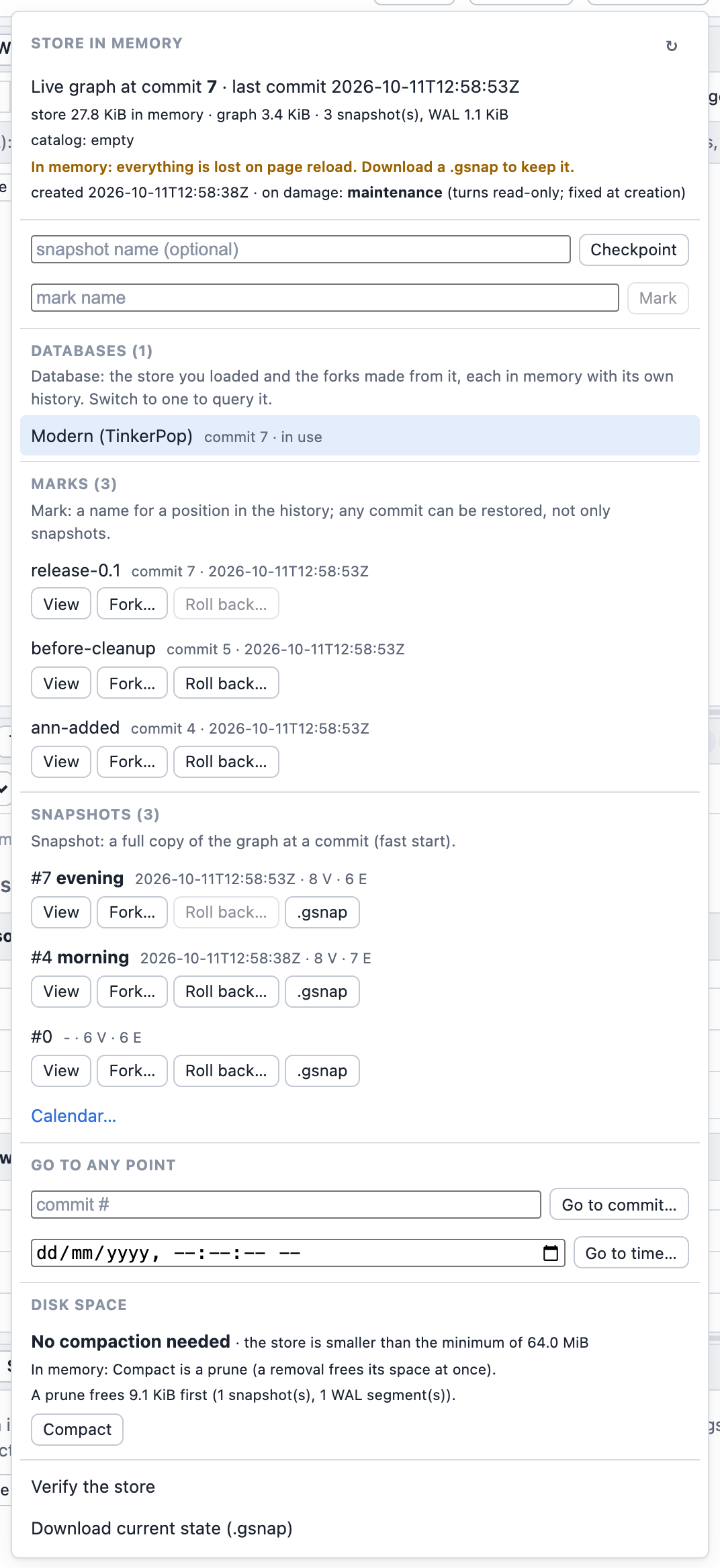
Calendar… shows every mark and snapshot by day, with the same actions:
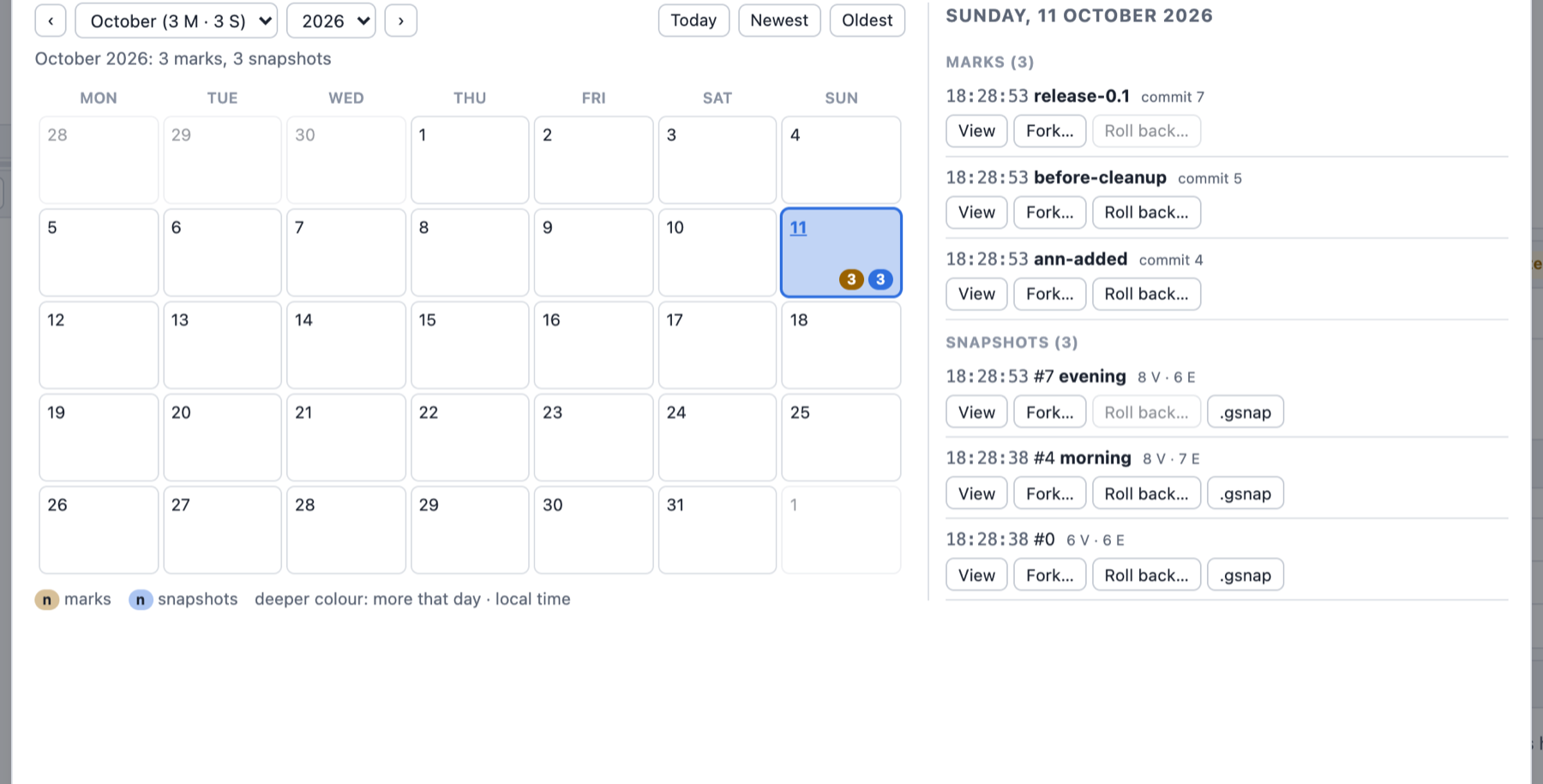
A running store action is shown in three places (the same on the dev server): its button switches to the running text in bold accent colour with a spinner and the elapsed time ("Verifying the store… 0:42"); the Store button in the top bar shows it while the menu is closed ("Store · verifying… 0:42"); and a toast gives the result at the end (a problem found, such as Verify's damage, has a Details button that opens the menu, where the last Verify's result is listed under its item). Meanwhile every other store action is disabled, its tooltip saying which one to wait for; screen readers hear the start and the end through a polite live region. The engine reports no progress for these actions and none of them can be cancelled: the elapsed time is all there is.
In memory: everything is lost on page reload. Download a .gsnap to keep a state (load it
back from the start page). The browser has no disk the playground writes to: syncs are no-ops,
and the byte format is the same as on disk, so a downloaded snapshot opens anywhere.
Stop (next to Run) restarts the engine: the graph is restored as it was last loaded or saved, and the store in memory starts over from that state (its history is lost).
To keep a history across reloads, run the same UI on a store on disk with the
dev server: graphersal --graph data/ --server.
Python
The Python binding (bindings/py-graphersal, package graphersal) has the packed snapshot, the
journal and recovery on graphersal.Graph, and the Store as graphersal.Store. Errors raise
graphersal.GraphersalError with the diagnostic and its help text. Build and test instructions:
bindings/py-graphersal/README.md.
Packed snapshots, journal and recovery
import graphersal

graph = graphersal.Graph.tinkerpop_modern()
graph.save("g.gsnap")                                     # {"commit_seq", "vertex_count", "edge_count"}; name= optional
graph = graphersal.Graph.load("g.gsnap")                  # no schema re-validation, checksummed
graph = graphersal.Graph.load("g.gsnap", memory_limit="auto")   # refuse a snapshot that does not fit

graph.start_journal("g.wal")                              # durability="every_commit" (default) | "os" | seconds
graph.execute('g.addV("person").property("name", "ann").next()')
graph.mark("after-ann")                                   # {"name", "commit_seq", "time"}

graph, report = graphersal.Graph.recover("g.gsnap", ["g.wal"])                    # to the end
graph, report = graphersal.Graph.recover("g.gsnap", ["g.wal"], mark="after-ann")  # or commit_seq=, time=
Graph.recover takes one target: commit_seq=, time= (microseconds since the Unix epoch) or
mark=; without one it replays to the end. An interrupted last write is ignored
(report["torn_tail"]); damage raises GraphersalError with its location. The recovered graph
has no journal: save and start_journal again to continue (see
Journal and Recovery).
The Store
with graphersal.Store.create("data") as store:            # or Store.open("data"); "x.gstore": one file
    store.graph.execute('g.addV("person").property("name", "ann").next()')   # durable when it returns
    store.mark("after-ann")
    store.checkpoint("nightly")
    store.snapshots(); store.marks(); store.verify()       # listings and the scrub
    store.fork("branch", mark="after-ann")                 # a new store (commit_seq=, time=, mark=)
    store.backup("bk")                                     # full, then incremental: {"incremental", "commit_seq", ...}
    store.open_report()                                    # {"clean_close", "commit_seq", "commits_replayed", ...}
| Method | Does | Page |
|---|---|---|
Store.create(path, on_damage="maintenance"), Store.open(path) | create (missing or empty path; on_damage is the damage policy, fixed for the store's life) / open read-write, with recovery; a second writer raises | Opening and Closing |
Store.create_file(path), Store.open_file(path) | a single-file store (create/open of a .gstore path do the same) | |
store.graph | the store's Graph; every commit is durable before it returns | Commits |
store.close(), with ...: | a clean close; the graph refuses commits afterwards | |
store.open_report() | what the open did | |
store.checkpoint(name=None) | write a snapshot | Checkpoints |
store.mark(name), store.marks() | name the position; list the marks | Marks |
store.snapshots() | the snapshots, oldest first | |
store.fork(path, commit_seq=, time=, mark=) | a new store from a point in time; the dict lists "marks_not_carried" | Fork |
store.rollback(commit_seq=, time=, mark=, delete=False) | roll back in place; the rest goes to the attic | Rollback |
store.attic(), store.attic_restore(id) | the attic entries; undo a rollback | |
store.backup(path, full=False, from_memory=False) | full or incremental backup, every checksum read in the store and in the copy (damage raises, nothing kept); from_memory=True after damage was found: the graph in memory, nothing written to the store | Backup and Restore |
store.store_id, store.damage_policy, store.damage_found, store.frozen_by_damage | the store id and the policy, fixed at creation; damage found on disk while the store is open; whether it turned read-only | Damage |
Store.open_backup(path), store.backup_marker | a backup, read-only; its marker | |
Store.restore_backup(path) | make a backup the live store (same graph id) | |
store.prune(up_to), store.compact(), store.compaction_advice(min_ratio=, min_reclaimable=, min_size=) | retention and disk space | Prune, Compact |
store.verify() | the scrub: {"ok", "problems", "notes"} | Verify |
store.maintenance | None, or the damage report of a store that opened read-only in maintenance mode | Damage |
store.repair_to(path) | a repaired copy: {"commit_seq", "lossless", "marks_not_carried", "lineage_approximate_before", "report"} | Damage |
Store.convert(source, target, single_file=False) | copy a closed store between a directory and a single file | Single-File Store |
with graphersal.Store.open_backup("bk") as backup:        # read-only; backup.backup_marker
    backup.snapshots()
graphersal.Store.restore_backup("bk")                      # the live store from now on: Store.open("bk")

with graphersal.Store.create("graph.gstore") as store:     # one file
    if store.compaction_advice()["recommended"]:
        store.compact()
graphersal.Store.convert("graph.gstore", "data")           # a closed store into a directory (or back)
Times in Python are microseconds since the Unix epoch (time=), as in Rust.
| Cannot create a store in data/: the directory is not empty, PersistError::DirectoryNotEmpty | a new store (Store::create, the target of Store::convert) needs a new or empty directory | choose an empty or new directory, or open the existing store if it is one (graphersal store info data/) |
FAQ and Troubleshooting
Choosing
Snapshot, journal or Store? A .gsnap when the application decides when to save (a script,
the browser, a download). A journal when you need durability over streams you manage yourself.
The Store for everything else: it is a snapshot plus a journal plus recovery, retention, backups
and repair. See Persistence.
Directory or single file? A directory for a server (parts can live on other disks, the files
are easy to inspect); a .gstore file when the store travels as one document. Both have the same
guarantees, and graphersal store convert switches between them.
Is GraphSON or GraphML not enough? They are exchange formats: they do not carry the schema, the commit position or the auto-id sequences, and GraphML loses value types without a schema. A snapshot is lossless.
Errors and what to do
| Message | Cause | What to do |
|---|---|---|
The store data/ is in use: another writer holds its lock | a dev server, a REPL or a program has the store open read-write | use the reading commands (they work), the dev server's Store menu, or stop the writer. A crashed writer never leaves a stale lock (the OS releases it) |
data/ is not a Graphersal store: no valid GRAPH file (...) | the path is not a store (a typo, or not created yet), or both GRAPH copies are unreadable | check the path; graphersal --graph <dir> --create-store creates a store; for damage see Damage |
... is a BACKUP (up to commit N, ...), PersistError::IsBackup | a backup opens read-only | graphersal store restore <dir> makes it the live store, store fork <dir> <new> a writable copy |
warning: the store ... has DAMAGE and opened READ-ONLY in maintenance mode | checksums failed, a WAL segment is missing, ... | follow the runbook: stop writing, verify, repair --to |
The commit was rejected by the commit hook 'maintenance' | a write to a store in maintenance mode | the same: repair into a new directory |
The journal is poisoned by an earlier failure | an fsync or a write failed (a full disk, an I/O error) | fix the cause, then reopen the store (or restart the server): recovery continues from the last durable commit |
The journal is poisoned by an earlier failure: a panic while writing a commit record: ... | the journal panicked while it wrote a record (a bug, or a store backend that panics); the record was cut off again and the unit rolled back | report the panic; reopen the store (or restart the server): it gives the state before that unit. Every case: Failures while committing |
Commit N is too large for the journal: its uncompressed record body is B bytes, more than the limit of 1073741824 bytes per commit / CommitTooLarge (in CommitRejected from the hook journal) | one unit changed more than 1 GiB of WAL record (every change with its before and after values: dropping and re-creating a large graph in one script of the dev server or the playground) | split the work: drop in a run of its own, load in several runs; see The size of one commit. The unit rolled back; the store keeps working |
Recovery target mark "x" not reached | no such mark, a commit after the end, or a target before the oldest retained snapshot (pruned) | store marks, store list, store info show what exists |
Cannot roll the store back: ... there is nothing after commit N | the target is the current commit or later | choose an earlier target |
Cannot <operation>: <reason> / PersistError::Store | the store's state refuses the operation; its cause (StoreFailure, Python err.cause) says why, see the table below | follow the help printed with it |
--at-time: "..." is not a date-time: add a zone | a time without a zone, or a bare date | write 2026-10-08T02:43:00Z (UTC) or an offset like +02:00 |
Incremental backup ... refused / BackupRefused | another graph, a pruned gap, a rollback behind the backup, a non-empty directory | back up into a new directory with --full |
The backup stopped: the store ... is damaged: <file> at byte N: ... / BackupDamaged, side Store | a checksum of something the backup copies failed in the store | repair the STORE (graphersal store repair <dir> --to <new_dir>), never the backup; while the store is open in a server or a program, save its graph first with a backup from memory. Nothing of the failed backup was kept |
The backup stopped: the backup ... does not verify / side Backup | the copy did not read back intact (the backup's disk) | check the backup's disk and back up again (into a new directory with --full when the old backup is damaged); the store is fine |
The store ... is read-only: backup found damage on disk ... damage policy "maintenance" / DamageFound | damage was found while the store is open, and its policy (fixed at creation) is maintenance | the data in memory is intact: back it up from memory, then repair the store; see Damage found while the store is open |
--on-damage ... applies only to a store being created | --on-damage for an existing store with another policy | the damage policy never changes; drop the option |
The store ... has the older format version N; this build reads and writes only version M / OlderFormat | a store written by an older Graphersal (store format version 1: before the store id) | migrate it through a packed snapshot: the recipe, also in the error's help |
Unsupported format version N of the store ... / UnsupportedVersion | a store written by a NEWER Graphersal | open it with that version; see Format Versions |
The snapshot needs about N bytes in memory, more than the memory limit | a memory budget (--memory-limit, ReadOptions::with_memory_limit) smaller than the graph | raise the budget, or load on a bigger machine |
Refused store operations (PersistError::Store)
A refused operation reads Cannot <operation>: <reason>. Its cause is one of a closed set
(graphersal::persist::StoreFailure, #[non_exhaustive]), so a program or a server can react to
it with a match; StoreFailure::name() is the stable name, which the Python exception carries as
err.cause (None for every other error). Each cause has its own help:
Cause (name()) | When | What to do |
|---|---|---|
Closed (closed) | the store was closed (close, shutdown) | open it again |
LockPoisoned (lock_poisoned) | a thread panicked while it held a lock of the open store | end the process and reopen the store |
NameTaken (name_taken) | a snapshot name in use, or a mark name used before (also by a mark a prune made unreachable) | choose another name; store list, store marks |
NameTooLong (name_too_long) | a snapshot name over 255 bytes | a shorter name |
SnapshotExists (snapshot_exists) | a named checkpoint at a commit that already has a snapshot under another name | commit something first, or checkpoint without a name |
NoSnapshot (no_snapshot) | an export of a commit without a snapshot, a backup of a store without one | store list, store checkpoint |
BackupRunning (backup_running) | a prune while a backup copies the files | prune again afterwards |
PruneRunning (prune_running) | a backup while a prune deletes files | back up again afterwards |
NothingAfterTarget (nothing_after_target) | a rollback to the current commit or later | an earlier target |
UnknownAtticEntry (unknown_attic_entry) | no attic entry with that id | store attic <dir> lists them |
AtticLineageChanged (attic_lineage_changed) | a later rollback or restore came after the entry's rollback | restore the newer entry first, or fork the entry |
ChangedSinceRollback (changed_since_rollback) | commits or marks since the entry's rollback | fork the entry (store attic <dir> fork <id> <new_dir>) |
AtticBaseMissing (attic_base_missing) | the snapshot an attic entry continues is gone | store verify; take the entry from a backup or remove it |
NotABackup (not_a_backup) | a backup-only operation (prune_backup) on a live store | open and prune it as a store |
KeptSnapshotDamaged (kept_snapshot_damaged) | a snapshot a prune would keep fails verification; nothing was removed | store verify, then store repair <dir> --to <new_dir> |
CopyDoesNotVerify (copy_does_not_verify) | a converted or repaired copy does not read back intact | check the target disk, repeat into a new directory |
ChangedConcurrently (changed_concurrently) | a store file changed or vanished while the operation read it | never edit a store's files; repeat, then store verify |
JournalSyncFailed (journal_sync_failed) | writing or syncing the journal failed | fix the disk, reopen the store |
MissingCapability (missing_capability) | the graph's storage does not claim atomic and change_capture, so no journal can be attached (never for TraversalGraph) | keep the graph in a storage that claims both |
ReloadFailed (reload_failed) | the files of a rollback or attic restore changed, but loading the new state into the open graph failed: the graph in memory was emptied and the store stopped | close the store and open it again (restart the server): the open completes the change |
Stopped (stopped) | an earlier rollback or attic restore failed part-way, so the store writes nothing more (Store::stopped_reason) | close the store and open it again |
Questions
Can I change the damage policy (or the chunk size) of a store? No. Both are fixed at
creation and carried by every fork, repair, conversion and backup. To get
another policy, create a new store with it and load the data (for example graphersal store export old/ graph.gsnap, then graphersal store create new/ --from graph.gsnap --on-damage continue).
Does a backup check what it copies? Yes, every checksum, in the store before anything is written and again in the copy. A backup never copies damage silently; see Every checksum, twice.
Is a commit really on disk when the query returns? Yes, with the default
Durability::EveryCommit: the WAL record is written and fsynced first; a failed sync rolls
the commit back. With Interval or Os a machine crash may lose the last commits (never one in
the middle). See Commits and Durability.
The dev server (or my program) was killed. Is the store damaged? No. The next open replays the WAL and cuts an interrupted last write; stderr notes that the store was not closed cleanly, which is harmless. Ctrl+C closes it cleanly in the first place.
Why does the store keep growing? Nothing is deleted implicitly: every commit is in the WAL and
every checkpoint adds a snapshot until you prune. store compact-advice tells
you what a prune and a compaction would give back.
How do I see the graph as it was yesterday? Store::open_read_only(dir, RecoveryTarget::Time(..)), the dev server's Go to time..., or graphersal store fork data/ yesterday/ --at-time 2026-10-07T18:00:00Z and open the fork. See
Point in Time.
I rolled back by mistake. graphersal store attic data/ lists the rolled-back history;
store attic data/ restore <ID> undoes the rollback as long as nothing was committed or marked
since, otherwise store attic data/ fork <ID> <NEW_DIR> keeps it as a new store. A rollback with
--delete cannot be undone (restore a backup).
Can I copy a store with cp or rsync? While no process has it open, yes: no file records a
path. While it is open, use graphersal store backup (it copies up to the durable end and pins the
files against a concurrent prune); a plain copy of a live store may catch a half-written file.
Can two processes use one store? One writer at a time (an operating-system lock). Any number
of readers (info, verify, fork, backup, Store::open_read_only) at the same time as the
writer.
Does a backup include the attic? No. It holds the snapshots and the WAL up to the durable end, and the marks.
Where is the time zone? Everything is stored and printed in UTC. --at-time takes any offset,
but refuses a time without one.
Does it work in the browser? Snapshots, journals and recovery work over any stream in
WebAssembly; the Store works there over a MemDir (the playground does
that). There is no disk: download a .gsnap to keep a state.
Can another program read the WAL (change data capture)? Yes. The byte format is public
(specification); a reader tails the WAL segments, reads complete records only, and
treats records after the writer's durable end as possibly not final. In Rust,
store.changes_since(commit) yields the ChangeSets.
Is the format stable? Store format version 2 (with file format version 1) is specified on the specification page; a newer version is refused, never guessed at, and a store of an older version is refused with a migration recipe (a packed snapshot exported by the older build). Before Graphersal 0.1.0 the format may still change.
Custom Storages
Graphersal's reference storage is TraversalGraph, an in-memory graph. A host (a server, an
application) can bring its own in-memory storage instead: any type that implements the
GraphStorage trait. The engine, the Rhai DSL, saved queries, the session of the playground and
the dev server (graphersal-session) and the persist Store then work over it.
EXPERIMENTAL in 0.1.x.
GraphStorage,PersistentStorage,AnyGraphand the conformance crategraphersal-storage-testsmay change in any 0.1.x release. Pin the exact versions (graphersal = "=0.1.0",graphersal-storage-tests = "=0.1.0").graphersal-sessionis internal and has no stability guarantees at all.
How it fits together
The engine (GraphTraversalSource<'g, S>) is generic over the storage and statically
dispatched: a traversal over a host storage is compiled for that storage, with no virtual call
per element. Everything above the engine holds one object-safe type per layer instead, and makes
one virtual call per operation (a terminal, a schema method, a catalog call, a view):
| Layer | Holds | Implemented for |
|---|---|---|
Rhai DSL, saved queries (graphersal::script) | Arc<dyn AnyGraph> | every Graph<S> (sealed blanket implementation) |
Session (graphersal-session) | Arc<dyn SessionGraph>, Arc<dyn SessionStore>, Arc<dyn GraphFactory> | every Graph<S>, every Store<S>, StorageKind<S> |
Store (graphersal::persist) | Store<S>, internally a non-generic core | every S: PersistentStorage |
Graph<S> (in graphersal::storage, also in the prelude) is the shared form of a storage: S
behind a read-write lock, with read()/write() guards that dereference to S. Graph without
a parameter means Graph<TraversalGraph>.
What a host implements
GraphStorage(required). Only the read methods, the element-creating and element-removing methods and the property writes are required; everything else has a default that is correct for a simple, non-transactional storage. The trait's rustdoc ("A guide for storage implementers") is the reference: handles that never alias, the write checks and their public helpers, units of atomicity, capabilities, change capture, statistics, schema and the catalog.Default(required by the DSL and the session). A whole script runs as one unit by moving the storage out of the shared lock while the write lock is held (std::mem::take), which leaves an empty instance behind. The session also builds every new graph (a sample, a file load) by reading it into aTraversalGraphand copying it into anS::default()(through the load sink of aPersistentStorage, through the write methods otherwise).Send + Sync + 'static, so the graph can be shared between threads.- Change capture (optional; needed for commit hooks, dry runs and the Store). A storage that
claims
change_capture(and thereforeatomic) incapabilities()builds theChangeSetof every committed unit itself with the public constructors (ChangeSet::builder, oneMutationconstructor per kind). There is no reusable undo log or capture component: the storage derives what a unit changed from its own bookkeeping. It embeds aCommitHooks(graphersal::storage) and calls it at its commit point, so the order of the hooks (user hooks in registration order, then the journal) is implemented once; the rustdoc ofCommitHookssays when to call each event. PersistentStorage(optional, featurepersist; needed for snapshots and the Store): the lineage id, the commit position, a load sink outside units,clear, the journal slot and replay. See Your Own Storage.
Units and transactions come for free: the Transactional extension trait (transaction,
transaction_with, dry_run) is implemented for every GraphStorage on top of the trait's
unit methods. dry_run needs change_capture.
Plugging it in
| Front end | Entry point |
|---|---|
| Engine | GraphTraversalSource::new(&storage) (reads), GraphTraversalSource::new(&mut storage) (writes) |
| Shared graph | Graph::new(storage); Graph::new_persistent(storage) for a PersistentStorage (adds g.export_snapshot(path) in the DSL) |
| Rhai DSL | graph_scope(graph), graph_scope_with_options(..), every eval_* function: they take impl IntoAnyGraph, i.e. an Arc<Graph<S>> or an Arc<dyn AnyGraph> |
| Session | Session::with_storage(Arc::new(StorageKind::<S>::persistent())) for a PersistentStorage (graphs, .gsnap loads, stores in memory), StorageKind::<S>::new() for any other storage (graphs only); session.load_shared(graph, name, kind) serves a graph the host already holds, session.attach_store(Arc::new(store), label) a Store |
| Store | Store::create_in(dir, storage, options), Store::open_in(dir, options, S::default), open_backup_in, open_read_only_in, create_from_packed_in; the Store page has the table |
| Snapshots | persist::write_snapshot(&storage, writer, &options), persist::read_snapshot_into(reader, &options, S::default()) |
A Store requires the capabilities atomic and change_capture and fails with
StoreFailure::MissingCapability without them. The files a Store<S> writes do not depend on
S: a store written by a host storage opens as Store<TraversalGraph> (in graphersal store,
the dev server, Python) and the other way round.
A complete host
The example below is a test of graphersal-session (crates/graphersal-session/tests/custom_storage_example.rs),
compiled and run by cargo test -p graphersal-session. The Forwarding storage of
graphersal-storage-tests stands in for the host's storage (see below).
use std::sync::Arc;

use graphersal::TraversalGraph;
use graphersal::persist::{MemDir, Store, StoreDir, StoreOptions};
use graphersal::prelude::{ElementProperty, GraphTraversalSource};
use graphersal::script::eval_value;
use graphersal::storage::{Graph, GraphStorage, Transactional};
use graphersal_session::{RunOptions, Session, StorageKind};
use graphersal_storage_tests::forwarding::Forwarding;

/// The host's storage. A real host writes its own `GraphStorage` (+ `Default`, and
/// `PersistentStorage` to be stored); `Forwarding` stands in for it.
type MyStorage = Forwarding;

fn modern() -> MyStorage {
    Forwarding::new(TraversalGraph::tinkerpop_modern())
}

#[test]
fn a_host_plugs_its_own_storage_into_every_front_end() -> Result<(), Box<dyn std::error::Error>> {
    // 1. The engine is generic: a traversal over `&S` (reads) or `&mut S` (writes).
    let mut storage = modern();
    let people = GraphTraversalSource::new(&storage)
        .v(None)
        .has_label("person")
        .count()
        .next()?;
    assert_eq!(people, Some(ElementProperty::from(4)));
    storage.transaction(|g| {
        GraphTraversalSource::new(&mut *g).add_v("robot").next()?;
        Ok::<_, Box<dyn std::error::Error>>(())
    })?;
    assert_eq!(storage.vertex_count(), 7);

    // 2. The DSL and saved queries take any `Arc<Graph<S>>` (`impl IntoAnyGraph`).
    //    `new_persistent` also gives the DSL's `g.export_snapshot(path)`.
    let graph = Arc::new(Graph::new_persistent(modern()));
    let _definition = eval_value(
        graph.clone(),
        r#"g.define_query(#{name: "older_than", params: #{age: "integer"},
               body: "fn older_than(age) { g.V().has(\"age\", P.gt(age)).values(\"name\").order() }"})"#,
    )?;
    let names = eval_value(
        graph.clone(),
        r#"g.query("older_than", #{age: 30}).toList()"#,
    )?;
    assert_eq!(names.to_string(), r#"["josh", "peter"]"#);

    // 3. A Store of the storage: `create_in` / `open_in` (it must claim `atomic` and
    //    `change_capture`). Every commit goes to the write-ahead log.
    let dir: Arc<dyn StoreDir> = Arc::new(MemDir::named("custom-storage-example"));
    let store = Store::create_in(&dir, modern(), StoreOptions::new())?;
    store.graph().write().transaction(|g| {
        GraphTraversalSource::new(&mut *g)
            .add_v("person")
            .property("name", "ada")
            .next()?;
        Ok::<_, Box<dyn std::error::Error>>(())
    })?;
    store.close()?;
    // `open_in` takes how to build the empty instance the snapshot is loaded into.
    let store: Store<MyStorage> = Store::open_in(&dir, StoreOptions::new(), MyStorage::default)?;
    assert_eq!(store.graph().read().vertex_count(), 7);

    // 4. A session over the storage: every graph it builds (samples, loads, stores in memory,
    //    forks) is a `MyStorage`; here it serves the Store opened above.
    let mut session = Session::with_storage(Arc::new(StorageKind::<MyStorage>::persistent()));
    session.attach_store(Arc::new(store), "my store");
    let answer = session.execute(
        r#"g.V().has("name", "ada").count().next()"#,
        &RunOptions::default(),
    );
    assert!(answer.contains(r#""ok":true"#), "{answer}");
    assert_eq!(
        session.graph().storage_type_name(),
        std::any::type_name::<MyStorage>()
    );
    let mark = session.store_mark("after-ada")?;
    assert_eq!(mark["mark"]["name"], "after-ada");
    Ok(())
}
What stays TraversalGraph-only
- Scratch graphs. Graphs a script creates itself are always
TraversalGraphs, whatever the host's storage:GraphSource::*,__,_g, the results ofsubgraph()/cap()/toGraph()andschema.toGraph(). A host-chosen scratch storage is not planned. withSideEffect(name, graph)into a host graph. Asubgraph()writes only into aTraversalGraph; a foreign target fails withGraphError::Unsupported. Let the subgraph land in a scratch graph and copy what is needed.- Compressed properties. A foreign storage keeps compression rules in its catalog like any
definition (defined, listed, persisted, dropped), but nothing applies them:
recompressfails withGraphError::Unsupportedand the compression statistics are absent. The session's compression manager lists and edits the rules and says "not supported by this storage" for the rest. - The undo log and its change-capture derivation. A foreign storage brings its own (see "Change capture" above).
- The Store's internal working graphs. The merge checkpoint's delta graph, salvage
(maintenance mode) and repair work on internal
TraversalGraphs and write files; they never touch the host's graph. - The shipped front ends. The CLI (REPL, one-shot runner), the dev server and its MCP
endpoint, the Python binding and the WebAssembly playground serve
TraversalGraph. A host that serves its own storage builds ongraphersal-sessioninstead. - Sample graphs and
TraversalGraph::with_execution_policy. The sample constructors (TraversalGraph::tinkerpop_modern(), ...) buildTraversalGraphs (the session copies them into the host storage); the trait methodexecution_policy()gives a host storage the same policy hook.
Operations a storage does not implement fail with GraphError::Unsupported, which names the
operation; its help points to the storage's documentation and capabilities.
Testing a storage
The conformance suite
Add graphersal-storage-tests as a dev-dependency (with its persist feature to test the
PersistentStorage side) and invoke the macro in one test of the implementing crate:
graphersal_storage_tests::conformance!(my_storage, base = MyStorage::default() => base);Each contract item becomes its own test; the capability-conditional items (rollback, savepoints,
hooks, change sets, dry runs) run for what capabilities() claims. See
Storage Conformance.
The Forwarding pattern
graphersal_storage_tests::forwarding::Forwarding forwards every GraphStorage (and, with
persist, PersistentStorage) method to a wrapped TraversalGraph, but has its own element
handle types. Graphersal uses it to prove that the front ends are storage-independent:
crates/graphersal/tests/all/foreign_storage_tests.rsruns every documented DSL example and a curated set of mutating, whole-script, dry-run and saved-query scripts on both storages and requires the same results;crates/graphersal/tests/all/foreign_store_tests.rsruns the Store onForwardingover every backend (commits, reopen, checkpoints, rollback, backups, ZIP, marks, damage) and opens the files with the other storage type;crates/graphersal-session/src/storage/tests.rsrequires the same JSON from a session over either storage;GRAPHERSAL_TEST_STORAGE=forwardingruns the whole TinkerPop suite on it, gated against the same baseline;- the CI job "foreign storage proof" runs all four.
A host can follow the same pattern for its own storage: run the same scripts on a
Graph<TraversalGraph> and on a Graph<MyStorage> loaded with the same data and compare the
rendered results. Differences are either bugs of the storage or behaviour the host chose (and
documents).
Cost
A storage behind Graph<S> runs within 1-4 % of TraversalGraph itself on the measured
traversals (measured with the Forwarding test storage), because the engine is monomorphised for it.
The price is build time: one engine instantiation per storage type a host uses.
Storage Conformance Tests
GraphStorageis experimental in 0.1.x: its methods and associated types may change in any 0.1.x release (a layered storage with snapshot reads is planned for 0.2). The trait's own rustdoc is the implementer's guide: handles, units, capabilities, change capture and statistics.
The crate graphersal-storage-tests (on crates.io, EXPERIMENTAL like the trait: it may break in any minor
release before 1.0, so pin the exact version) runs one contract against any GraphStorage implementation. Add it
as a dev-dependency (graphersal-storage-tests = "=0.1.0") and, in a test of the implementing crate:
graphersal_storage_tests::conformance!(my_storage, base = MyStorage::new() => base);The suite uses only graphersal's public API.
Each contract item is a separate test (ids, label sets, edge endpoints, property kinds, JSONPath writes and
removals, cascading drops, counts and *_by_label equal to scans after every mutation, schema application,
read-only wrappers, stale handles that never alias another element) plus a smoke layer that loads the
modern graph through the trait and compares eight traversals with TraversalGraph.
Schema support is optional: the schema items check enforcement only when set_schema does not return
GraphError::Unsupported (the trait default); otherwise they pass without checking anything. Schema enforcement is
not reusable outside graphersal yet, so a storage in another crate keeps that default and still passes
conformance!. conformance_core! leaves the schema items out entirely, for a storage that accepts schemas but
deliberately does not enforce them.
Some items depend on what the storage claims in capabilities() (see Transactions):
capabilities_are_consistent always runs (change_capture requires atomic); the rollback, savepoint and
unit_changes items run for an atomic storage; the commit-hook and apply_change_set items run for a storage
with change_capture (and check that a storage without it refuses hook registration). Where the trait documentation is silent the reference implementation decides;
those points are listed in the crate README.
The suite is run against TraversalGraph, &mut TraversalGraph, Box<TraversalGraph>, Arc<TraversalGraph>,
(read-only items) &TraversalGraph and the blanket &G view of that wrapper, the crate's Forwarding test storage
(own handle types, every method forwarded to a TraversalGraph) and a wrapper in the suite's own tests that keeps the
trait's schema defaults. It found two contract violations in TraversalGraph (a panic in add_edge for a dropped endpoint, stale edge-id
entries after drop_vertex); both are fixed and the suite runs with no ignored test.
Running the TinkerPop suite against another storage
The harness (crates/graphersal/tests/tinkerpop/harness/) holds every dataset graph as
Arc<dyn AnyGraph>, so the suite is storage-independent above the storage. Inside this repository
GRAPHERSAL_TEST_STORAGE=forwarding runs it on the Forwarding storage of this crate (see
TinkerPop Compliance). A storage in another crate cannot run it yet: the
harness lives inside the library's integration tests and would have to move into a library-like
crate that does not depend on test-only paths. Until then such a storage follows the
Forwarding pattern: the same scripts on a
TraversalGraph and on the storage, results compared.
How a host plugs its storage into the DSL, the session and the Store: Custom Storages.
Writing Queries
This part describes the Gremlin DSL in detail, topic by topic. The DSL is the text form of a
query: what the command line, the playground, Python, saved queries and AI agents run, and what
script::eval_value evaluates in Rust. It is Gremlin embedded in Rhai.
The shape of a script
A script is a sequence of Rhai statements. g is the graph, __ starts an anonymous traversal,
and the token classes (P, T, Order, Scope, Column, Pop, ...) are predefined:
let min_age = 30;
let names = g.v().has_label("person").has("age", P.gt(min_age)).values("name").to_list();
names.len()                                        // 2
- Terminals run a traversal.
to_list(),next()anditerate()run it and return native values; a traversal that is the last value of a script is displayed instead. A traversal in the middle of a script without a terminal is only built, not run. - Both spellings. Every step is available in snake_case (
has_label,out_e) and in Gremlin camelCase (hasLabel,outE), with the same overloads. - Strings in double quotes. Single quotes are Rhai character literals; maps are written
#{key: value}. - Anonymous traversals start with
__.:where(__.out("knows")),repeat(__.both()). - Every traversal is atomic. A failing traversal leaves nothing it wrote (Transactions).
An error names the failing step with its position in the plan, and most errors come with a help text that suggests a fix built from the failing query.
Topics
| Page | What it covers |
|---|---|
| Displaying Results | how results are shown, the row and item limits |
| Predicates | P.* and TextP.*, comparison and resolution rules |
| Id Arguments | what v(), e() and has_id() accept |
| Type Conversion | as_string(), as_bool(), as_number(), length() |
| Math Expressions | the math() step |
| Map Keys and Values, Non-String Keys | maps in the stream |
| Local Scope | steps applied inside a collection |
| Path Keys (jpath) | reading and writing nested values |
| UUID Values, Multi-Label Vertices, Property Elements | values and elements beyond strings and numbers |
The following chapters cover traversal patterns, changing the graph, schemas, saved queries and profiling; every single step is in the Step Reference.
Displaying Results
A traversal's result is either data or display:
- Data is what
to_list(),next(), a script variable, and the Rust data API return. It is never cut:let xs = g.v().to_list(); xs.len()counts every vertex.iterate()runs a traversal for its side effects (g.add_v("x").property("a", 1).iterate()) and returns nothing: its results are discarded, never materialized, so nothing is shown. - Display is every rendering of results into text: a traversal left without a terminal (the
session visualizer), a list or map that is a script's final value, and the explicit visualizers
to_table(),to_markdown(),to_json(),to_tree(),to_mermaid(),to_plantuml(),to_json_schema()andvisualize(fmt).
Display can be bounded by two limits:
| Limit | What it bounds |
|---|---|
max_rows | top-level results: table rows, traversers, list items |
max_items | items of every nested collection inside a row, at any depth (a fold() list, the keys of one group() row) |
Where the limits come from
- The library is unbounded by default. A Rust caller of
visualize_withand a script engine built without render options get everything. - Front ends set a session default.
graphersaland the web playground show at most 100 rows and 100 nested items, for every kind of display, including an explicitto_table(): the DSL cannot write a string to a file, so in a front end such a call is for viewing. - A single call overrides the session default with an options map.
Per-call options (DSL)
g.v().to_table(#{max_rows: 20})             // other limits for this call
g.v().to_json(#{max_items: 5})
g.v().visualize(V.Markdown, #{no_limit: true})  // no limit at all for this call
g.with("render.max_rows", 10).v()           // session default for one query
max_rows: 0 / max_items: 0 is an error: no_limit: true is the one way to say "unlimited".
no_limit: true together with max_rows or max_items is an error too. no_limit: false keeps the
session default. Both spellings work: max_rows/maxRows, max_items/maxItems,
no_limit/noLimit.
Session default (embedding the DSL)
A host passes its limits as scope options, and can change them later (a REPL /set):
#![allow(unused)]
fn main() {
use std::sync::Arc;
use graphersal::prelude::*;
use graphersal::auth::AllowAll;
use graphersal::exec::RenderOptions;
use graphersal::script::{graph_scope_with_options, render_scope_options, set_scope_render_options};

let limits = RenderOptions::new().with_max_rows(100).with_max_items(100);
let graph = Arc::new(GraphSource::tinkerpop_modern());
let mut scope =
    graph_scope_with_options(graph, &render_scope_options(&limits), Arc::new(AllowAll));
// ... later: remove the limits for the rest of the session.
set_scope_render_options(&mut scope, &RenderOptions::unlimited());
}
render_value / try_render_value take the host's RenderOptions for final lists and maps and
return a RenderedOutput.
Rust API
#![allow(unused)]
fn main() {
use graphersal::prelude::*;
use graphersal::exec::RenderOptions;

let graph = TraversalGraph::tinkerpop_modern();
let rendered = graph
    .traversal()
    .v(None::<()>)
    .visualize_with(VisualizeFormat::Table, &RenderOptions::new().with_max_rows(2))
    .unwrap();
println!("{}", rendered.text);
if let Some(notice) = rendered.notice() {
    eprintln!("{notice}");
}
}
visualize(fmt), to_table(), to_json(), ... are always unbounded and return a String;
visualize_with, to_table_with and to_markdown_with take RenderOptions and return a
RenderedOutput. RenderOptions::unlimited() / .with_no_limit() remove both limits.
How a cut is shown
The truncation is never part of the result text. RenderedOutput::truncation reports it
(rows_shown, more_rows, items_cut, max_items; there is no total count, because counting would
cost a full execution), and Truncation::notice() builds the one notice text every front end
prints:
… showing the first 100 rows; more exist. Use .limit(n), #{no_limit: true}, /set no-limit (--no-limit), or to_list() for the data.
… nested collections were cut to 100 items. Use #{max_items: n}, /set max-items <n> (--max-items <n>), or /set no-limit (--no-limit).
- Tables, markdown and trees mark a nested cut inside the cell with
…, for example[1, 2, 3, …], or with a└─ …line in a tree. A row with more keys thanmax_itemsshowsmax_itemscolumns and a…column. - Maps with typed keys in JSON: a map with a non-string key (
groupCount().by("age")) is written in the GraphSON shape{"@type": "g:Map", "@value": [29, 1, 27, 1]}; a string-keyed map is a plain object. Tables and trees print such keys as text (29,v[1]); see Maps With Non-String Keys. - JSON stays valid JSON: an array of the first
max_rowsresults, with nested collections cut and no marker inside, since a sentinel element would break the data's types. The only signal is the notice. The JSON-per-line fallback formats (jsonschema,mermaid,plantumlon traversal results) follow the same rules. - A schema (
g.get_schema(),g.infer_schema()) and aprofile()result are never bounded.
Graph values
A graph as a script's final value (g.e(0).to_graph(), g.e().subgraph("sg").cap("sg").next(),
GraphSource::empty(), g itself) is shown as one result {"vertices": [..], "edges": [..]},
each element materialized like a g.v()/g.e() result: exactly what cap("sg") shows for a graph
inside a traversal. A table prints the elements in their short form ([v[1], v[2]]), JSON with
all their properties:
graphersal> g.e(0).to_graph()
╭────────────────────┬──────────────╮
│ edges              │ vertices     │
├────────────────────┼──────────────┤
│ [e[0][1-knows->2]] │ [v[1], v[2]] │
╰────────────────────┴──────────────╯
max_items bounds both lists, and only max_items + 1 vertices and edges are read, so even g on
a large graph shows its first elements and the cut notice instead of materializing everything.
This is display only: next() and to_graph() still return the graph itself, a source you
traverse (sub.v().count().next()). The web playground shows the same result (and draws it in
the Graph panel).
A single list-valued result
A traversal that yields ONE list-valued traverser (g.v().values("age").fold(), cap("a") of an
aggregate("a")) is a list of one element in every terminal: to_list().len() is 1 and
to_json() is [[29, 27, 32, 35]]. Nothing is unwrapped. The only difference you may see is in the
graphersal printer: it prints a returned script array one element per line, so the list of one list prints as
[29, 27, 32, 35] (the single element), while the flat list [29, 27, 32, 35] prints as four lines. Use
to_json() or .len() to tell them apart.
Tokens and anonymous traversals
A DSL token shows as the DSL text that builds it, wherever a script prints it: as the final value
(also inside a list or map), through to_string() and in string interpolation ${..}. The text
is the canonical dotted spelling, and evaluating it gives the same token back:
| Script | Shows |
|---|---|
Scope::local | Scope.local |
Order::Desc | Order.desc |
keys, first | Column.keys, Pop.first |
T.id, By.Count | T.id, By.Count |
GType.INT | GType.LONG (the same type) |
Operator.sum, Barrier.normSack | Operator.sum, Barrier.normSack |
P.gt(1).and(P.lt(3)) | P.gt(1).and(P.lt(3)) |
TextP.containing("a") | TextP.containing("a") |
Cardinality.single(5), CastPolicy.Default("x") | the same text |
__.out().has("name", "x") | __.out().has("name", "x") |
Scope, P (a class itself) | Scope, P |
An anonymous traversal (__...) is a template for a child position, not a query of your graph, so
a script that returns one shows its text instead of running it; the steps read like .profile()
names them. The session's step-name spelling (--spelling camel, render.spelling) applies to a
displayed result (__.outE(), TextP.startingWith("a")); to_string() and ${..} always give
the canonical snake_case text. A UUID is a value, not a token: it shows its canonical text.
Early stop
With max_rows = n, the visualizer appends an internal limit(n + 1) to the pipeline before it
is optimized and executed, so only n + 1 results are produced and materialized. The extra one
only tells whether more exist. Barriers before it (group(), order(), ...) still see the whole
stream. In the executed plan it is the step limit(n + 1) [display].
An error location never shows it: the at #N: line with its caret, the plan: line,
step_location() and the query a help text rewrites show the
traversal as you wrote it, so g.inject(1).math("value + 1") fails with
Error: Step #1 'math("value + 1")' execution failed
  at #1: inject(1).math("value + 1")
                   ^^^^^^^^^^^^^^^^^
and not with a .limit(101) [display] you never wrote. The display step is appended last, so
leaving it out changes no step number. It is shown only when the failure is that step itself.
No limit is appended, and the traversal runs completely with only the output cut, when the
pipeline mutates the graph (so g.v().property("x", 1) still updates every vertex) or already ends
on a single-result step such as count(), fold() or group().
graphersal
- Defaults: 100 rows, 100 nested items, the same in the REPL,
-eand--in. - Flags:
--max-rows <N>,--max-items <N>(N ≥ 1), and--no-limit.--no-limittogether with either of the others is an invalid invocation (exit code 2). - REPL:
/set max-rows <N>,/set max-items <N>,/set no-limit. Setting a limit after/set no-limitturns limits back on. - In
-e/--inthe notice goes to stderr, so stdout carries only the result (and--format jsonstays parseable) and the exit code stays0. The REPL prints it after the output.
graphersal --graph large -e 'g.v()'                         # 100 rows, notice on stderr
graphersal --graph large --no-limit -e 'g.v()' > all.txt    # everything
graphersal --graph large --format json -e 'g.v()' | jq length   # 100
Web playground
The web playground uses the same defaults (changeable in its settings). It
runs a traversal without a terminal as execute() and keeps all results as data; its Table, JSON and
Raw views show them within the limits (Raw is the text the CLI prints), and a cut result shows the
same notice above them. g.with("render.max_rows", n) and to_table(#{max_rows: n}) override the
limits for one query there too.
Predicates: Comparison and Resolution
This page lists where Graphersal's predicates (P.eq, P.neq, P.lt, P.lte, P.gt, P.gte,
P.within, P.without, P.inside, P.outside, P.between), their composition (and, or,
not, negate) and the id order of elements differ from Apache TinkerPop 3.8.2 or settle what
TinkerPop leaves open. The Deviations table at the end collects them.
One comparison core
All of these predicates compare through one rule set (TinkerPop's semantics/Comparability).
- Numbers compare by value across
int64andfloat64;NaNis incomparable with everything, itself included. - Strings compare with strings, booleans with booleans (
false < true), UUIDs with UUIDs,nullonly withnull. - A string is never read as a number, a date or a UUID.
- Incomparable means false, never an error. Every test except
neqis false for an incomparable pair. A vertex, edge, path or collection on the stream against a number is false as well; for exampleg.V().where(P.eq(111))is an empty result, not a cast error.
g.V().where(P.eq(111)).count().next()          // 0, no error
g.V().has("age", P.gt("x")).count().next()     // 0, a number never compares with a string
Text predicates match strings only
TextP.startingWith, endingWith, containing and their negations (also spelled
P.startingWith(..)) test a string. Any other value on the stream (a number, a UUID, a list from
fold(), a map, a path, a vertex or an edge) is not one, so the predicate is false and its
negation true. This is never an error, matching TinkerPop, where TextP only matches a String:
g.V().values("age").is(TextP.startingWith("2")).count().next()   // 0
g.V().fold().is(TextP.startingWith("a")).count().next()           // 0
g.V().fold().is(TextP.notStartingWith("a")).count().next()        // 1
A property handle (values("name")) and a property element (properties("name")) are tested by
their stored value.
Regular expressions
TextP.regex(pattern) holds for a string in which pattern matches somewhere; TextP.notRegex(pattern)
is its complement (also spelled not_regex, and bare regex(..)/notRegex(..)). Like the other text
predicates, a value that is not a string makes regex false and notRegex true. The match is
unanchored, as Java's Matcher.find() is; write ^...$ to match the whole string.
g.V().has("name", TextP.regex("^[jp]")).values("name").to_list()   // josh, peter
g.V().has("name", TextP.regex("(?i)^MAR")).values("name").to_list() // marko
Deviation from TinkerPop: Graphersal compiles the expression with the Rust
regex crate and uses that crate's dialect, not
Java's java.util.regex. Look at the crate's syntax page for what an expression may contain.
Matching takes linear time in the input. The expression is compiled once, when the predicate is
built: an invalid one is a script error (ValueError::InvalidRegex) before the traversal runs. In
Rust the predicate is P::regex("^mar")? / P::not_regex(..)?.
Resolution of a string operand
where(P): a bare string operand ofeq/neq/lt/lte/gt/gte/within/withoutis resolved in this order: a path label (as("a")), then a side effect (aggregate,store,withSideEffect), then the literal string. A side effect holding a collection compares as a whole value foreq/neqand is false for the ordering predicates. An unknown name stays a literal.has(key, P),is(P),hasValue(P),all(P),any(P): operands are always literal values; they never resolve to a label or side effect, so a name that exists as a side-effect key cannot change the meaning of a property filter.eqwith a string resolves a step label or a vertex id first (kept from the original implementation), then compares literally.
hasId(P), hasLabel(P), hasKey(P)
hasId(P.neq("1")) and its siblings evaluate the predicate instead of stringifying it. A lone
P.eq(x)/P.within(xs) is rewritten to the literal step so source-filter pushdown still applies.
- Operands are always literal. No step label or side effect is consulted, so a label named like an id cannot shadow it.
- Label and key sets. A vertex carries a set of labels, a map a set of keys. A positive
predicate (
eq,within,lt, ...) holds if any label or key satisfies it; a negated one (neq,without,notStartingWith, ...) holds only if all do. For a single-label vertex this is TinkerPop's behaviour. - A predicate mixed with other arguments (
hasId(P.eq("1"), "2")) is anArgumentMismatch. - Ids are strings. An order predicate (
P.gt,P.gte,P.lt,P.lte,P.between,P.inside,P.outside) with a number operand inhasId(P)/has(T.id, P)is an error before the query runs, not a filter that silently matches nothing; the help shows the string form. Compare with a string instead,hasId(P.gt("3")), and mind the string order:"10"sorts before"9". Equality forms (hasId(3),hasId(P.eq(3)),hasId(P.neq(3)),hasId(P.within(1, 2)),hasId(P.without(1, 2)), also nested as inhasId(P.eq(1).or(P.eq(2)))) take numbers and compare their literal text, in the DSL and the Rust API (has_id_p(P::Neq(3))):3matches the id"3", a float3.0the id"3.0".
g.V().hasId(P.neq("1")).count().next()                     // 5
g.V().hasId(P.gt("3")).count().next()                      // 3 ("4", "5", "6")
g.V().hasId(P.without(1, 2)).count().next()                // 4
g.V().hasLabel(P.within("person", "x")).count().next()     // 4
Element order
- TinkerPop: vertices and edges order by id; its ids are typically numbers, so
9sorts before10. - Graphersal: ids are stored as strings and compared as strings (a string is never parsed
into a number), so
"10"sorts before"9". Elements with equal or missing ids fall back to a structural comparison.
g.V().order().by(T.id).id().toList() // "1", "2", ... ; with ids up to 10: "1", "10", "2", ...
Composing predicates: and, or, not, negate
g.V().has("age", P.gt(18).and(P.lt(30)).or(P.gt(35))).values("name").toList()   // marko, vadas
g.V().has("name", TextP.containing("o").and(P.lt("m"))).values("name").toList() // lop, josh
g.V().hasLabel(P.not(P.eq("person"))).count().next()                            // 2
g.V("1").out().aggregate("a").out().where(P.not(P.within("a"))).values("name").toList()
p.and(q)andp.or(q)are binary and left-associative:a.and(b).or(c)means(a and b) or c,a.or(b).and(c)means(a or b) and c. Evaluation is left to right and short-circuits, as TinkerPop'sAndP/OrPdo:P.eq(1).or(q)never evaluatesqfor a value equal to 1, so a runtime error on the right is not raised when the left side decides.P.not(p)(alsoP::not(p)and a barenot(p)) andp.negate()are the complement of the result for the same stream value.TextPpredicates compose withPones.- The logic is two-valued. An incomparable pair is plain
false(see above), soP.lt(NaN)is the "error" column of theComparabilityscenarios and reduces tofalse; there is no third value. - Over a label or key set (
hasLabel(P),hasKey(P)) a leaf keeps the rule above (positive: any, negated: all); a composite combines the set results:andis&&,oris||,notis!of the child's set result. - In
where(P)each child resolves a string operand on its own (step label, then side effect, then literal), and the path analysis records the union of the labels of the children (P.eq("a").or(P.eq("d"))recordsaandd). - A composite is never pushed into an index or a source filter (
.profile()showshas("age", P.gt(27).and(P.lt(33)))with no optimizer rule named); the results are identical withg.with("optimizer.disabled", [...]). - A non-predicate operand (
P.gt(1).and(__.out()),P.not("x")) is anArgumentMismatchwhose help names the predicate and the traversal combinators (__.and(..),__.or(..)). - Not part of this feature: the infix steps
g.V().has(..).and().has(..)(TinkerPop'sConnectiveStrategy) and the two-argumentwhere("a", P)withby()modulators.
Type predicates
P.typeOf(GType.X) keeps a value of the given type (GType.STRING, GType.LONG, GType.NUMBER,
GType.LIST, GType.VERTEX, ...). TinkerPop 3.8 also accepts a type name, and so does
Graphersal, for a fixed list of names:
g.V().values("name").is(P.typeOf("String")).count().next()   // 6
g.V().values("age").is(typeOf("Long")).count().next()         // 4
g.V().values("age").is(P.typeOf("Byte"))                      // script error: unknown type name
| Name | Token |
|---|---|
String | GType.STRING |
Integer, Long | GType.LONG (every integer is an int64) |
Double, Float | GType.DOUBLE (every float is a float64) |
Boolean, UUID, Number, List, Map, Vertex, Edge, Path, Graph | the token of the same name |
Both forms take the same values in both spellings (P.typeOf(GType.LONG), P::typeOf(GType::LONG),
typeOf("Long") select the same ages). The names are Java's simple class names, as TinkerPop
registers them, not the token names: "LONG" is not a type name, in TinkerPop either.
The names are case-sensitive. Any other name is a script error (ArgumentMismatch listing the
accepted names), as TinkerPop rejects a name it has not registered. In Rust, the same lookup is
GType::from_type_name.
Deviations
| Area | TinkerPop behaviour | Graphersal behaviour | Why | Scenarios affected |
|---|---|---|---|---|
P.typeOf(name) | any name in TinkerPop's registered-type cache, custom types included | a fixed list of names (above) | Graphersal has no type registry; one width per number kind | none (the suite uses "String" and an unregistered name) |
negate() / P.not(p) | Compare.negate() flips the operator (gt becomes lte), so the result differs from the complement for incomparable operands | The plain complement of the result: P.not(P.gt(1)) is true for "foo" and NaN | One rule for every predicate (text, typeOf, composites); operator flipping would need a per-variant inverse | None (every vendored scenario negates a comparable number) |
Error value in and/or | Comparability scenarios call a NaN comparison an "error" column | There is no error value: incomparable is false, the logic is two-valued | The expected results reduce to boolean and/or | 18 Comparability |
| Numeric widths in the test surface | byte, short, BigInteger, BigDecimal are distinct types | Only int64/float64 exist; the harness maps 1b/1s/1n to an integer and 1m to a float (documented in tests/tinkerpop/README.md) | Widths cannot be told apart; equality is by value | 8 Equality, Sum, AsNumber, Inject with width literals |
| Composites and indexes | n/a | A composite predicate is not index-pushable | Only a single comparison can be folded into a range | none |
| Incomparable pairs | Some comparisons raise | false for every test but neq, never an error | See "One comparison core" | Comparability, where(111) on a vertex |
| Element id order | Numeric ids order numerically | Ids compare as strings, "10" sorts before "9"; an order predicate on a number in hasId(P)/has(T.id, P) (P.gt(3)) is an error naming the string form P.gt("3") | A string is never parsed into a number; a number comparison against a string id could never hold | order().by(T.id) on ids with different digit counts |
null | Property null handling depends on the @AllowNullPropertyValues flavour | null is a real stored value | Graphersal has a null type | AddVertex/AddEdge/MergeEdge null-property scenarios |
| Property cardinality | list/set properties | One value per property key | By design | @MultiProperties scenarios |
Id Arguments of V(), E() and hasId()
g.V(ids...), g.E(ids...), the nested __.V(ids...)/__.E(ids...) and hasId(ids...) take
element ids. This page lists where Graphersal differs from Apache TinkerPop 3.8.2.
Arrays flatten in the first position only
- TinkerPop:
hasId(id, otherIds...)treats a list in a later position as one id that matches nothing; a list as the first argument is flattened. - Graphersal: the same observable result, modelled explicitly. Only the first argument flattens an array (recursively); an array in any later position contributes the empty id, which matches no element.
- Why: the TinkerPop scenario
HasId::g_VX1X_out_hasIdX2_listXid3_id4XXdepends on it.
g.V(["1", "2"]).values("name").toList()      // "marko", "vadas"
g.V("1", ["2", "3"]).values("name").toList() // "marko" only
null is the empty id
- TinkerPop: a null id is not a defined element id.
- Graphersal:
()(the DSL's null) contributes the empty id, which matches nothing, sog.E(())andhasId(())stay empty instead of widening to every element.
Elements and maps as ids (extension)
A map with an "id" key, as returned by next()/toList(), contributes that id, so
g.E(e) works with a previously fetched edge. Any other map is rejected with an
ArgumentMismatch error instead of being turned into an id that never matches.
Predicates
hasId(P) evaluates the predicate over the id; see
Predicates: Comparison and Resolution.
Type Conversion and length()
Deviations of length(), as_string(), as_bool(), as_number() and cast() from Apache
TinkerPop 3.8.2.
length() accepts strings only
- TinkerPop:
length()is a string step; any other input is a cast error. - Graphersal: the same. A list, map, path, vertex, edge or number raises a cast error, in
both scopes;
nullstaysnull. Usecount(Scope.local)for the size of a collection. Earlier Graphersal versions also measured lists and paths; that was removed.
g.V().fold().length().toList()            // error: expected type [string], got type 'array'
g.V().fold().count(Scope.local).toList()  // 6
- Deviation: the length counts Unicode scalar values (Rust
chars().count()). TinkerPop counts Javachars (UTF-16 code units). The two agree for every character in the Basic Multilingual Plane ("é"is 1,"日本語"is 3, in both). They differ for astral-plane characters such as emoji:"😀"is 1 here and 2 in TinkerPop. The same applies tolength(Scope.local)and tolength()of a label.
null: asString() and asBool() raise, asNumber() and cast() keep it
- TinkerPop:
asString()andasBool()rejectnull("Can't parse null");asNumber()keeps it. - Graphersal: the same, per step.
as_string()andas_bool()raise a cast error onnull(the configuredCastPolicystill applies);as_number()and the Graphersal extensioncast()keepnullasnull. The behaviour is deliberately not uniform.
g.inject(()).asString().toList()   // error: expected type [string], got type 'null'
g.inject(()).asNumber().toList()   // null
asBool() and asNumber() are explicit conversions
as_bool() and as_number(GType.INT | GType.LONG) follow TinkerPop's own rules, not the schema
coercion matrix. The matrix (used when a declared property is written) and the Graphersal
extension cast() stay strict: cast(GType.BOOLEAN) of 2 or of "TRUE" and
cast(GType.INT) of 5.43 still fail, because a lossy conversion there would corrupt stored data.
asBool():
| Input | Result |
|---|---|
true, false | unchanged |
0, 0.0, -0.0, NaN | false |
any other number (1, -1, 3.14, Infinity) | true |
the texts true / false in any ASCII letter case ("tRUe", "FALSE") | true / false |
any other text ("hello", "1", "", " true"), null, a uuid, a collection | error |
asNumber(GType.INT) and asNumber(GType.LONG) (the same int64 target):
| Input | Result |
|---|---|
| an integer | unchanged |
| a float | truncated toward zero (5.67 is 5, -5.67 is -5) |
a text that parses as a whole integer ("5"), a boolean | 5, 1/0 |
null | null |
"5.7", NaN, infinity, a float outside the int64 range | error |
- Deviation (asNumber): TinkerPop's
Integertarget wraps or narrows to its own width; Graphersal has one integer width, so aNaN, infinite or out-of-range float is an error instead. - Deviation (asBool): only the two literals
trueandfalseconvert from text, never"1"or"yes": a string is not interpreted by its content.
g.inject(-1, 0.0, "tRUe").asBool().toList()        // [true, false, true]
g.inject(5.67, -5.67).asNumber(GType.INT).toList() // [5, -5]
g.inject(5.43).cast(GType.INT).toList()            // error: stays strict
trim(), lTrim() and rTrim()
- Deviation: the three steps strip Unicode whitespace (the White_Space property, Rust
str::trim), while Java'sString.trim()strips only characters up to U+0020. A no-break space (U+00A0) or an ideographic space (U+3000) at the end of a string is removed here and kept by TinkerPop. No vendored scenario depends on it.
Math Expressions
math("<equation>") evaluates an arithmetic equation for every traverser and emits the result,
always as a double. Graphersal follows TinkerPop's math() step, which uses the
exp4j expression language: the same operators, precedence,
functions and constants, the same variable resolution and the same errors. The equation is parsed
once, when the traversal is built, by Graphersal's own expression engine; it does not need the
script feature.
Every example on this page was run with graphersal on the default modern graph; the line after //
is its real output.
Quick reference
g.V("1").values("age").math("_ / 2").toList()                                  // 14.5
g.V().math("_ + 1").by("age").toList()                                         // 30.0, 28.0, 33.0, 36.0
g.V().as("a").out("knows").as("b").math("a + b").by("age").toList()            // 61.0, 56.0
g.V("1").project("a", "b").by("age").by(__.out().count()).math("a / b").toList()  // 9.666666666666666
g.withSideEffect("x", 100).V("1").values("age").math("_ + x").toList()          // 129.0
g.inject(1).math("2^3").toList()                                                // 8.0
In Rust the step is math(expr) on GraphTraversalSource, AnonymousTraversal and __, with
the same by() modulators as in the DSL.
Syntax
An equation is built from:
- numbers:
12,1.5,.5,5.,1e3,1.2E-3,2.5e+2(no sign, hex orinfliteral; a sign is the unary operator); - the current value
_and variables (a,price_2): a name[A-Za-z_][A-Za-z0-9_]*that is not a function; - operators, functions and constants from the tables below;
- parentheses:
(,[and{all group and call (sqrt[_]), but a closer must match its opener.
There is no implicit multiplication, as in TinkerPop (which turns it off): 2 pi, 2(3) and
2 _ are errors; write 2 * pi.
A function name without parentheses applies to everything to its right up to the end of the
enclosing group, as in exp4j: sin _ is sin(_), sin _ + 1 is sin(_ + 1), and
(sin _ + 1) * 2 is sin(_ + 1) * 2.
g.inject(2).math("sin _ + 1").next()           // 0.1411200080598672  (= sin(3))
g.inject(100).math("log10(_) + log(e)").next() // 3.0
Operators
Higher precedence binds tighter. Unary operators never take a pending binary operator, so
-2^2 is -(2^2) and 2^-2^2 is 2^(-(2^2)).
| Operator | Precedence | Associativity | Meaning |
|---|---|---|---|
a + b | 500 | left | addition |
a - b | 500 | left | subtraction |
a * b | 1000 | left | multiplication |
a / b | 1000 | left | division; a zero divisor is an error |
a % b | 1000 | left | remainder with the sign of the dividend (Java %); a zero divisor is an error |
a ^ b | 10000 | right | power (right-associative) |
-a | 5000 | right | negation |
+a | 5000 | right | identity |
g.inject(1).math("-2^2").next()   // -4.0
g.inject(1).math("2^3^2").next()  // 512.0
g.inject(-7).math("_ % 3").next() // -1.0
+ and - are unary at the start, after an opening bracket, after , and after another
operator; everywhere else they are binary (2--2 is 4).
Functions
The exp4j 0.4.8 built-in set. All take one argument except pow. Domain errors are not errors:
sqrt(-1) and log(-1) are NaN and log(0) is negative infinity, as in Java.
| Function | Meaning |
|---|---|
abs(x) | absolute value |
acos(x) | arc cosine (radians) |
asin(x) | arc sine (radians) |
atan(x) | arc tangent (radians) |
cbrt(x) | cube root |
ceil(x) | round up to an integer |
cos(x) | cosine (radians) |
cosh(x) | hyperbolic cosine |
cot(x) | cotangent; an error where tan(x) = 0 |
exp(x) | e raised to x |
expm1(x) | exp(x) - 1 |
floor(x) | round down to an integer |
log(x) | natural logarithm |
log10(x) | base-10 logarithm |
log1p(x) | log(1 + x) |
log2(x) | base-2 logarithm |
pow(x, y) | x raised to y |
signum(x) | sign: -1, 0 or 1 |
sin(x) | sine (radians) |
sinh(x) | hyperbolic sine |
sqrt(x) | square root |
tan(x) | tangent (radians) |
tanh(x) | hyperbolic tangent |
There is no round; use floor(_ + 0.5). cot, expm1, log1p and pow are exp4j built-ins
that TinkerPop's math() cannot use (it declares their names as variables, which exp4j rejects);
Graphersal accepts them.
Constants
| Constant | Value | Meaning |
|---|---|---|
pi | 3.141592653589793 | π |
π | 3.141592653589793 | π |
e | 2.718281828459045 | Euler's number |
φ | 1.61803398874 | golden ratio (exp4j's 12-digit value) |
pi and e are variables with a fallback, as in exp4j: a map key, side effect or step label named
e wins, and the constant is used only when the name resolves to nothing else (TinkerPop fails in
that case). π and φ are always constants.
g.withSideEffect("e", 2).inject(1).math("e + _").next() // 3.0
Variables and by()
_ is the current traverser's value. Any other variable is resolved as in TinkerPop's Scoping,
in this order:
- a key of the current value when it is a map (
project(),select(),valueMap(),elementMap(),group()results, a map-valued property); - a side effect (
withSideEffect(),aggregate(),store()); - a step label (
as()); the last object with that label on the path.
The by() modulators form a ring over the distinct variables in order of first appearance: the
first by() applies to the first variable, the second to the second, and so on, cycling when there
are fewer by()s than variables. A variable used twice takes one slot. _'s by() runs on the
current traverser; any other variable's by() runs on the resolved object.
// b appears first: b takes in("created").count(), a takes age
g.V().as("a").out("created").as("b").math("b + a").by(__.in("created").count()).by("age").toList()
// 32.0, 33.0, 35.0, 38.0
A traverser for which a by() produces nothing (by("age") on a vertex without age) is
filtered out, as in TinkerPop 3.6+.
Every variable must resolve to a number. A string, a list or a map is an error; convert a numeric
string with as_number(GType.DOUBLE) first.
Nested access (Graphersal extension)
Graphersal extends the language with nested access after any variable, with no whitespace before
. or [. It is not part of exp4j or TinkerPop: exp4j rejects every such equation, so no
TinkerPop equation changes its meaning.
| Form | Reads |
|---|---|
_.key | a key of a map (or a property of a vertex or edge) |
_["unit price"], _['k'] | a key that is not an identifier (escapes \\, \", \') |
_[0], _[-1] | an element of a list; a negative index counts from the end |
The path is applied after the variable's by() projection and reads the value in place, without
materializing the element.
g.V("1").elementMap().math("_.age * 2").toList()        // 58.0
g.V("1").valueMap().math("_.age[0] + 1").toList()       // 30.0  (valueMap() values are lists)
g.inject(#{price: #{total: 10, items: [1, 2.5, 4]}}).math("_.price.total * 2 + _.price.items[-1]").toList()
// 24.0
g.inject(#{"unit price": 3}).math("_[\"unit price\"] * 4").toList()  // 12.0
Errors
An equation that does not parse fails before the traversal runs, even when no traverser reaches the step. Every other problem fails the traversal for the traverser that hits it. The diagnostic underlines the offending token:
g.inject(1).math("2 pi")
// Error: math("2 pi") failed at column 3: missing operator before name 'pi'; implicit multiplication is not supported, write '*' explicitly
//   equation: math("2 pi")
//                     ^
| Problem | Example | Message |
|---|---|---|
| syntax | math("2 +* 3") | unexpected '*'; expected a number, a variable, a function or '(' |
| unknown function | math("sqr(_)") | unknown function 'sqr'; ... (the help suggests sqrt) |
| unknown variable | math("_ + x") with no x anywhere | variable 'x' is not '_', a key of the current map, a side effect or a step label |
| bad path | elementMap().math("_.agee") | _.agee leads to no value: no key 'agee'; the available keys are: id, label, name, age |
| not a number | values("name").math("_ + 1") | the variable _ for math() must resolve to a number, but it is a string |
| null | a null value | the variable _.a for math() must resolve to a number, but it is null |
| division by zero | math("_ / 0") | Division by zero! (exp4j's message; also % and cot) |
The current value is _
The current value is _, as in TinkerPop; there is no other name for it. math("value + 1") fails
with an unknown-variable error whose help shows the rewritten query. Results are doubles
(math("2 + 2") is 4.0), and ^ is the power operator.
Map Keys and Values
group(), group_count(), project(), element_map() and select("a", "b") produce maps.
This page covers how a query reads a map's keys and values generically: unfold() turns a map
into its entries, and select(Column.keys) / select(Column.values) (TinkerPop
select(Column)) reads keys or values.
Quick reference
On the modern graph:
g.V().group().by("name").by(__.out().count())                                 // one map
g.V().group().by("name").by(__.out().count()).unfold()                        // 6 entries: marko=3, vadas=0, ...
g.V().group().by("name").by(__.out().count()).unfold().select(Column.keys)    // "marko", "vadas", "lop", ...
g.V().group().by("name").by(__.out().count()).unfold().select(Column.values)  // 3, 0, 0, 2, 0, 1
g.V().group().by("name").by(__.out().count()).select(Column.keys)             // ONE list: ["marko", "vadas", ...]
g.V().group().by("name").by(__.out().count()).select(Column.keys).unfold()    // "marko", "vadas", "lop", ...
The order is the map's own order. group() keeps first-seen order. The index-backed
group_count().by("label") pushdown does not guarantee any order.
unfold() of a map
unfold() emits one traverser per map entry. It still unrolls a list into its elements, and any
other value passes through unchanged. An entry is its own kind of stream value (TinkerPop's
Map.Entry). When an entry reaches a terminal (to_list(), next(), a table), it becomes a
single-key map, which is how the Gremlin console prints marko=3:
g.V().groupCount().by("label").unfold().toList()
// #{"person": 4}
// #{"software": 2}
unfold() of an entry passes it through unchanged. An entry is not a collection.
select(Column.keys) / select(Column.values)
| Input | select(Column.keys) | select(Column.values) |
|---|---|---|
a map (group(), group_count(), project(), element_map(), a nested object property) | one list of all keys | one list of all values, types kept |
an entry (from unfold() of a map) | the key | the value |
a path (from path()) | one list holding the step labels of each position | not implemented: cast error |
| anything else | cast error | cast error |
Map or entry? The rule depends on the kind of value, not on how many keys it has. A map is always a map, even with one key:
g.V("1").groupCount().by("name").select(keys).toList()            // [["marko"]]: one list
g.V("1").groupCount().by("name").unfold().select(keys).toList()   // ["marko"]: the key itself
This follows TinkerPop, where Map and Map.Entry are different types. A rule based on the
number of keys ("a single-key map is an entry") would make one-group group() results behave
differently from every other group() result. Only unfold() creates entries. A single-key map
that went through a terminal and came back into a query (for example through inject()) is a
map again, and values(k), select(k) and has(k, v) read its keys like those of a project()
result:
let m = #{name: "x", age: 3};
g.inject(m).values("name").toList()        // ["x"]
g.inject(m).select("name", "age").toList() // [#{age: 3, name: "x"}]
g.inject(m).has("age", P.gt(2)).count()    // 1
A path. select(Column.keys) of a path lists the step labels of its positions, one list per
position in position order (TinkerPop's Path.labels()); an unlabelled position is an empty list,
and the labels of one position keep the order of their as() calls:
g.V("1").as("a", "b").out().as("c").path().select(Column.keys).toList() // [[["a", "b"], ["c"]], ...]
select(Column.values) of a path lists its objects in position order (TinkerPop's
Path.objects(); after path().by(..) the modulated values), so keys and values line up by index:
g.V("1").out("knows").path().select(Column.values).toList()   // [[v[1], v[4]], [v[1], v[2]]]
g.V("1").out("knows").path().by("name").select(Column.values) // [["marko", "josh"], ["marko", "vadas"]]
select(Column...) has nothing to do with label-based select("a"). It reads the current value
only, never the traverser path. So an as() label before it records nothing, and .profile()
shows the step as select(Column.keys).
Spellings
| Notation | Keys | Values |
|---|---|---|
| Gremlin (dot) | select(Column.keys) | select(Column.values) |
| Gremlin console static import | select(keys) | select(values) |
| Rhai static module | select(Column::keys) | select(Column::values) |
| Rust API | .select(Column::Keys) | .select(Column::Values) |
The bare tokens keys and values are script constants. They do not interfere with the
values("age") step, because Rhai keeps variables and methods in separate namespaces.
Column, keys and values are reserved names and cannot be used as script parameters.
There is no keys() step. It does not exist in TinkerPop either. g.V().group().keys() fails
with Rhai's own Function not found: keys error. Use select(Column.keys) instead.
Errors
A map is not a graph element. So properties(), key(), value(), id() and out() on a map
or an entry stay errors, as in TinkerPop. The help text shows how to read the map instead:
g.V().group().by("name").by(__.out().count()).properties().key()
// Cast exception: expected type [vertex or edge], got type 'object'
// Help: ... Read its keys or values with unfold().select(Column.keys) / unfold().select(Column.values), ...
select(Column.keys) on something that is not a map fails with
expected type [map or entry]. The help names the steps that produce maps, and it names
unfold().
Maps With Non-String Keys
In TinkerPop a map key is any value: groupCount().by("age") returns {29=1, 27=1}, and
group().by(out()) has vertices as keys. Graphersal's logical value model holds such a map as
ElementProperty::Map(Box<ValueMap>). A map whose keys are all strings stays an
ElementProperty::Object, so everything that exists today (JSON shape, Rhai object maps, schemas,
storage) keeps seeing Object.
This page describes the value type and where a query produces it. group(), groupCount(), tree()
and unfold() of such a map keep the type of their keys: g.V().groupCount().by("age") is
{29: 1, 27: 1, 32: 1, 35: 1} with int64 keys, next()[29] reads 1, a list key stays a list, a float
stays a float, a UUID stays a UUID, and a vertex key stays a vertex. A result whose keys are all strings
is unchanged (an Object, a Rhai object map, a plain JSON object). Builders for the Rust API are
ElementProperty::from_entries and ValueMap::into_property.
g.V().groupCount().by("age").next()[29]                    // 1
g.V().group().by(__.out("created")).by("name").next()      // vertex keys
g.V().groupCount().by("age").unfold().select(Column.keys)  // 29, 27, 32, 35 as ints
The rule
ElementProperty::from_entries(entries)andValueMap::into_property()are the only constructors that decide the variant: all keys strings givesObject, any other key givesMap. AMapalways has at least one non-string key.- A
Mapis never storable as a property, in every schema mode:addV().property("k", map)fails withInvalidPropertyValue(the help shows the string-key form andto_json()). type_of(map)isobject(declared fields only describe string keys, so aMapcarries none) andGType.MAPmatches it.
Key equality
Keys follow Java equals, as TinkerPop does:
| Pair | Same key? |
|---|---|
1 and 1.0 | no (P.eq(1) still matches 1.0; key equality is stricter than predicate equality) |
NaN and NaN | yes |
"1" and 1 | no |
[1, 2] and [2, 1] | no |
| two maps with the same entries in a different order | yes |
Map equality and hashing ignore entry order: two equal maps built in a different order hash alike.
Output
- JSON (
to_json()): aMapis written in the GraphSON 3 shape{"@type": "g:Map", "@value": [k1, v1, k2, v2]}, keys and values lowered recursively. A string-keyed map is always a plain JSON object. The tag is output only: reading JSON back never interprets@type(aMapcannot be stored, so it never needs to be read back). - Table and tree: keys print through the display renderer (string unquoted,
29,2.0,null,true, a vertexv[1], a list as compact JSON). When two keys of one map print the same text ("29"and29) they stay separate columns, and the string key's header is shown quoted. - Console /
to_string:{29: 1, "a": 2}, strings quoted.
In scripts
A Map reaches Rhai as a Map value (Rust type ScriptMap, public so hosts can downcast it):
| Rhai | Meaning |
|---|---|
m[29], m["name"] | read an entry by any key; a missing key is () |
m.name | the same as m["name"] for a string key |
m.len(), m.is_empty() / m.isEmpty() | size |
m.keys(), m.values() | arrays in insertion order, keys keep their type |
m.contains(k), m.containsKey(k) / m.contains_key(k) | membership |
for pair in m | [key, value] arrays |
m.to_map() / m.toMap() | a Rhai object map; an error when a key is not a string |
select(Column.keys) and unfold() on a materialized Map return typed keys.
json_path() and math() address string keys only; a non-string entry is unreachable by path.
Deviations from TinkerPop
0.0and-0.0are the same key (Graphersal canonicalizes-0.0when a number is built; Java treats them as different keys).asString()of a map fails, for aMapas for a string-keyed map (see TinkerPop Deviations).- A missing key in a script reads as
(), the script'snull. - Vertex and edge keys are snapshots, not live elements (see above).
- Not storable: a map with a non-string key cannot be a property value (a string-keyed map can), because stored maps are plain JSON-like objects and GraphML and schemas only describe string keys.
Vertex and edge keys are snapshots
TinkerPop's key is the live element, compared by id. Graphersal materializes a vertex or edge key once,
when the result is built, into an ElementProperty::Vertex/Edge snapshot (its element map). Two
keys of one result that are the same vertex are equal (same snapshot), and a later graph change does not
alter an already returned key. Rendered as a table or tree a vertex key prints as v[1]; in JSON it is the
whole element. Entries of unfold() on a map are materialized as one-entry maps ({29: 1}), not as a
separate entry type.
What stays a string
Where the key space is text by definition a key is still text: T.label and the label-keyed
groupCount pushdown, the select("a", "b") and project(..) names, and GraphML or schema data. A
group() key that merely looks like a number ("29") stays a string and is a different key from 29.
Local Scope
Most steps work on the whole stream: count() counts traversers, sum() adds up every number
that flows past. TinkerPop's Scope token changes that. With Scope.local a step works on the
collection that each single traverser holds — a list from fold(), a map from group(), a
stored list property — and emits one result per traverser.
Quick reference
On the modern graph:
g.V().fold().count(Scope.local)                          // 6: the size of the one folded list
g.V().group().by(T.label).count(Scope.local)             // 2: the number of map entries
g.V().count(Scope.local)                                 // 1, 1, 1, 1, 1, 1: a vertex is one element
g.V().values("age").fold().sum(Scope.local)              // 123
g.V().values("age").fold().min(Scope.local)              // 27
g.V().values("age").fold().max(Scope.local)              // 35
g.V().values("age").fold().mean(Scope.local)             // 30.75
g.V().values("foo").fold().sum(Scope.local)              // nothing: the list is empty
g.V("1").values("age").sum(Scope.local)                  // 29: a scalar is a one-element list
g.V().where(__.out().fold().count(Scope.local).is(P.gt(2))).values("name")   // "marko"
g.V().values("name").fold().limit(Scope.local, 2)        // ["marko", "vadas"]
g.V().values("name").fold().skip(Scope.local, 4)         // ["ripple", "peter"]
g.V().values("name").fold().tail(Scope.local)            // ["peter"]: still a list
g.V().values("name").fold().range(Scope.local, 1, 3)     // ["vadas", "lop"]
g.V("1").valueMap("name", "age").tail(Scope.local, 1)    // {age: [29]}: a map stays a map
g.V("1").values("age").range(Scope.local, 20, 30)        // 29: a scalar passes through
g.V().hasLabel("person").fold().order(Scope.local).by("age")   // [v[vadas], v[marko], v[josh], v[peter]]
g.V().values("age").fold().order(Scope.local).by(Order.desc)   // [35, 32, 29, 27]
g.V("1").elementMap().order(Scope.local).by(Column.keys)       // {age, id, label, name}: entries sorted by key
g.V().out().in().values("name").fold().dedup(Scope.local)      // ["marko", "peter", "josh"]
g.V().values("name").order().fold().toUpper(Scope.local)       // ["JOSH", "LOP", "MARKO", "PETER", "RIPPLE", "VADAS"]
g.V().values("name").order().fold().length(Scope.local)        // [4, 3, 5, 5, 6, 5]
g.V().hasLabel("person").values("age").order().fold().asString(Scope.local)   // ["27", "29", "32", "35"]
g.V().hasLabel("software").values("name").order().fold().replace(Scope.local, "p", "g")  // ["log", "riggle"]
g.V().hasLabel("software").values("name").order().fold().substring(Scope.local, 1, 4)   // ["op", "ipp"]
g.V().values("name").toUpper(Scope.local)                      // "MARKO", "VADAS", ...: a string is one string
In Rust the scoped form of a step is <step>_scoped(scope):
use graphersal::prelude::*;

let graph = GraphSource::tinkerpop_modern();
let lock = graph.read();
let total = lock.traversal().v(None).values("age").fold().sum_scoped(Scope::Local).to_list();
What counts as a collection
| The traverser holds | Scope.local works on |
|---|---|
a list: fold(), cap() of an aggregate, a stored list property (values("list")) | its elements, in order |
a map: group(), group_count(), project(), select("a", "b"), value_map(), a stored map property | its entries |
a path (path()) | its objects (count(Scope.local) is the path length; the limit/skip/tail/range family fails with "not implemented" on a path) |
| anything else: a number, a string, a vertex, an edge, a map entry | a one-element collection holding the value |
Supported steps
| Step | List | Map | Anything else |
|---|---|---|---|
count(Scope.local) | the number of elements | the number of entries | 1 |
sum(Scope.local) | the sum of the elements | error | the value itself |
min(Scope.local) / max(Scope.local) | the smallest / largest element | error | the value itself |
mean(Scope.local) | the mean of the elements, a double | error | the value as a double |
limit(Scope.local, n) | the first n elements, as a list | the first n entries, as a map | the value itself |
skip(Scope.local, n) | all but the first n elements | all but the first n entries | the value itself |
tail(Scope.local, n) | the last n elements (tail(Scope.local) = n = 1) | the last n entries | the value itself |
range(Scope.local, low, high) | the elements [low, high) (high = -1: to the end) | the entries [low, high) | the value itself, even out of range |
order(Scope.local) + by(...) | the elements, sorted | the entries, sorted (still a map) | the value itself |
dedup(Scope.local) | the elements without duplicates, first occurrence first | the map itself (not a list) | the value itself |
toUpper/toLower/trim/lTrim/rTrim(Scope.local) | each string transformed, as a list of the same length | error, as the unscoped step | a string: transformed as by the unscoped step; null: null |
length(Scope.local) | the length of each string | the map's size, as length() | a string: its length; null: null |
replace(Scope.local, from, to) / substring(Scope.local, start[, end]) | each string transformed | error, as the unscoped step | a string: transformed as by the unscoped step; null: null |
asString(Scope.local) | each element converted to a string (a null element is an error) | error, as the unscoped step | converted as by asString() |
The reducers sum/min/max/mean skip null elements. A list that holds no number at all
(empty, or only nulls) emits nothing, so the traverser is dropped — exactly like the global
sum() on an empty stream. They use the numeric rules of the global steps, described next.
Numeric rules
These rules hold for the global sum()/min()/max() and their Scope.local forms alike.
- An integer stream stays an integer and stays exact; overflow of
int64raises an error (there is noBigInteger, see TinkerPop Deviations). - A float joining an integer stream promotes the result to a float, whatever the order:
sumof1, 2.5is3.5,minof3, 2.5, 1is1.0, andmaxof29, 0.5is29.0even though the maximum came from an integer (as in TinkerPop'sNumberHelper). Integers beyond 2^53 lose precision once widened.meanalways computes in floating point. min/maxalso compare strings (strorder), booleans (false < true) and UUIDs:g.V().values("name").max()is"vadas". Numbers compare with numbers and text with text; a stream that mixes kinds (a number and a string, a boolean and a number) fails with a clear error naming both kinds. Read the property as one kind first, withas_string()oras_number(GType.LONG).- Graph elements, paths and collections are not ordered by
min/maxand fail the same way. TinkerPop orders vertices and edges by id here; this engine orders elements only insideorder().sumandmeanaccept numbers only.
The limit/skip/tail/range family always returns a collection of the kind it got: a list
stays a list even when one element (or none) is left, as in TinkerPop 3.8
(limit(Scope.local, 1) on [1, 2, 3] is [1], not 1), and a map stays a map in entry order.
Bounds follow the global range(): low and every count must be zero or more and high must be
-1 or at least low; otherwise the traversal fails with an "Invalid range" error. In Rust the
steps are limit_scoped(scope, n), skip_scoped(scope, n), tail_scoped(scope, n) and
range_scoped(scope, low, high), all taking i64.
order(Scope.local) takes the same by() clauses as the global order(): a property key,
T.label/T.id, a traversal (its first result), Order.asc/Order.desc, and several by()s as
tiebreakers. The sort is stable, and an element whose by() yields nothing (a vertex without the
property) is dropped from the list, as in the global step. A by(__...) traversal runs on each
element with the path of the traverser that holds the list, so by(__.select("x")) sees the
outer step labels. In Rust: order_scoped(Scope::Local).by("age").
dedup(Scope.local) compares vertices and edges by identity and everything else by value, and
keeps the elements as they were (a folded vertex list stays a list of vertices). Like TinkerPop,
dedup(Scope.local, "x", "y") ignores the labels — upstream passes them only to the global step.
The global label form (dedup(Scope.global, "x"), dedup("x", "y")) is not implemented. In Rust:
dedup_scoped(Scope::Local) and dedup_scoped_labels(Scope::Local, ["x", "y"]).
count(Scope.local) is a per-traverser step, so the count_pushdown optimizer rule never folds
it into the source step: .profile() shows it as count(Scope.local).
String steps
The per-value string steps toUpper, toLower, trim, lTrim, rTrim, length, replace,
substring and asString take a Scope as their first argument. With Scope.local a list is
transformed element by element into a new list of the same length. A null element stays
null (["a", null, "b"] → ["A", null, "B"]), and so does a null input. Any other element
fails with TinkerPop's message, for example The trim(local) step can only take string or list of strings. The help shows how to convert or filter the elements first
(...fold().unfold().as_string().fold().trim(Scope.local)). asString(Scope.local) converts
numbers, booleans and UUIDs, but a null element has no string form and fails ("Can't parse").
A single string (not a list) is handled exactly as by the unscoped step, and a map fails with the
unscoped step's cast error.
substring also takes a single index: substring(2) cuts from the third character to the end,
substring(-3) keeps the last three characters. Indices count characters, a negative index
counts from the end, and every index is clamped to the string, so substring(-4, 2) on "lop"
is "lo" and substring(1, 0) is "".
In Rust: to_upper_scoped(Scope::Local), to_lower_scoped, trim_scoped, l_trim_scoped,
r_trim_scoped, length_scoped, as_string_scoped, replace_scoped(scope, from, to),
substring_from(start) and substring_scoped(scope, start, Option<end>). .profile() shows
the scope only when it is local: to_upper(Scope.local), substring(Scope.local, 1, 4),
replace(Scope.local, "h", "j").
Sorting maps with by(Column.keys) / by(Column.values)
Column.keys and Column.values are order() sort keys, in both scopes. On a map entry (from
unfold() of a map) they read the entry's key or value; order(Scope.local) applies them to each
entry of the map it sorts:
g.V().hasLabel("person").group().by("name").by(__.outE().values("weight").sum()).
  order(Scope.local).by(Column.values)                  // {peter: 0.2, josh: 1.4, marko: 1.9}
g.V().hasLabel("person").group().by("name").by(__.outE().values("weight").sum()).
  unfold().order().by(Column.values, Order.desc)        // marko=1.9, josh=1.4, peter=0.2
In Rust: .by(Column::Values). Every other step rejects by(Column...) with an "invalid
modulator" error whose help shows these forms; to read a map's keys or values as data, use
select(Column.keys) / select(Column.values).
Scope.global
Scope.global is the ordinary stream-wide step: sum(Scope.global) is exactly sum(), with the
same plan and the same errors, tail(Scope.global, 2) is exactly tail(2),
order(Scope.global) / dedup(Scope.global) are order() / dedup(), and
toUpper(Scope.global) is toUpper() (it fails on a list; use Scope.local).
Spelling
The token is written Scope.local / Scope.global (also Scope.Local / Scope.Global) or
Scope::local / Scope::global. There are no bare local / global tokens: local(...) is the
local() step, and global is reserved by the script engine. Scope is a reserved name, so a
query parameter cannot be called Scope.
Feeding a list to a global reducer is a common slip. The error names the fix:
g.V().values("age").fold().sum()
// Cast exception: expected type [...], got type 'array'
// The value is a list (for example from fold()): reduce each traverser's list with Scope.local,
// for example g.v().values("age").fold().sum(Scope.local) ...
Path keys (jpath)
Wherever a read step takes a property name, it also accepts jpath("..."): a path into a nested
property value (an object or an array). A plain string is always a literal property name:
"a.b" names a property called a.b, jpath("a.b") reads key b inside the property a.
Strings are never sniffed.
g.v().values(jpath("meta.tags[0]"))
g.v().has(jpath("meta.k"), P.gt(1))
g.v().order().by(jpath("meta.k"))
g.v().valueMap(jpath("meta.k"), "name")      // key of the entry: "$.meta.k"
g.v().properties(jpath("meta.k")).key()      // "$.meta.k"
Grammar
RFC 9535 singular queries only: member names and integer indices, so a path always reaches at
most one value. $ is optional (a.b[1].c and $.a.b[1].c are the same). Bracket names
['a.b'] / ["a.b"] hold a name that contains a dot, a quote or a bracket, with the escapes \',
\", \\ (and the RFC control escapes and \uXXXX). Negative indices count from the end: [-1]
is the last element. Not supported (a parse error naming the position): .. recursive descent,
wildcards *, filters [?(..)], slices [a:b], unions [a,b]. A path needs at least one
segment: $ alone and the empty string are errors. A path has at most 256 segments, and an index is at most
9007199254740991 (2^53 - 1, the interoperable JSON integer range) from either end; beyond that it
is a parse error naming the position.
Deliberate leniencies compared to the RFC, kept so that old json_path("meta.tags[0]") strings
keep working: the dot notation accepts any non-structural character in a name (user-name; the
canonical form then renders it as ['user-name']), a leading . and a leading [ without $ are
accepted, and whitespace inside brackets is allowed. Empty segments (a..b, a., a.[0]) are
rejected. The canonical text ($.a.b[1].c, bracket form only for names that need it) is what shows
up as a result key and in .profile(); parsing the canonical text gives the same path back.
A plain string is never parsed: values("a.b") reads the property named a.b. Write
jpath("a.b") for the path. In the Rust API, any &str/String converts to a name key
(PropKey::Name) and a JsonPath to a path key (PropKey::Path).
Missing paths
A path that does not exist (missing key, index out of range, a scalar on the way) is an absent
property, never an error: values yields nothing, has is false, hasNot is true, by() is
unproductive.
properties(jpath(...))
A path has no stored property to point at, so properties(jpath(..)) yields a path property
element: a materialized pair of the canonical path text and the value the path ends on. It
behaves like a property element otherwise:
| Step | Result |
|---|---|
key() | canonical path text, e.g. $.meta.k |
value() | the leaf value |
label(), hasLabel(..), hasKey(..) | the path text (like a property's key) |
hasValue(..), is(P), where(P) | compare the leaf |
id() | error: property elements have no id in Graphersal |
as_string() | p[$.meta.k->1] |
dedup() | compares path text and leaf |
terminal (toList(), display, JSON) | the leaf value |
out(), has(..), drop(), ... | error (not a vertex or an edge) |
Only a vertex or an edge is a valid input. This is a Graphersal extension: a plain name never produces this element and behaves exactly as in TinkerPop.
Name-taking steps and what they accept
Converted (accept a path): values, properties, has (all forms with a key), hasNot,
valueMap, elementMap, and by(jpath(..)) everywhere a property by() is read (order, group,
groupCount, dedup, path, tree, select, project, where, math, aggregate, store, sack).
Not applicable, on purpose:
hasKey/hasKey(P)filter the key of a property element or the keys of a map; there is nothing nested to descend into. Pass names; to filter a path property element use its path text (properties(jpath("a.b")).hasKey("$.a.b")).glob_path().by(..): the match key is the stored value of one property, ajpaththere is rejected with a message that namesby("name").project(names),select(labels),as(..),dedup("label"),math("a + b"),cap,aggregate("x"),store("x"),loops(name): these take step labels or result names, not property names (only theirby()was relevant).has_label,has_id,hasValue,out(..),in(..), ...: labels, ids, values.merge_v/merge_ematch maps: literal property names.property(map),property(T.id|T.label, v),property_json(..),mergeV/mergeEmaps: the keys of a map are literal property names (a map key"a.b"is the propertya.b),property_jsonmerges whole top-level properties. Useproperty(jpath(..), v)for nested writes.remove_property(jpath(..))is covered below;drop()on a path property element is an error (see below).
Writing: property(jpath(..), value)
The first segment is the property name on the vertex or edge, the rest descends into its value.
value is anything a plain property(name, value) accepts (a constant, a nested map or list, or a
traversal whose first result is used; an empty traversal result writes nothing). Vertices and edges
are still rejected as values.
| Situation | Result |
|---|---|
| a key segment, the key is missing (also the whole top-level property) | created as an object |
| a key segment, the key exists | replaced (leaf or whole subtree) |
[n], 0 <= n < len | replaces the element |
[len] as the last segment | appends |
[n], n > len, or [len] followed by more segments | error, arrays are never padded with null |
[-k], 1 <= k <= len | replaces counting from the end; error when out of range or the array is empty |
| an index segment where the array does not exist | error: only key segments create missing containers |
key on an array / scalar / null / non-string-keyed map | error, never an overwrite |
index on an object / scalar / null | error |
first segment is an index (jpath("[0]")) | error: the first segment names the property |
property(Cardinality.x, jpath(..), v) | error in v1 (Graphersal stores one value per property) |
g.V("a").property(jpath("meta.k.z"), 1)          // creates meta, k, z as objects
g.V("a").property(jpath("meta.tags[0]"), "x")    // replace; error when meta.tags does not exist
g.V("a").property(jpath("meta.tags[-1]"), "z")   // replace the last element
All faults surface as GraphError::InvalidPropertyPath with a help text, and every fault is
detected before anything changes, so a refused write leaves the property as it was. The failing
traversal is then rolled back as a whole, so writes made by earlier steps (or earlier traversers) of
the same traversal are undone too, exactly as for a plain property (see
Transactions). A single-segment path is the plain property. The write mutates the stored
value in place (no clone of the top-level property) when the graph has no schema; with a schema
the leaf is coerced at its declared nested type and the whole resulting top-level property is
validated (see Schemas and nested paths). There is no
property index to maintain: has(..) reads the stored value.
A write counts one nesting level per path segment below the property, plus the depth of the
written value: property(jpath("a.b.c"), [1]) leaves a value three levels deep. The result must
stay within the execution option traversal.max_value_depth (default 128), so a stored value is
never too deep to read back (see Resource Limits).
Removing: remove_property(jpath(..))
remove_property(key) / removeProperty(key) (and the array form remove_property([k1, k2]),
which may mix names and paths) removes the value at a path and lets the element continue, so
values(..) can follow. The first segment is the property name, the rest descends into its value.
| Situation | Result |
|---|---|
| the last segment is an object key that exists | the key is removed (the parent object stays, even when it becomes empty) |
the last segment is [n] / [-k] in range | the element is removed with shift (Vec::remove); [-1] is the last one |
| a missing key, a missing top-level property, an out-of-range index | no-op, not an error |
a type mismatch on the way (key step on an array, index step on an object, descent through a scalar or null, a non-string-keyed map) | no-op: for removal a mismatch means "the path does not exist" |
first segment is an index (jpath("[0]")) | no-op (it names no property) |
a one-segment path (jpath("age")) | the same as plain remove_property("age") |
a plain string, remove_property("a.b") | still a literal key: removes the property named a.b |
Removal is deliberately more lenient than writing (where a mismatch is an error): removing
something that is not there reaches the desired end state, whereas writing through a wrong
container type would have to overwrite data. property(k, null) still stores a null;
remove_property is the explicit removal.
g.V("a").remove_property(jpath("meta.k"))          // removes the key k below meta
g.V("a").remove_property(jpath("meta.tags[0]"))    // removes the first element, the rest shifts down
g.V("a").remove_property([jpath("meta.k"), "age"]) // paths and names mix
With no schema the removal mutates the stored value in place (no clone of the top-level property).
With a schema active the whole resulting top-level property is validated as described in
Schemas and nested paths: a removal that would violate the declaration
(a required nested key, min_items, ...) is refused and leaves the property as it was; a path that
does not exist never reaches the schema layer. A removal of a whole property (a name or a
one-segment path) is the plain removal and is not checked against the schema, like drop().
There is no property index to maintain.
properties(jpath(..)).drop() stays an error: a path property element is a materialized leaf and
holds no reference to the vertex or edge it was read from, so drop() cannot know what to remove
(its help text names remove_property(jpath(..))). Use remove_property on the element instead.
Schemas and nested paths
A schema describes nested content (properties of objects, items of arrays, anyOf
members), and every write and removal below a stored property honours it. The three modes:
| Mode | Declared nested field | Undeclared nested key |
|---|---|---|
none | unchecked, nothing is coerced | allowed |
open | coerced and type/constraint checked | allowed (unless the object says "additionalProperties": false) |
closed | coerced and type/constraint checked | rejected (unless the object says "additionalProperties": true), the error names the full path ($.meta.extra) |
- Leaf coercion.
property(jpath("meta.w"), 3)coerces the written leaf at the type the schema declares at that location (walkingpropertiesby key segments anditemsby index segments): anint64becomes afloat64where"number"is declared, a canonical UUID string becomes auuidwhere"format": "uuid"is declared. Nothing else converts, no type is guessed from content, and reads never coerce. An undeclared location is not coerced. - Validation of the result. The complete resulting top-level property is then validated:
nested types, nested constraints (
minimum,maximum,minLength,maxLength,pattern,minItems,maxItems,enum,const), and the nestedrequiredkeys (they must be present in every present object, inopenandclosedalike, because an object missing a required key does not conform to its declared type). Siblings that were already stored are validated but not re-coerced. - Unions. A value is valid when one
anyOfmember (or one type of a type array) accepts it. When a write path runs through members that declare the location with different types, the member the written value already conforms to exactly wins; with none exact the write is refused with a type mismatch listing the candidates (union<int64|string>). Ambiguity is never resolved by guessing a coercion. - Whole objects.
property("meta", #{..})andproperty_json(..)run the same nested validation (a plain object value is checked at any depth). Without a schema nothing changes. - Removal.
remove_property(jpath(..))that leaves the property violating the schema (a required nested key removed, an array belowmin_items) is refused with the schema error; a removal of something that is not there is a no-op and never errors. - Errors. The schema errors keep their variants (
TypeMismatch,UndeclaredProperty,MissingRequiredProperty,CoercionFailed,ConstraintViolation) and carry the canonical path ($.a.b[1].c) as the property name; their help texts read the location withjpath(..). - Inference and patches. An inferred schema (
infer_schema) and a schema changed withpatch_schemadescribe nested types the same way (properties/itemsat any depth), so nested writes are enforced against them.
// schema: P.meta = {"type": "object", "properties": {"k": {"type": "integer"},
//                     "w": {"type": "number"}}, "required": ["k"]}
g.V("a").property(jpath("meta.w"), 3)          // stored as 3.0
g.V("a").property(jpath("meta.k"), "x")        // error: Type mismatch on vertex 'P.$.meta.k'
g.V("a").property(jpath("meta.extra"), 1)      // Closed: error, Open: stored
g.V("a").remove_property(jpath("meta.k"))      // error: Missing required property '$.meta.k'
json_path() vs jpath
json_path("a.b[1]") is a standalone step: the path is a string argument and it navigates
whatever the stream carries (a vertex or edge property, or a materialized map). A jpath key is
the same grammar used as the name of the property inside the step that reads it (values, has,
by, ...). Both resolve a single target, share one parser, and a missing target produces
nothing. json_path() is unchanged and does not take a jpath(..) object.
Errors
| Error | When | Fix |
|---|---|---|
InvalidJsonPath (script error at jpath(..)) | the text is not a singular query: a..b, a[*], $..x, an unclosed bracket, $, "" | the help lists the grammar |
InvalidPropertyPath + FirstSegmentNotName | write path starts with an index, jpath("[0]") | start with the property name |
InvalidPropertyPath + KeyOnNonObject / IndexOnNonArray | a write meets a value of the wrong kind | write a whole value at a shorter path first |
InvalidPropertyPath + IndexOutOfRange / MissingArray | [n] beyond [len], or an index where the array does not exist | [len] appends, create the array first |
InvalidPropertyPath + CardinalityWithPath | property(Cardinality.x, jpath(..), v) | drop the cardinality |
ArgumentMismatch | a key that is neither a string nor a jpath(..) (property(5, 1)) | pass a string or jpath(..) |
InvalidModulator | glob_path().by(jpath(..)) | by("name") |
schema errors (TypeMismatch, UndeclaredProperty, MissingRequiredProperty, CoercionFailed, ConstraintViolation) | a nested write or removal violates the declared schema | the property name in the error is the canonical path |
cast error got type 'pathProperty' | drop() / navigation on properties(jpath(..)) | remove_property(jpath(..)) |
Reads never fail on a bad path target (see Missing paths); only the text of the
path itself can be invalid. Every error above carries a help() with a runnable example.
For storage implementers
A GraphStorage outside the crate sees a parsed path as JsonPath::segments(): a slice of
JsonPathSegments (Key(name) for a dot or bracket name, Index(i) for an index, negative
counting from the end; the leading $ is not a segment; the enum is #[non_exhaustive]). It
does not need to walk them itself: graphersal::storage has the helpers the trait defaults and
TraversalGraph use, path_property_name, write_path (on a copy of the top-level property)
and write_path_in (in place), remove_path / remove_path_in, with exactly the
InvalidPropertyPath faults of the table above, and check_property_value for the written
value. A path is built with "meta.tags[-1]".parse::<JsonPath>().
Performance
- A plain name builds exactly the step it always built (identical
.profile()text, same optimizer behaviour). A path key builds a separate step with the same name (has,values, ...) and is never fused or pushed into an index:has(jpath(..)).count()showshas(jpath("$.a.b"), v)thencount(), with nocount_only. There are no property indexes in any case (graph/index.rsindexes ids and labels only). - Reads descend into the stored property by reference and clone only the leaf, never the whole top-level object or array, per traverser. A one-segment path on a vertex keeps the lazy property handle.
- Writes and removals mutate the stored value in place when the graph has no schema. With a schema active they work on a copy of the top-level property so the complete result can be validated.
.profile()shows the optimized plan with the canonical path text,[path: ..]annotations are unrelated (those are traverser paths).
Groovy to Rhai
| Gremlin / earlier Graphersal | Rhai DSL |
|---|---|
values('a.b') (a literal key) | values("a.b") is still the literal name; a path is values(jpath("a.b")) |
has('k', 1) | has("k", 1); nested: has(jpath("meta.k"), 1) |
valueMap('a') | valueMap("a") / valueMap(jpath("meta.k")) (key $.meta.k) |
by('age') | by("age") / by(jpath("meta.k")) |
property('a', v) | property("a", v) / property(jpath("meta.tags[0]"), v) |
properties('a').drop() | remove_property("a") / remove_property(jpath("meta.k")) |
.json_path("$.a.b") | unchanged, a string argument, no jpath(..) object |
The camelCase spellings (hasNot, valueMap, elementMap, removeProperty) and their snake_case
twins (has_not, value_map, element_map, remove_property) both take a jpath(..). Rust:
g.values(jpath)/g.has(key, v)/g.property(key, v) take impl Into<PropKey> (so "a",
String and a parsed JsonPath all work).
UUID Values
A UUID is a value type of its own in Graphersal, not a string that happens to look like one. This page covers how UUIDs are stored, how a query writes one, and how they compare.
Storage model
At runtime a UUID is ElementProperty::Uuid(u128): 16 bytes stored inline, with no heap
allocation. A 36-character string would not fit CompactString's inline buffer. Equality and
ordering are single integer comparisons.
A UUID stays a UUID end to end, including in the Rhai DSL. A value that next() or to_list()
returns to a script has the Rhai type Uuid (type_of(x) == "Uuid"), so you can pass it back
into a filter and it still matches:
let x = g.v().values("uid").next();   // a Uuid, not a string
g.v().has("uid", x).count()            // 1
It prints as its canonical string (print(x), `${x}`, x.to_string(), x.as_string()).
Graphersal never infers a type from a string's content. A string that looks like a UUID stays a string until a query or a schema declaration converts it explicitly (see below).
Literals
| Notation | Literal |
|---|---|
| Java Gremlin | UUID.fromString("550e8400-e29b-41d4-a716-446655440000") |
| snake_case (Rhai, dot) | UUID.from_string("550e8400-e29b-41d4-a716-446655440000") |
| Rhai static module | UUID::fromString("…"), UUID::from_string("…") |
| Rust API | ElementProperty::uuid_from_string("…")? |
Only the canonical form parses: 8-4-4-4-12 lowercase hex digits, no braces. An uppercase or malformed literal is a cast error, and the error's help shows the canonical form:
UUID.fromString("550E8400-E29B-41D4-A716-446655440000") // Cast exception: expected type [uuid]
UUID() with no argument is a random UUID (version 4), the Gremlin grammar's UUID() and Java's
UUID.randomUUID(): g.inject(UUID()). It draws from the operating system's entropy; the
random.seed option does not apply to it.
UUID is a reserved name in the script scope, so a script parameter cannot be called UUID.
To convert a stream of canonical strings, use cast(GType::UUID). To go the other way, use
as_string():
g.inject("550e8400-e29b-41d4-a716-446655440000").cast(GType::UUID)
g.v().values("uid").as_string()
Strict equality
A Uuid never equals a String. This is the same as TinkerGraph, where UUID.equals(String) is
false. A filter never raises an error on a type difference; it just does not match:
g.v().has("uid", "550e8400-e29b-41d4-a716-446655440000")                   // finds nothing
g.v().has("uid", UUID.fromString("550e8400-e29b-41d4-a716-446655440000"))  // finds the vertex
The same holds for P.eq, P.neq, P.within, P.without and is(..). Each of them accepts a
UUID literal. In the Rust API the predicate value is PValue::Uuid(bits).
Reads never coerce, even when a schema declares the field uuid. If a has(..) on a UUID field
finds nothing, check whether the query passes a plain string where it should pass
UUID.fromString(..).
order() sorts UUIDs by their u128 value. That order is the same as the lexicographic order of
their canonical strings. dedup() and group_count() key by the UUID value. A group_count()
result is a map whose keys keep their type: m[UUID.fromString(..)] reads an entry, and the table
prints a UUID key in its canonical form (see Maps With Non-String Keys).
Coercion on write
JSON has no UUID type. property_json(#{uid: UUID.fromString(..)}) therefore writes the canonical
string. What gets stored depends on the schema mode:
- In
Nonemode (no schema), the string is stored as aString. - In
OpenorClosedmode, a field declareduuidconverts a canonical string to aUuidbefore validation. This applies toproperty_jsonand toproperty(..)alike. A non-canonical string is rejected.
GraphSON import and export
GraphSON has a UUID type: export writes a Uuid as {"@type": "g:UUID", "@value": "<canonical text>"} and import reads it back as a Uuid without any schema (an upper-case payload
is accepted). A plain string stays a string unless the target graph's open/closed schema
declares the property uuid, which coerces it on write like any other write.
GraphML import and export
GraphML has no UUID type either. Export writes a Uuid as its canonical string under a key with
attr.type="string". Import restores a Uuid only from a declaration: load the schema into the
graph before importing the file (set_schema(..)), and every <data> value of a property that the
schema declares uuid is converted, whatever the schema mode. For a vertex with several labels the
first label that declares the property decides. Without a declaration the value stays a String;
the importer never guesses a type from the text. A declared uuid whose text is not canonical
fails the import with an InvalidAttributeValue error that names uuid as the expected type.
GraphML is an exchange format and carries no schema: export writes the elements only, and
import never reads a schema from the file (graph-level <data> values are ignored). The schema
travels separately as its own JSON text (the schema format): save it next to the GraphML file
and set it on the target graph before importing, then the declared types come back:
let mut target = GraphSource::empty();
target.write().set_schema(GraphSchema::from_json(&schema_json)?)?;   // 1. the schema
target.import_graphml_reader(std::io::Cursor::new(graphml_text))?;       // 2. the graph
In Python the schema is a keyword of the load (a mapping or JSON text; mode replaces its own mode), or
set it on a live graph and import into it:
typed = graphersal.Graph.from_graphml("items.graphml", schema=json.load(open("items.schema.json")))
# or: graph.set_schema(schema); graph.import_graphml("items.graphml") # one unit, all or nothing
The command line does the same with graphersal --graph items.graphml --schema items.schema.json.
The browser playground's Save menu downloads these two files (Data as GraphML, Schema), and its "Load from
file" dialog takes both: the schema file is set on the new graph before the GraphML file is imported.
The other value types are written as their own text: true/false, integers as long keys
(GraphML's int is 32-bit), floats as double keys, and arrays and objects as JSON text under a
string key. A property whose type differs between labels is written under a string key, so an
integer there comes back as the string of its digits. A property the target's schema declares
array or object (also as a member of a union) is read back from that JSON text and must
conform to the declared type (IOError::InvalidJsonValue names the property when the text is not
JSON); without a declaration the JSON text stays a string. A union of a container and a text type
(string/uuid, e.g. union<string|array<int64>>) cannot be imported, because its GraphML text
could be either (IOError::AmbiguousContainerImport): declare one of the two. NaN and infinite
floats cannot be exported.
String operations do not apply
The string steps to_lower(), to_upper(), trim(), l_trim(), r_trim(), substring(),
replace() and length() raise a cast exception on a UUID (got type 'uuid'). Convert with
as_string() first if you really want string operations.
The text predicates (TextP.containing, starting_with, ending_with and their negations)
evaluate to false on a UUID and do not raise an error. TinkerPop behaves the same way, because a
text predicate never matches a non-string value.
Multi-Label Vertices
Gremlin/TinkerPop vertices carry exactly one label. Cypher and GQL vertices (nodes) carry a
set of labels: MATCH (n:A:B) matches a node tagged with both A and B, and SET n:Admin
adds a label to an existing node without touching the others. Graphersal's storage carries a
vertex's labels as an ordered, deduplicated set — zero, one, or many — so that a future Cypher/GQL
front end can sit on top of the same storage without another migration.
This page documents storage and Gremlin-facing behavior only. Graphersal does not implement Cypher or GQL today; multi-label storage is foundational work for that future front end, not a Cypher feature itself.
Creating a multi-label vertex
add_v() accepts a single label, a list of labels, or none:
g.addV("Person") // one label
g.addV(["Person", "Admin"]) // two labels, in the given order
g.addV() // no label
graph.traversal_mut().add_v(vec!["Person", "Admin"]).next()?;Labels are a set, not a multiset: adding the same label twice is a no-op, not an error, and the first label ever assigned is the vertex's primary label.
label() vs labels()
label()returns the vertex's single primary label — the first one it was given. This matches TinkerPop's single-valuedlabel()contract, and is whatelementMap()'s"label"key keeps returning too (valueMap()returns properties only, with noidorlabelkey). Unaffected by this feature for single-label vertices.labels()returns the full ordered label set as a list. For a single-label vertex this is a one-element list; for an unlabeled vertex, an empty list. On an edge (which always carries exactly one label),labels()returns a single-element list for parity with the vertex side.
g.addV(["Person", "Admin"]).label() // "Person"
g.addV(["Person", "Admin"]).labels() // ["Person", "Admin"]
has_label()'s OR-over-set semantics
has_label(a, b, ...) matches a vertex whose label set intersects the candidate set — true iff
any candidate label is one of the vertex's labels. For a single-label vertex this is exactly the
old "does my one label equal any candidate" check, so single-label queries behave identically to
before multi-label support existed. Under multi-label, it generalizes correctly:
g.addV(["Person", "Admin"]).hasLabel("Admin") // matches
g.addV(["Person", "Admin"]).hasLabel("Person", "Admin") // matches (either is enough)
g.addV(["Person", "Admin"]).hasLabel("Person").hasLabel("Admin") // matches (both filters pass independently)
Changing the labels of a vertex
The steps add_label("L")/addLabel and drop_label("L")/dropLabel add or remove a single
label on an existing vertex (Graphersal extensions, TinkerPop has no such steps; see
add_label, drop_label, set_label):
g.V("1").add_label("Admin").labels().next() // ["person", "Admin"]
g.V("1").drop_label("person").label().next() // "Admin"
They call GraphStorage::add_vertex_label/remove_vertex_label, which a future Cypher
SET n:Admin/REMOVE n:Admin will use as well.
Both methods go through the schema and commit only on success (Ok(true)/Ok(false) as before):
the vertex must be valid under the new label set. Adding a label fails when it is undeclared in a
Closed schema, when a field it newly requires is missing, or when an existing property
contradicts its declared type; removing a label fails in Closed mode when it would leave the
vertex without a label or with properties no remaining label declares. An undeclared label is
allowed in Open mode. In Closed mode a label change is also rejected when it would make an
incident edge violate its declared connections (see Schemas).
Schema
The schema's vertices stay keyed by a single label string — there is no composite
multi-label schema constraint (a rule requiring two labels to co-occur, for example). Instead,
schema inference and validation treat each of a multi-label vertex's labels independently:
- Inference contributes the vertex's properties to every label bucket it carries.
- Required keys are enforced in
openandclosedmode alike, per label: each label's ownrequiredlist must be present (on add, on set and on removal); whethernullis allowed is the declared type's business, independent ofrequired. - Undeclared properties: a top-level key that no label declares is allowed when ANY of the
vertex's labels admits additional properties (the mode's default, or the label schema's own
additionalProperties), the same "any label" rule as edge topology.closedalso requires every label the vertex carries to be declared. - Coercion on write (
OpenandClosedmode, on add and onproperty()) follows the declaration of the first label, in the vertex's label order, that declares the key: a canonical UUID string becomes auuid, anint64becomes afloat64. The coerced value is then type-checked against every label that declares the key, so conflicting declarations (A.kauuid,B.kastring) are reported as a type mismatch.
GraphML representation
GraphML has no native list-valued attribute type. Graphersal represents multiple vertex labels by
joining them into the same labelV attribute value with a "::" delimiter:
<data key="labelV">Person::Admin</data>
A single-label vertex round-trips to an unqualified value with no delimiter, byte-for-byte
identical to a graph with no multi-label vertices. Because "::" is the delimiter, a label
containing the literal substring "::" is rejected at add_vertex/add_vertex_label time with a
clear error, rather than silently corrupting a later export.
This delimiter convention is vertex-only — edges keep exactly one label in both Gremlin and
Cypher, and edge_label()/the edge schema/edge GraphML export are untouched by multi-label support.
GraphSON representation
GraphSON uses the same convention, as Amazon Neptune does: export writes
"label":"Person::Admin", and import splits a "::" label into the label set (empty parts are
dropped). TinkerGraph has no label sets and reads "Person::Admin" as one opaque label.
Property Elements
This page lists where Graphersal's property elements differ from Apache TinkerPop 3.8.2.
Everything not listed follows Dedup.feature and AsString.feature.
properties() yields property elements; properties(jpath(..)) yields a path property element, see
Path Keys (jpath).
properties() yields property elements. A property element is not its value: it has an identity,
key()/value() and a text form. values(), id(), label() and labels() yield plain
values. dedup(), as_string() and set side effects (withSideEffect("a", Set.of())) tell the
two apart:
g.V().properties("name").dedup() // by identity: three "josh" vertices stay three
g.V().values("name").dedup() // by value: one "josh"
g.V().properties("name").asString() // "vp[name->marko]"
g.E().properties("weight").asString() // "p[weight->0.5]"
g.V().asString() // "v[1]"
g.E().asString() // "e[0][1-knows->2]"
Labels and ids of property elements
The label of a vertex property is its key, as in TinkerPop, where a vertex property is an element:
g.V().properties().label() // "name", "age", ...
g.V().properties().hasLabel("name") // the name properties
g.V().properties().hasLabel(()) // empty: a null label matches nothing
g.V().properties().id() // error: property elements have no id
g.V("1").properties("name").element().id() // "1": the owning vertex
Only elements from properties() have a label. A plain value (values("name"), or the output of
id()/label()) and an edge property are not elements, and label()/hasLabel() fail on them with a
cast error. Other label readers (has(T.label, ..) and the token predicates) do not take property
elements and are unchanged.
by() tokens over property elements
by(T.label) over properties() is the key, like label(), so it works in order(), group(),
dedup(), project() and the other by() steps:
g.V().properties().order().by(T.label) // sorted by key: age, lang, name
g.V().properties().group().by(T.label).by(__.count())
by(T.id) over property elements is an error with the same help as id() (there are no property ids).
by(T.label) or by(T.id) over a value that is not a vertex, edge or vertex property (values("name"))
is an error too, as in TinkerPop (TokenTraversal throws IllegalStateException, read from the 3.7.2
bytecode; the 3.8.2 feature files agree): it is never a silently dropped traverser. A missing property
key, or a child traversal that yields nothing, still drops the traverser (TinkerPop 3.6+).
by(T.key) and by(T.value) read a property element's key and value, as in TinkerPop 3.8:
g.V().properties().order().by(T.key, Order.desc).key() // name, name, ..., lang, lang, age, ...
g.V().properties("name").dedup().by(T.value).count() // distinct names
Both also read a map entry (unfold() of a map: its key and its value) and a properties(jpath(..))
value (its path and its leaf). Any other value is a cast error, as in TinkerPop: a vertex, a number,
and also a values(..) result, which is the plain value, not a property element. To order or
deduplicate plain values, use by() with no argument:
g.V().values("age").order().by(T.value) // cast error: expected a property element or a map entry
g.V().values("age").order().by() // 27, 29, 32, 35
has() on property elements
has(key), has(key, value), has(key, P) and hasNot(key) on a property element address the
property's own value: the key inside an object-valued property, never another property of the
owning element. Graphersal has no meta-properties, so this is where has() looks instead:
// vertex: a = 100, meta = {a: 1, b: "x"}
g.V().properties("meta").has("a", P.eq(1)) // matches: meta.a is 1
g.V().properties("meta").has("a", P.eq(100)) // empty: the top-level `a` is not read
g.V().properties("meta").has("a") // meta has a key `a`
g.E().properties("info").has("w", P.gt(1)) // the same for edge properties
A missing nested key filters the traverser out; a property whose value is not an object is a cast
error (expected type [object], got type 'string'). For a deeper path use a jpath key on the
element, has(jpath("meta.a"), P.eq(1)), see Path Keys (jpath).
valueMap tokens
valueMap(true, keys..) starts each map with the element's id and label entries, which are plain
values, not lists. by() modulates only the property lists, never the tokens. A leading false is the
plain valueMap(keys..). A null key (() in Rhai) matches no property and is dropped.
g.V("1").valueMap(true, "name") // {id: "1", label: "person", name: ["marko"]}
g.V("1").valueMap(true).by(__.unfold()) // {id: "1", label: "person", age: 29, name: "marko"}
g.V("1").valueMap("name", ()) // {name: ["marko"]}
In Rust: value_map_with_tokens(args).
Deviations
- A vertex property's identity is the vertex and the key. A graph stores one value per key, so
that pair is the property id. TinkerPop gives every property instance its own id; there is no
multi-property (
Cardinality.list/set) here. dedup()of an edge property compares key and value, as TinkerPop'sProperty.equalsdoes: the same weight on two edges is one result.- A set side effect keeps an edge property by identity (its edge and key). TinkerPop compares
edge properties by key and value, so
withSideEffect("a", Set.of()).E().properties()keeps the same weight of two edges twice here and once there.values()is by value in both. has(key, ..)on a property element reads the key inside the property's object value. TinkerPop tests the property's meta-properties there (and an edge property has none). Graphersal has no meta-properties, soproperties("meta").has("a", P.eq(1))addressesmeta.a, never the owning element's top-levela; a non-object value is a cast error.key()andvalue()also accept a plain value that came fromvalues(key). TinkerPop rejects them there, becausevalues()yields no property. Graphersal keeps the lazy handle thatvalues(key)produces for speed and lets these two steps read it.- Number text follows the string cast, not Java's
toString. The value insidevp[..]/p[..]isas_string()'s text of the stored value:29for an integer, and a float with no fractional part prints without.0(TinkerPop:p[weight->1.0]). as_string()of a map or a list is not Java'sMap.toString.valueMap().asString()does not give{name=[marko]}; a map or list is a cast error.as_string(local)over a list converts each element with the rules above.- A property whose value is missing or null renders
nullinside the brackets (vp[name->null]); TinkerPop never holds such a property. - Property elements have no id. Graphersal has no property ids, so
properties().id()is an error whose help nameskey()andelement().id(); TinkerPop returns an opaque property id. No synthetic id is invented: it could never equal TinkerPop's and could not be fed back intoV()orhasId().Orderability::g_V_properties_order_idstays failing for this reason (it is a deliberate incompatibility). order()of property elements sorts by value only. TinkerPop ordersPropertyelements by their own total order (key, then value, with cross-type rules) and by property id; hereproperties().order()compares the values, soOrderability::g_E_properties_order_value, itsby(desc)twin and the twopath().order().by(..)scenarios differ. Those scenarios, andg_V_properties_order_id, are deliberate incompatibilities.label()andhasLabel()work for vertex-property elements only. Edge properties are plain properties in TinkerPop and stay errors, as do value handles fromvalues().- The
valueMap(true)tokens are the stringsidandlabel, not theT.id/T.labeltokens. A property namedidorlabeltherefore produces a second entry with the same key, the same limitelementMap()has. valueMap(null)alone means all keys. In Java the single-null varargs call is ambiguous; here a null key is dropped wherever it stands, so a lone null leaves no key and selects every property.
Traversal Patterns
The chapters of this section describe the steps that shape a walk through the graph: loops, labels and paths, branches, side effects and the sack. Several of them are short pages about the exact rules in a corner of TinkerPop's semantics and the few places where Graphersal differs.
| Page | What it covers |
|---|---|
| Recursive Traversals | repeat() with times(), until(), emit(), loops(); breadth and depth first |
| Bulk and Barriers | how equal traversers are merged, barrier(), why it stays invisible |
| where() Start and End Labels | where() with labels and predicates, filter() versus where() |
| Repeated Labels: select with Pop | select(Pop.first/last/all/mixed, ...), the Groovy copy-paste table |
| Path Windows | from()/to() on path(), simple_path(), cyclic_path() |
| union() as a Start Step | g.union(...) without v() |
| Branch Children and Global State | how union(), choose() and branch() feed their children |
| Option Keys of choose() and branch() | option() keys and unmatched traversers |
| The by() Modulator: Single-by Steps | steps that take one by() |
| Set Side Effects, tree() as a Side Effect | aggregate(), store(), cap(), tree("key") |
| Sack and Operators | with_sack(), sack(), Operator, reducers |
Recursive Traversals
See the Execution Options Reference for the full table of every
g.with() key, including repeat.order and repeat.max_loops below, and how a host can lock
either one so a query cannot override it.
repeat() loops a traversal: the output of each iteration is the input of the next. With it you
can write variable-length paths, walk hierarchies, compute a transitive closure, and search
breadth first or depth first. Graphersal follows the semantics of TinkerPop's
RepeatStep, including where the modulators times(), until() and emit() are written.
g.V("1").repeat(__.out()).times(2) // two hops away
g.V("1").repeat(__.out()).until(__.has("name", "ripple")).path() // the route to ripple
g.V("1").emit().repeat(__.out("knows")).times(2) // marko, josh, vadas
The script DSL and the Rust API use the same step names, with these Rust spellings for the overloads Rust cannot express:
| Script | Rust |
|---|---|
repeat(__.out()) | repeat(__::out(None)) |
repeat("a", __.out()) | repeat_named("a", __::out(None)) |
times(2) | times(2) |
until(__.has("name", "x")) | until(__::has("name", "x")) |
emit() | emit() |
emit(__.hasLabel("person")) | emit_with(__::has_label("person")) |
loops() | loops() |
loops("a") | loops_named("a") |
For tree-shaped walks, such as a directory tree matched against a pattern like
**/src/*.rs, the glob_path() step is shorter than a
repeat() loop: it matches the pattern level by level, prunes branches that cannot match, emits
each match once and stops on cycles. Where a loop would use times(n), glob_path("**", #{max_depth: n})
bounds the walk to n levels below the start, and prune: __... stops it below matching vertices
the way until() stops a loop (see Options). It is a
Gremlin extension, not part of TinkerPop.
Stopping and emitting
times(n)stops afterniterations. It isuntil(__.loops().is(n)).until(t)stops a traverser oncetyields a result for it. The traverser is output.emit()also outputs every traverser the loop visits, not only those it ends with.emit(t)outputs only the traversers for whichtyields a result.- Without
times()/until(), a traverser goes round until the body yields nothing for it. Withoutemit(), such a traverser is dropped, not output.
Placement: before or after repeat()
Where a modulator is written decides when it is checked, exactly as in TinkerPop:
- After
repeat()(do-while): the condition is checked after each iteration, so the body runs at least once.repeat(__.out()).times(0)runs the body once. - Before
repeat()(while-do): the condition is checked before each iteration, the first one included.times(0).repeat(__.out())returns its input unchanged, andemit().repeat(__.out())outputs the start vertex too.
| Written | Meaning |
|---|---|
repeat(__.out()).times(2) | two iterations |
times(2).repeat(__.out()) | two iterations, checked first |
emit().repeat(__.out()).times(2) | the start and every visited vertex, two iterations |
repeat(__.out()).emit().until(__.has(...)) | every visited vertex, until a match |
repeat(__.out()).times(2).emit().repeat(__.in()) | the emit() belongs to the first loop; the second repeat() is a new loop |
When a traverser meets both emit and until at the same check, it is output once. Setting a
modulator twice keeps the last one. A modulator with no repeat() before or after it, as in
g.V().times(2), fails with RepeatWithoutBody.
Loop counters: loops()
loops() is the number of iterations the enclosing loop has completed for the traverser:
0before the first iteration and inside its body;k + 1after the body of iterationk, which is when postfixuntil()/emit()run;0outside any loop, including after a traverser left its loop.
So repeat(__.out()).until(__.loops().is(2)) is repeat(__.out()).times(2), and
emit(__.loops().is(P.gt(0))).repeat(__.out()) emits everything except the start.
Nested and named loops
A repeat() can appear in the body, in until()/emit(), or in any child traversal of another
repeat(). loops() reads the innermost loop. To read an outer loop, name it:
g.V("1").repeat("a", __.out().repeat("b", __.in()).until(__.loops("b").is(1))).times(2)
g.V("1").repeat("a", __.out().repeat("b", __.in()).until(__.loops("a").is(0))).times(1)
loops(name) reads the nearest enclosing loop with that name. A name no enclosing loop has
fails with UnknownLoopName, which lists the active loop names.
Cycles and limits
On a graph with cycles, g.V().repeat(__.both()) never runs out of traversers. Three tools keep
loops finite:
simple_path()in the body drops every traverser that returns to an element it already visited:g.V("a").repeat(__.out().simplePath()).emit().path().times()/until()bound or stop the loop.repeat.max_loops(10 000 by default) stops a loop withouttimes()withRepeatLimitExceeded:g.with("repeat.max_loops", 100). A loop withtimes(n)is never limited.evaluationTimeoutbounds the wall-clock time of the whole traversal. See Query Limits.
Breadth first and depth first
By default a loop runs breadth first: the body runs once per iteration on all traversers of
that iteration, and everything iteration k outputs comes before what iteration k + 1 outputs.
Within an iteration, traversers output before the body (prefix emit/until) come before those
output after it.
g.with("repeat.order", "dfs") walks the loop depth first instead, in pre-order: a traverser
is followed to the end of its loop before its siblings. The walk uses an explicit stack, so deep
loops cannot overflow the call stack.
// a tree, children in the order out() returns them: r -> (b -> b1, a -> (a2, a1))
g.V("r").emit().repeat(__.out()) // r, b, a, b1, a2, a1
g.with("repeat.order", "dfs").V("r").emit().repeat(__.out()) // r, b, b1, a, a2, a1
Both orders return the same results for a body without barrier steps; only the order differs.
TinkerPop does not define the output order of repeat() in the same way, so a query that depends
on order should sort its results.
dedup() and other barriers in the body
A dedup() in the body keeps one seen-set for the whole loop, like in TinkerPop: an element met
again in a later iteration, or reached by another traverser, is dropped. V().repeat(dedup()).times(2)
passes every vertex in the first iteration and nothing in the second, and
g.V("s").repeat(__.out().dedup()).emit() is a visited set. Both orders (repeat.order) agree, and
merging the frontier stays invisible (survivors have bulk 1).
- Every
dedup()step of the body has its own set; a nestedrepeat()starts a fresh set each time it runs. - A
dedup()inside a per-traverser child of the body (where(...),not(...),local(...),by(traversal), theuntil()/emit()conditions) starts fresh for every traverser, like TinkerPop's reset children. Aunion()/choose()child of the body is not reset. simplePath()is still the way to stop cycles.
Other barriers in the body (limit(), range(), tail(), count()) run once per iteration in
breadth-first order, like TinkerPop 3.8.2: its feature files expect
g.V().repeat(both().limit(1)).times(2) to return one traverser and
repeat(union(constant('y').limit(1), identity())).times(2) to return y twice, which a loop-wide
counter would not give. In depth-first order (g.with("repeat.order", "dfs"), which TinkerPop
does not have) such a barrier sees one traverser at a time, so a limit() there limits each
traverser's walk, not the iteration. Only dedup() keeps loop-wide state.
Merging the frontier
In breadth-first order the loop merges equal traversers of the frontier (the same vertex reached by
different routes) into one traverser with a bulk, before until()/emit() are checked. The next
iteration then expands each distinct vertex once, so repeat(__.out()).times(8).count() on a dense
graph stays cheap. The results are the same multiset as without merging; only the order of
duplicates can change. Merging does not happen in depth-first order, when the plan records full
paths (path(), simplePath()), or when it mutates the graph. This is not a visited set:
unlike dedup(), every route still counts. A sack merge operator or withBulk(false) turns the
frontier merge off; write repeat(__.out().barrier()) to merge per iteration. See
Bulk and Barriers and
turn it off with g.with("bulk.merge", false).
Paths and labels
Every step of the body extends the path of its traversers, so path() after a loop shows the
whole route. as("x") in the body labels the position of every iteration, and select("x")
returns the last one. The path requirement analysis treats the body as loop-carried; see
Path Requirement Analysis.
Profiling
.profile() shows the loop as written, with the body and the until()/emit() traversals as
children. Their counts and times add up over all iterations. The loop summary line reports the
number of body executions, the deepest iteration reached, and the average loop count of the
output traversers:
repeat(__.out()).times(2) 1 1 2
[loops: 2, max_depth: 2, avg_loops: 2.0]
\> out() 2 4 5
repeat() and inject()
inject() cannot be a direct step of a repeat() body, because the injected values would
enter again in every iteration. Graphersal raises TraverserError::RepeatInject when the
traversal executes (not when it is built). An inject() nested deeper, for example inside
union(..), is allowed:
g.V("1").repeat(__.inject(1)).times(2).toList() // error
g.V().repeat(__.union(__.identity(), __.inject("y"))).times(2) // fine
A repeat() body that updates a sack (sack(Operator.sum).by(..)) keeps the sack of each traverser through every
iteration; see Sack and Operators.
Bulk and Barriers
Every traverser carries a bulk: how many identical traversers it stands for. When two
traversers are equal (the same vertex, reached by different routes), the engine can keep one of
them with bulk 2 instead of processing both. A step that expands the survivor does the work once,
and a count() adds up the bulks. This is the same idea as TinkerPop's traverser bulk.
Without it, repeat(out()).times(8).count() on the grateful-dead graph would have to walk about
2.5 * 10^15 paths. With it, the loop never holds more than one traverser per distinct vertex:
g.V().repeat(__.out()).times(8).count().next() // grateful graph: 2505037961767380 in milliseconds
Bulk is invisible
A query returns the same multiset of results with and without merging. Merging is an optimization, never a semantic change. Only the order of duplicates can change: equal traversers are emitted together, at the position of their first occurrence.
g.V().both().both().values("name").groupCount().next() // josh 7, lop 7, marko 7, ...
g.V().both().both().barrier().values("name").groupCount().next() // the same counts
Steps that need every value as its own item (fold(), aggregate(), store(), a terminal
toList(), group() value lists) expand a merged traverser back into one value per unit of bulk.
Steps that can work on the multiplicity directly (count(), sum(), mean(), groupCount(),
limit(), ...) never expand it.
Where traversers are merged
| Merge point | What it is |
|---|---|
barrier() / barrier(n) | An explicit merge point you write yourself. |
the repeat() frontier | (off with a sack merge operator or withBulk(false)) In breadth-first order, the starting traversers and the output of every iteration are merged before until()/emit() are checked. Depth-first repeat() never merges. |
lazy_barrier() | (off with a sack merge operator or withBulk(false)) Inserted by the lazy_barrier optimizer rule between adjacent steps such as out().out(). |
.profile() shows a Bulk column next to Out when some step's bulk differs from its traverser
count, and names the inserted steps:
g.V().both().both().barrier().profile()
dedup() is not a merge: every survivor gets bulk 1.
What prevents merging
Two traversers merge only if nothing later in the query can tell them apart.
- Full paths.
path(),simplePath()or anas()label that is read later make every traverser carry its own history, so none are equal. The merge pass is skipped. See Path Requirement Analysis.g.V().out().out().path()does not merge. - Containers. Arrays, maps, records, entries, paths and schemas are never merged (hashing them costs per item and they are not where explosions happen). Vertices, edges, properties and scalar values merge.
- Mutating traversals. If the plan contains
addV(),addE(),property(),drop(),mergeV()or another mutation, nothing merges, so every logical traverser runs its mutation.
barrier() and barrier(n)
g.V().out().barrier().out().values("name").toList()
barrier() merges the whole stream at that point. barrier(n) is accepted for TinkerPop
compatibility; n must be an integer of at least 1, and it is shown in .profile(), but it does
not cut the stream into chunks of n: the whole stream is merged at once. Because our engine
already materializes each step's stream, the size only affects TinkerPop's unspecified order of
grouped duplicates, so it is not implemented. barrier(0) fails with
barrier(0): the size must be an integer from 1 to 4294967295.
Options
| Option | Default | Meaning |
|---|---|---|
bulk.merge | true | false turns every merge point into a pass-through. The result is the same, only slower on dense graphs. Use it to diagnose or to compare. |
bulk.one | false | true (g.withBulk(false)) makes a merge keep bulk 1 (duplicates collapse and are emitted once), stops sacked traversers from merging, and switches the automatic merge points off. A strict boolean. See Sack and Operators. |
bulk.max_expansion | 10 000 000 | The most values a step may produce when it expands a merged traverser into single items. Larger expansions fail with BulkExpansionLimit. |
traversal.max_materialized_bytes | 1 GiB (256 MiB on wasm32) | The largest estimated size of one expansion (and of a value a repeat() body builds up). Larger ones fail with ResourceLimitExceeded before anything is allocated. See Resource Limits. |
g.with("bulk.merge", false).V().both().both().count().next() // same 30, no merging
g.with("bulk.max_expansion", 5).V().both().both().barrier().toList() // fails: 30 values > 5
The second query fails with:
Step 'to_list' would have to materialize 30 values, more than the limit of 5 (bulk.max_expansion).
The limit exists because a merged traverser is cheap but its expansion is not: one record with
bulk 10^12 would otherwise try to build 10^12 values and exhaust memory. The error message
suggests count(), groupCount(), dedup() or limit(n) before the step, or raising the limit
with g.with("bulk.max_expansion", n) when you really need every value and have the memory.
Both options are listed in the Execution Options Reference.
Rust callbacks: side_effect(SideEffectFn)
The Rust API's side_effect(func) (no DSL form: a Rhai script uses sideEffect(traversal)) calls
func(&value, bulk) once per traverser, as TinkerPop's sideEffect(Consumer) does: after a merge
point a traverser with bulk 3 is one call with bulk == 3. A callback that counts adds bulk, and
its total is then the same with and without merging. A failure later in the traversal rolls back
the writes of the unit; what the callback itself did outside the graph stays.
Overflow
Bulks are u64 and all arithmetic is checked. A bulk or total that does not fit fails with
BulkOverflow instead of wrapping. A count() above i64::MAX fails the same way.
Differences from TinkerPop
- Mutations never merge. In TinkerPop,
addV()after a barrier creates one vertex per merged traverser. Graphersal creates one vertex per logical traverser. - Side-effect children run once per logical traverser. A child traversal that writes a side
effect (for example
local(__.aggregate("x"))) runsbulktimes for a traverser with bulkbulk, so the side effect has the same content with and without merging. This holds for the child ofsideEffect(traversal)too:sideEffect(__.aggregate("x"))after a bulk-3 traverser aggregates three times (TinkerPop runs it once per merged traverser object); the incoming traverser itself continues unchanged, with its bulk. barrier(n)does not chunk (see above).withBulk(false)is the optionbulk.one: merging still happens at an explicitbarrier(), the merged traverser keeps bulk 1, and the automatic merge points are off. A sack merge operator (withSack(initial, Operator)) also switches the automatic points off and makes merging part of the result; a loop body then writesrepeat(__.out().barrier()). See Sack and Operators.- Merge equality is by identity. A vertex merges with the same vertex only. Paths are compared by handle, not by content, so traversers with equal but separately recorded paths do not merge.
A heuristic and its limit
Merging a stream in which nothing is equal is wasted work. The repeat() frontier and
lazy_barrier() therefore probe: after the first 4096 traversers, if fewer than one in sixteen
merged, the pass gives up and passes the stream through unchanged (and a repeat() stops merging
for its remaining iterations). Before that, lazy_barrier() also skips a merge whose duplicates
would save the following step less than one output per two traversers (their fan-out on that step,
estimated on the same first 4096; see Lazy Barrier Rule). The
probes only change speed, never results. Its limit is that it
judges the start of a stream. A stream whose first 4096 traversers are all distinct but whose
tail contains many duplicates is not merged, and a loop whose early iterations are sparse but
later ones dense stops merging early. Use an explicit barrier() (never adaptive) to force a
full merge at a chosen point.
Operators, sacks and bulk
fold(seed, Operator) and a side effect declared with withSideEffect(key, init, Operator) apply their operator
once per unit of bulk, so merging never changes their result. A sack merge operator and withBulk(false) are the
two places where merging is visible on purpose: see Sack and Operators
and Merge operator.
where() Start and End Labels
This page lists where Graphersal's where(traversal) start and end labels differ from Apache
TinkerPop 3.8.2. Everything not listed follows Where.feature.
In where(__.as("a").out().as("b")) a leading as("a") is a start label: the child starts at
the object labelled a (a key of the current map value, a side-effect key, or a path label, in that
order, like select()). A trailing as("b") is an end label: the traverser is kept only when some
result of the child equals the object labelled b. The same holds for the children of and(),
or() and not() when that connective is the first step of the where() child. A start or end
label that resolves to nothing filters the traverser out, without an error.
where(P) and by()
where(P) takes by() modulators, and a bare-string operand of any comparison (eq, neq, lt,
lte, gt, gte) is resolved as a step label first, then as a side-effect key, and only then
taken as a literal text:
g.V("1").as("a").out().has("age").where(P.gt("a")).by("age").values("name") // ["josh"]
The by() modulators form a ring, as in TinkerPop. The current object is projected through the
first by(); each label operand then takes the next one, from left to right in the textual order of
the predicate (and, or and not children included), cycling when there are fewer by() than
operands:
| Query | Current object | Operand a |
|---|---|---|
where(P.gt("a")).by("age") | age | age |
where(P.gt("a")).by("age").by("weight") | age | weight |
where(P.gt("a").and(P.lt("b"))).by("x").by("y").by("z") | x | y for a, z for b |
A comparison without a label operand (where(P.gt(30)).by("age")) projects only the current
object. A by() that yields no value (a vertex without the property, a child traversal with no
result) drops the traverser, also under a not(). Without by(), two scalars compare by value
(values("age").as("a") followed by where(P.gt("a")) works); two elements compare by identity
for eq/neq and are incomparable (false) for an ordering. has(key, P.gt("x")), is(P.gt("x")),
all() and any() keep comparing literal strings, even when a label x exists.
Deviations
- The end label is read on the incoming traverser. TinkerPop looks it up on the child's output traverser. Both see the same path labels; they differ only when the child itself defines the label.
- Several labels on a start or end step are rejected when the query is planned, for both ends. TinkerPop rejects an end step with several labels only.
- A connective after a start label is an ordinary step.
where(__.as("a").and(...))does not turn theas()calls inside theand()children into labels, as in TinkerPop. - Outside a
where()nothing changes. Anas()at the start or end of the children ofnot(),and(),or()orunion()labels the child's own path. - A start label that was never declared.
where(__.as("a").out())with no earlieras("a")filters every traverser out (TinkerPop's missing-key behaviour). - No flattening. The optimizer rule
where_unnestleaves awhere()with a start or end label alone, because the label changes what the child runs on. where(P.gt("a"))resolves the labelafor every comparison predicate, the ordering ones included, so it compares against the labelled object, never the text"a".- Ring order of composite predicates follows the textual order.
where(P.gt("a").and(P.lt("b")))givesathe second andbthe thirdby()whatever short-circuiting skips. How TinkerPop's connective handling orders its traversal ring was not verified, and no vendored scenario has a composite predicate withby(). - Not implemented: a
by()projection of the operands ofwithin/without.
where("a", P)
The two-argument form tests the object labelled a instead of the current object (TinkerPop's
WherePredicateStep with a start key). a is looked up like select("a"): a key of the current
map, then a side effect, then the path label (Pop.last); a traverser without it is filtered out.
The by() ring starts with that object.
g.V("1").as("a").out("created").in("created").as("b").where("a", P.neq("b")).values("name")
// ["peter", "josh"]
g.V().as("a").out("created").in("created").as("b").where("a", P.gt("b")).by("age").
select("a", "b").by("name")
// {"a": "josh", "b": "marko"}, {"a": "peter", "b": "josh"}, {"a": "peter", "b": "marko"}
Rust: where_label_p("a", P::Neq("b")).
filter() versus where()
filter(traversal) (Rust filter_t, also __.filter) keeps a traverser when the child traversal
yields at least one result, exactly like TinkerPop's TraversalFilterStep. It is not an exact alias
of where(traversal):
where(traversal) | filter(traversal) | |
|---|---|---|
| plain child | existence test | existence test (same result) |
leading as("a") | start label: the child starts at the object labelled a | ordinary label of the child's own path |
trailing as("b") | end label: some child result must equal b | ordinary label of the child's own path |
| predicate form | where(P.gt("a")) | not accepted |
g.V().filter(__.as("a").out("knows").as("b")).values("name") // ["marko"]
g.V().where(__.as("a").out("knows").as("b")).values("name") // []: `a` is not labelled outside
Labels declared inside a filter() child are not visible to the outer traversal. The child is
optimized and path-analysed like the child of where(); a child that mutates the graph makes the
whole query a mutating one. There is no deviation from TinkerPop.
Repeated Labels: select with Pop
A step label can occur several times on one path: as("a") inside repeat() sets it once per iteration, and a query can reuse a name at several steps. select("a") reads the newest occurrence. The Pop token chooses which occurrence select reads, as in TinkerPop:
| Pop | Reads |
|---|---|
Pop.first | the oldest occurrence |
Pop.last | the newest occurrence (what select("a") does) |
Pop.all | a list of every occurrence, in path order; always a list, also for one occurrence |
Pop.mixed | the value itself for one occurrence, a list in path order for several |
Pop goes first: select(Pop.all, "a"), select(Pop.first, "a", "b") (a map, one entry per label), select(Pop.all, ["a", "b"]).
g.V("1").as("a").repeat(__.out().as("a")).times(2).select(Pop.first, "a").by(__.unfold().id().fold()) // ["1"] ["1"]
g.V("1").as("a").repeat(__.out().as("a")).times(2).select(Pop.last, "a").by(__.unfold().id().fold()) // ["5"] ["3"]
g.V("1").as("a").repeat(__.out().as("a")).times(2).select(Pop.all, "a").by(__.unfold().values("name").fold())
// ["marko", "josh", "ripple"] ["marko", "josh", "lop"]
Pop.all returns one list per traverser; the elements stay lazy handles until a terminal materializes them. In Rust:
#![allow(unused)] fn main() { use graphersal::prelude::*; let graph = GraphSource::tinkerpop_modern(); let lock = graph.read(); let lists = lock .traversal() .v("1") .as_("a") .repeat(__::out(None).as_("a")) .times(2) .select_pop(Pop::All, "a") .to_list() .unwrap(); assert_eq!(lists.len(), 2); }
select_pop(pop, labels) exists on the traversal source, on AnonymousTraversal and as __::select_pop; select(labels) is Pop::Last.
Lookup order
For each key, select looks in this order, and Pop applies only to the last source:
- the traverser's own value, when it is a map that contains the key (
valueMap().select(Pop.all, "name")returns the map's list forname, not a wrapped list); - a side effect of that name (
aggregate("a"),store("a"), ...); - a path label: here the pop chooses among the occurrences.
If the key is found nowhere, the traverser is filtered out. With several keys, the result is a map and one missing key filters the whole traverser. Several labels on one position (as("a").as("a"), or as("a").has(..).as("a"): a filter adds no position) are one occurrence, so Pop.all has one element for it.
by() applies to the selected value as a whole, never per element: after select(Pop.all, "a") it receives the list. by("name") on a list fails with PropertyNotFound (a list has no properties); use by(__.unfold().values("name").fold()) as above. With several keys the existing by() ring applies (one by() per key in turn, the last one wins for a repeated key).
Notations
The Rhai DSL accepts both the Gremlin (Java/Groovy) and the Rust spellings, so a Gremlin query can be pasted as it is:
| Spelling | Example |
|---|---|
| dot (Gremlin) | Pop.first, Pop.last, Pop.all, Pop.mixed |
:: (Rust style) | Pop::first, Pop::all ... |
| PascalCase aliases | Pop.First, Pop::All ... |
bare constants (Groovy import static Pop.*) | first, last, all, mixed |
| Rust | Pop::First, Pop::All ..., select_pop(Pop::All, "a") |
Notes:
- The bare names are scope constants, like
keysandvaluesforColumn. They coexist with steps and methods of the same name (g.V().all(P.gt(0)),[1, 2].all(|x| x > 0)): a constant and a method share no namespace. A script variable namedfirst/last/all/mixedshadows the constant for the rest of the script (afterlet all = 1,select(all, "a")reads the labels1anda, which the undeclared-label diagnostic catches). eval_with_paramsreserves the class namePopas a parameter name, but not the bare names (first,last,allare likely parameter names; a parameter namedfirstwins over the constant).Popmust be the first argument. A lonePop, aPopin any other position and a non-string label after it are anArgumentMismatchwith ahelp()that shows the forms, never a silentselect("first", "a").Pop.first == Pop::firstworks (==and!=are registered for the token).- Only
Column(keys,values) andPophave bare constants in the DSL. Every other token needs its class (Scope.local,Order.desc,Direction.OUT,T.label,Operator.sum): a barelocal,descorOUTis "Variable not found" in a script (the TinkerPop test harness rewrites them, a user query does not). select(Pop, traversal)andselect(traversal)take a traversal as the key, see the next section.
A traversal as the key
The key does not have to be a literal: select(Pop.x, <traversal>) and plain select(<traversal>) (TinkerPop's TraversalSelectStep; plain select(traversal) is Pop.last) compute it.
g.V().as("a").out("knows").as("a").select(Pop.all, __.constant("a")).by(__.unfold().values("name").fold())
// ["marko", "josh"] ["marko", "vadas"]
- The key traversal runs on the incoming traverser with its path, so it can read labels itself (
__.select("k")wherekholds the name of the label to read). - Its first result is the key; the other results are ignored. No result filters the traverser. A result that is not a string (a vertex, a number) can only be a key of the incoming map, for example
group().by().by(..)keyed by vertices:g.V().as("a").group("m").by().by(__.bothE().count()).barrier().select("m").select(__.select("a")). A key that is not found filters the traverser (TinkerPop raisesKeyNotFoundException, whichselectturns into an empty traverser). - The key is then looked up exactly like a literal one: a key of the traverser's own map, then a side effect, then a path label read with the
Pop(the pop applies to the last source only). - One
by()applies, the last one, to the whole selected value; aby()that yields nothing filters the traverser. A secondby()is not an error (TinkerPop's ring has size 1 and the last modulator wins). - Exactly one key traversal is allowed:
select(Pop.all, __.constant("a"), "b")is anArgumentMismatch, as TinkerPop has no such overload. - The key is only known at run time, so the plan cannot name the label it needs and records the full path upstream (
[path: full]in.profile(), step textselect(Pop.all, __.constant("a"))). The plan-time undeclared-label diagnostic does not apply to a traversal key.
In Rust: select_traversal(Pop::All, __::constant("a")) on the traversal source, on AnonymousTraversal and as __::select_traversal; plain select(traversal) is select_traversal(Pop::Last, ..).
Reading a property of every element of a selected list: by("name") is applied to the list itself and fails with PropertyNotFound (the help() of the error shows the recipe). Use a child traversal, .by(__.unfold().values("name").fold()).
How the occurrences are found
Only Pop.last with literal labels keeps the cheap recording: the path analysis records just the labelled positions it needs. Every other pop needs all occurrences, so the plan records full paths upstream of the select (.profile() shows [path: full] on every step before it, and a select text such as select(Pop.all, "a")). Full paths also switch off bulk merging for those steps, so a repeat() that explodes into many equal paths is slower and uses more memory with Pop.all than with select("a"). A plan without a Pop select is not affected. Measured on the 110k-element large graph (g.V().as("a").repeat(__.out().as("a")).times(3)....count(), debug build): execute time 117 ms for select("a"), 164 ms for select(Pop.all, "a") (about 1.4x); these forms record full paths.
Copy-paste cheat sheet
The DSL is Gremlin with Rhai syntax. A Gremlin Groovy line pastes as it is, except for the few places below; the Pop forms need no edit at all.
| Gremlin Groovy | Rhai DSL | Why |
|---|---|---|
select(Pop.all, 'a'), select(Pop.first, "a") | the same (Pop.all, Pop::all, Pop.All, Pop::All or bare all) | Pop is a registered class; Pop.all and Pop::all are equal |
select(first, 'a') (static import) | select(first, "a") | bare first/last/all/mixed are constants, but a script variable of that name shadows them |
'a' single quotes | "a" | Rhai strings: use double quotes (single quotes are a char literal) |
count(local), sum(local) | count(Scope.local) | bare local exists only through the test-harness translator |
order().by(desc), by('age', asc) | by(Order.desc), by("age", Order.asc) | same: bare asc/desc/shuffle are harness-only |
toE(OUT, 'x'), property(list, 'k', 1) | toE(Direction.OUT, "x"), property(Cardinality.list, "k", 1) | bare token names are harness-only; T.label/T.id already carry the class |
by(label), group().by(values) | by(T.label), by(Column.values) | keys/values also work bare for Column, label does not |
where(out()), union(out(), in()), not(has('x')) | where(__.out()), union(__.out(), __.in()), not(__.has("x")) | an anonymous step needs the __. prefix, also for V() (__.V()) |
by(constant(1)) | by(__.constant(1)); never by(1) | a literal in by() is a property key (by(1) reads the property 1 and finds nothing), not a constant |
1L, 1.5d | 1, 1.5 | Rhai integers are 64-bit, floats 64-bit |
[1, 2], [a: 1] | [1, 2], #{a: 1} | Rhai object maps use #{ } |
g.V().as('a'), hasLabel | the same; as_/has_label also work | every step is registered in both snake_case and camelCase |
Rust: select_pop(Pop::All, "a"), select_traversal(Pop::All, __::constant("a")) | select(Pop::All, "a"), select(Pop::All, __.constant("a")) | the DSL has one select; the token tells which form it is |
A snake_case query with a Gremlin token and a camelCase query with a Rust token both work: the receiver spelling and the token spelling are independent (the matrix in tests/all/pop_notation_tests.rs runs every combination).
Deviations from TinkerPop
All also listed in TinkerPop Deviations.
- Undeclared label.
g.V().select(Pop.first, "a")where nothing in the query declaresaraises the same plan-time diagnostic asg.V().select("a"); TinkerPop returns nothing. Sixmap/Select.featurescenarios (g_V_selectXfirst_aX,g_V_selectXfirst_a_bX,g_V_selectXlast_aX,g_V_selectXlast_a_bX,g_V_selectXall_aX,g_V_selectXall_a_bX) are therefore deliberate incompatibilities and leave the compatibility scope. A map-producing step upstream (valueMap(),inject()) disables the check, sog.V().valueMap().select(Pop.first, "a")filters to nothing like TinkerPop (those six scenarios pass). - Full path recording (above, and for every traversal key) is a cost difference, not a result difference.
Pop.mixedwith a list-valued oldest occurrence. TinkerPop'sPath.get(label)appends the later occurrences to the stored list in place when the oldest occurrence is itself a list. Graphersal gives the same result (the list's elements followed by the later occurrences) on a copy and never changes the stored value.
The list-valued occurrence
A label whose single occurrence is itself a list (g.V("1").values("name").fold().as("a")) is returned whole by first, last and mixed, and all wraps it: [[ "marko" ]]. This is TinkerPop's behaviour for the path every live traversal uses (no deviation): javap -c of gremlin-core 3.7.2 shows that ImmutablePath, the only path the traverser classes of that version create, overrides Path.get(Pop, String) and returns an occurrence as it is (first/last the occurrence, all a list of the occurrences, so a list-valued occurrence stays nested). MutablePath also returns first/last as they are; only its all unwraps a single list-valued occurrence, and no traverser creates one. The interface default of Path.get(Pop, String) does unwrap a list (first/last return its first/last element, all returns it unwrapped), but only paths that do not override it use it (DetachedPath, ReferencePath, EmptyPath: results already detached from a traversal); select never reads those. No scenario of the vendored 3.8.2 feature files depends on it; the 3.8.2 sources were not available, so 3.7.2 is the source for this rule.
Path Windows: from() and to() on path(), simplePath() and cyclicPath()
path(), simplePath() and cyclicPath() take from(label), to(label) and by(...), as the
Apache TinkerPop steps do. from() and to() cut the path of each traverser down to a window
between two labelled positions; by() projects the objects of that window before the step uses
them.
g.V().as("a").out().as("b").out().as("c").path().from("b").to("c").by("name")
// ["josh", "ripple"], ["josh", "lop"]
g.V().as("a").out().as("b").out().as("c").simplePath().by(T.label).from("b").to("c").path().by("name")
// ["marko", "josh", "ripple"], ["marko", "josh", "lop"]
Rules
- Window. The window starts at the position labelled by
from()(position 0 withoutfrom()) and ends at the position labelled byto()(the last position withoutto()), both included. The two bounds are found independently of each other.from("a").to("a")is the one object labelleda; two labels on the same position (as("a", "b")) work the same way. path()returns the windowed objects. The traverser's own path is unchanged, so a laterpath()is the whole path again.simplePath()/cyclicPath()test only the window (afterby()). The traverser continues with its whole path; only the test sees the window.by()is a ring over the window: the firstby()applies to the first object of the window, the next one to the second object, and so on, cycling. Aby()that yields no value for an object (a missing property) drops the traverser, forpath(),simplePath()andcyclicPath()alike.simplePath().by(...)compares the projected values, so two different vertices with the same age are a repeat.- Order of the modulators does not matter:
path().by("age").from("a").to("b")andpath().from("a").to("b").by("age")are the same. - Cost. The plain forms (no modulator) test the path in place without copying it. The modulated
forms materialize the path once per traverser.
.profile()shows the modulators, for examplesimple_path().from("b").to("c").by(T.label) [path: full].
Deviations
These are choices where the engine had to decide; none is a difference from TinkerPop's behaviour on a feature scenario.
- Repeated labels. If several positions carry the same label (the same
as("a")inside arepeat(), oras("a")twice), bothfrom()andto()use the last position carrying the label. This is TinkerPop'sPath.subPath(checked against the 3.7.2 byte code, since no Java sources are available offline), so a window may start at the lastaeven when an earlieraexists. Ato()position before thefrom()position is an error. - Unknown label. A
from()orto()label that no position carries is an error (Property '<label>' not found on element type 'path'). TinkerPop raises anIllegalArgumentExceptiontoo; only the text differs. - Repeated
from()/to(). A secondfrom()replaces the first (TinkerPop'saddFromsetter does the same). - Exactly one label.
from(["a", "b"])(a list) is anInvalidModulatorerror, detected before the traversal runs. TinkerPop'sfrom()takes one label (or a traversal, which Graphersal does not support forpath()). - No value from
by(). Aby()that produces nothing drops the traverser (aspath().by()already did); TinkerPop does the same withoutProductiveByStrategy. - Empty argument list.
from([])/to([])in a script is the no-argument form and is ignored, as it is foraddE().
union() as a Start Step
g.union(branches...) starts a traversal without V(). It differs from Apache TinkerPop 3.8.2
in two details.
The seed is null
- TinkerPop: the start union has no incoming traverser of its own.
- Graphersal: a root traversal whose first step is
union()gets exactly one seed traverser holdingnull; child traversals are never seeded. A branch such as__.identity()therefore yields thatnull:g.union(__.identity())returns onenull.
A branch that opens with inject() is its own start
- Graphersal: such a branch runs over an empty source instead of the seed.
- Why: otherwise
g.union(__.inject(1), __.inject(2))would echo the seed and returnnull, 1, null, 2instead of1, 2. In the middle of a traversalinject()still emits the incoming traverser as well.
g.union(__.inject(1), __.inject(2)).toList() // 1, 2
g.union(__.identity()).toList() // null
g.union(__.V("1"), __.V("4")).values("name").toList()
Nested V()/E() in a branch start from the incoming traverser and extend its path.
Branch Children and Global State
union(), choose() and branch() run their child traversals over a stream of traversers.
This page lists where Graphersal differs from Apache TinkerPop 3.8.2 in how it feeds that stream
to a child.
The rule
A child traversal is stateful when one of its top-level steps holds global state: a barrier
(count, sum, min, max, mean, fold, group, ...) or a stream-wide step (order,
dedup, limit, range, tail, skip-like steps).
- Stateful child: every traverser routed to the child is fed into one run of it, as in
TinkerPop's
BranchStep.union(__.limit(1), __.limit(2))over six vertices returns 3 results, andunion(__.outE().count())returns one total, not one count per vertex. - Stateless child: each traverser runs through the child on its own. The multiset of results is the same as in TinkerPop.
local(...)is the per-traverser form of a stateful child:union(__.outE().count(), __.local(__.inE().count()))returns one global count and then one count per vertex.
For choose() and branch() the selector still runs per traverser; the traversers it routes to an
option form that option's stream. A traverser dropped by the selection joins no stream; one that
choose() passes through unchanged is emitted after the option streams. The option keys and the
unmatched-traverser rules are on Option Keys.
Deviations
- Output order. With a stateful child the branches run one after the other, so the output is
branch-major (all results of the first branch, then of the second); for
choose()/branch()it is option-major (declaration order). Without a stateful child the output stays traverser-major. TinkerPop does not promise an order for either, so only the order of results can differ. - What counts as stateful is decided from the optimized plan, by step kind.
repeat(),barrier()anddiscard()do not make a child stateful (a loop streams in TinkerPop), except arepeat()whose body holds adedup(): its seen-set lives for the whole loop, so the child runs as one batch. Alimitinside arepeat()body is not looked at here:repeat()keeps its own frontier semantics. - Bulk. A stateful child receives the stream with its bulks (
bulk.merge, on by default), so acount()is bulk-weighted; results are the same with merging on or off. - Side effects. A child that writes side effects runs once for the whole stream, not once per traverser.
g.V().union(__.limit(1), __.limit(2)).toList().len() // 3
g.V("1","2").union(__.outE().count(), __.inE().count()).toList() // 3, 1
g.V().choose(__.values("age").is(P.lte(30)),
__.out().order().by("name").limit(1),
__.out().order().by("name").limit(2)).count().next() // 3
Option Keys of choose() and branch()
This page lists where Graphersal's option() keys and unmatched-traverser rules differ from, or
deliberately extend, Apache TinkerPop 3.8.2. Everything not listed follows the TinkerPop feature
files (Choose.feature, Branch.feature).
Rules in one table
choose(traversal) | branch(traversal) | |
|---|---|---|
| option keys | literal, predicate (P.between(26, 30)), Pick.none, Pick.unproductive | the same, plus a traversal key and Pick.any |
| match | the first matching option, in declaration order | every matching option |
| selector produced a value, nothing matches | the Pick.none option (the first one); without one the traverser passes through unchanged | every Pick.none option; without one the traverser is dropped |
| selector produced nothing | the Pick.unproductive option (the first one); without one the traverser passes through unchanged, even when a Pick.none option exists | every Pick.unproductive option; without one the traverser is dropped |
traversal key, Pick.any | error when the traversal executes | allowed; Pick.any is additive |
A literal key is compared like P.eq(literal): numbers match by value (option(2, ..) matches the
integer 2 and the float 2.0). A literal or predicate operand is always data: a bare string never
names a step label or a vertex id. A traversal key matches when it produces at least one result with
the selector's value as its start.
Deviations
Pick.anyand an unproductive selector.Pick.anyis documented as "always", so it also runs for a traverser whose selector produced nothing. The TinkerPop feature files do not cover this case.- Traversal key and paths. A traversal key starts at the selector's value but keeps the path of
the choosing traverser, so
path()inside a key sees that path. - Profile attribution.
.profile()lists the steps of a traversal key as nested steps of the option, before the steps of its branch. - Order of passed-through traversers. When a
choose()option holds global state (Branch Children), traversers that pass through unchanged are emitted after the option buckets. TinkerPop does not promise an order. - Errors.
choose()with a traversal key orPick.anyraisesInvalidOptionwhen the traversal executes, not when the step is built. The error text differs from TinkerPop's; only the error type is compared by the conformance suite. Pick.unproductiveis implemented for both steps.discard()andfail()in the TinkerPop option scenarios are separate steps that are not implemented yet.
The by() Modulator: Single-by Steps
aggregate(), store(), groupCount() and valueMap() take one by().
- TinkerPop: a second
by()on these steps is an error. - Graphersal: the same; the second
by()fails withInvalidModulatorwhen the traversal executes, and thehelp()text shows how to project several values in one traversal. valueMap().by(...)applies its oneby()to every key; it never cycles through severalby()modulators.- Unaffected:
group()takes a keyby()and a valueby();project(),order()andpath()keep their ownby()rules.
g.V().aggregate("x").by("name").by("age").toList()
// Caused by: `aggregate()` cannot use its by() #2: aggregate() and store() take a single by()
g.V().aggregate("x").by(__.values("name", "age").fold()).cap("x") // one traversal instead
Set Side Effects
withSideEffect("a", Set.of(..)) declares a side effect as a set: aggregate("a") and store("a")
keep each value once, and cap("a")/select("a") return it as a list without duplicates. It
differs from Apache TinkerPop 3.8.2 in these details.
A set is a property of the side effect, not a value type
- TinkerPop: a set is a first-class value (
{"alice"}in Groovy,toSet(),GType.SET). - Graphersal: there is no set value. The set belongs to the side-effect bucket.
cap("a")returns a plain array (insertion order, no duplicates);toSet(),GType.SETand set literals anywhere else are not implemented. - DSL spelling:
Set.of("a", "b")(0 to 10 arguments),Set.ofList(["a", "b"])and theSet::of(..)/Set::of_list([..])forms. The Groovy literal{..}does not exist in Rhai. In Rust:GraphTraversalSource::with_side_effect_set. Set.of(..)accepts only plain values (strings, numbers, booleans, UUIDs, null); a vertex, a traversal or a map is a script error.
Order
- TinkerPop: the iteration order of a set is the one of its implementation (
HashSet: unspecified). - Graphersal: first-seen order, seed values first.
Equality of members
- Members are compared by value.
1and1.0are different members. - A property value collected from
values()is compared by its value, not by the element it came from, so two vertices named "x" contribute one member. A property element collected fromproperties()is compared by its element and key (TinkerPop's property id), so those two vertices contribute two members (an edge property is also kept by identity, unlike TinkerPop; see Property Elements). Elements (vertices, edges) keep their identity. - Bulk is invisible: a traverser of bulk
ninserts its value once, with merging on or off.
g.withSideEffect("a", Set.of()).V().both().values("name").aggregate("a").cap("a").next()
// ["josh", "lop", "vadas", "marko", "peter", "ripple"]
g.withSideEffect("a", []).V().both().values("name").aggregate("a").cap("a").next()
// a list seed keeps duplicates
Empty side effects
aggregate("a"), store("a") and subgraph("a") declare their key when they run, even if they
collect nothing (an empty upstream, or a by() that resolves no value). cap("a") then returns
the empty collection, as in TinkerPop, and where(P.within("a")) is false and
where(P.without("a")) true for it. Only a key that no step declares (a typo) is an error.
cap("sg")of asubgraph("sg")that collected nothing is an empty graph (see Subgraphs).
Subgraphs
subgraph("sg") collects the edges that pass through it, and cap("sg") returns them as a graph
value, as in TinkerPop:
let sub = g.e(0).subgraph("sg").cap("sg").next();
sub.v().to_json() // the two endpoint vertices of edge 0, with all their properties
sub.e().count().next() // 1
The graph value is a traversal source: sub.v(), sub.e(), sub.addV(..) work as on g.
What the graph holds:
- the selected edges and both endpoint vertices of each (a vertex shared by several edges is copied once; a vertex without a selected edge is not included),
- ids, the whole label set of every vertex (not only the first label) and all properties at full depth (nested objects and arrays),
- the schema the source graph stores (mode and declarations, copied; clear it with
set_schemaon the copy if you do not want it). A source with no stored schema gives a copy that keeps inferring from its own data.
subgraph() needs the label: subgraph() alone is an error that names subgraph("sg") + cap("sg") and the
short to_graph() terminal. The stream must be made of edges: a vertex (or any other value) reaching
subgraph("sg") is an error whose help points at outE()/inE()/bothE()
(g.v(1).bothE().subgraph("sg").cap("sg")). The kind is checked when each traverser arrives, so this
also holds inside a nested traversal (local(__.out().subgraph("sg")) fails, local(__.outE().subgraph("sg"))
works); an empty stream is fine and gives the empty graph.
It is a snapshot: a copy, never a view. Changing the subgraph does not touch the source, and
later changes of the source do not reach the subgraph. Ids are preserved (so the same vertex has
the same id in both graphs) and stay unique. Bulk is invisible: an edge that reaches subgraph()
once or a thousand times is collected once. While the stream runs only edge handles are
collected; the copy is built when cap() runs.
to_graph() is the short form (a Graphersal extension, TinkerPop has no such step): a terminal
that builds the same graph from a stream of edges, without a label.
g.e(0).to_graph() // one edge and its two vertices
g.v(1).bothE().to_graph() // all edges of vertex 1, with their vertices
g.v(1).to_graph() // error: to_graph() needs edges
A stream of anything else than edges (vertices, values) is an error that names the edge forms; a
stream with no results is an empty graph. In the Rust API to_graph() returns the shared graph
handle (Arc<Graph>), and cap("sg").next() lists the graph as
{"vertices": [..], "edges": [..]}. A script that ends on a graph value (g.e(0).to_graph(),
cap("sg").next()) shows that same listing in graphersal and the playground, cut to the display
limits (see Graph values); in the script the value stays a
graph you traverse.
Writing into your own graph
By default cap("sg") builds a new in-memory TraversalGraph. To write into a graph you own,
declare it as the side effect, as in TinkerPop:
let target = g.e(0).to_graph(); // or GraphSource::empty()
g.withSideEffect("sg", target).v(1).outE("created").subgraph("sg").toList();
target.e().count().next() // 2: the edge copied before, plus one
The step writes through the graph mutation API when it has run, and cap("sg") returns the target
itself. A vertex id the target already holds is reused and an edge id it already holds is skipped,
so writing the same edges twice changes nothing. The target's own stored schema is kept (the
source schema is copied only into a target that stores none). The target must not be the graph
being traversed (g itself): that fails with an error instead of deadlocking.
The target must also be a TraversalGraph. Every graph a script builds is one (GraphSource::*,
to_graph(), cap("sg"), _g), but a host may serve its own g from another GraphStorage.
withSideEffect("sg", g) with such a graph fails when the step is built, with
GraphError::Unsupported naming the target's storage type. To get a subgraph of a foreign graph,
let it land in a graph of the script (g.E().hasLabel("knows").to_graph()) and copy what you
need from there.
- Deviations from TinkerPop: the default graph is a Graphersal
TraversalGraph, not a TinkerGraph, and an explicit target must be a graph value of this kind.to_graph()and the schema copy are extensions. In the Rust API a graph value is shown bynext()/to_list()as its{"vertices", "edges"}listing; useto_graph()for the graph itself. See TinkerPop deviations.
Reduced values
withSideEffect("a", 0, Operator.sum) declares a side effect that aggregate("a") and store("a") combine with
an Operator instead of collecting a list: g.withSideEffect("a", 1, Operator.sum).V().aggregate("a").by("age").cap("a")
is 124. See Sack and Operators for the rule and the deviations.
tree("key") as a Side Effect
This page lists where tree("key") differs from Apache TinkerPop 3.8.2. Everything not listed
follows Tree.feature.
tree() without a key is a reducing barrier that emits the tree. tree("a") is a side effect: every
traverser passes through unchanged and its path is added to the tree stored under a. A second
tree("a") adds to the same tree, cap("a") and select("a") read it, and by() works on both forms:
g.V().out().tree("a").select("a").count(Scope.local) // six rows of 3
g.V("1").out().out().tree("a").by("name").both().both().cap("a")
Deviations
- A later step does not see a half-built tree. The engine runs each step over the whole batch
before the next one starts, so
g.V().out().order().by("name").local(__.tree("a")).select("a")gives the finished tree on every row, where TinkerPop's streaming execution gives the growing tree (1, 1, 1, 2, 2, 3). Everything inside onelocal()child is evaluated per traverser and is progressive:g.V().out().local(__.tree("a").select("a").count(Scope.local))matches TinkerPop. Reading the tree before the traversers are done needs a streaming executor. - Bulk is ignored, as in TinkerPop: a path reached many times is one branch.
- A key that already holds something other than a tree is an error (
aggregate("a").tree("a")). TinkerPop fails with its own cast error. - An empty stream still leaves an empty tree that
cap("a")returns as{}.
Sack and Operators
TinkerPop's Operator is a binary function over two values. One token drives four features: the sack (a
value that travels with a traverser: withSack(init, Operator), sack(Operator)), and two reducers
(fold(seed, Operator) and withSideEffect(key, init, Operator)). This page is the complete reference: the
operators first, then the sack, the merge operator, withBulk(false), the reducers, and finally every deviation
from TinkerPop in one list.
Operators
Eleven tokens, written Operator.sum or Operator::sum in the Rhai DSL (there are no bare constants:
sum() and max() are steps). In Rust the token is graphersal::prelude::Operator and
Operator::apply(&left, &right) applies it to two property values.
| Operator | Accepts | Result | Errors |
|---|---|---|---|
sum, minus, mult | two numbers | integer arithmetic when both are int64, float64 when either is a float | integer overflow; a non-number |
div | two numbers | int64 / int64 truncates toward zero; with a float operand IEEE division (inf, NaN, no error) | integer divisor 0; i64::MIN / -1; a non-number |
max, min | two numbers (int and float widen to float) or two values of one scalar kind (string, boolean, uuid) | the larger or smaller value | mixed kinds, lists, maps, elements |
assign | anything | the right operand, even null | none |
and, or | two booleans | logical and / or | a non-boolean |
addAll | list + list, map + map, list + scalar | concatenation; putAll (the right value wins, the left key order is kept, new keys are appended); the scalar is appended | list + map, map + scalar |
sumLong | two int64 | the sum | a non-int64; overflow |
Every failure is a ValueError::OperatorFailed with a kind (Overflow, DivisionByZero,
IncompatibleOperands); its help() names the casts as_number(), as_bool() and as_string().
Examples (each runs in graphersal; inject with withSack shows an operator on its own):
g.withSack(2).inject(5).sack(Operator.mult).sack() // 10
g.withSack(2).inject(5).sack(Operator.minus).sack() // -3
g.withSack(7).inject(2).sack(Operator.div).sack() // 3 (int / int truncates)
g.withSack(7.0).inject(2).sack(Operator.div).sack() // 3.5
g.withSack(3).inject(9).sack(Operator.max).sack() // 9
g.withSack("b").inject("a").sack(Operator.min).sack() // a
g.withSack(true).inject(false).sack(Operator.and).sack() // false
g.withSack([1,2]).inject(3).sack(Operator.addAll).sack() // [1, 2, 3]
g.withSack(#{a: 1}).inject(#{b: 2}).sack(Operator.addAll).sack() // {a: 1, b: 2}
g.withSack(1).inject(2).sack(Operator.assign).sack() // 2
g.withSack(9223372036854775807).inject(1).sack(Operator.sum).sack()
// error: Operator 'sum' overflowed the int64 range combining 9223372036854775807 (int64) with 1 (int64)
Null rule: for sum, minus, mult and div a null operand makes the result the left operand (sum(null, 1)
is null, sum(1, null) is 1); min/max and and/or return the other operand (two nulls give null);
assign returns the right operand even when it is null. This is TinkerPop's NumberHelper rule, kept on purpose.
Sack
A sack is a value that travels with a traverser, separate from the value the traverser currently holds.
g.withSack(5).V().sack() // 5, six times
g.withSack(0.0).inject(1).sack() // 0.0
g.V().sack() // null, six times: no withSack, no sack
g.withSack(7).V().values("age").sack() // 7 each: the value changes, the sack stays
withSack(initial)(with_sackin Rust and as a snake_case alias in Rhai) is an option of the traversal source, likewithSideEffect. The initial value may be a number, string, boolean, UUID, list or map. As in Gremlin, both exist only ong: written inside a child traversal (local(__.withSack(1).sack())) they fail before execution withSourceStepInChild, whose help shows the fix (g.withSack(1).V().local(__.sack())).sack()replaces the traverser's value with its sack. WithoutwithSackthe sack isnull.- Who gets the initial sack. A traverser generated by a start step (
V(),E(),inject(), a firstaddV()) or by a reducing barrier (count(),sum(),fold(),group(),cap(), ...) starts with the initial sack, sog.withSack(9).V().count().sack()is9. A traverser derived from another one (everyout(),has(),values(),unfold()and so on) keeps the sack of its parent, and a child traversal sees the sack of the traverser it runs for (where(__.sack().is(P.eq(5))),order().by(__.sack()),local(__.sack())). Aby()that projects an object taken from the traverser (path().by(..),select("a").by(..),tree().by(..),math(..).by(..)over a named variable,where(P).by(..)) starts a fresh traverser for that object, which has the initial sack: this is what TinkerPop does (TraversalUtil.produce(object, traversal)). - Sacks are immutable values. Nothing changes a sack in place;
an update (
sack(Operator)) gives that one traverser a new value. A traverser stores only a four byte handle into a per-execution table, so carrying a sack costs nothing for queries that do not use one (the traverser stays 80 bytes) and equal scalar sacks share one stored copy (about 48 bytes per distinct scalar, 32 bytes per container).1and1.0are different values;0.0and-0.0too. - Merging. Traversers merge at a
barrier(), in arepeat()frontier and at the optimizer'slazy_barrier()only when their sacks are equal (same stored value). Different sacks never merge. A list or map sack is stored once per update and therefore only merges with copies of the very same stored value. The results never depend on merging (see Bulk and barriers).
Updating a sack
sack(Operator) replaces the traverser's sack with operator(sack, operand). The operand is what a following
by() resolves for the traverser, or the traverser's own value without a by().
g.withSack(0).V().outE().sack(Operator.sum).by("weight").inV().sack() // running total of edge weights
g.withSack("hello").V().outE().sack(Operator.assign).by(T.label).inV().sack()
g.withSack(2).V().sack(Operator.div).by(__.constant(4.0)).sack() // 0.5, six times
g.withSack(1).inject(2).sack(Operator.sum).sack() // 3: no by(), the value is the operand
by()rules. A property key,T.id/T.label, or a traversal; a traversal contributes its first result (writeby(__.values("x").sum())to combine several) and runs with the traverser's sack. Aby()that resolves nothing (a missing property, an empty traversal) is unproductive: the traverser is dropped, sog.V().sack(Operator.assign).by("age").sack()has four results, not six. A secondby()is anInvalidModulatorerror ("Sack step can only have one by modulator").- The path and bulk are untouched. The step does not add a path position (
sack()does), and a traverser that stands for several equal ones is updated once, all copies share the new sack. A child traversal's ownsack(Operator)never flows back to the parent:where(__.sack(Operator.sum).by(__.constant(5)))leaves the outer sack alone,local(__.sack(Operator.sum)...)carries the update out becauselocalhands the child's traverser on. - Which sack a child sees. A child that receives the traverser itself (
project().by(__.sack()),order().by(__.sack())) sees its updated sack. Aby()that projects an object taken from the traverser (path().by(__.sack()),select("a").by(..)) starts a fresh traverser, which has the initial sack, sog.withSack(1).V().sack(Operator.sum).by(__.constant(1)).path().by(__.sack())yields1, not2. TinkerPop does the same. - Null sack. The
NumberHelperrule applies:sumof anullsack isnull(anullleft operand wins),assignworks on it. - Only an
Operator.sack(BiFunction)lambdas are not supported;g.V().sack(5)fails with a message that namessack(Operator.sum).
normSack
barrier(Barrier.normSack) (or Barrier::normSack) merges the stream like barrier() and then scales every
numeric sack so that the sacks add up to one: total = 0.0 + sum(sack * bulk), sack = sack / total (sack * bulk / total next to a merge operator), always a
float64. g.withSack(1.0).V().out().barrier(Barrier.normSack).sack() gives six times 1/6. A null sack is
skipped and stays null; a sack that is neither a number nor null fails with OperatorFailed. A zero total
divides by zero in IEEE arithmetic (no error). The consumer runs even with bulk.merge=false and on a stream of
one traverser (it gives 1.0).
Merge operator
g.withSack(initial, Operator.sum) (Rust with_sack_merge(initial, Operator::Sum)) sets the merge operator.
It is not a split operator: in TinkerPop the two-argument form takes a BinaryOperator that combines the sacks of
traversers that merge, and a split needs a UnaryOperator lambda, which is not supported (a non-Operator second
argument fails with a message that says so, and so does the three-argument form).
With a merge operator, merging becomes part of the result. Traversers that are equal (same object, same path)
merge whatever their sacks are; the merged sack is operator(first, next) in encounter order, and the bulks
add up:
g.withSack(1, Operator.sum).V().out().barrier().sack() // 3, 3, 3, 1, 1, 1: lop merges three traversers
g.withSack(1, Operator.assign).V().out().barrier().sack() // the last sack wins
A merge that fails (sum over string sacks) is an error of the barrier step. Plans that record full paths
(path(), simplePath(), a read as() label) and plans that mutate never merge, so the operator never combines
there; containers (arrays, maps) never merge either.
barrier(Barrier.normSack) next to a merge operator uses TinkerPop's numerator: total = sum(sack * bulk) and
sack = sack * bulk / total (see normSack). Without a merge operator the numerator is sack.
withBulk(false)
g.withBulk(false) (Rust with_bulk(false), also with_bulk) sets the option bulk.one (TinkerPop's
ONE_BULK requirement). It does not switch merging off: an explicit barrier() still collapses equal
traversers, but the merged traverser keeps bulk 1, so the duplicate is emitted once:
g.V().out().barrier().count() // 6
g.withBulk(false).V().out().barrier().count() // 4: lop, vadas, josh, ripple
g.withBulk(false).withSack(1, Operator.sum).V().out().barrier().sack() // 3, 1, 1, 1
Under bulk.one a traverser that carries a sack and has no merge operator never merges (TinkerPop
carriesUnmergeableSack), so g.withBulk(false).withSack(0).V().out().barrier() has six results.
withBulk(true) clears the option. This is the one place where merging is visible on purpose.
Automatic merging and sacks
| Plan | Equal-key rule | Explicit barrier() | repeat() frontier and lazy_barrier() |
|---|---|---|---|
| no sack | the sack handle is NONE on both sides | merges | merge (invisible optimization) |
withSack(init), no operator | equal sacks merge, different sacks do not | merges | merge (invisible: the multiset is the same) |
withSack(init, Operator) | the sack is ignored, the operator combines the sacks | merges and combines | pass through (off for the whole execution) |
withBulk(false) | a sacked traverser never merges; others merge but keep bulk 1 | merges (bulk 1) | pass through |
bulk.merge=false | nothing merges | pass through | pass through |
With a merge operator or bulk.one the automatic merge points are switched off for the whole execution, so the
result does not depend on where the optimizer happens to put a lazy_barrier(). The lazy_barrier rule still
inserts its steps (the profile shows the row with Out == In). A loop body that wants merging writes it:
g.withSack(1, Operator.sum).V().repeat(__.out().barrier()).times(3).sack()
Without the barrier() the loop does not merge and a dense graph runs into the path explosion; the help of the
timeout and loop-limit errors says so.
bulk.merge=false keeps its diagnostic meaning (no merging anywhere, including the explicit barrier). For a plan
with a merge operator that changes the result: g.with("bulk.merge", false).withSack(1, Operator.sum).V().out().barrier().sack()
gives six times 1.
Reducer operators
fold(seed, Operator)
fold(seed, Operator) keeps one accumulator, starting at seed, and applies acc = operator(acc, value) to every
value of the stream in order. It emits one traverser holding the accumulator (with the initial sack, like every
reducing barrier). An empty stream gives the seed. A traverser that stands for n equal ones (after a merge)
applies the operator n times, within bulk.max_expansion: there is no acc + value * n shortcut, so minus
and div stay exact and the result never depends on merging.
g.V().values("age").fold(0, Operator.sum) // 123
g.V().hasLabel("none").values("age").fold(0, Operator.sum) // 0, the seed
g.V().values("age").fold(100, Operator.minus) // -23, in stream order
g.V().values("age").fold([], Operator.addAll) // [29, 27, 32, 35]
g.inject(#{a: 1}, #{b: 2}, #{b: 4}).fold(#{}, Operator.addAll) // {a: 1, b: 4}
g.V().constant(false).fold(true, Operator.and) // false
g.withSack(3).V().values("age").fold(0, Operator.sum).sack() // 3
The seed decides the kind (0 for sum, 1 for mult, true for and, [] or #{} for addAll). A seed the
operator cannot combine with (fold("", Operator.sum) over names) is an OperatorFailed error. Rust:
fold_with(seed, Operator::Sum) on the source, AnonymousTraversal and __. The profile row is fold(0, Operator.sum).
A second argument that is not an Operator (a BiFunction lambda) is an error that names fold(0, Operator.sum).
withSideEffect(key, initial, Operator)
A side effect declared with an operator is a reduced value: aggregate(key) and store(key) combine what they
collect into it with the operator instead of appending to a list, and cap(key), select(key) and
where(P.lt(key)) read the accumulated value.
g.withSideEffect("a", 1, Operator.sum).V().aggregate("a").by("age").cap("a") // 124
g.withSideEffect("a", 100, Operator.min).V().aggregate("a").by("age").cap("a") // 27
g.withSideEffect("a", [1,2,3], Operator.addAll).V().aggregate("a").by("age").cap("a")
// [1, 2, 3, 29, 27, 32, 35]
g.withSideEffect("a", 0, Operator.assign).V().aggregate("a").by("age").cap("a") // [29, 27, 32, 35]
g.withSideEffect("a", 7, Operator.sum).V().hasLabel("none").aggregate("a").cap("a") // 7: nothing collected
The rule. One execution of aggregate() (the whole stream of the step, or a single traverser inside a
local() child) collects the values v1..vk in stream order (bulk expanded, by() applied, unproductive ones
skipped). Then:
assignandaddAllreceive the values as one list:operator(value, [v1..vk]).assignkeeps the list ([29, 27, 32, 35]; insidelocal()there is one execution per vertex, so the last one wins:[35]),addAllconcatenates it;- every other operator folds the values one by one:
operator(operator(value, v1), v2). This is what the expectations forsum,minus,mult,div,min,max,andandorneed (124, 0, 1753920, 1, 27, 35).
store(key) is lazy and applies the rule after every element (one value per execution), so assign leaves a
one-element list. An execution that collects nothing leaves the value unchanged. Bulk is invisible: a traverser of
bulk n contributes n values. An array seed together with an operator is a reduced value, not a list. A
reduced value is neither a list nor a set bucket: within("a") over it tests the items when it holds a list and
the value when it holds a scalar. Rust: with_side_effect_reduced(name, initial, Operator).
Where the rule comes from. TinkerPop 3.7.2 (AggregateGlobalStep, DefaultTraversalSideEffects.add,
Operator$1, read with javap -c on gremlin-core-3.7.2.jar) hands the reducer one BulkSet per step execution,
so sum(1, BulkSet) is a ClassCastException there and cannot give 124. The suite pins 3.8.2 and its source is
not available offline, so the 24 sideEffect/Aggregate.feature scenarios with an Operator decide the rule (all
24 pass): the global and the local form of sum, minus, mult, div, min and max (seeds 1 and 100),
and, or, addAll and assign. Global assign returns the four rows 29, 27, 32, 35, so the reducer must
see the whole collection and not one element per call; every numeric and boolean operator needs the
element-by-element result (minus: 123 - 29 - 27 - 32 - 35 = 0, div: 876960 / 29 / 27 / 32 / 35 = 1). The
local scenarios cannot tell a scalar 35 from a one-element list [35] (iterated next spreads a collection
into rows), so the special case "a single value is applied as a scalar", which an earlier design considered, is
not used: one uniform rule keeps the type of the result independent of how many traversers reach the step.
Deviations from TinkerPop
Every deliberate difference in one list (the same rows are in the developer table tinkerpop_deviations.md).
Operators
- Integer overflow is an error. TinkerPop widens
inttolongandlongtoBigInteger; Graphersal hasint64andfloat64only, sosum,minus,multanddiv(i64::MIN / -1) fail withOperatorFailedinstead of promoting. Floats follow IEEE (1.79e308 + 1.79e308isInfinity). The integer widths of the feature files collapse toint64. sumLongdoes not wrap around (TinkerPop 3.7.2 does); it fails on overflow and on a non-int64operand.divof two integers truncates toward zero like Java; a zero integer divisor is an error, a float divisor givesinf/NaN.addAllwith a scalar appends it (3.8.2 feature files; 3.7.2 throws for a non-collection).- Only the
OperatorandBarriertokens. No lambdas:sack(BiFunction),fold(seed, BiFunction),withSideEffect(key, init, BinaryOperator),barrier(Consumer), and noSupplierinitial value (withSack { [:] }). There is no split operator (withSack(init, UnaryOperator)); a container sack is shared by handle, which is safe because sack values are never modified in place. - The null rule is TinkerPop's (see Operators), not an error.
Sack
- A vertex or edge is not a valid sack value or operand (
withSack(vertex),sack(assign)of an element, an element innormSack): a cast orOperatorFailederror whose help namesby(T.id). TinkerPop accepts any object. BigInteger/BigDecimalsacks (withSack(BigInteger ...)) are not supported; that scenario stays a translator gap.- A traversal in
sack(op).by(..)contributes its first result; writeby(__.values("x").sum())to combine. - Equal sacks merge at automatic merge points when there is no merge operator (TinkerPop never merges sacked traversers); the result multiset is identical after bulk expansion.
normSacknumerator. Without a merge operator the sack is divided bytotal = sum(sack * bulk)(notsack * bulk / total), so merging never changes the answer; next towithSack(initial, Operator)the formula is TinkerPop's.- Memory. About 48 bytes per distinct scalar sack and 32 bytes per container update;
SackArenaExhaustedat about 4 billion values (compaction at barriers is a follow-up).
Merging
- Only an explicit
barrier()merges next to a merge operator orwithBulk(false). TinkerPop'sLazyBarrierStrategyalso inserts barriers when a sack exists, so its merged sacks depend on where it puts them. Here therepeatfrontier andlazy_barrier()pass through; writerepeat(__.out().barrier()). bulk.merge=falsealso disables the explicit barrier, so it changes the result of a merge-operator plan.withBulk(false)is the optionbulk.one: merging collapses duplicates and keeps bulk 1 (TinkerPop'sONE_BULK); it is not "no merging".- Containers and
Full-path traversers never merge, so a merge operator cannot combine them (path equality is by handle; content-based path equality is a follow-up).
Reducers
- The
aggregate/storereducer rule (one list forassignandaddAll, an element-by-element fold for every other operator, the same for any batch size) is inferred from the 3.8.2 feature files because 3.7.2 cannot runsumthere (see Reducer operators). fold(seed, Operator)applies the operatorntimes for bulkn(no shortcut), withinbulk.max_expansion.
Math
sinin the last scenario ofmap/Math.featurediffers from Java in the last digit (Rust libm), see the deviations table.
Sources: the semantics were read from the Operator, NumberHelper, SackFunctions, SackValueStep,
TraverserSet, AggregateGlobalStep and DefaultTraversalSideEffects classes of gremlin-core-3.7.2.jar
(javap -c) and checked against the vendored 3.8.2 feature files, which win on any conflict.
Changing the Graph
add_v(), add_e(), property(), drop(), remove_property() and the upsert steps
merge_v()/merge_e() write to the graph. Whatever writes, the same guarantees hold:
- One traversal is one unit. It commits when it succeeds; when any step fails (a schema violation, a limit, a timeout) nothing it wrote stays. A whole script, or several traversals in Rust, can be one unit too.
- A schema is enforced on every write, when the graph has one in mode
openorclosed. - Writes need permission when the host restricts queries:
Create,UpdateorDeleteon the data, checked before the traversal runs.
g.add_v("person").property("name", "ann").as("a")
.v().has("name", "marko").add_e("knows").to("a")
.iterate();
g.merge_v(#{name: "ann"}).iterate(); // finds ann, creates nothing
g.v().has("name", "ann").remove_property("age").iterate();
| Page | What it covers |
|---|---|
| Transactions | units, whole-script units, dry runs, change capture, commit hooks |
| Upserts: mergeV and mergeE | find-or-create in one step |
| addE() Endpoints | every way to name the ends of a new edge |
| Dropping Elements | drop() and what an old reference sees afterwards |
| Removing Properties | remove_property() |
| Compressed Properties | keeping large texts compressed in memory |
Transactions
Every traversal is atomic: it runs as one unit of work (implicit auto-commit). When it succeeds, all its changes stay. When it fails, every change it made is rolled back before the error is returned, so a failing traversal leaves nothing behind.
g.V().property("checked", true).values("name").asNumber(GType.LONG).toList()
// fails in asNumber("marko") -> no vertex has "checked" afterwards
g.inject(1).sideEffect(__.V("1").drop()).constant("x").asNumber(GType.LONG).next()
// fails -> vertex 1 and its three edges are still there
Any error counts: a failing step, a schema violation, a resource limit
(traversal.max_traversers, see Resource Limits), an expired
evaluationTimeout (see Query Limits), and an error while the terminal
materializes the results (for example returning a vertex the same traversal dropped, see
Dropping Elements).
What one unit is
| Entry point | Unit |
|---|---|
Rust API and Rhai: to_list(), next(), iterate(), to_table() and the other visualizers, profile(), execute(), to_graph() | one traversal, including the materialization of its results |
Rhai (CLI, Python, eval_* entries): every executed traversal of a script | one traversal; statements before a failing one stay applied |
Rhai through eval_value_atomic (host option), the playground, Python execute(.., atomic=True) | the whole script (below) |
Rhai through eval_value_dry_run (host option), Python Graph.dry_run | the whole script, always rolled back (below) |
Rust API: Transactional::transaction(|g| ..) (every storage) | the closure; every traversal inside is a savepoint (below) |
Rust API: Transactional::dry_run(|g| ..) (storages with change capture) | the closure, always rolled back (below) |
GraphStorage methods called directly (add_vertex, set_vertex_property, ...) | one call: it either succeeds or changes nothing; outside a unit it is not recorded, so no hook sees it (use it for loading, see below) |
set_schema() / patch_schema() outside a unit | one unit of its own |
a catalog change (set_definition(), remove_definition(), define_query(), move_query(), describe_query()) outside a unit | one unit of its own |
import_graphml() / import_graphson() into an existing graph | the whole import |
apply_change_set() | the whole change set |
In a script, the unit is the traversal, not the whole script:
g.V("1").property("checked", true).toList(); // applied
g.V("2").property("checked", true).values("name").asNumber(GType.LONG).toList(); // fails, rolled back
// vertex 1 has "checked", vertex 2 has not
A host can make the whole script one unit instead (see below); the script itself cannot.
execute() never throws: on failure its error and the partial profile are kept, its results
are empty, and none of the traversal's changes are applied.
Explicit transactions (Rust)
graph.transaction(|g| -> Result<T, E> { .. }) -> Result<T, E> runs a closure as one unit. There
is no transaction object to finish or forget, and nothing is rolled back in a Drop: the closure's
result decides.
The API is the extension trait Transactional (transaction, transaction_with, dry_run; in
graphersal::prelude and graphersal::storage). It has a blanket implementation for every
GraphStorage: TraversalGraph, its &mut/Box/solely owned Arc wrappers and a storage of your
own, built only on the trait's unit methods (begin_unit, set_unit_metadata, commit_unit,
rollback_unit, discard_unit). What Err undoes is the storage's business: an atomic storage
(capabilities().atomic, like TraversalGraph) rolls everything back, a non-atomic one keeps
what was changed before the error.
#![allow(unused)] fn main() { use graphersal::prelude::*; let mut graph = TraversalGraph::tinkerpop_modern(); let result: TraverserResult<()> = graph.transaction(|g| { g.traversal_mut().add_v("person").property("name", "ann").to_list()?; // A failing traversal is a savepoint: only its own changes are rolled back, and the // closure gets the error and decides (here: go on). let failed = g.traversal_mut().v("1").property("age", 30).constant("x") .as_number(GType::LONG).to_list(); assert!(failed.is_err()); g.traversal_mut().v("2").property("age", 28).to_list()?; Ok(()) }); assert!(result.is_ok()); }
- Savepoints. Every traversal inside the closure is a nested unit. When it fails, only its own
changes are rolled back and the error is returned to the closure, which gives up with
?or goes on (TinkerPop / SQL behaviour). Errfrom the closure rolls back everything the transaction changed. The commit hooks getafter_rollback(RollbackReason::Failed) when it had changed something.Okcommits once: one commit sequence number and oneChangeSetfor the whole transaction.- A veto. When a hook's
before_commitrefuses the change set, everything is rolled back and the call returnsE::from(GraphError::CommitRejected { hook, source });sourceis the hook's own error. This is why the closure's error type needsE: From<GraphError>. The usual types all qualify:TraverserResult/BoxedTraverserError(what?on a terminal gives),TraverserError,GraphError,Box<dyn Error>, or an application error with aFromimpl. - Nesting. A
transactioninside another one is a savepoint of the enclosing transaction: itsErrrolls back only its own changes, itsOkkeeps them in the enclosing unit, which alone commits and can still roll them back. - Commit metadata.
transaction_with(CommitMetadata::new().with_principal("migrator"), |g| ..)gives the commit'sChangeSeta principal and free attributes. A nestedtransaction_withthat succeeds adds its metadata to the enclosing one's (a principal only when none is set yet, attributes only for keys not set yet); a nested one that fails adds nothing. Plain traversals commit with empty metadata. - No isolation needed.
&mutexcludes every other reader and writer for the duration; a sharedGraphis used through its write lock (graph.write().transaction(..)). - A rolled-back transaction leaves gaps in the automatic ids (they are never reused).
Execution::mutated() (Rhai: r.mutated) of a traversal inside a transaction says whether it
changed something that is now part of the enclosing unit; whether that becomes final is decided by
the transaction. Outside a transaction it says whether the run committed a change.
Dry run
graph.dry_run(|g| ..) runs the closure like a transaction and then always rolls it back. It returns the closure's result together with the ChangeSet of what the closure changed
(and what was undone), exactly as a commit hook would have received it; compact() gives the net
effect. A preview of a migration:
#![allow(unused)] fn main() { use graphersal::prelude::*; let mut graph = TraversalGraph::tinkerpop_modern(); let (_, changes) = graph .dry_run(|g| g.traversal_mut().v(None).has_label("software").drop().to_list()) .unwrap(); assert_eq!(changes.len(), 6); // 2 vertices and their 4 edges assert_eq!(graph.vertex_count(), 6); // untouched }
- The graph is left exactly as it was, schema included. Only the automatic id sequences keep their progress.
- No commit hook is called: nothing is committed, attempted or vetoed. The change set is built
whether or not hooks are registered; its
commit_seq()andcommitted_at()are0(never committed), its metadata is empty, andlast_commit_seq()/last_committed_at()do not move. Itsnode_sequence()/edge_sequence()are the id sequences after the dry run. - A failing traversal inside the dry run is a savepoint as in a transaction and is not in the
change set.
Errfrom the closure comes back unchanged (no change set). - Inside a transaction a dry run is a savepoint that is always rolled back; its change set holds only its own changes.
- A dry run needs a storage with change capture (
capabilities().change_capture, likeTraversalGraph): it ends withGraphStorage::discard_unit("roll back without hooks, tell me what it changed"). On any other storage the unit is closed with an ordinary rollback and the call returnsE::from(GraphError::Unsupported { .. }); that is whydry_runalso needsE: From<GraphError>.
A whole script as one unit (Rhai)
The default unit of a script is one traversal. A host that wants all-or-nothing for the whole
script (a migration script, an import, a playground run) calls
graphersal::script::eval_value_atomic(graph, script, params, &limits, authorizer) instead of
eval_value_with_limits. The script cannot choose this itself (no g.tx() in 0.1.0).
g.addV("person").property("name", "ann").next(); // part of the unit
g.V("1").property("age", 99).next(); // part of the unit
g.V().values("name").asNumber(GType.LONG).toList(); // fails: the whole script is rolled back
- Every traversal of the script is a savepoint. A failure the script handles (
execute()never throws;try/catch) rolls back only that statement, and the script goes on. - An uncaught error (or a resource limit) rolls back everything the script changed and is returned.
- A script that ends normally commits once (one
ChangeSet); a commit hook's veto rolls it back and is returned as the script's error. - The graph's write lock is held for the whole script: no other reader or writer of the same graph runs between its statements.
- A traversal the script returns without a terminal is not part of the unit: it runs when the host renders it, after the commit, as a unit of its own.
- The script must not return a closure or function pointer (also inside an array or a map): a
closure that captured
gwould point at the empty private graph once the script ends. It fails withScriptError::ReturnedClosureand everything is rolled back; return data or a traversal. - The authorizer is asked per traversal as everywhere else (Permissions).
Front ends: the playground runs every script as one unit (it also counts the implicit
execution of a trailing traversal, and commits only when the run reports no error, so a run that
shows an error leaves nothing behind). The CLI keeps the default (each traversal is a unit),
so a scripted -e session behaves like TinkerPop's Gremlin console. The Python binding keeps
the default too and offers the whole-script unit per call: graph.execute(script, atomic=True)
(a returned closure raises ReturnedClosureError; a traversal returned without a terminal is run
like to_list() after the commit).
Dry run of a script (Rhai)
graphersal::script::eval_value_dry_run(graph, script, params, &limits, authorizer) is the
script-side counterpart of Transactional::dry_run: it runs the script like eval_value_atomic
and then always rolls everything back, returning (value, ChangeSet).
#![allow(unused)] fn main() { use std::sync::Arc; use graphersal::prelude::*; use graphersal::auth::AllowAll; use graphersal::script::{ScriptLimits, eval_value_dry_run}; let graph = Arc::new(GraphSource::tinkerpop_modern()); let (count, changes) = eval_value_dry_run( graph.clone(), r#"g.V().hasLabel("software").drop().toList(); g.V().count().next()"#, Default::default(), &ScriptLimits::default(), Arc::new(AllowAll), ) .unwrap(); assert_eq!(count.as_int().unwrap(), 4); assert_eq!(changes.len(), 6); // 2 vertices and their 4 edges assert_eq!(graph.read().vertex_count(), 6); // untouched }
- The rules of Dry run apply: the graph is left as it was, no commit hook is called,
commit_seq()is0, a failing traversal the script handles is a savepoint and is not in the change set, and a failing script returns its error and no change set. - As in a whole-script unit, the write lock is held for the whole script, and a returned closure
fails with
ScriptError::ReturnedClosure. - A traversal the script returns without a terminal (also inside an array or a map) runs
inside the dry run, as if it ended in
toList(), so its result reflects the previewed changes (graphersal::script::materialize_traversals).
The Python binding exposes it as graph.dry_run(script, params=None, *, policy=None), which
returns a DryRunResult with .result and .changes (the change set's serde form as plain
Python data).
What a rollback restores
Everything the traversal changed: vertices and edges (a dropped vertex comes back with all its
edges), labels, properties (at their old position in the property order), ids and the lookups by id
(g.V(id), g.E(id)), the label index and the label counts, the stored schema and the catalog of definitions (saved
queries).
Not restored:
- Iteration order. A restored element can come back in another place:
g.V()/g.E()order, the order of a neighbour'sout()/in(), the order within a label. Iteration order is unspecified, as in TinkerGraph. - Element handles (Rust API). A handle taken inside the failed traversal, or a handle to an element the traversal dropped, stays stale: a restored element is a new element with the same id. Look elements up again by id.
Cost
The reference storage TraversalGraph keeps an internal undo log while a unit is open. A read
costs nothing. A mutation costs one log entry holding the old value (a property write, a label
change, a schema change) or the removed element (a drop); on success the log is cleared.
A rollback does not give back automatically assigned ids: an id handed out to an element that was rolled back is never handed out again, exactly like a database sequence. Auto ids can therefore have gaps; they are unique, not dense.
The counters never wrap around. The commit sequence number and both automatic id sequences are
u64; an increment past u64::MAX fails with GraphError::SequenceOverflow instead (a reused
commit number or id would corrupt a journal or a replica). For the commit sequence number the
failing unit is rolled back like any failed unit (the hooks get after_rollback); for an id
sequence the step that needed the id fails, and with it the query. In practice only a renumbered
graph (with_last_commit_seq(u64::MAX)) or an explicit numeric id at the end of the range
(property(T.id, "18446744073709551615"), which raises the vertex id sequence to it) gets there;
explicit ids keep working.
Change capture: ChangeSet
What a committed unit changed is described as a ChangeSet (Rust API,
graphersal::changes): the basis for persistence, replication, change data capture and
audit on top of the library. It is handed to the commit hooks (next section).
A ChangeSet carries:
commit_seq(): the commit sequence number, monotonic per graph. Only a unit that changed something advances it (last_commit_seq()); a read-only, rolled-back or vetoed unit does not.committed_at(): the commit time,i64microseconds since the Unix epoch (UTC), taken from the system clock at the outermost commit (web_time, so also on wasm32). It is monotonic per graph:max(now, time of the previous commit), so a clock that steps back repeats the previous time instead of going back. Every commit of a unit that changed something takes a time, also without hooks (last_committed_at()); point-in-time recovery compares against it.node_sequence()/edge_sequence(): the automatic id sequences of vertices and edges after the unit (the last auto id handed out, or the highest numeric explicit id seen). They are on every change set because an id of a rolled-back unit or of a dropped element leaves no other trace in a journal:replayandapply_change_setraise the graph's sequences to them, so no automatic id is ever handed out twice, also not after recovery or on a replica.metadata(): an optional principal and free attributes, passed through, never interpreted.mutations(): the changes in execution order, each with its before and after values:
Mutation | Fields |
|---|---|
AddVertex | id, labels, properties |
DropVertex | id, before (labels and properties) |
AddEdge | id, label, out_id, in_id, properties |
DropEdge | id, before (label, endpoints and properties) |
SetProperty | element (kind and id), key, before (absent: None), after |
RemoveProperty | element, key, before |
AddLabel / RemoveLabel | id, label (a vertex label) |
SetEdgeLabel | id, before (unlabeled: None), after |
SetSchema | before, after |
SetDefinition | kind, name, before (absent: None), after (removed: None): one mutation for every kind of catalog definition (define, replace, move, describe, remove) |
Rules a consumer can rely on:
- Cascades are explicit. Dropping a vertex lists one
DropEdgeper removed edge before theDropVertex; replaying the list in order needs no knowledge of the cascade. - jpath writes (
property(jpath("a.b[1]"), v)) appear asSetPropertyof the top-level key with the whole new value. - Schema changes are in the same stream, in order with the data; so are catalog changes
(
SetDefinition). - A write of an equal value is still a
SetProperty(before == after). compact()returns the net effect: one entry per element, key and label (an element added and dropped again disappears, an added element absorbs its later changes, a property set back to its old value disappears). Schema changes stay barriers, and the result is ordered so that it replays. The changes of one catalog definition merge into one (dropped when it ends where it started), listed at the end.
Building a change set
The graph builds the change sets of its own commits. Outside it (a storage of your own that
captures changes, a replication feed, a test) a change set is built with
ChangeSet::builder(commit_seq, committed_at), optionally .with_sequences(node, edge) and
.with_metadata(..), then push(..) per mutation and build(). Every mutation kind has a
constructor: Mutation::add_vertex, drop_vertex (with VertexState::new), add_edge,
drop_edge (with EdgeState::new), set_property, remove_property, add_label,
remove_label, set_edge_label, set_schema and set_definition. build() makes the cheap
checks and fails with GraphError::InvalidChangeSet: a commit_seq of 0 (a never-committed
change set, like a dry run's) has no commit time, a commit time is not negative, and a definition
change has a before or an after image of its own kind and name. A built change set applies,
replays and serializes exactly like a captured one.
#![allow(unused)] fn main() { use graphersal::changes::{ChangeSet, ElementRef, Mutation}; use graphersal::prelude::*; let mut builder = ChangeSet::builder(1, 1_700_000_000_000_000); builder .push(Mutation::add_vertex("ann", ["person"], Default::default())) .push(Mutation::set_property(ElementRef::vertex("ann"), "age", None, 29i64.into())); let changes = builder.build().unwrap(); let replica = TraversalGraph::new().replay(&changes).unwrap(); assert_eq!(replica.last_commit_seq(), 1); }
Serialization
With the serde feature a ChangeSet serializes as JSON ({"commit_seq": 1, "committed_at": 1791369725123456, "node_sequence": 7, "edge_sequence": 12, "mutations": [{"op": "set_property", ...}]}; a missing committed_at or sequence reads as 0, which replay ignores), and a serialized change set replays into an identical graph
without any schema. JSON-native values stay plain JSON; a value of a logical type JSON cannot hold
carries an explicit per-value type tag, at any depth (in element images, property writes and
commit attributes). Today that is only uuid, in TinkerPop GraphSON style:
{"@type": "g:UUID", "@value": "6f1d3c2a-0000-4000-8000-000000000001"}
A user map that happens to have an "@type" key of its own is escaped, so it can never be misread
as a tag: {"@type": "graphersal:Object", "@value": {"@type": "mine", "x": 1}} (the payload's keys
are literal). Reading is strict: an object with an "@type" key must be exactly one of these two
forms (only @type and @value, a canonical lowercase uuid or an object payload); anything else
is an error, never a guess. The tags exist for the ChangeSet only; GraphML and the other exports
are unchanged.
Commit hooks
A host registers a CommitHook on the graph (GraphStorage::register_commit_hook); while at least
one is registered, every committed unit builds its ChangeSet (without hooks nothing is captured
and nothing is paid):
| Event | When | Can veto? |
|---|---|---|
before_commit(&ChangeSet) -> Result<(), HookError> | the unit validated, before it is final | yes: Err rolls the unit back |
after_commit(&ChangeSet) | after the unit is final | no |
after_rollback(&RollbackReason) | after a unit that changed something was rolled back (vetoed or failed) | no |
#![allow(unused)] fn main() { use graphersal::prelude::*; use graphersal::changes::ChangeSet; use graphersal::changes::{CommitHook, HookError, RollbackReason}; /// A write-ahead log: one JSON line per committed unit (needs the `serde` feature). struct Wal<W: std::io::Write + Send + Sync> { out: W, // a `std::fs::File` in a server (call `sync_data()` after the write) } impl<W: std::io::Write + Send + Sync> CommitHook for Wal<W> { fn name(&self) -> &str { "wal" } fn before_commit(&mut self, changes: &ChangeSet) -> Result<(), HookError> { // Persist BEFORE the commit is final: an Err rolls the unit back and the caller // gets GraphError::CommitRejected { hook: "wal", source }. serde_json::to_writer(&mut self.out, changes)?; self.out.write_all(b"\n")?; self.out.flush()?; Ok(()) } fn after_rollback(&mut self, reason: &RollbackReason) { let _ = reason; // metrics, audit of failed attempts } } let mut graph = TraversalGraph::tinkerpop_modern(); graph.register_commit_hook(Box::new(Wal { out: Vec::new() })).unwrap(); graph.traversal_mut().add_v("person").property("name", "ann").to_list().unwrap(); assert_eq!(graph.last_commit_seq(), 1); // one committed unit, one WAL line }
- Hooks run in registration order. The first
before_committhat returnsErrstops the commit: the laterbefore_commithooks are not called, the unit is rolled back, every hook getsafter_rollback(RollbackReason::Vetoed), and the caller getsGraphError::CommitRejected { hook, source }(inside aTraverserErrorfor a traversal) whosesourceis the hook's own error. The error's help says to fix the cause and run the query again; a veto for which that is wrong (a state that refuses every write) returns achanges::HookRefusal::new(message, help), whose help replaces it (a Store's refusals do the same with their own help: a backup, maintenance mode, damage, a read-only view). - This makes
before_commita write-ahead log: when persisting fails the in-memory change is undone, so memory and journal never diverge. - Only the outermost unit emits events; a unit that changed nothing emits none and takes no sequence number, unless it raised an automatic id sequence (a sequence-only commit, see Applying and replaying change sets). Hooks run synchronously, strictly in commit sequence order, and get the change set only, never the graph.
- Hooks cannot be removed (register them before publishing the graph).
- A hook that panics in
before_commitis treated like a veto that does not come back as an error: the unit is rolled back, every hook getsafter_rollback(RollbackReason::Failed; a second panic there is dropped), the commit sequence number does not move, and the panic then continues to the caller (see Panics). A Store's journal runs after every user hook, so it never writes a unit whose user hook panicked. A panic inside the journal itself cuts its record off again, poisons it and rolls the unit back as well (Failures while committing). A panic inafter_commitcomes after the unit is final (and, with a journal, durable): the unit stays committed and the panic continues.
execute() reports whether a run changed the graph: Execution::mutated() (Rhai: r.mutated;
inside a transaction or a whole-script unit see above).
Applying and replaying change sets
apply_change_set(&changes)(anyGraphStorage) applies a change set to a live graph as one unit: ids preserved (an explicit numeric id raises the automatic id sequence), schema enforced, all-or-nothing, captured and seen by the hooks like any other commit. A replica or a migration uses it. Inside the unit it raises the graph's automatic id sequences to the change set's own (GraphStorage::raise_id_sequences, never lowered), likereplaydoes: an automatic id the source handed out to an element whose add and drop were compacted away, or in a unit it rolled back, is never handed out again in the target. The raise is not undone by a rollback (ids are never reused, gaps are fine). When the change set changes nothing in the target (every mutation was compacted away) but raises a sequence, the unit is still committed as a sequence-only commit: it takes a commit sequence number, the hooks get a change set without mutations whosenode_sequence/edge_sequencecarry the raised values (a veto rolls it back; the raise stays in memory), and a journal or a Store writes it, so the raise survives a reopen, a checkpoint, a backup or a fork.Execution::mutated()staysfalsefor it (no data changed). A change set that raises nothing (the target's sequences are already as high) commits nothing.TraversalGraph::replay(self, &changes) -> Result<TraversalGraph, _>rebuilds a graph nobody sees yet (recovery from a snapshot plus the write-ahead log). It runs outside units: no undo log, no capture, no hook fires (a server must not re-write the journal it is reading). The graph's commit sequence number, commit time and both automatic id sequences are raised to the change set's own (never lowered), so the next live commit continues the journal's numbering and clock, and an automatic id of an element that was dropped or rolled back before the journal ends is never handed out again. On error the half-built graph is simply dropped.
Loading versus importing
Two ways to bring data in, with different rules:
| Loading (a graph nobody sees yet) | Importing (a live graph) | |
|---|---|---|
| Examples | start-up from disk: GraphSource::from_graphml, from_graphml_reader; recovery: TraversalGraph::replay; building a graph with direct GraphStorage calls before it is shared | import_graphml into an existing graph, apply_change_set, any mutating traversal |
| Unit | none: no undo log, no ChangeSet, no hooks | one unit: all-or-nothing |
| On error | drop the half-built graph | the import is rolled back |
| Commit hooks | never called (replaying a journal must not re-write it) | called like for any commit, may veto |
Isolation for loading comes from "build, then publish": nobody else can see the graph yet. A
server therefore registers its hooks after loading and before it publishes the graph. Only an
import into a live graph pays for change capture (a ChangeSet about the size of the imported
data, built only while hooks are registered).
Snapshot with position
last_commit_seq() read together with a full export under the same read lock is a consistent
snapshot with its position:
use graphersal::prelude::*; use graphersal::changes::ChangeSet; fn wal_after(_position: u64) -> Vec<ChangeSet> { Vec::new() } fn main() -> Result<(), Box<dyn std::error::Error>> { let graph: Graph = GraphSource::tinkerpop_modern(); // the live, shared graph let (graphml, position) = { let g = graph.read(); let mut buf = Vec::new(); g.export_graphml_writer(&mut buf)?; (buf, g.last_commit_seq()) }; // keep the snapshot, truncate the write-ahead log up to `position` // recovery: let loaded = GraphSource::from_graphml_reader(std::io::Cursor::new(graphml))?; let mut recovered = std::mem::take(&mut *loaded.write()).with_last_commit_seq(position); for changes in wal_after(position) { recovered = recovered.replay(&changes)?; } // register the commit hooks, then publish `recovered` Ok(()) }
GraphML carries no schema. A graph that stores one keeps its schema JSON next to the snapshot
(serde_json::to_string(&schema) under the same read lock); on recovery, set that schema on the
empty target before importing the GraphML, so the declared types (uuid, array, object) come
back (see UUID Values).
Storages
The unit boundaries are three methods of GraphStorage: begin_unit(), commit_unit(mark) and
rollback_unit(mark, reason). Units nest; an inner unit is a savepoint. Their default
implementation does nothing: a custom storage that does not implement them is not atomic, and
a failing traversal keeps the changes it made before the error. TraversalGraph (and &mut,
Box and a solely owned Arc of it) implements them with the undo log. An atomic storage also
answers unit_changes(mark) exactly (UnitChanges { data, schema, definitions }; it drives
Execution::mutated() and Execution::changes() inside an outer unit)
and counts its commits in last_commit_seq(). Outside a unit a mutation records nothing: no hook
is called and last_commit_seq() does not move.
Three more methods carry the explicit units of Transactional, each with a default:
set_unit_metadata(metadata) hands transaction_with's metadata to the unit before its commit
(default: ignored); discard_unit(mark) undoes a unit without hooks and returns its ChangeSet
(the end of dry_run; it needs change_capture, the default rolls back and returns
GraphError::Unsupported); mark(name) has the storage's journal record a named mark (Rhai
g.mark; default GraphError::MarkUnavailable). The rustdoc of GraphStorage is the guide for
writing a storage; Storage Conformance is its test
suite.
A storage that captures changes builds its change sets with the constructors above (there is no
reusable undo-log component) and embeds a CommitHooks (graphersal::storage): it registers the
user hooks, holds the journal slot (JournalSlot, handed out by the library's journal and Store)
and runs the events in the required order: before_commit of the user hooks in registration
order, then the journal's. The storage assigns the commit sequence number first and does nothing
fallible after an Ok (the journal has written its record); on a veto it rolls back and calls
after_rollback(&RollbackReason::from_error(&err)). GraphStorage::mark forwards to
CommitHooks::mark. With feature persist, PersistentStorage (EXPERIMENTAL) adds what a
snapshot and a Store need: the lineage id, the commit position (raise_position, never lowered),
a load sink (load_vertex, load_edge, load_schema, load_definition, finish_load; outside
units, no hooks, no schema scan), clear (keeps the hooks and the journal), attach_journal and
replay(&changes, verify) (a default over the write methods; TraversalGraph overrides it).
What a storage guarantees is GraphStorage::capabilities(), a StorageCapabilities value (facts,
not permissions): atomic, change_capture, isolation, concurrent_writers, durability,
writable, immutable. The default claims nothing. TraversalGraph reports atomic,
change_capture and writable; a read-only &TraversalGraph and a shared Arc claim nothing.
change_capture requires atomic. A storage that cannot roll back cannot honour a
before_commit veto, so it reports change_capture: false and refuses hook registration
(GraphError::Unsupported); there is no half-atomic notification. The conformance suite
(graphersal-storage-tests) runs its rollback and hook items only for a storage that claims them.
Panics
The engine maps every failure to an error, so a panic inside it is a bug. Still, a host that
catches a panic (a server thread, a test harness) must not keep serving a half-applied unit: every
unit rolls itself back when a panic unwinds through it, innermost first, and the panic then
continues to the caller unchanged. This covers a traversal run and its terminal, execute(), an
explicit transaction(|g| ..) (also a panic in the caller's own closure; the commit hooks get
after_rollback), a dry_run(|g| ..), a whole-script unit (eval_value_atomic,
eval_value_dry_run), apply_change_set, a GraphML or GraphSON import into a live graph and a
schema change. The commit itself is covered too: a panic in a commit hook's before_commit rolls
the unit back before it continues (see Commit hooks); a panic in after_commit
leaves the unit committed.
No unit is left open afterwards, so the graph keeps working. The success path pays nothing for it
(no allocation, no clock).
With panic = "abort" (the default on wasm32-unknown-unknown) there is nothing to catch: the
process ends, and the graph with it.
Not covered yet
- Transactions in the script DSL (
g.tx()) and a dry-run preview in the playground. - Commit hooks registered from Python (Python gets change sets only as data, through
dry_run). - Removing a commit hook.
- Isolation of concurrent readers during a write: readers wait for the writer. A layered storage with snapshot reads is planned for 0.2.
Deviations from TinkerPop
- TinkerGraph without transactions keeps the changes a traversal made before it failed. Graphersal rolls them back: the graph is never left half-changed by one failing traversal.
- TinkerPop opens an explicit transaction with
g.tx()and ends it withcommit()/rollback(). Graphersal has notx()(in 0.1.0); the Rust API uses the closuretransaction(|g| ..), and a host can make a whole script one unit. - TinkerPop's
EventStrategyreports each mutation to aMutationListenerafter it happened. Graphersal's commit hooks get oneChangeSetper committed unit, before it is final (with a veto) and after it; there are no per-mutation events.
See TinkerPop Deviations.
Upserts: mergeV and mergeE
An upsert finds an element and creates it only when it does not exist yet. Graphersal follows
TinkerPop's mergeV() / mergeE() steps: one map describes the element to look for, and
option(Merge.onCreate, ..) / option(Merge.onMatch, ..) say what to write in either case.
Every example on this page was run with graphersal (--graph empty where noted, otherwise the
default modern graph); the line after // is its real output.
Quick reference
// --graph empty: the first call creates, the second one matches and updates
g.mergeV(#{"T.label": "person", "name": "marko"}).option(Merge.onCreate, #{"age": 29}).elementMap().toList()
// #{"age": 29, "id": "1", "label": "person", "name": "marko"}
g.mergeV(#{"T.label": "person", "name": "marko"}).option(Merge.onCreate, #{"age": 29}).option(Merge.onMatch, #{"age": 30}).elementMap().toList()
// #{"age": 30, "id": "1", "label": "person", "name": "marko"}
// modern graph
g.mergeV(#{"T.id": "1"}).values("name").toList() // "marko"
g.mergeE(#{"T.label": "knows", "Direction.OUT": "1", "Direction.IN": "2"}).elementMap().toList()
// #{"id": "0", "label": "knows", "weight": 0.5}: the existing edge
g.mergeE(#{"T.label": "knows", "Direction.OUT": "2", "Direction.IN": "1"}).option(Merge.onCreate, #{"weight": 0.1}).elementMap().toList()
// #{"id": "6", "label": "knows", "weight": 0.1}: created
In Rust the steps are merge_v(map), merge_v_by(traversal), merge_e(map), merge_e_by(traversal)
and option_merge(Merge::OnCreate, map), option_merge_by(Merge::OnMatch, traversal),
option_merge_with(Merge::OnCreate, map, Cardinality::Single) on GraphTraversalSource,
AnonymousTraversal and __. A map is an ElementProperty::Object with the same string keys as
in the DSL.
Map keys: properties and reserved token keys
Rhai map keys are strings, so a Gremlin token such as T.label cannot be a key. Graphersal
reserves four string keys spelled exactly like the token:
| Gremlin key | DSL key | Meaning |
|---|---|---|
T.id | "T.id" | the element id |
T.label | "T.label" | the label |
Direction.OUT (Direction.from) | "Direction.OUT" | the out-vertex (mergeE() only) |
Direction.IN (Direction.to) | "Direction.IN" | the in-vertex (mergeE() only) |
Every other key is a property name. The engine reads these keys in every map a merge step
receives, whether it is written as a literal, injected, taken from select() or built by
project(), so a map keeps its meaning when it travels through a traversal:
// --graph empty
g.inject(#{"T.label": "person", "name": "marko"}, #{"T.label": "person", "name": "stephen"}).mergeV().elementMap().toList()
// #{"id": "1", "label": "person", "name": "marko"}
// #{"id": "2", "label": "person", "name": "stephen"}
Why not "id" and "label"? Those are ordinary property names: elementMap() uses them for
the id and label entries, but a vertex may also carry a property called id, which then shadows
the entry, and [id: 1] in Gremlin is the property id as well:
// --graph empty
g.addV("person").property("id", 5).property("label", "x").elementMap().toList()
// #{"id": 5, "label": "x"}
So #{"id": "1"} in a merge map searches for a property named id. Note the consequence for
round trips: elementMap() returns "id"/"label", so its result cannot be passed to mergeV()
unchanged (TinkerPop's elementMap() returns T.id/T.label keys; see the backlog).
Reserved prefixes. In a merge map and in property(map), a key that starts with T. or
Direction. but is not one of the four keys above, or a key that starts with ~, is an error,
never a silent property name:
// --graph empty
g.mergeV(#{"~id": 1}).toList()
// Error: Property key can not be a hidden key: ~id (in the merge() map of mergeV())
// Help: Write the id with the reserved key "T.id" instead of "~id", for example g.merge_v(#{"T.id": "1"}). ...
g.mergeV(#{"T.key": 1}).toList()
// Error: unsupported token key "T.key": a merge map takes only the token keys "T.id", "T.label", "Direction.OUT" and "Direction.IN" (in the merge() map of mergeV())
A property literally named "T.label" can still be written one key at a time:
// --graph empty
g.addV("person").property("T.label", "x").valueMap().toList() // #{"T.label": ["x"]}
mergeV
mergeV(map) searches for vertices whose id equals "T.id" (if given), whose label set contains
"T.label" (if given) and whose every other entry equals the stored property, with the same
equality as has(key, value). Every match is emitted. null (() in Rhai) and #{} match every
vertex. mergeV(traversal) takes the map from the first result of the traversal, and mergeV()
with no argument uses the incoming traverser itself as the map (the inject() example above).
- onMatch runs on each match. Its map is written with
property()semantics;null/#{}change nothing. An onMatch traversal receives the matched vertex and must yield a map."T.id"/"T.label"are not allowed in onMatch. - onCreate runs only when nothing matched. The new vertex gets the merge map plus the onCreate map (inheritance). An onCreate traversal receives the incoming traverser.
- Override rule. A key present in both maps must have the same value; onCreate can only add keys. With two constant maps the check runs before execution, even when a match exists:
// --graph empty
g.mergeV(#{"T.label": "person", "name": "marko"}).option(Merge.onCreate, #{"T.label": "dog"}).toList()
// Error: option(onCreate) cannot override values from merge() argument: T.label is "person" in mergeV() but "dog" in option(onCreate)
// Help: option(Merge.onCreate, ..) can only add keys to the merge() map: a key present in both must have the same value there. ...
// --graph empty: inheritance, the label comes from onCreate
g.mergeV(#{"name": "marko"}).option(Merge.onCreate, #{"T.label": "person", "age": 29}).elementMap().toList()
// #{"age": 29, "id": "1", "label": "person", "name": "marko"}
g.mergeV(()).option(Merge.onCreate, #{"T.label": "person", "name": "marko"}).elementMap().toList()
// #{"id": "1", "label": "person", "name": "marko"}
// modern graph: an onMatch traversal
g.mergeV(#{"name": "marko"}).option(Merge.onMatch, __.project("visits").by(__.constant(1))).valueMap("name", "visits").toList()
// #{"name": ["marko"], "visits": [1]}
Start step or mid-traversal. As the first step, mergeV() runs once. In the middle of a
traversal it runs once per incoming traverser and emits every match each time; an empty stream
merges nothing:
g.mergeV(#{}).count().next() // 6
g.V().hasLabel("software").mergeV(#{}).count().next() // 12: 2 traversers × 6 vertices
g.V().hasLabel("software").mergeV(#{"T.label": "person", "name": "vadas"}).values("name").toList()
// "vadas"
// "vadas"
Graphersal keeps its own defaults where they differ from TinkerPop: a vertex created without
"T.label" is unlabeled (as with addV()), ids are strings, and a null property value is
stored.
mergeE
mergeE() takes the same forms and options, plus the keys "Direction.OUT" and "Direction.IN".
Their value is an existing vertex id, a vertex, or the placeholder Merge.outV / Merge.inV,
which option(Merge.outV, ..) / option(Merge.inV, ..) resolve before the search:
g.V("1").as("a").V("3").as("b").mergeE(#{"T.label": "likes", "Direction.OUT": Merge.outV, "Direction.IN": Merge.inV}).option(Merge.outV, __.select("a")).option(Merge.inV, __.select("b")).project("label", "out", "in").by(T.label).by(__.outV().values("name")).by(__.inV().values("name")).toList()
// #{"in": "lop", "label": "likes", "out": "marko"}
g.mergeE(#{"T.label": "knows", "Direction.OUT": "2", "Direction.IN": Merge.inV}).option(Merge.inV, #{"T.label": "person", "name": "josh"}).elementMap().toList()
// #{"id": "6", "label": "knows"}
An option(Merge.outV|inV, map) map is a vertex search ("T.id", "T.label", properties) that
must find exactly one vertex; an option traversal receives the incoming traverser and must yield a
vertex or a vertex id.
- Search. Edges with the given id, label, out-vertex, in-vertex and properties. The incoming
vertex is not an implicit endpoint:
g.V().hasLabel("person").mergeE(#{"T.label": "knows"}).count().next()returns8(4 traversers × 2knowsedges). - Create. Needs both vertices after onCreate inheritance:
// --graph empty
g.mergeE(#{"T.label": "knows"}).toList()
// Caused by: Out Vertex not specified
// Help: An edge merge_e() creates needs both vertices: give "Direction.OUT" and "Direction.IN" an existing vertex id, ...
// modern graph
g.mergeE(#{"T.label": "knows", "Direction.OUT": "1", "Direction.IN": "100"}).toList()
// Caused by: Vertex id could not be resolved from mergeE: 100
- The override rule covers
"Direction.OUT"/"Direction.IN"too."Direction.BOTH"is rejected (an edge has two named ends), and so is everyCardinality: edge properties have none."T.id"sets the id of a created edge.
Cardinality
Graphersal stores one value per property key. Of TinkerPop's three cardinalities only
Cardinality.single (replace the current value) is supported:
g.V("1").property(Cardinality.single, "age", 30).values("age").toList() // 30
g.V("1").property(Cardinality.list, "age", 30).toList()
// Caused by: Cardinality.list is not supported: Graphersal stores one value per property key (property() would write a second value)
// Help: ... To keep several values, store them as one array value: g.v("1").property("tags", ["a", "b"]).
g.V("1").property("tags", ["a", "b"]).values("tags").toList() // ["a", "b"]
Cardinality.list and Cardinality.set are accepted as tokens and fail with
TraverserError::UnsupportedCardinality only when a value would be written, because that is
where a second value would silently replace the first. A call that writes nothing succeeds, as in
TinkerPop:
// --graph empty
g.addV("person").property(Cardinality.set, #{}).count().next() // 1
The token works everywhere TinkerPop takes it: as the first argument of property(), as the
default of a map (property(Cardinality.single, map),
option(Merge.onCreate, map, Cardinality.single)) and per value with Cardinality.single(v):
g.mergeV(#{"name": "marko"}).option(Merge.onCreate, #{"age": Cardinality.single(29)}, Cardinality.single).values("age").toList()
// 29
On an edge any cardinality is an error ("Property cardinality can only be set for a Vertex").
property(map), property(T.id), property(T.label)
property(map) writes one property per entry; null / #{} write nothing. Its keys are plain
property names (the reserved prefixes above are errors). The id and label of a vertex that
addV() is creating are set with property(T.id, v) / property(T.label, v), anywhere among the
property() calls that follow it:
// --graph empty
g.addV("person").property(#{"name": "marko", "age": 29}).valueMap().toList()
// #{"age": [29], "name": ["marko"]}
g.addV("person").property(T.id, "p1").property("name", "marko").elementMap().toList()
// #{"id": "p1", "label": "person", "name": "marko"}
g.addV("person").property(T.label, "animal").label().toList() // "animal"
// modern graph: the id of an existing element cannot change
g.V("1").property(T.id, "p1").toList()
// Caused by: property(T.id, ..) can only set the id of an element addV()/addE() is creating
Direction, to/toE/toV and has(label, key, value)
Direction.OUT, Direction.IN and Direction.BOTH (aliases Direction.from = OUT,
Direction.to = IN) are the merge-map keys above and the argument of the generic navigation
steps: to(Direction, labels..) is out/in/both(labels..), toE(Direction, labels..) is
outE/inE/bothE, and toV(Direction) is outV/inV/bothV. In Rust: to_direction, to_e,
to_v.
g.V("1").to(Direction.OUT, "knows").values("name").toList() // "josh", "vadas"
g.V("1").toE(Direction.OUT, "created").toV(Direction.IN).values("name").toList() // "lop"
g.V("4").to(Direction.BOTH).values("name").toList() // "ripple", "lop", "marko"
The three-argument has(label, key, value) (and has(label, key, P)) combines hasLabel() and
has(); in Rust has_labeled / has_labeled_p:
g.V().has("person", "name", "marko").values("age").toList() // 29
g.V().has("person", "age", P.gt(30)).values("name").toList() // "josh", "peter"
Confirming the lookup with profile()
A merge step looks elements up through the storage indexes, not through a nested traversal.
.profile() names the strategy after the step: id ("T.id"), label ("T.label"),
out-edges / in-edges (mergeE() with a known vertex), scan (only property keys) or
dynamic (the map comes from a traversal). Add the missing key to turn a scan into an index
lookup.
g.mergeV(#{"T.id": "1"}).profile()
// merge_v(#{"T.id": "1"}) [lookup: id] 1 0 1 360.416µs 40.60
g.mergeV(#{"T.label": "person"}).profile()
// merge_v(#{"T.label": "person"}) [lookup: label] 1 0 4 1.375µs 20.75
g.mergeV(#{"name": "marko"}).profile()
// merge_v(#{name: "marko"}) [lookup: scan] 1 0 1 1.125µs 27.83
g.mergeE(#{"Direction.OUT": "1"}).profile()
// merge_e(#{"Direction.OUT": "1"}) [lookup: out-edges] 1 0 3 12.250µs 73.13
The three-argument has() folds its label into the source step:
g.V().has("person", "name", "marko").profile()
// v(labels: ["person"]) 1 0 4 3.833µs 12.92
// has("name", "marko") 1 4 1 11.166µs 37.64
// Optimizer rules applied: source_filter_pushdown
Two limits of the profile output: a long step name is cut, so the [lookup: ..] suffix of a large
map may not be visible, and the option traversals of one merge step share one nested row.
Not supported yet
Cardinality.list/Cardinality.setwrites and meta-properties (property(key, value, metaKey, metaValue)): Graphersal has one value per key.- Removing a property by writing
null(TinkerPop's@DisallowNullPropertyValuesmode): Graphersal stores thenull. This is deliberate:nullis a real value of the property model, and the four@AllowNullPropertyValuesscenarios, which expect it to be stored, pass; removing onnullwould trade them for the three@DisallowNullPropertyValuesones. Settling it needs a graph-level null mode (roadmap/first-public-release.md, section 4). Remove a property explicitly withremove_property()instead, see Removing Properties. PartitionStrategyand the other traversal strategies.- Multi-label merge (
"T.label"as a list).
addE() Endpoints: property(), Traversals and Side Effects
addE() takes everything Apache TinkerPop's AddEdgeStep takes: property() calls between
addE() and from()/to(), an endpoint given as a traversal, as a step label or as a side-effect
key, and a label given as a traversal.
// property() before from()/to() (as() labels in between are fine too)
g.addV("p").as("a").addV("p").as("b").
addE("knows").property("weight", 1).from("a").to("b")
// an endpoint is a traversal: its first result is the vertex (or the id of a vertex)
g.addE("knows").from(__.V("1")).to(__.V().has("name", "vadas"))
g.V("1").addE("knows").to(__.V("2").id())
// a traversal runs once per incoming traverser, and may create the vertex itself
g.addV().as("first").
repeat(__.addE("next").to(__.addV()).inV()).times(5).
addE("next").to(__.select("first"))
// an endpoint is a side-effect key
g.withSideEffect("b", "2").V("1").addE("likes").to("b")
// the label is a traversal: its first result must be a string
g.V().has("name", "marko").as("a").outE("created").as("b").inV().
addE(__.select("b").label()).to("a")
Rules
- Where
from()/to()attach. They modulate theaddE()before them, with any number ofproperty()calls,as()labels and otherfrom()/to()calls in between. After any other step (g.V().property("a", 1).from("x")) they still name that step in the error. - Endpoints.
from()/to()take a step label, a side-effect key, a vertex id, or a traversal. A name is looked up as the object last labelled so on the path (as()), then as a side effect of that key (a single value; anaggregate()/store()list or a set bucket is an error), then as a vertex id. A traversal endpoint is run on the incoming traverser (forg.addE(..)on a seed holdingnull) and its first result is used; no result is an error. - What an endpoint value may be. A vertex, or the id of a vertex present in the graph: a string
or an integer (its decimal text). An edge, a path, a list, a map, a property element (
properties()) andnullare errors, and so is an id that matches no vertex. Nothing is created when an endpoint fails. - Labels.
addE(traversal)runs the traversal on the incoming traverser before the endpoints and uses its first result, which must be a string; no result is an error. - One endpoint per traversal. The traversal of one
from()/to()yields one vertex; to connect many vertices, runaddE()per traverser. - Incoming traverser. With
from()only, the incoming vertex is thetoend; withto()only, it is thefromend; with neither, the edge is a self-loop. With both, the incoming traverser is only the parent of the traversals and the owner of the path labels.
Rust API: from_by(traversal), to_by(traversal) and add_e_by(traversal) on the traversal source,
on __ (add_e_by) and on anonymous traversals.
Deviations
Documented from TinkerPop 3.8.2 behaviour as seen in its feature files; AddEdgeStep itself was not
read.
- A plain vertex id is an endpoint. A name that is neither a path label nor a side-effect key is
treated as the id of a vertex (
to("2")). TinkerPop resolves a string likeselect(key)only and fails when nothing is found. - A list of names creates one edge per name.
to(["2", "3"])creates two edges; TinkerPop takes exactly one endpoint. (Rhai'sfrom([])/to([])is read as no argument and is ignored.) - Endpoint ids compare as strings.
2and"2"are the same id, consistent with the id rule forhasId()andV().
Dropping Elements
drop() removes the incoming vertices or edges from the graph (a vertex together with its edges) and
emits nothing. sideEffect(__.drop()) removes them and lets the traverser continue. To remove only
properties, see Removing Properties.
g.V().hasLabel("software").drop() // remove all software vertices and their edges
g.V("1").outE("knows").drop() // remove two edges
g.V("1").sideEffect(__.drop()).count() // remove and keep counting: 1
Dropping an element that is already gone is not an error; the step is idempotent.
An element dropped earlier in the same query
A traversal can still hold an element after it was dropped: through a step label (as("a") ...
select("a")), a side effect (aggregate("x") ... cap("x")), a path, or a lazy value taken before
the drop (values("name"), id(), label() are read only when they are returned). Graphersal never
lets such a handle reach another element, even when a new element is stored in the freed place
(generational handles): the removed element reads as removed.
| Use of a removed element | Result |
|---|---|
property reads (values(), properties(), has(k, v), by("k")) | absent: nothing is emitted, has() filters it out |
adjacency (out(), inE(), outV(), ...) | empty |
filters that need its data (hasLabel(), hasId(), has(T.id, ..)) | filtered out |
id(), label(), returning it (materialization), elementMap(), a lazy values()/id() read after the drop | error ElementRemoved |
writes (property(), addE() to it) | error ElementRemoved |
drop() again | no-op |
An error here fails the whole traversal, and a failing traversal is rolled back: the drop itself is undone too (see Transactions).
g.V("1").as("a").sideEffect(__.drop()).addV("ghost").property("name", "GHOST").select("a").values("name")
// [] (the new vertex may take the freed storage place, but never the dropped one's handle)
g.V("1").outE().as("e").sideEffect(__.drop()).select("e").label()
// error: The edge was removed earlier in this query; its id, label and value are no longer available
To keep data of an element you drop, materialize it before the drop, for example with
elementMap(), valueMap() or project():
g.V("1").as("a").elementMap().as("m").select("a").sideEffect(__.drop()).select("m")
Deviation from TinkerPop
TinkerGraph keeps id() and label() of a removed element on its element object, so
select("a").id() after the drop still returns 1 there, and properties and edges are gone, as here.
Graphersal keeps no data of a removed element (its storage place may already hold another
element), so id(), label() and returning the element fail with ElementRemoved instead. The same
holds for a lazy values(k)/id() taken before the drop and returned after it. outV()/inV() of a
removed edge return its endpoints in TinkerGraph and nothing here. See
TinkerPop Deviations.
Removing Properties
remove_property(keys...) (Gremlin spelling removeProperty) removes properties from the incoming
vertices or edges and lets the element continue. A jpath(..) key removes a value below a stored
property instead, see Path Keys (jpath).
g.V().hasLabel("person").remove_property("age") // one key
g.V().removeProperty(["age", "name"]) // several keys, as an array
g.E().remove_property() // every property of each edge
g.V("1").remove_property("age").values("name") // the vertex flows on
- A key the element does not carry is not an error; the step is idempotent (a bulk-n traverser removes once).
- A value, map, path or property handle as input is a cast error (
vertexoredgeexpected). - An empty array is an argument error, because it would silently mean "everything".
- The step is mutating, like
property(); it is never fused or reordered, andcount()after it does not skip it.
Relation to properties(k).drop()
properties("age").drop() also removes the property, but it consumes the traverser (nothing is
emitted) and needs a handle per key. remove_property("age") takes the element, names keys directly
and emits the element, so it behaves like sideEffect(properties("age").drop()) without the handles.
Why a separate step, and why this name
property(k, null) stores a real null (see Upserts), so removal must be explicit.
remove is the verb the storage layer uses for partial removals and the one Cypher/GQL use
(REMOVE n.prop); the singular mirrors the writer property(k, v). drop_properties was rejected
because drop() ends the stream, and a sentinel value in property(k, <sentinel>) cannot remove
several keys or all keys and cannot come from a child traversal.
Deviations
remove_property()is a Graphersal extension. TinkerPop removes withproperties(k).drop()or, in the@DisallowNullPropertyValuesflavour, withproperty(k, null).property(k, null)keeps storingnull; the three@DisallowNullPropertyValuesscenarios stay failing and are excluded from the compatibility numbers.remove_property()is the supported way.- Removal is checked against a declared schema (
openandclosedmode): removing a property in its label'srequiredlist is rejected, the element stays unchanged, and the error names the property and the label. This holds forremove_property(),properties(k).drop()and a one-segmentjpathremoval alike. Removing a property that is not required (whether or not its type admitsnull) or an undeclared one is allowed, and removing an absent property is a no-op. A property required by any of a multi-label vertex's labels cannot be removed. With schema modeNonenothing is checked. - Several keys are passed as an array; there is no variadic form (start-up cost of the overload table).
Compressed Properties
Large text values that queries rarely read (a CV, a product description, a document body) can take most of a graph's memory. A compression rule names where such values live (an element kind, a label and a property path) and the graph keeps the strings there LZ4-compressed in memory. A traversal that reads one gets the plain string, decompressed on the fly; the graph never holds a decompressed copy. Nothing else changes: queries, results, change sets, exports and files see plain strings only.
// Strings of `customer` vertices at `details.career.cv` (and their `bio`) are kept compressed.
g.define_compression(#{name: "customer_cv", label: "customer", path: "details.career.cv"});
g.define_compression(#{name: "customer_bio", label: "customer", path: "bio", min_bytes: 512});
// An edge rule.
g.define_compression(#{name: "order_notes", element: "edge", label: "bought", path: "notes"});
g.v().has_label("customer").values(jpath("details.career.cv")).limit(1) // plain text
g.compressions() // the rules and their stats
g.memory_usage() // compressed_values, ...
When it pays off
- Long strings (hundreds of bytes and more) that are written once and read seldom: CVs, descriptions, notes, logs, document bodies. Typical text compresses to 40 to 55 % of its size (measured below); highly repetitive text much further.
- Not for short strings (names, codes): a value is compressed only when it is at least
min_byteslong (default 256) and its compressed form is at most 90 % of the plain size; everything else stays plain.
The cost model
- A read decompresses.
values(),value_map(),element_map(),project().by(),order().by(), a jpath read, a result: each decompresses the value it reads (about 1.5 to 3 GB/s, below). A read that never touches the field costs nothing. - A filter on such a field decompresses every candidate.
has("bio", TextP.containing("Rust"))reads the text of every vertex it tests; there is no index on compressed fields. Filter on other properties first. - A write compresses a string at a rule path (with the rule's dictionary). Only the touched top-level property is looked at; with no rule for the element's labels a write costs one lookup.
- The disk stays plain. Snapshots, the write-ahead log, GraphSON and GraphML hold the plain text: the persistence layer compresses whole chunks and large WAL records already, compressing single values twice would only cost CPU. A load compresses the rule paths again in one pass.
Rules
A rule is a definition of kind compression in the graph's catalog, next to the saved queries. It
has:
| Field | Meaning | Default |
|---|---|---|
name | an identifier, unique among the rules | required |
element | "vertex" or "edge" | "vertex" |
label | the label the rule applies to (it need not exist yet) | required |
path | a property name or a jpath of names: "cv", "details.career.cv", jpath("$['a b'].c"); no index ([0], [-1]): arrays are not compressed in this version | required |
codec | "lz4" (the only codec of this version) | "lz4" |
min_bytes | strings shorter than this (UTF-8 bytes) stay plain; 1 to 16 MiB | 256 |
dictionary | build a dictionary from the rule's values | true |
- Any number of rules: several paths on one label, the same path on different labels, vertex
and edge labels. One rule per element kind, label and path: a second one is refused
(
DefinitionError::Conflict, its help namesdrop_compression). - Several labels of one vertex: every label's rules apply; when two labels have a rule for the same path, the first label in label order wins (the same rule as schema coercion).
- A label change (
add_vertex_label/remove_vertex_label,set_edge_label) compresses what a new label's rules cover and decompresses what no rule covers any more. - Only strings are compressed. A number, an object or an array at a rule path stays as it is.
The explicit pass
Defining a rule, redefining it with other parameters, dropping it and loading the catalog run the
pass over the rule's label in the same commit: every value at the old and the new path is
re-encoded (compressed when it qualifies, decompressed when it no longer does). g.recompress(name)
runs it again on demand and rebuilds the dictionary, for example after much data was added to a
rule that was defined on an empty label. The pass changes no data: a commit hook sees only the
SetDefinition of the rule, and a recompress alone commits nothing.
Dictionaries
With dictionary: true the pass builds a dictionary from a sample of the rule's current values (in
id order, up to 1 KiB of each value, up to 64 KiB, the LZ4 window) and compresses with it, which
helps short and similar texts most. A dictionary is in memory only: a load builds it again. A value
written before a dictionary exists (a rule on an empty label) is compressed without one until the
next recompress or load. Every compressed value carries its dictionary, so it stays readable when
the rule changes.
API
| Define | List | Drop | Recompress | |
|---|---|---|---|---|
| Rhai (both spellings) | g.define_compression(#{..}) | g.compressions() | g.drop_compression(name) | g.recompress(name) |
Rust (GraphTraversalSource) | define_compression(name, CompressionDefinition), set_definition(Definition::compression(..)) | list_definitions(Some(DefinitionKind::COMPRESSION)), compression_stats(name) | remove_definition(DefinitionKind::COMPRESSION, name) | recompress(name) |
Python (Graph) | define_compression(name, label, path, element="vertex", min_bytes=256, dictionary=True) | compressions() | drop_compression(name) | recompress(name) |
| Playground | Catalog ▾ ▸ Compression: the rules with their stats, a form with field errors | |||
| Dev server | POST /api/compression/define | GET /api/compression | POST /api/compression/drop | POST /api/compression/recompress |
| MCP | define_compression | list_compressions | drop_compression | recompress |
g.compressions() lists each rule with compressed_values, plain_bytes, stored_bytes and
dictionary_bytes. g.memory_usage() (and MemoryStats) adds compressed_values,
compressed_plain_bytes, compressed_stored_bytes and compression_dictionary_bytes;
property_bytes counts the compressed (stored) size.
#![allow(unused)] fn main() { use graphersal::prelude::*; use graphersal::{catalog::CompressionDefinition, storage::ElementKind}; let mut graph = TraversalGraph::new(); let rule = CompressionDefinition::new(ElementKind::Vertex, "customer", "details.career.cv") .unwrap() .with_min_bytes(512) .with_dictionary(false); graph.traversal_mut().define_compression("customer_cv", rule).unwrap(); }
Authorization: a rule is the resource Definition { kind: compression, name }: define asks
Create (Update when it replaces one), drop Delete, recompress Update, listing Read. No data
request is made (the logical data does not change). AccessPolicy::read_only(), the MCP read-only
mode and a saved query (which always runs read-only) cannot change rules.
The catalog file: rules travel with the saved queries in one catalog file
({"definitions": [..]}, the playground's Catalog ▾ ▸ Save catalog, the dev server's
GET /api/catalog/export); loading it stores the rules and compresses their values at once. A
snapshot and a Store carry the catalog, so a rule survives every store operation (WAL replay,
checkpoint, fork, backup, restore, repair, rollback); the files hold plain values, and the load
compresses again. A version that does not know the kind keeps the rule unchanged and only loses the
compression (the definition is not critical).
In the playground, Catalog ▾ ▸ Compression lists the rules with their statistics (here 400 customer biographies, about 1 KiB each) and defines, edits, recompresses and drops them:
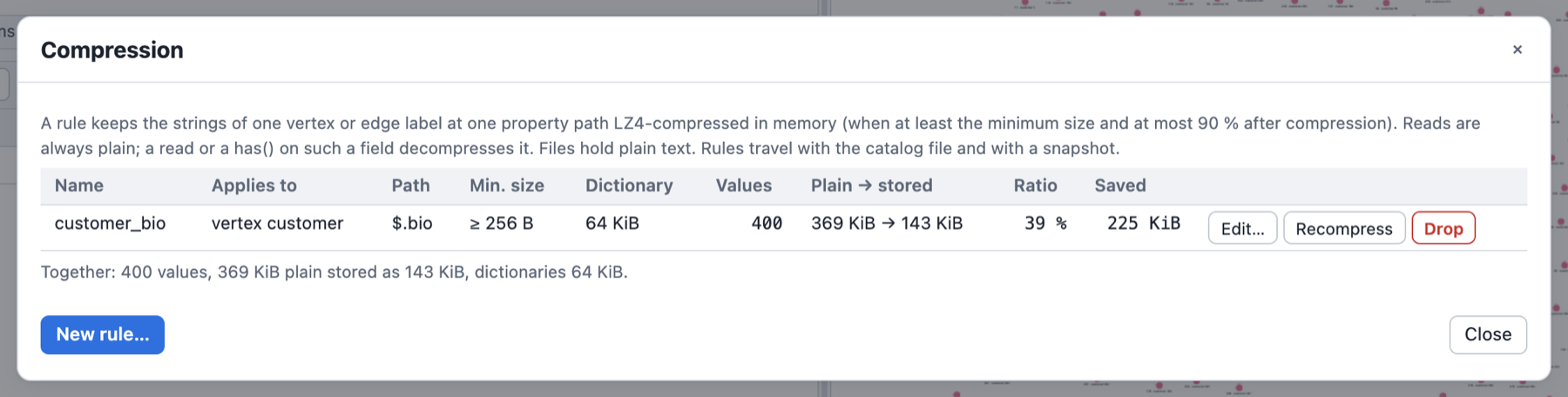
Measured
On a generated CV-like corpus of 5,000 texts of 2 to 20 KB (55 MB: section headers, sentences
from a 200-word vocabulary, company names, years and numbers), Apple M-series, --release
(compressed_property_tests::measure_ratio_and_throughput, an #[ignore]d test):
| Stored / plain | Dictionary | Define pass (compress) | Read (decompress + materialize) | |
|---|---|---|---|---|
| LZ4 | 0.52 | none | 451 MB/s | 2,741 MB/s |
| LZ4 with dictionary | 0.42 | 64 KiB | 328 MB/s | 1,626 MB/s |
The compression figures include a round-trip check of every value (a compressed value is verified once when it is made, so reading it back cannot fail). A highly repetitive corpus (a dozen phrases recombined) compresses to 0.07 (0.05 with a dictionary).
Schemas
A graph can store a schema: which vertex and edge labels exist, which properties they carry, of
which types and within which constraints, and how edges may connect labels. The schema is plain
data in one format, the same in Rust, the script DSL, Python and the playground: our envelope
outside, standard JSON Schema 2020-12 inside (a strict subset), so a model_json_schema() from
Pydantic can be pasted as a label's schema.
The rule behind enforcement: the storage owns consistency. Every operation that changes the graph passes the schema inside one storage call, never in a step, and every traversal is one unit of work: it is applied completely or not at all.
A first schema
g.set_schema(`{
"mode": "closed",
"vertices": {
"person": {"schema": {
"type": "object",
"properties": {
"name": {"type": "string", "minLength": 1},
"age": {"type": ["integer", "null"], "minimum": 0}
},
"required": ["name"]
}}
},
"edges": {
"knows": {"connections": [{"from": "person", "to": "person"}],
"schema": {"type": "object", "properties": {"weight": {"type": "number"}}}}
}
}`)
g.add_v("person").property("name", "Ann").next() // ok
g.add_v("person").property("age", -1).next() // error: age >= 0 (and name is required)
g.get_schema() returns the stored schema as a map (() without one), g.infer_schema() the
schema the data satisfies. Rendered as the final value of a session (the CLI, the playground) a
schema shows as a table; --format mermaid|plantuml|json|jsonschema|markdown|tree picks another
view.
Freeze the structure you have
A common way to start: build the graph without a schema, experiment until the shape is right, then freeze that shape so every later write has to follow it:
g.set_schema(g.infer_schema(), SchemaMode.closed) // or SchemaMode.open / SchemaMode.none
set_schema(schema, mode) stores schema with its mode replaced by mode (an inferred schema
has mode none, which enforces nothing). The mode is a SchemaMode token (SchemaMode.closed,
SchemaMode::closed) or one of the strings "none", "open", "closed"; validate_schema(schema, mode) is the dry run. SchemaMode is a reserved name in the script scope.
| Binding | Freeze |
|---|---|
| DSL | g.set_schema(g.infer_schema(), SchemaMode.closed) (also setSchema(.., "closed")) |
| Rust | let s = g.infer_schema()?.with_mode(SchemaMode::Closed); g_mut.set_schema(s)? |
| Python | graph.set_schema(graph.infer_schema(), mode="closed") |
| Playground | Schema panel: Freeze as open / Freeze as closed (shown while the graph stores no enforcing schema) |
What each mode freezes:
open: the labels and properties that exist get their types andrequiredlists; new labels and new properties stay allowed (unchecked).closed: additionally, no other label, no other property (at any depth) and no edge between other labels than the ones that exist.
It always succeeds on the data the schema was inferred from, in both modes: inference declares
every kind seen at every position and requires only the keys every element has (see
Inference). The one exception is closed with elements without a label: an
unlabeled vertex or edge has no label to declare, and a closed schema admits only declared labels.
Then the call fails, changes nothing, and the report names them:
Cannot apply the Closed schema: the existing data violates it (2 kinds of violations on 2 elements of 6 checked)
1) 1 edge without a label (Closed admits only declared labels) [ids: "7"]
2) 1 vertex without a label (Closed admits only declared labels) [ids: "3"]
Freeze such a graph in open mode (it admits unlabeled elements unchecked), or give those
elements a label first with the label steps
(add_label, drop_label, set_label) and freeze again:
g.v("3").add_label("thing").to_list(); // a vertex from the report
g.e().not(__.has_label()).set_label("link").to_list(); // every unlabeled edge
g.set_schema(g.infer_schema(), SchemaMode.closed)
(g.v().not(__.has_label()).add_label("thing") labels every unlabeled vertex; Rust:
the same steps, or GraphStorage::add_vertex_label/set_edge_label.) (The generated large
sample graph has unlabeled edges: it freezes open, not closed.)
Later changes go through patch_schema (add a property, relax a rule) like any other schema.
The format
Envelope
| Key | Type | Meaning |
|---|---|---|
$schema | string, optional | The format: https://graphersal.dev/schema/v1 (any other value is an error). |
meta | object, optional | Free-form data the library stores, round-trips and never interprets (a version, a status, server data). Changing it is a schema change. |
mode | "none" | "open" | "closed", default "none" | What is enforced, see Modes. |
vertices | object | Vertex label → {"schema": <label schema>}. |
edges | object | Edge label → {"connections": [{"from": .., "to": ..}], "schema": <label schema>}. |
A label schema is a JSON Schema object node describing the element's property map:
{"type": "object", "properties": {..}, "required": [..], "additionalProperties": ..} plus
annotations. It may carry $defs (for $ref), $schema and $id (accepted and not stored). A
label without schema declares no properties. A connection's from/to is a vertex label or *
(any label).
Unknown keys are errors everywhere, the envelope included: {"mdoe": "closed"} is rejected
with its location (Invalid schema at /mdoe: unknown key 'mdoe'), never silently ignored.
The canonical form (what get_schema, to_json and every binding return) always writes
$schema, mode, vertices and edges, keywords in a fixed order, integers as integers. The
empty schema (mode none, no meta, no labels) is no schema: set_schema({}) removes the stored
schema. The format is described by the meta-schema graphersal-schema-v1.json
(graphersal::schema::META_SCHEMA_JSON).
Types
| JSON Schema | Engine type | Note |
|---|---|---|
"integer" | int64 | A value outside i64 cannot be stored at all; 3.0 is not an integer. |
"number" | float64 | An int64 written to it is coerced when exactly representable; a stored int64 does not conform. |
"string" | string | |
"string" + "format": "uuid" | uuid | A canonical UUID string is coerced on write; a stored string does not conform. |
"boolean", "null" | boolean, null | |
"array" + items | array<T> | items is a full schema (constraints and nullability apply to the items); without items any item. |
"object" + properties | object | With required and additionalProperties. |
["integer", "null"] | union<int64|null> | A type array: any of the listed types. |
anyOf: [..] | union<..> | At least one member accepts the value (Pydantic's Optional[X] is anyOf: [X, {"type": "null"}]). |
{} (no type) | any | Admits every value. |
Diagnostics, Display and GType keep the engine's names (int64, float64, uuid).
Keywords
| Kind | Keywords |
|---|---|
| Structure | type, format (only uuid), items, properties, required, additionalProperties (true/false), anyOf |
| Constraints | minimum, maximum, exclusiveMinimum, exclusiveMaximum (numbers), minLength, maxLength, pattern (strings), minItems, maxItems (arrays), enum, const (any value) |
| Annotations (no effect on validation) | title, description, $comment, examples, deprecated, default |
| References | $ref: "#/$defs/Name" with $defs at the label schema's root; inlined when the schema is loaded |
A constraint applies to the values of its own kind and ignores the others (JSON Schema
semantics): in {"type": ["integer", "string"], "minimum": 10, "minLength": 3} the bound checks
the integers and the length the strings. Next to a declared type, a keyword of another kind is
an error (minLength on an integer is a mistake, not a no-op). enum/const compare JSON values
(1 equals 1.0, a uuid compares as its canonical string).
Local references are inlined: a loaded schema has no $ref/$defs, and a reference cycle is
an error (recursive schemas are not supported). Only annotations may sit next to a $ref; they
override the definition's.
What is an error, and why
| Input | Why it is rejected |
|---|---|
| An unknown key or keyword, anywhere | A typo must never weaken a schema silently. |
format other than uuid (date-time, date, email, ...) | Dates come with a date type in 0.2.0. Accepting date-time as a plain string now would let 0.2.0 silently change what an existing schema accepts. Remove the format (the value is a string). |
additionalProperties: {schema} (a map of T, Pydantic dict[str, T]) | No map type yet. Use {"type": "object", "additionalProperties": true}. |
oneOf, allOf, not, if/then/else | Not implemented; anyOf covers oneOf when the members cannot both match. |
prefixItems, contains, tuples (items: [..]) | An array has one item schema. |
uniqueItems, multipleOf | Not yet (additive later). |
patternProperties, propertyNames, minProperties, dependent*, unevaluated* | Keys are declared with properties, required, additionalProperties. |
readOnly, writeOnly, content* | Not among the accepted annotations. |
A remote or non-$defs $ref, a reference cycle | References are inlined at load. |
nullable, variants, min, min_length, int64, ... (spellings of other schema dialects, such as OpenAPI's nullable) | The hint names the JSON Schema spelling. |
Every error is SchemaError::InvalidSchema { path, reason, hint }, path a JSON Pointer into
the input (/vertices/person/schema/properties/age/minimum), and its help names the fix.
default is not applied
default is an annotation only, and it stays one:
- it is never applied on write: an element created without the property does not get it;
- it is never substituted on read:
values("age"),valueMap(), the display and every export show nothing for an absent property; - changing a default changes no data (the diff classifies it as a compatible annotation change);
- a
requiredproperty with adefaultis still required: the default does not fill it.
Why, although it may look surprising: this is JSON Schema's own meaning of default ("may be used
by a user interface", not by a validator); Pydantic writes default on every optional field
("default": null), so applying it would materialise values nobody asked for; and a default that
re-valued data whenever the schema changes would be "magic" no one can audit. Clients and editors
may use it (the playground's schema editor prefills a form with it). Should create-time defaults
(SQL DEFAULT semantics: stored physically, only for new elements) ever be supported, they get a
separate keyword, because giving default that meaning later would silently change existing
schemas.
Required and nullable
required (on the object) and nullability (the type) are independent, as in JSON Schema:
null not admitted ("type": "string") | null admitted ("type": ["string", "null"]) | |
|---|---|---|
in required | must be present, non-null | must be present, may be null |
not in required | may be absent, never null | may be absent or null |
A missing required key is MissingRequiredProperty; a null where the type does not admit it is
a TypeMismatch (expected string, got null). null stays a real stored value
(property("k", ()) stores it, it never removes a property: use remove_property, see
Removing Properties). Inside a JSON value {"a": null} differs from {}.
Required properties must be supplied when an element is created. The optimizer rule
add_property_fold folds addV(..)/addE(..) and the
property(k, v) steps that follow into one creation, so
g.addV("Person").property("name", "Ann").property("age", 30) creates a valid element in one
call. With the rule disabled, or for a property() that cannot be folded, the empty creation is
rejected before anything is written. Removing a required property is rejected in open and
closed mode.
Modes and additionalProperties
none | open | closed | |
|---|---|---|---|
Coercion on write (canonical string to uuid, int64 to float64) | no | declared properties | declared properties |
Types, constraints, required of declared labels (any depth) | no | yes | yes |
| Undeclared labels | allowed | allowed, unchecked | rejected (also unlabeled elements) |
Default additionalProperties of an object node | - | true | false |
Edge topology (connections) | no | no | yes |
mode governs undeclared labels and topology, and it is the default additionalProperties of
every node typed object that does not state its own. An explicit value wins, both ways: a
free-form object in a closed graph is {"type": "object", "additionalProperties": true}, a strict
object in an open graph says false. A node without type: "object" (an anyOf wrapper) puts no
constraint on keys; its members do.
Multi-label vertices (see Multi-Label Vertices): every label checks
the properties it declares and its own required list; a top-level property that no label declares
is allowed when ANY label admits additional properties (the same "any label" rule as
topology). Coercion uses the first label, in label order, that declares the key. closed rejects
a vertex without a label or with an undeclared label. Adding or removing a label re-validates the
vertex under the new label set and commits only on success.
Edge labels are single, but can be changed (set_label(..), GraphStorage::set_edge_label). The change checks
the edge as stored under the new label (closed: a declared label and a declared connection;
open and closed: the new label's required keys and declared types) and changes nothing on a
violation. Stored values are not coerced by a label change (reads never coerce); later writes
coerce by the new label's declarations.
none describes without enforcing; the GraphML import still restores the declared logical types
from it (uuid, array, object; see UUID Values).
Edge topology (closed)
An edge label declares its allowed connections ({"from": "Person", "to": "Company"}, * matches
every label). Because labels are a set, an edge is accepted if ANY label of the source and ANY
label of the target matches a declared connection. An edge label without connections allows
every pair. A label change that would make an incident edge violate the connections is rejected as
a whole.
Nested values
The content of an object, array or anyOf value is validated at any depth: declared nested keys
are type- and constraint-checked, required nested keys must be present, undeclared nested keys
follow the object's additionalProperties. Errors name the canonical path ($.address.zip,
$.items[1].n). A nested write (property(jpath("address.zip"), v)) coerces the leaf to the type
declared at that location. See Path Keys (jpath).
Constraints
pattern is a regular expression with JSON Schema semantics: it is not anchored, so a value
matches when the expression matches anywhere in it. Write ^...$ to match the whole value:
{ "type": "string", "pattern": "^[A-Z][a-z]+$" }
{ "type": "string", "pattern": "@" }
{ "type": "string", "pattern": "^\\d{4}-\\d{2}-\\d{2}$" }
The syntax is the ECMA-262-like subset of the Rust regex crate: literals,
., classes ([a-z], [^0-9], \d, \w, \s), anchors, groups, alternation | and the
quantifiers *, +, ?, {n}, {n,}, {n,m}. Two differences to ECMA-262: look-around and
back-references are not supported (matching stays linear in the input), and \d, \w, \s, \b
are Unicode-aware (write [0-9] for ASCII digits). A JSON text doubles every backslash. The
expression is compiled once, when the schema is loaded, and an invalid one rejects the schema.
minLength/maxLength count characters (code points). An empty array satisfies every items
(it has no item of a wrong type); use minItems: 1 to require one.
The schema methods
Seven methods, the same everywhere. They are plain calls on the graph source, not traversal steps
(like g.statistics()); each runs in the current unit (a transaction, a whole-script unit) or as a
unit of its own.
| Method | Returns | Authorization |
|---|---|---|
get_schema() | the stored schema, or none (never inferred) | Read on Schema |
set_schema(schema), set_schema(schema, mode) | - (replaces the stored schema; mode replaces the schema's mode) | Update on Schema |
patch_schema(patch) | the new schema (JSON Merge Patch, RFC 7396, onto the stored one) | Update on Schema |
validate_schema(schema), validate_schema(schema, mode) | {violations, diff, compatible}: a dry run against the data | Read on Schema |
validate_schema_patch(patch) | the same for a patch | Read on Schema |
infer_schema() | the schema the data satisfies | Read on Schema |
diff_schema(schema) | {changes, compatible} from the stored schema | Read on Schema |
| Input | Output | |
|---|---|---|
Rust (GraphTraversalSource) | GraphSchema (GraphSchema::from_json(text), from_value, or the builders), SchemaPatch (graphersal::schema) | GraphSchema, SchemaValidation, SchemaDiff (to_value() gives the data shape) |
DSL (both spellings: get_schema/getSchema, ...) | a map or JSON text | a map |
Python (Graph.get_schema(), ...) | a dict or JSON str (keyword policy=) | a dict |
Playground engine (wasm getSchema, ...) | JSON text | JSON |
A map built in the DSL keeps its keys in alphabetical order (Rhai maps are sorted), so the
property order of a schema that went through a map is alphabetical; JSON text and Python dicts keep
it. The traversal step g.v()...infer_schema() infers over a stream, with the same inference.
In a DSL map literal, quote the keys that are not plain identifiers: $ref, $defs, $schema
and $id start with $. default (a word Rhai reserves) is accepted as a plain key in the
Graphersal DSL, quoted or not:
g.patch_schema(#{vertices: #{person: #{schema: #{type: "object", properties: #{
age: #{type: ["integer", "null"], default: 7}
}}}}})
JSON text needs no quoting rules of its own: g.set_schema(text) takes the schema as written.
A schema change is a database change: it advances the commit sequence number, makes the run
mutated, is recorded as Mutation::SetSchema { before, after } (the canonical JSON) in the same
change set as the data, rolls back with its unit, and is reported in the result's
changes: {data, schema} (Execution::changes(), the DSL's r.changes, the playground's
response). Validation is immediate: the existing data is checked when the schema is set, not at
commit.
Applying a schema to existing data
set_schema and patch_schema validate all existing data first, in one pass over the vertices
and edges, when the mode is open or closed. If anything violates the schema, the graph and its
current schema stay unchanged and the call fails with one aggregated error that lists every
kind of violation, grouped by rule with a count and a few sample ids:
Cannot apply the Closed schema: the existing data violates it (5 kinds of violations on 22 elements of 22 checked)
1) Person.age is declared mandatory but is missing on 12 vertices [ids: "p0", "p1", "p2", "p3", "p4" and 7 more]
2) vertex label Alien is not declared (Closed): 5 vertices [ids: "x0", "x1", "x2", "x3", "x4"]
3) Company.name is declared mandatory but is missing on 3 vertices [ids: "c0", "c1", "c2"]
4) Person.age has the wrong type on 1 vertex (declared int64, found string) [ids: "t"]
5) Robot.model is not declared (Closed) on 1 vertex [ids: "r"]
- A group is
(kind, label, field or path): missing required keys, undeclared labels or properties, type mismatches, constraint violations, edge topology violations (closed) and nested path violations (Person $.address.zip is declared mandatory but is missing on 1 vertex). - Every violation inside a value is listed, not only the first: all keys, all array items, at any
depth, each under its own path (
$.address.zipwrong type,$.address.streetmissing and$.address.cityundeclared are three groups). Array indices are collapsed into[*]: a rule broken by any item of an array is ONE group ($.addresses[0].zipand$.addresses[2].zipmissing are the group$.addresses[*].zip), which shows the first concrete path it met (Person $.addresses[*].zip is declared mandatory but is missing on 5 vertices (first at $.addresses[1].zip) [ids: ...]). Per node only the first failing constraint is named. An element counts once per group, however many of its items break the rule. A single write still fails on the first violation it meets. - Groups are ordered by count (largest first), then kind, element, label and field, so the same data gives the same report.
- Each group shows its count and up to 5 sample ids (cut to 40 characters, escaped); at most 20 groups are printed, the structured report keeps up to 1000, further violations are only counted.
- Stored data is checked exactly as it is: nothing is coerced and nothing is written.
validate_schemareturns the same report as data:violations: {mode, elements_checked, violating_elements, total_violations, omitted_violations, groups: [{kind, element, label, field, example_field, detail, count, sample_ids, omitted_ids}]}(example_fieldis the first concrete path of a[*]field,nullotherwise), withkindone ofunknown_label,missing_required,type_mismatch,constraint_violation,undeclared_property,invalid_topology.
How to proceed: fix or migrate the offending data, relax the schema (make a key optional, admit
null, declare the label or property), apply it with mode none, or start from
infer_schema(), which is valid for the data it came from.
Making a key required: backfill first, in one transaction
A schema that requires a key the existing elements lack is rejected. Backfill first and tighten last, all in one transaction, so no reader ever sees the intermediate state:
let declare = SchemaPatch::from_json(
r#"{"vertices": {"person": {"schema": {"properties": {"email": {"type": "string"}}}}}}"#)?;
let require = SchemaPatch::from_json(
r#"{"vertices": {"person": {"schema": {"required": ["name", "age", "email"]}}}}"#)?;
graph.transaction(|g| -> TraverserResult<()> {
// 1. In a closed schema, declare the key (optional) so it may be written.
g.traversal_mut().patch_schema(&declare)?;
// 2. Backfill.
g.traversal_mut().v(None).has_label("person").property("email", "unknown").to_list()?;
// 3. Make it required.
g.traversal_mut().patch_schema(&require)?;
Ok(())
})?;(schema_api_tests::backfill_then_require_in_one_transaction runs this recipe.)
The same in a script run as one unit (atomic=True in Python, every playground run): patch to
optional, backfill, patch to required. A schema default does not backfill anything.
Changing a schema: patch and diff
patch_schema applies a JSON Merge Patch (RFC 7396) to the canonical form of the stored schema
({} without one): an object merges member by member (property order is kept), null removes a
member, any other value (an array too) replaces it. RFC 7396 cannot set a member to null; use
set_schema for a "default": null. validate_schema_patch previews the result against the data.
diff_schema lists the changes (kind, element, label, path such as $.address.zip or
$.tags[*], before, after) and whether each is backward compatible: data and clients
written against the old schema keep working: the old data stays valid and every write that
followed the old schema still succeeds. In short, a compatible change only adds (an optional
key, a label, an allowed value) or relaxes (a wider type, a looser bound, a less strict mode);
tightening a rule or removing a declaration something could depend on (a label, a key of a closed
object) is incompatible. This is the usual schema-registry convention: adding an optional property
is compatible, also to an open object, and so is removing a property declaration from an open
object (the key becomes an undeclared one, which the object admits; the change is still listed as
property_removed). A server's "compatible changes only" policy can veto the rest
in a before_commit hook.
| Change | Compatible when |
|---|---|
mode | it gets less strict (closed → open → none); open → closed is incompatible |
meta, annotations (title, description, default, ...) | always |
| label added | the old mode was closed (no client could write it), or its schema requires no key and admits undeclared keys (an open graph) |
| label removed | never |
| connection added/removed | the label's connections still allow every old pair (an empty list allows all), or the new mode is not closed (topology binds only there) |
| property added | it is optional (not in required), also in an open object |
| property removed | the object admits undeclared keys (open: mode open/none or additionalProperties: true), whether the key was optional or required; from a closed object never |
| key made required / optional | never / always |
additionalProperties | false → true |
| type | the new type admits every kind the old one did ("integer" → ["integer", "null"]) |
minimum, maxLength, minItems, ... | removed or relaxed |
pattern, const | removed |
enum | removed, or a superset |
A key the old schema listed in required without declaring it was written by every old client,
with any value: declaring it later is compatible only if the declaration accepts everything. With
a new mode none every change is compatible (nothing is enforced any more).
The diff is static: it compares the two schemas, never the data. Existing data that conflicts
with a compatible change (an element that already holds a newly declared optional key with another
type, say) is found by validate_schema / validate_schema_patch, and set_schema refuses to
apply the schema until it is fixed.
Inference
infer_schema() (and the step) report what the data holds, at every position: the kinds seen
(a type array, or anyOf when a string and a uuid share a position), items of arrays,
properties of objects, and required only for keys every object at that position has, at any
depth (also inside arrays and next to other kinds). Every label of a vertex is declared;
connections use the endpoints' first labels. The result has mode none and is valid for the data
it came from in open and in closed mode (an unlabeled element has no label to declare, so
closed rejects it; see Freeze the structure you have). It
never guesses from string content: a UUID-shaped string is a string. Inference statistics (counts)
are not part of the format.
Renderers
| Format | Shows |
|---|---|
table, markdown | one row per property path (address.zip, roles[].name), type, required, nullable, constraints (0..150, length 1..80, pattern ^x$), notes (description, default marked as annotation) |
tree | the labels and their properties as a tree |
json | the canonical format |
jsonschema | one standalone JSON Schema per label ($defs: vertex:person, edge:knows), the mode's default additionalProperties written out |
mermaid | an erDiagram; nested objects are entities of their own (`person |
plantuml | the label topology as entity diagrams, then a @startjson view of the condensed schema |
The meta-graph (schema.to_graph() in the DSL, GraphSchema::to_graph in Rust) has one vertex per
vertex label and one edge per connection, each with its schema node as the schema property.
The playground's Schema panel shows the same schema as editable tables, as JSON, as a graph of its labels (node size and count from the data) and as the Mermaid diagram, here for a small cloud inventory:
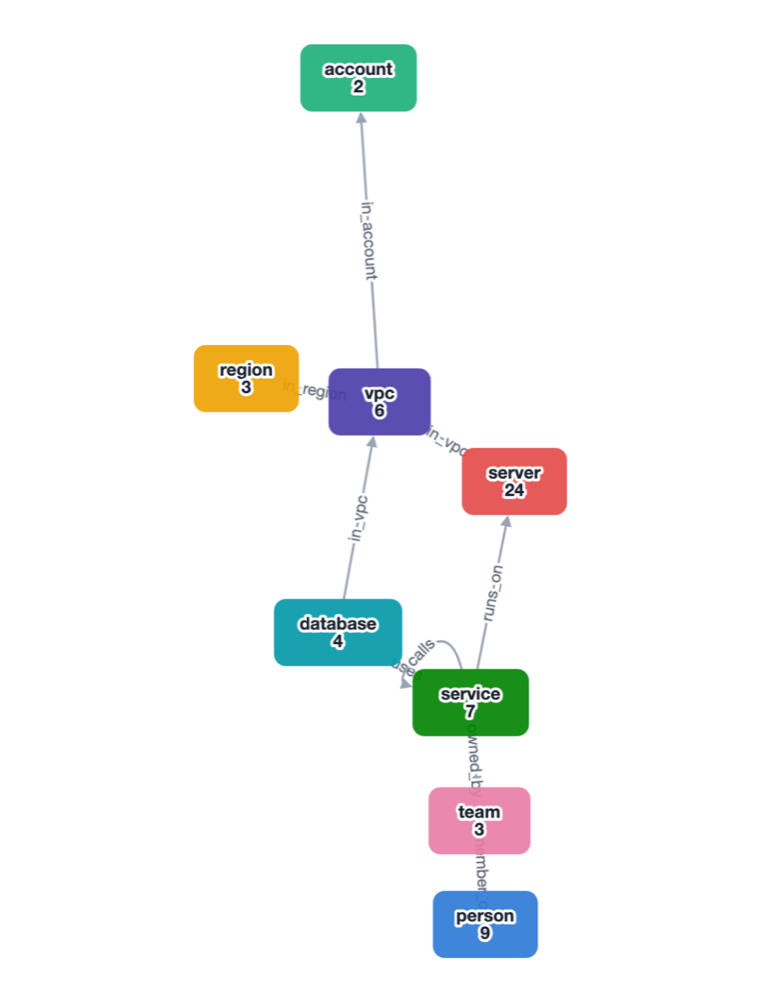
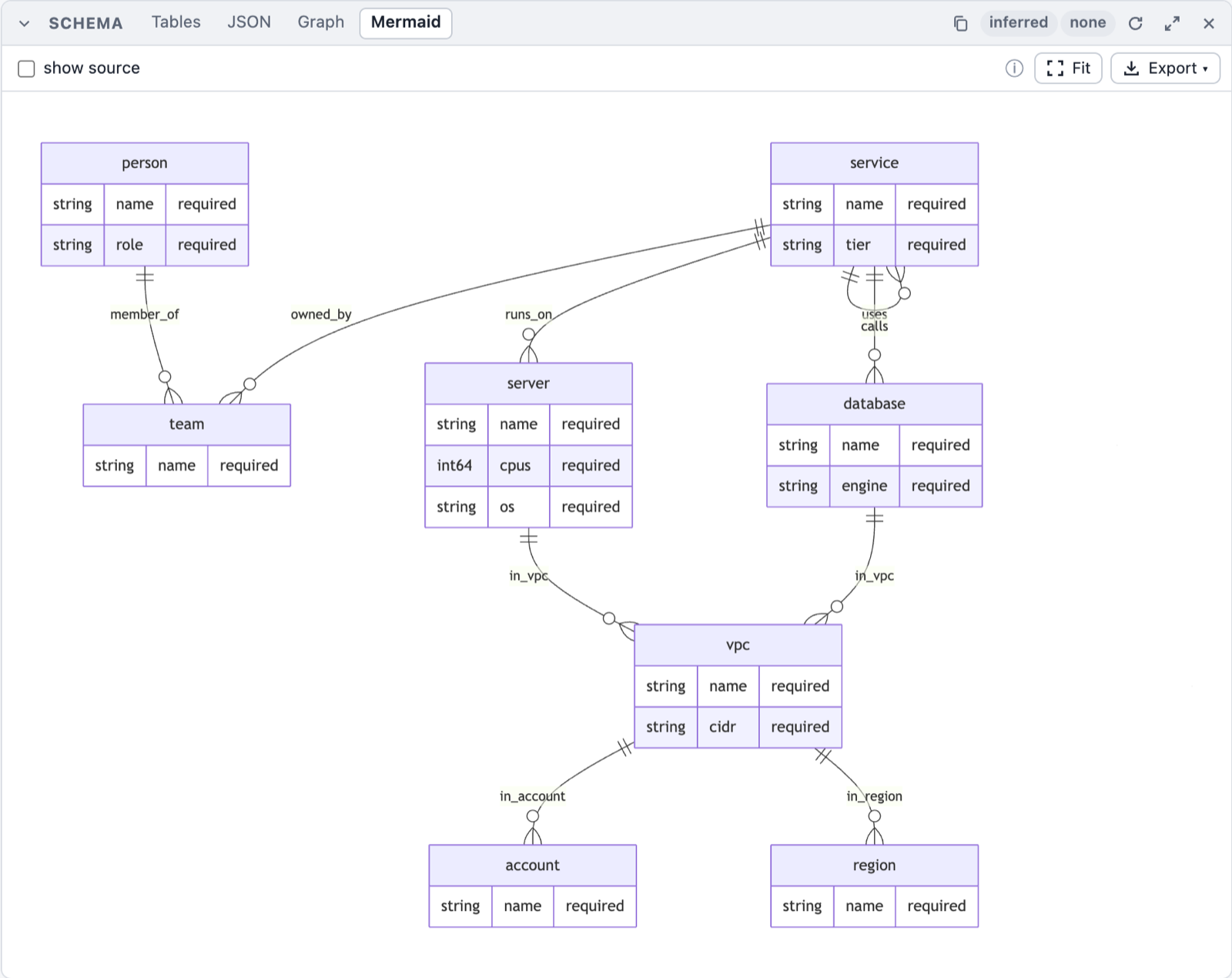
Pasting a Pydantic model
Model.model_json_schema() loads as a label schema as it is ($defs/$ref, anyOf with null,
title, description, default, enum, const, exclusive*, additionalProperties: false),
except for two things to remove first:
datetime/date/timefields ("format": "date-time", ...): no date type before 0.2.0; drop theformat(a plain string) or the field.dict[str, T]fields ("additionalProperties": {..}): no map type; write{"type": "object", "additionalProperties": true}.
Tuples (prefixItems) and Decimal (anyOf with a string pattern for some versions) are not
supported either. The top level of the model must be an object ("type": "object").
A failing query changes nothing
The schema is validated per storage call (one add_v with its folded properties, one single
property(key, value), one drop, ...), and every traversal is one unit of work: when a call fails,
the whole traversal is rolled back, including what its earlier steps wrote (see
Transactions).
In the playground a refused write shows the failing step and how to fix it (here a closed schema
that declares cpus as int64):
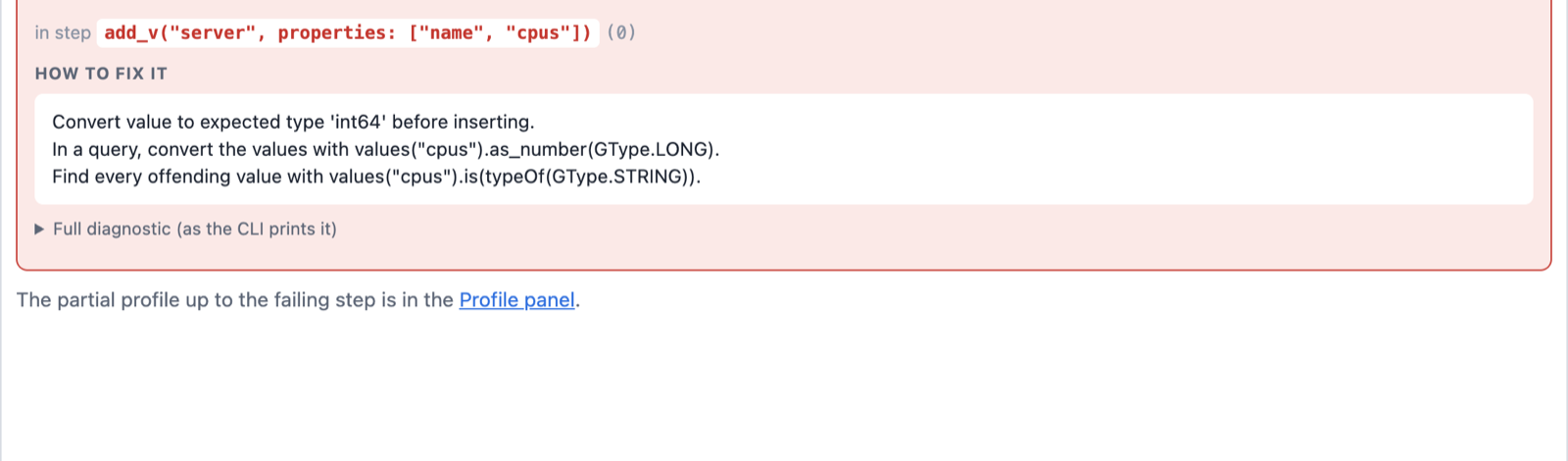
| Case | Test |
|---|---|
property(map) with several entries | schema_gap_tests::gap4_property_map_is_atomic |
property_json (Rust API) | schema_gap_tests::gap4_property_json_is_atomic |
mergeV/mergeE option(Merge.onMatch, map) with several entries | schema_gap_tests::gap4_merge_v_on_match_is_atomic |
addE over several start vertices | schema_gap_tests::gap4_add_e_over_several_endpoints_is_atomic |
| any traversal with several steps | transaction_tests::a_schema_violation_rolls_back_the_whole_traversal |
A GraphML import into an existing graph is one unit too: an invalid element rolls back the
elements imported before it. GraphML carries no schema: set the schema first, then import. The
CLI does both in that order with graphersal --graph g.graphml --schema schema.json [--schema-mode closed] (also for GraphSON, and with --server); a violation stops the start with
exit code 1.
Saved Queries
A saved query is a named, parameterized piece of DSL stored IN the database, next to the schema: written once, called by name from any front end (the CLI, Python, the playground).
g.query("older_than", #{age: 30}).values("name").toList()
// ["josh", "peter"]
- The body is the text of ONE Rhai function; its parameters are named and typed.
- A call returns what the function returns: a traversal can be continued by the caller (like a SQL view), a value (a number, a list, a map) is a value (like a stored procedure).
- Saved queries are read-only, always: a query never writes data, the schema, the saved queries or files, not even through a query it calls or a traversal it returns.
- Queries live in folders (an attribute, not part of the name) and carry an optional description.
Every example on this page was run with graphersal on the default modern graph; the line after
// is its real output. Each block starts from a fresh graph.
Defining a query
g.define_query(#{
name: "older_than",
folder: "reports/people",
description: "Persons older than the given age.",
params: #{
age: #{schema: #{type: "integer", minimum: 0, maximum: 150,
description: "Age in years"},
default: 30}
},
body: `fn older_than(age) {
g.v().has_label("person").has("age", P.gt(age)).order().by("age")
}`
})
g.query("older_than").values("name").toList()
// ["josh", "peter"]
g.define_query(#{..}) (g.defineQuery(..)) stores a new query or replaces the one of that
name. The keys:
| Key | Required | Meaning |
|---|---|---|
name | yes | the query's name, also its Rhai function name: [A-Za-z_][A-Za-z0-9_]*, 1 to 128 bytes, not a Rhai keyword; case-sensitive, unique per database |
body | yes | the text of ONE Rhai function named like the query |
params | when the function has parameters | parameter name -> its declaration (see Parameters) |
folder | no | a /-separated path such as "reports/sales"; "" or () is the root |
description | no | free text (at most 4 KiB); defaults to the function's doc comment |
meta | no | free text, stored and never interpreted |
The definition is checked before anything is stored, and refused with an error naming the problem:
- the body compiles and is exactly one function named like the query, with nothing beside it;
- every parameter of the function is declared in
params, andparamsdeclares nothing else; - the catalog rules: name, folder (at most 8 segments, 255 bytes), sizes (source at most 64 KiB),
parameter names (not a DSL global such as
g,PorT), every parameter schema, and every default against its schema.
Saved queries called by the body are not checked at definition: a missing one fails when it is called.
Several queries at once
g.define_queries(folder, source[, params]) (g.defineQueries(..)) stores every function of a
source as a query of its own, named like the function, described by its doc comment (///
lines or a /** .. */ block). params maps each function name to its parameter map. All of
them are stored in one unit: either every query is stored or none. It returns the names.
g.define_queries("reports/sales", `
/// Persons, oldest first.
fn oldest(n) { g.v().has_label("person").order().by("age", Order.desc).limit(n) }
/// Software names.
fn software() { g.v().has_label("software").values("name") }
`, #{oldest: #{n: #{schema: #{type: "integer", minimum: 1}, default: 2}}})
// ["oldest", "software"]
g.query("oldest").values("name").toList()
// ["peter", "josh"]
g.get_query("oldest")["body"]
// fn oldest(n) { g.v().has_label("person").order().by("age", Order.desc).limit(n) }
Each query stores the text of its own function only.
Parameters
A parameter is declared as #{schema: <schema node>, default: <value>}, or as a bare type name
(the short form): "integer", "number", "string", "boolean", "array", "object",
"null" or "uuid".
- The schema uses the node format of the graph schema:
type,enum,minimum,maximum,pattern,minLength,items, ..., and the annotationstitle,description,examples. - The default sits beside the schema, not inside it: a data schema's
defaultis an annotation only, while a parameter default IS substituted when the argument is left out. A parameter without a default is required.
Arguments are named: g.query("x", #{limit: 5}), or g.query("x") when every parameter has
a default. An argument is a data value (a string, a number, a boolean, a UUID, a list, a map;
never a traversal or a closure), bound to the function's parameter like a prepared-statement
parameter, never spliced into text. It is checked against its schema before the body runs; the
only conversion is the schema's write coercion (an int64 where a float64 is declared, a
canonical UUID string where a uuid is declared). () is a value (null), not an omitted
argument.
g.query("older_than", #{age: 200})
// Error: Invalid argument 'age' for saved query 'older_than': Constraint violation on 'older_than.age': value <= 150 (actual: 200)
g.query("older_than", #{years: 30})
// Error: Saved query 'older_than' has no parameter 'years'
Calling a query
g.query(name) / g.query(name, #{..}) calls the query at the start of a traversal, on g;
it works anywhere a script can use g (loops, functions, the body of another saved query). It is
not a step: g.v().query(..) and __.query(..) fail with an error that says so (calling a query
on incoming traversers is a later feature).
A traversal result is continued like any other traversal, and the optimizer sees the whole plan: the caller's filters are pushed into the body's steps.
g.define_query(#{name: "everything", body: "fn everything() { g.v() }"})
g.query("everything").has_label("person").count().profile()
// Step Call In Out ...
// v(labels: ["person"]).count() 1 0 4 ...
// Optimizer rules applied: source_filter_pushdown, count_pushdown
A value result is returned as it is:
g.define_query(#{name: "stats", body: `fn stats() {
#{people: g.v().has_label("person").count().next(), software: g.v().has_label("software").count().next()}
}`})
g.query("stats")
// #{"people": 4, "software": 2}
A call does not recompile an unchanged body: a compiled body is cached per thread, keyed by the stored text, so a redefined query (or one restored by a rollback) always runs its current body, and the plan is made anew on every call (new optimizations apply to old queries).
Saved queries may call each other up to 16 levels deep; a deeper call (usually a query that
calls itself without an end) fails with Saved query calls nested deeper than 16 levels.
Read-only, always
A saved query never writes. The call runs under a read-only restriction on top of the host's
authorizer: creating, changing or deleting data, the schema, saved queries or files is denied
with PermissionDenied (a saved query is read-only) before anything runs, and nested queries
inherit it, so no chain of calls can write. A traversal the query returns carries the
restriction too:
g.define_query(#{name: "people", body: "fn people() { g.v().has_label(\"person\") }"})
g.query("people").property("seen", true).toList()
// Error: ... Permission denied for 'property' (Update Data): a saved query is read-only: ...
Write in a traversal of your own after the call:
let ids = g.query("people").id().toList();
g.v(ids).property("seen", true).toList();
g.v().has("seen").count().next()
// 4
- A query that returns a traversal with a writing step (
fn f() { g.v().drop() }) fails at the call (returned a traversal with a writing step). - A graph the query builds itself (
GraphSource::empty(),__) stays writable; it is not the database. - Terminals inside the body (
next(),toList()) are allowed: a value-returning query needs them. Each runs as a reading traversal of its own. - For the analysis of a host, nothing built from a query result is mutating
(
is_mutating()is false), so a read-only host can offer every saved query and the playground needs no confirmation before running one.
A writing kind of stored code ("procedure") may come later as a definition kind of its own.
Errors name the query
An error inside a body keeps its diagnostic and gains one line per call, innermost first:
g.define_query(#{name: "broken", body: "fn broken() { g.v().values(\"name\").as_number(GType.LONG).toList() }"})
g.query("broken")
// Error: Step #2 'as_number(GType.LONG)' execution failed
// at #2: v().values("name").as_number(GType.LONG)
// ...
// Caused by: Cast exception: expected type [int64], got type 'string'
// value: "marko"
// origin: vertex id="1" label="person" property="name"
// in saved query: "broken" (line 1, position 58 of its body)
// Help: ...
A missing query, a body that no longer compiles and a call at the wrong position fail with
errors naming the query and a Help: line with the fix.
Managing queries
| Call | Result |
|---|---|
g.queries() | every saved query as a list of maps, by name |
g.queries("reports") | the queries in reports and the folders below it (reports/sales, not reportsx) |
g.get_query(name) / getQuery | one query as a map, () when there is none |
g.drop_query(name) / dropQuery | removes it; false when there was none |
g.move_query(name, folder) / moveQuery | moves it ("" or (): the root) |
g.describe_query(name, text) / describeQuery | sets the description ("" or () removes it) |
An entry of queries() has name, folder and description (() when absent), params (a
list in signature order: #{name, schema, default?, required}) and status: "ok", or
"error" with error, the reason the body does not run (a body stored by an older version or
through the Rust API that does not compile). get_query adds body, dialect and meta.
g.define_query(#{name: "older_than", folder: "reports/people", params: #{age: #{schema: #{type: "integer"}, default: 30}},
body: "fn older_than(age) { g.v().has(\"age\", P.gt(age)) }"})
g.queries("reports")
// [#{"description": (), "folder": "reports/people", "name": "older_than", "params": [#{"default": 30, "name": "age", "required": false, "schema": #{"type": "integer"}}], "status": "ok"}]
Moving a query or renaming a folder never breaks a caller: a call uses the name only. Dropping a query that others call is allowed (dependencies are not tracked); the callers fail when they call it.
Every change of the catalog (define, replace, move, describe, drop) is a database change like a
schema change: one unit of its own, or a savepoint inside a running unit (the playground runs a
script as one unit, so a script that fails leaves no definition behind), rolled back with it,
visible to commit hooks as a SetDefinition mutation (see Transactions).
Permissions
Calling a query asks Execute on Definition(query "name") before the body runs; the body's own
reads are then asked as usual. Listing asks Read, defining Create (Update to replace, move
or describe), dropping Delete. AccessPolicy::read_only() allows calling and listing. See
Permissions.
Limits
| What | Limit |
|---|---|
| name | 1 to 128 bytes, [A-Za-z_][A-Za-z0-9_]*, not a Rhai keyword |
| folder | at most 255 bytes and 8 segments |
| description | at most 4 KiB |
| body (source) | at most 64 KiB |
| parameters | at most 64 per query |
| definitions | at most 10 000 per database |
| call depth | 16 |
Persistence
The catalog is part of the database: a Store keeps it in its
snapshots and journal, losslessly (every catalog change is a durable commit; recovery, rollback,
forks and backups carry it), and a packed snapshot (.gsnap) carries it too. A query is stored as
its source text, never as a compiled plan: every call plans anew. GraphML and GraphSON carry no
saved queries, like they carry no schema. The byte layout is in the
format spec (sections 6.3, 9.3 and 16).
Front ends
- Playground (WebAssembly and the dev server alike): the Catalog ▾ ▸ Saved queries manager
lists the queries by folder, creates and edits them in an editor with a parameter list and the
body in the code editor, deletes them, and runs one from a form built from its parameter
schemas, which writes the
g.query(..)call into a query tab. Saved queries travel in the catalog file with the other definitions (Catalog ▾ ▸ Save catalog, Load catalog), like the schema. See Web Playground. - MCP (the dev server with
--mcp): an AI agent lists them withlist_saved_queries, runs one withrun_saved_query, readsgraphersal://saved-queries, and is told to look for a saved query before writing a new one;--mcp-query-toolsalso offers each query as a tool of its own. All of it works read-only. - Python:
graph.queries(folder),graph.get_query(name),graph.define_query(spec),graph.drop_query(name)andgraph.call_query(name, params)(graph.querystays the alias ofexecute). - CLI: the DSL calls (
graphersal -e 'g.queries()');graphersal store info <dir>prints how many definitions a Store's catalog holds.
In the playground, Catalog ▾ ▸ Saved queries lists the queries by folder:
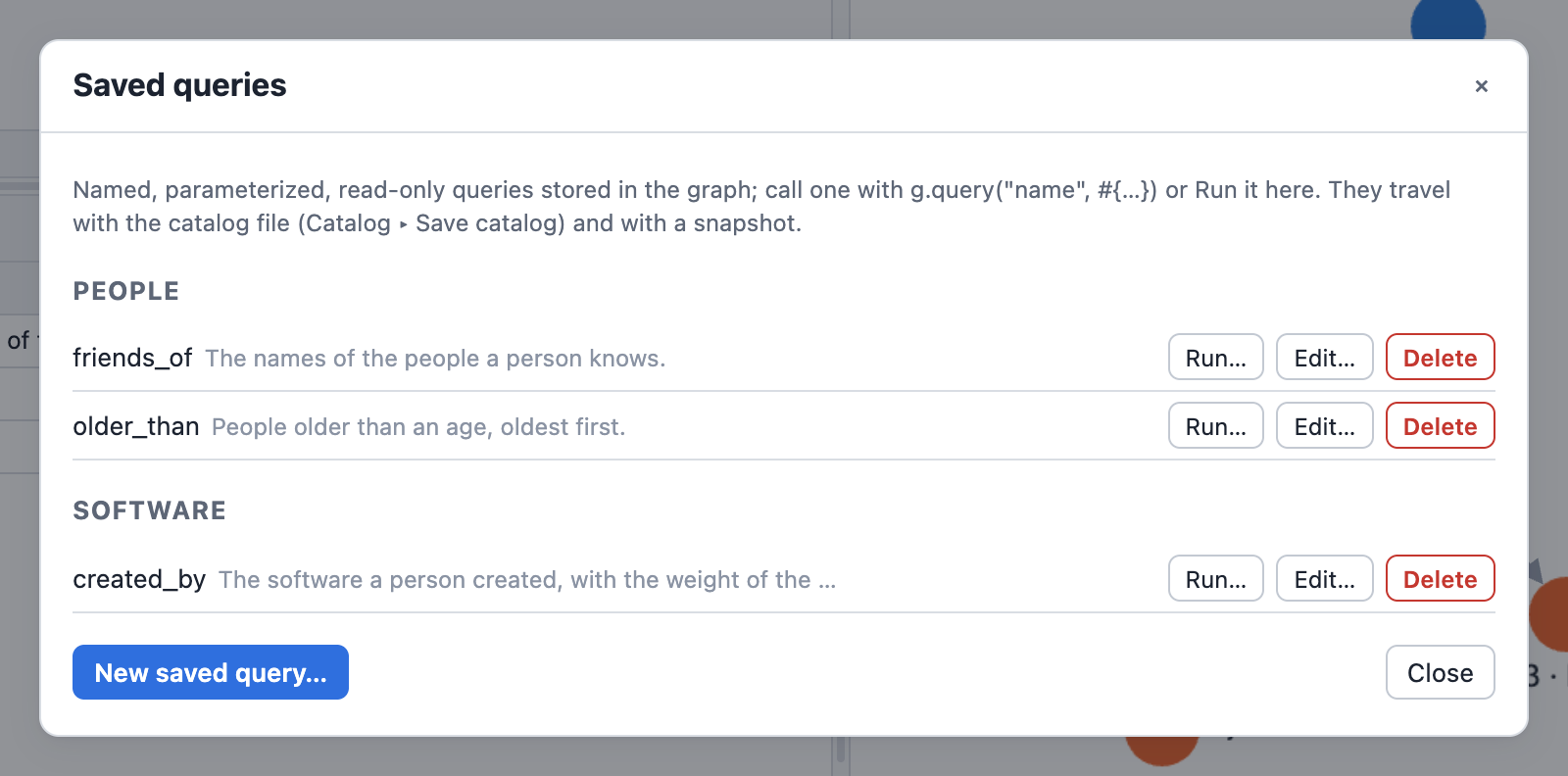
Edit… opens the editor: name, folder, description, every parameter with its type, default and constraints, and the body in the code editor:
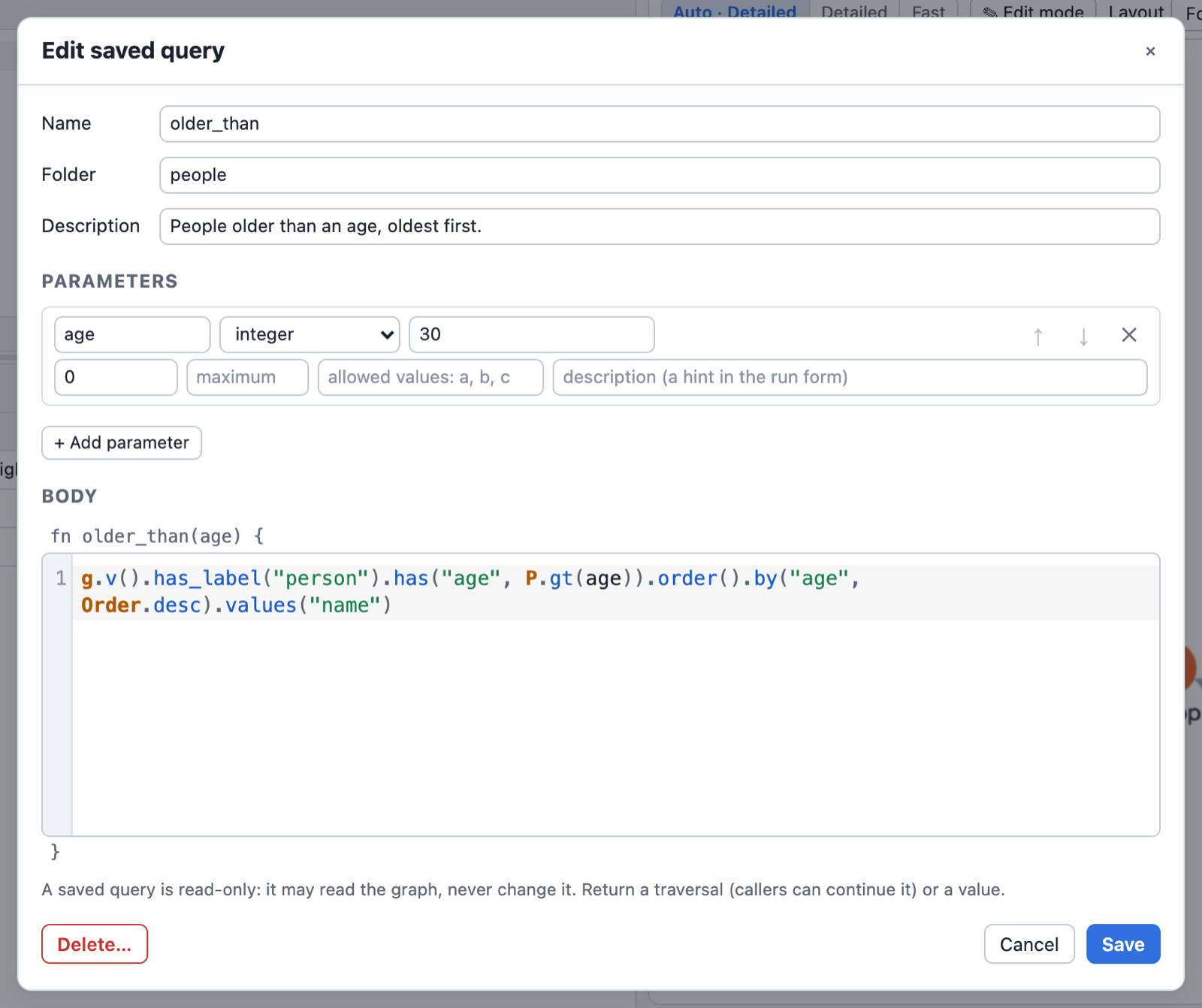
Run… builds a form from the parameter schemas; Run writes the g.query(..) call into a
query tab and runs it there:
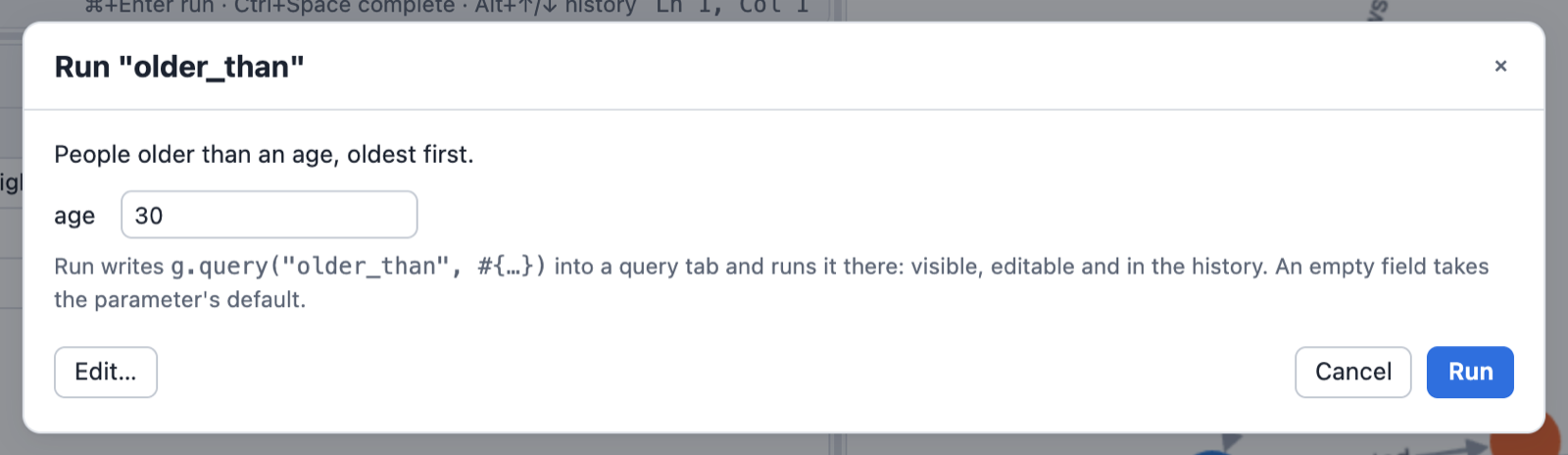
In Rust
The catalog is reachable without the DSL: GraphTraversalSource::list_definitions,
get_definition, define_query(name, QueryDefinition), remove_definition, move_query,
describe_query (module graphersal::catalog). The Rust API stores a body without
compiling it (the core has no Rhai); the DSL compiles it on definition and on every call.
Host-defined catalog kinds
Saved queries are one kind of catalog definition; compression rules are another. An application
built on the library (a server, say) can keep its own entities in the same catalog, so they are
stored, journaled, rolled back, forked and backed up with the graph: definition kinds 128 to 255
are reserved for hosts and never assigned by the library (DefinitionKind::host(n) refuses a
kind below 128; DefinitionKind::HOST_FIRST/HOST_LAST, is_host()). Kind 2 stays reserved for
a future library property index.
use graphersal::catalog::{decode_payload, encode_payload};
use graphersal::catalog::{Definition, DefinitionFlags, DefinitionKind};
let kind = DefinitionKind::host(200).unwrap();
let bytes = encode_payload(&payload)?; // a property map, the codec of the library's own kinds
graph.set_definition(Definition::opaque(kind, DefinitionFlags::NONE, "person_name", bytes))?;
let back = decode_payload(graph.definition(kind, "person_name").unwrap().opaque_payload().unwrap())?;The library keeps a host definition as opaque bytes: it checks only the name (1 to 1024 bytes)
and the payload size, writes the bytes back unchanged everywhere, and never reports them as
damage. encode_payload/decode_payload (feature persist) are optional, but they keep the
payload a property map like every library kind (decoding is safe on hostile input). The
critical flag means what it means for any kind the library does not decode: a store holding
a critical host definition opens read-only, and a Store refuses to write one. The byte rules are in the
format spec (sections 6.3 and 16).
Profiling and execute()
Two terminals tell you how a traversal ran:
profile()runs the traversal and returns only its metrics, like TinkerPop'sprofile().execute()runs it and returns an execution object: the results, the error (as data, never thrown) and, when you ask for it, the metrics of the same run.
Both report the optimized plan, the one that actually ran: fused steps appear under their real
names (v(labels: ["person"]).count()). What a step records into traverser paths is the separate
path_recording field ("full", "labels(a,b)"); only the table renders it after the name, as
[path: ...].
Profiling instruments every step, so a profiled run is slightly slower; its results are identical.
profile()
g.V().hasLabel("person").where(__.out("knows")).profile()
As the final value of a session (the CLI, the REPL, the playground) it renders as the familiar table:
Traversal Metrics
Step Call In Out Time % Dur
===============================================================================================================
v(labels: ["person"]) 1 0 4 3.708µs 0.44
where(__.out("knows")) 1 4 1 131.291µs 15.72
\> out("knows") 4 4 2 128.000µs 15.33
[min: 41ns, avg: 32.000µs, max: 127.542µs]
TOTAL: execute: 835.000µs 16.17
===============================================================================================================
Optimizer rules applied: source_filter_pushdown
In a script it is data, a TraversalMetrics value:
let p = g.V().hasLabel("person").out("knows").profile();
p.duration_ns // the whole run, integer nanoseconds
p.metrics[0].name // "v(labels: [\"person\"])"
p.metrics[1].counts.traverser_count // 2
p.optimizer_rules_applied // ["source_filter_pushdown"]
p.to_map() // the whole tree as a map
p.to_json() // ... as compact JSON text
p.to_table() // the text table above
profile(ProfileType.Memory) (also ProfileType::Memory, and profile_with(..)) adds a memory
section to every step; see Memory Inspection and Profiling.
A traversal that fails inside profile() is a script error with the full diagnostic, exactly
like to_list(). Use execute(#{profile: true}) to get the profile up to the failing step.
In Rust, profile() / profile_with(flags) return TraverserResult<TraversalMetrics>; its
Display impl renders the table.
Step names
Every step has one rendering, used by .profile(), by the step location of an error
(at #2: ... with its caret) and by the help() text that rewrites the failing query. It reads
like the DSL call that builds the step:
- snake_case step names:
has_label("person"),group_count(),side_effect(__.out()); - Rhai literals for arguments:
"x",1,2.5,(),[1, 2],#{name: "marko"},UUID.from_string("..."),jpath("$.a.b"); - predicates and tokens as you write them:
P.gt(30).and(P.lt(40)),TextP.starting_with("m"),Order.desc,T.label,Scope.local,Pop.first,Column.keys,GType.LONG,Operator.sum,Cardinality.list; - child traversals as
__.out().has("name", "x"); awhere()child shows its start and end labels where you wrote them:where(__.as("a").out().as("b")); - nothing for an argument you left out (
v(),out()), and the defaultOrder.ascof a sort key is left out too (order().by("age")).
A step the optimizer fused or inserted shows under the name of what it does:
v(labels: ["person"]).count(), v(ids: ["1"], labels: ["person"]),
e().group_count().by(T.label), add_v("person", properties: ["name"]), lazy_barrier().
An empty intersection of id filters (g.V("1").hasId("2")) is v([]), a scan of nothing.
Profile annotations stay after the name in brackets: [path: full], [lookup: label].
g.with("render.spelling", "camel") switches the whole rendering to the Gremlin camelCase
spelling for one query ("snake" is the default):
$ graphersal -e 'g.with("render.spelling", "camel").V().hasLabel("person").outE().groupCount().profile()'
Traversal Metrics
Step Call In Out Time % Dur
=====================================================================================================
v(labels: ["person"]) 1 0 4 3.958µs 5.86
outE() 1 4 6 2.542µs 3.76
groupCount() 1 6 1 4.667µs 6.91
TOTAL: execute: 67.541µs 16.54
=====================================================================================================
Optimizer rules applied: source_filter_pushdown
Front ends set it for a session: graphersal --spelling camel (REPL: /set spelling camel), the
playground's Settings dialog, and in Rust RenderOptions::with_spelling(Spelling::Camel) passed on
through graphersal::script::render_scope_options. A query's own g.with(..) wins. The camelCase
names are the ones the DSL registers for each step (hasLabel for has_label), so a step that
was not fused can be pasted back into a query in either spelling. Error messages and help() follow the same
spelling, also for an error raised before the run (a denied step, an invalid option, a plan-time
check); results never depend on it. In the Rust API, TraverserError::spelling() tells which
spelling an error was rendered in; an error without a step frame comes wrapped in
TraverserError::Spelled under camel (root_cause() unwraps it).
Long literal arguments are cut in every rendered step: a string after 64 characters
(replace("aaaa…" (8192 chars), "b")) and a list, a map or the arguments of a variadic step
after 16 items (a 10 000-item list shows its first 16 items, then , …] (10000 items)), so a
location stays readable.
The metrics
TraversalMetrics { duration_ns, metrics: [Metrics], optimizer_rules_applied: [string] }
Metrics {
id, name, duration_ns, percent_duration,
path_recording?: "full" | "labels(a,b)", // what the step records into paths
counts: { traverser_count, element_count },
calls, count_in,
timing?: { min_duration_ns, max_duration_ns }, // once the step completed a call
loops?: { total_loops, max_depth, avg_loops_per_traverser }, // repeat() only
memory?: { bytes_materialized, bytes_retained, alloc_count, source }, // ProfileType.Memory
nested: [Metrics], // steps of the child traversals
}
Keys are snake_case everywhere: Rust getters (metrics.counts().traverser_count()), Rhai map keys
and JSON keys. Durations are Duration in Rust and integer nanoseconds (duration_ns) in Rhai
and JSON. A key marked ? is absent unless it applies.
TinkerPop Metrics | Graphersal | Notes |
|---|---|---|
dur | duration (duration_ns) | total over all calls of the step |
traverserCount | counts.traverser_count | traverser objects the step emitted |
elementCount | counts.element_count | logical traversers they stand for (sum of bulks) |
percentDur | percent_duration | share of the run's duration |
| nested metrics | nested | flat list of every child-traversal step, ordered by id |
| — | calls, count_in | ours: completed calls, traversers handed in |
| — | timing, loops, memory | ours: optional sections |
traverser_count and element_count differ only when equal traversers were merged
(bulk); the table then shows a Bulk column.
The extensibility rule
The metrics are data that you may store, compare and parse, so they only ever grow one way:
a new ProfileType adds a new optional section to Metrics (as memory did), present only
when that type was requested. The meaning and type of an existing field never change. Rust structs
are #[non_exhaustive] and read through getters; consumers of the map or JSON form must ignore
keys they do not know.
Step ids
Every step of the optimized plan has an id, its static position in the plan:
- a top-level step is its index:
"0","1", ...; - a step inside a child traversal alternates step index and child-traversal index:
<step>.<child>.<step>...."3.1.0"is top-level step 3, its child traversal 1, step 0 in it.
The children of a step are numbered in a fixed order: the step's own traversal arguments
first, in argument order (the union()/coalesce()/and()/or() branches, the body of
where()/not()/filter()/local()/optional()/sideEffect(), the repeat() body, the
choose()/branch() selector, the key of select(traversal)), then the modulator children in
attachment order (by(__...), every option()'s key traversal and branch, the until() and
emit() conditions of repeat()). A modulator without a traversal (by("name"), times(2))
takes no number.
g.V().union(__.out("knows"), __.in("created").values("name"))
// 0: v() 1: union(..) 1.0.0: out("knows") 1.1.0: in("created") 1.1.1: values("name")
Ids come from the plan, not from execution: a branch that never runs leaves no gap, and a step
called once per traverser keeps one id (its calls counts the calls). The same numbering locates
errors (below), so a partial profile and an error join by id.
execute()
let r = g.V().hasLabel("person").out("knows").execute();
r.results // what to_list() returns
r.error // () on success, else a map (below)
r.profile // () unless requested
r.is_ok // also isOk
let r = g.V().hasLabel("person").execute(#{profile: true});
let r = g.V().hasLabel("person").execute(#{profile_types: [ProfileType.Memory]}); // implies profile
r.to_map() // #{results, error, profile}
r.to_json()
execute() never throws. Every error is in r.error: a runtime error (with the profile up
to the failing step when profiling was on), an error that prevents the run from starting (an
invalid with() option, a plan check, a locked option), and a malformed options map
(execute(#{colour: 1})). The options are profile (bool) and profile_types (a list of
ProfileType values or their names, "memory").
The error map:
#{
message: "Step #1.1.1 'sum()' execution failed: Cast exception: ...",
help: "...", // how to fix the query, when there is advice
step_id: "1.1.1", // the failing step, numbered like Metrics.id
step_path: [#{id: "1", name: "union(...)"}, #{id: "1.1.1", name: "sum()"}],
diagnostic: "Error: ...", // the full text the CLI prints
}
step_id/step_path are absent for an error that has no step (an invalid option). An error
found before the run (a rejected by()/from()/to(), an invalid constant argument such as
merge_v(1) or math("_ +"), an undeclared step label, a denied step) carries the location of
the step it is about, like a run-time failure. The names in step_path are the same plain step
names as Metrics.name.
As the final value of a session an execution renders as its results (in the traversal's
visualizer format, within the display limits) followed by the profile table; a failed execution
renders as its diagnostic, followed by the partial profile, and counts as a failure (the CLI exits
with code 1).
In Rust
#![allow(unused)] fn main() { use graphersal::prelude::*; let graph = GraphSource::tinkerpop_modern(); let g = graph.read(); let exec = g .traversal() .v(None::<()>) .has_label("person") .out(None::<()>) .execute_with(ExecOptions::profile(ProfileType::none())); assert!(exec.error().is_none()); assert_eq!(exec.results().len(), 6); let profile = exec.profile().unwrap(); assert_eq!(profile.metrics()[0].id(), "0"); let results = exec.into_result().unwrap(); // the Result shape, for `?` }
When the run fails, none of its changes are applied: the traversal is rolled back as a whole
(see Transactions); results is empty and error and the partial profile are
kept. exec.error() is Option<&TraverserError>; TraverserError::step_location() returns its
StepLocation { step_id, step_path } (also usable on any error of to_list() and the other
terminals). exec.mutated() (Rhai r.mutated) says whether the run changed the graph and kept the
change: committed on its own, or part of the enclosing unit inside an explicit transaction or a
whole-script unit (see Transactions). exec.changes() (Rhai r.changes, a map
#{data, schema}) says what it changed: UnitChanges { data, schema }, with schema true when the
run set or patched the schema (Schemas). Execution is #[non_exhaustive]: later
per-run data is added to it as new getters.
TinkerPop differences
profile()returns the metrics in the same shape, with snake_case names and our extra fields (table above). The TinkerPop key names are not mirrored.- Step ids are static plan positions with the child-traversal index in them (
3.1.0); TinkerPop numbers its metrics by internal step ids. execute()is ours; TinkerPop has no terminal returning results and metrics of one run.- Step names are the canonical DSL rendering described in Step names (snake_case,
or camelCase with
render.spelling), not TinkerPop's step class names such asHasStep([~label.eq(person)]).
Memory Inspection and Memory-Aware Profiling
The structured result of profile() and the execute() terminal are described in
Profiling and execute(); this page covers the memory figures.
Graphersal has two related tools for answering "how much memory is this using": an on-demand
snapshot of a graph's own footprint, and a per-step memory figure inside .profile().
graph.memory_usage()
g.memory_usage()
Returns a map with structure_bytes, index_bytes, property_bytes, total_bytes, and
total_mb — an on-demand, opt-in-by-call snapshot of the graph's own vertex/edge storage, its
label/ID indexes, and its property store. It is entirely separate from traversal execution: it
never touches a running query and cannot regress query performance.
With compression rules it also reports compressed_values (strings
kept compressed), compressed_plain_bytes and compressed_stored_bytes (their plain and stored
sizes) and compression_dictionary_bytes (the rules' dictionaries, each shared one once; part of
total_bytes). property_bytes counts the stored, compressed size, so a rule's saving shows there
directly. All four are 0 without rules.
All figures are estimates: they sum std::mem::size_of/capacity-based arithmetic over the
structures that back the graph, not a true allocator-level accounting. Two caveats worth knowing:
structure_bytescan be a loose bound on a heavily churned graph. The underlying storage never releases a removed vertex/edge's slot immediately (it keeps the slot to preserve other indices' stability), so a graph that has added and removed many elements can retain more memory than its current live element count would suggest.structure_bytesaccounts for this using the storage's actual retained capacity, not just the live count, but no operation today reclaims that space (shrink_to_fit()only compacts the index, not the underlying graph storage).property_bytesis an O(n) walk. It visits every vertex, every edge, and every property, so its cost scales with graph size. On a graph of ~110k elements it completes in roughly a millisecond (see the crate's benchmarks for a current number) — fine for interactive use, not something to call in a hot loop.
memory_usage() is reachable through the GraphStorage trait, so any storage backend plugged into
a GraphTraversalSource gets it uniformly — not just TraversalGraph. A backend that doesn't
support introspection returns None.
Graph statistics
g.statistics()
Returns the element counts the graph keeps up to date as it changes: vertex_count,
edge_count, and three label maps:
| Key | Counts |
|---|---|
vertex_labels | vertices carrying a label anywhere in their label set (a multi-label vertex counts under every label, like has_label) |
primary_vertex_labels | vertices whose primary (first) label it is, what label() returns; every labeled vertex counts once |
edge_labels | edges per label |
$ graphersal -e 'g.statistics()'
"edge_count": 6
"edge_labels": #{"created": 4, "knows": 2}
"primary_vertex_labels": #{"person": 4, "software": 2}
"vertex_count": 6
"vertex_labels": #{"person": 4, "software": 2}
In Rust, GraphStorage::statistics() (and GraphTraversalSource::statistics()) returns
Option<&GraphStatistics>, with getters such as vertex_label_count(label) and
primary_vertex_label_counts(). Unlike memory_usage() this costs nothing to read: the counts are
maintained incrementally by every mutation (O(labels involved), no allocation except for a label
seen for the first time) and restored exactly by a rollback. A storage backend that keeps no
statistics returns None; GraphStatistics::from_storage(&storage) computes them with one scan,
and a backend that does report statistics must report exactly that. The optimizer reads label
counts only through this method (Group Count Pushdown) and
scans when it gets None.
The statistics are the place for everything the engine knows about the data. Planned
extensions: degree statistics, property statistics (counts, distinct values), histograms, and
persisted statistics stamped with the commit sequence they describe. Everything kept today is
recomputable from the data, so nothing is persisted: loading a graph (GraphML, a change-set
replay) rebuilds the statistics. A serialized form (behind the serde feature) will come with
the first statistic that cannot be derived cheaply on load.
In the playground the same counts, the memory footprint and the limits a query runs under are the Statistics tab of the Profile panel:
.profile_with(ProfileType::Memory)'s Mem/Retained/Allocs columns
A bare .profile() (no argument) collects no memory data: it renders the plain
Step | Call | In | Out | Time | % Dur table, at no extra measurement cost. Memory collection and
its columns are opt-in through the ProfileType bitmask: .profile_with(ProfileType::Memory)
(Rust) or g.profile(ProfileType::Memory) / g.profile(ProfileType.Memory) (Rhai, both token
forms). .profile() is .profile_with(ProfileType::none()).
g.v().group().by("label").profile(ProfileType::Memory)
In the playground, tick Memory next to Profile in the Query toolbar: the Steps tab gets
the Mem, Retained and Allocs columns (shown here on the dev server, whose timings are native;
the browser rounds its timer to 0.1 ms):
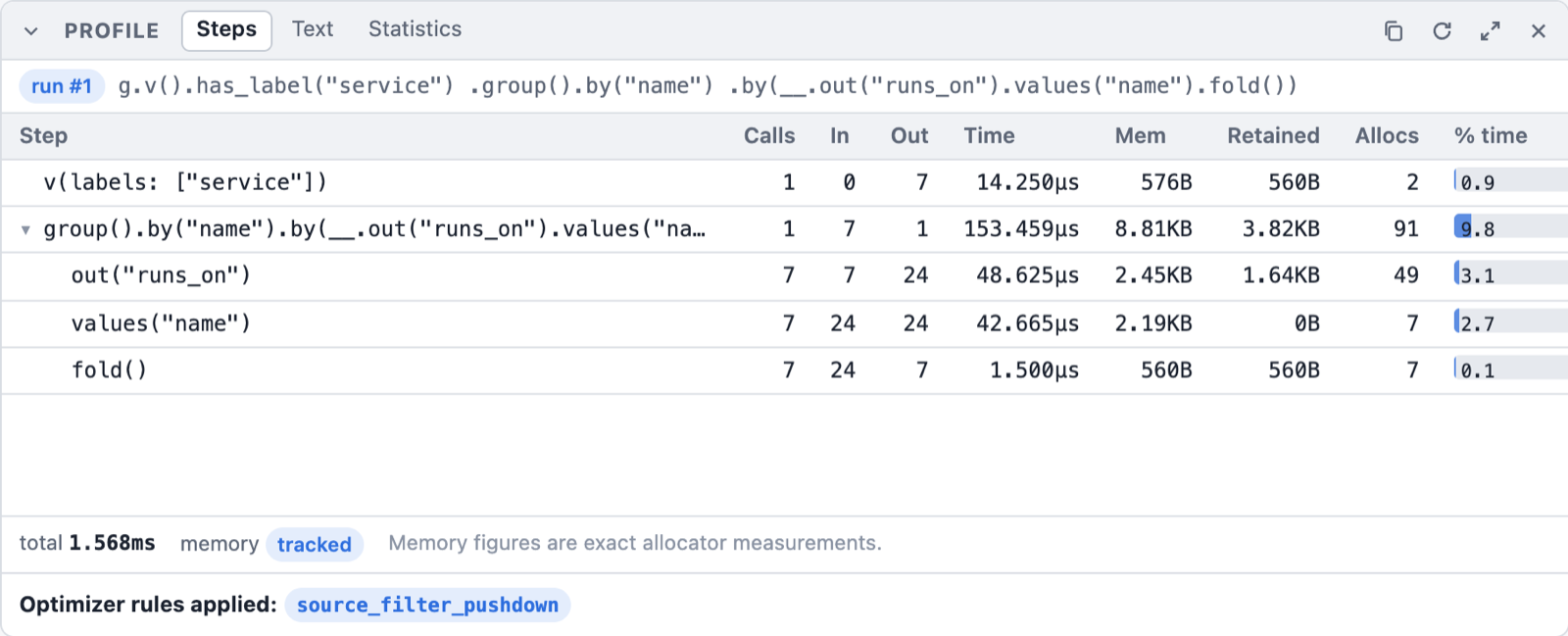
Traversal Metrics
Step Call In Out Time Mem Retained Allocs % Dur
===============================================================================================================================
v() 1 0 6 13.208µs 480B 480B 1 6.30
group().by(T.label) 1 6 1 50.042µs 1.37KB 588B 7 23.87
TOTAL: execute: 209.625µs 30.17
TOTAL: memory materialized: 1.84KB
TOTAL: net retained: 1.04KB
===============================================================================================================================
(real output, captured via graphersal.) Compare with a bare .profile() on the same query — no Mem/
Retained/Allocs columns, no TOTAL: memory materialized:/TOTAL: net retained: rows:
Traversal Metrics
Step Call In Out Time % Dur
=====================================================================================================
v() 1 0 6 1.750µs 5.01
group().by(T.label) 1 6 1 7.041µs 20.14
TOTAL: execute: 34.958µs 25.15
=====================================================================================================
Every step in a memory-profiled traversal reports bytes_materialized: how much heap data that
step newly owns, beyond the lazy handles it passes through. Most steps (filters, has_label,
out()/in()/both(), values() before a terminal materializes them, ...) never own new heap
data at all — they carry lazy vertex/edge handles — so they report 0 at no measurement cost.
Steps that build something new (group(), fold(), sum(), mean(), median(), path(),
element_map()) report their aggregation/materialization buffer's size in the Mem column, next
to Retained (net bytes kept) and Allocs (allocator call count) — see the next section for how
to read all three together.
A ~ prefix on a Mem figure means it is estimated; a plain number means it is tracked
(exact). Which one you get depends on how the binary was built — see below. As data, the figures
are the optional memory section of every step's Metrics
(MemoryMetrics: bytes_materialized, bytes_retained, alloc_count, source); a
Retained/Allocs value of - means that figure simply isn't tracked for this run
(source: "estimated", which has no allocator-level figures to show).
No memory section vs. Estimated vs. Tracked
- No
memorysection (a bare.profile(), noProfileTypeargument): memory profiling wasn't asked for. No allocator thread-local is read, no estimate is computed — the executor skips the work entirely, not just its display. Every step'smemoryis absent (Nonein Rust, no key in the Rhai map and the JSON): "never measured," not "measured and found zero." Estimated(.profile_with(ProfileType::Memory)without thealloc-trackingfeature): asize_of/capacity-based estimate over the data the step already built, computed inside.profile_with()'s timing-collection gate. Expect roughly 10-30% divergence from true bytes for structures dominated by many small, separately-heap-allocated values, and it cannot see temporary allocation churn (memory allocated and freed again within a single step's own execution).Tracked(.profile_with(ProfileType::Memory)withalloc-tracking): a real allocator-level measurement, via thealloc-trackingfeature'sTrackingAllocator. This requires two things: the feature compiled in, and the binary installingTrackingAllocatoras its own#[global_allocator](a library crate cannot do this for you — the attribute can only be set once, by the final binary). The CLI (graphersal), the web playground's WebAssembly module (graphersal-wasm) and the Python extension (py-graphersal, acdylibthat installs it for its own Rust heap; Python objects are not counted) all do this by default.
The trade alloc-tracking makes: once a binary installs TrackingAllocator, every
allocation in that process pays a small, constant bookkeeping cost (a thread-local counter
increment), whether or not the query in flight is profiled. This is the accepted cost in the graphersal command
line, the web playground and the Python extension, for always-exact numbers in the reference
binaries this project ships; the graphersal library without the feature, and any other consumer
that doesn't opt in, stay exactly zero-cost. ProfileType::Memory gates a further, finer-grained cost on top of that: even in an
alloc-tracking build, a query profiled without ProfileType::Memory (or not profiled at all)
skips AllocSnapshot::capture/step_memory_metrics completely for every step.
The Bulk column
When equal traversers were merged (barrier(), the repeat() frontier, the optimizer's
lazy_barrier()), .profile() shows a Bulk column after Out. Out counts traverser objects
(TinkerPop's "Traversers"); Bulk is the sum of their bulks, i.e. how many logical traversers the
step's output stands for (TinkerPop's "Count"). A lazy_barrier() row that reads In 8049, Out 562, Bulk 8049 merged 8049 traversers into 562 without losing any. A query where nothing merged has no
Bulk column at all.
Gross vs. net: reading Mem alongside Retained/Allocs
Under Tracked, a step whose Mem figure looks alarmingly large is not automatically a bug. The
Mem column (bytes_materialized) is gross allocation traffic: it sums every byte the step
ever asked the allocator for during its execution, including a buffer that was grown by
reallocation and then partly (or wholly) freed again before the step finished. It answers "how much
allocator work did this cost," not "how much memory does this step's output now occupy."
For that second question, a Tracked step's row also carries real Retained/Allocs columns:
Step Call In Out Time Mem Retained Allocs % Dur
===============================================================================================================================
v(labels: ["company"]) 1 0 88000 29.126ms 11.25MB 10.00MB 33 12.62
in() 1 88000 747988 136.318ms 80.00MB 70.00MB 19 59.04
has_label("country") 1 747988 88000 65.371ms 80B -80.00MB 1 28.31
count() 1 88000 1 375ns 0B 0B 0 0.00
(real figures from a 110k-element dataset, .profile_with(ProfileType::Memory): in() has a
large fan-out, each input vertex expanding to 8-9 output vertices on average, written into one
amortized-growth output buffer. has_label("country")'s -80.00MB Retained is a genuine
negative delta: it drops in()'s large intermediate output as it filters, so it frees far more
than it allocates.)
Retainedis the net figure: live bytes at the step's exit minus live bytes at its entry. It isMemoryMetrics::bytes_retained, and it can be smaller thanMem(gross) whenever the step freed more than it kept (the reallocation churn described below), and it can even be negative — a step that frees more than it allocates (for instance, one that drops a large intermediate the previous step built) genuinely shows a negative delta, and this is reported honestly rather than clamped to0, ashas_label("country")'s-80.00MBabove shows. Forin(), gross (80.00MB) is only modestly larger than retained (70.00MB): about 10MB of that 80MB was allocated and freed again within the step's own execution (the shared output buffer's amortized-doubling growth), not memory the step's output still holds by the time it hands off to the next step — a tightMem/Retainedgap like this, together with a lowAllocscount relative to output size, is the signature of a step writing into one reused buffer rather than allocating per item.AllocsisMemoryMetrics::alloc_count: the number of distinct calls the step made to the allocator (alloc/alloc_zeroed, plus anyreallocthat grew a buffer). A step that does a handful of large, deliberate allocations (reserve()d once, filled once, or grown by a shared buffer's own amortized doubling — 19 allocations for 747,988 output items above) has a lowAllocsrelative to its output size — efficient and expected. A step whoseAllocscount runs into the hundreds of thousands for tens of thousands of output items is very likely allocating per-item or per-small-batch, which is exactly the structural symptom a largeMem/Retainedgap usually traces back to.
Together, Retained and Allocs turn "this step's Mem figure looks huge" into a diagnosable
statement: high Mem, low Retained, high Allocs reads as "high churn, low net retention" —
a step reallocating a growing buffer many times over — rather than a flat, unexplained number.
Both columns read - under Estimated (the size_of-based path has no allocator to draw them
from), and neither column exists at all — not even as - — under a bare .profile(), since the
Mem column itself isn't rendered without ProfileType::Memory.
This is a lightweight, always-available, in-process diagnostic, not a replacement for external
profiling tools. It tells you that a step is churning and roughly how much, at the whole-step
granularity; it does not attribute any individual allocation to a call site (e.g. "this came from
Vec::push at line 107"), and it has no peak/high-water-mark figure (the maximum live bytes at any
point during a step, as opposed to just at its entry and exit). For that level of detail, reach
for valgrind --tool=massif, heaptrack, or a sampling allocator profiler — this feature exists so
you rarely need to reach for those tools for a first-pass diagnosis, not so you never do.
Summary
| Scope | Cost when unused | Accuracy | |
|---|---|---|---|
graph.memory_usage() | The whole graph's storage | N/A — never runs on the query path | Estimate (capacity-based) |
A bare .profile() (no memory section) | One query's steps, timing only | Zero — no memory collection at all | N/A — no memory data |
.profile_with(ProfileType::Memory), Estimated | One query's steps | Zero when ProfileType::Memory isn't requested | Estimate, ~10-30% divergence possible |
.profile_with(ProfileType::Memory), Tracked | One query's steps | A small, constant, always-on cost per allocation once alloc-tracking is installed, plus the per-call cost of requesting ProfileType::Memory | Exact (Mem, gross); Retained/Allocs add net and churn figures |
Step Reference
Every step of the DSL has a page of its own, listed in alphabetical order under this chapter in the sidebar and by category below. This page is the short guide to what every query shares: where it starts, how it runs, how much it returns and how it is shown.
g and __
g is the graph you query; a query starts with a start step on it, such as v() (vertices),
e() (edges) or inject(..) (values). __ starts an anonymous traversal: the child of a step
such as where, repeat, union or by, which runs once for every element that reaches it.
g.v().has_label("person").where(__.out("created")).values("name") // marko, josh, peter
Every step has a snake_case name and its Gremlin camelCase twin (has_label and hasLabel,
out_e and outE); they are the same function. Strings are written in double quotes, maps as
#{key: value}, lists as [1, 2]. Tokens are written with their class: P.gt(30),
Order.desc, T.label, Scope.local, Column.keys (see Predicates and
Functions, Tokens and Values).
Running a query
A query runs when it reaches a terminal. A query without one, at the end of a script, is run and shown (a table in the command line and the playground).
| Terminal | Returns |
|---|---|
to_list() | all results, as a list |
next() | the first result |
iterate() | nothing: runs the query for what it writes |
to_graph() | the edges reached and their vertices, as a graph |
profile() | the optimized plan with timings and counts |
execute() | results, error and profile together, never throws |
g.v().values("name").next() // marko
g.v().has("name", "marko").property("age", 30).iterate() // a write, nothing returned
Every query is one unit: when a step fails, nothing the query wrote stays (Transactions).
How many results
The data a query returns is never cut. To ask for less, use the steps that select a part:
limit(n), range(low, high), tail(n),
skip(n), dedup(), sample(n).
g.v().has_label("person").values("name").limit(2) // marko, vadas
g.v().has_label("person").values("name").range(1, 3) // vadas, josh
What is shown is bounded: a displayed result has at most 100 rows and 100 items per nested
list or map, with a notice when more exist. One query changes it with an argument of its
visualizer or a g.with() option; the command line has --max-rows, --max-items and
--no-limit (Displaying Results).
g.v().to_table(#{max_rows: 2}) // two rows and a notice that more exist
g.with("render.max_rows", 2).v().values("name") // the same for one query
Showing results
| Visualizer | Shows |
|---|---|
to_table() | a table (the default) |
to_markdown() | a Markdown table |
to_json() | JSON |
to_tree() | a tree of nested values |
to_mermaid(), to_plantuml(), to_json_schema() | a diagram or a JSON Schema of a schema, for example of infer_schema() |
visualize(V.Json) | any of them by token: V.Table, V.Markdown, V.Json, V.Tree, V.Mermaid, ... |
g.v().has_label("person").value_map("name", "age").to_markdown()
g.v().infer_schema().to_mermaid()
Options of one query
g.with(key, value) sets an option for the query that follows it: a time limit, the loop limit,
the display limits, the spelling of the profile, which optimizer rules run. Every key is in the
Execution Options Reference; a host can lock them
(Running Queries Safely).
g.with("evaluationTimeout", 1000).v().count() // stops after one second
g.with("repeat.max_loops", 10).v("1").repeat(__.out()).until(__.has("name", "ripple")).values("name")
Help inside the tools
The text of every step page is also where you write queries:
- in the REPL:
/help <name>(/help has_label,/help hasLabel),/help steps,/help tokens; - in the web playground: the completion of the query editor;
- over MCP: the
graphersal://dsl-referenceresource of the dev server.
Steps follow the Apache TinkerPop reference documentation unless a page says otherwise; the differences are collected in TinkerPop Deviations.
Steps by category
Start
Walking the graph
out · in · both · out_e · in_e · both_e · out_v · in_v · both_v · other_v · to_e · to_v · glob_path
Filters
has · has_id · has_key · has_label · has_not · has_p · has_value · has_value_any · has_value_p · is · where · where_p · where_t · filter · and · or · not · dedup · limit · range · skip · tail · coin · sample · simple_path · cyclic_path · none · discard · all · any
Values and properties
values · value_map · element_map · properties · id · label · labels · key · value · constant · element · json_path · index · identity
Strings and type conversion
to_lower · to_upper · trim · l_trim · r_trim · substring · replace · concat · format · split · length · as_string · as_bool · as_number · cast
Lists and ordering
fold · unfold · combine · conjoin · difference · disjunct · intersect · merge · product · reverse · order
Aggregation
count · sum · min · max · mean · median · group · group_count · tree · aggregate · store · cap · barrier
Labels and paths
as · select · path · project · math
Branches and loops
union · choose · branch · option · coalesce · optional · repeat · times · until · emit · loops · local · map · flat_map
Modulators and options
by · from · to · with · with_path · with_bulk
Sack and side effects
sack · with_sack · with_side_effect · side_effect · subgraph
Changing the graph
add_v · add_e · property · property_json · drop · remove_property · add_label · drop_label · set_label · merge_v · merge_e · fail
Running and showing results
to_list · next · iterate · execute · profile · profile_with · to_graph · to_table · to_json · to_markdown · to_tree · to_mermaid · to_plantuml · to_json_schema · visualize · set_visualizer
Schema
get_schema · set_schema · patch_schema · validate_schema · validate_schema_patch · infer_schema · diff_schema
Saved queries
define_query · define_queries · query · queries · get_query · drop_query · move_query · describe_query
Compressed properties
define_compression · drop_compression · compressions · recompress
Graph information and files
statistics · memory_usage · mark · import_graphml · import_graphson · export_graphml · export_graphson · export_snapshot
Predicates, tokens and test data
Predicates · Functions, Tokens and Values · Test Data Functions
Predicates
See also Predicates: Comparison and Resolution.
P.between: Predicate: at least the first and less than the second value.
g.v().values("age").is(P.between(27, 30)).to_list() // [29, 27]
P.containing: Text predicate: the string contains the given text.
g.v().values("name").is(TextP.containing("ar")).to_list() // ["marko"]
P.ending_with · P.endingWith: Text predicate: the string ends with the given text.
g.v().values("name").is(TextP.ending_with("o")).to_list() // ["marko"]
P.eq: Predicate: equal to the value.
g.v().has("age", P.eq(29)).values("name").to_list() // ["marko"]
P.gt: Predicate: greater than the value.
g.v().values("age").is(P.gt(30)).to_list() // [32, 35]
P.gte: Predicate: greater than or equal to the value.
g.v().values("age").is(P.gte(32)).to_list() // [32, 35]
P.inside: Predicate: strictly between the two values (both excluded).
g.v().values("age").is(P.inside(27, 32)).to_list() // [29]
P.lt: Predicate: less than the value.
g.v().values("age").is(P.lt(29)).to_list() // [27]
P.lte: Predicate: less than or equal to the value.
g.v().values("age").is(P.lte(29)).to_list() // [29, 27]
P.neq: Predicate: not equal to the value.
g.v().values("age").is(P.neq(29)).to_list() // [27, 32, 35]
P.not: Predicate: the complement of the given predicate (see the book page Predicates for the deviation from TinkerPop).
g.v().values("age").is(P.not(P.gt(30))).to_list() // [29, 27]
P.not_containing · P.notContaining: Text predicate: the string does not contain the given text.
g.v().values("name").is(TextP.not_containing("o")).to_list() // ["vadas", "ripple", "peter"]
P.not_ending_with · P.notEndingWith: Text predicate: the string does not end with the given text.
g.v().values("name").is(TextP.not_ending_with("s")).to_list() // ["marko", "lop", "josh", "ripple", "peter"]
P.not_starting_with · P.notStartingWith: Text predicate: the string does not start with the given text.
g.v().values("name").is(TextP.not_starting_with("r")).to_list() // ["marko", "vadas", "lop", "josh", "peter"]
P.outside: Predicate: below the first or above the second value.
g.v().values("age").is(P.outside(27, 32)).to_list() // [35]
P.starting_with · P.startingWith: Text predicate: the string starts with the given text.
g.v().values("name").is(TextP.starting_with("m")).to_list() // ["marko"]
P.typeOf: Predicate: the value is of the given GType or type name (String, Integer, Double, UUID, ...).
g.v().has("age", P.typeOf(GType.LONG)).count().next() // 4
P.within · P.WithIn: Predicate: equal to one of the values (given as arguments or one list).
g.v().values("age").is(P.within(27, 35)).to_list() // [27, 35]
P.without · P.WithOut: Predicate: equal to none of the values (given as arguments or one list).
g.v().values("age").is(P.without(27, 35)).to_list() // [29, 32]
TextP.containing: Text predicate: the string contains the given text.
g.v().values("name").is(TextP.containing("ar")).to_list() // ["marko"]
TextP.ending_with · TextP.endingWith: Text predicate: the string ends with the given text.
g.v().values("name").is(TextP.ending_with("o")).to_list() // ["marko"]
TextP.not_containing · TextP.notContaining: Text predicate: the string does not contain the given text.
g.v().values("name").is(TextP.not_containing("o")).to_list() // ["vadas", "ripple", "peter"]
TextP.not_ending_with · TextP.notEndingWith: Text predicate: the string does not end with the given text.
g.v().values("name").is(TextP.not_ending_with("s")).to_list() // ["marko", "lop", "josh", "ripple", "peter"]
TextP.not_regex · TextP.notRegex: Text predicate: the string does not match the regular expression.
g.v().values("name").is(TextP.not_regex("^[mjp]")).to_list() // ["vadas", "lop", "ripple"]
TextP.not_starting_with · TextP.notStartingWith: Text predicate: the string does not start with the given text.
g.v().values("name").is(TextP.not_starting_with("r")).to_list() // ["marko", "vadas", "lop", "josh", "peter"]
TextP.regex: Text predicate: the string matches the regular expression (Rust regex dialect, see the book page Predicates).
g.v().values("name").is(TextP.regex("^[mj]")).to_list() // ["marko", "josh"]
TextP.starting_with · TextP.startingWith: Text predicate: the string starts with the given text.
g.v().values("name").is(TextP.starting_with("m")).to_list() // ["marko"]
Predicate.and: Combines two predicates: both must match.
g.v().has("age", P.gt(30).and(P.lt(35))).values("name").to_list() // ["josh"]
Predicate.negate: The complement of the predicate (see the book page Predicates for the deviation from TinkerPop).
g.v().has("age", P.gt(30).negate()).values("name").to_list() // ["marko", "vadas"]
Predicate.or: Combines two predicates: at least one must match.
g.v().has("age", P.lt(28).or(P.gt(33))).values("name").to_list() // ["vadas", "peter"]
Functions, Tokens and Values
between: the same as P.between, without the class name.
containing: the same as P.containing, without the class name.
empty: Creates a new empty graph, private to the script, and returns its traversal source.
GraphSource::empty().v().count().next() // 0
ending_with · endingWith: the same as P.ending_with, without the class name.
eq: the same as P.eq, without the class name.
Fake: A seeded generator of English test data and random numbers: the same seed and calls give the same values; without a seed it picks one (see the book page Generating test data).
Fake(1).full_name() // Victoria Vargas
file: Loads a graph file (.xml/.graphml, GraphSON .json) into a new private graph (needs file access).
GraphSource::file("modern.graphml").v().count().next()
file_tree: Creates a private sample graph of a file tree (directories, files, symlinks), as used by glob_path().
GraphSource::file_tree().v().count().next() // 37
gt: the same as P.gt, without the class name.
gte: the same as P.gte, without the class name.
inside: the same as P.inside, without the class name.
jpath: Builds a JSONPath property key for nested values, usable wherever a property name is (see the book page Path keys (jpath)).
g.inject(#{a: #{b: [5, 6]}}).values(jpath("a.b[1]")).to_list() // [6]
lt: the same as P.lt, without the class name.
lte: the same as P.lte, without the class name.
neq: the same as P.neq, without the class name.
not: the same as P.not, without the class name.
not_containing · notContaining: the same as P.not_containing, without the class name.
not_ending_with · notEndingWith: the same as P.not_ending_with, without the class name.
not_regex · notRegex: the same as TextP.not_regex, without the class name.
not_starting_with · notStartingWith: the same as P.not_starting_with, without the class name.
outside: the same as P.outside, without the class name.
regex: the same as TextP.regex, without the class name.
starting_with · startingWith: the same as P.starting_with, without the class name.
tinkerpop_modern: Creates a private copy of TinkerPop's modern sample graph (6 vertices, 6 edges).
GraphSource::tinkerpop_modern().e().count().next() // 6
typeOf: the same as P.typeOf, without the class name.
UUID: Returns a new random UUID value.
type_of(UUID()) // Uuid
within: the same as P.within, without the class name.
without: the same as P.without, without the class name.
By.JsonPath: A by() argument that reads a nested value by a JSONPath.
g.inject(#{a: #{b: 2}}, #{a: #{b: 1}}).order().by(By.JsonPath("a.b")).to_list() // [#{"a": #{"b": 1}}, #{"a": #{"b": 2}}]
By.Property: A by() argument that reads the named property (the same as by("name")).
g.v().has_label("person").order().by(By.Property("age")).values("name").to_list() // ["vadas", "marko", "josh", "peter"]
By.Traversal: A by() argument that runs a child traversal (the same as by(__.x())).
g.v().has_label("person").order().by(By.Traversal(__.out_e().count())).values("name").to_list() // ["vadas", "peter", "josh", "marko"]
Cardinality.list: A property value tagged with Cardinality.list; writing it fails (one value per key, see the book page Upserts).
type_of(Cardinality.list(5)) // CardinalityValue
Cardinality.set: A property value tagged with Cardinality.set; writing it fails (one value per key, see the book page Upserts).
type_of(Cardinality.set(5)) // CardinalityValue
Cardinality.single: A property value tagged with Cardinality.single, for merge_v()/merge_e() option maps.
g.merge_v(#{"T.id": "1"}).option(Merge.onMatch, #{age: Cardinality.single(30)}).values("age").next() // 30
CastPolicy.Default: A cast policy that replaces a value that does not convert with the given fallback.
g.inject("x", "1").as_number(GType.LONG, CastPolicy.Default(0)).to_list() // [0, 1]
UUID.from_string · UUID.fromString: Parses a UUID value from its canonical text.
UUID.from_string("123e4567-e89b-12d3-a456-426614174000").as_string() // 123e4567-e89b-12d3-a456-426614174000
Uuid.as_string · Uuid.asString: The canonical text of the UUID value.
UUID.from_string("123e4567-e89b-12d3-a456-426614174000").as_string().len() // 36
Set.of: A set value (duplicates dropped) of the given values, e.g. to seed a set side effect.
g.with_side_effect("s", Set.of()).v().out().values("name").aggregate("s").cap("s").next() // ["josh", "lop", "vadas", "ripple"]
Set.of_list · Set.ofList: A set value (duplicates dropped) of the elements of the given list.
g.with_side_effect("s", Set.of_list(["lop"])).v().out().values("name").aggregate("s").cap("s").next() // ["lop", "josh", "vadas", "ripple"]
Map.contains: Whether a map with non-string keys has the given key.
g.v().group().by("age").next().contains(29) // true
Map.contains_key · Map.containsKey: Whether a map with non-string keys has the given key (alias of contains()).
g.v().group().by("age").next().contains_key(30) // false
Map.is_empty · Map.isEmpty: Whether a map with non-string keys has no entries.
g.v().group().by("age").next().is_empty() // false
Map.keys: The keys of a map with non-string keys (group(), group_count() results).
g.v().has_label("person").group_count().by("age").next().keys() // [29, 27, 32, 35]
Map.len: The number of entries of a map with non-string keys.
g.v().group().by("age").next().len() // 4
Map.to_map · Map.toMap: Converts the map to a plain Rhai object map; fails when a key is not a string.
g.v().group_count().by("age").next().to_map() // error: non-string key 29
Map.values: The values of a map with non-string keys.
g.v().has_label("person").group_count().by("age").next().values() // [1, 1, 1, 1]
V.Auto: The default display format: chosen by the result's shape.
g.v(1).values("name").visualize(V.Auto)
V.Json: Display format: JSON text.
g.v(1).values("name").visualize(V.Json)
V.JsonSchema: Display format: the JSON Schema of the results (a schema map as JSON Schema; other results as JSON per line).
g.v(1).values("name").visualize(V.JsonSchema) // "marko"
V.Markdown: Display format: a Markdown table.
g.v(1).values("name").visualize(V.Markdown)
V.Mermaid: Display format: Mermaid (a schema map as a diagram; other results as JSON per line).
g.v(1).values("name").visualize(V.Mermaid) // "marko"
V.PlantUML: Display format: PlantUML (a schema map as a diagram; other results as JSON per line).
g.v(1).values("name").visualize(V.PlantUML) // "marko"
V.Table: Display format: a text table.
g.v(1).values("name").visualize(V.Table)
V.Tree: Display format: an indented tree.
g.v(1).out().visualize(V.Tree)
GraphSource.empty: Creates a new empty graph, private to the script, and returns its traversal source.
GraphSource::empty().v().count().next() // 0
GraphSource.file: Loads a graph file (.xml/.graphml, GraphSON .json) into a new private graph (needs file access).
GraphSource::file("modern.graphml").v().count().next()
GraphSource.file_tree: Creates a private sample graph of a file tree (directories, files, symlinks), as used by glob_path().
GraphSource::file_tree().v().count().next() // 37
GraphSource.tinkerpop_modern: Creates a private copy of TinkerPop's modern sample graph (6 vertices, 6 edges).
GraphSource::tinkerpop_modern().e().count().next() // 6
map.subgraph: The meta-graph of one label of a schema map (private to the script).
g.infer_schema().subgraph("person").v().count().next() // 1
map.subgraph_labels: The meta-graph of the given labels of a schema map (private to the script).
g.infer_schema().subgraph_labels(["person", "software"]).v().count().next() // 2
map.to_graph · map.toGraph: Builds the meta-graph of a schema map: one vertex per label, one edge per declared connection (private to the script).
g.infer_schema().to_graph().v().count().next() // 2
TraversalMetrics.to_json · TraversalMetrics.toJson: The profile as JSON text.
g.v().count().profile().to_json().contains("count_pushdown") // true
TraversalMetrics.to_map · TraversalMetrics.toMap: The profile as a map: duration_ns, metrics per step, optimizer_rules_applied.
g.v().count().profile().to_map()["optimizer_rules_applied"] // ["count_pushdown"]
TraversalMetrics.to_table · TraversalMetrics.toTable: The profile as the text table that profile() shows.
g.v().count().profile().to_table().contains("v().count()") // true
Execution.to_json · Execution.toJson: The execution (results, error, profile) as JSON text.
g.v().count().execute().to_json() // {"results":[6],"error":null,"profile":null}
Execution.to_map · Execution.toMap: The execution as a map: results, error, profile, mutated, changes.
g.v().count().execute().to_map()["results"] // [6]
Test Data Functions
See also Generating Test Data.
Fake.address: A random one-line US address whose city and state belong together.
Fake(1).address() // 5666 Broad Trail, Bakersfield, CA 44960
Fake.chance: True with the given probability (0.0 to 1.0).
Fake(1).chance(0.5) // false
Fake.city: A random US city name.
Fake(1).city() // Irvine
Fake.company: A random company name.
Fake(1).company() // Vargas & Ryan
Fake.country: A random country name.
Fake(1).country() // South Africa
Fake.domain_name · Fake.domainName: A random domain name.
Fake(1).domain_name() // vasquezsalt.info
Fake.email: A random e-mail address at a reserved example domain (example.com, .org, .net); with a name, one made from that name.
Fake(1).email("Ada Lovelace") // ada.lovelace57@example.net
Fake.first_name · Fake.firstName: A random English given name.
Fake(1).first_name() // Victoria
Fake.float: A random float from 0.0 (included) to 1.0 (excluded), or from lo to hi.
Fake(1).float(0, 100) // 56.65615751722809
Fake.fork: An independent generator for a named stream of the same seed, unaffected by what was drawn before.
Fake(1).fork("people").first_name() // Mason
Fake.full_name · Fake.fullName: A random given name and surname.
Fake(1).full_name() // Victoria Vargas
Fake.int: A random integer from lo to hi, both included.
Fake(1).int(1, 6) // 4
Fake.job_title · Fake.jobTitle: A random job title such as Senior Data Analyst.
Fake(1).job_title() // Principal Infrastructure Officer
Fake.last_name · Fake.lastName: A random English surname.
Fake(1).last_name() // Vasquez
Fake.lorem: Lorem ipsum text of a random length from lo to hi bytes, in paragraphs, ending with a period.
Fake(1).lorem(100, 200).len() // 157
Fake.lorem_paragraph · Fake.loremParagraph: A random Lorem ipsum paragraph of 3 to 7 sentences.
Fake(1).lorem_paragraph().len() // 300
Fake.lorem_sentence · Fake.loremSentence: A random Lorem ipsum sentence of 6 to 14 words.
Fake(1).lorem_sentence() // Vel non non accumsan libero est consequat ac excepteur montes sunt.
Fake.phone: A random US phone number in the fictional 555-01xx range.
Fake(1).phone() // +1-648-555-0174
Fake.pick: A random element of a non-empty array.
Fake(1).pick(["red", "green", "blue"]) // green
Fake.sample: The given number of distinct elements of the array, in random order.
Fake(1).sample([1, 2, 3, 4], 2) // [3, 4]
Fake.seed: The seed the generator (or the root of a fork) was created with; pass it to Fake(seed) to reproduce a run.
Fake(1).seed() // 1
Fake.sentence: A random sentence of 4 to 12 words.
Fake(1).sentence() // Salt winter linen linen shadow swift mountain glacier snow.
Fake.shuffle: A copy of the array in random order.
Fake(1).shuffle([1, 2, 3, 4]) // [1, 2, 4, 3]
Fake.state: A random US state name.
Fake(1).state() // New Hampshire
Fake.state_abbr · Fake.stateAbbr: A random US state postal abbreviation.
Fake(1).state_abbr() // NH
Fake.street_address · Fake.streetAddress: A random house number and street name.
Fake(1).street_address() // 5666 Broad Trail
Fake.street_name · Fake.streetName: A random street name.
Fake(1).street_name() // Lakeview Circle
Fake.username: A random user name: a lowercase given name, an initial and a number.
Fake(1).username() // victoriav971
Fake.uuid: A random version 4 UUID value drawn from the seed.
Fake(1).uuid().as_string() // 910a2dec-8902-4cc1-beeb-8da1658eec67
Fake.word: A random English word.
Fake(1).word() // onyx
Fake.zip_code · Fake.zipCode: A random five-digit US ZIP code.
Fake(1).zip_code() // 57062
List Functions
The list functions work on the list a traverser holds and turn it into one new value per traverser (they are map steps, 1 to 1):
| Step | Result | Page |
|---|---|---|
combine(list) | the incoming list followed by list, duplicates kept | combine |
conjoin(delimiter) | the elements joined into one string | conjoin |
difference(list) | the incoming elements that are not in list (a set) | difference |
disjunct(list) | the elements in exactly one of the two lists (a set) | disjunct |
intersect(list) | the incoming elements that are also in list (a set) | intersect |
merge(list) / merge(map) | the union of two lists (a set), or two maps merged | merge |
product(list) | every [a, b] pair of the two lists | product |
They are TinkerPop 3.7+ steps and follow the TinkerPop 3.8.2 feature files (map/Combine.feature
and the others: every in-scope scenario passes).
The incoming list
A traverser holds a list after fold(), path(), a list constant (constant([..]),
inject([..])) or a list-valued property (values("tags")). A path counts as the list of its
objects. Anything else, null included, is an error that names the step and the fix:
graphersal> g.V().values("name").combine(["x"])
Error: Step #2 'combine(["x"])' execution failed
at #2: v().values("name").combine(["x"])
^^^^^^^^^^^^^^
Caused by: The combine() step takes a list as its incoming value, but got string
Help: combine() works on the list a traverser holds (a fold(), a path(), a list-valued property). Collect the stream into a list with fold() first, for example g.V().values("name").fold().combine(["x"]).
A fused count() after the step does not skip it: g.V().values("name").combine(["x"]).count()
raises the same error.
The argument
The second operand is either
- a list constant:
combine(["dave", "kelvin"])(Rust:combine(vec!["dave", "kelvin"])), or - a child traversal whose first result is the list:
combine(__.V().values("name").fold())(Rust:combine_traversal(__::v(None).values("name").fold())). It runs on the incoming traverser, with its path, so__.select("a")reads a label of the traverser. End it withfold()to turn a stream into a list.
null, a single value (combine(2)) and a traversal that yields nothing, null or a non-list
are errors. merge() of a map takes a map instead (see merge).
Element equality
difference, disjunct, intersect and merge have set semantics: every element appears at most
once in the result, in the order of its first occurrence (incoming list first). Elements compare
the way dedup() compares traversers: vertices and edges by identity, everything else by value
(1 and 1.0 are different values, as in TinkerPop). null is an element like any other. The
kept elements stay what they were, so a folded vertex list keeps its vertices:
graphersal> g.V("1").out("knows").fold().difference(__.V("4").fold()).unfold().values("name")
vadas
In the Rust API
Every list function has a constant form and a _traversal form on GraphTraversalSource,
AnonymousTraversal and __: combine / combine_traversal, difference /
difference_traversal, and so on; conjoin(delimiter) has one form. In the DSL both spellings are
the same name (combine, conjoin, ...), which takes a list, a map or a traversal.
Steps - add_label, drop_label, set_label
Graphersal extensions that change the labels of existing elements. TinkerPop labels are immutable and TinkerPop has no such steps, so these add to Gremlin rather than deviate from it. Each step changes the element it receives and passes the same element on, so the traversal can continue.
| Step | Element | What it does |
|---|---|---|
add_label("L") / addLabel("L") | vertex | adds L to the vertex's label set (appended; the first label stays the primary one label() returns) |
drop_label("L") / dropLabel("L") | vertex | removes L from the label set; dropping the last one leaves the vertex unlabeled |
set_label("L") / setLabel("L") | edge | replaces the edge's one label (an unlabeled edge gets L) |
g.v(1).add_label("employee").labels().next() // ["person", "employee"]
g.v(1).drop_label("person").labels().next() // []
g.e(0).set_label("met").label().next() // "met"
g.v().has_label("person").add_label("employee") // every person
- Idempotent. Adding a label a vertex already carries, dropping one it does not carry, or setting
the label an edge already has changes nothing and is no error; a traverser with bulk
nchanges its element once. - Wrong element kind.
add_label/drop_labelon an edge,set_labelon a vertex, or any of them on a value (g.v().values("name").add_label("x")) fails; the help names the step for the kind that arrived. - Schema. With an
openorclosedschema the element must be valid under its new labels, or the step fails and the traversal rolls back: inclosedmode the new label must be declared, a vertex may not lose its last label or keep a property no remaining label declares, and every connection (incident edges, an edge's endpoints) must stay declared; in both modes a newly applying label'srequiredkeys must be present and the stored values must have its declared types. Stored values are not coerced. See Schema Enforcement and Multi-Label Vertices. - Atomic. Like every traversal, a failing one leaves no label change behind (Transactions).
- Permissions.
add_label/drop_labelaskUpdateon vertex data,set_labelon edge data (Permissions). - A label containing
"::"is rejected for vertices (the multi-label encoding of GraphSON and GraphML).
Selecting labeled and unlabeled elements
has_label() / hasLabel() without arguments keeps the elements that have a label at all: a
vertex with a non-empty label set, an edge with a label (a vertex property is labeled with its key,
so it always passes). Its complement not(__.has_label()) selects the unlabeled ones. There is no
has_not_label(). TinkerPop has no zero-argument hasLabel(), so this is a Graphersal extension
(TinkerPop Deviations); has_label([]) (an empty
list) still keeps nothing. label() yields null for an unlabeled vertex, so
not(__.label()) does not select them; use not(__.has_label()).
g.v().has_label().count().next() // labeled vertices
g.v().not(__.has_label()).count().next() // unlabeled vertices
g.e().not(__.has_label()).to_list() // unlabeled edges
The optimizer never folds the zero-argument form into the source step (it is not an empty label
list), and .profile() shows it as has_label().
A typical use is labelling unlabeled elements before freezing a closed schema
(Freeze the structure you have):
g.v().not(__.has_label()).add_label("thing").to_list()
g.e().not(__.has_label()).set_label("link").to_list()
g.set_schema(g.infer_schema(), SchemaMode.closed)
Rust: add_label(label), drop_label(label), set_label(label) on GraphTraversalSource and
__; they call GraphStorage::add_vertex_label, remove_vertex_label and set_edge_label.
Step-level with(WithOptions..)
with(WithOptions.key) / with(WithOptions.key, WithOptions.value) after a step configures that step
(TinkerPop's Configuring steps). Two steps take an option:
| Step | Option | Values |
|---|---|---|
valueMap() | WithOptions.tokens | none given or all: id and label; ids; labels; none |
index() | WithOptions.indexer | list (default): [element, position] pairs; map: {position: element} |
g.V("1").valueMap("name", "age").with(WithOptions.tokens, WithOptions.labels).next()
// {"label": "person", "name": ["marko"], "age": [29]}
g.V().hasLabel("person").values("name").fold().order(Scope.local).
index().with(WithOptions.indexer, WithOptions.map).next()
// {0: "josh", 1: "marko", 2: "peter", 3: "vadas"}
WithOptions.keys/WithOptions.valuesselect the key and value tokens of a vertex-property map in TinkerPop;valueMap()here reads vertices and edges only, so they add no token.- Any other step, an option the step does not know, or a
with()with no step before it fails withInvalidModulatorbefore the traversal runs. with("key", value)with a string key is something else: an execution option of the whole traversal (g.with("random.seed", 7)), see the options reference.
The DSL spells the tokens WithOptions.tokens and WithOptions::tokens.
Rust: with_option(WithOptions::Tokens, Some(WithOptions::Labels)),
with_option(WithOptions::Indexer, Some(WithOptions::Map)).
Step - add_e
add_e · addE · category: Changing the graph
Adds an edge with the given label; its endpoints come from from() and to() (see the book page addE() Endpoints).
Forms
add_e()
add_e(arg1: any)
Example
g.v(1).add_e("likes").to("3").label().next() // likes
See also
Step - add_label
add_label · addLabel · category: Changing the graph
Adds a label to the label set of each incoming vertex and passes it on (Graphersal extension; edges use set_label()).
Forms
add_label(arg1: string)
Example
g.v(1).add_label("employee").labels().next() // ["person", "employee"]
See also
Step - add_v
addV(label) adds a vertex, addV([labels]) a vertex with several labels, addV() an unlabeled
one. As a start step (g.addV(..)) it adds one vertex; in the middle of a traversal one per
incoming traverser.
addV(traversal)
The label is the first result of a child traversal, run on the incoming traverser (on a null seed
when the step starts the traversal), TinkerPop's AddVertexStep with a label traversal.
g.addV(__.V("1").label()).label() // "person"
g.addV(__.constant("prefix_").concat(__.V("1").label())).label() // "prefix_person"
The result must be a string; no result or another value is a cast error, and the traversal is
rolled back. Directly following property(key, constant) calls fold into the step as for the
other forms.
Rust: add_v(label), add_v_by(traversal).
Step - aggregate
aggregate · category: Aggregation
Collects every incoming value into the named list side effect before passing them on (a barrier); read it with cap() or select().
Forms
aggregate(arg1: string)
Example
g.v().has_label("person").values("age").aggregate("ages").cap("ages").next() // [29, 27, 32, 35]
See also
Step - all
all · category: Filters
Keeps a list whose every element matches the predicate (an empty list matches).
Forms
all(arg1: any)
Example
g.inject([1, 2, 3]).all(P.gt(0)).next() // [1, 2, 3]
Step - and
and(a, b, ...) keeps a traverser when every child traversal produces a result for it.
g.V().and(__.outE("knows"), __.values("age").is(P.lt(30))).values("name") // ["marko"]
The infix form a.and().b
and() with no argument is TinkerPop's infix notation, rewritten as TinkerPop's
ConnectiveStrategy does before the traversal runs:
- the left operand is every step before
and(), back to the start of the traversal; the start step of the root traversal (V(),E(),inject(), ...) and the step labels it carries stay outside; - the right operand is every step after
and()up to the end of the traversal; a furtherand()starts another operand (a.and().b.and().cisand(a, b, c)); and()binds tighter thanor():a.and().b.or().cisor(and(a, b), c).
g.V().where(__.out("created").and().out("knows").or().in("knows")).values("name")
// ["marko", "vadas", "josh"]
g.V().has("name", "marko").and().has("age", 29) // v[1]
Because the right operand runs to the end, a step written after the infix form is part of it:
g.V().has("name", "marko").and().has("age", 29).values("name") still yields the vertex, with
values("name") inside the and(). Wrap the connective in a child traversal
(filter(__.has(..).and().has(..)), where(..)) to continue after it.
Rust: the prefix form and(vec![a, b]); the infix form is a DSL notation.
Step - any
any · category: Filters
Keeps a list where at least one element matches the predicate.
Forms
any(arg1: any)
Example
g.inject([1, 5, 3]).any(P.gt(4)).next() // [1, 5, 3]
Step - as
as · as_ · category: Labels and paths
Labels the current step so select(), where() and path() can refer back to it.
Forms
as(arg1: any)
as(arg1: array)
as(arg1: any, arg2: any)
as(arg1, …, arg10)
Example
g.v(1).as("a").out("knows").as("b").select("a", "b").by("name").next() // #{"a": "marko", "b": "josh"}
Step - as_bool
as_bool · asBool · category: Strings and type conversion
Converts the value to a boolean: true/false strings in any case, numbers (0 is false); anything else is an error unless a CastPolicy says otherwise.
Forms
as_bool()
as_bool(arg1: CastPolicy)
Example
g.inject("true", "FALSE", 0).as_bool().to_list() // [true, false, false]
See also
Step - as_number
as_number · asNumber · category: Strings and type conversion
Converts the value to a number, optionally of the given GType (GType.LONG truncates toward zero, see the book page Type Conversion and length()).
Forms
as_number()
as_number(arg1: GType)
as_number(arg1: GType, arg2: CastPolicy)
Example
g.inject("42", 3.9).as_number(GType.LONG).to_list() // [42, 3]
See also
Step - as_string
as_string · asString · category: Strings and type conversion
Converts each value to its string text (Scope.local: each element of a list); a list itself is a cast error.
Forms
as_string()
as_string(arg1: CastPolicy)
as_string(arg1: Scope)
Example
g.v(1).values("age").as_string().to_list() // ["29"]
See also
Step - barrier
barrier · category: Aggregation
Collects the whole stream before passing it on; equal traversers merge into one with a bulk (see the book page Bulk and Barriers).
Forms
barrier()
barrier(arg1: any)
Example
g.v().out().barrier().count().next() // 6
See also
Step - both
both · category: Walking the graph
Moves to the adjacent vertices over incoming and outgoing edges, optionally only edges with the given labels.
Forms
both()
both(arg1: any)
both(arg1: array)
both(arg1: any, arg2: any)
both(arg1, …, arg10)
Example
g.v(4).both("knows").values("name").to_list() // ["marko"]
Step - both_e
both_e · bothE · category: Walking the graph
Moves to the incident edges in both directions, optionally only edges with the given labels.
Forms
both_e()
both_e(arg1: any)
both_e(arg1: array)
both_e(arg1: any, arg2: any)
both_e(arg1, …, arg10)
Example
g.v(4).both_e().label().to_list() // ["knows", "created", "created"]
Step - both_v
both_v · bothV · category: Walking the graph
Moves from an edge to both of its endpoint vertices (out vertex first).
Forms
both_v()
Example
g.e("0").both_v().values("name").to_list() // ["marko", "vadas"]
Step - branch
branch · category: Branches and loops
Routes each traverser by the value its child traversal yields to the matching option().
Forms
branch(arg1: any)
Example
g.v().has_label("person").branch(__.values("age")).option(29, __.values("name")).option(Pick.none, __.constant("other")).to_list() // ["marko", "other", "other", "other"]
See also
Step - by
by() modulates the step right before it: what to read from each traverser, or how to sort or
group it. The arguments and the steps that take by() are described in
The by() Modulator.
by() without an argument
A bare by() is the identity: TinkerPop's by() is by(__.identity()), and Graphersal lowers it to
exactly that child traversal.
g.V("1").as("a").values("name").as("b").select("a", "b").by(T.label).by().next()
// {"a": "person", "b": "marko"}
g.V().values("name").fold().order(Scope.local).by() // the same as order(Scope.local)
g.V().repeat(__.out()).times(2).path().by().by("name").by("lang")
In group() a bare value by() collects the members of each key as a list, as TinkerPop's
GroupStep does for an identity value traversal (map(identity).fold()), instead of keeping one
member: g.V().group().by(T.label).by() maps person to its four vertices.
Rust: by(__::identity()).
Step - cap
cap · category: Aggregation
Emits the value of the named side effect(s) (one map for several keys) after the stream is exhausted.
Forms
cap()
cap(arg1: any)
cap(arg1: array)
cap(arg1: any, arg2: any)
cap(arg1, …, arg10)
Example
g.v().group_count("c").by(T.label).cap("c").next() // #{"person": 4, "software": 2}
Step - cast
cast · category: Strings and type conversion
Converts the value to the given GType (number, string, boolean, uuid, list, map), optionally with a CastPolicy for values that do not convert.
Forms
cast(arg1: GType)
cast(arg1: GType, arg2: CastPolicy)
Example
g.inject("1", "2").cast(GType.LONG).sum().next() // 3
Step - choose
choose · category: Branches and loops
If-then-else: runs the true or false child traversal depending on a predicate or child traversal; with one argument it picks an option() by value.
Forms
choose(arg1: any)
choose(arg1: any, arg2: any)
choose(arg1: any, arg2: any, arg3: any)
Example
g.v().has_label("person").choose(__.values("age").is(P.gt(30)), __.constant("older"), __.constant("younger")).to_list() // ["younger", "younger", "older", "older"]
See also
Step - coalesce
coalesce · category: Branches and loops
Runs the child traversals in order and emits the results of the first one that yields anything.
Forms
coalesce(arg1: any)
coalesce(arg1: any, arg2: any)
coalesce(arg1, …, arg10)
Example
g.v(1, 3).coalesce(__.values("age"), __.values("lang")).to_list() // [29, "java"]
Step - coin
coin · category: Filters
Keeps each traverser with the given probability (0.0 to 1.0); seed it with g.with("random.seed", n).
Forms
coin(arg1: f64)
coin(arg1: i64)
Example
g.v().coin(1.0).count().next() // 6
Step - combine
combine(list) appends a second list to the list a traverser holds. Duplicates and order are
kept. The incoming value must be a list (see List Functions for the input and
argument rules shared by all list functions).
graphersal> g.V().values("name").fold().combine(["dave", "marko"])
[marko, vadas, lop, josh, ripple, peter, dave, marko]
graphersal> g.V().out().out().path().by("name").combine(["dave"])
[marko, josh, ripple, dave]
[marko, josh, lop, dave]
graphersal> g.inject([1, 2]).combine(__.constant([2, 3]))
[1, 2, 2, 3]
Rust: combine(vec!["dave"]) and combine_traversal(__::constant(vec![2, 3])).
The set counterpart, which keeps each element once, is merge.
Step - compressions
compressions · category: Compressed properties
Lists the compression rules as maps: name, element, label, path, codec, min_bytes, dictionary and the current compressed_values, plain_bytes, stored_bytes, dictionary_bytes.
Forms
compressions()
Example
{ g.define_compression(#{name: "bio", label: "person", path: "details.bio"}); g.compressions().map(|r| r.path) } // ["$.details.bio"]
See also
Step - concat
concat(string...) appends strings to the string a traverser holds; concat(traversal...) appends
the first result of each child traversal, run on the incoming traverser (its path included).
The arguments are all strings or all traversals. Without an argument the string passes unchanged.
graphersal> g.V().hasLabel("software").as("s").values("name").concat(" uses ").concat(__.select("s").values("lang")).to_list()
"lop uses java"
"ripple uses java"
graphersal> g.V("1").outE("created").as("e").V("1").values("name").concat(__.select("e").label(), __.select("e").inV().values("name")).to_list()
"markocreatedlop"
graphersal> g.inject("a").concat(__.inject("c")).to_list()
"aa"
The last example shows the first-result rule: __.inject("c") yields the incoming "a" first.
null
A null is skipped wherever it occurs, as the incoming value, as a constant (() in Rhai) or as a
child result. The result is null only when everything was null:
graphersal> g.inject((), "a").concat((), "b").to_list()
"b"
"ab"
graphersal> g.inject(()).concat().to_list()
()
Errors
- An incoming value that is neither a string nor
nullis a cast error. Convert it first, for examplevalues("age").as_string().concat(" years old"). - A constant argument that is neither a string nor
null(concat(1)) is rejected before the traversal runs. - A child traversal that yields nothing, or a value that is not a string, is a
ValueError::StringFunctionInput. Make the child always produce a string, for example withcoalesce(..., constant(""))oras_string().
Rust API: concat(vec!["a", "b"]) (a null argument is ElementProperty::Null) and
concat_traversal(vec![__::select("a").values("lang")]).
Step - conjoin
conjoin(delimiter) joins the elements of the list a traverser holds into one string, with
delimiter between two elements. null elements are skipped (no delimiter is written for them),
and an empty list gives the empty string. The incoming value must be a list (a fold(), a
path(), a list constant or property; see List Functions).
graphersal> g.V().values("age").order().fold().conjoin(";")
27;29;32;35
graphersal> g.V("1").out().path().by("name").conjoin(" -> ")
marko -> josh
marko -> lop
marko -> vadas
graphersal> g.inject(["a", (), "b"]).conjoin("+")
a+b
Each element is written as as_string() writes it:
numbers (27, 2.5), booleans, UUIDs and strings as their text, a vertex as v[1], an edge as
e[7][1-knows->2].
Deviation from TinkerPop
A nested list or a map inside the list has no string form in Graphersal: conjoin() fails with a
cast error there, where TinkerPop writes Java's toString text ([a, b], {k=v}). Graphersal
never produces Java formats as data text (the same rule as for
asString() of a map); unfold or conjoin() the
inner list first. No scenario of the TinkerPop suite covers the case.
Step - constant
constant · category: Values and properties
Replaces every incoming value with the given constant.
Forms
constant(arg1: any)
Example
g.v().has_label("software").constant("app").to_list() // ["app", "app"]
Step - count
count · category: Aggregation
Counts the traversers (bulk included); with Scope.local counts the elements of each incoming collection.
Forms
count()
count(arg1: Scope)
Example
g.v().has_label("person").count().next() // 4
Step - cyclic_path
cyclic_path · cyclicPath · category: Filters
Keeps only traversers whose path visits some element twice.
Forms
cyclic_path()
Example
g.v(1).out().in().cyclic_path().count().next() // 3
Step - dedup
dedup() keeps the first traverser of each distinct object, in stream order; one by() makes the
key a projection of the object. dedup(Scope.local) removes duplicates inside the list each
traverser holds. The rules are in the rustdoc of GraphTraversalSource::dedup.
dedup("a", "b", ...)
With step labels the key is the list of the objects last labelled so on each traverser's path,
each projected by the by() when there is one (TinkerPop's DedupGlobalStep with dedup labels).
g.V().as("a").both().as("b").dedup("a", "b").by(T.label).select("a", "b").by("name")
// {"a": "marko", "b": "josh"}, {"a": "marko", "b": "lop"}, {"a": "lop", "b": "peter"}
- One traverser survives per distinct combination; its bulk is reset to 1, as for
dedup(). - The
by()runs on each labelled object as a fresh traverser. - A traverser whose
by()yields nothing is filtered out. Deviation from TinkerPop: a traverser that lacks one of the labels is filtered out too, where TinkerPop raises an error. dedup(Scope.local, "a")ignores the labels, as TinkerPop does.
Rust: dedup_scoped_labels(Scope::Global, ["a", "b"]).
Step - define_compression
define_compression · defineCompression · category: Compressed properties
Stores (or replaces) a compression rule #{name, label, path, element, codec, min_bytes, dictionary}: strings at that path are kept compressed in memory and read plain (see the book page Compressed Properties).
Forms
define_compression(arg1: any)
Example
{ g.define_compression(#{name: "names", label: "person", path: "name", min_bytes: 1}); g.v().has_label("person").values("name").limit(1).to_list() } // ["marko"]
See also
Step - define_queries
define_queries · defineQueries · category: Saved queries
Stores every function of a Rhai source as a saved query in a folder, described by its doc comment; params maps function name -> its parameter map (see the book page Saved Queries).
Forms
define_queries(arg1: any, arg2: string)
define_queries(arg1: any, arg2: string, arg3: any)
Example
{ g.define_queries("reports", "/** Persons. */ fn people() { g.v().has_label(\"person\") }"); g.query("people").count().next() } // 4
See also
Step - define_query
define_query · defineQuery · category: Saved queries
Stores (or replaces) a saved query: #{name, body, folder, description, params}, the body being one Rhai function named like the query (see the book page Saved Queries).
Forms
define_query(arg1: any)
Example
{ g.define_query(#{name: "older", params: #{min: #{schema: #{type: "integer"}, default: 30}}, body: "fn older(min) { g.v().has(\"age\", P.gt(min)) }"}); g.query("older").count().next() } // 2
See also
Step - describe_query
describe_query · describeQuery · category: Saved queries
Sets the description of a saved query ("" or () removes it).
Forms
describe_query(arg1: string, arg2: any)
Example
{ g.define_query(#{name: "n", body: "fn n() { 1 }"}); g.describe_query("n", "One."); g.get_query("n")["description"] } // One.
See also
Step - diff_schema
diff_schema · diffSchema · category: Schema
Compares the stored schema with the given schema map: {changes, compatible}.
Forms
diff_schema(arg1: any)
Example
g.diff_schema(g.infer_schema())["compatible"] // true
See also
Step - difference
difference(list) keeps the elements of the list a traverser holds that are not in list.
The result is a set: each element at most once, in the order of its first occurrence. Elements
compare like dedup() compares traversers (see List Functions).
graphersal> g.V().values("age").fold().difference([27, 29])
[32, 35]
graphersal> g.V().out().out().path().by("name").difference(["ripple"])
[marko, josh]
[marko, josh, lop]
graphersal> g.inject(["a", (), "b"]).difference(["a", "c"])
[null, b]
Rust: difference(vec![27, 29]) and difference_traversal(__::v(None).values("age").fold()).
Step - discard
discard() filters out every traverser. It is TinkerPop 3.8's name for the step that older
versions (and Graphersal before 0.1.0) called none(); none(P) is now a
list predicate.
g.V().hasLabel("person").discard().to_list() // []
g.V().discard().fold().to_list() // [[]]: fold() still emits its seed
g.V().project("x").by(__.coalesce(__.values("age").is(P.gt(29)), __.discard())).select("x").to_list()
// [32, 35]
The last query uses discard() as the "drop it" branch of coalesce(): a vertex younger than 30
(or without an age) produces nothing, so project()'s by() is unproductive and the vertex is
dropped. discard() is also the usual option(Pick.none, __.discard()) of choose().
Rust: GraphTraversalSource::discard(), __::discard().
Step - disjunct
disjunct(list) is the symmetric difference: the elements that are in exactly one of the list a
traverser holds and list. The result is a set: first the incoming elements that are not in
list, then the elements of list that are not in the incoming list, each at most once (see
List Functions for element equality).
graphersal> g.V().values("age").fold().disjunct([27, 40])
[29, 32, 35, 40]
graphersal> g.inject(["a", (), "b"]).disjunct(["a", "c"])
[null, b, c]
Rust: disjunct(vec![27, 40]) and disjunct_traversal(__::v(None).values("age").fold()).
Step - drop
drop · category: Changing the graph
Removes the incoming vertices, edges or properties from the graph (a vertex takes its edges with it) and yields nothing (see the book page Dropping Elements).
Forms
drop()
Example
{ g.v(1).out_e("knows").drop().to_list(); g.e().count().next() } // 4
See also
Step - drop_compression
drop_compression · dropCompression · category: Compressed properties
Removes a compression rule and decompresses its values; false when there is none.
Forms
drop_compression(arg1: string)
Example
{ g.define_compression(#{name: "bio", label: "person", path: "bio"}); g.drop_compression("bio") } // true
See also
Step - drop_label
drop_label · dropLabel · category: Changing the graph
Removes a label from the label set of each incoming vertex and passes it on; the last one leaves it unlabeled (Graphersal extension).
Forms
drop_label(arg1: string)
Example
g.v(1).drop_label("person").labels().next() // []
See also
Step - drop_query
drop_query · dropQuery · category: Saved queries
Removes a saved query; false when there is none.
Forms
drop_query(arg1: string)
Example
{ g.define_query(#{name: "n", body: "fn n() { 1 }"}); g.drop_query("n") } // true
See also
Step - e
e · E · category: Start
Starts at the edges of the graph, all or the ones with the given ids.
Forms
e()
e(arg1: any)
e(arg1: array)
e(arg1: any, arg2: any)
e(arg1, …, arg10)
Example
g.e().has_label("created").count().next() // 4
See also
Step - element
element · category: Values and properties
Moves from a property to the vertex or edge that owns it.
Forms
element()
Example
g.v(1).properties("name").element().values("age").next() // 29
Step - element_map
element_map · elementMap · category: Values and properties
Turns each vertex or edge into a map of its id, label and the given (or all) properties; an edge also gets its endpoints.
Forms
element_map()
element_map(arg1: any)
element_map(arg1: array)
element_map(arg1: any, arg2: any)
element_map(arg1, …, arg10)
Example
g.v(1).element_map("name").next() // #{"id": "1", "label": "person", "name": "marko"}
Step - emit
emit · category: Branches and loops
Within repeat(): also emits the traversers of intermediate iterations (all, or those that match the child traversal or predicate).
Forms
emit()
emit(arg1: any)
Example
g.v(1).repeat(__.out()).times(2).emit().values("name").to_list() // ["josh", "lop", "vadas", "ripple", "lop"]
See also
Step - execute
execute · category: Running and showing results
Runs the traversal and returns an Execution with results, error and optionally the profile; it never throws (see the book page Profiling and execute()).
Forms
execute()
execute(arg1: any)
Example
g.v().count().execute().results // [6]
See also
Step - export_graphml
export_graphml · exportGraphml · category: Graph information and files
Writes the whole graph to a GraphML file at the given path (needs file access).
Forms
export_graphml(arg1: string)
Example
g.export_graphml("modern.graphml")
Step - export_graphson
export_graphson · exportGraphson · category: Graph information and files
Writes the whole graph to a GraphSON file at the given path (needs file access).
Forms
export_graphson(arg1: string)
Example
g.export_graphson("modern.json")
See also
Step - export_snapshot
export_snapshot · exportSnapshot · category: Graph information and files
Writes the whole graph to a packed snapshot file (.gsnap) at the given path (needs file access).
Forms
export_snapshot(arg1: string)
Example
g.export_snapshot("modern.gsnap")
See also
Step - fail
fail() and fail(message) stop the whole traversal with an error as soon as a traverser reaches
the step (TinkerPop FailStep). Use it to assert that a branch is never taken.
g.V().fail("msg").to_list()
// Error: ... Caused by: msg (fail() reached by v[1])
g.V().coalesce(__.values("name"), __.fail("no name")).count().next() // 6: fail() is never reached
g.V().union(__.out(), __.fail()).to_list()
// Error: ... Caused by: fail() step triggered (fail() reached by v[1])
- The error is
TraverserError::Fail, with the message (fail() step triggeredwithout one) and a short rendering of the value that reached the step (v[1],e[7], or the JSON text of a value). Itshelp()shows how to guard the step withcoalesce()orchoose(). - Like every failing traversal, a traversal that changed the graph before
fail()is rolled back as a whole (see Transactions). fail()is a side-effect step: the optimizer never moves a filter across it, so only the traversers that reach it as written fail the query.
Rust: GraphTraversalSource::fail(None | Some(message)), __::fail(..).
Step - filter
filter · category: Filters
Keeps the traverser when the child traversal yields a result (or the predicate matches).
Forms
filter(arg1: any)
Example
g.v().filter(__.out_e("created")).values("name").to_list() // ["marko", "josh", "peter"]
Step - flatMap
flatMap(traversal) (also flat_map) replaces each traverser by every result of a child
traversal run on it (TinkerPop FlatMapStep). A traverser for which the child yields nothing is
dropped.
g.V("1").flatMap(__.out().values("name")).to_list() // ["josh", "lop", "vadas"]
g.V().flatMap(__.out().out()).path().by("name").to_list()
// [["marko", "ripple"], ["marko", "lop"]]
g.V().local(__.out().out()).path().by("name").to_list()
// [["marko", "josh", "ripple"], ["marko", "josh", "lop"]]
The last two queries show the difference to local(): flatMap() hides the child's steps from
path() (each result is one new position after the incoming path), while local() continues the
child's own path.
- The child sees the incoming traverser with its path, sack and labels.
- Bulk is kept: the results of a merged traverser carry its bulk.
For only the first result, use map().
Rust: GraphTraversalSource::flat_map(traversal), __::flat_map(traversal).
Step - fold
fold · category: Lists and ordering
Collects the whole stream into one list; with a seed and an Operator it reduces the stream instead.
Forms
fold()
fold(arg1: any, arg2: any)
Example
g.v().has_label("person").values("age").fold(0, Operator.sum).next() // 123
See also
Step - format
format(pattern) builds a string from pattern. Each %{name} placeholder is replaced by a value
read from the incoming traverser.
graphersal> g.V().format("%{name} is %{age} years old").to_list()
"marko is 29 years old"
"vadas is 27 years old"
"josh is 32 years old"
"peter is 35 years old"
The two software vertices have no age, so they are filtered out.
Resolving a placeholder
%{name} is looked up in this order:
- the property
nameof an incoming vertex or edge; - as
select(name)resolves it: the keynameof an incoming map (elementMap(),project()), then a side-effect key, then the last path value labelledname(as("name")).
graphersal> g.V().hasLabel("person").as("a").values("name").as("p1").select("a").in("knows").format("%{p1} knows %{name}").to_list()
"vadas knows marko"
"josh knows marko"
%{_} takes the next by() modulator. The by()s form a ring: they are used round robin, and the
ring restarts for every traverser. Without a by(), %{_} is the incoming value itself.
graphersal> g.V().format("%{name} has %{_} connections").by(__.bothE().count()).to_list()
"marko has 3 connections"
"vadas has 1 connections"
"lop has 3 connections"
"josh has 3 connections"
"ripple has 1 connections"
"peter has 1 connections"
graphersal> g.V("1").format("%{_} %{_} %{_}").by(__.constant("hello")).by("name").to_list()
"hello marko hello"
When a placeholder resolves to nothing or to null (a missing property or label, an unproductive
by(), a null map or path value), the traverser is filtered out. A stored null property is
present, so it is written as the text null, as in TinkerPop (g.V("1").property("nick", ()) then
g.V("1").format("%{name} aka %{nick}") gives "marko aka null"). %%{x} is
not a placeholder and stays in the output as written, and so does a %{ without a closing } on
the same line.
Value text
A value is written as as_string() writes it: 29, true,
a UUID as its canonical text, a vertex as v[1]. A list or a map has no string form here, so
format() fails with a cast error. This is the same deviation as for
conjoin(): TinkerPop writes Java's toString text, and no
suite scenario covers the case.
Step - from
from · category: Modulators and options
Sets the out vertex of the edge add_e() creates: a vertex id, a path label or a child traversal; for path() it starts the window at a label.
Forms
from(arg1: any)
from(arg1: array)
Example
g.add_e("knows").from("2").to("4").out_v().values("name").next() // vadas
Step - get_query
get_query · getQuery · category: Saved queries
Returns a saved query as a map (name, folder, description, params, status, body, dialect, meta), unit when there is none.
Forms
get_query(arg1: string)
Example
{ g.define_query(#{name: "n", body: "fn n() { 1 }"}); g.get_query("n")["body"] } // fn n() { 1 }
See also
Step - get_schema
get_schema · getSchema · category: Schema
Returns the graph's stored schema as a map (unit when none is stored).
Forms
get_schema()
Example
g.get_schema() == () // true
See also
Step - glob_path
glob_path(pattern) walks the tree below each incoming vertex along a filesystem-style glob
pattern and emits every vertex the pattern matches:
g.v("root").glob_path("**/author/*/some/*.rs").by("name").by(["directory","file"])
It is a Gremlin extension: TinkerPop has no such step, and a query that uses it does not run on other Gremlin servers. It makes nothing newly possible (see Equivalents), but it turns a common tree query into one short step. The step prunes every branch as soon as the pattern can no longer match there, emits each match once, and stops on cycles.
pattern:/-separated segments; each segment matches one level below the incoming vertex.- First
by()(required): the match key, which a named segment is compared with: a property key such asby("name"), the vertex id or the vertex labels. - Second
by()(optional): a list of vertex labels; the walk only visits vertices that carry one of them.
Every example on this page runs on the file_tree sample graph and shows the output of
graphersal --graph tree. The step's output order is unspecified, so the examples sort with
order().by(T.id) where there is more than one result.
Quick start
Start the CLI on the sample tree:
graphersal --graph tree
The graph is a small filesystem. Vertex ids are paths from root, the labels are directory,
file and symlink, the name property holds the file name, and contains edges point from a
directory to its entries. Two points_to edges add a cycle and a second route to root/author:
root directory
├── author
│ ├── x
│ │ └── some
│ │ ├── f.rs file
│ │ └── readme.md file
│ └── q
│ └── author
│ └── w
│ └── some
│ └── h.rs file
├── y
│ ├── author
│ │ └── z
│ │ └── some
│ │ └── g.rs file
│ └── loop symlink ──points_to──▶ root (a cycle)
├── src
│ ├── main.rs lib.rs test_a.rs test_b.rs
│ └── util
│ ├── mod.rs
│ └── io.rs
├── docs
│ └── guide.md notes.txt data[1].csv résumé.md
├── #unnamed directory without a name property
│ └── orphan.rs
├── #42 directory whose name is the int64 42
│ └── answer.rs
├── #slash directory named "a/b"
│ └── c.rs
└── latest symlink ──points_to──▶ root/author (a diamond)
Every unmarked entry with children is a directory, every other one a file. The id of each
vertex is the path of names from root, for example root/src/util/io.rs; the three
directories marked # have the ids root/#unnamed, root/#42 and root/#slash.
Find every Rust file two levels below any author directory, where the level in between is
some:
g.v("root").glob_path("**/author/*/some/*.rs").by("name").by(["directory","file"]).order().by(T.id).id().to_list()
"root/author/q/author/w/some/h.rs"
"root/author/x/some/f.rs"
"root/y/author/z/some/g.rs"
** crosses any number of levels, so the nested root/author/q/author/... is found too. The
second by() keeps the walk on directories and files: it never follows a symlink.
The step can be chained, and used in child traversals like any other step:
g.v("root").glob_path("src").by("name").glob_path("util/*").by("name").order().by(T.id).id().to_list()
"root/src/util/io.rs"
"root/src/util/mod.rs"
g.v("root").glob_path("*").by("name").by(["directory"]).where(__.glob_path("*.md").by("name")).id().to_list()
"root/docs"
The camelCase spelling globPath(...) is the same step.
Pattern syntax
A pattern is a list of segments separated by /. Segment k matches the vertices k levels
below the incoming vertex. A segment with at least one character that is not * is a named
segment: it reads the match key of the vertex and compares it with the segment. * and **
alone never read the key.
Each row below is the query
g.v("root").glob_path(PATTERN).by("name").order().by(T.id).id().to_list() with the pattern of that row:
| Construct | Meaning | Pattern | Matches on file_tree |
|---|---|---|---|
| literal | exactly this value | src/main.rs | root/src/main.rs |
* | any value, including the empty one | src/* | root/src/lib.rs, root/src/main.rs, root/src/test_a.rs, root/src/test_b.rs, root/src/util |
* inside a segment | any sequence of characters | src/util/*.rs | root/src/util/io.rs, root/src/util/mod.rs |
? | exactly one character (a Unicode character, not a byte) | src/test_?.rs | root/src/test_a.rs, root/src/test_b.rs |
? with non-ASCII | é is one character | docs/r?sum?.md | root/docs/résumé.md |
leading ** | zero or more levels | **/src | root/src |
leading ** | zero or more levels | **/util | root/src/util |
inner ** | zero or more levels | author/**/h.rs | root/author/q/author/w/some/h.rs |
trailing ** | one or more levels: everything below, not the level itself | src/** | root/src/lib.rs, root/src/main.rs, root/src/test_a.rs, root/src/test_b.rs, root/src/util, root/src/util/io.rs, root/src/util/mod.rs |
[..] | one character of the set | src/test_[ab].rs | root/src/test_a.rs, root/src/test_b.rs |
[!..] | one character not in the set | src/test_[!a].rs | root/src/test_b.rs |
[a-z] | one character of the range | src/[a-m]*.rs | root/src/lib.rs, root/src/main.rs |
{a,b} | one of the alternatives | src/{main,lib}.rs | root/src/lib.rs, root/src/main.rs |
several {..} | every combination | docs/{guide,notes}.{md,txt} | root/docs/guide.md, root/docs/notes.txt |
| empty alternative | the group may match nothing | docs/guide{,s}.md | root/docs/guide.md |
{..} per segment | groups choose within their own segment | {src,docs}/{m,g}* | root/docs/guide.md, root/src/main.rs |
\ | the next character is literal | docs/data\[1\].csv | root/docs/data[1].csv |
\/ | a / inside one value, not a separator | a\/b/c.rs | root/#slash/c.rs |
| case | matching is case-sensitive | docs/*.MD | nothing |
Details:
**must be a whole segment;a**or**bis an error. A run such as**/**counts as one**.- A
]right after[or[!is a literal member of the set, so[]]matches]. A stray],}or,outside a class or alternatives is an ordinary character. - Alternatives cannot be nested and cannot contain
/. The{..}groups of one segment expand to their product, at most 256 alternatives. - A pattern has at most 63 segments, after collapsing
**/**. .and..as whole segments are reserved (see Limitations and reserved extensions);\.matches a value that is literally..- A pattern cannot be empty, start or end with
/, or contain//. - In a Rhai or Rust string literal the backslash itself must be escaped: the pattern
docs/data\[1\].csvis written"docs/data\\[1\\].csv"(orr"docs/data\[1\].csv"in Rust):
g.v("root").glob_path("docs/data\\[1\\].csv").by("name").id().to_list()
"root/docs/data[1].csv"
Every violation fails with a positioned error; see Errors.
The by() modulators
The by() modulators of glob_path() are positional, like group().by(key).by(value):
| Position | Required | Accepts |
|---|---|---|
1st by() | yes | the match key: a property key (by("name")), the vertex id (by(T.id)) or the vertex labels (by(T.label)) |
2nd by() | no | a non-empty list of vertex labels (by(["directory","file"])) |
In Rust the tokens are By::Id and By::Label.
Match on the id. Here a segment is compared with the full vertex id. Inside one segment *
also matches /, so an id's / is written \/ in the pattern:
g.v("root").glob_path("**/*\\/util\\/*").by(T.id).order().by(T.id).id().to_list()
"root/src/util/io.rs"
"root/src/util/mod.rs"
Match on the label. A named segment matches when any of the vertex's labels matches:
g.v("root").glob_path("**/symlink").by(T.label).order().by(T.id).id().to_list()
"root/latest"
"root/y/loop"
Restrict the walk by label. With a second by(), every vertex the walk visits below the
start must carry one of the listed labels. A vertex without one is neither emitted nor walked
through:
g.v("root").glob_path("src/*").by("name").by(["directory"]).id().to_list()
"root/src/util"
Invalid combinations. Anything else fails when the traversal runs, with
InvalidModulator naming the position of the offending by():
| Written | Error (Caused by: line) | Fix |
|---|---|---|
glob_path("*") | `glob_path()` cannot use its by() #1: glob_path() needs a first by() naming the match key | Add the match key as the first by(). |
glob_path("*").by(["directory"]) | `glob_path()` cannot use its by() #1: the first by() is the match key; the vertex-label list goes into the second by() | The first by() is the key and the label list goes second: put a key such as by("name") before the label list. |
glob_path("*").by(__.values("name")) | `glob_path()` cannot use its by() #1: the match key must be a property key, T.id or T.label | A traversal, an order, a JSON path, Value or Count cannot be the match key. |
glob_path("*").by("name").by("name") | `glob_path()` cannot use its by() #2: the second by() must be a list of vertex labels | The second by() only filters by vertex label: pass a list such as by(["directory", "file"]), or drop it to visit every vertex. |
glob_path("*").by("name").by([]) | `glob_path()` cannot use its by() #2: the vertex-label list is empty | An empty label list would admit no vertex: list at least one label, or drop the second by() to visit every vertex. |
glob_path("*").by("name").by(["file"]).by(T.id) | `glob_path()` cannot use its by() #3: glob_path() takes at most two by() modulators | There is no third by(): drop it. |
Options
glob_path(pattern, #{...}) takes a map of options after the pattern. Each option is independent
and optional; glob_path(pattern) is the same as glob_path(pattern, #{}). The by()
modulators stay the same.
| Option | Value | Effect |
|---|---|---|
max_depth | an integer from 1 | never visit a vertex more than this many levels below the start vertex |
prune | an anonymous traversal | do not descend into a visited vertex for which it yields a result |
In Rust the options are a GlobPathOptions built with max_depth(n) and prune(traversal),
passed to glob_path_with(pattern, options); see Rust API.
max_depth. The start vertex is level 0, its children are level 1. With max_depth: n a
vertex deeper than level n is not visited at all: it is not emitted, not walked through, and its
key is never read. The bound applies to the whole walk, not only to **. max_depth: 1 visits
exactly the children of the start vertex:
g.v("root").glob_path("**", #{max_depth: 1}).by("name").order().by(T.id).id().to_list()
"root/#42"
"root/#slash"
"root/#unnamed"
"root/author"
"root/docs"
"root/latest"
"root/src"
"root/y"
The Rust files at most two levels down:
g.v("root").glob_path("**/*.rs", #{max_depth: 2}).by("name").order().by(T.id).id().to_list()
"root/#42/answer.rs"
"root/#slash/c.rs"
"root/#unnamed/orphan.rs"
"root/src/lib.rs"
"root/src/main.rs"
"root/src/test_a.rs"
"root/src/test_b.rs"
A vertex that several routes reach, such as root/author (directly and through root/latest),
counts at the depth of its shortest route within the bound, so no match within the bound is lost
whatever order the walk takes.
prune. The child traversal starts from each visited vertex; when it yields at least one
result, the walk does not descend below that vertex, like find -prune. Nothing below the three
author directories:
g.v("root").glob_path("**/*.rs", #{prune: __.has("name", "author")}).by("name").order().by(T.id).id().to_list()
"root/#42/answer.rs"
"root/#slash/c.rs"
"root/#unnamed/orphan.rs"
"root/src/lib.rs"
"root/src/main.rs"
"root/src/test_a.rs"
"root/src/test_b.rs"
"root/src/util/io.rs"
"root/src/util/mod.rs"
Pruning never suppresses the vertex itself: a pruned vertex that matches the pattern is still
emitted. Here the nested root/author/q/author is not found, because the walk stops below
root/author:
g.v("root").glob_path("**/author", #{prune: __.has("name", "author")}).by("name").order().by(T.id).id().to_list()
"root/author"
"root/y/author"
The child starts from a vertex that carries the path of the incoming traverser (the walk records
no intermediate levels), so it can read a step label set before glob_path. Here select("a")
is the start vertex, so every child is emitted and none is descended into:
g.v("root/src").as("a").glob_path("**", #{prune: __.select("a").has("name", "src")}).by("name").order().by(T.id).id().to_list()
"root/src/lib.rs"
"root/src/main.rs"
"root/src/test_a.rs"
"root/src/test_b.rs"
"root/src/util"
The child can be any traversal, a glob_path included (__.glob_path("*.md").by("name") prunes
every directory that holds a Markdown file). An error it raises fails the whole traversal.
The label filter is the cheap prune. A second by() already prunes: a vertex without one of
the listed labels is neither emitted nor walked through, and checking a label costs no child
traversal. Use prune for conditions a label cannot express.
The options combine with each other and with the label filter; the checks for each visited vertex run in this order: label filter, depth bound, pattern, emission, prune.
g.v("root").glob_path("**/*.rs", #{max_depth: 3, prune: __.has("name", "author")}).by("name").by(["directory","file"]).count().next()
9
Any other key fails when the step is built, so a misspelled option is never silently ignored. The
keys edges, path and case_insensitive are reserved for later options (see
Limitations and reserved extensions).
Semantics
The start vertex is the root. The pattern describes the path below the incoming vertex: the first segment matches its children. The start vertex itself is never checked against the pattern or the label filter, and it is never emitted, even when the walk comes back to it through a cycle:
g.v("root").glob_path("root").by("name").count().next()
0
g.v("root").glob_path("**/root").by("name").count().next()
0
root/latest is a symlink, but as the start it passes a ["directory"] filter:
g.v("root/latest").glob_path("*").by("name").by(["directory"]).id().to_list()
"root/author"
All outgoing edges. The walk follows every outgoing edge, whatever its label. Here it goes
through the points_to edge of root/latest; with the label filter it does not enter the
symlink at all:
g.v("root").glob_path("latest/*").by("name").order().by(T.id).id().to_list()
"root/author"
g.v("root").glob_path("latest/*").by("name").by(["directory","file"]).count().next()
0
The filter applies to every visited vertex, not only to emitted ones, which is what keeps a walk on a real filesystem tree:
g.v("root").glob_path("**/loop").by("name").order().by(T.id).id().to_list()
"root/y/loop"
g.v("root").glob_path("**/loop").by("name").by(["directory","file"]).count().next()
0
Multiplicity. Each matched vertex is emitted at most once per incoming traverser, even when
several routes or several splits of ** reach it. root/author is reachable directly and through
root/latest, yet it appears once:
g.v("root").glob_path("**/author").by("name").order().by(T.id).id().to_list()
"root/author"
"root/author/q/author"
"root/y/author"
g.v("root").glob_path("**/author/**/*.rs").by("name").order().by(T.id).id().to_list()
"root/author/q/author/w/some/h.rs"
"root/author/x/some/f.rs"
"root/y/author/z/some/g.rs"
Distinct incoming traversers are independent, like out(): each one emits its own matches.
g.v(["root","root/author"]).glob_path("**/f.rs").by("name").id().to_list()
"root/author/x/some/f.rs"
"root/author/x/some/f.rs"
Path. The step extends the traverser path by exactly one element, the matched vertex. The intermediate levels are not recorded:
g.v("root").glob_path("src/util/io.rs").by("name").path().by(T.id).to_list()
["root", "root/src/util/io.rs"]
Output order is unspecified. Sort with order() (or order().by(...)) when the order
matters.
Missing and non-string values. A named segment works like has(): a vertex whose match key
is missing, or holds a value that is not a string, does not match. The value is never converted
to a string, and no error is raised. * and ** never read the key, so such vertices are still
walked through:
g.v("root").glob_path("*/orphan.rs").by("name").id().to_list()
"root/#unnamed/orphan.rs"
g.v("root").glob_path("?*/orphan.rs").by("name").count().next()
0
?* matches every non-empty string, but root/#unnamed has no name. root/#42 has the int64
name 42, which the segment 42 does not match:
g.v("root").glob_path("42/*").by("name").count().next()
0
g.v("root").glob_path("*/answer.rs").by("name").id().to_list()
"root/#42/answer.rs"
Case-sensitive. docs/*.MD matches nothing (see the syntax table).
No hidden-file rule. Unlike a shell, * and ? also match a value that starts with ..
There are no special names.
Performance
- The pattern is compiled once, when the traversal is built, into an automaton whose live states fit in one 64-bit mask. The walk is an iterative depth-first search, so deep trees cannot overflow the stack.
- Pruning. A branch is abandoned as soon as no pattern state is alive in it. A pattern
without
**, such assrc/util/*.rs, reads only the levels it names; a leading**has to visit the whole subtree, but still skips everything the label filter excludes. - Trees and graphs. On a tree every vertex is visited at most once per incoming traverser. A vertex reachable over several routes (a diamond, a cycle) is walked again only when it arrives with pattern states it has not seen yet, so the walk always ends, but it may do more than one pass over a shared subtree. Use the label filter to keep the walk on the tree edges when the graph has shortcuts such as symlinks: without it the walk below counts every vertex once, including the symlinks; with it, the 34 directories and files.
g.v("root").glob_path("**").by("name").count().next()
36
g.v("root").glob_path("**").by("name").by(["directory","file"]).count().next()
34
- Depth bound.
max_depthstops the walk at a fixed level, so a**walk over a deep or huge tree costs only the levels it is allowed to see. On a vertex that several routes reach, the walk keeps the smallest depth per pattern state and walks the vertex again only when it arrives at a smaller depth, which keeps it exact and finite. - Prune cost.
pruneruns its child traversal once for every visited vertex the walk would descend into, so it pays off when it cuts large subtrees; prefer the label filter where a label is enough. - Counting. A
count()directly after the step counts the matches without creating a traverser for each one, also withmax_depth. Withprune, the child traversal may allocate for every vertex it is evaluated on:
g.v("root").glob_path("**/*.rs").by("name").by(["directory","file"]).count().next()
12
- Output size. Graphersal executes a traversal one step at a time, so a step with N matches
holds N traversers in memory before the next step runs, exactly like
out(). Put alimit()after the step to shorten the result, not to shorten the walk. - A long walk respects
evaluationTimeout; see Query Limits. .profile()shows the step with its modulators and the options that are set, for exampleglob_path("**/*.rs", {max_depth: 3, prune: __.has("name", "author")}).by("name"), with its traverser counts; theprunechild appears as a nested row with how often it ran.
Errors
The pattern and by() errors are raised when the traversal runs. graphersal shows the failing step,
the cause and a help text. For example:
g.v("root").glob_path("src/a**").by("name").to_list()
Error: Step #1 'glob_path("src/a**").by("name")' execution failed
at #1: v("root").glob_path("src/a**").by("name")
^^^^^^^^^^^^^^^^^^^^^^^^^^^^^^^
Caused by: Invalid glob pattern 'src/a**' at position 5: '**' must be a whole segment
Help: '**' spans whole levels, so it must stand alone between slashes. Write glob_path("src/a*/**") instead, or plain glob_path("**") to match every level below the start vertex. A literal '*' is written '\*'.
A pattern is a '/'-separated list of segments matched level by level below the start vertex: '*' (any value), '?' (one character), '**' (any number of levels, a whole segment only), '[a-z]' / '[!a-z]' (character classes), '{a,b}' (alternatives within one segment) and '\' to escape any of them, for example glob_path("**/src/*.{rs,toml}").
Invalid glob pattern
InvalidGlobPattern reports the pattern, the 0-based character position of the problem and the
reason. Each row is g.v("root").glob_path(PATTERN).by("name").to_list(); the Fix column quotes the
help text, which graphersal shows in full together with a summary of the pattern syntax:
| Pattern | Error (Caused by: line) | Fix |
|---|---|---|
empty: "" | Invalid glob pattern '' at position 0: the pattern is empty | Pass a non-empty pattern, for example glob_path("*") for the children of the start vertex or glob_path("**") for all of its descendants. |
/src | Invalid glob pattern '/src' at position 0: a pattern cannot start with '/' | The pattern is relative to the start vertex: drop the leading and trailing '/' and the empty segments |
src/ | Invalid glob pattern 'src/' at position 3: a pattern cannot end with '/' | The pattern is relative to the start vertex: drop the leading and trailing '/' and the empty segments |
src//a | Invalid glob pattern 'src//a' at position 4: empty segment between two '/' | The pattern is relative to the start vertex: drop the leading and trailing '/' and the empty segments |
src/.. | Invalid glob pattern 'src/..' at position 4: '.' and '..' are reserved as whole segments | The start vertex is already the current level: glob_path("docs/*") matches its children directly. To walk back up use .in() or repeat(__.in()) before the step, for example g.v("x").in().glob_path("docs/*"). A value that is literally '.' is matched with '\.'. |
src/a** | Invalid glob pattern 'src/a**' at position 5: '**' must be a whole segment | Write glob_path("src/a*/**") instead, or plain glob_path("**") to match every level below the start vertex. A literal '*' is written '\*'. |
src\ | Invalid glob pattern 'src\' at position 3: a trailing '\' escapes nothing | '\' escapes the character after it; match a literal backslash with '\\' |
src/[ab | Invalid glob pattern 'src/[ab' at position 4: unclosed character class '[' | Close the character class with ']' in the same segment, for example glob_path("file[0-9].txt"); match a literal '[' with '\['. |
src/[] | Invalid glob pattern 'src/[]' at position 4: empty character class | A character class needs at least one character; a ']' right after '[' or '[!' is taken literally, so glob_path("[]]") matches ']' and glob_path("[!]]") anything else. |
src/[z-a] | Invalid glob pattern 'src/[z-a]' at position 5: inverted character range | A range goes from the lower to the higher character, for example glob_path("[a-z]*") instead of glob_path("[z-a]*"). |
src/{a,b | Invalid glob pattern 'src/{a,b' at position 4: unclosed alternatives '{' | Close the alternatives with '}', for example glob_path("*.{rs,toml}"); match a literal '{' with '\{'. |
src/{a,{b}} | Invalid glob pattern 'src/{a,{b}}' at position 7: alternatives '{..}' cannot be nested | Alternatives cannot be nested; flatten them into one group, for example glob_path("{a,b1,b2}") instead of glob_path("{a,b{1,2}}"), or place two groups side by side: glob_path("{a,b}{1,2}"). |
src/{a/b,c} | Invalid glob pattern 'src/{a/b,c}' at position 6: alternatives '{..}' cannot contain '/' | Split the alternative into two queries, for example glob_path("src/a") and glob_path("lib/b") instead of glob_path("{src/a,lib/b}"), or use '**' to span levels, for example glob_path("**/{a,b}"). A value that itself contains '/' is matched with '\/'. |
{a,b} nine times | Invalid glob pattern '{a,b}{a,b}{a,b}{a,b}{a,b}{a,b}{a,b}{a,b}{a,b}' at position 40: a segment expands to more than 256 alternatives | Replace a group with a class or a wildcard, for example glob_path("file[0-9][0-9]") instead of glob_path("file{0,1,...,9}{0,1,...,9}"), or split the query. |
a 64 times, joined by / | Invalid glob pattern 'a/a/.../a' at position 126: the pattern has more than 63 segments | Split the walk into two consecutive steps, each matching below the vertices the previous one emits, for example glob_path("a/b/c").glob_path("d/e/f") instead of glob_path("a/b/c/d/e/f"). |
In Rhai the backslash pattern is written "src\\", and the last row builds its pattern in a loop:
let p = "a"; for i in 0..63 { p += "/a"; } g.v("root").glob_path(p).by("name").to_list()
Invalid modulator
InvalidModulator names the step, the position of the by() and the reason. The cases are listed
under Invalid combinations. Every help text ends with a corrected query:
g.v("root").glob_path("**/*.rs").by("name").by(["directory","file"]).
Invalid options
A max_depth below 1 or above 4294967295 fails when the traversal runs, after the pattern and
by() checks, with InvalidOption for the key glob_path.max_depth. The help repeats the query
with a valid value:
g.v("root").glob_path("**", #{max_depth: 0}).by("name").to_list()
Error: Step #1 'glob_path("**", {max_depth: 0}).by("name")' execution failed
at #1: v("root").glob_path("**", {max_depth: 0}).by("name")
^^^^^^^^^^^^^^^^^^^^^^^^^^^^^^^^^^^^^^^^^^
Caused by: Invalid value for option 'glob_path.max_depth': must be at least 1, got 0
Help: max_depth is the deepest level below the start vertex that glob_path() visits: the start vertex is level 0 and its children are level 1, so max_depth is an integer from 1 to 4294967295. Leave it out to walk without a bound. For example g.v("root").glob_path("**", #{max_depth: 1}).by("name").
An unknown or reserved key, or a value of the wrong type (max_depth: "3", prune: 5), fails in
Rhai as soon as the step is built, with an argument mismatch:
g.v("root").glob_path("**", #{edges: ["contains"]}).by("name").to_list()
Error: Argument mismatch for step 'glob_path': expected an options map with the keys max_depth, prune, got the reserved key `edges`, which is not implemented yet
Help: glob_path(pattern, #{...}) accepts the options max_depth (an integer from 1: the deepest level below the start vertex the walk visits) and prune (an anonymous traversal: a visited vertex for which it yields a result is not descended into, but is still emitted when it matches); the keys edges, path and case_insensitive are reserved. For example g.v("root").glob_path("**/*.rs", #{max_depth: 3, prune: __.has("name", "target")}).by("name").
An error inside the prune child traversal fails the traversal with that error.
Equivalents
The step makes a common query compact and fast; it makes nothing newly possible. The quick-start query reads as follows elsewhere.
Vanilla Gremlin. emit().repeat(...) covers the leading ** (zero or more levels), one
out() per segment follows, and dedup() removes the duplicates of several routes. In Graphersal
(TextP.endingWith(".rs") stands in for *.rs, which only differs for a name containing /):
g.V("root").emit().repeat(__.out().hasLabel("directory","file")).out().hasLabel("directory","file").has("name","author").out().hasLabel("directory","file").out().hasLabel("directory","file").has("name","some").out().hasLabel("directory","file").has("name", TextP.endingWith(".rs")).dedup().order().by(T.id).id().to_list()
"root/author/q/author/w/some/h.rs"
"root/author/x/some/f.rs"
"root/y/author/z/some/g.rs"
In TinkerPop's Groovy syntax, with an exact regex for *.rs:
g.V('root').emit().repeat(out().hasLabel('directory','file'))
.out().hasLabel('directory','file').has('name','author')
.out().hasLabel('directory','file')
.out().hasLabel('directory','file').has('name','some')
.out().hasLabel('directory','file').has('name', regex('^[^/]*\\.rs$'))
.dedup()
emit().repeat(...) needs no until(): the loop ends when no vertex is left, and emit() before
repeat() also covers zero levels. Do not write ** as repeat(...).until(has("name", "author")): it stops at the first author on each branch and loses the nested
author/.../author/... match, here h.rs:
g.V("root").repeat(__.out().hasLabel("directory","file")).until(__.has("name","author")).out().hasLabel("directory","file").out().hasLabel("directory","file").has("name","some").out().hasLabel("directory","file").has("name", TextP.endingWith(".rs")).dedup().order().by(T.id).id().to_list()
"root/author/x/some/f.rs"
"root/y/author/z/some/g.rs"
The vanilla form grows with every **, {a,b} or character class, and it expands the whole
subtree before it filters. On a cycle TinkerPop loops forever; Graphersal stops after
repeat.max_loops iterations (see Recursive Traversals).
Cypher. A classic variable-length relationship cannot constrain the labels of the vertices in
between without a WHERE over the whole path:
MATCH p = (r {id:'root'})-[*0..]->(a:directory|file {name:'author'})
-->(:directory|file)-->(s:directory|file {name:'some'})-->(f:directory|file)
WHERE all(n IN nodes(p)[1..] WHERE n:directory OR n:file) AND f.name =~ '[^/]*\\.rs'
RETURN DISTINCT f
GQL (ISO/IEC 39075) and Neo4j 5 quantified path patterns express the ** directly:
(r) ( ()-->(:directory|file) ){0,} (a:directory|file {name:'author'}) --> ...
TigerGraph GSQL (pattern syntax v2) can express it with -(>)-*0.. and LIKE or regex
conditions, but verbosely.
Limitations and reserved extensions
- Only outgoing edges are followed, whatever their label. An edge-label filter is reserved.
- The path grows by one element. Recording the full path of intermediate vertices is reserved.
- Matching is case-sensitive. Case-insensitive matching is reserved.
..as "go to the parent" is reserved; today.and..as whole segments are an error.
The first three will be further keys of the options map (edges, path: "full",
case_insensitive; today these keys are rejected), never extra positional by()s, and the
defaults never change: a one-element path, all outgoing edges, case-sensitive matching. max_depth
and prune are available now; see Options.
Rust API
The step is glob_path(pattern) on GraphTraversalSource, followed by by(); __::glob_path
builds it in a child traversal. TraversalGraph::file_tree() builds the sample graph
(GraphSource::file_tree() wraps it in a lock):
#![allow(unused)] fn main() { use graphersal::prelude::*; let graph = TraversalGraph::file_tree(); let rust_files = graph .traversal() .v("root") .glob_path("**/author/*/some/*.rs") .by("name") .by(["directory", "file"]) .id() .order() .to_list()?; assert_eq!( rust_files, vec![ ElementProperty::from("root/author/q/author/w/some/h.rs"), ElementProperty::from("root/author/x/some/f.rs"), ElementProperty::from("root/y/author/z/some/g.rs"), ] ); let symlinks = graph.traversal().v("root").glob_path("**/symlink").by(By::Label).count().next()?; assert_eq!(symlinks.and_then(|count| count.as_i64()), Some(2)); let docs_with_markdown = graph .traversal() .v("root") .glob_path("*") .by("name") .by(["directory"]) .where_t(__::glob_path("*.md").by("name")) .id() .to_list()?; assert_eq!(docs_with_markdown, vec![ElementProperty::from("root/docs")]); let outside_author = graph .traversal() .v("root") .glob_path_with( "**/*.rs", GlobPathOptions::default().max_depth(3).prune(__::has("name", "author")), ) .by("name") .by(["directory", "file"]) .count() .next()?; assert_eq!(outside_author.and_then(|count| count.as_i64()), Some(9)); }
The options are glob_path_with(pattern, GlobPathOptions), on GraphTraversalSource and in child
traversals (__::glob_path_with). GlobPathOptions::default() sets nothing, max_depth(n) takes
a u32 and prune(traversal) an anonymous traversal; glob_path(p) is
glob_path_with(p, GlobPathOptions::default()).
An invalid pattern, by() or max_depth surfaces as a TraverserError from the terminal step:
ValueError::InvalidGlobPattern (under TraverserError::Value),
TraverserError::InvalidModulator or TraverserError::InvalidOption.
Step - group
group() is a reducing barrier: it collects the whole stream into one map. The first by() gives
the key of each traverser, the second by() its value; without by() the key is the traverser itself
and the value is the list of its members.
g.V().group().by(T.label).by("name").next()
// {"person": ["marko", "vadas", "josh", "peter"], "software": ["lop", "ripple"]}
g.V().group().by(T.label).by(__.count()).next() // {"person": 4, "software": 2}
How the value by() reduces the members of one key:
- a property key,
T.id,T.label,T.key,T.value, ajpath(..)or a bareby(): a list with one projected value per member (map(projection).fold()in TinkerPop). A key whose members all lack the property maps to[]; by(Count)orby(__.count()): the member count;- a traversal without a barrier: the first result of the last member that produced one;
- a traversal with a barrier (
fold(),count(),sum(),order(),limit(), ...): the traversal runs once over all members of the key, and the key maps to its first result. A key whose run produces nothing is left out.
The side-effect form: group("key")
group("a") does the same grouping into the side effect a and passes every traverser on
unchanged (TinkerPop's GroupSideEffectStep). Read the map with cap("a"), select("a") or
where(P.within("a")).
g.V().group("a").by(T.label).by("name").cap("a").next()
// {"person": ["marko", "vadas", "josh", "peter"], "software": ["lop", "ripple"]}
g.V().hasLabel("person").as("p").out("created").
group("a").by("name").by(__.select("p").values("age").sum()).cap("a").next()
// {"lop": 96, "ripple": 32}
- The map grows while the traversal runs: a reader later in the same traversal sees everything
the step has collected so far.
g.V().groupCount("a").select("a")sees all six vertices (one execution of the step handles the whole batch),local(groupCount("a").select("a"))a map that grows by one per vertex, as in TinkerPop. - A value traversal with a barrier is re-run over all members of each key that grew, at the end of
every execution of the step; inside
repeat()that is once per iteration. - The side effect exists, as
{}, as soon as the step has run, even when no traverser reached it:g.V().has("no").groupCount("a").cap("a")is{}. - Several group steps may fill one key (
union(__.groupCount("m").by(..), __.groupCount("m").by(..))) as long as they reduce a key the same way; a key that holds another kind of side effect (aggregate("a"),withSideEffect("a", ..),tree("a")) is an error. Deviation from TinkerPop, which merges the map into whatever the key holds.
Rust: group(), group_side_effect("a") (and the same on __/AnonymousTraversal).
See also group_count and by.
Step - group_count
groupCount() counts the traversers per key into one map. Its single by() gives the key; without
it the key is the traverser itself. A second by() is an InvalidModulator error.
g.V().values("age").groupCount().next() // {29: 1, 27: 1, 32: 1, 35: 1}
g.V().groupCount().by(T.label).next() // {"person": 4, "software": 2}
groupCount("key") is the side-effect form: it counts into the side effect key and passes every
traverser on (TinkerPop's GroupCountSideEffectStep). The same rules as for
group("key") apply.
g.V().out("created").groupCount("a").by("name").cap("a").next() // {"lop": 3, "ripple": 1}
g.V("1").repeat(__.groupCount("m").by(__.loops()).out()).times(3).cap("m").next()
// {0: 1, 1: 3, 2: 2}
Rust: group_count(), group_count_side_effect("a"); the DSL spells both groupCount and
group_count.
Step - has
has · category: Filters
Keeps elements that have the property (and, with a value or predicate, whose value matches); the 3-argument form also tests the label.
Forms
has(arg1: any)
has(arg1: By, arg2: any)
has(arg1: any, arg2: any)
has(arg1: string, arg2: any, arg3: any)
Example
g.v().has("person", "age", P.gt(30)).values("name").to_list() // ["josh", "peter"]
See also
Step - has_id
has_id · hasId · category: Filters
Keeps elements whose id is one of the given ids (ids are strings, see the book page Id Arguments).
Forms
has_id(arg1: any)
has_id(arg1: array)
has_id(arg1: any, arg2: any)
has_id(arg1, …, arg10)
Example
g.v().has_id(1, 2).values("name").to_list() // ["marko", "vadas"]
See also
Step - has_key
has_key · hasKey · category: Filters
Keeps properties whose key is one of the given keys.
Forms
has_key(arg1: any)
has_key(arg1: array)
has_key(arg1: any, arg2: any)
has_key(arg1, …, arg10)
Example
g.v(1).properties().has_key("age").value().to_list() // [29]
Step - has_label
has_label · hasLabel · category: Filters
Keeps elements whose label is one of the given labels (or matches a predicate); without arguments it keeps the elements that have a label, so not(__.has_label()) selects the unlabeled ones (Graphersal extension).
Forms
has_label()
has_label(arg1: any)
has_label(arg1: array)
has_label(arg1: any, arg2: any)
has_label(arg1, …, arg10)
Example
{ g.add_v().to_list(); [g.v().has_label("software").count().next(), g.v().not(__.has_label()).count().next()] } // [2, 1]
Step - has_not
has_not · hasNot · category: Filters
Keeps elements that do not have the given property.
Forms
has_not(arg1: any)
Example
g.v().has_not("age").values("name").to_list() // ["lop", "ripple"]
Step - has_p
has_p · category: Filters
Graphersal form of has(key, predicate): keeps elements whose property matches the predicate (a bare value means P.eq).
Forms
has_p(arg1: any, arg2: any)
Example
g.v().has_p("age", P.gt(30)).values("name").to_list() // ["josh", "peter"]
Step - has_value
has_value · hasValue · category: Filters
Keeps properties whose value is one of the given values (or matches a predicate).
Forms
has_value(arg1: any)
has_value(arg1: array)
has_value(arg1: any, arg2: any)
has_value(arg1, …, arg10)
Example
g.v(1).properties().has_value("marko").key().to_list() // ["name"]
Step - has_value_any
has_value_any · category: Filters
Graphersal alias of has_value(v1, v2, ...): keeps properties whose value is any of the given values.
Forms
has_value_any(arg1: array)
has_value_any(arg1: any, arg2: any)
has_value_any(arg1, …, arg10)
Example
g.v().properties("name").has_value_any("marko", "josh").value().to_list() // ["marko", "josh"]
Step - has_value_p
has_value_p · category: Filters
Graphersal form of has_value(predicate): keeps properties whose value matches the predicate.
Forms
has_value_p(arg1: any)
Example
g.v().properties("age").has_value_p(P.gt(30)).value().to_list() // [32, 35]
Step - id
id · category: Values and properties
Yields the id of each vertex or edge (a string).
Forms
id()
Example
g.v().has("name", "josh").id().to_list() // ["4"]
Step - identity
identity · category: Values and properties
Passes every traverser through unchanged.
Forms
identity()
Example
g.v().identity().count().next() // 6
Step - import_graphml
import_graphml · importGraphml · category: Graph information and files
Imports a GraphML file into the graph as one unit (needs file access).
Forms
import_graphml(arg1: string)
Example
g.import_graphml("modern.graphml")
Step - import_graphson
import_graphson · importGraphson · category: Graph information and files
Imports a GraphSON file into the graph as one unit (needs file access).
Forms
import_graphson(arg1: string)
Example
g.import_graphson("modern.json")
See also
Step - in
in · in_ · category: Walking the graph
Moves to the adjacent vertices over incoming edges, optionally only edges with the given labels.
Forms
in()
in(arg1: any)
in(arg1: array)
in(arg1: any, arg2: any)
in(arg1, …, arg10)
Example
g.v(3).in("created").values("name").to_list() // ["peter", "josh", "marko"]
Step - in_e
in_e · inE · category: Walking the graph
Moves to the incoming edges, optionally only edges with the given labels.
Forms
in_e()
in_e(arg1: any)
in_e(arg1: array)
in_e(arg1: any, arg2: any)
in_e(arg1, …, arg10)
Example
g.v(3).in_e("created").count().next() // 3
Step - in_v
in_v · inV · category: Walking the graph
Moves from an edge to its in (head) vertex.
Forms
in_v()
Example
g.e("0").in_v().values("name").next() // vadas
Step - index
index() maps a collection to the list of its [element, position] pairs, positions counted from
0 (TinkerPop IndexStep with its default list indexer).
g.V().hasLabel("software").values("name").fold().index().to_list() // [[["lop", 0], ["ripple", 1]]]
g.V("1").values("age").index().to_list() // [[[29, 0]]]
g.V("1").valueMap("name", "age").index().to_list()
// [[[{"name": ["marko"]}, 0], [{"age": [29]}, 1]]]
- A list and a path are indexed element by element.
- A map is indexed entry by entry; each entry is a one-entry map.
- Any other value (a number, a string, a vertex,
null) is a one-element collection, sog.V().hasLabel("software").index().unfold()yields[v[3], 0]and[v[5], 0].
with(WithOptions.indexer, WithOptions.map) (see with(WithOptions..)) builds a
{position: element} map instead:
g.V().hasLabel("person").values("name").fold().order(Scope.local).
index().with(WithOptions.indexer, WithOptions.map).next()
// {0: "josh", 1: "marko", 2: "peter", 3: "vadas"}
Rust: GraphTraversalSource::index(), __::index(), followed by
with_option(WithOptions::Indexer, Some(WithOptions::Map)).
Step - infer_schema
infer_schema · inferSchema · category: Schema
Infers a schema map from the data: on g from the whole graph, after steps from the elements the traversal yields.
Forms
infer_schema()
Example
g.infer_schema()["vertices"].keys() // ["person", "software"]
See also
Step - inject
inject · category: Start
Inserts the given values into the stream (on g it starts a traversal with them).
Forms
inject()
inject(arg1: any)
inject(arg1: any, arg2: any)
inject(arg1, …, arg10)
Example
g.inject(1, 2, 3).sum().next() // 6
Step - intersect
intersect(list) keeps the elements of the list a traverser holds that are also in list.
The result is a set: each element at most once, in the order of its first occurrence; null is an
element like any other (see List Functions).
graphersal> g.V().values("age").fold().intersect([27, 40])
[27]
graphersal> g.inject(["marko", "dave"]).intersect(__.V().values("name").fold())
[marko]
Rust: intersect(vec![27, 40]) and intersect_traversal(__::v(None).values("name").fold()).
Step - is
is · is_ · category: Filters
Keeps values equal to the given value or matching the predicate.
Forms
is(arg1: any)
Example
g.v().values("age").is(P.lt(30)).to_list() // [29, 27]
See also
Step - iterate
iterate · category: Running and showing results
Runs the traversal for its side effects and returns unit; the results are discarded, never materialized.
Forms
iterate()
Example
{ g.add_v("x").property("n", 1).iterate(); g.v().has_label("x").count().next() } // 1
See also
Step - json_path
json_path · jsonPath · category: Values and properties
Reads a nested value from each element with a JSONPath (Graphersal extension, see the book page Path keys (jpath)).
Forms
json_path(arg1: string)
Example
g.inject(#{a: #{b: [1, 2]}}).json_path("a.b[1]").next() // 2
See also
Step - key
key · category: Values and properties
Yields the key of each property.
Forms
key()
Example
g.v(1).properties().key().to_list() // ["name", "age"]
Step - l_trim
l_trim · lTrim · category: Strings and type conversion
Removes leading whitespace (Unicode White_Space) from each string.
Forms
l_trim()
l_trim(arg1: Scope)
Example
g.inject(" a ").l_trim().next() // a
Step - label
label · category: Values and properties
Yields the label of each vertex or edge.
Forms
label()
Example
g.v(1).out_e().label().to_list() // ["knows", "created", "knows"]
Step - labels
labels · category: Values and properties
Yields the full label set of each vertex as a list (Graphersal multi-label vertices).
Forms
labels()
Example
g.v(1).labels().next() // ["person"]
See also
Step - length
length · category: Strings and type conversion
Yields the length of each string in characters (Unicode scalar values, see the book page Type Conversion and length()).
Forms
length()
length(arg1: Scope)
Example
g.v(1).values("name").length().next() // 5
See also
Step - limit
limit · category: Filters
Passes on only the first n traversers; with Scope.local the first n elements of each collection.
Forms
limit(arg1: i64)
limit(arg1: Scope, arg2: i64)
Example
g.v().values("name").limit(2).to_list() // ["marko", "vadas"]
Step - local
local · category: Branches and loops
Runs the child traversal separately for each traverser (per-object scope).
Forms
local(arg1: any)
Example
g.v().has_label("person").local(__.out_e().limit(1)).label().to_list() // ["knows", "created", "created"]
See also
Step - loops
loops · category: Branches and loops
Within repeat(): yields the current iteration count (of the named loop).
Forms
loops()
loops(arg1: string)
Example
g.v(1).repeat(__.out()).until(__.loops().is(2)).values("name").to_list() // ["ripple", "lop"]
See also
Step - map
map(traversal) replaces each traverser's value by the first result of a child traversal run
on it (TinkerPop TraversalMapStep). A traverser for which the child yields nothing is dropped.
g.V("1").out().map(__.values("name")).to_list() // ["josh", "lop", "vadas"]
g.V().map(__.out("created").values("name")).to_list() // ["lop", "ripple", "lop"]
g.V().as("a").out("created").map(__.select("a").values("name")).to_list()
// ["marko", "josh", "josh", "peter"]
- The child sees the incoming traverser with its path, sack and labels, so
select("a")inside the child reads anas("a")beforemap(). - The result is one new path position: the child's own steps do not show up in a later
path(). nullis a result like any other:g.V().map(__.constant(()))yields sixnulls.- Bulk is kept: a merged traverser maps once and keeps its bulk.
For every result of the child instead of the first, use flatMap(). withPath()
is accepted on g for Gremlin compatibility and changes nothing: Graphersal records the path
positions a query reads on its own. Like withSack(), it is a source step: inside a child traversal
(__.withPath()) it fails before execution with SourceStepInChild, as __.withSack(1) does.
Rust: GraphTraversalSource::map(traversal), __::map(traversal).
Step - mark
mark · category: Graph information and files
Records a named mark in the graph's journal for point-in-time recovery; needs a journal (see the book page Persistence).
Forms
mark(arg1: string)
Example
g.mark("before-import") // error: no journal is registered
See also
Step - math
math · category: Labels and paths
Evaluates an arithmetic expression; _ is the incoming value and other names are path labels or by() values (see the book page Math Expressions).
Forms
math(arg1: string)
Example
g.v(1).values("age").math("_ * 2").next() // 58.0
See also
Step - max
max · category: Aggregation
Yields the largest value of the stream (Scope.local: of each collection; see the book page Local Scope).
Forms
max()
max(arg1: Scope)
Example
g.v().values("age").max().next() // 35
Step - mean
mean · category: Aggregation
Yields the arithmetic mean of the stream (Scope.local: of each collection).
Forms
mean()
mean(arg1: Scope)
Example
g.v().values("age").mean().next() // 30.75
Step - median
median · category: Aggregation
Yields the median of the numbers in the stream.
Forms
median()
Example
g.v().values("age").median().next() // 30.5
Step - memory_usage
memory_usage · memoryUsage · category: Graph information and files
Returns the graph's own memory footprint in bytes (structure, indexes, properties).
Forms
memory_usage()
Example
g.memory_usage().keys() // ["compressed_plain_bytes", "compressed_stored_bytes", "compressed_values", "compression_dictionary_b…
See also
Step - merge
merge() has two forms.
Lists. merge(list) is the union of the list a traverser holds and list: a set, each element
at most once, the incoming elements first (see List Functions). Use
combine to keep duplicates.
graphersal> g.V().values("age").fold().merge([27, 40])
[29, 27, 32, 35, 40]
Maps. When the traverser holds a map (project(), elementMap(), valueMap(), a map
constant), merge(map) adds the argument's entries to it; an entry of the argument replaces the
incoming entry with the same key.
graphersal> g.V().hasLabel("person").project("name").by("name").merge(#{kind: "person"})
╭────────┬───────╮
│ kind │ name │
├────────┼───────┤
│ person │ marko │
│ person │ vadas │
│ person │ josh │
│ person │ peter │
╰────────┴───────╯
graphersal> g.V("1").elementMap().merge(__.V("3").elementMap())
╭─────┬────┬──────────┬──────┬──────╮
│ age │ id │ label │ lang │ name │
├─────┼────┼──────────┼──────┼──────┤
│ 29 │ 3 │ software │ java │ lop │
╰─────┴────┴──────────┴──────┴──────╯
The two forms do not mix: a list with a map argument, or a map with a list argument, is an error.
The DSL writes a map constant as #{kind: "person"}; Rust: merge(ElementProperty::Object(..))
and merge_traversal(__::v("3").element_map(None)).
merge() is unrelated to the upsert steps mergeV()/mergeE().
Step - merge_e
merge_e · mergeE · category: Changing the graph
Upsert of an edge: finds the edge matching the map (T.label, Direction.OUT/IN ids, properties) or creates it (see the book page Upserts).
Forms
merge_e()
merge_e(arg1: any)
Example
g.merge_e(#{"T.label": "knows", "Direction.OUT": "1", "Direction.IN": "2"}).id().next() // 0
See also
Step - merge_v
merge_v · mergeV · category: Changing the graph
Upsert of a vertex: finds the vertices matching the map or creates one; option(Merge.onCreate/onMatch, ..) adds properties (see the book page Upserts).
Forms
merge_v()
merge_v(arg1: any)
Example
g.merge_v(#{"T.label": "person", name: "marko"}).values("age").next() // 29
See also
Step - min
min · category: Aggregation
Yields the smallest value of the stream (Scope.local: of each collection; see the book page Local Scope).
Forms
min()
min(arg1: Scope)
Example
g.v().values("age").min().next() // 27
Step - move_query
move_query · moveQuery · category: Saved queries
Moves a saved query into a folder ("" or () for the root); callers name it without the folder.
Forms
move_query(arg1: string, arg2: any)
Example
{ g.define_query(#{name: "n", body: "fn n() { 1 }"}); g.move_query("n", "archive"); g.get_query("n")["folder"] } // archive
See also
Step - next
next · category: Running and showing results
Runs the traversal and returns its first result (unit when there is none).
Forms
next()
Example
g.v().values("name").next() // marko
See also
Step - none
none(P) keeps a list traverser when no element of the list satisfies the predicate. It is
the sibling of any(P) and all(P) (TinkerPop 3.8 NoneStep). The step that filtered out every
traverser, called none() before TinkerPop 3.8, is now discard().
g.V().values("age").fold().none(P.gt(40)).to_list() // [[29, 27, 32, 35]]
g.V().values("age").fold().none(P.gt(30)).to_list() // []
g.inject([], [1, 2]).none(P.eq(3)).to_list() // [[], [1, 2]]
g.inject(7).none(P.eq(8)).to_list() // []
- The list is a
fold(), an injected or constant list, or a stored list property. - An empty list passes: none of its elements matches.
- A value that is not a list (a number, a string,
null, a map, a vertex) never passes, whatever the predicate. nullelements are compared like any other value:none(P.eq(null))drops[null, 1].
Rust: GraphTraversalSource::none(predicate), __::none(predicate).
Step - not
not · category: Filters
Keeps the traverser when the child traversal yields nothing.
Forms
not(arg1: any)
Example
g.v().not(__.out_e()).values("name").to_list() // ["vadas", "lop", "ripple"]
Step - option
option · category: Branches and loops
Adds a branch to choose()/branch() for a key (a value, Pick.none, Pick.any), or the onCreate/onMatch map of merge_v()/merge_e().
Forms
option(arg1: any, arg2: any)
option(arg1: Merge, arg2: any, arg3: Cardinality)
Example
g.v().has_label("person").choose(__.values("age")).option(29, __.constant("marko's age")).option(Pick.none, __.constant("other")).to_list() // ["marko's age", "other", "other", "other"]
See also
Step - optional
optional · category: Branches and loops
Emits the results of the child traversal, or the traverser itself when it yields nothing.
Forms
optional(arg1: any)
Example
g.v(2).optional(__.out()).values("name").to_list() // ["vadas"]
Step - or
or(a, b, ...) keeps a traverser when at least one child traversal produces a result for it.
g.V().or(__.has("age", P.gt(30)), __.hasLabel("software")).values("name")
or() with no argument is the infix form a.or().b, with the operand rules of the infix
and(); and() binds tighter, so a.and().b.or().c is
or(and(a, b), c).
g.V().emit(__.has("name", "marko").or().loops().is(2)).repeat(__.out()).values("name")
// ["marko", "ripple", "lop"]
Rust: the prefix form or(vec![a, b]); the infix form is a DSL notation.
Step - order
order · category: Lists and ordering
Sorts the stream (Scope.local: each collection) by the by() modulators, ascending by default.
Forms
order()
order(arg1: Scope)
Example
g.v().values("name").order().to_list() // ["josh", "lop", "marko", "peter", "ripple", "vadas"]
See also
Step - other_v
other_v · otherV · category: Walking the graph
Moves from an edge to the vertex at the other end than the one the traverser came from.
Forms
other_v()
Example
g.v(1).out_e("knows").other_v().values("name").to_list() // ["josh", "vadas"]
Step - out
out · category: Walking the graph
Moves to the adjacent vertices over outgoing edges, optionally only edges with the given labels.
Forms
out()
out(arg1: any)
out(arg1: array)
out(arg1: any, arg2: any)
out(arg1, …, arg10)
Example
g.v(1).out("knows").values("name").to_list() // ["josh", "vadas"]
Step - out_e
out_e · outE · category: Walking the graph
Moves to the outgoing edges, optionally only edges with the given labels.
Forms
out_e()
out_e(arg1: any)
out_e(arg1: array)
out_e(arg1: any, arg2: any)
out_e(arg1, …, arg10)
Example
g.v(1).out_e().count().next() // 3
Step - out_v
out_v · outV · category: Walking the graph
Moves from an edge to its out (tail) vertex.
Forms
out_v()
Example
g.e("0").out_v().values("name").next() // marko
Step - patch_schema
patch_schema · patchSchema · category: Schema
Applies a JSON Merge Patch to the stored schema (checking the data first) and returns the new schema.
Forms
patch_schema(arg1: any)
Example
g.patch_schema(#{vertices: #{robot: #{schema: #{type: "object"}}}})["vertices"].keys() // ["robot"]
See also
Step - path
path · category: Labels and paths
Yields the path of each traverser (every element it visited), modulated by by() round-robin.
Forms
path()
Example
g.v(1).out("knows").path().by("name").to_list() // [["marko", "josh"], ["marko", "vadas"]]
Step - product
product(list) is the Cartesian product of the list a traverser holds and list: one
two-element list [a, b] per pair, a from the incoming list (outer loop) and b from list
(inner loop). Duplicates are kept; an empty side gives an empty list (see
List Functions for the input rules).
graphersal> g.inject(["a", "b"]).product([1, 2])
[[a, 1], [a, 2], [b, 1], [b, 2]]
graphersal> g.V().values("age").order().limit(2).fold().product(__.V().hasLabel("software").values("name").fold()).unfold()
[27, lop]
[27, ripple]
[29, lop]
[29, ripple]
Rust: product(vec![1, 2]) and product_traversal(__::v(None).values("name").fold()).
Step - profile
profile · category: Running and showing results
Runs the traversal and returns its metrics per step of the optimized plan (time, traverser counts; ProfileType.Memory adds memory; see the book page Profiling and execute()).
Forms
profile()
profile(arg1: ProfileType)
Example
g.v().count().profile().to_map()["optimizer_rules_applied"] // ["count_pushdown"]
See also
Step - profile_with
profile_with · category: Running and showing results
Rust-API spelling of profile(ProfileType): profiles with the given extra metric sections.
Forms
profile_with(arg1: ProfileType)
Example
g.v().count().profile_with(ProfileType.Memory).to_table().contains("Mem") // true
See also
Step - project
project · category: Labels and paths
Turns each traverser into a map with the given keys, one by() per key in order.
Forms
project(arg1: any)
project(arg1: array)
project(arg1: any, arg2: any)
project(arg1, …, arg10)
Example
g.v(1).project("name", "degree").by("name").by(__.both().count()).next() // #{"degree": 3, "name": "marko"}
Step - properties
properties · category: Values and properties
Yields the property elements of vertices/edges (all, or the given keys).
Forms
properties()
properties(arg1: any)
properties(arg1: array)
properties(arg1: any, arg2: any)
properties(arg1, …, arg10)
Example
g.v(1).properties("age").value().next() // 29
See also
Step - property
property(key, value) sets a property on the incoming vertex or edge; the value can be a constant
or a child traversal (its first result; no result leaves the property untouched). The key can be
a jpath(..) (Path Keys), and property(Cardinality, key, value) and
property(map) exist as well.
property(traversal, value)
The key is the first result of a child traversal run on the incoming traverser (TinkerPop's
AddPropertyStep with a key traversal):
g.withSideEffect("a", "name").addV().property(__.select("a"), "marko").values("name") // "marko"
The key must be a string; no result or another value is a cast error. The value may be a
traversal too (property(__.select("k"), __.values("age"))).
Rust: property_key_by(key_traversal, value), property_key_by_traversal(key_traversal, value_traversal).
Step - property_json
property_json · propertyJson · category: Changing the graph
Sets every key of the given map (or JSON object) as a property of the incoming vertex (Graphersal extension).
Forms
property_json(arg1: any)
Example
g.v(1).property_json(#{age: 30, tags: ["a", "b"]}).values("tags").next() // ["a", "b"]
See also
Step - queries
queries · category: Saved queries
Lists the saved queries (of a folder and its subfolders) as maps: name, folder, description, params, status.
Forms
queries()
queries(arg1: string)
Example
{ g.define_query(#{name: "n", folder: "a/b", body: "fn n() { 1 }"}); g.queries("a").map(|q| q.name) } // ["n"]
See also
Step - query
query · category: Saved queries
Calls a saved query by name with named arguments (start of a traversal only); a traversal result can be continued, read-only (see the book page Saved Queries).
Forms
query(arg1: string)
query(arg1: string, arg2: any)
Example
{ g.define_query(#{name: "people", body: "fn people() { g.v().has_label(\"person\") }"}); g.query("people").values("name").limit(2).to_list() } // ["marko", "vadas"]
See also
Step - r_trim
r_trim · rTrim · category: Strings and type conversion
Removes trailing whitespace (Unicode White_Space) from each string.
Forms
r_trim()
r_trim(arg1: Scope)
Example
g.inject(" a ").r_trim().next() // a
Step - range
range · category: Filters
Passes on the traversers from position low (inclusive) to high (exclusive); with Scope.local inside each collection.
Forms
range(arg1: i64, arg2: i64)
range(arg1: Scope, arg2: i64, arg3: i64)
Example
g.v().values("name").range(1, 3).to_list() // ["vadas", "lop"]
Step - recompress
recompress · category: Compressed properties
Rebuilds a compression rule's dictionary from the current values and re-encodes them; changes no data.
Forms
recompress(arg1: string)
Example
{ g.define_compression(#{name: "bio", label: "person", path: "bio"}); g.recompress("bio"); g.compressions()[0].compressed_values } // 0
See also
Step - remove_property
remove_property · removeProperty · category: Changing the graph
Removes the given properties (none = all) from vertices and edges and passes them on (Graphersal extension, see the book page Removing Properties).
Forms
remove_property()
remove_property(arg1: any)
Example
g.v(1).remove_property("age").values("age").to_list() // []
See also
Step - repeat
repeat · category: Branches and loops
Runs the child traversal in a loop, controlled by times(), until() and emit(); a name makes loops(name) readable.
Forms
repeat(arg1: any)
repeat(arg1: string, arg2: any)
Example
g.v(1).repeat(__.out()).times(2).values("name").to_list() // ["ripple", "lop"]
See also
Step - replace
replace · category: Strings and type conversion
Replaces every occurrence of a substring in each string.
Forms
replace(arg1: any, arg2: any)
replace(arg1: Scope, arg2: any, arg3: any)
Example
g.v(1).values("name").replace("ar", "AR").next() // mARko
Step - reverse
reverse() reverses a string or a list. One step covers both.
- A string comes back with its characters in reverse order (Unicode scalar values).
- A list comes back with its elements in reverse order. This covers a
fold(), apath()(which becomes a list) and a list constant or property. - Every other value passes through unchanged:
null, numbers, booleans, maps, vertices and edges.
graphersal> g.inject("feature", ()).reverse().to_list()
"erutaef"
()
graphersal> g.V().out().out().path().by("name").reverse().to_list()
["ripple", "josh", "marko"]
["lop", "josh", "marko"]
graphersal> g.V().values("age").fold().reverse().to_list()
[35, 32, 27, 29]
g.V().values("age").reverse() returns the ages unchanged, because a number is neither a string
nor a list.
Step - sack
sack · category: Sack and side effects
Without arguments yields the traverser's sack value; with an Operator, by() feeds a value into the sack (see the book page Sack and Operators).
Forms
sack()
sack(arg1: any)
Example
g.with_sack(1).v(1).out().sack(Operator.sum).by(__.constant(2)).sack().to_list() // [3, 3, 3]
See also
Step - sample
sample(n) keeps a random sample of n traversers of the whole stream, drawn without replacement
(TinkerPop SampleGlobalStep). sample(Scope.local, n) samples n elements of the list (or
entries of the map) each traverser holds (SampleLocalStep).
g.with("random.seed", 42).V().values("name").sample(2).to_list() // ["vadas", "josh"]
g.with("random.seed", 42).V().values("name").fold().sample(Scope.local, 3).to_list()
// [["josh", "peter", "marko"]]
g.V("1").values("age").sample(Scope.local, 5).to_list() // [29]
- A stream (or a list) of at most
nelements passes unchanged. sample(Scope.local, n)keeps the drawn elements in the order they were drawn; a value that is not a list or map (a number, a vertex, a path,null) passes through.- A negative
nsamples nothing. - Merged traversers are sampled unit by unit, so the sample never stands for more than
ntraversers. - In a
repeat()body,sample(n)samples each iteration's frontier (g.V().repeat(__.sample(2)).times(2)yields 2 vertices); inlocal()it samples per traverser (g.V().local(__.outE().sample(1))).
Weights
A by() after sample(n) weighs each traverser: it is drawn with a probability proportional to
its weight.
g.E().sample(2).by("weight") // heavier edges are more likely
g.V().sample(1).by(__.outE().count()) // vertices with more out-edges are more likely
- The weight must be a number of at least 0; anything else fails with
ValueError::SampleWeight, whose help shows how to convert it. - A traverser whose
by()is unproductive (a missing property) is dropped, as inorder(). - A weight of 0 is never drawn, so fewer than
ntraversers come back when fewer have a positive weight. TinkerPop's sampling loop does not end in that case; this is a deliberate difference. - Only one
by()is allowed; a second one fails withInvalidModulator.
Reproducible samples
sample(), coin() and order().by(Order.shuffle) draw from one random number generator per
execution, shared by child traversals. Without options it is seeded from the operating system's
entropy (also in the browser playground). With g.with("random.seed", n) (any integer) the same
query draws the same values on every run with the same Graphersal version:
g.with("random.seed", 42).V().values("name").order().by(Order.shuffle).to_list()
// ["marko", "ripple", "peter", "lop", "vadas", "josh"]
The option is Graphersal's counterpart of TinkerPop's SeedStrategy. It does not reproduce the
draws of TinkerPop's Java Random for the same seed, and the SeedStrategy scenarios of the
TinkerPop suite stay out of scope with withStrategies(). See the
execution options reference.
Order.shuffle
order().by(Order.shuffle) puts the stream (or, with order(Scope.local), the list) into random
order. As in TinkerPop, a clause after the shuffle still sorts: the items are shuffled first and
then stably sorted by the clauses that follow the last Order.shuffle, so
order().by(Order.shuffle).by("age") is sorted by age with ties in random order.
Rust: GraphTraversalSource::sample(n), sample_scoped(Scope, n), Order::Shuffle;
.with("random.seed", n) on the source.
Step - select
select · category: Labels and paths
Selects path labels, map keys or side effects (one label: the value, several: a map; an undeclared label is an error, see the book page Repeated Labels: select with Pop).
Forms
select(arg1: Column)
select(arg1: any)
select(arg1: array)
select(arg1: any, arg2: any)
select(arg1, …, arg10)
Example
g.v(1).as("a").out("created").as("b").select("a", "b").by("name").next() // #{"a": "marko", "b": "lop"}
See also
Step - set_label
set_label · setLabel · category: Changing the graph
Changes the label of each incoming edge and passes it on (Graphersal extension; vertices use add_label()/drop_label()).
Forms
set_label(arg1: string)
Example
g.e(0).set_label("met").label().next() // met
See also
Step - set_schema
set_schema · setSchema · category: Schema
Stores a schema map on the graph, optionally with a SchemaMode; open/closed modes check the existing data first.
Forms
set_schema(arg1: any)
set_schema(arg1: any, arg2: any)
Example
{ g.set_schema(g.infer_schema()); g.get_schema()["mode"] } // none
See also
Step - set_visualizer
set_visualizer · setVisualizer · category: Running and showing results
Sets how results of g are displayed in this session (a V token such as V.Table or V.Json).
Forms
set_visualizer(arg1: VisualizeFormat)
Example
{ g.set_visualizer(V.Json); g.v(1).values("name").to_list() } // ["marko"]
See also
Step - side_effect
side_effect · sideEffect · category: Sack and side effects
Runs the child traversal for its side effects and passes each traverser on unchanged.
Forms
side_effect(arg1: any)
Example
g.v(1).side_effect(__.out().aggregate("x")).cap("x").next().len() // 3
Step - simple_path
simple_path · simplePath · category: Filters
Keeps only traversers whose path never repeats an element.
Forms
simple_path()
Example
g.v(1).both().both().simple_path().count().next() // 4
Step - skip
skip · category: Filters
Skips the first n traversers (Scope.local: elements of each collection).
Forms
skip(arg1: i64)
skip(arg1: Scope, arg2: i64)
Example
g.v().values("name").skip(4).to_list() // ["ripple", "peter"]
Step - split
split(separator) turns the string a traverser holds into a list of strings, cut around
separator. The separator itself is not kept.
graphersal> g.inject("that", "this", "test", ()).split("h").to_list()
["t", "at"]
["t", "is"]
["test"]
()
- A
null(()in Rhai,Nonein Rust) separator splits on runs of whitespace:g.inject(" hello world ").split(())gives["hello", "world"]. - An empty separator splits into single characters:
g.inject("abc").split("")gives["a", "b", "c"]. - A non-empty separator follows Apache Commons'
splitByWholeSeparator, which TinkerPop uses. Adjacent separators produce no empty string, but a separator at the very end leaves a trailing"":"a--b"split by"-"is["a", "b"], and"ath"split by"h"is["at", ""]. - A
nullinput staysnull. Any other value that is not a string is a cast error.
Scope.local
split(Scope.local, separator) splits each string of the list a traverser holds, which gives a
list of lists. A null element stays null, and a single string is split as by the unscoped
step.
graphersal> g.V().hasLabel("person").values("name").order().fold().split(Scope.local, "a").to_list()
[["josh"], ["m", "rko"], ["peter"], ["v", "d", "s"]]
Rust API: split("h"), split(None), split_scoped(Scope::Local, "a").
Step - statistics
statistics · category: Graph information and files
Returns the graph's counts: vertices and edges in total and per label.
Forms
statistics()
Example
g.statistics()["vertex_labels"] // #{"person": 4, "software": 2}
See also
Step - store
store · category: Aggregation
Like aggregate(), but adds each value lazily, without a barrier.
Forms
store(arg1: string)
Example
g.v().has_label("software").values("name").store("s").cap("s").next() // ["lop", "ripple"]
See also
Step - subgraph
subgraph · category: Sack and side effects
Collects the incoming edges with both endpoints into a graph side effect; cap() it or use to_graph() (see the book page Set Side Effects).
Forms
subgraph()
subgraph(arg1: string)
Example
g.v(1).out_e("knows").subgraph("sg").cap("sg").next().v().count().next() // 3
See also
Step - substring
substring · category: Strings and type conversion
Yields the part of each string from start (to end, exclusive); negative positions count from the end.
Forms
substring(arg1: i64)
substring(arg1: Scope, arg2: i64)
substring(arg1: i64, arg2: i64)
substring(arg1: Scope, arg2: i64, arg3: i64)
Example
g.v(1).values("name").substring(1, 3).next() // ar
Step - sum
sum · category: Aggregation
Yields the sum of the numbers in the stream (Scope.local: of each collection).
Forms
sum()
sum(arg1: Scope)
Example
g.v().values("age").sum().next() // 123
Step - tail
tail(n) keeps the last n traversers of the stream; tail() is tail(1). tail(Scope.local, n)
keeps the last n elements of the list each traverser holds.
g.V().values("name").order().tail() // ["vadas"]
g.V().values("name").order().tail(2) // ["ripple", "vadas"]
Rust: tail(n), tail_scoped(Scope::Local, n).
Step - times
times · category: Branches and loops
Within repeat(): runs the loop body exactly n times.
Forms
times(arg1: i64)
Example
g.v(1).repeat(__.out()).times(2).values("name").to_list() // ["ripple", "lop"]
See also
Step - to
to · category: Modulators and options
Sets the in vertex of the edge add_e() creates (vertex id, path label or child traversal); with a Direction it moves like out()/in()/both().
Forms
to(arg1: Direction)
to(arg1: any)
to(arg1: array)
to(arg1: any, arg2: any)
to(arg1, …, arg10)
Example
g.v(1).to(Direction.OUT, "knows").values("name").to_list() // ["josh", "vadas"]
Step - to_e
to_e · toE · category: Walking the graph
Moves to the incident edges in the given Direction, optionally only edges with the given labels.
Forms
to_e(arg1: Direction)
to_e(arg1: any, arg2: any)
to_e(arg1, …, arg10)
Example
g.v(1).to_e(Direction.OUT, "knows").count().next() // 2
Step - to_graph
to_graph · toGraph · category: Running and showing results
Runs the traversal and builds a new graph from the edges it yields, both endpoints included (Graphersal terminal).
Forms
to_graph()
Example
g.v(1).out_e().to_graph().v().count().next() // 4
See also
Step - to_json
to_json · toJson · category: Running and showing results
Runs the traversal and renders its results as JSON text.
Forms
to_json()
to_json(arg1: any)
Example
g.v(1).values("name").to_json()
See also
Step - to_json_schema
to_json_schema · toJsonSchema · category: Running and showing results
Runs the traversal and renders the JSON Schema of its results (a schema map as JSON Schema; other results as JSON per line).
Forms
to_json_schema()
to_json_schema(arg1: any)
Example
g.v(1).values("name").to_json_schema() // "marko"
See also
Step - to_list
to_list · toList · category: Running and showing results
Runs the traversal and returns all results as a list.
Forms
to_list()
Example
g.v().has_label("software").values("name").to_list() // ["lop", "ripple"]
See also
Step - to_lower
to_lower · toLower · category: Strings and type conversion
Converts each string to lower case.
Forms
to_lower()
to_lower(arg1: Scope)
Example
g.inject("ABC").to_lower().next() // abc
Step - to_markdown
to_markdown · toMarkdown · category: Running and showing results
Runs the traversal and renders its results as a Markdown table.
Forms
to_markdown()
to_markdown(arg1: any)
Example
g.v(1).values("name").to_markdown()
See also
Step - to_mermaid
to_mermaid · toMermaid · category: Running and showing results
Runs the traversal and renders its results in Mermaid format (a schema map as a diagram; other results as JSON per line).
Forms
to_mermaid()
to_mermaid(arg1: any)
Example
g.v(1).values("name").to_mermaid() // "marko"
See also
Step - to_plantuml
to_plantuml · toPlantUML · toPlantuml · category: Running and showing results
Runs the traversal and renders its results in PlantUML format (a schema map as a diagram; other results as JSON per line).
Forms
to_plantuml()
to_plantuml(arg1: any)
Example
g.v(1).values("name").to_plantuml() // "marko"
See also
Step - to_table
to_table · toTable · category: Running and showing results
Runs the traversal and renders its results as a text table.
Forms
to_table()
to_table(arg1: any)
Example
g.v(1).values("name").to_table()
See also
Step - to_tree
to_tree · toTree · category: Running and showing results
Runs the traversal and renders its results as an indented tree.
Forms
to_tree()
to_tree(arg1: any)
Example
g.v(1).out().to_tree()
See also
Step - to_upper
to_upper · toUpper · category: Strings and type conversion
Converts each string to upper case.
Forms
to_upper()
to_upper(arg1: Scope)
Example
g.v(1).values("name").to_upper().next() // MARKO
Step - to_v
to_v · toV · category: Walking the graph
Moves from an edge to its vertex in the given Direction (Direction.OUT: out vertex).
Forms
to_v(arg1: Direction)
Example
g.e("0").to_v(Direction.IN).values("name").next() // vadas
Step - tree
tree · category: Aggregation
Builds a tree map of the paths the traversers took (modulated by by()); with a key it is a side effect (see the book page tree("key") as a Side Effect).
Forms
tree()
tree(arg1: string)
Example
g.v(1).out("knows").tree().by("name").next() // #{"marko": #{"josh": #{}, "vadas": #{}}}
See also
Step - trim
trim · category: Strings and type conversion
Removes leading and trailing whitespace (Unicode White_Space, see the book page Type Conversion and length()) from each string.
Forms
trim()
trim(arg1: Scope)
Example
g.inject(" a ").trim().next() // a
See also
Step - unfold
unfold · category: Lists and ordering
Splits a list (or map, into entries) into its elements, one traverser each.
Forms
unfold()
Example
g.inject([1, 2, 3]).unfold().sum().next() // 6
Step - union
union(a, b, ...) runs every child traversal on each traverser and emits all their results.
As a start step (g.union(..)) the children start the traversal themselves.
g.V("1").union(__.out("knows"), __.out("created")).values("name") // ["josh", "vadas", "lop"]
g.union() // nothing
union() with no child produces nothing.
Rust: union(vec![a, b]).
Step - until
until · category: Branches and loops
Within repeat(): stops the loop for a traverser when the child traversal yields a result (or the predicate matches).
Forms
until(arg1: any)
Example
g.v(1).repeat(__.out()).until(__.has_label("software")).values("name").to_list() // ["lop", "ripple", "lop"]
See also
Step - v
v · V · category: Start
Starts at the vertices of the graph (all, or the ones with the given ids); after steps it starts a new scan per traverser.
Forms
v()
v(arg1: any)
v(arg1: array)
v(arg1: any, arg2: any)
v(arg1, …, arg10)
Example
g.v(1, 2).values("name").to_list() // ["marko", "vadas"]
See also
Step - validate_schema
validate_schema · validateSchema · category: Schema
Dry run of set_schema(): checks the data against a schema map (optionally with a SchemaMode) and returns {violations, diff, compatible}.
Forms
validate_schema(arg1: any)
validate_schema(arg1: any, arg2: any)
Example
g.validate_schema(g.infer_schema())["compatible"] // true
See also
Step - validate_schema_patch
validate_schema_patch · validateSchemaPatch · category: Schema
Dry run of patch_schema(): checks the patched schema against the data and returns {violations, diff, compatible}.
Forms
validate_schema_patch(arg1: any)
Example
g.validate_schema_patch(#{vertices: #{robot: #{schema: #{type: "object"}}}})["compatible"] // true
See also
Step - value
value · category: Values and properties
Yields the value of each property.
Forms
value()
Example
g.v(1).properties("name").value().next() // marko
Step - value_map
value_map · valueMap · category: Values and properties
Turns each element into a map of its properties (each value in a list); value_map(true) adds id and label.
Forms
value_map()
value_map(arg1: any)
value_map(arg1: array)
value_map(arg1: any, arg2: any)
value_map(arg1, …, arg10)
Example
g.v(1).value_map("name").next() // #{"name": ["marko"]}
Step - values
values · category: Values and properties
Yields the values of the given (or all) properties; a jpath() key reads a nested value.
Forms
values()
values(arg1: any)
values(arg1: array)
values(arg1: any, arg2: any)
values(arg1, …, arg10)
Example
g.v(1).values("name", "age").to_list() // ["marko", 29]
Step - visualize
visualize · category: Running and showing results
Runs the traversal and renders its results in the given V format (default: the session's).
Forms
visualize()
visualize(arg1: VisualizeFormat)
visualize(arg1: VisualizeFormat, arg2: any)
Example
g.v(1).values("name").visualize(V.Json)
See also
Step - where
where · category: Filters
Keeps the traverser when the child traversal yields a result, or when a labelled object matches a predicate on another label (see the book page where() Start and End Labels).
Forms
where(arg1: any)
where(arg1: string, arg2: any)
Example
g.v(1).as("a").out().where(__.in("created").as("a")).values("name").to_list() // ["lop"]
See also
Step - where_p
where_p · category: Filters
Graphersal form of where(predicate): compares the current object with a labelled one, modulated by by().
Forms
where_p(arg1: any)
Example
g.v(1).as("a").out("knows").where_p(P.gt("a")).by("age").values("name").to_list() // ["josh"]
See also
Step - where_t
where_t · category: Filters
Graphersal form of where(traversal): keeps the traverser when the child traversal yields a result.
Forms
where_t(arg1: any)
Example
g.v().where_t(__.out("created")).values("name").to_list() // ["marko", "josh", "peter"]
See also
Step - with
with · category: Modulators and options
On g sets an execution option (g.with("key", value), see the book page Execution Options Reference); after a step a WithOptions token configures it.
Forms
with(arg1: WithOptions)
with(arg1: WithOptions, arg2: WithOptions)
with(arg1: string, arg2: any)
Example
g.with("random.seed", 7).v().count().next() // 6
See also
Step - with_bulk
with_bulk · withBulk · category: Modulators and options
g.with_bulk(false) makes every merge keep bulk 1, so equal traversers collapse at barrier().
Forms
with_bulk(arg1: bool)
Example
g.with_bulk(false).v().out().barrier().count().next() // 4
See also
Step - with_path
with_path · withPath · category: Modulators and options
Records full paths for this traversal (TinkerPop's withPath(); path recording is otherwise derived from the query).
Forms
with_path()
Example
g.with_path().v(1).out().path().count().next() // 3
Step - with_sack
with_sack · withSack · category: Sack and side effects
Gives every traverser an initial sack value, optionally with a merge Operator for when traversers merge.
Forms
with_sack(arg1: any)
with_sack(arg1: any, arg2: any)
Example
g.with_sack(0).v(1).sack().next() // 0
See also
Step - with_side_effect
with_side_effect · withSideEffect · category: Sack and side effects
Starts the traversal with a named side effect holding the given value (optionally with a reducing Operator).
Forms
with_side_effect(arg1: string, arg2: any)
with_side_effect(arg1: string, arg2: any, arg3: any)
Example
g.with_side_effect("x", [1]).v(1).values("age").aggregate("x").cap("x").next() // [1, 29]
Query Optimizer
Before a traversal runs, Graphersal's rule-based optimizer rewrites its steps into a cheaper
physical plan: it folds filters into the start step, fuses counts, inserts merge points and so on.
.profile() always shows the plan after optimization, with fused steps under their real names
(for example v(labels: ["person"]).count()).
See the Execution Options Reference for the full
table of every g.with() key, including optimizer.disabled/optimizer.enabled below.
Rules, order and default state
The rules run in this order, once per traversal level. Each has a stable name: the string
.profile() reports and the string g.with("optimizer.disabled", [...]) /
g.with("optimizer.enabled", [...]) accept.
| # | Rule | Name | Default | Rewrites |
|---|---|---|---|---|
| 1 | Where Unnest | where_unnest | on | where(__.has...) of local filters → the filters inline |
| 2 | Add Property Fold | add_property_fold | on | add_v(..).property(k, v)... → one creation with all properties |
| 3 | Filter Reorder | filter_reorder | on | adjacent filters sorted cheapest first |
| 4 | Has ID Pushdown | has_id_pushdown | on | v().has_id(..) → v(ids) |
| 5 | Source Filter Pushdown | source_filter_pushdown | on | v().has_label(..)/has_id(..)/has(k, v) → v(labels, ids).has(k, v) (checked while scanning) |
| 6 | Barrier Pushdown | barrier_pushdown | on | out_e().has_label(..) → out_e(labels) |
| 7 | Group Count Pushdown | group_count_pushdown | on | v().group_count().by(T.label) → one fused step |
| 8 | Count Pushdown | count_pushdown | on | v().count() → one fused step |
| 9 | Lazy Barrier | lazy_barrier | on | inserts lazy_barrier() between adjacent adjacency steps |
All 9 rules ship on by default; none is opt-in today. The order matters: the early rules
bring filters into the position where the later ones can fold them. For example
g.v().where(__.has_label("person")).count() becomes v(labels: ["person"]).count() through
where_unnest, source_filter_pushdown and count_pushdown together.
Nested traversals (the children of where(), union(), repeat(), by(__...), ...) are
optimized first, bottom-up, with the same rules, before their parent level. The rules that fold
into a start step only fire on a level that begins with v()/e(), so they rarely apply inside a
child; where_unnest, filter_reorder, barrier_pushdown and lazy_barrier do.
Modulators. A by() belongs to the step in front of it and moves with it: no rule moves a
filter across a by(), from()/to() or as(). filter_reorder, has_id_pushdown,
source_filter_pushdown and barrier_pushdown stop at such a step; lazy_barrier and
add_property_fold look past modulators (and add_property_fold past as()) because these do not
change their stream. group_count_pushdown reads the by() modulators of the grouping step: only
by(T.label) (plus by(Count) for group()) can be fused.
See which rules fired
.profile()/.profile_with(...) end with an "Optimizer rules applied: ..." line after the
timing table, naming every rule (top-level and nested, deduplicated, in pipeline order) that
actually changed the plan. The line is omitted when no rule fired.
$ graphersal -e 'g.v().has_label("person").count().profile()'
Traversal Metrics
Step Call In Out Time % Dur
=====================================================================================================
v(labels: ["person"]).count() 1 0 4 4.042µs 10.58
TOTAL: execute: 38.208µs 10.58
=====================================================================================================
Optimizer rules applied: source_filter_pushdown, count_pushdown
The same list is available as data: optimizer_rules_applied on the TraversalMetrics value
(a property in Rhai, TraversalMetrics::optimizer_rules_applied() in Rust).
$ graphersal -e 'g.v().has_label("person").count().profile().optimizer_rules_applied'
"source_filter_pushdown"
"count_pushdown"
Toggle rules for one query
Disable a rule, e.g. to compare a plan with and without it, or to work around a rule producing an unwanted plan:
g.with("optimizer.disabled", ["filter_reorder"]).v().has_label("person").count().profile()
Disable every rule at once with the reserved name "all", to see a query's genuinely
unoptimized plan (the "Optimizer rules applied" line then disappears):
$ graphersal -e 'g.with("optimizer.disabled", ["all"]).v().has_label("person").count().profile()'
Traversal Metrics
Step Call In Out Time % Dur
=====================================================================================================
v() 1 0 6 3.041µs 10.21
has_label("person") 1 6 4 2.000µs 6.71
count() 1 4 1 42ns 0.14
TOTAL: execute: 29.791µs 17.06
=====================================================================================================
Force-enable an off-by-default rule with optimizer.enabled (it also accepts "all"). This
is a no-op today, since no rule defaults to off, but it is ready for the first rule that does.
A name that is neither a rule above nor "all", or a rule named in both lists, fails with
InvalidOption when the traversal executes (not at with() time):
$ graphersal -e 'g.with("optimizer.disabled", ["no_such_rule"]).v().count().to_list()'
Error: Invalid value for option 'optimizer.disabled': unknown optimizer rule "no_such_rule"; valid names are: where_unnest, add_property_fold, filter_reorder, has_id_pushdown, source_filter_pushdown, barrier_pushdown, group_count_pushdown, count_pushdown, lazy_barrier, all
Help: Set 'optimizer.disabled'/'optimizer.enabled' to an array of optimizer rule names ...
Do the rules change results?
A rule changes the plan, not the result, with these exceptions, each described on the rule's page:
- Add Property Fold decides whether
addV(..).property(..)can satisfy a schema with required properties at all. Without it, the creation fails. - The order of results is not part of the guarantee: Source Filter
Pushdown reads elements label by label from the index, and
Lazy Barrier can reorder duplicates. Use
order()when the order matters.
Path requirement analysis
After the rules, the path requirement analysis walks every level of the final
plan backwards and decides what each step must record into traverser paths (none, only some
labels, or full) so that later readers such as path(), select("a") or simple_path() find
what they need. .profile() shows the decision as [path: ...] on each step that records
something, and g.with("path.analysis", false) forces full recording everywhere for diagnosis. It
runs after the rules because they fuse and remove steps, and it is not a rule: it cannot be
disabled through optimizer.disabled.
Optimizer cost
The optimizer's own cost is not broken out as a separate row in .profile(). On a real graph it
is negligible next to the actual traversal work; on graphs the size of tinkerpop_modern the whole
query runs in microseconds, a scale where debug-build measurement noise dominates any number this
crate could report.
Where Unnest Rule
Rule name: where_unnest (on by default, runs first).
What it rewrites
A where(__...) whose child traversal consists only of local element filters is replaced by
those filters, inlined at the position of the where():
v().where(__.has_label("person").has("age", P.gt(30))) → v().has_label("person").has("age", ...)
The local filters are has, has_label, has_id, has_not, has_key, has_property,
has_value, the predicate forms of has (has_p), is and is(GType...). A where() with an
empty child traversal (which keeps every traverser) is removed.
Why
A where() runs its child traversal once per incoming traverser. A child made of filters only
neither walks the graph nor changes the number of results, so running it inline is equivalent and
saves the per-traverser child execution. More importantly, the inlined filters become visible to
the rules that run later: Filter Reorder can sort them, and
Source Filter Pushdown / Has ID Pushdown can fold
them into v()/e().
When it does not fire
- The child contains any other step:
where(__.out("created")),where(__.has_label("person").out()),where(__.values("age").is(P.gt(30))). - The child starts or ends with an
as()label (where(__.as("a")...)): a start or end label changes what the child runs on, so it cannot be flattened. where(P...)(the predicate form),filter(__...),not(__...),and(...),or(...): the rule looks atwhere(traversal)only.g.v().filter(__.has_label("person"))stays afilter()with a child.
Example
With the rule (the default), the has_label inside the where() ends up folded into v():
$ graphersal -e 'g.v().where(__.has_label("person").has("age", P.gt(30))).values("name").profile()'
Traversal Metrics
Step Call In Out Time % Dur
=====================================================================================================
v(labels: ["person"]) 1 0 4 3.500µs 6.19
has("age", P.gt(30)) 1 4 2 4.042µs 7.15
values("name") 1 2 2 11.166µs 19.75
TOTAL: execute: 56.542µs 33.09
=====================================================================================================
Optimizer rules applied: where_unnest, source_filter_pushdown
Without it, the child traversal runs once per vertex:
$ graphersal -e 'g.with("optimizer.disabled", ["where_unnest"]).v().where(__.has_label("person").has("age", P.gt(30))).values("name").profile()'
Traversal Metrics
Step Call In Out Time % Dur
===============================================================================================================
v() 1 0 6 1.667µs 3.75
where(__.has_label("person").has("age", P.gt(30))) 1 6 2 7.042µs 15.85
\> has_label("person") 6 6 4 1.292µs 2.91
[min: 0ns, avg: 215ns, max: 1.042µs]
\> has("age", P.gt(30)) 4 4 2 3.292µs 7.41
[min: 83ns, avg: 823ns, max: 3.000µs]
values("name") 1 2 2 2.208µs 4.97
TOTAL: execute: 44.416µs 24.58
===============================================================================================================
Note that no other rule fired either: source_filter_pushdown cannot see a has_label hidden in a
child traversal.
Results
Unchanged. Both plans return "josh" and "peter", in the same order. A filter-only child keeps
or drops a traverser exactly as the same filters do inline.
Interaction with other rules
Runs first so that every later rule sees the inlined filters. Nested traversals are optimized
before their parent level, so a where() inside a repeat() body or a union() branch is unnested
too.
Add Property Fold Rule
Rule name: add_property_fold (on by default, second in the pipeline).
What it rewrites
addV("Person").property("name", "Ann").property("age", 30) is written as three steps, but the
graph should see one creation: the vertex with all its properties. The rule folds addV() /
addE() and the run of constant property(key, value) steps right behind it into a single
add_vertex / add_edge call. .profile() lists the folded keys:
add_v("Person", properties: ["name", "age"]).
Why
- Required properties. A schema (
openorclosed) that lists a property inrequiredrejects an element created without it (a schemadefaultdoes not fill it in). Without the fold, the emptyaddV("Person")would be validated before anyproperty()ran and could never succeed. - No half-created elements. The storage validates the complete element before inserting it, so a failing property (wrong type, undeclared key in a Closed schema) leaves no element behind.
- It is also faster: one storage call instead of one per property.
What folds
The run starts directly after the add step and continues over:
property(key, constant)steps with a plain string key;as()labels and thefrom()/to()modulators ofaddE()(they do not break the run).
The same key repeated keeps the last value, exactly as the unfused sequence does.
When it does not fire (where the run stops)
The run stops at the first step it cannot reproduce exactly; that step and everything after it stay unfused and run as separate steps on the created element:
property(key, __.something): the child traversal receives the new element as input, so it cannot be evaluated before the element exists;property(Cardinality, key, value);property(jpath("a.b"), value): a path write below a stored property. A required top-level property cannot be supplied through a path write at creation; give the whole value instead, e.g.property("a", #{b: 1});property(map),property_json(..)and any other step.
An unfolded property() that fails after the element was created fails the traversal, and
the failing traversal is rolled back as a whole, the created element included (every traversal is
one unit, see Transactions). The fold still matters: it lets a
required property be supplied at creation, where a separate property() would come too late.
Example
$ graphersal -e 'g.add_v("Person").property("name", "Ann").property("age", 30).profile()'
Traversal Metrics
Step Call In Out Time % Dur
=====================================================================================================
add_v("Person", properties: ["name", "age"]) 1 0 1 28.291µs 19.91
TOTAL: execute: 142.125µs 19.91
=====================================================================================================
Optimizer rules applied: add_property_fold
$ graphersal -e 'g.with("optimizer.disabled", ["add_property_fold"]).add_v("Person").property("name", "Ann").property("age", 30).profile()'
Traversal Metrics
Step Call In Out Time % Dur
=====================================================================================================
add_v("Person") 1 0 1 262.250µs 18.84
property("name", "Ann") 1 1 1 115.834µs 8.32
property("age", 30) 1 1 1 292ns 0.02
TOTAL: execute: 1.392ms 27.19
=====================================================================================================
An edge, with as() and from() inside the run:
$ graphersal -e 'g.v("1").as("a").v("2").add_e("knows").from("a").property("weight", 0.5).property("since", 2020).profile()'
Traversal Metrics
Step Call In Out Time % Dur
=====================================================================================================
v("1") 1 0 1 4.167µs 2.73
as("a") [path: labels(a)] 1 1 1 2.250µs 1.47
v("2") [path: labels(a)] 1 1 1 1.916µs 1.25
add_e("knows", properties: ["weight", "since"]).from("a") 1 1 1 21.125µs 13.83
TOTAL: execute: 152.750µs 19.29
=====================================================================================================
Optimizer rules applied: add_property_fold
A traversal-valued property() ends the run; the constant property("age", 30) behind it is not
folded either:
$ graphersal -e 'g.add_v("Person").property("name", "Ann").property("nick", __.values("name")).property("age", 30).profile()'
Traversal Metrics
Step Call In Out Time % Dur
===============================================================================================================
add_v("Person", properties: ["name"]) 1 0 1 15.417µs 3.50
property("nick", __.values("name")) 1 1 1 168.833µs 38.37
\> values("name") 1 1 1 1.875µs 0.43
property("age", 30) 1 1 1 292ns 0.07
TOTAL: execute: 440.000µs 41.94
===============================================================================================================
Optimizer rules applied: add_property_fold
Results
Without a schema, or with a schema the element satisfies at every intermediate step, the created
element and the results are the same. g.add_v("Person").property("name", "Ann").property("name", "Bo").values("name")
returns "Bo" either way.
This is the one rule whose absence can change a result: under a schema with required properties, the empty creation fails without it. With this schema (both fields are required):
$ S='g.set_schema(`{"mode": "open", "vertices": {"Person": {"schema": {"type": "object",
"properties": {"name": {"type": "string"}, "age": {"type": "integer"}},
"required": ["name", "age"]}}}}`)'
$ graphersal --graph empty -e "$S" -e 'g.addV("Person").property("name", "Ann").property("age", 30).values("name").toList()'
"Ann"
$ graphersal --graph empty -e "$S" -e 'g.with("optimizer.disabled", ["add_property_fold"]).addV("Person").property("name", "Ann").property("age", 30).values("name").toList()'
Error: Step #0 'add_v("Person")' execution failed
at #0: add_v("Person").property("name", "Ann").property("age", 30).values("name")
^^^^^^^^^^^^^^^
Caused by: Missing required property 'name' on vertex 'Person'
Help: Provide a value for 'name' or remove it from the label's "required" in the schema. A schema "default" is an annotation only: it is never filled in, so a required property needs a value even when its schema has a default.
A required property must be supplied when the element is created: add_v("L").property("name", value) works because the optimizer rule add_property_fold folds the directly following constant property() steps into add_v()/add_e(). If a property() after it is not folded (the rule is disabled with g.with("optimizer.disabled", ["add_property_fold"]), the value is a traversal, a Cardinality or a jpath key, or another step sits in between), the element is created empty and this error is raised; move a constant property("name", value) directly behind add_v()/add_e() and keep add_property_fold enabled.
The failed query leaves the graph unchanged. See Schemas.
Interaction with other rules
Runs before every other rule except Where Unnest. The folded add_v/add_e is
a mutating step, so Lazy Barrier's merge points in the same plan pass
traversers through without merging.
Filter Reorder Rule
Rule name: filter_reorder (on by default, third in the pipeline).
What it rewrites
Every run of adjacent filter steps is sorted by an estimated cost, cheapest first. The sort is stable: filters of the same cost keep the order in which they were written.
| Rank | Filters | Why this cost |
|---|---|---|
| 0 | has_id | an id comparison |
| 1 | has_label | a check of the element's labels |
| 2 | has_key, has_property, has_not, is(GType...) | a key presence or type check, no value comparison |
| 3 | has, has with a predicate, is, has_value, has_id/has_label/has_key with a predicate | a property value is read and compared |
| 4 | where(...), filter(...), not(...), and(...), or(...) | a child traversal runs per traverser |
| 5 | every other filter step | unknown cost |
Why
A cheap filter that runs first shrinks the stream that the expensive filters must look at. It also
moves has_id/has_label to the front of the run, directly behind v()/e(), where
Has ID Pushdown and Source Filter Pushdown can
fold them into the start step.
When it does not fire
- The filters are already in rank order (the profile then does not list the rule).
- The filters are not adjacent: any non-filter step between them, including
as(),out()or aby()modulator, ends the run. Only filters inside one run are sorted, nothing moves across another step. - A run of a single filter.
- A filter with an effect (see Results) splits the run: the filters before it and the filters after it are sorted separately.
Example
has("age", ...) is written before has_label("person"). The rule swaps them, and the label filter
then folds into v():
$ graphersal -e 'g.v().has("age", P.gt(30)).has_label("person").values("name").profile()'
Traversal Metrics
Step Call In Out Time % Dur
=====================================================================================================
v(labels: ["person"]) 1 0 4 3.875µs 8.44
has("age", P.gt(30)) 1 4 2 3.959µs 8.62
values("name") 1 2 2 2.500µs 5.44
TOTAL: execute: 45.916µs 22.51
=====================================================================================================
Optimizer rules applied: filter_reorder, source_filter_pushdown
Disabled, the plan keeps the written order, and the label filter can no longer be folded because it
does not follow v() directly:
$ graphersal -e 'g.with("optimizer.disabled", ["filter_reorder"]).v().has("age", P.gt(30)).has_label("person").values("name").profile()'
Traversal Metrics
Step Call In Out Time % Dur
=====================================================================================================
v() 1 0 6 1.417µs 3.91
has("age", P.gt(30)) 1 6 2 4.084µs 11.27
has_label("person") 1 2 2 666ns 1.84
values("name") 1 2 2 2.333µs 6.44
TOTAL: execute: 36.250µs 23.45
=====================================================================================================
The rule also works in the middle of a traversal, where no pushdown follows:
$ graphersal -e 'g.v().out().has("lang", "java").has_id("3").values("name").profile()'
Traversal Metrics
Step Call In Out Time % Dur
=====================================================================================================
v() 1 0 6 2.833µs 3.53
out() 1 6 6 5.459µs 6.80
has_id("3") 1 6 3 2.084µs 2.60
has("lang", "java") 1 3 3 2.417µs 3.01
values("name") 1 3 3 1.584µs 1.97
TOTAL: execute: 80.250µs 17.92
=====================================================================================================
Optimizer rules applied: filter_reorder
Results
For pure filters, the same results in the same order: a run of filters keeps a traverser only if every filter in the run keeps it, whatever their order.
A filter with an effect is never moved, and nothing moves across it: a filter that mutates the
graph or writes a side effect, itself (drop()) or anywhere in its child traversals
(filter(__.aggregate("x")), where(__.sideEffect(..)), filter(__.property(..))), ends the
run like a non-filter step. It therefore sees exactly the traversers it sees in the written order:
$ graphersal -e 'g.v().filter(__.aggregate("x")).has_label("software").cap("x").count(Scope.local).to_list()'
6
$ graphersal -e 'g.with("optimizer.disabled", ["filter_reorder"]).v().filter(__.aggregate("x")).has_label("software").cap("x").count(Scope.local).to_list()'
6
Filters that can raise an error are reordered like any other filter (by design, as TinkerPop's
FilterRankingStrategy does): a cheap filter moved in front of one that fails for some elements
can drop those elements first, so a query that fails unoptimized may succeed optimized. The
results of a query that succeeds both ways are the same.
Interaction with other rules
Runs after Where Unnest, so filters inlined from a where() are sorted too, and
before the pushdown rules, which only fold filters that directly follow the start step.
Has ID Pushdown Rule
Rule name: has_id_pushdown (on by default, fourth in the pipeline).
What it rewrites
A has_id(...) filter in the run of filters directly behind a leading v() or e() is removed and
its ids are moved into the start step, which then looks the ids up instead of scanning every
element:
v().has_id("1", "2") → v("1", "2")
v("1", "2").has_id("2", "3") → v("2") (the intersection)
v().has_label("person").has_id("1") → v("1").has_label("person")
- If the start step already has ids, the new id list is the intersection of both lists.
- The rule looks past
has_labelfilters while it searches forhas_id(it does not fold the labels; that is Source Filter Pushdown's job). has_id(P.within(...))is built as a plainhas_idand folds the same way.
Why
An id lookup costs one hash-map access per id; the scan it replaces touches every vertex or edge of the graph.
When it does not fire
- The traversal does not start with
v()/e(). Av()in the middle of a traversal (g.v("1").as("a").v()) and child traversals (__.has_id("1")) are left alone. - Any step other than
has_id/has_labelsits between the start step and thehas_id:g.v().out().has_id("3")keeps its filter. - A
has_idwith another predicate (has_id(P.neq("1")),has_id(P.gt(...))): it has no fixed id list to fold.
Example
$ graphersal -e 'g.v("1", "2").has_id("2", "3").values("name").profile()'
Traversal Metrics
Step Call In Out Time % Dur
=====================================================================================================
v("2") 1 0 1 7.042µs 6.33
values("name") 1 1 1 5.459µs 4.91
TOTAL: execute: 111.209µs 11.24
=====================================================================================================
Optimizer rules applied: has_id_pushdown
With both rules that fold ids disabled, the scan and the filter stay separate (Filter Reorder
still moves has_id to the front):
$ graphersal -e 'g.with("optimizer.disabled", ["has_id_pushdown", "source_filter_pushdown"]).v().has_label("person").has_id("1", "2", "3").values("name").profile()'
Traversal Metrics
Step Call In Out Time % Dur
=====================================================================================================
v() 1 0 6 5.500µs 4.56
has_id("1", "2", "3") 1 6 3 5.000µs 4.15
has_label("person") 1 3 2 3.667µs 3.04
values("name") 1 2 2 5.917µs 4.91
TOTAL: execute: 120.541µs 16.66
=====================================================================================================
Optimizer rules applied: filter_reorder
and with both enabled (the default), ids and labels end up in the start step:
$ graphersal -e 'g.v().has_label("person").has_id("1", "2", "3").values("name").profile()'
Traversal Metrics
Step Call In Out Time % Dur
=====================================================================================================
v(ids: ["1", "2", "3"], labels: ["person"]) 1 0 2 1.750µs 4.61
values("name") 1 2 2 3.125µs 8.22
TOTAL: execute: 38.000µs 12.83
=====================================================================================================
Optimizer rules applied: filter_reorder, has_id_pushdown, source_filter_pushdown
An empty intersection leaves a start step with an empty id list, which produces nothing. The
profile renders that empty list as v([]); the Out column (0) shows that nothing was scanned:
$ graphersal -e 'g.v("1").has_id("2").profile()'
Traversal Metrics
Step Call In Out Time % Dur
=====================================================================================================
v([]) 1 0 0 1.667µs 1.94
TOTAL: execute: 86.000µs 1.94
=====================================================================================================
Optimizer rules applied: has_id_pushdown
Results
Unchanged: g.v("1", "2").has_id("2", "3") returns "vadas" with and without the rule. An id that
does not exist is skipped by the lookup exactly as the filter would drop it.
A repeated id in the filter is folded once: the filter's ids are a set (has_id("1", "1") passes
vertex 1 once), while a start step's ids are a sequence (g.v("1", "1") yields vertex 1 twice, as
in TinkerPop), so g.v().has_id("1", "1").count() is 1 with and without the rule.
Interaction with other rules
Source Filter Pushdown, which runs right after, folds has_id as well,
so in the default pipeline the two overlap: disabling only has_id_pushdown produces the same plan.
has_id_pushdown is the one that still folds when the ids sit behind more than one has_label
(Source Filter Pushdown stops at the second has_label) and Filter Reorder has
been disabled. With Filter Reorder on, has_id is moved in front of every has_label first.
$ graphersal -e 'g.with("optimizer.disabled", ["filter_reorder"]).v().has_label("person").has_label("software").has_id("3").profile()'
Traversal Metrics
Step Call In Out Time % Dur
=====================================================================================================
v(ids: ["3"], labels: ["person"]) 1 0 0 1.541µs 4.71
has_label("software") 1 0 0 333ns 1.02
TOTAL: execute: 32.709µs 5.73
=====================================================================================================
Optimizer rules applied: has_id_pushdown, source_filter_pushdown
$ graphersal -e 'g.with("optimizer.disabled", ["filter_reorder", "has_id_pushdown"]).v().has_label("person").has_label("software").has_id("3").profile()'
Traversal Metrics
Step Call In Out Time % Dur
=====================================================================================================
v(labels: ["person"]) 1 0 4 5.375µs 9.38
has_label("software") 1 4 0 1.500µs 2.62
has_id("3") 1 0 0 42ns 0.07
TOTAL: execute: 57.333µs 12.06
=====================================================================================================
Optimizer rules applied: source_filter_pushdown
Source Filter Pushdown Rule
Rule name: source_filter_pushdown (on by default, fifth in the pipeline).
What it rewrites
The run of has_label(...), has_id(...) and has(key, value) filters directly behind a leading
v() or e() is folded into the start step, which then reads its candidates from the label index
or by id instead of scanning the whole graph, and checks the property conditions while it reads:
v().has_label("person") → v(labels: ["person"])
e().has_label("knows") → e(labels: ["knows"])
v().has_label("person").has_id("1") → v(ids: ["1"], labels: ["person"])
v().has_label("person").has("title", "CEO") → v(labels: ["person"]).has("title", "CEO")
has_label(a, b)folds as "carries at least one ofa,b", which is exactlyhas_label's meaning.has_label(P.within(...))folds the same way.has_idfolds into the start step's id list (intersected with ids that are already there), like Has ID Pushdown.- With ids and labels both folded, the start step looks the ids up and keeps the elements that carry one of the labels.
has(key, value)with a plain property name folds as a condition the start step checks on each candidate before it creates a traverser, with exactly the equality of thehasstep. The profile shows the fused step as one row,v(labels: ["person"]).has("title", "CEO"). There is no property index yet: every candidate is still read, but the ones that fail cost no traverser, no memory and no second pass (on 546 500personvertices with 500 matches: 18 ms → 11 ms, 42 MB → 40 KB).
Why
The label index answers "every vertex with label person" without touching other vertices. On a
graph where a label is a small share of all elements, this replaces a full scan by a read of just
that share. A folded has(key, value) keeps the elements that fail it from ever becoming
traversers.
When it does not fire
- The traversal does not start with
v()/e()(a mid-traversalv(), a child traversal). - The first step after the start step is neither
has_label,has_idnorhas(key, value). Anything in between (as("a"),out(), a predicatehas("age", P.gt(30)), a jpath keyhas(jpath("a.b"), 1)) stops the rule; the filters after it stay filters. Filter Reorder usually moveshas_label/has_idto the front of a run of filters first, sov().has("name", "marko").has_label("person")folds completely. - A folded
has(key, value)keeps Count Pushdown and Group Count Pushdown from answering from the statistics (they count every element of the label):v().has_label("person").has("age", 29).count()scans and counts the matches. - Only the first
has_labelfolds. A second one (v().has_label("person").has_label("software")) stays a filter step, and so does everything after it. This is deliberate: a multi-label vertex tagged{a, b}passeshas_label("a").has_label("b"), and intersecting both label lists into one start step could drop it. - A
has_labelwith another predicate (has_label(P.neq("person"))) has no fixed label list and is left as a filter.
Example
$ graphersal -e 'g.v().has("name", "marko").has_label("person").profile()'
Traversal Metrics
Step Call In Out Time % Dur
=====================================================================================================
v(labels: ["person"]).has("name", "marko") 1 0 1 78.041µs 15.09
TOTAL: execute: 517.042µs 15.09
=====================================================================================================
Optimizer rules applied: filter_reorder, source_filter_pushdown
With the whole optimizer off, the scan touches all six vertices:
$ graphersal -e 'g.with("optimizer.disabled", ["all"]).v().has_label("person").count().profile()'
Traversal Metrics
Step Call In Out Time % Dur
=====================================================================================================
v() 1 0 6 2.875µs 10.18
has_label("person") 1 6 4 1.625µs 5.75
count() 1 4 1 41ns 0.15
TOTAL: execute: 28.250µs 16.07
=====================================================================================================
and with the default pipeline the label folds into v() (and the count then into the start step,
see Count Pushdown):
$ graphersal -e 'g.v().has_label("person").count().profile()'
Traversal Metrics
Step Call In Out Time % Dur
=====================================================================================================
v(labels: ["person"]).count() 1 0 4 3.500µs 11.21
TOTAL: execute: 31.209µs 11.21
=====================================================================================================
Optimizer rules applied: source_filter_pushdown, count_pushdown
Only the first of two label filters folds:
$ graphersal -e 'g.v().has_label("person", "software").has_label("software").count().profile()'
Traversal Metrics
Step Call In Out Time % Dur
=====================================================================================================
v(labels: ["person", "software"]) 1 0 6 3.791µs 10.55
has_label("software") 1 6 2 1.083µs 3.02
count() 1 2 1 41ns 0.11
TOTAL: execute: 35.917µs 13.68
=====================================================================================================
Optimizer rules applied: source_filter_pushdown
Results
Unchanged (4 for the count above, with and without the rule). A vertex that carries several of the
requested labels is produced once, not once per matching label, and a repeated label or id in the
filter is folded once (g.e().has_label("knows", "knows").count() is 2). The order of the produced elements
can differ from a full scan: the folded start step reads them label by label from the index.
$ graphersal -e 'g.v().has_label("software", "person").id().fold().to_list()' -e 'g.with("optimizer.disabled", ["all"]).v().has_label("software", "person").id().fold().to_list()'
["3", "5", "1", "2", "4", "6"]
["1", "2", "3", "4", "5", "6"]
Add an order() step when a query depends on the order.
Interaction with other rules
- Where Unnest and Filter Reorder run first and bring label and id filters to the start step.
- Group Count Pushdown and Count Pushdown run later and need the filters already folded: they only fire when the grouping or counting step directly follows the start step.
Barrier Pushdown Rule
Rule name: barrier_pushdown (on by default, sixth in the pipeline).
Despite its name, this rule has nothing to do with barriers: it pushes edge label filters into the edge-walking step in front of them.
What it rewrites
The run of has_label(...) filters directly behind an out_e(), in_e() or both_e() is folded
into that step's label parameter:
out_e().has_label("knows") → out_e("knows")
out_e("knows", "created").has_label("created") → out_e("created") (the intersection)
If the edge step already has labels, the folded list is the intersection of both lists. Unlike
Source Filter Pushdown, every consecutive has_label folds: an edge
carries exactly one label, so intersecting is exact.
The rule fires anywhere in a traversal, not only at its start, and in child traversals too.
Why
An out_e("knows") reads only the matching edges from the vertex's adjacency, instead of creating
a traverser for every incident edge and dropping most of them in the next step.
When it does not fire
- The filter does not directly follow the edge step:
out_e().has("weight", ...).has_label("knows")only folds because Filter Reorder first moveshas_labelin front ofhas. Anas()or any other step in between stops the rule. - Vertex steps:
out().has_label("person")filters the adjacent vertices, not the edges, and is left alone. has_labelwith another predicate (has_label(P.neq("knows"))).
Example
$ graphersal -e 'g.v("1").out_e().has_label("knows").in_v().values("name").profile()'
Traversal Metrics
Step Call In Out Time % Dur
=====================================================================================================
v("1") 1 0 1 4.625µs 4.21
out_e("knows") 1 1 2 7.792µs 7.10
in_v() 1 2 2 1.166µs 1.06
values("name") 1 2 2 3.042µs 2.77
TOTAL: execute: 109.791µs 15.14
=====================================================================================================
Optimizer rules applied: barrier_pushdown
Disabled, out_e() produces all three edges of vertex 1 and the filter drops one:
$ graphersal -e 'g.with("optimizer.disabled", ["barrier_pushdown"]).v("1").out_e().has_label("knows").in_v().values("name").profile()'
Traversal Metrics
Step Call In Out Time % Dur
=====================================================================================================
v("1") 1 0 1 2.917µs 4.13
out_e() 1 1 3 3.708µs 5.25
has_label("knows") 1 3 2 2.708µs 3.83
in_v() 1 2 2 833ns 1.18
values("name") 1 2 2 2.000µs 2.83
TOTAL: execute: 70.625µs 17.23
=====================================================================================================
Together with Filter Reorder:
$ graphersal -e 'g.v("1").out_e().has("weight", P.gt(0.4)).has_label("knows").profile()'
Traversal Metrics
Step Call In Out Time % Dur
=====================================================================================================
v("1") 1 0 1 10.458µs 0.48
out_e("knows") 1 1 2 37.375µs 1.70
has("weight", P.gt(0.4)) 1 2 2 118.209µs 5.38
TOTAL: execute: 2.197ms 7.56
=====================================================================================================
Optimizer rules applied: filter_reorder, barrier_pushdown
Results
Unchanged, in the same order: the edge step produces the same edges the filter would have kept.
Interaction with other rules
Runs after Filter Reorder, which brings has_label to the front of a run of
filters behind the edge step. Lazy Barrier never inserts a merge point directly
behind an out_e()/in_e()/both_e() (each edge is produced once), so the two rules do not
compete for the same position.
Group Count Pushdown Rule
Rule name: group_count_pushdown (on by default, seventh in the pipeline).
What it rewrites
A "count per label" directly behind a leading v() or e() is fused into the start step, which
then computes the counts from the graph's label index instead of producing one traverser per element
and grouping them:
v().group_count().by(T.label) → v().group_count().by(T.label) (one fused step)
v().group().by(T.label).by(__.count()) → v().group_count().by(T.label)
e().group_count().by(T.label) → e().group_count().by(T.label)
v().has_label("person").group_count().by(T.label) → v(labels: ["person"]).group_count().by(T.label)
The accepted spellings are group_count().by(T.label), and group().by(T.label) followed by
by(Count) or by a child traversal that is a plain count(). The fused step keeps any ids and
labels that Source Filter Pushdown already folded into the start step.
Why
The counts per label are already known to the label index. Without the rule, the scan creates a traverser for every element and the grouping step reads each element's label and updates a map.
When it does not fire
- The grouping step does not directly follow the start step: anything between them that was not
folded into
v()/e()(out(),has("age", ...), a secondhas_label) stops the rule. - The traversal does not start with
v()/e(). - The key is not
T.label:group_count().by("age"),group_count().by(__.label()). group().by(T.label)without a secondby(), or with a value projection other than a count.- The start step was already fused with a
count()by Count Pushdown (which runs later, so this only matters for hand-built plans).
Example
$ graphersal -e 'g.v().group_count().by(T.label).profile()'
Traversal Metrics
Step Call In Out Time % Dur
=====================================================================================================
v().group_count().by(T.label) 1 0 1 166.792µs 86.66
TOTAL: execute: 192.459µs 86.66
=====================================================================================================
Optimizer rules applied: group_count_pushdown
Disabled, the scan produces six traversers that the grouping step consumes:
$ graphersal -e 'g.with("optimizer.disabled", ["group_count_pushdown"]).v().group_count().by(T.label).profile()'
Traversal Metrics
Step Call In Out Time % Dur
=====================================================================================================
v() 1 0 6 1.833µs 1.36
group_count().by(T.label) 1 6 1 106.208µs 78.70
TOTAL: execute: 134.958µs 80.06
=====================================================================================================
Combined with a folded label filter:
$ graphersal -e 'g.v().has_label("person").group_count().by(T.label).profile()'
Traversal Metrics
Step Call In Out Time % Dur
=====================================================================================================
v(labels: ["person"]).group_count().by(T.label) 1 0 1 5.458µs 16.21
TOTAL: execute: 33.667µs 16.21
=====================================================================================================
Optimizer rules applied: source_filter_pushdown, group_count_pushdown
The rule saves the scan, not the result: the cost of building the result map stays. The large
graph gives every vertex its own label (V_0_0, V_0_1, ...), so the result has 111110 entries,
building it dominates both plans, and the fused plan only saves the few milliseconds of the scan:
$ graphersal --graph large -e 'g.v().group_count().by(T.label).profile()'
Traversal Metrics
Step Call In Out Time % Dur
=====================================================================================================
v().group_count().by(T.label) 1 0 1 18.220ms 99.83
TOTAL: execute: 18.251ms 99.83
=====================================================================================================
Optimizer rules applied: group_count_pushdown
$ graphersal --graph large -e 'g.with("optimizer.disabled", ["group_count_pushdown"]).v().group_count().by(T.label).profile()'
Traversal Metrics
Step Call In Out Time % Dur
=====================================================================================================
v() 1 0 111110 1.536ms 9.23
group_count().by(T.label) 1 111110 1 15.087ms 90.59
TOTAL: execute: 16.653ms 99.82
=====================================================================================================
Results
Unchanged. Every vertex is counted once, under its primary label, the value label() returns; a
vertex without a label is not counted, with or without the rule. A
multi-label vertex counts once, under its first label:
$ graphersal --graph empty -e 'g.add_v(["Person", "Admin"]).next(); g.add_v("Person").next(); g.add_v().next(); g.v().group_count().by(T.label).to_list()'
#{"Person": 2}
Without a label filter, the fused step reads the per-primary-label counts from the storage's
statistics (GraphStorage::statistics),
which the graph keeps up to date on every mutation: no scan at all, one map entry per label. A
storage that keeps no statistics is scanned instead, with the same result. With a folded label
filter the fused step fetches the matching vertices once each and groups them by primary label.
In a child traversal that receives several traversers at once (union(__.V().groupCount().by(T.label))),
every incoming traverser stands for its own pass over the graph, so the counts are multiplied by
the number of incoming traversers, as in the unfused plan.
Interaction with other rules
Runs after Source Filter Pushdown (whose folded filters it keeps) and
before Count Pushdown. A count() after the fused step is not folded again;
it counts the single map the fused step produces.
Count Pushdown Rule
Rule name: count_pushdown (on by default, eighth in the pipeline).
What it rewrites
A count() directly behind a leading v() or e() is fused into the start step, which then
computes the number without producing a traverser per element:
v().count() → v().count() (one fused step)
e().has_label("knows").count() → e(labels: ["knows"]).count()
v("1", "2", "99").count() → v("1", "2", "99").count()
How the fused step counts:
| Start step | Source of the number |
|---|---|
v() / e() without ids or labels | the graph's element count, no iteration at all |
with labels (v(labels: ...)) | the label index; a vertex carrying several of the labels counts once |
with ids (v("1", "2")) | one lookup per id; ids that do not exist (or, with labels, whose element carries none of them) are not counted |
The count() does not have to be the last step: v().count().is(6) fuses as well, and the
following steps run on the single count value.
Why
v().count() on an unfiltered graph becomes a constant-time read instead of a scan.
When it does not fire
- Any step between the start step and
count()that was not folded into the start step:v().out().count(),v().has("age", P.gt(30)).count(),v().as("a").count(), a secondhas_label. - The traversal does not start with
v()/e(). count(Scope.local): it counts the elements of a collection, not the stream.- The start step was already fused with a count per label by Group Count Pushdown.
Example
On the large graph (111110 vertices):
$ graphersal --graph large -e 'g.v().count().profile()'
Traversal Metrics
Step Call In Out Time % Dur
=====================================================================================================
v().count() 1 0 111110 3.125µs 4.45
TOTAL: execute: 70.208µs 4.45
=====================================================================================================
Optimizer rules applied: count_pushdown
$ graphersal --graph large -e 'g.with("optimizer.disabled", ["count_pushdown"]).v().count().profile()'
Traversal Metrics
Step Call In Out Time % Dur
=====================================================================================================
v() 1 0 111110 1.557ms 98.25
count() 1 111110 1 0ns 0.00
TOTAL: execute: 1.585ms 98.25
=====================================================================================================
The fused step's Out column shows the counted number (111110), not the one traverser that carries
it.
On the modern graph, combined with Source Filter Pushdown:
$ graphersal -e 'g.e().has_label("knows").count().profile()'
Traversal Metrics
Step Call In Out Time % Dur
=====================================================================================================
e(labels: ["knows"]).count() 1 0 2 1.667µs 5.31
TOTAL: execute: 31.417µs 5.31
=====================================================================================================
Optimizer rules applied: source_filter_pushdown, count_pushdown
A count that is not directly behind the start step stays a separate step:
$ graphersal -e 'g.v().has("age", P.gt(30)).count().profile()'
Traversal Metrics
Step Call In Out Time % Dur
=====================================================================================================
v() 1 0 6 1.875µs 4.97
has("age", P.gt(30)) 1 6 2 5.375µs 14.25
count() 1 2 1 0ns 0.00
TOTAL: execute: 37.708µs 19.23
=====================================================================================================
Results
Unchanged: the fused step returns the same number as the scan and the count (4 for
g.v().has_label("person").count(), with and without the rule).
In a child traversal that receives several traversers at once, every incoming traverser stands for
its own pass over the graph, so the fused count is multiplied by the number of incoming traversers,
as the unfused plan counts them: g.v().has_label("software").union(__.v().count()) returns 12
(2 x 6) either way.
Interaction with other rules
Runs after Source Filter Pushdown and Has ID Pushdown,
whose folded labels and ids it keeps, and after Group Count Pushdown,
which it leaves alone. Where Unnest and Filter Reorder
indirectly widen its reach: v().where(__.has_label("person")).count() ends up as
v(labels: ["person"]).count().
Lazy Barrier Rule
Rule name: lazy_barrier (on by default, runs last).
What it rewrites
Between two adjacent adjacency steps the rule inserts a merge point, shown as lazy_barrier() in
.profile():
v().out().out().count() → v().out().lazy_barrier().out().count()
It inserts before out, in, both, out_e, in_e, both_e, out_v, in_v, both_v or
other_v when the previous step is out, in, both, out_v, in_v, both_v or other_v (the
steps whose output can contain duplicates; an out_e() yields each edge once per input). Modulators
between the two are ignored. This follows TinkerPop's LazyBarrierStrategy.
Why
Equal traversers (the same vertex reached along different routes) are merged into one traverser that carries a bulk, so the next step expands each distinct vertex once instead of once per route. On a dense graph this turns an exponential number of traversers into a bounded one. See Bulk and Barriers.
A merge costs a hash insert per traverser and pays only through the work it saves the next step,
so on a stream of 4096 traversers or more lazy_barrier() first estimates that saving: over the
first 4096 traversers it adds, for every one that would merge into an earlier one, its fan-out on
the following step (how many traversers that step would produce from it, counted without producing
them). Fewer than one saved output per two traversers and the stream passes through unmerged. A
high merge ratio alone is not enough: when the vertices the duplicates meet on have no edges in the
next step's direction, merging saves nothing (measured on an org chart: has_label("person").out()
gives 1.64M traversers that merge into 183k, but the merge cost 39 ms and saved 12 ms on the
following out()). Smaller streams are always merged. If the estimate says merge, the pass still
stops early when, after the first 4096 traversers, fewer than one in sixteen merged (and a
repeat() stops merging for its remaining iterations). Neither check changes results.
When it does not fire
- Never across
as()or any other non-modulator step:v().out().as("x").out()gets no merge point. - Never at the end of a traversal level, and never next to an explicit
barrier(). - Never directly behind
out_e()/in_e()/both_e(). - Nested traversals (
repeat()bodies,union()branches) are optimized on their own, so the rule applies inside each of them separately.
In some plans the rule still inserts its step, but the step passes traversers through without
merging (the profile row shows Out equal to In):
- the plan mutates the graph or records full paths (
path(),simple_path(), shown as[path: full]), because then no two traversers are equal; withSack(init, Operator)with a merge operator, orwithBulk(false): merging is visible there, so only an explicitbarrier()merges. See Sack and Operators;g.with("bulk.merge", false), which turns every merge off.
Example
On the modern graph, the six traversers that out() produces hold only four distinct vertices:
$ graphersal -e 'g.v().out().out().count().profile()'
Traversal Metrics
Step Call In Out Bulk Time % Dur
==========================================================================================================
v() 1 0 6 6 148.167µs 2.41
out() 1 6 6 6 17.208µs 0.28
lazy_barrier() 1 6 4 6 560.750µs 9.13
out() 1 4 2 2 145.042µs 2.36
count() 1 2 1 1 333ns 0.01
TOTAL: execute: 6.141ms 14.19
==========================================================================================================
Optimizer rules applied: lazy_barrier
$ graphersal -e 'g.with("optimizer.disabled", ["lazy_barrier"]).v().out().out().count().profile()'
Traversal Metrics
Step Call In Out Time % Dur
=====================================================================================================
v() 1 0 6 6.542µs 5.16
out() 1 6 6 7.709µs 6.08
out() 1 6 2 5.584µs 4.40
count() 1 2 1 375ns 0.30
TOTAL: execute: 126.792µs 15.94
=====================================================================================================
The Bulk column (shown when some traverser carries a bulk above 1) is the number of traversers
the stream stands for; Out is the number of traverser objects. On the tiny modern graph the merge
pass costs more than it saves. On the large graph (about 110k vertices) it cuts a three-hop
expansion from about 896 ms to about 282 ms (a debug build):
$ graphersal --graph large -e 'g.v().both().both().both().count().profile()'
Traversal Metrics
Step Call In Out Bulk Time % Dur
=============================================================================================================
v() 1 0 111110 111110 5.236ms 1.86
both() 1 111110 222200 222200 52.350ms 18.58
lazy_barrier() 1 222200 111110 222200 72.081ms 25.58
both() 1 111110 222200 1444100 41.948ms 14.89
lazy_barrier() 1 222200 111110 1444100 69.180ms 24.55
both() 1 111110 4884000 4884000 37.058ms 13.15
count() 1 4884000 1 1 500ns 0.00
TOTAL: execute: 281.776ms 98.61
=============================================================================================================
Optimizer rules applied: lazy_barrier
$ graphersal --graph large -e 'g.with("optimizer.disabled", ["lazy_barrier"]).v().both().both().both().count().profile()'
Traversal Metrics
Step Call In Out Time % Dur
=====================================================================================================
v() 1 0 111110 5.487ms 0.61
both() 1 111110 222200 41.880ms 4.67
both() 1 222200 1444100 203.851ms 22.75
both() 1 1444100 4884000 644.628ms 71.95
count() 1 4884000 1 500ns 0.00
TOTAL: execute: 895.971ms 99.99
=====================================================================================================
(Timings are from a debug build and vary between runs; the traverser counts do not.)
With full path recording the merge point is inserted but passes everything through:
$ graphersal -e 'g.v().out().out().path().by("name").profile()'
Traversal Metrics
Step Call In Out Time % Dur
=====================================================================================================
v() [path: full] 1 0 6 8.458µs 1.71
out() [path: full] 1 6 6 7.625µs 1.54
lazy_barrier() [path: full] 1 6 6 2.250µs 0.46
out() [path: full] 1 6 2 1.417µs 0.29
path().by("name") 1 2 2 189.292µs 38.33
TOTAL: execute: 493.791µs 42.33
=====================================================================================================
Optimizer rules applied: lazy_barrier
Results
The same multiset of results with and without the rule (2 for the count above, 4884000 on the
large graph). Only the order of duplicates may change, because merged traversers are expanded
together:
$ graphersal -e 'g.v().out().in().values("name").to_list()'
"marko"
"peter"
"peter"
"peter"
"josh"
"josh"
"josh"
"marko"
"marko"
"marko"
"marko"
"josh"
$ graphersal -e 'g.with("optimizer.disabled", ["lazy_barrier"]).v().out().in().values("name").to_list()'
"marko"
"peter"
"josh"
"marko"
"marko"
"josh"
"peter"
"josh"
"marko"
"peter"
"josh"
"marko"
Interaction with other rules
Runs last, on the final shape of every level: steps that earlier rules fused or removed are no
longer between two adjacency steps. Turn it off for one query with
g.with("optimizer.disabled", ["lazy_barrier"]), or merge nothing at all with
g.with("bulk.merge", false). The path requirement analysis runs after it and
decides whether the inserted steps can merge ([path: full] disables merging).
Path Requirement Analysis
See the Execution Options Reference for the full
table of every g.with() key, including path.analysis below.
Steps such as path(), select("a") and simple_path() read the path of a traverser: the
objects it went through, and the step labels as() attached to them. Recording a path costs memory
and time, so Graphersal records only what a later step actually reads. The path requirement
analysis decides what that is. It follows the idea of TinkerPop's PathRetractionStrategy.
The analysis runs once for each compiled traversal, after all optimizer rules, because rules fuse and remove steps. A query without a path consumer records no path at all.
Path modes
Each step reports what it reads from the path of its incoming traversers:
| Step | Reads |
|---|---|
path(), simple_path(), cyclic_path() | the full path |
select("a", ...), math("a + b") (every variable except _), add_e().from("a").to("b"), where(P.eq("a")), is(P.eq("a")), has(key, P.eq("a")) | those labels |
where(), not(), and(), or(), union(), coalesce(), optional(), repeat(), until(), emit(), by(__...), property(key, __...) | what their child traversals read |
as("a") | nothing: it produces the label a |
One backward walk over each traversal level then gives every step a mode: what it must write into the paths of its outputs so that every later step finds what it reads.
full: the step records each output object as a new path position.labels(a, ...): only anas()with one of these labels records its position, together with its labels. Every other step leaves the path untouched.none: the step drops the path of its outputs.
A string in P.eq("marko") is treated as a label only when some as("marko") exists in the
query, so ordinary value comparisons never turn tracking on.
Retraction
Walking backwards, a label stops being needed once the walk passes the as() that produces it.
In g.V().as("a").out().as("b").select("a"), only a is stored: as("b") records nothing,
because no later step reads b. Steps before the last consumer track the path; steps after it
drop it. full is never retracted, because a full path covers every position from the start.
Barriers (fold(), group(), count(), ...) start new paths, so nothing upstream of them is
needed for the steps that follow. A pure map right before a fused count() is never executed,
so g.V().out().path().count() records nothing.
Nested traversals
A child traversal is analysed with its own backward walk. What its first step still needs is
reported as the requirement of the step that holds it. For example,
g.V("1").out().where(__.in().simple_path()) makes v("1") and out() record full paths.
When a child's output continues the parent path (union(), coalesce(), optional()), the
parent passes its own downstream needs into the child. The child then keeps writing what the
parent's later steps read.
Loops
The body of a repeat() is loop-carried: its output feeds the steps after the loop, the
until()/emit() conditions, and its own input on the next iteration. It is therefore analysed
with the downstream need
need after repeat() ∪ entry(body) ∪ entry(until) ∪ entry(emit)
and the walk is repeated until that need stops growing. This settles within two passes: sets only
grow over the finite set of labels in the query, and full absorbs everything. The repeat()
step reports entry(body) ∪ entry(until) ∪ entry(emit) upward, on top of what the steps after it
read (a loop can end before its first iteration).
For example, g.V("1").repeat(__.out().simple_path()).times(3).values("name") makes v("1") and
every step of the body record full paths, while values("name") records nothing:
v("1") [path: full]
repeat(__.out().simple_path()).times(3)
\> out() [path: full]
\> simple_path() [path: full]
values("name")
Observing the analysis
.profile() appends the mode to each step that records something:
v("1") [path: full]
out() [path: full]
path()
Kill switch
g.with("path.analysis", false) turns the analysis off: every step records its full path. Use it
to diagnose a suspected analysis bug. With the analysis on or off, a query must return the same
results.
Storage
Paths live in a per-execution arena. A traverser holds a 4-byte handle to the last position of its path, and positions link to their parent. Siblings produced by one fan-out share their prefix, so extending a path is a single push and cloning a traverser copies no path data.
Storage Format Specification (store version 2, file version 1)
This page is the normative specification of Graphersal's storage format, store format version 2
with file format version 1 (15): the packed snapshot (.gsnap), the write-ahead log
(journal), the Store directory and its files, and the single-file container (.gstore). It is
written so that a third party can read (and write) these files without Graphersal's code: a
backup tool, a converter, a change-data-capture connector that tails the WAL.
The reference implementation is the persist module of the graphersal crate. Where this text
and the implementation disagree, it is a bug in one of them; please report it.
Contents
- Scope, conformance and terms
- Conventions
- Value encoding
- The store: layout and names
- The
GRAPHfile - The snapshot manifest
- Segment files and chunks
- The packed snapshot
- The write-ahead log
- The
marksfile - The
INTENTandATTICfiles - Operations
- Damage handling
- The single-file container
- Versioning
- Extensibility
- Conformance notes
1. Scope, conformance and terms
The key words MUST, MUST NOT, SHOULD, SHOULD NOT and MAY are to be read as described in RFC 2119. Byte layouts, numeric constants, magic values, names and the rules that tell a valid file from a damaged one are normative. Default sizes (chunk, segment, thresholds) are informative unless a file records them; a reader MUST NOT assume a default where the file states the value.
Terms
| Term | Meaning |
|---|---|
| graph | a property graph: vertices (an id, a set of labels, properties) and edges (an id, at most one label, an out and an in vertex, properties), plus an optional schema and a catalog of definitions |
| definition | a named entry of the graph's catalog, stored beside the schema: a saved query or a compression rule today, other kinds later (6.3) |
| commit | one committed unit of change (a transaction); it has a commit sequence number and a time |
commit_seq | the commit sequence number: u64, the first commit of a graph is 1, every later commit is the previous one + 1; 0 is the position before any commit |
| position | a commit_seq: the state after that commit |
graph_id | a UUID (version 7 when created by the reference implementation) naming a lineage: a history of commits. A fork, an in-place rollback and a repair start a new lineage |
| lineage chain | the list of lineages a store descends from, with the commit at which each child branched off |
| snapshot | the whole graph at one position: a manifest (with the catalog of definitions), a schema and segment files |
| chunk | a self-contained, optionally compressed block of elements inside a segment |
| WAL, journal | the write-ahead log: a sequence of records, one per commit and one per mark |
| mark | a name for a position, recorded in the WAL |
| target | a position to recover to: a commit_seq, a time, or a mark name |
| store | the set of files of ONE graph, kept below a root (a directory, a single container file, or memory) |
| backup | a store whose GRAPH file carries a backup marker (12.6) |
| attic | the part of a store that keeps history an in-place rollback moved aside |
| donor | an intact older copy of damaged data (13) |
| torn tail | the incomplete end of a file left by an interrupted write; distinguished from damage by the rules of 9.6 and 14.4 |
2. Conventions
- Fixed-width integers are little-endian:
u8,u16,u32,u64unsigned,i64two's complement. uvaris an unsigned LEB128 varint (7 bits per byte, least significant group first, high bit = more bytes follow). Auvarlonger than 10 bytes, or one whose value overflowsu64, is invalid. Writers MUST write the shortest encoding.svaris a signed integer as zigzag ((n << 1) ^ (n >> 63)) followed byuvar.stringisuvarbyte length followed by that many bytes of UTF-8. Invalid UTF-8 is invalid.opt_stringisuvar 0for "none", elseuvar (length + 1)followed by the UTF-8 bytes.- Time is an
i64of microseconds since the Unix epoch, UTC. Commit times of one lineage are monotonic: a commit's time ismax(now, time of the previous commit). - UUID values and every
graph_idare 16 bytes in RFC 9562 network order (big-endian), so that byte order equals the order of the canonical text. - Element ids are strings. "Sorted by id" means the bytewise order of the UTF-8 encoding.
- Checksums are CRC-32C (Castagnoli, polynomial
0x1EDC6F41, reflected, initial value and final XOR0xFFFFFFFF), stored asu32. "The CRC of bytesa..b" covers exactly those bytes. - Reserved bytes and fields MUST be written as zero. A reader MUST ignore reserved bytes unless a section says otherwise.
- Bounds. Every length or count read from a file MUST be checked against the bytes that
remain before anything is allocated for it; a count that the remaining bytes cannot hold is
invalid. An uncompressed chunk or WAL body is at most 1 GiB. A declared uncompressed size of
an LZ4 block above
255 * stored length + 64is invalid.
2.1 Compression codecs
| Codec byte | Codec | Stored bytes |
|---|---|---|
| 0 | none | the raw bytes; the stored length MUST equal the uncompressed length |
| 1 | LZ4 | one LZ4 block (no frame, no size prefix) |
| 2 | zstd | one zstd frame |
Writers compress a block only when it is at least 4096 bytes long and compression makes it smaller; otherwise they store it with codec 0. Other codec bytes are invalid. A reader that does not implement codec 2 MUST report such a block as unsupported, never as damage.
3. Value encoding
One encoding is shared by segment chunks and WAL records. A value starts with a tag byte:
| Tag | Value | Payload |
|---|---|---|
| 0 | null | none |
| 1 | false | none |
| 2 | true | none |
| 3 | int64 | svar |
| 4 | float64 | 8 bytes, IEEE 754 binary64, little-endian; NaN payloads are preserved |
| 5 | string | string |
| 6 | uuid | 16 bytes, big-endian |
| 7 | array | uvar n, then n values |
| 8 | object | uvar n, then n pairs of key and value; a key is a string-table reference (uvar) inside a segment chunk and an inline string inside a WAL record |
| 9..254 | reserved | invalid in version 1 |
| 255 | absent | only where a field explicitly allows it (the before value of a SetProperty mutation, 9.3) |
- The order of object entries (and of property maps, 7.3) is the insertion order and MUST be preserved. A repeated key in one object or property map is invalid.
- Readers MUST bound the nesting depth of arrays and objects (the reference reader defaults to 128 levels and is configurable); writers MUST NOT write more than 4096 levels.
A property map is uvar count followed by count pairs of key and value, with keys encoded
as object keys are in the same context.
4. The store: layout and names
4.1 Layout
A store is a set of named files below a root:
GRAPH identity and state (5); written with its copy GRAPH.copy
GRAPH.copy
LOCK an empty file; the writer's operating-system lock (12.10)
BACKUP an empty file; the backup pin (12.10)
INTENT present only while a multi-file operation runs (11.1)
marks the marks, derived from the WAL (10)
snapshots/
00000000000000052817/ one snapshot; the name is its commit_seq, 20 decimal digits
manifest 6
schema.json the schema, canonical compact JSON
v-000000.seg vertex segments (7), six decimal digits per kind, from 0
e-000000.seg edge segments
00000000000000052000/ a holder: the directory of a pruned snapshot without its manifest,
e-000002.seg keeping only files newer snapshots reference (6.2, 12.4)
tmp-<32 hex digits>/ a snapshot being written (never listed, removed on open)
wal/
00000000000000052818.wal a WAL segment; the name is the first commit_seq it may hold (9)
attic/
20261007T182205Z-00000000000000052001/ one rolled-back history (11.6, 12.5)
LOCK and BACKUP exist only for directories on a file system; other backends provide the same
locks without files (4.3). A snapshot directory holds exactly the files its manifest lists. A
directory under snapshots/ named by a commit but without a manifest file is a holder: it
is no snapshot (it is not listed, loaded or counted) and only keeps segment files that newer
snapshots reference (6.2); a prune removes it when no snapshot uses them any more (12.4).
4.2 Names
Every name a store file records (segment paths in a manifest, paths in INTENT, names in
ATTIC) is relative to the store root, /-separated, and contains no empty, . or ..
part, no \, no : and no NUL. No store file holds an absolute path, an operating-system path,
a device, or the target of a symbolic link. A store is therefore relocatable: moved or copied as
a whole, it opens unchanged. A reader MUST refuse a recorded name that breaks these rules.
4.3 Backends
The format does not depend on where the named files live. The reference implementation provides three backends behind one directory abstraction:
- a directory on a file system (names map to files below the root; parts of the tree MAY be symbolic links to other file systems, which are never resolved or recorded);
- a single container file (14);
- memory (no durability; locks are in-process flags).
A backend MUST provide: reading a file or a byte range of it; appending to a file (an append MAY
tear on a crash); replacing a whole file atomically (GRAPH, GRAPH.copy, marks rewrites,
INTENT, ATTIC); an atomic rename; removal of a file or a directory tree; a durability barrier
(fsync of a file and of a directory); an exclusive writer lock; and a shared/exclusive backup
pin. Files are only ever appended to, cut back, or replaced whole; lengths are logical bytes.
On a file system, a move between two parts of the tree that live on different file systems is
done as: copy into tmp-xdev-<name> in the target directory, sync, rename there, sync the
directory, remove the source, sync its directory. Leftover tmp-xdev-* names MUST be ignored by
every listing.
5. The GRAPH file
5.1 Layout
A fixed part of 256 bytes, followed by the lineage chain:
| Offset | Size | Field |
|---|---|---|
| 0 | 8 | magic GRSLGRPH |
| 8 | 4 | store format version (u32, 2; see 15) |
| 12 | 4 | state: 0 = closed cleanly, 1 = open (a writer has it, or it was not closed cleanly); other values are invalid |
| 16 | 16 | graph_id of the current lineage |
| 32 | 8 | created at (time) |
| 40 | 4 | lineage entry count n (at least 1) |
| 44 | 4 | chunk target size in bytes, fixed when the store is created |
| 48 | 4 | flags (5.2) |
| 52 | 8 | WAL cut: segment (its first commit_seq); zero unless flag bit 1 |
| 60 | 8 | WAL cut: byte offset in that segment; zero unless flag bit 1 |
| 68 | 8 | backup marker: the last commit the backup holds; zero unless flag bit 2 |
| 76 | 8 | backup marker: taken at (time); zero unless flag bit 2 |
| 84 | 8 | wal_head: the first commit_seq (the name) of the newest WAL segment; zero unless flag bit 3 |
| 92 | 8 | closed_at: the last commit at a clean close; zero unless flag bit 4 |
| 100 | 16 | store_id: the store's identity, random, never zero (5.5) |
| 116 | 136 | reserved, zero |
| 252 | 4 | CRC-32C of bytes 0..252 |
| 256 | 32 × n | lineage entries, newest first: graph_id (16), branched at commit_seq (u64), at time (i64) |
| 256 + 32n | 4 | CRC-32C of the lineage entries |
The file's length MUST be exactly 256 + 32n + 4. The first lineage entry's graph_id MUST
equal the one at offset 16. The root entry (the last) has branched at 0. A store_id of zero
is invalid (the file is damaged).
5.2 Flags
| Bit | Meaning |
|---|---|
| 0 | reserved for parity data; MUST be 0 in store format version 2 |
| 1 | a WAL cut is recorded (offsets 52, 60; 12.2) |
| 2 | the store is a backup (offsets 68, 76; 12.6) |
| 3 | wal_head is recorded (offset 84; 9.8) |
| 4 | closed_at is recorded (offset 92; 9.8) |
| 5 | the damage policy is continue (13.3); clear: maintenance, the default |
| 6..31 | reserved; a writer MUST preserve unknown bits it read |
Bit 5 is a creation parameter like the chunk target size (offset 44): it is set when the store
is created and never changed; every writer of GRAPH keeps it, and every copy of the store
(fork, repair, conversion, backup, restore, a backup from memory) carries it. A reader that does
not know it treats the store as maintenance, the safe default. A repair that finds both GRAPH
copies unusable cannot read it and writes the default.
A GRAPH file without bits 3 and 4 (written before they existed) means "unknown": the checks
of 9.8 are skipped.
5.3 Two copies
GRAPH is written as two files, GRAPH.copy first and then GRAPH, each through a temporary
name (<name>.tmp), fsync and an atomic rename; then the directory is synced. A reader uses:
both valid and equal, either; both valid and different, the one with the longer lineage chain,
on a tie GRAPH.copy (it was written first, so it is the newer); one valid, that one. A
read-write open that found the copies different or one of them invalid rewrites both (and
reports it). Both invalid is damage (13).
5.4 The lineage chain
The chain records every lineage the store descends from. A fork's chain is
[new id, branched at the target commit, time] followed by the parent's chain; an in-place
rollback adds such an entry in the same store; a repair starts a new lineage whose chain
continues the damaged store's. An ancestor lineage is valid only up to the branched at of its
child entry: a WAL record of an ancestor beyond that commit does not belong to this store's
history. A file (a WAL segment, a snapshot manifest) whose graph_id is not on the chain MUST
NOT be replayed.
5.5 The store identity
store_id (offset 100; new in store format version 2) identifies the STORE, where graph_id
identifies a lineage of its data. It is a creation parameter: a create writes a new random one
(128 bits, like a lineage id), and every writer of GRAPH keeps it. A fork, an attic fork (12.5), a repair (13.4) and a conversion
to another backend are new stores with a new store_id (their lineage chain still names the
parent); an in-place rollback, an attic restore, a compaction and a restored backup (12.6, 12.8)
keep it: a restore IS the store. Every backup (full, increment, ZIP, from memory) records its
source's store_id, and an increment requires it to be equal (12.7).
6. The snapshot manifest
manifest = fixed part (4096) | variable part | CRC-32C of the variable part (u32) | copy of the fixed part (4096).
6.1 Fixed part
| Offset | Size | Field |
|---|---|---|
| 0 | 8 | magic GRSLMANI |
| 8 | 4 | format version |
| 12 | 4 | flags (bit 0: incremental, the segment table references files of older snapshots; other bits reserved) |
| 16 | 16 | graph_id |
| 32 | 16 | parent graph_id (zero if none) |
| 48 | 8 | parent commit_seq |
| 56 | 8 | commit_seq: every commit up to and including it is contained |
| 64 | 8 | created at (time) |
| 72 | 8 | last commit at: the time of the commit at commit_seq |
| 80 | 8 | node_sequence: the vertex auto-id sequence |
| 88 | 8 | edge_sequence: the edge auto-id sequence |
| 96 | 8 | vertex count |
| 104 | 8 | edge count |
| 112 | 8 | vertex property count |
| 120 | 8 | edge property count |
| 128 | 8 | estimated in-memory bytes of the loaded graph (lets a loader refuse a snapshot that does not fit a memory budget before reading it) |
| 136 | 8 | schema.json length |
| 144 | 4 | schema.json CRC-32C |
| 148 | 4 | segment count |
| 152 | 8 | offset of the variable part: 4096 |
| 160 | 8 | length of the variable part: from offset 4096 up to, not including, its CRC |
| 168 | 2 | name length (bytes, at most 255) |
| 170 | 255 | name: UTF-8, name length bytes followed by zeros (optional, human-readable) |
| 425 | 3 | reserved, zero |
| 428 | 4 | chunk target size in bytes |
| 432 | 3660 | reserved, zero |
| 4092 | 4 | CRC-32C of bytes 0..4092 |
Listing the snapshots of a store reads only the first 4096 bytes of each manifest. A reader uses the head copy and falls back to the tail copy when the head's CRC fails.
6.2 Variable part
In this order:
- meta:
string(empty = none). Free-form text the format never interprets. - Segment table:
segment countrows ofkind u8(1 vertex, 2 edge, other kinds 7.5; 0 is invalid) |path string|first id string|last id string|element count u64|byte length u64|CRC-32C u32of the whole segment file. Vertex rows precede edge rows, rows of other kinds follow the edge rows; vertex and edge rows of one kind are ordered by id range and their ranges never overlap. A path isv-NNNNNN.segore-NNNNNN.segin the snapshot's own directory, or, in an incremental snapshot (flag bit 0), a reference: a name relative tosnapshots/such as00000000000000001000/v-000003.seg, exactly two parts, a 20-digit snapshot name and a file name (see References below). - Definitions: the definitions table (6.3).
- Chunk index:
uvarrow count, then rows ofsegment number u32(its position in the segment table; it MUST name a vertex or edge row) |chunk offset u64|first id string|last id string|chunk CRC u32(the value of 7.2), grouped by segment in table order. With it the id range of a damaged chunk is known even when the segment's own footer is damaged.
schema.json holds the stored schema as canonical compact JSON (an empty schema of mode none
when the graph stores none); its length and CRC MUST match the manifest.
References (incremental snapshots). A reference names a vertex or edge segment file of an OLDER snapshot of the same store, unchanged; its row (kind, ids, count, length, CRC) and its chunk index rows are those of the referenced file. Rules:
- A manifest with a reference MUST have flag bit 0 set; a reference in a manifest without it, a
reference that is not
<20 digits>/<file name>, and a row of another kind than 1 or 2 with a/are invalid. - Every segment a manifest lists, a referenced one too, carries the manifest's
graph_idin its header (7.1): a snapshot of a new lineage (after an in-place rollback) references no file of an older lineage. - A reference is resolved in the directory that holds the snapshot:
snapshots/of the store, or of an attic entry (11.2) for a snapshot moved there; a referenced file not found next to a snapshot of an attic entry is resolved in the store's ownsnapshots/. - The referenced file may lie in a snapshot directory or in a holder (4.1). Reading, verifying and loading an incremental snapshot check the referenced files exactly like its own.
- A writer MUST NOT reference a file that the store's newest snapshot uses (the donor rule of 12.3): a new snapshot references only twins of the newest snapshot's files, held by the snapshot before it.
- A packed snapshot (8) is self-contained and has no references: writing one from an incremental
snapshot names each segment
v-NNNNNN.seg/e-NNNNNN.segby its position per kind and clears flag bit 0 (the manifest is re-encoded; the segment sections are the files' bytes).
6.3 The definitions table
The graph's catalog of definitions: named, typed entries stored in the database beside the schema (saved queries and compression rules today). One self-describing table serves every kind, present and future, so that a new kind needs no new layout and no new version (16).
definitions = uvar count | definition*
definition = kind u8 | flags u8 | name string | length uvar | payload (length bytes)
flags = bit 0: critical (a reader that does not know `kind` MUST NOT write the store, 16);
bits 1-7 reserved: written as zero, preserved as read
payload = property map (3) with inline keys (as in a WAL record)
- The rows are ordered by
kind, then bynamebytewise, strictly increasing: a kind and name appear at most once. A table out of this order is invalid. lengthMUST NOT exceed the bytes that remain; the payload is exactlylengthbytes.- The payload of every kind, known or not, is a property map. Its keys MUST NOT be
kind,nameorflags: these are the envelope keys of the exchange form of a definition, a JSON object that puts the payload keys beside them. A writer never writes such a key; a reader that decodes the payload treats one as invalid. - A reader that knows the kind decodes the payload; a payload that is not a valid property map of its kind (a missing or mistyped known key, trailing bytes, a reserved key) is damage (13; a repair takes the catalog from a donor, 13.4). It ignores, and keeps, keys it does not know (16 rule 1).
- A reader that does not know the kind keeps the definition as opaque bytes (kind, flags, name, payload) and writes it back unchanged (16 rules 2 and 3).
- A load does not validate a definition beyond this (as it does not validate data against the schema, 12.1); a saved query whose source no longer compiles is loaded and fails when called.
| Kind | Definition |
|---|---|
| 0 | invalid |
| 1 | saved query |
| 2 | reserved for property index definitions |
| 3 | compression rule |
| 4..127 | unassigned (assigned only by this format) |
| 128..255 | host kinds: reserved for applications built on the library, never assigned by this format (16 rule 8) |
A saved query (kind 1) is one Rhai function stored as text and called by name; its name is
an identifier ([A-Za-z_][A-Za-z0-9_]*, at most 128 bytes). Its payload keys, written in this
order, followed by the keys the writer does not know in the order it read them:
| Key | Value |
|---|---|
folder | string: a /-separated folder path; absent = the root |
description | string; absent = none |
dialect | string: the content version of source, "graphersal-rhai/1" |
source | string: the Rhai function text |
params | string: canonical compact JSON of an object, parameter name -> {"schema": <schema node>, "default": <value>} (default absent when the parameter has none), in declaration order |
meta | string, free, never interpreted; absent = none |
source is required; every other key is optional. The text is stored, never a compiled plan:
every call plans it anew.
A compression rule (kind 3, not critical) keeps the strings of one element kind and label at one property path compressed in memory (book page "Compressed Properties"). Its name is an identifier as for a saved query. The data in snapshots and the WAL is ALWAYS plain: the rule describes only the in-memory representation, so a reader that does not know the kind loses nothing but the compression, and a load compresses the rule paths again. Its payload keys, in this order, followed by the unknown keys:
| Key | Value |
|---|---|
element | string: "vertex" or "edge" |
label | string: the label |
path | string: canonical jpath text of object keys only ($.details.career.cv) |
codec | string: "lz4" |
min_bytes | int64: strings shorter than this (UTF-8 bytes) stay plain, 1 to 16777216 |
dictionary | boolean: whether the load builds a dictionary from the rule's values |
label and path are required; element defaults to "vertex", codec to "lz4",
min_bytes to 256, dictionary to true. Two rules with the same element, label and path
are invalid (a writer refuses the second).
7. Segment files and chunks
segment = header (64) | chunk* | footer. A segment holds elements of one kind, in strictly
increasing id order across its chunks.
7.1 Header
| Offset | Size | Field |
|---|---|---|
| 0 | 8 | magic GRSLSEGM |
| 8 | 4 | format version |
| 12 | 1 | kind: 1 vertex, 2 edge |
| 13 | 1 | default codec (informative) |
| 14 | 2 | zero |
| 16 | 16 | graph_id |
| 32 | 4 | chunk count |
| 36 | 8 | footer offset |
| 44 | 16 | reserved, zero |
| 60 | 4 | CRC-32C of bytes 0..60 |
7.2 Chunks
chunk = uncompressed length u32 | stored length u32 | codec u8 | element count u32 | chunk CRC u32 | stored bytes.
The chunk CRC covers the first 13 header bytes (both lengths, the codec, the element count) followed by the stored bytes, so a damaged length or codec is detected too. Chunks start right after the header and end exactly at the footer offset. The uncompressed payload (2.1) is the chunk payload (7.3), which its elements fill exactly. A chunk's uncompressed size is close to the store's chunk target size (default 1 MiB); the chunk is the unit of repair (13.4).
7.3 Chunk payload
payload = string table | element* (element count elements)
string tbl = uvar n | string*n labels and property keys of this chunk
vertex = id string | uvar label count | uvar label ref * | property map
edge = id string | label uvar (0 = none, else ref + 1) | out id string | in id string | property map
A chunk is self-contained: its own string table holds every label and property key it uses (string values stay inline), so any chunk decodes alone. References are indexes into that table; a reference outside it is invalid. A vertex's labels are a set (a repeated label is invalid); its first label is its primary label. In a property map and in object values inside a chunk, keys are table references. An edge with an empty property map and one without properties are the same (count 0).
7.4 Footer
footer = (chunk offset u64 | first id string) per chunk | CRC-32C u32 of the footer bytes before it.
The footer allows a binary search by id without reading every chunk.
7.5 Files of other segment kinds
Large data of a future feature (an index, statistics) lives in files of its own, not in the
manifest (16 rule 5): a row of the segment table with another kind than 1 and 2 names such a
file. Its path is a plain file name in the snapshot's own directory (4.2), its byte length and
CRC-32C are those of the whole file; first id, last id and element count belong to the
kind (a reader that does not know it ignores them). The file's content belongs to the kind; no
chunk index row names it.
- Kinds 3..127 are ignorable: a reader that does not know the kind checks the file's length and CRC like any segment (a mismatch is damage), copies it wherever the snapshot is copied file by file (backup, import and export of the packed form, 8) and otherwise ignores it. Such a file holds data derived from the snapshot; a writer that does not know the kind does not carry it into a new snapshot (a checkpoint, fork or repair), and a writer that knows it rebuilds it.
- Kinds 128..255 are critical: a store whose base snapshot has such a row opens read-only for a reader that does not know the kind (16 rule 3).
8. The packed snapshot
A packed snapshot (.gsnap) is a whole snapshot in one stream:
packed = magic "GRSLPACK" | format version u32 | section count u32 | section* | trailer
section = kind u8 | length u64 | bytes
trailer = CRC-32C u32 of every byte before it, from the magic on
| Section kind | Content |
|---|---|
| 1 | the manifest (6) |
| 2 | schema.json |
| 3 | a vertex segment (7) |
| 4 | an edge segment |
| 5 | a named extra file: name string followed by the file's bytes; the file of a segment-table row of another kind (7.5), name = the row's path |
| 0, 6..255 | invalid |
The sections appear in this order: the manifest, schema.json, the vertex segments, the edge
segments, the named extra files, each in the manifest's table order; the section count is 2 + the
manifest's segment count, and each section's length MUST equal what the manifest records for it
(for kind 5: the length of name as a string plus the row's byte length; the file's bytes MUST
match the row's length and CRC). A new file type therefore needs no new section kind. The manifest and
schema.json sections are at most 256 MiB each. The sections are byte-identical to the files of
a store's snapshot directory, so a store imports and exports packed snapshots by copying, and a
directory snapshot can be read as the packed stream it is equivalent to. A reader of a
non-seekable stream checks each section's CRC as it streams and the trailer at the end; nothing
follows the trailer.
Writing without seeking (informative). The manifest precedes the segments, every section
starts with its length, and a segment file starts with its chunk count and footer offset (7.1),
so a writer must know every segment's length, CRC and chunk index before it writes the first
segment byte. A writer that neither seeks nor holds the encoded snapshot can plan first: encode
every chunk once and keep only its size, CRC and first and last id; write the header, the
manifest and schema.json; then encode each chunk again from the same elements and write it.
Chunks are self-contained (7.3), so with a deterministic compressor the second encoding yields
the planned bytes; the reference writer checks every chunk's CRC against its plan and fails on
a difference (the graph must not change in between). A segment's CRC covers its header, which
is known only after the chunks; it is the CRC-32C combination of the header's CRC and the CRC
of the rest. A store writes a snapshot directory the same way, each segment file as soon as its
plan is complete and the manifest last, holding one chunk at a time.
9. The write-ahead log
The WAL is a sequence of segment files. Over a plain stream (a journal outside a store) the same bytes are one segment that is never rotated.
9.1 Segment header
| Offset | Size | Field |
|---|---|---|
| 0 | 8 | magic GRSLWALS |
| 8 | 4 | format version |
| 12 | 16 | graph_id of the lineage that writes the segment |
| 28 | 8 | first commit_seq the segment may contain |
| 36 | 8 | created at (time) |
| 44 | 16 | reserved, zero |
| 60 | 4 | CRC-32C of bytes 0..60 |
In a store the file name is the first commit_seq as 20 decimal digits; a header whose first
commit_seq differs from its file name is damage (9.8).
9.2 Record frame
A record is a 25-byte frame followed by its payload:
| Offset | Size | Field |
|---|---|---|
| 0 | 4 | sync marker 0x47525357 (bytes 57 53 52 47) |
| 4 | 4 | payload length |
| 8 | 8 | commit_seq: a Commit's own number; for a Mark or Checkpoint, the commit it refers to |
| 16 | 1 | record type |
| 17 | 4 | header CRC-32C of bytes 0..17 |
| 21 | 4 | body CRC-32C of the payload |
| 25 | length | payload |
| Type | Record |
|---|---|
| 1 | Commit (9.3) |
| 2 | Mark (9.4) |
| 3 | Checkpoint (9.5) |
| 0, 4..255 | reserved: an unknown type is invalid, never skipped |
The sync marker and commit_seq lie outside the possibly compressed payload, so a reader can
resynchronise after a damaged record by searching for the next position that holds the sync
marker, a valid header CRC and a valid body CRC. The separate header CRC makes a damaged length
detectable, so it is never taken for an interrupted write (9.6). A record is never split between
segments.
9.3 Commit payload
commit = commit_seq u64 | time i64 | node_sequence u64 | edge_sequence u64 | codec u8 | body'
body' = body when codec = 0
| uncompressed length u32 | stored body when codec = 1 or 2
body = principal opt_string | attributes property map | uvar mutation count | mutation*
commit_seq MUST equal the frame's. The auto-id sequences are written with every commit so
that an id handed out before a crash, a drop or a rollback is never handed out again after a
recovery. body is at most 1 GiB (the bound of section 2): a writer
refuses a larger commit (PersistError::CommitTooLarge, the unit rolls back) instead of
splitting it over records. A commit with a mutation count of 0 is valid: a sequence-only commit, a unit that
changed nothing but raised an auto-id sequence (applying a change set whose mutations were all
compacted away); replaying it only raises the sequences (and advances the commit position). The
attributes are free metadata of the commit (keys inline). Every string is inline.
| Op | Mutation | Fields |
|---|---|---|
| 1 | AddVertex | id string | uvar label count | label string* | property map |
| 2 | DropVertex | id | before: labels (as in AddVertex) | property map |
| 3 | AddEdge | id | label opt_string | out id | in id | property map |
| 4 | DropEdge | id | before: label opt_string | out id | in id | property map |
| 5 | SetProperty | element kind u8 (1 vertex, 2 edge) | id | key string | before value (tag 255 = absent) | after value |
| 6 | RemoveProperty | element kind | id | key | before value |
| 7 | AddLabel | vertex id | label |
| 8 | RemoveLabel | vertex id | label |
| 9 | SetSchema | before schema string | after schema string (canonical JSON) |
| 10 | SetDefinition | kind u8 | name string | before opt(definition) | after opt(definition) |
| 11 | SetEdgeLabel | edge id | before label opt_string | after label string |
opt(definition) is u8 0 for none, or u8 1 followed by a definition encoded as in the
definitions table (6.3); other presence bytes are invalid. Op 10 serves every definition kind,
so a new kind needs no new op: a define has no before, a removal no after, a change (replace,
move, describe) both; at least one is present, and each present image MUST carry the op's kind
and name. A definition the reader cannot decode follows 6.3: an unknown kind is kept opaque
(and replayed as such), an invalid payload of a known kind is damage. A writer MUST NOT write an
after image that is a critical definition of a kind it does not know (16 rule 3).
Mutations are in execution order. Before images are always present: a reader can reconstruct the state before each commit, and CDC consumers get before and after values. The edges a vertex drop removes appear as DropEdge mutations before the DropVertex. A write to a nested path inside a property is a SetProperty of the top-level key.
9.4 Mark payload
mark = commit_seq u64 | time i64 | name string.
A mark names the position right after commit commit_seq (recovering to it replays up to and
including that commit). Its time is max(now, time of the last commit). Mark names are unique
along a store's whole history (across lineages); a duplicate MUST be refused when it is set.
9.5 Checkpoint payload
checkpoint = commit_seq u64 | time i64: informational, "a snapshot at commit_seq exists".
Readers accept and skip it. Commits newer than commit_seq MAY precede it.
9.6 Torn tail and damage
At the end of the last segment (of a recovery's last journal), the following are a torn tail, the remains of an interrupted write:
- fewer than 25 bytes that are a prefix of the sync marker (the first up to four bytes match) or all zero;
- a frame with a valid header CRC whose payload runs past the end of the file;
- zero bytes only, from a record boundary to the end (space the file system allocated that the interrupted write never filled).
A full frame header with a bad header CRC, a full record with a bad body CRC, and any other bytes at the end are damage, wherever they are, also in the last record. Anything that is not a valid record before the end of a segment that is not the last one is damage. A torn tail is cut off by the next read-write open (12.2), never by a reader; damage is never cut (13).
9.7 WAL segments in a store
- Segments are named by the first
commit_seqthey may contain. Rotation is lazy: before a record is written, if the current segment exceeds the segment size (default 16 MiB) or a checkpoint asked for a new segment, the current file is synced, and a new segment named by the next commit sequence number is created with its header, synced, and its directory synced. A Mark or Checkpoint record may therefore be the first record of a segment namedcommit_seq + 1of the commit it refers to. Only the last segment can end in a torn record. - The replay set of a snapshot at position
Sis the last segment whose name is<= S + 1and every later one. Commit records<= Sare skipped; every later commit record MUST be exactly the previous + 1 (else the history has a gap: damage). - After an in-place rollback or a fork, the new lineage writes a new segment (its header carries
the new
graph_id). - A record whose write or sync failed is cut off again (the file truncated to the record's start
and synced) before the writer refuses further commits. When that cut fails, the valid end is
recorded in
GRAPH(flag bit 1); readers MUST read only up to it, and the next read-write open truncates the segment there and removes later segments.
9.8 The newest segment and a clean close
A cut of the last WAL record is indistinguishable from an interrupted write and is treated as a
torn tail. A segment that is missing, emptied or replaced by another segment's bytes must never
be: it would silently open the store at an earlier commit. Without a metadata write per commit,
GRAPH therefore records:
wal_head(flag bit 3, offset 84): the name of the newest WAL segment, written whenever a segment is started, after the segment's header was written and synced and its directory synced (rotation, the first segment of an open, the segmenttarget + 1of a rollback together with its lineage entry), and after an attic restore (the newest restored segment); a recorded WAL cut lowers it to the cut segment. A failed write leaves the older value.closed_at(flag bit 4, offset 92): the last commit at a clean close (state 0).
At every read-write open (before the torn-tail rules), in the damage scan and in verification it
is damage when: a segment's header names another first commit than its file name; the
segment wal_head is missing, or it or an older segment is shorter than its 64-byte header; or
the store was closed cleanly at closed_at and the snapshot plus the WAL end at an earlier
commit. A last segment newer than wal_head and shorter than its header is a crash while it
was being started: it is removed as a torn tail.
9.9 Write ordering and durability
The writer of a journal MUST:
- assign the commit's sequence number (checked against overflow) before writing its record;
- run every other commit check (hooks that may veto) before writing, so that nothing fallible follows a written record and the WAL never holds a commit that did not happen;
- write the record, then make it durable according to the configured durability: a sync after every commit (the default), at most once per interval, or left to the operating system;
- treat a failed write or sync as a vetoed commit (the unit rolls back) and refuse every later commit and mark until the WAL is reopened, because the state of the file is unknown.
The durable end is the offset after the last record whose sync completed. Records after it may still be vetoed and MUST NOT be copied by a backup (12.6).
10. The marks file
A derived list of the store's marks: append-only frames
length u32 | CRC-32C u32 of the payload | Mark payload (9.4), appended and synced after the
Mark record is durable in the WAL. The WAL is the source of truth: a missing or damaged marks
file is rebuilt from all WAL segments on open, and marks in the replayed WAL that the file lacks
are appended. Listing marks reads only this file and lists only the marks a target can reach: those
at or after the oldest snapshot of the store (or backup) listed. The file is not rewritten by a
prune (12.4): a backup copies it and may still reach older marks with older snapshots of its own.
A mark that is not listed keeps its name taken; resolving it as a target fails.
11. The INTENT and ATTIC files
11.1 INTENT
A multi-file operation writes INTENT (compact JSON, replaced atomically and synced) before its
first file change and removes it after its last one. Every step is idempotent; a read-write open
that finds INTENT completes (or, for a backup increment, rolls back) the operation before
anything else. An unknown op MUST fail the open. Every path in it follows 4.2.
{"op": "<operation>", "files": ["<store-relative names>"], "started_at": <micros>, ...}
Further parameters are string values. Operations of store format version 2:
op | Parameters and steps |
|---|---|
prune | files: the snapshot directories and WAL segments to remove. On open: each listed name is removed (missing is fine), the directories synced, INTENT removed |
rollback | files: snapshot directories and WAL segments to move (or delete); target, last_commit, base_snapshot (newest snapshot at or before the target), mode (move | delete), old_graph_id, new_graph_id (32 hex digits), time, attic (attic/<YYYYMMDDTHHMMSSZ>-<target+1, 20 digits>), reason; and either split + split_offset (the segment holding the first commit after the target is cut there; its tail becomes <attic>/wal/<target+1>.wal with the old lineage's header) or kept (hex; when that segment is itself named target+1, it moves whole, and the records before the cut, marks pointing at the target, open the new lineage's segment). The tail of a split segment keeps the header lineage of the segment it is cut from (an ANCESTOR's when the target lies before the current lineage's branch point), not necessarily old_graph_id. files names every directory under snapshots/ after the target, holders (4.1) included. For the existing attic entries (11.2) whose history before their own WAL reaches past the target, three more parameters, each a list of lines separated by \n: copies (<source> <destination>: the store's WAL segments, or the split segment meaning its tail as the attic gets it, that hold the commits from target + 1 up to such an entry's prefix end, copied into <entry>/wal/ under their names), rebase (the ids of those entries) and drop (the snapshot directories of entries one of whose snapshots references a file of a directory this rollback moves). Steps: attic directories; the copies (each written whole under its final name, skipped when present; all of them exist before any source changes); the drop directories removed; each rebase entry's ATTIC rewritten with base_snapshot = this rollback's base_snapshot; tail and cut; move or delete files; ATTIC; marks filtered to <= target; GRAPH with the new lineage entry [new id, branched at target, time]; the new lineage's segment <target+1>.wal (written whole, its header created at time, then the kept records; one found shorter is written again); holders no snapshot of the store or of an attic entry references any more are removed (12.4); INTENT removed |
attic_restore | Allowed only while the store is at the entry's target on the rollback's lineage and its new segment holds nothing beyond the kept records. files: the entry's directories under snapshots/ (holders too) and its WAL segments named after its target (its prefix copies, 11.2, stay behind: the store holds that history again); refused when one of them exists in the store. Steps: remove the new lineage's segment and a snapshot of the new lineage at the target (a checkpoint of the closed store after the rollback writes one without a WAL record), move the entry's files back, drop the lineage entry from GRAPH, rebuild marks from the WAL, remove the entry |
backup_increment | written in the backup's root (12.7): files (new snapshot directories and WAL segments), graph_before (hex of the backup's GRAPH), taken_at, optionally tail + tail_len (the segment appended to and its length before) and replaced |
Stray *.tmp files in the store root and snapshots/tmp-* directories are removed on open.
11.2 ATTIC and attic entries
An attic entry is a directory attic/<YYYYMMDDTHHMMSSZ>-<first moved commit, 20 digits>/ with
the moved snapshots/ and wal/ and an ATTIC file (the name is unique: when it is taken, by
an entry or an entry being removed, the time part is advanced by one second until it is free;
the ATTIC file records the exact time): compact JSON with the string values
graph_id (the old lineage), new_graph_id, target, last_commit, time, reason,
base_snapshot and kept_bytes. An entry being removed is first renamed
attic/removing-<id> (removed at the next open).
An entry is self-sufficient given the store (it never needs another entry). Its history is
its base snapshot (base_snapshot, a snapshot of the store's own snapshots/), then the store's
WAL from it up to the prefix end, then the entry's own WAL; or, when the entry holds
snapshots, its newest one and its own WAL after it. The prefix end is the commit before the
entry's first WAL segment, at most its target. Segments of the entry named at or before its
target are its prefix: copies of the store's history that a later rollback to an earlier
commit (rebase, 11.1) gave it before moving that history into its own entry; the same rollback
points base_snapshot at its own base and drops the entry's snapshots when they reference files
it moves (they are derived: the entry's WAL rebuilds every state they held). The store's history
up to an entry's prefix end therefore stays in the store: rollbacks keep everything at or before
their target, restores add only history after theirs, and prune keeps every entry's base and the
WAL after it (12.4). The entry's segment and snapshot listings treat a missing snapshots/ or
wal/ as empty.
12. Operations
12.1 Load and recovery
A target is Latest, a commit_seq, a time (the last commit whose time is at or before it), or
a mark name. Loading a target: take the newest snapshot at or before the target (for Latest,
the newest), then replay its replay set (9.7) along the lineage chain (5.4) up to the target.
- A load checks
GRAPHand the lineage, may check the manifest's estimated in-memory bytes against a budget, loads the vertex segments, then the edge segments (an edge's endpoints are resolved by id), rebuilds every index and statistic, and restores thegraph_id, the position, the last commit time and the auto-id sequences. - A snapshot load does not validate the data against the stored schema: the data was valid when it was committed, and integrity comes from the checksums. It restores the catalog of definitions from the manifest (6.3).
- WAL replay applies mutations without running commit hooks or schema validation; op 10 stores or removes a definition.
- A read-write open whose loaded state holds a critical definition of a kind the reader does not
know, or whose base snapshot has a file of a critical segment kind it does not know (7.5),
opens the store read-only (16 rule 3): every commit, mark, checkpoint, prune, rollback
and compaction is refused, and nothing is written after the load (no torn-tail cut, no
marksrebuild, no change ofGRAPH). The steps of 12.2 before the load (completing anINTENT, removing leftovers, applying a recorded WAL cut) MAY have run; they do not change the graph. Reading, verification, export, fork and backups work; a fork or backup keeps the definition and is read-only for that reader too. - Recovery to a target before the end yields a read-only past state. A writable state from it is either a fork (a new store, 12.5) or an in-place rollback.
- Without a snapshot (a journal over a stream), the first journal MUST start at commit 1.
12.2 Open and close
A read-write open: take the writer lock (12.10); complete an INTENT; remove leftovers
(snapshots/tmp-*, *.tmp); apply a recorded WAL cut; run the checks of 9.8; load (12.1, mode
Latest); cut a torn tail of the last segment; rebuild marks if needed; set GRAPH state 1.
A clean close: sync, then write GRAPH with state 0 and closed_at. A store whose state is 1
at open was not closed cleanly; that is not damage (the WAL replay recovers it).
12.3 Checkpoints
A checkpoint writes a snapshot of the current state: encoded consistently at one position
(the reference implementation streams it chunk by chunk, see 8, or merges it, below), into
snapshots/tmp-<32 hex>/, every file synced, the directory synced, verified (manifest CRCs,
schema.json, every segment's length and CRC, every chunk CRC and the chunk index), renamed to
its 20-digit name, snapshots/ synced; then a Checkpoint record is appended and a new WAL
segment is requested. The manifest carries the whole catalog of definitions, every definition
of an unknown kind byte for byte as read (6.3). Only renamed snapshots exist for listing, loading
and retention. A
checkpoint at a position that already has a snapshot returns that snapshot. The chunk target
size is the store's (GRAPH offset 44) for its whole life.
Merge checkpoint. A writer MAY build the new snapshot from the newest snapshot (the base) and the WAL after it instead of from a loaded graph (the reference implementation does, without the graph's lock, unless the WAL after the base exceeds a configured bound). Such a writer:
- reads the WAL only up to its durable end (9.9), from the base's replay set (9.7) along the
lineage chain (5.4), with every header and body CRC, commit continuity and every lineage rule
of a load; the new snapshot's position is the last commit read and its
graph_idthe lineage the replay ends in (an empty segment of a new lineage counts); - applies the commits as a load replays them (12.1) to the base's state of every element they name, and MUST check every mutation's before image against that state: a mismatch (the WAL does not continue the base) is damage;
- reads every base chunk it uses with its CRC and chunk index row, every base segment it rewrites in full (header, chunks, footer, file CRC), and verifies the new snapshot, referenced files included, before the rename;
- carries the schema, the catalog (unknown non-critical definitions byte for byte), the auto-id sequences, the position and the last commit time exactly as a load followed by a checkpoint would; drops files of an ignorable unknown segment kind (7.5); refuses a base or a state with something critical it does not know (16 rule 3);
- rewrites every segment that holds an element a commit names (an element whose id falls between two segments' ranges goes to the later one, beyond the last range to the last one); the rewritten elements are in strictly increasing id order across the new segments;
- keeps every other segment of the base byte for byte under the donor rule: the new snapshot uses no file the base uses, so the base stays an independent copy of every id range, the donor of 13.4. Such a segment is referenced (6.2) when the snapshot before the base (the newest snapshot older than the base, of the same lineage) has a twin: a row with the same kind, first and last id, element count, byte length and file CRC, the same chunk index rows, naming another file than the base's (after resolving both, 6.2); the reference names that file. Otherwise the segment's bytes are copied into a new file of the new snapshot (read with the file CRC checked). So an unchanged range alternates between two files from checkpoint to checkpoint, and only the first checkpoint after the range was rewritten copies it. A writer that encodes a loaded graph (8) writes only new files and meets the rule too;
- on damage, writes nothing visible: the temporary directory is removed, no file of the store changes.
A closed store MAY be checkpointed the same way by a process that takes the writer lock (12.10),
completes an INTENT and removes leftovers (12.2); it ignores a torn tail of the last segment,
honours a recorded WAL cut, applies the checks of 9.8, and appends no Checkpoint record.
12.4 Prune and retention
prune(up_to) keeps every snapshot from min(newest snapshot <= up_to, second-newest snapshot)
on, plus the base snapshot of every attic entry; it verifies each kept snapshot first, then
removes the older snapshots and the WAL segments before the replay set of the oldest kept one,
under an INTENT (prune). The last two verified snapshots and the WAL between them always stay
(the donors of 13.4). Nothing is ever removed implicitly. Prune is refused while a backup holds
the pin (12.10). Marks before the oldest kept snapshot become unreachable (10); a prune reports
them, from the marks file only.
Files that a kept snapshot or a snapshot of an attic entry references (6.2) stay: of a removed
snapshot directory that holds one, only the other files are removed, the manifest first (the
directory is a holder from then on, 4.1); a holder older than the oldest kept snapshot that no
such snapshot uses any more is removed whole. The INTENT's files then name single files of
such a directory. Under the donor rule (12.3) the last two snapshots share no file, so each is
the other's donor. A rollback that deleted the history using a holder's files, and the removal
of an attic entry whose snapshots used them, remove the files no snapshot of the store or of an
attic entry references any more (and the holder when it is left empty); a file nobody
references is never referenced again (a checkpoint references only files of a listed snapshot),
so this needs no INTENT.
12.5 Fork, in-place rollback, attic
- Fork: load the target (12.1) and write it as a new store: one snapshot (with the catalog,
6.3), a new
graph_id, the manifest's parent fields set, the chain[new id, branched at target, time]+ the source's chain. Marks are not copied. - In-place rollback (
moveordelete), underINTENTrollback(11.1): everything after the target (later snapshots, the WAL after it; the segment holding the target is split) moves into an attic entry or is deleted; the store continues as a new lineage in the same root. - Attic restore (11.1) undoes a rollback while nothing was committed or marked since; an attic fork writes the entry's history as a new store. Prune never removes an attic entry's base snapshot except together with the entry.
- Every attic entry stays whole after any sequence of rollbacks, restores, removals and
prunes (11.2): a rollback to a commit before an older entry's history copies what that entry
needs into it first (11.1
copies,rebase,drop). Entries never depend on each other: removing, restoring or forking one never breaks another. Restore order (normative): an entry MAY be restored only whileGRAPH's currentgraph_idequals the entry'snew_graph_id(the lineage its rollback started) and nothing was committed or marked since; after several rollbacks the entries therefore restore newest first, each restore bringing back the lineage the next older one needs. A writer MUST refuse an out-of-order restore without changing any file, and SHOULD name the newer entry to restore first. Any entry MAY be forked at any time. - A rollback or restore that fails once its
INTENTis written leaves the files ahead of the graph in memory: the writer refuses every further change and its close writes noGRAPH; the next open completes the operation.
12.6 Backups
A backup is a file-level copy that takes no graph lock: snapshots are immutable once renamed
and the WAL is append-only. A full backup copies GRAPH (rewritten: state 0, no WAL cut, the
backup marker, wal_head and closed_at of the backup's own files) to GRAPH and GRAPH.copy;
the marks file as read before the copy ends were fixed (every mark in it is in the copied WAL);
the latest snapshot (verified before and after the copy) with the files it references (6.2,
copied under their names, in holders when their snapshot is not copied) and its replay set, the
segment of the durable end cut at the durable end, later segments left out. A copy by another process, which has
no durable end, copies the last segment up to its last complete record (a torn tail, 9.6, is left
out; damage before it stops the backup), never past a recorded WAL cut.
LOCK, BACKUP and the attic are not copied. During the copy the source's BACKUP pin is held
shared.
Verification. A backup (full, increment, ZIP) reads every checksum of what it copies in the SOURCE before it writes anything, and again in the COPY after writing it:
- in the source: both
GRAPHcopies (one unusable copy is a warning, both are damage; the backup writes two fresh ones); themarksfile (derived, 10: damage is a warning and the backup's is rebuilt from the WAL it copies); every snapshot it copies with everything 12.3 verifies (manifest CRCs,schema.json, every segment and chunk, the chunk index, referenced files) and both copies of the manifest's fixed part (one damaged copy is a warning: the backup gets the file with the intact copy in both places, byte for byte what the writer wrote); every WAL record of every segment it copies, header and body CRC, each segment's header against its name (9.8) and the lineage chain, the segment set of 9.8, and commit continuity (every commit the previous + 1; the first commit after the snapshot, or after the backup's position, its successor); - in the copy:
GRAPH,GRAPH.copyandmarksbyte for byte as written, every snapshot as 12.3 verifies it (both fixed copies strictly), every WAL segment read again with the same end and the same commits as the source's; a ZIP archive is read back entry by entry (12.8).
Damage in the source stops the backup before anything is written; damage of the copy removes a
new backup and rolls an increment back (for an increment, the backup's old GRAPH is written
first, so the rollback never takes a final GRAPH that did not read back for a completed one).
When the copy does not read back, the source's checks run again: a source that fails them now is
the source's damage. The report lists each problem with its file, offset and reason, as
verification does (12.9), and names the side; the remedy for damage in the source is a repair of
the SOURCE (13.4, never of the backup), or, while the source is open in a process whose graph is
intact, a backup from memory (12.11).
Marker. Flag bit 2 marks a backup; offset 68 holds the last commit it holds and offset 76 when
it (its last increment) was taken. graph_id, store_id and the lineage chain are the source's. A marked
store never opens read-write; read-only loads, verification, listing, export, fork, prune of the
backup and backups of it work. Restoring a backup in place takes the writer lock, rolls back an
interrupted increment, clears bit 2 and the marker fields and writes GRAPH clean: the root is
then the live store with the same graph_id and store_id.
12.7 Incremental backups
A backup into a root that holds a marked backup is an increment; into an empty or missing root, a full backup; anything else is refused (a store that is not a backup is never written to).
- Relation. The backup's chain MUST equal the tail of the source's chain that starts at the
entry with the backup's
graph_id. With that entry at position k > 0, the backup may hold commits only up to the smallestbranched atof the entries 0..k-1 (a rollback of a later lineage to before its own start branches from an ancestor at an earlier commit); a backup holding more (the source was rolled back behind the backup's position) is refused; a full backup into a new directory follows the new history, and the old backup stays as the archive of the abandoned one. Unrelated stores are refused. - Identity. The backup's
store_id(5.5) MUST equal the source's. A fork, repair or conversion of the backed-up store shares its lineage chain up to the copy but is a different store: its increment is refused, and a full backup into a new directory is needed. - Position. The backup's position is the larger of its newest snapshot and the last commit of its WAL; its last segment L MUST end with a complete record.
- WAL. If the source has a segment named L with an equal 64-byte header: the source's copy end MUST be at least L's length, and the 25-byte frame of L's last record MUST equal the source's bytes at that offset (prefix check); the bytes from L's length to the copy end are appended. Equal name, different header: allowed only when L holds no commit record and the source branched from the backup's lineage (a rollback to exactly the backup's position); the source's segment then replaces L. The source has no segment L (pruned): its next segment MUST be named at most position + 1, else the gap is refused and a full backup is needed. Every source segment named after L, up to the durable end, is copied whole.
- Snapshots. Every source snapshot newer than the backup's newest is copied, verified before
and after. A referenced file (6.2) the backup lacks (its snapshot was written and pruned since
the last increment) is copied from the source, under its name, before the snapshots that use
it, and listed in the
INTENT'sfiles; one the source lacks too is refused. - Steps, with the backup's writer lock held and the source's pin shared: complete or roll
back an earlier interrupted increment; write
INTENTbackup_increment; when the lineage changed, writeGRAPHwith the source's chain and the OLD marker; copy each snapshot throughsnapshots/tmp-<hex>/(synced, verified, renamed); append the tail and sync, re-reading every record of the segment; copy a replacing segment and each new segment through<name>.wal.tmp(synced, re-read, renamed; a replaced L is first renamed<name>.wal.replaced); check that the copied commits continue the backup's WAL without gap or overlap; writemarks; writeGRAPHwith the source's identity, clean, no WAL cut, the new marker; remove the.replacedfile; removeINTENT. The backup is a valid store after every step. - Interrupted increment (found at the next backup, restore or prune of the backup): when the
marker's time equals the intent's
taken_at, the increment is complete (remove.replacedandINTENT); otherwise it is rolled back: the listed files and everysnapshots/tmp-*andwal/*.tmpremoved, a.replacedsegment renamed back, the tail cut totail_len,GRAPHrewritten fromgraph_before,marksrebuilt from the WAL,INTENTremoved. - Nothing pins the source's WAL for a backup: a prune of the source can make the next increment impossible (a full backup is then needed).
12.8 ZIP backups
A full backup MAY be written as one ZIP archive: stored entries (method 0), UTF-8 names (the
store's names, 4.2), DOS time 1980-01-01 00:00, the CRC-32 (IEEE, as ZIP requires) in the local
header, zip64 extended fields always (sizes in the local header, sizes and offset in the central
header), then the zip64 end record, its locator and the end record. The archive's GRAPH carries
the backup marker; unpacking it is the explicit restore and clears the marker. A reader MUST
accept only the store's names and MUST refuse compressed, encrypted or streamed (data
descriptor) entries. The reference writer reads the archive back after writing it (12.6): every
entry's CRC-32 and every checksum of the store files in it, which arrive in an order a one-pass
reader can check (GRAPH, GRAPH.copy, marks, then each snapshot's manifest before its
other files, then the WAL segments).
12.9 Verification (scrub)
Verification reads every checksum: both GRAPH copies, every manifest (both fixed copies), every
schema.json, every segment and chunk (and the chunk index), every WAL record; it checks id order
and non-overlapping ranges, WAL continuity (commit_seq + 1 per Commit, no gaps) along the
lineage chain, the checks of 9.8, every attic entry (its history is rebuilt as 11.2 describes,
and each of its snapshots verified), and the marks file. A holder (4.1) with files that no
snapshot of the store or of an attic entry references is a problem (a lost manifest, or files a
prune left). A segment file the newest snapshot shares with the previous one (a break of the
donor rule, 12.3) is a warning, not damage: the range has no independent donor; the next
checkpoint finds no twin for it and copies it. It is meant to be run regularly: it finds damage while donors
still exist.
12.10 Locks and pins
- Writer lock: at most one writer per store. On a directory it is an exclusive operating
system advisory lock (
flock/LockFileEx) onLOCK, held while the store is open read-write; in a container file it is the lock on the file itself (14.5). Read-only loads, verification, listing, export, fork and out-of-process backups take none. - Backup pin: a backup holds the
BACKUPlock shared while it copies (waiting while a prune holds it); prune takes it exclusively and without blocking, and is refused while a backup runs.
12.11 Backups from memory
A writer that holds a store open and has found damage in its files (13.3) MAY write a backup of its graph in memory instead of copying files: the graph was verified when it was loaded and changed only by commits since. It reads and writes NOTHING in the store's directory. The backup is an ordinary marked backup (12.6):
snapshots/<seq>/: one snapshot of the graph at its last commitseq, written throughsnapshots/tmp-<hex>/, synced, verified (12.3) and renamed;wal/<seq + 1>.wal: an empty WAL segment of the graph's lineage (its header only), synced;GRAPHandGRAPH.copy: the store's identity, lineage chain and creation parameters (5.2) with state 0, no WAL cut, the backup marker (seq, the time),wal_headseq + 1,closed_atseq; read back. Nomarksfile: like a fork, the backup holds no WAL before its snapshot, so the marks would not be targets.
Into a missing or empty root it is a full backup. Into a marked backup of the same store (the
relation of 12.7, and its position at most seq) it is an increment under an INTENT
backup_increment whose files are the new snapshot directory and segment: the snapshot is newer
than everything the backup holds, the commits between the backup's position and seq are not in
it (no target between them). A later file-level increment of such a backup finds no segment of
the source it continues and is refused: a full backup is needed.
13. Damage handling
13.1 Redundancy
GRAPHandGRAPH.copy(5.3); the manifest's fixed part at its head and its tail (6).- The manifest's chunk index (6.2) carries the id range and CRC of every chunk.
- WAL frames carry a sync marker and
commit_seqoutside the payload (9.2). - Retention keeps the last two verified snapshots and the WAL between them (12.4), and the donor rule (12.3) makes them independent: the newest snapshot shares no segment file with the previous one, so every id range of the newest has a donor in a distinct file (the previous snapshot's chunks plus the WAL between the two), and every range of the previous one has a later snapshot covering it. A file the newest snapshot references is a twin in the directory (or holder) of an older snapshot; its damage is repaired from the previous snapshot like damage of the newest's own files.
- Flag bit 0 of
GRAPHis reserved for parity data (not in store format version 2).
13.2 The damage scan
Chunks are checked one by one against the manifest's chunk index (a damaged segment header or
footer with intact chunks is framing damage; the data is intact). WAL records are read with
resynchronisation (9.2). Torn tails follow 9.6, the segment set follows 9.8. The commits a
damaged WAL region lost are those between the valid commits around it; if none are missing, the
region held a Mark or Checkpoint record. Damage to one copy of redundant metadata (one GRAPH
copy, one manifest fixed part of the latest snapshot) is a warning, not damage.
13.3 Maintenance mode
A read-write open whose load fails with damage (a checksum, a gap, a lineage mismatch, a missing
file, both GRAPH copies invalid, container damage, 14.4) does not fail and does not repair: the
store opens read-only with a damage report that lists the damaged files, chunks and records,
the id ranges and commits affected, and for each its donor: an older snapshot whose chunks
cover the id range plus the WAL up to the damaged one; a later snapshot that covers a damaged
WAL record; or the other copy. The readable state is built from donors. Nothing is written in
maintenance mode (no state change in GRAPH, no torn-tail cut).
Damage found while a store is open. Damage a writer finds in its files while it holds the store open (a backup, 12.6; a checkpoint's merge, 12.3; a verification, 12.9) follows the store's damage policy (5.2 bit 5), fixed when the store was created:
maintenance(the default): the store turns read-only for the rest of the time it is open, with the damage as the reason: every commit, mark, checkpoint, prune, rollback and compaction is refused, and nothing more is written (a close syncs the WAL and does not rewriteGRAPH, so the next open sees an unclean close, which is no damage). Reading and a backup from memory (12.11) go on.continue: the store keeps accepting commits; the damage stays reported for as long as it is open.
The policy does not apply to damage found when the store is OPENED: that is always maintenance mode, as above. Problems of attic entries alone (history moved aside, 11.2) are reported by verification but do not count as damage of the store's own history.
13.4 Repair
Repair is explicit and never in place; it writes a new, verified store elsewhere:
- The base is the newest snapshot with a readable manifest; its schema comes from
schema.json, else an older snapshot's plus the WAL's schema changes. Its catalog of definitions comes from its manifest (covered by the variable part's CRC); when a definition there does not decode, from an older snapshot's catalog plus the WAL's op 10 changes up to the base, else it is lost (reported). The repaired snapshot carries the catalog, unknown definitions byte for byte. - A damaged chunk is rebuilt from the newest older snapshot whose chunks overlapping its id range are all intact, provided the WAL between the two is complete: that range's elements are decoded and every WAL mutation naming an element of the range is replayed. Edges of intact chunks whose endpoint is lost are lost elements.
- The WAL after the base is replayed mutation by mutation: a damaged record is skipped when a later snapshot covers it; otherwise replay continues after the gap, and every element whose current state does not match a later mutation's before image (or whose mutation fails) is reported as diverged (the later value is kept), never guessed.
- The result is a new lineage whose chain continues the damaged store's, with one snapshot named
repaired. The report lists what was repaired, the lost commits, id ranges and elements, and the diverged elements. The damaged files are never changed.
14. The single-file container
A whole store in ONE file (extension .gstore by convention; the content decides): a
log-structured container behind the backend abstraction of 4.3. The store's own files, names and
byte formats are exactly those of a directory; the container only records which bytes a name
holds. Nothing inside the file is ever overwritten, except the two header slots.
14.1 Layout
0 preamble (16): magic "GRSLFILE" | container version u32 = 1 | flags u32 = 0;
zeros up to 4096; written once at creation
4096 header slot 0 (64), zeros up to 8192
8192 header slot 1 (64), zeros up to 12288
12288 records, appended one after the other to the end of the file
Header slot (64 bytes): 0 magic "GRSLHEAD" | 8 generation u64 | 16 table offset u64 (the table record's frame) | 24 table record length u64 (the whole frame) | 32 table record sequence number u64 | 40 zero (20) | 60 CRC-32C of bytes 0..60. An all-zero slot is unused. Generation
g lives in slot g mod 2; a new table is published by writing the OLDER slot with g + 1.
Record frame:
| Offset | Size | Field |
|---|---|---|
| 0 | 4 | sync marker GSFR |
| 4 | 1 | record type |
| 5 | 3 | zero |
| 8 | 8 | sequence number: +1 per record within one file, the first record is 1 |
| 16 | 8 | durable end: the file offset up to which every byte was synced when this record was written (at most the record's own offset) |
| 24 | 4 | fields length F (at most 16 KiB) |
| 28 | 8 | payload length P |
| 36 | F | fields |
| 36 + F | 4 | header CRC-32C of bytes 0..36+F |
| 40 + F | 4 | payload CRC-32C |
| 44 + F | P | payload |
Record types (fields: strings are string, numbers uvar; names follow 4.2 and are never
empty):
| Type | Record | Fields | Payload |
|---|---|---|---|
| 1 | append | name, logical offset | the bytes to append there (a missing file is created; a longer file is first cut to the offset) |
| 2 | create | name | none: an empty file, replacing one |
| 3 | put | name | the file's whole new content (an atomic replacement) |
| 4 | truncate | name, length | none |
| 5 | mkdir | name | none (parents are implied) |
| 6 | rename | from, to | none: a file replaces a file; a directory moves with its subtree; onto an existing directory it is the completed cross-device move of 4.3 (only the source goes) |
| 7 | remove | name | none: a file or a whole subtree |
| 8 | table | none | every name (14.1, below) |
Table payload: uvar directory count, the directory names (string); uvar file count,
per file name string | length uvar | extent count uvar | extents (container offset uvar, length uvar). An extent at
offset 0 is a hole (zeros: bytes a damaged record lost); every other extent lies in
12288..table offset; the extents of a file add up to its length.
14.2 Writing
- Every backend operation appends records: an atomic replace is one put record + sync; an append is one append record + sync; a truncate one truncate record + sync; name changes (mkdir, create, rename, remove) one record each, durable at the next sync. Bytes written through an open file handle are buffered (at most 1 MiB) and become one append record when the handle is flushed, synced, cut, full or dropped.
- A new table is appended when the records since the last one reach
max(16 MiB, 16 × the last table record's length), when the writer lock is released (a close), and after a damaged or missing table was found: table record, sync, the older header slot withgeneration + 1, sync. A torn table write leaves the previous header and table valid. - A new file is written under
<name>.create-<hex>.tmp(preamble, an empty table as record 1, header slot 1 with generation 1), synced, hard-linked to the name only when nothing is there (a rename on file systems without links), and the directory synced.
14.3 Opening
The header slots are read; the valid ones are tried newest generation first: the table record a slot points at MUST be a type-8 frame with that sequence number and length, an intact payload CRC and a valid table. The first one that works is the base; the records after it are replayed. A damaged slot or table is a warning: the older generation and the records after it give the same names, because every change is a record. Without any usable table every record from offset 12288 is replayed (a warning).
14.4 Torn tail and damage
Replaying from the base, at a position p:
- fewer than 44 bytes, or a header whose CRC is valid but whose payload runs past the end: the torn tail of an interrupted write;
- an invalid frame header (marker, type, non-zero padding, fields length, header CRC, a durable
end above
p, or a sequence number below the expected one): the next position with a valid frame header is searched. None: if every byte frompon is zero, a torn tail; otherwise damage. Found atq: if the last valid frame of the file names a durable end abovep, the bytesp..qhad been made durable and are damage (replay continues atq; a sequence gap is reported as lost records); otherwise nothing afterpwas ever made durable: a torn tail atp; - an intact header with a payload CRC mismatch: an append whose bytes were made durable (a later
frame names a durable end above
p) is applied as it is and reported as damage; the last append of the file is applied as it is without a report (the store's own checksums judge it, as on a directory: zeros at the end of a WAL segment are a WAL torn tail, other bytes WAL damage); a put or another record made durable is skipped and reported as damage (a put keeps the old content); a table made durable is skipped with a warning (redundant); anything not made durable is a torn tail atp; - a valid record whose sequence number is above the expected one: damage (lost records);
- an append beyond a file's end (a lost earlier append) leaves a hole and is damage.
A torn tail is cut (truncate + sync) at the next write, never by a reader. Container damage opens the store in maintenance mode (13.3); the container then refuses every write. Damage of both header slots or both tables alone loses nothing.
14.5 Locks, processes, relocation
- The writer lock is the operating system's lock on the container file itself, held on its own handle; after taking it, the path MUST still name the locked file (a compaction may have replaced it), else it is taken again. A process without the writer lock changes the file only under that lock, taken for the one change.
- A process that does not hold the writer lock compares the file's identity and length before each operation and replays what another process appended (or reloads a replaced file). A backup pin freezes the pinning process's view: every byte it references stays where it is until a compaction, and a replaced file stays readable through the open handle.
- The file holds no path; it may be moved or copied while no process has it open. Temporary files
of an interrupted create or compaction (
<name>.create-*.tmp,<name>.compact-*.tmp) are removed when the writer lock is taken.
14.6 Compaction
A removal frees space only inside the file. Compaction copies the live state into
<name>.compact-<hex>.tmp next to the file: the preamble, one mkdir record per directory, per
file one create record (empty) or append records of at most 64 MiB, the table, header slot 1
with generation 1; synced; the writer lock is moved to the new file; the new file is renamed over
the old one and the directory synced. It needs free disk space for the live data meanwhile and
is refused on a damaged container.
Space accounting: total = the file's size; live = what a compaction would write, from the in-memory table; garbage = total - live (old tables, replaced and removed files, the framing of many small appends).
15. Versioning
- Every file starts with a magic and a format version. There are three version axes: the
store format version in
GRAPH(offset 8, 5.1), the file format version in the manifests, segments, WAL segments and packed snapshots, and the single-file container version (14.1). This specification is store format version 2, file format version 1 and container version 1. - Version history of the store format: 1, the first version; 2 (Graphersal 0.1.0) added the
store identity
store_idatGRAPHoffset 100 (5.5), which version 1 left zero. The file format and the container are still at version 1, so a packed snapshot written by a version 1 store is a valid packed snapshot of this version. - A writer writes only the current version.
- A file with a newer version than the reader knows MUST be refused (unsupported version), never guessed at.
- A
GRAPHof an OLDER store format version (its magic and fixed-part checksum valid, the version word below the current one) MUST be classified by its version word before any field that version did not have is checked: it is neither damage (13) nor "not a store". Before 0.1.0 there is no upgrade path inside the store: every operation (open, read-only open, info, verify, backup, restore, fork, repair, conversion) refuses it with "older format", and the migration is a packed snapshot exported by the build that wrote the store, from which this build creates a new store (only the graph state, schema and catalog move; marks, the attic and backups do not). - New value tags, record types, mutation ops,
INTENToperations and flag bits require a new version, except flag bits that a reader may ignore without misreading the store (a writer preserves unknown bits it read). - New definition kinds (6.3), new payload keys of a known kind, new segment kinds (7.5) and named extra files (8) do not change the version: the rules of 16 tell every reader how to treat what it does not know.
16. Extensibility
The format is meant to grow without migrations. These rules bind every reader and writer of store format version 2 and file format version 1:
- Length before payload, payload as a map. Every definition carries its length before its
payload (6.3), so a reader skips an unknown kind by its length; a payload is a property map,
so a reader ignores unknown keys of a known kind. A new field is a new key, never a new
layout. Payload keys are never
kind,nameorflags(6.3). - Unknown, not critical: kept. A definition of an unknown kind without the critical flag is kept as opaque bytes (kind, flags, name, payload) and written back unchanged at the next checkpoint and in every copy (fork, backup, ZIP, repair), so an older reader never drops a newer definition. Unknown keys of a known kind are kept the same way (their values, written after the known keys in the order read).
- Unknown and critical: read-only. A critical definition of an unknown kind, or a file of a critical unknown segment kind (7.5), must stay consistent with the data (an index, for example); a writer that does not maintain it would corrupt it. A store holding one opens read-only for that reader (12.1), and a writer never stores such a definition itself (9.3).
- One WAL op for every kind. Op 10 (9.3) carries every definition change; a new kind needs no new op and no new version. Its replay follows rules 2 and 3.
- Large data in files of its own. The manifest is read whole and bounded at 256 MiB: a feature with large data stores a definition in the catalog plus files in the snapshot directory, referenced from the segment table by a new segment kind (7.5) with the same critical/ignorable rule; packed snapshots carry such a file as a named extra file (section kind 5, 8).
- Two version axes. The format version (the byte structure; with rules 1-5 it rarely
moves) and content versions such as a saved query's
dialect: a DSL evolves by compiling the stored text, never by re-encoding files. - Migration through a packed snapshot. A store of an older store format version is refused (15); the build that wrote it exports a packed snapshot (the file format moves far less often than the store format), and the current build creates a new store from it.
- Host kinds. Definition kinds 128-255 (6.3) belong to hosts, the applications built on a library that implements this format; the format never assigns them, so a host entity never collides with a future library kind. To the library a host kind is an unknown kind: kept as opaque bytes under rules 2 and 3 (a critical one opens the store read-only), never damage. A host SHOULD encode its payload as the property map of 6.3 (the reference implementation offers that codec publicly), so the payload stays inspectable and extensible by key.
17. Conformance notes
Readers
- Check every CRC before using the bytes it covers; check every count and length against the remaining input before allocating (2).
- Never treat damage as a torn tail: apply 9.6 and 14.4 exactly. Never skip an unknown record type, value tag or mutation op.
- Keep what you do not know (16): an unknown definition byte for byte, unknown payload keys of a known kind, an ignorable file of an unknown segment kind in every file-level copy; open a store with something critical you do not know read-only.
- Replay only files whose
graph_idis on the lineage chain, each ancestor only up to its branch point (5.4), and require commit continuity (9.7). - A read-only reader of a store MUST NOT write anything into it, take the writer lock, or cut a torn tail. It SHOULD take the shared backup pin while it copies files, so that a prune cannot remove them meanwhile.
- A reader tailing a live WAL (CDC) reads only complete records with valid CRCs and treats an incomplete record at the end as "not yet written". Records before the writer's durable end are final; a record after it may still be cut off (9.7).
Writers
- Follow the write ordering of 9.9: a WAL never holds a commit that did not happen, and a caller never gets "ok" for a commit that is not durable under the configured durability.
- Make files visible only when complete: a temporary name, sync, an atomic rename, a sync of the directory. Verify a snapshot before it is renamed (12.3).
- Write
GRAPHas specified in 5.3,wal_headas in 9.8, and every multi-file change under anINTENTwith idempotent steps (11.1). - Never remove WAL or snapshots implicitly: only an explicit prune (12.4), a rollback (12.5) or removal of an attic entry removes history.
- Record only store-relative names (4.2).
TinkerPop Compliance
Graphersal measures its Gremlin compliance against the reference semantics that Apache TinkerPop ships as executable Gherkin scenarios. Each scenario names a graph, a traversal and the exact expected result, so the suite works as a ready-made differential test against real Gremlin. It serves three purposes:
- Compliance measure: what passes, what does not, and why, grouped by root cause.
- Regression gate: a scenario that passed must keep passing;
cargo testfails otherwise. - Backlog generator: the failure report ranks the fix tasks.
The suite
- Pinned version: Apache TinkerPop 3.8.2 (commit
952d8d8e4c3cd37ed8e192ecb97348e6e82594a9), vendored undercrates/graphersal/tests/tinkerpop/features/. Only the scenarios in the compatibility scope count (see Out of scope and Deliberate incompatibilities); their number is in the generated headline numbers. The vendored directory'sREADME.mdrecords the upgrade procedure. - Runner: the integration test target
crates/graphersal/tests/tinkerpop_features.rs, with its harness incrates/graphersal/tests/tinkerpop/harness/. Every scenario is translated to the Rhai DSL and runs through the script engine, the same path users take, so the suite also tests DSL parity. - Gate:
crates/graphersal/tests/tinkerpop/baseline.tomllists every scenario that does not pass yet, with its class and a one-line reason.
Headline numbers
The numbers below are the suite's result on the current code, with the strategy scenarios and the deliberate
incompatibilities excluded from the compatibility scope. All totals and percentages count in-scope scenarios only. The scope, the tables and the
counts between the tinkerpop:begin/tinkerpop:end markers on this page are generated by the suite and
checked by every test run (see Running and regenerating); never edit them by hand.
Scope of this run:
1675 in-scope scenarios; 215 excluded (strategies), 182 excluded (deliberate incompatibilities).
| Scenarios | Share | |
|---|---|---|
| Passed | 1599 / 1675 | 95.5 % |
| Skipped | 5 / 1675 | 0.3 % |
| Unsupported (not implemented) | 71 / 1675 | 4.2 % |
| Wrong behaviour of supported steps | 0 / 1675 | 0.0 % |
| Passed of executed (non-skipped) | 1599 / 1670 | 95.7 % |
Unsupported = translate 51, missing 20. Wrong behaviour = runtime 0, wrong_result 0, wrong_error 0, timeout 0, panic 0.
Every remaining non-pass is a missing step, overload or token, or a literal type the translator cannot express (see Classes); the scenarios that ran but differed on purpose are the deliberate incompatibilities. The per-class counts are in the line below the table.
| Category | Pass % | Passed | Total | Skipped | Unsupported | Wrong |
|---|---|---|---|---|---|---|
branch | 100.0 % | 142 | 142 | · | · | · |
data | 78.3 % | 65 | 83 | · | 18 | · |
filter | 98.3 % | 356 | 362 | · | 6 | · |
integrated | 100.0 % | 4 | 4 | · | · | · |
map | 94.2 % | 737 | 782 | 3 | 42 | · |
semantics | 97.2 % | 103 | 106 | · | 3 | · |
sideEffect | 98.0 % | 192 | 196 | 2 | 2 | · |
| all | 95.5 % | 1599 | 1675 | 5 | 71 | · |
API inventory (TinkerPop 3.8.2): 22 of 151 methods, 6 of 21 token classes, 39 of 127 members of registered token classes not registered
The largest remaining blockers are the date/time steps and literals (asDate, datetime, planned for
0.2.0), the set literals and GType.SET/TREE/VPROPERTY (no such value types), ranked
with their scenario counts in the report and in the API inventory section of it.
The full ranking is in the report. The open gaps are listed in
TinkerPop Deviations.
Out of scope
Graphersal will provide subgraph views, partitions, read-only mode and row-level security through
its own, more flexible access-control mechanism, and execution settings through its own unified,
hierarchical execution-metadata mechanism (replacing with()/withStrategies()/parameters) — not
through TinkerPop TraversalStrategys. GraphComputer/OLAP strategies do not apply to an in-memory
OLTP engine. Therefore every scenario whose traversal, graph initializer or graph-count traversal
calls withStrategies(...) or withoutStrategies(...) is excluded from the compatibility
scope: it is not run, gets the class excluded, has no baseline entry, and is left out of every
total and percentage. Scenarios that only use withSideEffect, withSack or with(key, value)
stay in scope. The rule matches the strategy call wherever the scenario lives, not the feature file
name; the table is crates/graphersal/tests/tinkerpop/harness/scope.rs.
| Reason | Strategies |
|---|---|
| Views, partitions, read-only, row-level security: Graphersal's own access-control mechanism | SubgraphStrategy, PartitionStrategy, ReadOnlyStrategy |
| GraphComputer/OLAP, not applicable | VertexProgramStrategy, HaltedTraverserStrategy, VertexProgramRestrictionStrategy, ComputerVerificationStrategy, ComputerFinalizationStrategy, MessagePassingReductionStrategy, GraphFilterStrategy |
| Strategy configuration not supported: Graphersal's own execution-metadata mechanism | every other strategy (catch-all), e.g. ProductiveByStrategy, RepeatUnrollStrategy, SeedStrategy, CountStrategy, EarlyLimitStrategy, OptionsStrategy, the verification strategies |
The counts per reason and strategy (generated):
Excluded from compatibility scope: 215 scenarios [views/partitions/read-only/row-level security are provided by Graphersal's own access-control mechanism, not by TinkerPop strategies: 93 (SubgraphStrategy 62, PartitionStrategy 24, ReadOnlyStrategy 7); GraphComputer/OLAP — not applicable to Graphersal: 16 (VertexProgramStrategy 3, VertexProgramRestrictionStrategy 2, ComputerVerificationStrategy 2, ComputerFinalizationStrategy 2, HaltedTraverserStrategy 3, MessagePassingReductionStrategy 2, GraphFilterStrategy 2); TinkerPop strategy configuration is not supported — Graphersal will provide its own unified, hierarchical execution-metadata mechanism (replacing with()/withStrategies()/parameters): 106 (AdjacentToIncidentStrategy 4, ByModulatorOptimizationStrategy 2, ConnectiveStrategy 2, CountStrategy 2, EarlyLimitStrategy 3, EdgeLabelVerificationStrategy 3, ElementIdStrategy 2, FilterRankingStrategy 2, IdentityRemovalStrategy 2, IncidentToAdjacentStrategy 2, InlineFilterStrategy 2, LambdaRestrictionStrategy 2, LazyBarrierStrategy 2, MatchAlgorithmStrategy 3, MatchPredicateStrategy 2, OptionsStrategy 3, OrderLimitStrategy 2, PathProcessorStrategy 2, PathRetractionStrategy 2, ProductiveByStrategy 29, ProfileStrategy 2, ReferenceElementStrategy 2, RepeatUnrollStrategy 18, ReservedKeysVerificationStrategy 3, SeedStrategy 6, StandardVerificationStrategy 2)]
Most of them are in integrated/ (all its strategy feature files); the rest live in a few other
files (map/Max, Mean, Min, Sum, filter/Sample, sideEffect/Aggregate and single scenarios elsewhere).
A feature file whose scenarios are all excluded is not listed in the report's per-file table. The
report's "Excluded from compatibility scope" section lists the counts per reason and strategy and every
excluded id.
Deliberate incompatibilities
Some scenarios cannot pass because Graphersal chose a different behaviour, or does not plan the feature at all.
Each reason is a design decision, is documented on the page linked in the table and as a row of
TinkerPop Deviations, and is listed explicitly by scenario id in
INCOMPATIBILITIES in crates/graphersal/tests/tinkerpop/harness/scope.rs (ids, never tags, so a scenario a
suite upgrade adds is never excluded silently). These scenarios are not run, have no baseline entry and are
in no total or percentage; a guard test fails when one of them starts to pass, and another when an id does
not exist. To move one back into scope, remove its id from the table and run the suite.
| Code | Where (feature files) | Why | Docs | Scenarios |
|---|---|---|---|---|
select-undeclared-label | Select | select("a"), select("a", "b") and select(Pop.x, ..) on a step label that no as() or side-effect key of the query declares raise Graphersal's own detailed diagnostic, which names the label and shows how to declare it, before execution; TinkerPop silently filters the traverser out. A silent filter hides typos. | for_developers/tinkerpop_deviations.md#deliberate-differences | 9 |
property-element-order | Orderability | order() over properties() elements: TinkerPop orders Property elements by their own total order (key, then value, with cross-type rules) and by property id; properties() here yields value-bearing handles that are ordered by value only, and Graphersal has no property ids. Property elements are handles, not values. | users_guide/property_elements.md#deviations | 5 |
multi-meta-properties | AddVertex, Combine, Conjoin, Dedup, Difference, Disjunct, Drop, Element, Has, HasLabel, Intersect, Local, Merge, MergeVertex, Product, Repeat, Select, ValueMap | The storage model is one value per property key, by design, with no properties on properties: Cardinality.list and Cardinality.set fail with UnsupportedCardinality and meta-property arguments are not stored. Every non-passing scenario tagged @MultiProperties or @MetaProperties that runs here (the executable part of the reason) is listed. The scenarios that need the crew dataset (the multi-/meta-property dataset, which the GraphSON import loads with one value per key: several entries fold into an array and meta-properties into _meta) are listed too. | users_guide/upserts.md#not-supported-yet | 41 |
null-property-removal | AddEdge, AddVertex, MergeEdge | Scenarios tagged @DisallowNullPropertyValues: TinkerPop removes the property on property(k, null); Graphersal stores a real null, and removal is the explicit remove_property() step. By design: no hidden deletes. | users_guide/removing_properties.md | 3 |
map-to-string | AsString | valueMap().asString() yields Java Map.toString text ({name=[marko]}) in TinkerPop; Graphersal never produces Java formats as data text (the physical codec is the only text form), so a map is a cast error. | users_guide/property_elements.md#deviations | 2 |
path-retraction-artefact | Paths | expected result depends on TinkerPop's PathRetractionStrategy dropping repeat-loop labels; Graphersal returns the full shortest-path set (verified on TinkerPop: 24 with the strategy, 30 without) | for_developers/tinkerpop_deviations.md#deliberate-differences | 1 |
match-step | Local, Match | The declarative match() step is not planned: declarative pattern matching will come through a Cypher/GQL front end on top of the same engine instead. match is also a reserved Rhai word. | for_developers/tinkerpop_deviations.md#excluded-for-good | 36 |
extra-number-types | AsNumber, BigDecimal, BigInt, Byte, Sack, Short, TypeOf | The number model is int64 and float64 by design: GType.BYTE, SHORT, BIGINT, BIGDECIMAL, CHAR and BINARY and BigInteger literals have no Graphersal value type and are not planned; the width literals 1b/1s/1n/1m collapse to int64/float64 in the harness. | for_developers/tinkerpop_deviations.md#excluded-for-good | 42 |
io-step | Read, Write | The io() source step with read()/write() and the IO tokens is not planned: GraphML import and export is Graphersal's own API (GraphSource::from_graphml, import_graphml, the CLI --graph), not a traversal step. | for_developers/tinkerpop_deviations.md#excluded-for-good | 12 |
graph-algorithms | ConnectedComponent, PageRank, PeerPressure, ShortestPath | The GraphComputer vertex-program steps pageRank(), shortestPath(), connectedComponent() and peerPressure() (and their token classes) are not planned for the traversal language; these scenarios are also @GraphComputerOnly. | for_developers/tinkerpop_deviations.md#excluded-for-good | 31 |
| all | 182 |
The report's "Deliberate incompatibilities" section has the same table, with the full id list per code.
Running and regenerating
# Run the suite (also part of the plain `cargo test --package graphersal --features script,io,display,serde,persist`)
cargo test --package graphersal --features script,io,display,serde,persist --test tinkerpop_features
# Rewrite the baseline AND the generated blocks of this page after intended changes; review the diff like code
TINKERPOP_UPDATE_BASELINE=1 cargo test --package graphersal --features script,io,display,serde,persist --test tinkerpop_features
Every run prints the summary to stderr and writes the full report to target/tinkerpop-report.md:
headline, per-category and per-file tables, failures grouped by class (within missing ranked by
the missing name, within runtime/wrong_result by the exercised step), baseline class changes,
order-relaxed passes and the API inventory. TINKERPOP_DETAILS=1 prints one line per non-passing
scenario; TINKERPOP_LANES=<n> sets the number of parallel worker lanes (default: one per core).
The test fails when:
-
a scenario that is not in the baseline fails (a regression);
-
a scenario in the baseline passes now, no longer exists or is excluded from the scope (the entry is stale; remove it in the same change);
-
an id of the deliberate-incompatibility table does not exist, is also excluded by a strategy, has no existing doc page, or names a scenario that passes now (
deliberate_table_is_consistent,deliberate_scenarios_do_not_pass_silently). -
a generated block of this page (between
<!-- tinkerpop:begin NAME -->and<!-- tinkerpop:end NAME -->:scope,headline,categories,inventory,excluded,incompat) differs from what the run computes. The message shows the differing lines and the command above. Only trailing whitespace is ignored. A missing, duplicated or unclosed marker fails with a clear error too.
A normal run never writes a file (apart from the report under target/). With TINKERPOP_UPDATE_BASELINE=1 the
run rewrites baseline.toml and the text between the markers of this page, nothing else: the prose and the
step tables are hand-written. The blocks render the same Markdown as
target/tinkerpop-report.md, so the page and the report cannot disagree. The page path resolves through
CARGO_MANIFEST_DIR, so the suite works from the repository root and from the crate directory. Commit the
regenerated page together with the change that moved the numbers.
A baseline scenario that keeps failing under a different class is reported, not failed.
GRAPHERSAL_TEST_STORAGE=forwarding runs the whole suite on a storage that is not TraversalGraph (the
Forwarding wrapper of graphersal-storage-tests, with its own element handle types) to prove the front ends
are storage-independent: it is gated against the same baseline and generated blocks, additionally fails when a
scenario changes class, never rewrites either (TINKERPOP_UPDATE_BASELINE is refused with it) and writes its
report to target/tinkerpop-report-forwarding.md.
Classes
| Class | Meaning |
|---|---|
skipped | @GraphComputerOnly (OLAP) or an upstream "unsupported test"; counted in the scope, not executed (the crew scenarios are not skipped: they are the deliberate incompatibility multi-meta-properties, since Graphersal stores one value per key and its GraphSON import maps multi- and meta-properties to arrays and _meta) |
translate | the translator cannot express it, e.g. a literal type Graphersal lacks (BigDecimal, BigInteger, byte, short, datetime, set, a map with a non-string key) |
missing | Rhai "Function/Variable not found": a missing step, overload or token; the name is extracted |
runtime | an error while executing: the step exists but rejects this input |
wrong_result | executed, but the result differs from the expected one |
wrong_error | expected an error but got a result (an expected error matches by type: any non-missing runtime error, whatever its text; a deliberate deviation of the harness, Graphersal's error texts differ from TinkerPop's) |
timeout | exceeded the per-scenario budget |
panic | a panic was caught (a rule-1 violation, top priority) |
excluded | out of the compatibility scope (a withStrategies/withoutStrategies scenario, or a deliberate incompatibility): not run, in no total |
The headline splits the non-passing, non-skipped scenarios into two groups, because they mean different things. Graphersal does not plan to support 100 % of Gremlin's steps, but every step it does support must behave as the specification says:
- Unsupported (classes
missingandtranslate): the step, overload, token or literal type does not exist in Graphersal. An open feature gap, not a defect. - Wrong behaviour of supported steps (classes
runtime,wrong_result,wrong_error,timeout,panic): the step exists and runs, but differs from the specification or fails. This is the number to keep at 0, and any entry in it is a bug.
The report, the console summary and the per-category and per-file tables use the same two groups; the per-class counts stay in a line below the headline table and in the "Failures by class" section.
Documented normalizations
The runner applies a small, fixed set of normalizations. None of them hides a semantic gap.
- Tolerant id comparison. Graphersal's element ids are strings, TinkerPop's stock datasets use
small integers with the same values. An expected
d[N].i/d[N].lthat stands for an id is stringified and compared with the string id. This applies to ids only. - Number-class comparison. Graphersal has
int64andfloat64only, so numbers compare by class (integer vs. floating point), ignoring the declared width:d[1].iandd[1].lboth match anint64,d[1].fandd[1].dboth match afloat64. - 1 ulp float tolerance. Two
float64result values compare equal when they are equal or differ by at most 1 ulp (NaNequalsNaN, infinities exact,+0equals-0, other signs must agree). This absorbs last-digit differences between Rust's libm and Java (sin(4.0)), not an arithmetic deviation of Graphersal (see Deviations). It applies to float vs. float result values only, never to integers, ids, orderings or error cases. - Order relaxation. When a scenario expects an
orderedresult, the sequence differs but the multiset matches, and the translated traversal has no explicit ordering step (order()/by()), the scenario passes as an "order-relaxed pass", listed separately in the report. Graphersal does not guarantee TinkerGraph's insertion order acrossGraphStorageimplementations. With an explicit ordering step the exact sequence is required. - Tree assertions.
the result should be a tree with a structure ofcompares the single result as a map of key to nested map (a leaf is an empty map). Keys are compared by value (vertices by id, numbers by class, strings) and the siblings of a node match as a set, because TinkerPop'sTreeis an unordered map. - Subgraph assertions.
the result should be a subgraph with the followingcompares the graph value's{"vertices": [..], "edges": [..]}listing with the edge and the vertex table, each as a multiset (vertices and edges by id). - Lexical-only translation. The translator from canonical Gremlin to the Rhai DSL rewrites only
lexical differences between Groovy and Rhai: numeric suffixes (
1L,1d), list and map literals, string quoting, parameter and side-effect bindings, and Groovy's static imports (a bareout()becomes__.out(), a baredescbecomesOrder.desc). Token map keys (T.label:,(T.id):,Direction.OUT:, and thet[..]/D[..]keys of parameter maps) become the DSL's reserved string keys"T.label","T.id","Direction.OUT","Direction.IN". A missing step, overload or token is never emulated: it reaches the engine and fails there, counted against that step.
Test Coverage
Coverage is measured with cargo-llvm-cov (source-based LLVM coverage on the
stable toolchain; install the tool and llvm-tools-preview once). Coverage is an analysis aid, not an acceptance gate: it shows
thinly tested places, it does not prove behaviour.
Running it
Three runs separate what the hand-written tests cover from what only the TinkerPop suite reaches. Clear the old profile between runs, otherwise the runs are merged:
F=script,io,display,serde,persist
IGN='(tests/|benches/)'
# 1. everything: lib unit tests + tests/all + the TinkerPop suite
rm -f target/llvm-cov-target/*.profraw target/llvm-cov-target/*.profdata
cargo llvm-cov --no-report --package graphersal --features $F
# 2. hand-written tests only (no TinkerPop suite)
rm -f target/llvm-cov-target/*.profraw target/llvm-cov-target/*.profdata
cargo llvm-cov --no-report --package graphersal --features $F --lib --test all
# 3. TinkerPop suite only
rm -f target/llvm-cov-target/*.profraw target/llvm-cov-target/*.profdata
cargo llvm-cov --no-report --package graphersal --features $F --test tinkerpop_features
Right after a run, turn its profile into a report:
cargo llvm-cov report --package graphersal --ignore-filename-regex "$IGN" # table on stdout
cargo llvm-cov report --package graphersal --ignore-filename-regex "$IGN" --json --summary-only > summary.json
cargo llvm-cov report --package graphersal --ignore-filename-regex "$IGN" --html # target/llvm-cov/html/index.html
--ignore-filename-regex '(tests/|benches/)' removes the tests, the TinkerPop harness and the benches from the percentages, so only
crates/graphersal/src/ is measured. Never commit target/. The single command from CLAUDE.md
(cargo llvm-cov --package graphersal --features script,io,display,serde,persist) is run 1 with a text report.
Reading the report
- Lines % is the number to rank by. Functions count monomorphized instances (a generic step instantiated for three storages
counts three times). Regions are finer than lines (branches,
?early returns, match arms). - A file with a
#[cfg(test)]module counts those test lines as covered code, soerror.rslooks a little better than it is. - Doc tests are not measured:
--doctestsneeds a nightly toolchain. - Compare the runs per file: covered by run 1 but not run 2 means only the TinkerPop suite protects that code (fragile; add a hand-written test). Missed by run 1 means nothing tests it.
- In the HTML report, red lines are uncovered; open a file and look for whole
process/error branches that are red. Fused or batch steps often have an unexercised per-traverser fallback; run the query with the optimizer disabled (g.with("optimizer.disabled", [...])) to reach it.
Last measured numbers
Measured with the three-run recipe above, with the features script,io,display,serde (before persist joined the
recipe, so the persistence code is not in these figures):
| Run | Lines | Functions | Regions |
|---|---|---|---|
| Everything | 89.50 % | 89.14 % | 89.63 % |
| Hand-written only | 89.22 % | 89.03 % | 89.37 % |
| TinkerPop only | 32.82 % | 29.26 % | 29.87 % |
The TinkerPop suite adds only 0.3 points on top of the hand-written tests, so little code depends on it alone. The
weakest hand-written areas at that point were traversal/traverser.rs (72 %, the string readers of edge-property
handles), the from()/to() modulators (72 %, Debug/Clone only), has(key, P) (75 %), step_by.rs (75 %),
traversal/step/mod.rs (75 %, trait default methods every step overrides) and value/mod.rs (76 %, the per-shape
fetch_* arms).
These figures are a snapshot, not a gate; re-run the recipe for a current report.
Releases and Versioning
Versioning
Graphersal follows Semantic Versioning. Before 1.0 a minor version (0.1 to 0.2) may break the API; a patch version (0.1.0 to 0.1.1) does not.
Every crate of the workspace shares one version number ([workspace.package] in the root Cargo.toml), and the
Python package and the web playground are released with the same number:
| Artifact | Where | Notes |
|---|---|---|
graphersal | crates.io | the library: engine, Rhai DSL, I/O, persistence (feature flags) |
graphersal-session | crates.io | the playground session logic, published because the CLI depends on it; internal, no stability guarantees |
graphersal-cli | crates.io | the graphersal binary: REPL, one-shot runner, graphersal store, the dev server |
graphersal-storage-tests | crates.io | the GraphStorage conformance suite, EXPERIMENTAL like the trait (pin the exact version) |
graphersal (Python) | wheels (abi3, Python 3.10+) | the PyO3 binding from bindings/py-graphersal |
| web playground | static files | runs graphersal-wasm (not published; its JS API is internal to the playground) |
Stability in 0.1.x
- Stable within 0.1.x (additive changes only): the public API of
graphersaloutside the items marked EXPERIMENTAL, the DSL and the schema format. - EXPERIMENTAL (may change in any 0.1.x release): the
GraphStoragetrait and its associated types,PersistentStorage,StoreDir, andgraphersal-storage-tests. - Internal:
graphersal-session, the wasm crate's JS API, the dev server's HTTP API (--serveris a development tool, bound to the loopback interface). - The storage format has its own version number (Format Versions and Upgrade).
The API rules that keep a change additive (public enums and result structs #[non_exhaustive], default methods
for every new trait method) are checked with cargo-semver-checks:
cargo install --locked cargo-semver-checks # one-time
cargo semver-checks --package graphersal --baseline-rev <previous release tag>
From 0.1.0 on a reported break is a release blocker unless the version number says so.
Release gates
Before a version is tagged:
- the CI workflow is green (format, clippy, every test suite incl. the TinkerPop suite and the foreign-storage proof, the feature and wasm32 matrices, the playground tests);
cargo deny check(licences, RustSec advisories, duplicate crates, sources) passes againstdeny.toml;- the long fuzz budgets pass: robustness, the merge checkpoint and the verified backups (below; a fast budget of
each runs in every
cargo test); - a benchmark run on a quiet machine shows no unexplained regression against the previous release;
cargo publish --dry-runsucceeds for every published crate,graphersalfirst, then the crates that depend on it;CHANGELOG.mdhas the version's section with its date, and the release notes summarize it.
The long fuzz budgets (release builds with overflow checks and debug assertions kept on):
CARGO_PROFILE_RELEASE_OVERFLOW_CHECKS=true CARGO_PROFILE_RELEASE_DEBUG_ASSERTIONS=true \
ROBUSTNESS_CASES=500000 ROBUSTNESS_SEED=23 ROBUSTNESS_THREADS=7 \
cargo test --release -p graphersal --features script,io,display,serde,persist \
--test all robustness_fuzz_tests::fuzz_long -- --ignored
ROBUSTNESS_INPUT_CASES=20000 cargo test --release -p graphersal \
--features script,io,display,serde,persist --test all robustness_input_tests::
MERGE_FUZZ_CASES=60000 MERGE_FUZZ_SEED=1 MERGE_FUZZ_THREADS=8 cargo test --release -p graphersal \
--features script,io,display,serde,persist,persist-zip --test all merge_checkpoint_fuzz_tests::
BACKUP_FUZZ_CASES=60000 BACKUP_FUZZ_SEED=1 BACKUP_FUZZ_THREADS=8 cargo test --release -p graphersal \
--features script,io,display,serde,persist,persist-zip --test all backup_fuzz_tests::
Robustness findings go to target/robustness-findings.txt (ROBUSTNESS_REPLAY=<seed> replays one case); a failing
merge or backup case prints MERGE_FUZZ_REPLAY=<seed> or BACKUP_FUZZ_REPLAY=<seed>.
Version Control and Contributions
The short human guide for contributors is CONTRIBUTING.md in the repository root; this page summarizes how
changes reach the repository.
Branches and pull requests
mainis the only long-lived branch; every change comes as a pull request against it.- A pull request keeps the CI workflow green (format, clippy, the test suites, the feature and wasm32 matrices). When it adds or fixes a Gremlin step, the TinkerPop baseline is updated in the same pull request (TinkerPop Compliance).
- A user-visible change adds a line to
CHANGELOG.mdunder the upcoming version (Added, Changed, Removed or Fixed). - Releases are tags on
main(Releases and Versioning).
Commit messages
Commit messages follow Conventional Commits, in English:
type(scope): summary, for example fix(step): has_id() with a numeric predicate or
docs(book): the Store's backup page. Common types are feat, fix, docs, test, refactor, perf,
build and chore.
Sign-off (DCO)
Graphersal is licensed under Apache-2.0, and contributions are accepted under the same licence; there is no
Contributor License Agreement. Instead, every commit carries a sign-off that certifies the Developer Certificate of
Origin 1.1 (the DCO file in the repository root):
git commit -s -m "fix(step): ..."
# adds: Signed-off-by: Your Name <you@example.com>
The name and e-mail must match the commit author. A CI check rejects pull requests with commits that are not signed
off; to fix an existing branch, run git rebase --signoff <base> and force-push it.
Release 0.1.0
The first public release of Graphersal: an in-memory graph traversal engine in Rust, modelled on Apache TinkerPop
Gremlin, with a durable store, a command line, a Python binding and a browser playground. This page gives the
highlights; the complete list of changes is CHANGELOG.md in the repository root. What 0.1.0 does not do yet is
on Current Limitations.
The engine and the query language
- Gremlin traversals in Rust and in a Rhai script DSL, in both spellings (
has_labelandhasLabel), with a rule-based optimizer, bulk traversers, sacks,repeat()loops, upserts (mergeV/mergeE),math(), nested property paths (jpath), UUID values and multi-label vertices. - TinkerPop conformance: the vendored Apache TinkerPop 3.8.2 Gherkin suite runs on every test run. More than 95 % of the in-scope scenarios pass and no supported step behaves differently from the specification; the numbers and every deliberate difference are on TinkerPop Compliance and TinkerPop Deviations.
- Every traversal is atomic: a failing traversal leaves nothing behind; explicit transactions, dry runs, change capture and commit hooks are in the Rust API (Transactions).
- Profiling of the optimized plan with timings, traverser counts and
optional exact memory figures;
execute()returns results, error and profile of one run without throwing. - Schemas: one format everywhere (a strict subset of JSON Schema 2020-12
per label), enforced in
openorclosedmode, inferred from data, diffed and patched; a schema change is a database change. - Saved queries and compressed properties live in a catalog stored with the graph.
- Safe for untrusted queries: resource limits, an optional memory budget, cancellation, and a pluggable authorizer; no query may crash the engine (a fuzzer checks it).
Data in and out
- GraphSON 3.0 import and export (TinkerGraph reads the export), and GraphML with logical types restored from a stored schema.
- Persistence: lossless packed snapshots, a write-ahead journal and the Store: one directory (or one file) per graph with recovery on open, checkpoints, marks, point-in-time reads, fork, rollback with an attic, verified full and incremental backups, verify, damage detection with a read-only maintenance mode and repair. The format is a public specification.
Front ends
- Command line
graphersal: a REPL with completion and help, a scriptable one-shot runner with bounded display and exit codes, andgraphersal storeto operate stores (Command Cheat Sheet). - Web playground: the real engine compiled to WebAssembly, with a graph
drawing, a schema editor, saved queries and a store in memory; the same UI runs over the
dev server (
graphersal --server), which can also serve MCP to AI clients and an experimental AI Chat. - Python: the
graphersalpackage (abi3 wheels for Python 3.10+) with graphs, schemas and the Store (Python).
For integrators
- The
GraphStoragetrait lets a host run the engine, the DSL, saved queries and the Store over its own storage (Custom Storages);graphersal-storage-testschecks an implementation (Storage Conformance). Both are experimental in 0.1.x.
Compatibility
- Minimum supported Rust version: 1.88.
- Versioning and what is stable in 0.1.x: Releases and Versioning.
- Date and time values and the TinkerPop date steps are planned for 0.2.0.